
Professional office communications | Tanzania
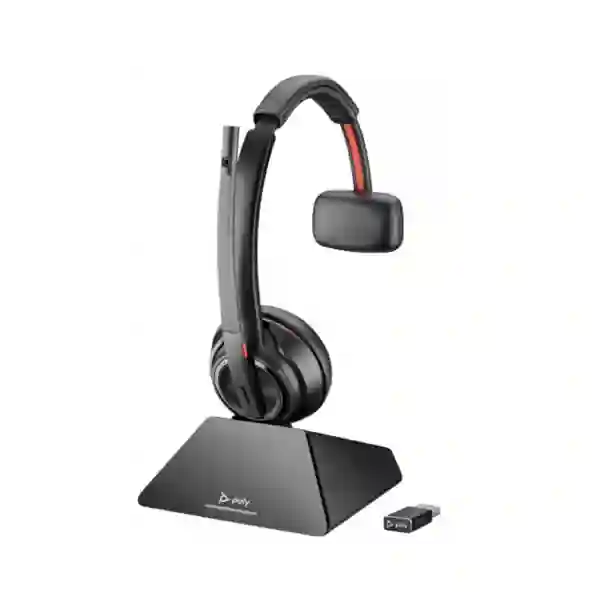
HP Poly Savi 8210 Office Monaural DECT Headset
Move between compatible desk-phone, computer and mobile calls using one office headset system. The HP Poly Savi 8210 Office Monaural DECT Headset combines a single-ear wearing style, a noise-canceling microphone and a dedicated multi-device base for employees who need clear customer conversations while staying aware of the workplace around them.
With up to 13 hours of talk time and manufacturer-stated roaming of up to 55 metres in typical office conditions, it is a practical candidate for reception, administration, customer service and office operations. Confirm the exact device connections and accessories before requesting a quote.
Product facts at a glance
| Wearing style | Single-ear, over-the-head, monaural |
|---|---|
| Primary workstation fit | Compatible desk phone, PC and mobile via Office base |
| Headset radio | DECT connection to Office base |
| Mobile connection | Bluetooth through the base |
| Talk time | Up to 13 hours on a full charge |
| Wireless distance | Up to 180 m open area; up to 55 m typical office |
| Recharge time | Approximately three hours |
| Microphone | Noise canceling with close conversation limiting |
| Workstation software | Poly Lens Desktop for supported call-control functions |
| Important option | Phone-specific EHS cable or lifter may be required |
Figures are from Poly/HP product literature for the Savi 8210 Office family. Actual environment, regional configuration, included items and application compatibility should be confirmed for the offered unit.
Quick suitability guide
Good fit
Frequent business calls, desk and PC switching, optional mobile connection, single-ear awareness and movement around the office.
Consider alternatives
Binaural isolation, purely mobile off-site calling, a simple computer-only setup, or a requirement for accessories not supported by the phone.
A single-ear headset built for a connected workday
Many office conversations happen while the user is still watching a screen, checking a customer record, or speaking briefly with a nearby colleague. The Savi 8210 Office uses a monaural, over-the-head design so one ear receives the call while the other remains open to the surrounding environment. For a receptionist, customer service advisor, account manager, supervisor, or administrator, that balance can be useful when awareness of the room matters as much as uninterrupted telephone audio. It is a professional communications headset rather than a pair of general-purpose music headphones.
The important distinction is not just that this is a wireless headset; it is an Office system with a dedicated charging and connection base. The base is the point where compatible desk-phone, computer, and mobile-phone audio come together. Instead of juggling separate headsets at the same workstation, a user can select the relevant channel on the base and continue working through the day. The model particularly suits a fixed or semi-fixed desk where people alternate among different calling applications and telephones.
Who should consider the Savi 8210 Office
The strongest candidates are users whose daily work includes frequent incoming or outgoing calls and a real need to move away from their seat. A front-desk worker can reach for documents without leaving the conversation. A sales coordinator can check a stock sheet on a nearby shelf while staying on a customer call. An IT or operations worker can move around the immediate office during a routine discussion. These are practical examples of mobility, not promises that every corner of every building will have equal wireless reception.
A monaural headset is not necessarily the right choice for everyone. Someone who needs to concentrate on one call in a highly distracting room might prefer a dual-ear design, while a person who only takes occasional computer calls may be better served by a simpler USB headset. The Savi 8210 Office makes most sense when the buyer values single-ear awareness, the flexibility of an office base, and regular professional use. Choosing by workflow, rather than by headline specification alone, usually leads to a more comfortable deployment.
How the three-device office base works
The Savi 8200 Office family is designed around three source types: a desk telephone, a computer, and a mobile phone. A compatible desk phone uses the base telephone connection, a computer connects to the base through USB, and a smartphone pairs using Bluetooth at the base. The headset then communicates with its base using DECT wireless technology. This architecture matters because the Bluetooth radio used for the mobile connection is not the same as saying the headset itself operates as an independent Bluetooth earbud wherever the phone travels.
Separate computer, mobile, and desk-phone audio buttons on the base make the system easier to understand in a mixed calling environment. The user chooses the intended source before placing a call and uses the headset call button or corresponding base controls as supported. It is possible to combine audio from two connected sources for a small conference in supported scenarios, but telephone platforms, call applications, and line states can limit the precise behavior. For procurement, identify all three planned devices before selecting cables or promising one-touch remote answering.
DECT wireless freedom: what the range figure means
HP specifies a maximum wireless reach of up to 180 metres in an open area and up to approximately 55 metres in a typical office environment. These are different reference conditions, not two interchangeable guarantees. The open-area number assumes a much clearer path than a busy workplace provides; internal walls, reinforced partitions, equipment, the position of the base, and neighboring wireless systems all influence the experience. Use the typical-office figure as a planning reference, then validate performance on the actual floor where the headset will operate.
The extra mobility is helpful for short trips to a printer, filing cabinet, adjacent desk, or meeting point while a conversation continues. It does not make the headset a cellular or internet device, and it does not replace a phone service or business communications platform. The base must remain powered and connected, and the user must remain within workable radio reach of it. A sensible deployment checks the usual walk route, the distance to nearby rooms, and any areas where dropped audio would have a serious impact on customer interactions.
Battery capacity and charging habits
The Savi 8210 has a rechargeable lithium-ion polymer battery, and the manufacturer describes up to 13 hours of talk time on a full charge. That is an upper-limit operating figure, not a promise that every calling application, audio mode, or battery age will deliver exactly the same duration. Real endurance depends on activity, wireless conditions, settings, battery health, and how consistently the unit is returned to its charging cradle. For an office shift dominated by calls, regular charging is more reliable than assuming the maximum talk-time estimate every day.
A full charge takes around three hours according to the series documentation. The included office base also functions as a convenient dock, making it natural to recharge between sessions or after work. Before an intensive calling shift, check the headset’s battery prompts rather than discovering low charge halfway through an important conversation. In shared workstations, assign responsibility for docking the headset correctly, keeping the contacts clean, and reporting noticeable battery decline. If the organization operates longer shifts, plan charging coverage or an approved replacement strategy instead of treating the device as an unlimited-runtime headset.
Microphone noise reduction versus earcup noise cancellation
This is a common source of confusion in headset shopping. The Savi 8210 Office provides a noise-canceling boom microphone with close conversation limiting, designed to reduce the amount of nearby conversation and background sound sent to the person at the far end of a call. That feature improves microphone pickup in a shared environment; it does not mean that the wearer is acoustically isolated from colleagues. The single-ear design deliberately leaves one ear open, which can be an advantage for awareness but a disadvantage for uninterrupted listening in very noisy surroundings.
The original Savi 8200 Office series specifications specifically identify active noise cancellation for the dual-ear Savi 8220, rather than the monaural 8210. Some generic specification listings blur this difference, so buyers should not assume the 8210 supplies the same earcup active-noise-canceling experience. Ask what kind of noise problem needs solving: if callers hear too much room noise, microphone technology is the relevant feature; if the wearer needs less noise entering both ears, compare a suitable binaural model. Those are different needs and should not be collapsed into one marketing phrase.
A clear voice starts with the boom position
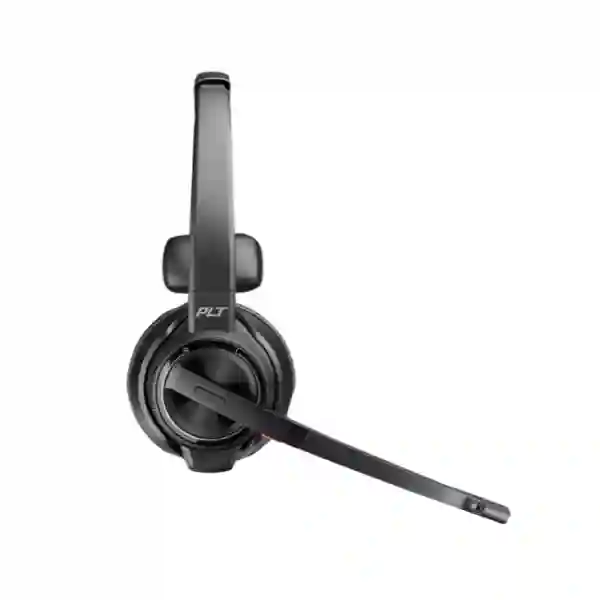
Even an effective business microphone needs the right physical placement. The adjustable microphone boom should sit near the corner of the mouth without touching the lips, with the manufacturer suggesting a distance of about two finger widths. A boom positioned too far away can make the voice sound thin and allow more environmental sound into the signal; a boom placed directly in the airflow of the mouth can exaggerate breathing and plosive sounds. This small setup step is worth including in every new-employee orientation and periodic headset check.
When evaluating sound quality, distinguish what the customer hears from what the agent hears. Have a colleague make a test call from the desk phone and another from the computer calling application. Confirm natural speech level, intelligibility, sidetone or echo behavior, and the effect of background conversations. If the far-end listener reports a muffled or overly quiet voice, check microphone placement, selected audio channel, application input device, and base speaking-volume setting before concluding that the headset hardware is faulty. A brief controlled test can prevent many avoidable support requests.
Wearing comfort and situational awareness
At approximately 115 grams in the manufacturer’s Savi 8210 series data, the over-the-head monaural unit is designed for repeated office calling without needing both ears covered. An adjustable headband and on-ear cushion help the wearer establish a stable fit. As with any headset, comfort is individual: head size, glasses, hair, skin sensitivity, and how tightly the headband sits all affect extended wear. A user should be able to take calls without the headband slipping or the microphone moving away each time they look down at a keyboard.
The free ear supports interaction with colleagues and awareness of ordinary office cues, yet it also allows nearby distractions to remain audible. That tradeoff makes sense in reception, administration, dispatch coordination, and supervision, but may be less ideal in an extremely loud support floor. During a pilot, ask staff to try the device for an actual work session, not just a thirty-second sound demonstration. Review pressure points, preferred ear, microphone position, headset storage, and how easily the user can reach mute. Human fit is as important as a list of electrical specifications.
Desk phone integration needs one compatibility check
The Office base offers a telephone interface for compatible desk phones, but telephone compatibility should never be guessed from the presence of a familiar handset socket. Some business telephones offer a dedicated headset port, whereas others require the Savi telephone interface to connect through the handset arrangement. The quick-start guidance describes both paths. Different manufacturers and models may need a particular base configuration switch position, and some functions that appear automatic on one telephone require a manual button press on another.
Remote answer and end from the headset can depend on an appropriate electronic hookswitch cable or handset lifter for the exact telephone. These items are distinct accessories, not guaranteed parts of the base package, and must be selected for the telephone model. If the user wants to answer calls while away from the desk, identify the telephone manufacturer, model, firmware if relevant, and expected remote-control behavior before quoting a complete system. A working audio connection is not necessarily the same thing as full remote call control.
Computer calling and softphone considerations
For PC or laptop work, the office base connects over USB. Users can select it as the input and output audio device within a supported operating system and calling application. This is relevant to organizations that split their workflow between desk-phone lines and browser-based contact centre tools, conferencing applications, or unified communications software. The audio connection itself is only the first part of deployment: the microphone and speaker must also be selected correctly in the chosen software, and any organization-level device policies must allow the required access.
Headset-button call control for a computer softphone may require Poly Lens Desktop software and compatibility with that particular application. Do not treat audio playback, microphone pickup, and remote answer/end integration as the same feature. During pilot testing, confirm whether the staff member can answer, mute, end, and change call status as intended. An application can deliver excellent audio while not supporting every physical button on the headset. The difference matters for workers who handle high call volumes and rely on predictable interaction rather than reaching for a mouse each time.
Mobile phone pairing is through the base
The mobile connection uses the Bluetooth functionality in the Office base. In the manufacturer’s setup process, the base is placed in pairing mode and the smartphone then discovers the device under the Poly Savi name. Once paired and connected, the mobile source can be selected at the base for calls. Bluetooth functionality does not eliminate the need for the Savi base, and it should not be presented as a direct standalone headset-to-phone connection in the same way as a consumer Bluetooth headset.
This distinction is important for professionals who alternate between a desk and visits outside the building. The Savi 8210 Office works best where the office base remains central to daily calling. If the user needs to carry a headset outdoors with only a smartphone, evaluate a product explicitly designed for that usage. For office use, test pairing with the intended phone, review any company mobile-device policy, and verify how incoming mobile calls interact with computer or desk-phone calls. A successful Bluetooth pairing alone does not prove that every application-level behavior matches a specific workflow.
Controls that matter during live conversations
The headset includes familiar controls for answering or ending calls, muting the microphone, changing listening volume, and powering the device on or off. These simple functions can be more valuable than a complicated feature list when a customer is speaking and the agent must react quickly. Voice prompts can provide status information such as mute state and low battery. The base adds source-specific computer, mobile, and desk-phone controls, helping reduce the risk of speaking into the wrong channel after moving between devices.
Organizations should standardize a short usage routine: identify the active source, verify the microphone is live before speaking, use mute when consulting with colleagues, and confirm a call has ended before beginning a new discussion. In a shared office, this is also a privacy and professionalism habit. During rollout, show staff what indicator or prompt confirms mute and which button actually selects the current line. The location and naming of call controls can vary with configuration and application support, so training should be based on a tested workstation rather than an assumption.
Two-source conferencing and shared call handling
One attraction of the Savi Office platform is the ability to combine audio from two supported connected sources in a mini conference. This can help when, for example, a telephone conversation must briefly involve someone on another compatible audio source. It is more flexible than a headset limited to one permanently wired audio input. However, a two-source audio combination is not equivalent to a full hosted conference service, and organizations should verify their telephone platform, policies, and call recording rules before relying on it in regulated or sensitive workflows.
Make a clear distinction between the devices attached to the base and the number of simultaneous conversations an employee can manage effectively. The base has three source selections, while manufacturer information describes conferencing across up to two connected devices at once. Users must still manage holds, call states, and customer consent where appropriate. A small test involving the actual desk telephone and calling application is the best way to establish what the organization can operationally support. This avoids promising advanced bridging or transfer functions that belong to the phone system rather than the headset.
Poly Lens software and device administration
Poly Lens Desktop provides a way to adjust supported headset settings, support software-assisted softphone interaction, and manage device updates. In a business deployment, this can help IT teams reduce inconsistent user configurations and simplify basic troubleshooting. The manufacturer’s setup guidance specifically calls for Poly Lens Desktop when computer softphone call control is needed. It is worth checking application support and the operating system before rollout, especially in tightly managed environments where users cannot install software without administrator approval.
Software-managed features should be understood separately from the hardware’s ordinary audio path. A user may be able to hear and speak through a USB-connected base while a particular call-control function still requires supporting software. Some hearing-protection functionality in the manufacturer’s literature is also dependent on the desktop application. If the business restricts software installation or updates, document that constraint in the purchasing decision. For a large deployment, test one representative device, record the working configuration, then apply a consistent setup to the rest of the team.
Hearing protection and responsible volume levels
The Savi 8200 Office family includes SoundGuard Digital acoustic protection technology. Its purpose is to help manage potentially uncomfortable sound events and listening exposure under supported conditions. Manufacturer documentation explains that some associated settings or functions require Poly Lens software. It is sensible to verify that the planned installation uses the relevant software and supported configuration rather than assuming every protection behavior is automatically active in every environment. The headset is not a substitute for an organization’s workplace hearing-risk assessment.
Daily habits remain important. Keep listening volume only as high as needed for intelligible conversation, lower unexpected loud audio promptly, and investigate distorted lines instead of compensating with more volume. Businesses handling calls all day should train employees on volume controls, periodic breaks, and reporting sudden sound spikes. Microphone noise cancellation primarily concerns the outgoing voice signal; listening protection concerns the sound delivered to the wearer’s ear. Treating these as separate capabilities leads to clearer user expectations and more responsible procurement decisions.
What is normally in the Office package
HP’s documentation for a specific Savi 8210 Office regional product describes a wireless headset, office charging base, USB Type-A cable, USB Type-C cable, telephone cable, and AC power adapter. These are the core components expected for a workstation installation, but contents can differ by regional package or purchase configuration. The safest commercial description identifies the intended model and asks the seller to confirm the box contents for the actual quotation. A list copied from a related variant should not be treated as a binding promise for every Savi 8210 product.
Accessories for special desk-phone control are a separate buying question. An electronic hookswitch cable or HL10 handset lifter may be appropriate in certain setups, but neither should be assumed included unless specifically itemized. Likewise, replacement ear cushions, replacement batteries, and other accessories require compatibility checks. At receiving, compare the physical product label, regional model identifier, base, power supply, and cables against the order documents. Resolving a packaging difference before installation is far easier than discovering one when an employee is due to start taking calls.
A practical first-installation sequence
Begin by placing the office base on a stable desk close to mains power, the intended computer, and the telephone. Connect power first, then the USB cable to the computer, followed by the telephone cable if a desk phone is part of the workflow. Charge the headset in its cradle before intensive use. The manufacturer advises an initial charge of at least twenty minutes, although a full charge is longer. Once powered, select each source in turn and perform a short test to verify incoming and outgoing audio.
If mobile use is required, put the base into Bluetooth pairing mode and complete pairing on the phone. For computer calling, select the correct audio devices in the chosen application and install approved Poly Lens Desktop software where necessary. For desk telephones, verify the dial tone and the base configuration before changing settings at random. Finally, test remote answering, mute, range along the usual walk route, and the behavior of calls arriving on a second source. Record the final configuration for future support and employee replacement.
Troubleshooting without unnecessary equipment changes
When a user reports no dial tone, start by checking the selected desk-phone source, cabling, power, and telephone’s own headset setting. The manufacturer’s instructions describe a base configuration switch with multiple positions because telephone interfaces differ. A computer call with no microphone audio may simply have the wrong input device selected in its application. Mobile pairing problems may require confirming pairing mode at the base and reviewing the phone’s Bluetooth device list. These are distinct problems and should be diagnosed separately rather than by changing everything at once.
Intermittent or distorted audio can be related to range, furniture or walls, the placement of the base, microphone positioning, listening-volume settings, or computer application configuration. Check the fault while standing close to the base, then repeat along the normal roaming route. Test one source at a time to isolate whether the problem belongs to the headset, a phone, or a software application. If a desk-phone lifter or EHS accessory is involved, inspect its model compatibility and physical connection. Consistent, simple fault isolation usually gives a more dependable answer than repeated resetting.
Comparing Savi 8210 Office, 8220 Office and UC versions
Savi model numbers are close enough that buyers can easily order a related product by mistake. The 8210 Office is the mono, single-ear member of the office-base family. The Savi 8220 Office is a dual-ear alternative, and the original series specifications associate the receiver-side active noise cancellation feature with that stereo model. The choice is mainly about whether the wearer wants awareness of surrounding colleagues or more isolation from surrounding noise. Neither wearing style is automatically superior for every employee or workplace.
The UC version of the Savi 8210 has a different connection emphasis, typically aimed at computer calling with a DECT USB adapter rather than the three-source Office base. Microsoft Teams-specific editions and regional radio configurations also exist. A model with a similar name should not be substituted without checking the exact description, part number, platform requirements, and contents. When preparing a purchase order, write out the words Office and Monaural, then request confirmation that the required base, telephone connection and application behavior belong to the offered package.
A sensible headset for different office roles
Reception teams often need to hear both a remote caller and a visitor approaching the desk. A single-ear headset gives them a way to keep one ear available for the room, while the base can support a compatible desk telephone and computer. Customer service staff may value movement to nearby records or colleagues while continuing to listen. Account managers who divide their time between a mobile phone and desk-based applications can find the three-source arrangement helpful, provided they remain within range of the office base.
Other roles may have different priorities. A crowded contact centre may need deeper ear coverage for concentration, a field technician may need a truly mobile smartphone headset, and a meeting-room participant may benefit more from an audio system that serves several people. In a shared-service environment, test microphone pickup and user comfort during actual calls before standardizing a whole team. A small number of well-defined use cases produces a better equipment specification than assigning the same headset to everyone regardless of their job or surroundings.
Tanzania purchasing considerations
For an organization sourcing business communication headsets in Tanzania, the first priority is to match the product variant to the intended devices and working environment. Gather the exact desk-phone model, computer operating system, calling application, and whether mobile pairing is required. The reseller can then confirm the correct Office configuration, compatible accessories, and regional part identifier. The Savi 8210 Office has documented DECT and Bluetooth technologies, but a generic international specification sheet should not be treated as proof of approval for any particular national radio requirement.
Commercial terms deserve the same care. Ask for a written quotation that identifies the offered item, charging base, cables, warranty arrangements, and any required electronic hookswitch or lifter accessory. Confirm local price, availability, delivery arrangements, and service terms directly from the actual quotation rather than relying on estimates copied from another market. No stock quantity, Tanzania shilling price, delivery promise, local service coverage, or regulatory authorization is implied by this description. Those details must be checked for the specific transaction.
What to verify before ordering more than one unit
A single-user pilot is valuable before an organization places a multi-seat order. Select a workstation that represents the most demanding normal setup: the actual desk telephone, the current software calling client, managed operating system, and the usual office wireless environment. Confirm that the user can answer and end calls where expected, move to the normal nearby work areas, recharge between shifts, and use mute without confusion. If an EHS cable is needed, test the exact cable and phone combination rather than assuming compatibility across a product family.
For several users, also review base placement, wireless planning, firmware management, acoustic settings, and help-desk training. Record the selected accessory and computer software versions. Consider who owns the headset at shared desks and how cushions will be maintained or replaced. The purchase decision should compare total deployable workstation cost, not just the headline cost of one headset, because telephone-control accessories and support time can matter. A short pilot can reveal practical issues before they are multiplied across an office or contact team.
Care, cleaning and long-term use
Workplace headsets are handled frequently, so simple care practices matter. Dock the headset gently, keep charging contacts free of debris, and clean the ear cushion according to approved product care guidance. Avoid excess moisture around microphone openings, buttons, connectors, and the base. Do not stretch the headband unnecessarily or store the boom under pressure where it may lose its position. In shared environments, give each user clear hygiene guidance and a defined storage arrangement rather than leaving the device loose on a crowded desk.
Battery performance can change with use and age. If normal talk time becomes substantially shorter, check charging behavior, contact cleanliness, firmware or software settings, and the health of the battery before arranging repair or replacement. A damaged cable or power accessory should be assessed and replaced with a compatible approved item, not improvised. Keep proof of purchase and the offered warranty documents accessible for service queries. These ordinary practices help preserve a reliable calling workflow, even though they cannot guarantee a particular equipment lifespan.
Buying decision: the most important questions
Before committing to the Savi 8210 Office, ask whether the user truly needs a single-ear design, whether the office base will connect to every required call source, and whether the existing desk telephone supports the required level of remote control. Next, assess the actual roaming distance and the availability of a sensible charging location. These factors determine whether the product solves the user’s problem. The stated maximum wireless range, by itself, should not outweigh the actual way calls are handled at the workplace.
Then confirm the exact regional model and what is included in the proposed package. Ask for evidence of compatibility with the selected softphone and determine whether Poly Lens Desktop can be used within the organization’s IT policy. Finally, distinguish the features of this mono Office model from stereo, UC, and Teams-specific variants. A quotation built around these checks is clearer for both the buyer and the implementer, reduces avoidable returns, and gives employees a headset that suits the job they actually do.
Before placing an order
- Identify the exact desk-phone brand, model and headset or handset interface.
- Confirm the Windows or macOS calling application and required call-control buttons.
- Decide whether Bluetooth connection to a mobile phone through the base is required.
- Test the normal office roaming route instead of relying on open-area maximum range.
- Check whether a compatible EHS cable or handset lifter is needed and included.
- Verify regional variant, actual box contents, power adapter and quoted warranty.
- Agree on Poly Lens installation, updates, device ownership and charging routines.
Frequently asked questions
Can this headset connect to a desk phone, computer and mobile phone?
The Savi 8210 Office family is built for these three types of devices through its office base. The specific telephone, computer software, and mobile device still need checking for compatibility. The base handles the source connections while DECT connects the headset to the base. A three-device base does not mean all calling applications can be controlled in exactly the same way or that all three calls can be freely mixed together.
Is Bluetooth built directly into the headset?
The mobile-phone Bluetooth connection is made through the Savi Office base. The headset itself uses the DECT link to communicate with that base. This is different from an ordinary standalone Bluetooth headset designed to travel with a smartphone. If the intended user frequently makes calls away from the office base, evaluate that requirement before choosing the Office model. It is intended principally for desk-oriented communication with useful freedom to move around the nearby workplace.
What is the realistic wireless range?
Manufacturer figures are up to 180 metres in an open line-of-sight situation and up to about 55 metres in a typical office environment. These are indicative maximums, not guarantees for a particular building. Reinforced walls, floor plans, radio conditions, and base placement can reduce practical reach. For important calls, test the headset in the actual work areas and along the user’s normal walking route before using the range number in an operational plan.
Does the mono Savi 8210 have active noise cancellation?
It has a noise-canceling boom microphone with close conversation limiting to help reduce background sound heard by callers. The original Savi 8200 Office series specification identifies earcup active noise cancellation with the stereo Savi 8220. Therefore, the 8210 should not be bought on an assumption that it offers the same receiver-side ANC experience. If blocking sound heard by the wearer is essential, compare the stereo model and verify the exact variant.
How long does the battery last and how is it charged?
HP lists up to 13 hours of talk time for the Savi 8210 Office, with a full charge taking approximately three hours. The headset recharges through its office cradle. Actual talk time varies with operating conditions, feature use, and battery age. For a busy calling team, establish a regular docking routine and check battery alerts at the start of the shift. Do not treat the published maximum as an assured duration for every installation.
Does it work with Microsoft Teams or another softphone?
The base can provide computer audio over USB, but remote call-control features depend on the supported software, application and model variant. The manufacturer’s quick-start material says Poly Lens Desktop is required for softphone call control. Microsoft Teams-specific editions are separate variants, so a generic Office listing should not automatically be represented as a Teams-certified package. Test audio and button behavior with the actual applications before ordering a large quantity.
Do I need an electronic hookswitch cable or handset lifter?
Not every telephone requires these accessories simply to carry audio. They become relevant when the user wants remote answer or end functionality with certain desk phones. The appropriate EHS cable or handset lifter depends on the exact telephone model and the way its headset or handset port operates. Do not assume the accessory is included. Share the desk-phone details and required call behavior when requesting a quotation so the right configuration can be assessed.
Is the Savi 8210 Office the same as Savi 8210 UC?
No. The Office version is associated with a multi-source office base for desk-phone, computer and mobile workflows. The UC family generally targets computer-centric connections through a DECT USB adapter. Similar naming can hide meaningful differences in package contents, platform focus and included connection hardware. Verify that an offer explicitly identifies the Office, monaural version and specifies the base and cables expected for the purchase.
Can two callers or devices be combined into a conference?
Manufacturer material describes conferencing across up to two connected audio sources through the Savi 8200 Office base. This may be useful in limited office scenarios, but it is not a replacement for the conferencing functions, call recording, or transfer features provided by a telephony service. Test the intended source combination and the relevant application or telephone behavior. Users should still manage customer consent and any workplace policy about who can hear a conversation.
What should a Tanzania buyer confirm in a quotation?
Request the precise Office model and regional identifier, included headset and base components, relevant cables, compatibility with the selected telephone and software, and any separately required remote-answer accessory. Ask the supplier to state the current price, availability, delivery terms and warranty support for the proposed order. These commercial details are not verified by generic international product literature. If local regulatory suitability or a particular radio configuration is important, request documented confirmation before deployment.
Request a Savi 8210 Office quotation
Share the headset quantity, desk-phone model, computer calling application, preferred monaural wearing style, and any requirement to answer calls remotely. Ask for the exact Poly Savi 8210 Office variant, confirmed package contents, and any compatible EHS or handset-lifter accessory to be shown in the quotation. For purchases in Tanzania, verify current availability, local price, delivery and support terms directly in the offer. This product description is a buying guide, not a stock or pricing commitment.
Contact FourTeck Tanzania to request product and compatibility details.




Reviews
There are no reviews yet.