
One ear. Computer calls. DECT freedom.
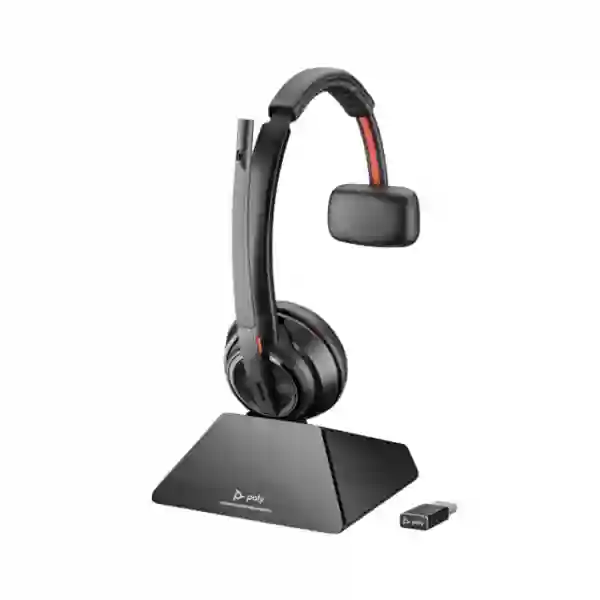
HP Poly Savi 8210 UC Monaural DECT Headset
A single-ear wireless headset for professionals who want to stay connected to computer calls while moving within a suitable workspace. Check the correct regional and calling-software variant before requesting a quote in Tanzania.
Key specifications at a glance
These are manufacturer-published reference characteristics for the Savi 8210 UC family. The exact regional product configuration and box contents should be confirmed for the proposed manufacturer part number.
| Wearing style | Monaural on-ear; over-the-head |
|---|---|
| Connectivity | PC via DECT USB adapter; confirm the quoted kit |
| Wireless range | Up to 180 m open area or 55 m typical office, subject to environment |
| Talk and standby | Up to 13 hours talk; up to 50 hours standby |
| Charging | Under 3 hours, per HP specifications |
| Microphone | Noise-cancelling boom |
| UC variant | Standard UC; separately offered Teams-certified version |
| Compatibility | Check computer, ports, softphone and operating system |
| Package | Confirm DECT adapter, charging stand and relevant accessories |
Who this headset is built for
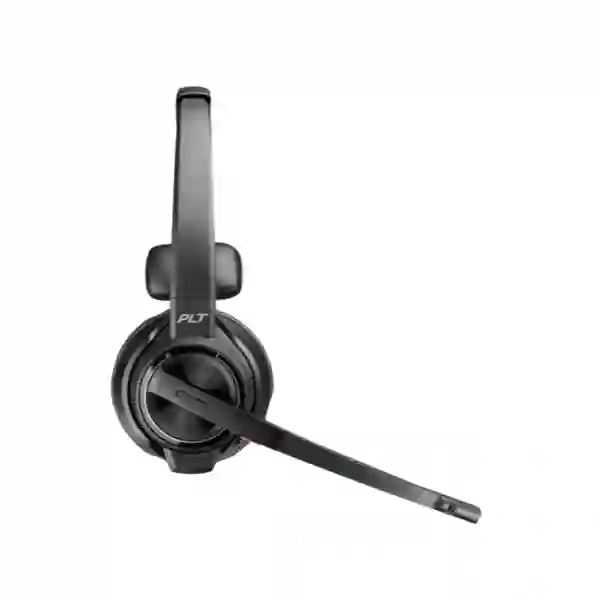
The HP Poly Savi 8210 UC monaural DECT headset serves staff who spend much of the day on computer-based calls but do not want to remain attached to a desk by a cable. It is designed around a single on-ear speaker, adjustable headband, boom microphone and wireless connection through a computer’s compatible DECT USB adapter. That arrangement can suit a customer service representative, administrative employee, manager or support specialist who needs to consult colleagues or retrieve nearby information while staying on a call.
The buying question is not merely whether a headset is wireless. It is whether the wearer uses a PC calling application, wants one-ear listening, and works within a realistic DECT coverage area. A UC kit should not be mistaken for an automatic connection to a physical desk telephone or a smartphone. Confirm the actual calling devices first, then select the variant and accessories to match them.
The value of monaural listening
Monaural means sound is played to one ear, leaving the other ear uncovered. This is a practical choice when a staff member needs some awareness of surrounding office activity while listening to a caller. The Savi 8210 UC’s over-the-head design provides an on-ear speaker rather than two earcups. This can be useful to a receptionist who receives visitors, an administrator coordinating with colleagues, or a worker who alternates between online conversation and questions from people nearby.
An uncovered ear is not a guarantee of safety or complete awareness. Attention is still divided while talking. A one-ear design may also be less suitable for somebody who wants a more isolated listening environment or stereo playback during long multimedia sessions. In a loud shared office, a two-ear option could feel more comfortable to some people. Allow a realistic user trial before ordering a single wearing style for every department.
DECT wireless versus everyday Bluetooth expectations
The UC connection uses DECT wireless technology between the headset and a compatible USB adapter connected to a computer. HP’s setup materials describe the D400 adapter for Savi 8210 and 8220 UC models, along with a USB-A-to-USB-C conversion adapter for suitable computer ports. This connection method offers the convenience of walking away from the immediate desk while the computer remains the calling endpoint. It is distinct from pairing an ordinary Bluetooth headset directly with a mobile phone.
Some technical specification sheets include a Bluetooth version field for the wider product family or particular packages. That field alone should not be interpreted as proof that this specific UC kit will connect directly to any smartphone. If the buyer needs calls from a physical desk phone, mobile handset and laptop, the required connection paths should be written down and checked against the exact proposed headset system. Avoid buying a product based on a family name rather than its actual included adapter and connectivity.
Understanding published wireless range
HP lists up to 180 metres in an open area and up to 55 metres in a typical office environment for the referenced Savi 8210 UC configuration. These figures help buyers understand why DECT can be attractive for workplace mobility. They are not guarantees that a call will continue without interruption over the stated distance in every building. Concrete walls, metal cabinets, lifts, floors, obstructions, interference and the adapter’s placement all affect real-world coverage.
A purchaser should test the routes employees actually use. Walk from the desk to the usual document shelves, adjoining rooms and meeting areas while staying on a test call. Take note of spots where sound deteriorates, rather than treating an open-area maximum as a promise for a multistorey office. The objective is dependable communication throughout the working zone, not the largest number on a specification sheet. Avoid sensitive conversations in public areas merely because the wireless signal reaches them.
Microphone noise cancellation
The Savi 8210 UC is equipped with a noise-cancelling boom microphone. HP’s Savi 8200 UC product descriptions also refer to close-conversation-limiting microphone behavior. The intention is to focus on the wearer’s speech and reduce some nearby sound reaching the person at the other end of the conversation. This can help with background voices, general office activity and routine call handling, although the result depends on microphone placement and the acoustic environment.
It is important to separate microphone noise reduction from active noise cancellation for the wearer’s own ears. HP’s official setup guidance identifies the stereo Savi 8220 UC as the model with a listening ANC feature. This page does not promise earcup ANC for the monaural 8210. Buyers who primarily want their own ears shielded from surrounding conversation should compare stereo alternatives; buyers focused on how clearly customers hear their speech should test the microphone in normal office noise.
Positioning the boom microphone correctly
Even a capable microphone can produce poor results if it is pointing away from the mouth. HP’s quick-start guidance recommends adjusting the boom to approximately two finger widths from the corner of the wearer’s mouth. This position helps the microphone pick up speech while limiting direct breath noise. The headband and boom are adjustable, and the design supports wearing the microphone on the preferred side. Users should make these adjustments before their first important conversation.
During setup, ask a colleague to listen to a short call while the headset wearer speaks normally. If speech is unusually faint or sounds distorted, check boom position before assuming a device fault. Test with ordinary office activity continuing in the background. It is also worth checking the selected microphone and input volume in the computer’s audio settings. A simple wearing and audio check often reveals issues that cannot be identified by reading specifications alone.
What the wearer hears and what callers hear
A communication headset has separate audio responsibilities. The speaker must deliver understandable incoming speech, and the microphone must transmit the wearer’s words. The Savi 8210 UC places a single speaker on the ear while the boom captures speech. HP lists a 32 mm speaker and frequency responses for communication and multimedia use in product specifications. These figures describe the technical audio system but do not guarantee identical perceived clarity in every software application or room.
During a trial, ask the user whether the remote speaker can be understood at a comfortable volume. Separately ask the remote participant whether the headset user’s voice sounds natural and intelligible. Both questions matter. A user may be satisfied with their own listening experience while a customer struggles to hear them, or the reverse. Computer processing, the calling platform, internet quality and the remote party’s equipment also affect the result, so compare headsets under consistent conditions.
Talk time and charging expectations
HP specifies up to 13 hours of talk time and up to 50 hours of standby time for the Savi 8210 UC, using a rechargeable lithium-ion polymer battery. HP also lists charging time as under three hours for the referenced configuration. These published figures indicate suitability for extended calling routines, but they are maximum specifications rather than guaranteed performance for every employee. Volume, usage pattern, distance from the adapter and battery ageing can all influence practical runtime.
A sensible routine is to return the headset to its charging stand when it is not being worn. Give each worker an accessible place to charge the unit and confirm the exact power arrangement supplied with the kit. A department running long or overlapping shifts should assess charging opportunities during a normal workday. Planning around real usage, rather than assuming that the maximum talk-time figure always applies, reduces interruptions. Keep the charging area organized, particularly where several similar units are used.
On-headset calling controls
HP documents user controls for answering and ending compatible calls, adjusting speaker volume and muting the microphone. These controls can reduce the need to reach for the computer during everyday conversations. HP’s setup directions describe using the call button for supported call handling, adjusting the volume control and activating mute with the headset’s red mute button. Voice alerts may indicate conditions such as mute status, connection state and low battery, helping users stay informed without watching a screen continuously.
Call controls depend partly on the connected application and software environment. A computer may recognize the headset as an audio device even when the application’s answer button does not respond to the headset control. Some softphones need Poly software or specific settings to support integrated call control. Test answering, ending and muting in the actual program used at work. Do not infer that every button will work identically in every video meeting service, desktop softphone or browser-based calling application.
Comfort during a full working day
The over-the-head, single-ear design is intended for repeated business communication. The headband, ear cushion and boom can be adjusted so the headset sits securely and the microphone is correctly positioned. Because comfort varies by person, purchasing teams should not judge a wearing style solely from a photograph. Someone who wears glasses, spends hours in continuous calls or prefers a particular ear may have different requirements from a colleague making only occasional calls.
Provide a practical fitting session and allow each user to try the device during ordinary work. Ask whether the ear cushion feels too firm, whether the headband stays in place while walking and whether the uncovered ear arrangement is useful. A short demonstration may not expose discomfort that arises after several meetings. Proper fitting, appropriate breaks and cleaning practices support a better ownership experience. Users requiring a more enclosed listening style should have access to a comparison with stereo models before a large purchase decision.
PC operating systems and USB compatibility
HP documents the Savi 8210 UC as a computer-connected headset, with Windows and macOS listed in relevant specifications. The UC kit connects through a DECT USB adapter, with documented USB-A and USB-A-to-USB-C options depending on the package. This is helpful when a workplace has both older laptops with USB-A ports and newer systems that rely on USB-C. Nevertheless, the port type is only one part of a complete compatibility check.
Verify the actual laptop, operating-system version, USB policy and calling application. Organizations sometimes restrict software installation or device permissions, and a dock or hub can alter how an audio device is recognized. HP describes a direct computer connection as the normal quick-start path. Test the preferred docking arrangement rather than assuming every hub will behave identically. A broad operating-system reference should also not be taken to mean this DECT USB kit is designed as a direct smartphone headset. Check the complete connection workflow.
Poly Lens and software management
HP’s setup guidance refers to Poly Lens Desktop for supported configuration and firmware management. This can be relevant to individual users who want to check device settings and to IT administrators preparing a standardized configuration. A managed approach helps ensure that employees use an appropriate device version and know where to get support when the calling application changes. However, the exact supported settings depend on the headset variant, software version and administrative environment.
Before installing anything, follow the organization’s approved software process. IT teams should document the working audio configuration, test an incoming call and record whether call control and mute synchronization function correctly. Firmware changes should be treated as normal managed updates rather than informal fixes applied during a critical shift. A reliable headset deployment includes clear ownership of software settings, support responsibilities and accessories. Hardware quality alone does not solve a misconfigured computer audio system.
Microsoft Teams and standard UC editions
HP identifies a standard Savi 8210 UC configuration and a separately described Microsoft Teams-certified variant. The title of this requested product does not specify a manufacturer part number or confirm that the supplied item is a Teams-certified edition. This distinction is meaningful for organizations that have formal device certification requirements or depend on particular Teams integration behavior. Using a device for audio in a Teams meeting is not necessarily the same as purchasing a certified Teams edition.
When requesting a quote, specify whether formal Teams certification is required and ask the supplier for the exact manufacturer part number. Review current compatibility guidance for the software used by the organization. The same caution applies when buyers see labels such as UC, M UC, standard or Teams-certified in different catalogues. Do not substitute one variant based only on visual similarity. A small test with the business’s account and computer configuration helps establish whether the proposed package supports the workflow staff actually use.
Physical desk phones require a separate decision
The Savi 8210 UC discussed here is primarily a PC calling headset connected via the compatible DECT USB adapter. A physical desk telephone is a different endpoint with its own headset connector, controls and possibly an additional interface. A charging stand for a UC kit should not be confused with an Office base designed for different connection arrangements. This is a frequent cause of ordering mistakes when buyers focus on the familiar Savi model number.
If the office uses physical telephones, record their brand and model before buying. Ask for a system that explicitly supports those devices, including any required cable or base. If workers divide calls between computer software and a desk phone, explain whether they need the ability to switch sources or maintain multiple connections. Avoid assuming a USB headset will directly connect to a phone merely because both products are used for business calls. The right endpoint specification should come before headset color, battery claims or price comparisons.
Mobility around the workstation
A wireless connection can make routine activities easier. An employee can stand up, consult a document or briefly move within the working area without repeatedly removing the headset. The Savi 8210 UC’s DECT design is intended to provide this flexibility while the computer remains connected through its USB adapter. For office staff who spend much of the day on calls, fewer cable restrictions may make ordinary movements more convenient.
The benefit has practical boundaries. Range depends on the office layout, and the headset is not an independent mobile phone that can continue calls anywhere. Employees should be aware of confidential conversations when moving near visitors or public spaces. Users also need to remember that moving beyond radio coverage may interrupt the call. Test normal walking routes before treating mobility as a critical business process. The aim is freedom within an appropriate work zone, not unlimited connectivity throughout the entire building.
Wireless security in context
HP lists DECT security certification for relevant Savi 8210 UC packages. For businesses choosing wireless voice equipment, this is a useful part of the technical assessment. It should still be understood in context: a conversation also depends on the computer, software, network, identity controls and service provider. The security of the radio link alone does not establish the privacy of the full calling system or prove conformity with a particular customer’s policies.
For a managed deployment, request documentation for the exact variant and incorporate the headset into the organization’s device and software maintenance practices. Confirm any regional equipment requirements separately. For everyday users, simple habits also matter: mute when appropriate, avoid discussing personal information in public areas and lock the computer when leaving it unattended. Do not assume that a generic security statement establishes approval for all industries, all countries or all communication services. Organizational requirements should be checked against the actual intended use.
Understanding the package contents
HP’s product specifications for published regional Savi 8210 UC configurations list a wireless headset, charging stand, USB-A charging cable, travel case, DECT USB-A adapter and USB-A-to-USB-C adapter. HP’s quick-start instructions also describe the charging arrangement. These references are useful for identifying what a complete PC-oriented kit may include, but the actual offered accessories depend on the precise package and market. A listing title without a part number cannot establish every item in the box.
Before purchase, request the full kit description in writing. The DECT USB adapter is especially important because it provides the documented computer connection. Confirm the charging stand and power arrangement, including any relevant plug or supply accessory. If workers travel, verify the case and USB-C conversion component. Ask how replacements can be obtained when an adapter is lost. Small components have a direct effect on whether the headset can be deployed on the planned date.
A first-use setup sequence
Begin by identifying the wireless headset, its charging stand and the DECT USB adapter. Charge the headset according to the supplied instructions before a critical work session. HP’s Savi quick-start process describes connecting the D400 adapter to a suitable computer and powering on the headset. The documented USB-A-to-USB-C adapter can help when the computer has a compatible USB-C port. Select the headset as both the microphone and speaker device within the computer’s calling application.
Next, adjust the headband and position the boom near the corner of the mouth. Make a test call, check volume and mute, and listen for relevant voice alerts. If Poly Lens Desktop is required or recommended by the organization’s configuration, follow its approved installation procedure. Where a company uses shared desks or standardized laptops, record the tested setup steps so that another employee can reproduce them. Proper configuration on day one reduces avoidable support tickets later.
Troubleshooting common audio problems
If the headset is silent, confirm that it is charged, switched on and connected through the expected DECT USB adapter. Check the computer’s output selection and then check the microphone input separately. A meeting application may have retained the built-in laptop microphone or speaker even though the wireless headset is available. Verify mute status on the headset and inside the software. A local recording or test call can help separate a microphone problem from a network issue.
If audio deteriorates while walking, move closer to the adapter and note whether particular rooms or obstacles cause dropouts. If sound works but the call button does not, investigate softphone integration and any supported Poly utility rather than immediately replacing the headset. If adapter subscription appears lost, consult the exact manufacturer procedure. Record symptoms, application version and computer details for IT support. Not every interruption comes from the headset: bandwidth, system permissions and calling-service issues can also affect results.
Customer service and administrative workplaces
The Savi 8210 UC can be evaluated for teams whose work involves repeated customer calls, note-taking and occasional interaction with nearby colleagues. The one-ear design may help a worker remain aware of office activity, while the boom microphone is designed to reduce some unwanted outgoing sound. A wireless range beyond a short desk cable can be helpful when checking nearby information during a conversation. These benefits are most relevant when employees make their calls through a compatible computer application.
High-density contact centers need special attention to noise and comfort. Many adjacent conversations can make it difficult for a user to concentrate even if the remote caller hears their microphone reasonably well. A stereo or more isolating alternative may suit some roles. Evaluate the number of hours each employee wears the headset, the level of background conversation, the calling software and the available charging routine. A mixed headset policy may better serve different job functions than forcing one design on every person.
Hybrid work and moving between desks
For employees who move between compatible computers, a compact USB-based DECT system can be appealing. HP lists a travel case among the accessories of published UC kits, which may support transport between work locations. Users should keep the correct DECT USB adapter, any USB-C conversion piece and the headset together. The wireless connection still depends on a computer, and the charging stand needs a suitable arrangement wherever the unit is normally stored.
When changing desks, check that the computer has recognized the headset and that the application is using it for microphone and output. Corporate USB restrictions, meeting software and computer permissions may vary between workstations. The headset should not be assumed to work on every public or unmanaged device. A repeatable setup checklist makes hybrid use smoother. Businesses should also have a clear procedure for lost adapters and for cleaning equipment used by more than one employee.
Calls made through internet-based software
A UC headset handles the audio side of a computer call; the telephony or collaboration platform handles the communication session. This distinction matters when evaluating performance. Clear speech depends not only on the microphone and ear speaker but also on the calling software, the internet connection, local network reliability and the other participant’s equipment. Buying a better headset cannot compensate for a persistently unstable connection or a conferencing application configured with the wrong input device.
For a business using internet-based calling in Tanzania, verify the computer platform and audio settings before finalizing a purchase. If a PBX, hosted telephony service or collaboration platform is involved, test actual calls using that service. Check incoming calls, mute synchronization, answer behavior and reconnection after the computer wakes. Document the results for IT support. Headset selection is one part of a dependable communications setup and should be assessed alongside the systems that carry the conversation.
Savi 8210 UC versus Savi 8220 UC
The two names are close, but their listening designs differ. The Savi 8210 UC is the monaural option with one ear covered. The Savi 8220 UC is a stereo model, and HP’s setup guidance specifically describes active noise cancellation on the 8220. Buyers should not read a series-level feature list and assume that both headsets deliver the same listening isolation. A worker who wants awareness of nearby colleagues may prefer the 8210; a worker who wants more separation from nearby conversation may prefer a stereo alternative.
Compare the precise regional part numbers before ordering. Published accessories, software certifications and other configuration details can differ by variant. It is also important to ask users about their comfort during actual calls. A large purchasing decision is better supported by a short trial of appropriate wearing styles than by treating every headset in the same series as interchangeable.
Savi UC versus an Office-style system
A UC package is oriented toward PC audio through the compatible DECT USB adapter. Other Savi systems may use a larger Office base and offer different telephone and workstation connection possibilities. The presence of the number 8210 in a product name is not enough to establish desk-phone compatibility. The electronics and accessories included with the package determine what the user can connect to. This distinction is vital for buyers replacing an older desk-phone headset.
Write down whether calls come from a laptop, desktop computer, physical desk telephone or several endpoints. Request a product that explicitly supports those connections. Do not assume the charging stand supplied with the UC kit provides phone sockets or source-switching functions. If reception staff need to answer calls from both a telephone and a computer, ask for a documented multi-device solution. Clear requirements protect against an avoidable mismatch between good hardware and the wrong workplace endpoint.
Buying checklist for your IT team
Begin with the number of intended users, their departments and the calling applications they rely on. Record whether one-ear awareness is desirable, how long users spend on calls, and which rooms they expect to walk into while speaking. Check USB-A or USB-C ports on the workstations and note whether employees use docks. Determine if formal Microsoft Teams certification or other application-specific behavior is required. These details help a supplier select the proper UC variant instead of guessing from the product family name.
Next, request the proposed manufacturer part number and a complete component list. Ask about regional radio suitability, charging accessories, support arrangements and any compatible spare parts. State if the company uses security restrictions that limit installing configuration software. For a large order, plan a small test before distribution. A written compatibility checklist gives the purchasing and IT teams a common basis for comparing quotes and approving the actual product supplied.
Tanzania-specific procurement questions
Tanzania buyers should confirm that the proposed hardware is suitable for the destination market rather than assuming every similarly named import is identical. HP publishes regional configurations, including products described with different DECT operating bands. This page does not establish local regulatory approval, import eligibility or the correct radio version for any particular shipment. Those matters must be verified for the exact quoted equipment through appropriate supplier documentation and applicable official requirements.
Also ask for the total commercial quote, confirmed availability, actual delivery arrangements, local support process, charging accessories and applicable warranty handling. None of these details can be inferred responsibly from a global manufacturer specification. If headsets will be used at several offices, verify each site’s computer setup and representative wireless conditions. A product can meet its published specification while being unsuitable for a specific building or purchasing requirement. Confirming these points in advance makes deployment more predictable.
Running a small pilot deployment
A short workplace pilot can reveal issues that a catalogue cannot. Select users who represent different calling patterns: a customer service employee, a manager, a worker with a USB-C-only laptop and somebody using the organization’s most important softphone. Give them the same fitting instructions and ask them to test ordinary calls, audio levels, mute behavior, comfort, battery routine and walking range. A pilot should use the actual offices and software that will be involved after purchase.
Collect specific observations instead of vague satisfaction scores. Did callers hear speech clearly? Was the microphone positioned correctly? Did call control work from the headset? Did changing desks require a new audio selection? Was one-ear listening helpful or distracting? Use the answers to refine a setup guide and decide whether a stereo model is needed for certain roles. When a pilot succeeds, standardize the tested configuration, adapter handling and charging process before ordering for the full team.
Comparing quotations fairly
A quote comparison should go beyond the product’s headline price. Check that the proposed models have the same manufacturer part number, software certification, radio version, included DECT adapter and charging accessories. A lower quote may be incomplete if it omits a component required by the workstations. A more expensive Teams-certified variant may be worthwhile for a Teams-specific deployment, but unnecessary for a company whose primary calling system does not require it. Compare exactly what employees will receive and use.
Consider deployment and support effort as well. Will an administrator need to configure the application? Is replacement access available for a lost adapter? What local warranty or service process applies to the quoted unit? These are questions for the supplier and should be answered in writing. Avoid treating general manufacturer information as a confirmed local offer. A transparent specification makes it easier to compare suppliers without assuming that visually similar headsets are identical.
Long-term care and responsible use
Keep the headset and its charging equipment in a clean, dry location. Return the device to the charging stand when practical, and follow the manufacturer’s instructions for cleaning the ear cushion, microphone and other surfaces. Avoid harsh chemicals, excessive heat and liquids. In a shared workplace, establish a hygiene procedure rather than transferring a worn headset between people without preparation. Check the headband, boom and charging accessories for visible wear as part of normal equipment care.
Battery runtime can change as a rechargeable device ages, so record the actual symptoms before deciding whether an accessory or headset needs service. Maintain a record of the exact model and adapter supplied. If IT makes major changes to the calling application, retest audio and button integration. The goal is not to promise a fixed product lifespan, but to operate the equipment consistently and make informed replacement decisions. Good ownership procedures support reliable calling and reduce avoidable interruptions.
A practical audio evaluation method
Test prospective headsets using the same computer, software and network conditions as far as possible. Ask the wearer to speak at a normal level while a colleague listens remotely. Repeat the call with ordinary background conversation and then while walking through the intended work zone. Have the remote person judge intelligibility, not merely loudness. Separately ask the headset wearer how easy it is to understand incoming speech at a comfortable volume. Both sides of the call are important.
Compare the results with those of an existing headset or an appropriate stereo alternative. Make sure the boom is correctly adjusted before drawing conclusions. Record any dropouts near walls or particular rooms and note whether USB hubs change the behavior. This test does not replace laboratory measurement, but it can reveal the factors that matter most for that workplace. A good purchasing decision is based on actual communication needs, not maximum-range numbers alone.
When another headset may be better
A user who needs strong listening isolation may prefer a two-ear headset, and a person who mainly calls on a mobile phone may need a different connection approach. Physical desk-phone users should purchase a configuration specifically verified for their telephone. Staff who need dependable coverage across several building levels should evaluate the actual wireless environment before relying on a computer-connected DECT headset. A monaural model is a practical design choice, not a universal solution.
The Savi 8210 UC is most compelling when the buyer’s priority is PC calling with wireless freedom and some environmental awareness through an uncovered ear. If that matches the user, test the headset with the required application and make sure the correct regional kit is quoted. If one of those requirements does not match, compare alternatives before committing. This balanced approach protects the organization from choosing equipment for a feature that does not solve its actual problem.
What to include in a FourTeck quote request
State that you need the HP Poly Savi 8210 UC, the required quantity, and the computers on which it will be used. Name the main calling software and note whether Microsoft Teams certification is essential. Tell the supplier whether users have USB-A, USB-C or both, and whether any physical telephones are involved. This allows the quotation to address the right connection package and avoids confusion between standard UC and other Savi family configurations.
Ask for the exact manufacturer part number, documented contents, regional suitability, accessory requirements, commercial price, expected delivery details and local support terms. If purchasing for many employees, request a practical pilot if one is available. There is no reason to share confidential credentials or customer records for an ordinary headset quote. A concise but precise requirement list helps the supplier provide a more useful proposal and gives the internal procurement team a clear basis for review.
Frequently asked questions
These answers address the questions most likely to affect product fit, computer setup and a responsible purchasing decision.
Is this headset wireless?
Yes. The documented UC configuration uses a DECT wireless link to a USB adapter connected to a computer. It is not a conventional cable-connected audio headset, even though its kit may include cables for charging. Make sure the DECT adapter is supplied with the quoted package. The exact arrangement depends on the manufacturer part number.
What does monaural mean?
Monaural means a single speaker covers one ear. The other ear remains uncovered, which can be useful for office awareness. It does not guarantee noise isolation or complete awareness of surrounding events. A stereo alternative may be preferable for someone who wants both ears covered during calls.
How much talk time does HP specify?
HP lists up to 13 hours of talk time and up to 50 hours of standby time for the Savi 8210 UC reference configuration. It also lists charging in under three hours. These are published maximum specifications; actual performance varies with use, battery condition, settings and wireless conditions.
How far can I move away from my computer?
Published specifications list up to 180 metres in open space and up to 55 metres in a typical office. Actual coverage can be shorter because of walls, floors, metal or interference. Test the intended rooms and walking route. The computer and its USB adapter remain the connection point.
Does Savi 8210 UC have noise cancellation?
It has a noise-cancelling boom microphone to help reduce unwanted sound transmitted to the caller. This is different from active noise cancellation for the wearer’s ears. HP specifically describes listening ANC on the stereo Savi 8220 in its setup guidance. Do not assume the same listening feature on the monaural 8210.
Can I connect it to a desk phone?
The UC package is primarily designed for PC calling via its DECT USB adapter. A physical desk phone may require a different Savi configuration or compatible accessories. Ask for explicit support for your phone’s brand, model and connection interface before ordering. The charging stand by itself is not proof of desk-phone connectivity.
Is this a Microsoft Teams-certified headset?
HP publishes both standard and separately identified Teams-certified Savi 8210 UC configurations. The supplied product name alone does not confirm which one is being offered. If certification is important, request the exact certified manufacturer part number and check compatibility with the organization’s current platform.
Can I use a USB-C laptop?
HP describes an included USB-A-to-USB-C adapter for relevant Savi 8210 UC kits. Confirm the actual quoted box contents and test your laptop or docking configuration. Having a USB-C port is not the whole compatibility check; organizational security settings and calling software also matter.
What should I do if call buttons do not work?
Check that the headset is recognized as the selected audio device and confirm the calling application’s mute and control settings. Some softphones require Poly software or particular integration settings for call-control functions. Audio functioning does not guarantee every application will handle answer and end commands the same way.
Is the headset suitable for a call center?
It can be evaluated for computer-based customer calls, particularly where single-ear awareness and wireless movement matter. Suitability depends on nearby conversation levels, user comfort, software and charging routines. A particularly noisy workplace may benefit from a stereo comparison. Pilot testing with real calls is recommended before large orders.
Can it travel between desks?
The compact USB connection and travel case listed in published kits can make it practical to move between compatible computers. Keep the correct DECT adapter with the headset, and reselect the device in software if needed. Corporate restrictions and different applications can affect integration when changing workstations.
What must a buyer in Tanzania verify?
Confirm the manufacturer part number, regional radio configuration, relevant local regulatory suitability, included accessories, computer compatibility and certification requirements. Ask the supplier to confirm actual stock, price, delivery, service and warranty arrangements. Those local commercial details have not been verified for this listing and should not be assumed.
Request a suitable Savi 8210 UC quote
Ask FourTeck Tanzania to confirm the exact manufacturer part number, variant, required USB adapters, regional suitability, software integration and commercial terms. State your quantity, calling application and whether Microsoft Teams certification is required.
Price, stock, delivery, local certification and local warranty handling are not represented as verified on this page and should be confirmed for the exact quotation.




Reviews
There are no reviews yet.