
Office headset accessory • Tanzania purchasing guide
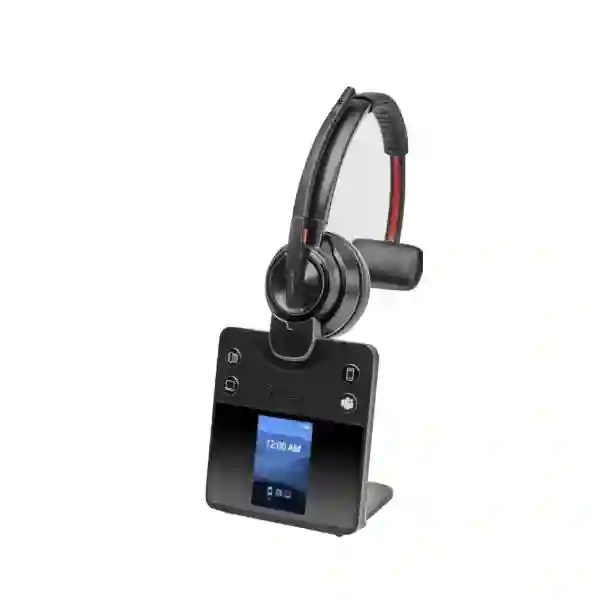
HP Poly Savi 8400 Office Charging Base
Need to replace a damaged office headset base or assemble a compatible Savi workstation? The HP Poly Savi 8400 Office Charging Base is the office-side connection and management hub used with suitable Savi 8400-series DECT wireless headsets. It can bring a compatible headset into a desk-phone, computer and mobile-phone calling workflow, while a matching detachable charging cradle provides the actual headset docking position. The base is an accessory rather than a complete wearable headset system, so checking the precise unit and accessories before ordering matters.
For business buyers in Tanzania, the first step is identifying the existing headset model, the base’s regional radio variant and the parts required at the desk. A Savi 8410 or 8420 may need a different docking cradle from an 8440 or 8445. Some base variants are labelled for Microsoft Teams and regional DECT versions are not interchangeable assumptions. Request a configuration-specific quote with the headset model and a photo of the old base label; ask for the included components to be listed in writing.
At a glance
Office-side DECT headset base and call connection hub
Compatible computer, desk-phone and mobile workflows
Must match the precise Savi headset model
Validate item code, regional radio version and supplied accessories
What this office base actually does
A Savi 8400 Office installation has three distinct pieces: the wearable wireless headset, the desk-side base electronics and a model-matched charging cradle. The headset carries the microphone, speaker, battery and user controls. The base manages its DECT wireless link and presents the connections used for office calls. The cradle provides the physical place to dock and recharge the headset when connected to the appropriate base. Calling all three pieces a charging base is understandable in everyday language, but that shorthand can lead to buying the wrong replacement part.
The office base is useful when an otherwise serviceable headset needs a replacement base station, an additional compatible desk installation or a more flexible connection hub. It is not a universal stand for every Poly headset, nor does a base-only order necessarily include the headset, AC adapter, telephone interface cable, computer leads or charging cradle. Exact contents vary by accessory code and supplier packaging. Establish whether the requirement is a base station, a cradle, a power supply, a headset or a complete system before comparing quotations.
The headline benefit is a more orderly place to manage communication devices rather than another battery inside the base. Properly paired, the office-side system supports the compatible headset’s call workflow. Actual charging depends on having the right dock, supported power arrangement and a functioning headset battery. For replacement orders, take a practical inventory of what can be reused and what must be replaced.
Why buyers choose a separate base
Replacing an entire headset system can be unnecessary if the headset itself still performs well and the problem has been isolated to the base hardware. A spare base also helps a support team prepare a desk before a colleague returns to work, provided the chosen accessory matches the headset and site environment. This can be particularly useful in customer service, reception and administrative offices where several communication channels converge at one workstation.
A separate base is not automatically the lowest-cost fix. If the symptom is intermittent audio, charging failure or inability to answer a desk phone remotely, the underlying issue may be a cable, settings mismatch, unsupported handset interface, exhausted battery or incorrect cradle. Check the failing component before ordering. An IT team can often save time by collecting the exact headset model, base identifier, accessory requirements and a short description of the fault.
The strongest purchasing case combines technical fit with operational readiness: you know which headset will pair, which phones and computers must connect, which power and interface accessories are present, and who will configure the station. For an office preparing several desks, a small compatibility worksheet is often more valuable than a vague request for a generic wireless headset charger.
Base station, charging cradle and complete headset: the difference
The office base station is the main desktop hub. Its functions include the wireless connection to a compatible DECT headset and the device connections used by the office calling setup. The charging cradle is the shaped docking accessory for a specific headset family. A full Savi 8400 Office headset package may contain the headset, base, cradle, power supply and cables, but an accessory-only order can be different. These distinctions are important because product photographs frequently show several assembled pieces even when the orderable item is only one.
For Savi 8410 and 8420 Office headsets, HP’s accessory documentation identifies an 8410/8420 charging cradle family. It separately identifies a cradle for 8440/8445 Office headsets. The two are not a safe substitute for one another simply because both belong to the Savi 8400 family. The accessories must be matched to the physical headset and the chosen office base.
Before payment, ask the supplier to write down whether the quotation includes the base electronics, the removable cradle, the headset itself, AC power and the necessary connection leads. A photograph can help, but the precise labeled product description and item contents are what remove ambiguity. If the user already owns a working cradle, ask whether it is approved for the particular replacement base rather than assuming any docking insert fits.
Connectivity: computer, desk phone and mobile
HP describes the Savi 8400 Office system as offering three-way connection possibilities: computer, desk phone and mobile phone. In the relevant configuration, the computer connects through the provided compatible USB interface, a desk phone through its supported telephone or headset interface, and a mobile device through Bluetooth capability in the office base. The headset’s wireless audio connection to that base uses DECT. That division of roles matters: Bluetooth pairing a phone to the base is not the same as pairing the Savi headset to the base.
The setup allows an employee to handle several kinds of calls from one suitable headset system. It does not establish that every desk phone, PC application or mobile handset works with every accessory version. USB connector type, operating-system audio settings, phone-specific wiring, hookswitch functions and software configuration may all affect the result. With desk phones, the ability to hear audio and the ability to answer or end calls remotely are different compatibility questions.
A useful procurement brief states the actual desk-phone manufacturer and model, the computer’s available USB ports, the operating system, the calling application and whether mobile calls need to be handled at that desk. This prevents paying for connectivity that is not required while identifying any extra accessories needed for the workflow.
Computer calling and USB setup
For a PC-based workstation, start by confirming the correct office-base variant and the USB connection expected by the computer. HP’s Savi 8400 series documentation describes USB Type-A and USB Type-C connection options in complete systems; do not presume both leads are packed with a separately supplied replacement base. The computer must recognise the connected audio device, and the calling application must direct its speaker and microphone streams to the intended headset system.
During setup, connect the base using the correct approved cable and power arrangement, pair the headset if necessary, and select the Poly audio device inside the operating system and meeting or calling application. Run a short test call. Listen for the remote party clearly, confirm that your microphone is received, and test mute, call start and call end in the application used each day. A computer can have one default audio device while the calling software is set to another.
For shared computers or managed corporate machines, administrator policies may limit software installation or USB device configuration. Coordinate any optional device-management or firmware activity with IT. If a user reports that the microphone works in one application but not another, check the affected application’s permissions and device selections before concluding that a replacement base is faulty.
Desk-phone compatibility needs a specific check
A wired office desk phone may connect through the headset or telephone interface on the base, subject to the phone’s design and the correct cabling. HP’s troubleshooting guidance highlights the configuration setting on Savi 8400 and Savi 7400 office bases because different phone arrangements require different audio paths. A connection that physically fits is not proof that call controls, ring detection and audio levels will all function correctly.
Some phones can use a supported electronic hookswitch arrangement; others may require manual use of the telephone’s headset button or an optional mechanical handset lifter. The correct accessory depends on the precise phone model and supported integration. Avoid ordering an electronic hookswitch cable solely from the phone brand name. Match the exact phone model and approved accessory configuration.
If a caller can be heard but the far end cannot hear the headset user, investigate the phone configuration, cabling and microphone path. If audio works but the headset button does not answer a call, investigate remote-call-control support separately. Ask the supplier to confirm both audio and call-control behaviour for the intended desk phone. This is especially important for reception teams or staff who need to move away from the handset without interrupting a call.
Mobile-phone pairing is a separate path
The compatible Savi 8400 Office base can connect to a mobile phone using the base’s Bluetooth function. In this arrangement, the mobile phone communicates with the office base, while the DECT headset connects to the base through its own subscription process. This arrangement helps distinguish the Savi system from ordinary Bluetooth-only headsets. It also explains why a failure to connect a mobile phone is not always related to the headset’s DECT pairing.
HP’s mobile troubleshooting instructions for Savi 8400 and 7400 models describe holding the base’s Bluetooth pairing button until the appropriate indicator flashes for pairing. Follow the instructions for the exact model and software release rather than copying settings from a different Poly product. Verify that the mobile device can see the base and complete a real call test. If a phone has been paired elsewhere or its saved connection is stale, reviewing Bluetooth settings may help.
For team handovers, consider the privacy implications of leaving a personal phone associated with a shared base. A mobile pairing should be cleared or managed according to the organisation’s device policy when a workstation changes hands. Buyers should establish whether mobile connectivity is truly required and whether the staff member will regularly work at the same desk.
Charging and the right docking cradle
Charging is the reason many buyers begin looking for the HP Poly Savi 8400 Office Charging Base, yet the charger assembly should be specified carefully. The base supplies the desk-side system functions; a correctly matched cradle creates the charging position for the particular headset. HP lists different charging cradles for the Savi 8410/8420 and 8440/8445 families. A headset that cannot sit securely in its cradle may fail to charge even when the electronic base is functioning.
Before changing parts, inspect whether the headset seats correctly, whether the cradle is firmly attached, whether the power connection is sound and whether the charging indication appears as described in the product guidance. Check for obvious damage or contamination around contacts, and use a suitable non-abrasive cleaning approach when the equipment is powered down. Never force an incompatible headset into a dock or alter the contacts to make it fit.
Charging time and talk time are characteristics of the supported headset model and battery condition, not promises created by buying the base alone. HP advertises up to 13 hours of talk time for certain Savi 8400 Office configurations; actual results depend on the headset variant, usage and condition. If an older battery no longer retains adequate charge, replacing the base may not correct the problem. Identify whether the fault follows the headset, cradle, power supply or base.
Controls and day-to-day operation
The Savi 8400 Office family uses a base interface intended to help users work with multiple connected calling devices. HP’s support material references a navigation wheel and base menu for headset subscription, and product material describes a color display on the office base. Those controls can reduce reliance on obscure button sequences during setup, but their exact menus and behaviour depend on the hardware and software revision.
At the start of a workday, a user should be able to identify the desired audio source, verify the headset is subscribed, place or receive a test call, and return the headset to its cradle when finished. The call-control buttons on the headset and options on a desk phone or software application do not necessarily perform identical actions across all connection types. Train staff using the applications they actually use.
For team leads, clear procedures can prevent common errors: a mobile call routed to the wrong device, a headset left muted, or a staff member assuming the headset is charging while it is poorly seated. A brief desk-side instruction card can explain which source to select, which button answers each type of call, how to check charging and who should handle faults. The base is a coordination point, not a replacement for appropriate user training.
DECT radio region and the exact variant
Regional radio configuration is one of the most important checks when buying a replacement Savi office base. HP’s accessory documentation lists Savi 8400/7400 Office bases with different DECT frequency variants, including 1880–1900 MHz and 1920–1930 MHz versions. These are distinct hardware descriptions, not two performance modes that a buyer can assume are available on any base. An exact product or part-number match is necessary before choosing a replacement.
Do not select a radio version using assumptions based only on where a reseller is located or what a foreign catalogue happens to list. The appropriate use of radio equipment in Tanzania should be established through current applicable rules and the precise version offered. A product’s appearance in an international catalogue is not evidence of local regulatory approval, legal suitability or compatibility with an existing fleet.
For a Tanzania deployment, provide the supplier with the identification label from the current office base, the headset model and the intended operating location. Request written confirmation of the exact regional variant and any evidence required for lawful deployment. If the existing base was imported from another region, do not assume a similarly named replacement is interchangeable. Avoid mixing unverified regional units across a fleet.
Microsoft Teams and standard office-base versions
Not every item sold under the broad Savi 8400/7400 Office base description is the same collaboration-platform variant. HP’s accessory list identifies ordinary Office bases separately from Microsoft Teams certified Office base variants, with different item codes. A generic statement that the Savi 8400 family supports Teams does not by itself prove the specific base-only item in a quote is a Teams-certified version.
If an organisation has a Teams-first calling environment, ask for the exact Teams variant, supported headset combination and relevant platform configuration to be confirmed. If staff mainly use a different softphone or traditional desk phone, the priority may instead be compatible audio and call control, supported cabling and manageable device settings. Teams certification cannot be transferred from one item in a product family to another by changing the wording of a listing.
Similarly, features such as active noise cancellation belong to particular headset models rather than the charging base itself. HP specifically identifies active noise cancellation in the Savi 8420 Office headset configuration. Buyers should evaluate the wearable model’s audio features separately from the electronics in a replacement base, and should not expect a new base to add microphone or earcup features missing from the existing headset.
Conference, coaching and headset sharing
HP describes the Savi 8400 Office series as capable of conferencing up to four headsets on one compatible base. This can be relevant for supervised calls, training and certain collaborative listening situations. The capability belongs to a configured Savi system and its supported headset pairing workflow; it does not mean one base will independently charge four headsets or replace multiple individual workplace chargers.
A supervisor considering this feature should distinguish temporary conferencing from permanent device assignment. Which headset is the primary unit, which additional headsets can join, whether the guest headsets are compatible, and how the call application handles audio all matter. Conference participants may hear the same call, but the organisation still needs clear rules on consent, privacy, recording and customer information.
Do not buy a second base solely to provide guest listening unless the intended workflow actually needs another call hub. Equally, do not buy a multi-unit charger expecting it to provide the same call-control and multi-source connection features as an office base. Clarifying whether the requirement is coaching, additional charging capacity or another independent agent workstation leads to a more accurate solution.
Office layout, wireless range and coverage
DECT gives the headset a dedicated wireless connection to its compatible base, which can be useful when staff need to move within an office while on a call. HP advertises an open-area range of up to 180 metres for the Savi 8400 family and gives a shorter typical office figure in its support specifications. These figures describe favourable conditions and product capabilities, not a guaranteed coverage radius for every building.
Walls, metal shelving, crowded layouts and the placement of the base relative to the user can affect real-world results. In a reception area, the base may be near a telephone and computer. In an operations office, it could be on an equipment-dense desk. Position the base where required cables reach without tension and where the user can access its controls without awkward movements. Do not assume that putting the base inside a cabinet will provide the same wireless performance as an open desk.
For larger rollouts, test representative work areas before standardising expectations. A short walk test can check whether reception, meeting rooms or adjacent desks are within reliable range for the intended calls. Document the result rather than promising that every employee can roam across an entire floor. Coverage depends on the installation environment, the exact headset and the chosen operating configuration.
Power, cables and accessory planning
A base-only quotation can look complete until installation day reveals that the required power supply, telephone interface lead or USB cable was not included. HP’s accessories documentation lists Savi Office power supplies and telephone connection items separately, and complete headset packages have their own contents lists. Since packaged accessories can differ by ordering code, do not copy the contents of a full headset bundle into a replacement-base listing.
Before ordering, check the power adapter requirement against the exact unit, the physical plug arrangement and the power available at the workstation. Do not substitute an unverified adapter just because its connector appears similar. If the desk phone or computer is being upgraded at the same time, confirm which USB and phone connections will be used after the change rather than relying on cables removed from the old setup.
For multi-desk deployment, it helps to list the base unit, compatible headset, matched cradle, approved power accessory, USB lead, telephone cable and optional electronic hookswitch accessory as separate checklist items. Mark each as already owned, included in quote or separately required. This makes spare-parts decisions easier for the buyer and reduces confusion when multiple desks use different headset wear styles.
A practical replacement and setup sequence
First, photograph or record the headset identification and the existing base’s part label. Note whether the headset still charges and works with another compatible dock, if such a controlled test is available. Second, determine what failed: power, charging contact, wireless subscription, desk-phone connectivity or software audio selection. Third, identify the required replacement component by its role, not merely by a search phrase such as headset charger.
Once the correct accessory is obtained, prepare the desk using the documented installation instructions. Position the base, attach the approved power connection and the appropriate computer and telephone leads, and insert the matching cradle where required. Connect only the devices that are part of the desired workflow. Keep cables tidy and avoid straining connectors. If replacing an old base, do not assume that a previously paired headset will immediately subscribe to the replacement.
HP’s setup guidance for the Savi 8400 and 7400 families describes using the base’s navigation wheel and Devices menu to add a headset during subscription. Follow the precise steps for the unit in front of you, verify the pairing indicator, then test an outbound and inbound call on each required device. Finish by docking the headset and confirming that charging is indicated. Record what was changed so future troubleshooting starts from a known working setup.
Troubleshooting before you replace more equipment
When the headset does not connect, distinguish wireless subscription from Bluetooth phone pairing and USB computer selection. A base that is not subscribed to the headset can behave differently from one that is connected to the headset but has no PC audio route. HP’s troubleshooting materials provide separate guidance for computer, desk-phone and smartphone problems for this reason. A systematic test of one source at a time usually gives clearer information than changing every setting together.
If the computer has no sound, check the physical connection, device selection and audio settings in the calling software. If the desk phone has audio but cannot be answered from the headset, review phone compatibility and the call-control accessory. If mobile pairing fails, verify the base Bluetooth pairing procedure and the phone’s stored devices. If charging fails, look at the cradle, contacts, battery and approved power path. Each symptom points to a different part of the system.
Keep a brief record of symptoms, headset and base labels, firmware version if available, connected phone model and cable arrangement. Avoid factory resets during live service without a recovery plan, especially when multiple users rely on the equipment. Escalate persistent issues using the official HP Poly support procedures or the responsible IT service team. A replacement base is one possible solution, not a universal repair for every Savi headset fault.
Business scenarios where the base is useful
Reception teams may need to handle a desk phone and a computer-based calling application at the same workstation. A suitable office base can organise those connection paths, but the phone’s remote-answer behaviour must be checked. Purchasing should prioritise reliable answering, comfortable headset use and straightforward training over unverified extras. Keep one consistent workstation configuration where possible so a substitute receptionist does not need to learn a different setup.
Customer service desks often have a mix of calls, internal collaboration and short periods away from the screen. A configured Savi system can support hands-free work while the base stays near the phone and PC. The team’s real requirements are correct headset pairing, application selection and dependable charging at the end of a shift. Where agents share desks, establish how personal mobile pairings and headset assignments are cleared or maintained.
Administrative and management users may value the ability to handle a compatible mobile phone alongside calls from a desktop system. Training teams may be interested in compatible multi-headset conferencing. IT support teams may use spare bases to isolate a hardware fault or rebuild a workstation. In every case, the first purchasing question is not how many features appear in a catalogue, but whether the chosen base variant, headset, cradle and phone combination match the actual use case.
Considerations for purchasing in Tanzania
For a Tanzania-based buyer, a good quote should spell out the exact product description, regional variant, number of units, included accessories and any separately required components. It should also address practical deployment questions such as the supported desk-phone models, computer connection and whether on-site IT staff will perform the setup. This is more useful than an unqualified claim that a base is universal or available everywhere.
Because regulatory and radio-frequency suitability are model- and region-dependent, request verification for the particular supplied DECT unit. Also confirm local commercial details directly before purchase: quoted price, currency, taxes, availability, delivery arrangements, after-sales support and applicable warranty terms. No particular Tanzania stock level, delivery commitment, local certification or selling price is assumed on this page.
If several employees already use Savi 8400 headsets, collecting photographs of base labels and charging cradles can help prevent mismatches. A planned fleet may include more than one wearing style, software platform or radio variant. Identify those differences before requesting a single bulk replacement line. The aim is a repeatable ordering specification that local purchasers and remote IT stakeholders can both understand.
How to compare quotations accurately
Two offers may both be described as an HP Poly Savi 8400 Office Charging Base while including very different components. One might refer to the electronic Savi 8400/7400 Office base, another to a charging cradle, and another to a full headset kit with an assembled dock. Compare the seller’s actual manufacturer description and included parts rather than relying on a shortened listing heading or a photograph showing accessories.
Check the precise headset model supported, the regional DECT specification, the ordinary or Teams-oriented variant where relevant, the cradle type, power supply and cables. Ask whether any optional phone-control accessory is needed for the named desk phone. Confirm the condition of the item and its documentation. If the procurement is for replacement hardware, provide the existing unit label and ask the supplier to explain any difference in the proposed part.
For IT budgets, total deployment readiness is more important than the isolated price of the base. A low initial accessory price can be outweighed by an extra cradle, unavailable cable or time spent resolving an incompatibility. Conversely, buying a complete new headset may be unnecessary if only the base is defective. A written bill of included and excluded items gives procurement and technical staff a common basis for a sensible decision.
What to check before placing an order
Start with four basic pieces of information: the exact Savi headset designation, the identification on the existing office base, the parts physically present and the calling devices that must connect. Next, decide whether you are replacing a failed base, a separate charging cradle or both. If the user wants a complete headset package, request that explicitly. Do not interpret a generic accessory headline as a confirmation that a wearable headset is included.
Where desk phones are involved, provide the complete telephone model and state whether headset-side call answering is required. Where PCs are involved, note USB port types and the calling platform. If mobile connectivity matters, confirm the compatible base’s Bluetooth capability. If an organisation requires Teams-related functionality, request the identified version rather than assuming every Savi 8400 accessory shares certification.
Finally, request written confirmation of the regional radio variant, supplied power and cables, matching cradle, commercial terms and support arrangements. Take the opportunity to establish who will perform pairing and end-to-end call tests. A properly specified accessory supports a smoother installation; a poorly described order risks a base that looks correct but cannot be used at the intended desk.
Care, workspace hygiene and responsible operation
An office base is intended to stay at the workstation while the headset is worn and returned for storage or charging. Place it on a stable surface with space around the cables and access to the controls. Do not position the dock where a headset can easily be knocked off, where liquid spills are likely or where tension on a power lead could pull the base from the desk. Follow the product’s official environmental and cleaning guidance.
For shared workstations, explain who is responsible for keeping the charging contacts clean and ensuring the correct cradle remains with the base. Avoid swapping unlabeled cradles between different headset models. If a staff member moves to another desk, the equipment team should confirm pairing and mobile-phone association before the station is reused. A small asset label that identifies the correct headset family and support contact can prevent avoidable mistakes.
Treat headsets and accessories as individual components for service records. When a unit is moved, record its model and regional variant rather than simply noting that a charger was replaced. This makes it easier to reproduce working configurations and distinguish a headset battery fault from a base-electronics problem. Use the device within the permitted operating environment and the organisation’s own security and communications policies.
When another item is the better choice
If the headset is missing, the user may need a complete Savi 8400 Office headset system rather than only a base. If the headset works and the charging dock has broken, a correctly matched charging cradle may be the more appropriate replacement. If the battery no longer holds useful charge, investigate the supported headset battery or headset service options instead of assuming the base needs replacement. These items are related but solve different problems.
An employee who uses only a computer may not need the extra desk-phone and mobile connection workflow offered by a full Office base. Conversely, a busy reception station may benefit from that workflow but require a very specific desk-phone control accessory. A team looking to charge several headsets at once should ask about compatible multi-unit charging equipment rather than expecting a single Office base to provide multiple independent charging bays.
Where there is uncertainty, describe the problem in plain language: ‘headset will not charge’, ‘base has no power’, ‘need a second complete workstation’, or ‘need to answer a desk phone away from the handset’. Pair that description with the exact model label. This makes it easier to recommend the correct accessory, including the possibility that no new base is needed.
Product and compatibility reference
The descriptions below distinguish component families; codes are manufacturer reference examples, not the SKU of this Tanzania listing. The exact supplied accessory has not been identified, so none is presented as the product being sold.
| Component family | Documented reference | Buyer check |
|---|---|---|
| Savi 8400/7400 Office base | Multiple regional and Teams variants | Verify the full ordering code and permitted regional version |
| Savi 8410/8420 charging cradle | HP accessory reference 8L573AA | Match to 8410 or 8420 headset and base |
| Savi 8440/8445 charging cradle | HP accessory reference 8L577AA | Match to 8440 or 8445 headset and base |
| Savi Office power and telephone accessories | Separately documented accessory types | Confirm what the exact quoted package includes |
Frequently asked questions
Is the charging base a complete wireless headset?
No. This listing describes the office-base accessory category, not a guaranteed complete headset kit. A complete Savi 8400 Office configuration requires a compatible wearable headset and the appropriate docking and connection components. Ask for the exact included items before ordering.
Does every Savi 8400 headset use the same charging cradle?
No. HP identifies different charging cradles for the Savi 8410/8420 Office and 8440/8445 Office families. The right cradle depends on the physical headset model. Do not order a cradle by appearance alone.
Will it work with both a computer and a desk phone?
Compatible Savi 8400 Office systems offer connections for a computer and supported desk phones, along with a mobile-phone path. Whether a particular phone and its call controls work depends on the base version, cabling, phone model and configuration.
Can the office base connect to my smartphone?
The supported office base can use Bluetooth for a mobile phone, while the headset communicates with the base through DECT. Pairing the smartphone to the base and subscribing the headset to the base are separate processes.
Can I use the same base with a Savi 7200 headset?
HP’s Savi 8400 series support information specifically notes that the Savi 7200 headset does not connect to that system. Confirm any other proposed cross-series compatibility against the exact manufacturer documentation.
Do I need a separate power supply?
A supported power connection is required, but accessory bundles vary. Confirm whether the exact quoted base includes the correct AC adapter and which power specification applies. Do not substitute an unverified adapter.
What is the difference between standard and Microsoft Teams versions?
HP lists standard Office base and Microsoft Teams certified Office base product variants separately. Obtain the intended version by its full product description and part code; family-level marketing alone does not identify the supplied variant.
Does a new base improve headset battery life?
Not necessarily. Battery endurance belongs to the headset and its battery condition. Replacing a faulty base or cradle can restore charging functionality, but it does not renew an ageing headset battery or change the wearable model’s design.
What DECT frequency should a Tanzania buyer choose?
HP has documented different regional base-frequency variants. Select only after verifying the exact offered unit and its suitability for use in Tanzania under current applicable requirements. Do not infer a regional version from the product name alone.
Can several headsets join one call?
HP describes conferencing up to four compatible headsets using the Savi 8400 Office system. That is a supported call-conferencing capability, not a statement that one office base can charge four headsets simultaneously.
Why is there no price or stock promise in this description?
The exact accessory code and the commercial terms for the Tanzania listing have not been supplied or independently verified. A responsible quotation must confirm included items, availability, currency, price, taxes and delivery terms before those claims can be made.
How do I request an accurate quote?
Share the Savi headset model, existing base label, desired quantity, desk-phone model if applicable, computer connection, preferred calling platform and which accessories you already own. Request the exact base variant and included components in writing.
What if my headset charges but has no call audio?
Investigate pairing, the selected computer audio device, application settings, telephone compatibility and the base source selection. A charging indicator alone does not prove all audio connections are configured. Work through the relevant HP Poly troubleshooting instructions.
Do I need an electronic hookswitch cable?
Only for specific desk-phone and remote-call-control arrangements. The correct accessory depends on the precise phone model and supported connection. A physical audio connection does not automatically provide hands-free answer and end functions.
Can I move a base between different desks?
Potentially, if each destination has the correct power, cables, supported phones and compliant radio environment. Recheck headset subscription, audio sources and mobile pairings after a move. The base is not universally plug-and-play across different phone systems.
Request a configuration-matched quote
The best way to buy the right office charging base is to specify the exact component rather than rely on the family name. Share the headset model, old base identification, regional requirements, calling applications and the accessories already available. Ask the supplier to confirm the specific unit, a matching cradle where needed, approved power supply and connection leads.
Request a Tanzania quotation for the HP Poly Savi 8400 Office Charging Base with the intended quantity and the desk-phone details where relevant. The final offer should identify the component and confirm stock, pricing, commercial conditions and any assistance required for configuration. No local inventory, price, warranty arrangement or regulatory approval is implied until verified for the actual item.




Reviews
There are no reviews yet.