
OFFICE COMMUNICATIONS · TANZANIA BUYER GUIDE
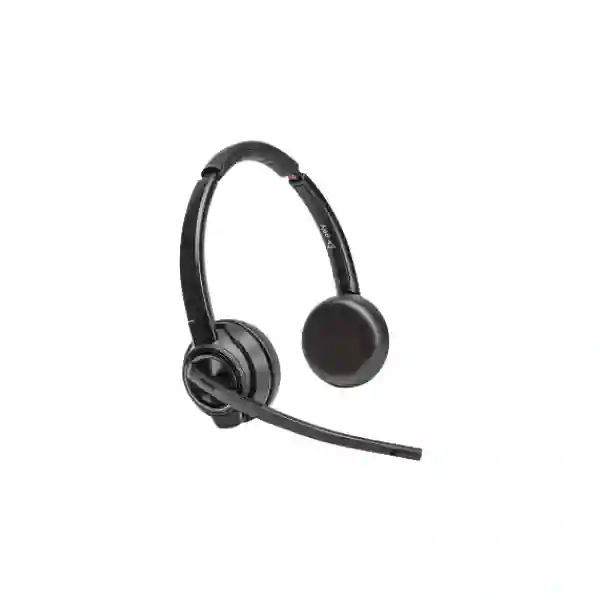
HP Poly Savi 8440 Office Convertible DECT Headset
A busy workday often means switching between a desk telephone, computer calling application and mobile phone. The HP Poly Savi 8440 Office Convertible DECT Headset is an office-oriented wireless headset system listed in HP’s product-support specifications for desk phone, PC and mobile use. Its convertible design gives the wearer alternatives to a conventional fixed headset shape, while the office base provides a central point for managing work calls. For teams evaluating a headset in Tanzania, the first questions should be practical: which telephone and softphone are in use, how calls need to be answered, whether the wearing style suits the individual, and exactly which model and package can be quoted. This guide explains the verified capabilities, everyday benefits, deployment considerations and the details worth confirming before placing an order.
Quick specifications and buying checkpoints
These details are drawn from HP’s Savi 8440 Office support specification. Confirm model identity and packaging on the supplier’s actual quotation.
| Connection use | Desk phone, PC and mobile, according to HP’s Savi 8440 Office support record |
|---|---|
| Wireless headset link | DECT between the headset and office base |
| Mobile connectivity | Bluetooth through the office base |
| Wearing style | Convertible, with a fit kit listed by HP |
| Microphone | Noise-cancelling |
| Published battery figures | Up to 13 hours talk time; up to 50 hours standby |
| Published charge time | Less than three hours |
| Computer cables listed | USB Type-A and USB Type-C |
| Computer operating systems listed | Windows 10, Windows 11 and macOS |
| Manufacturer box listing | Headset, base, charger, power adapter, cables, battery accessories and fit kit; confirm commercial package |
Who is this office headset intended for?
This headset is relevant to people who spend a meaningful part of the day on voice communication but do not remain permanently seated. Examples include front-desk personnel who check information while talking, customer-service staff who use an application on the computer, sales teams handling supplier and customer calls, and office coordinators who divide their time between a telephone and other tasks. A DECT connection between headset and base helps keep the user’s hands free for reading records, taking notes or checking an order. The office configuration is especially relevant where an existing desk phone remains part of daily work instead of being replaced entirely by browser or mobile calling.
It is not automatically the right solution for every role. A person who only joins occasional online meetings may need a simpler USB headset, while someone working outside the office may prefer a portable Bluetooth model designed to travel without a powered base. People sharing stations should evaluate hygiene, fitting accessories and user assignment. In loud shared spaces, the quality of microphone placement and the acoustic properties of the room still matter. Choosing on real workflows rather than a large feature list reduces avoidable spending and helps staff adopt the device comfortably.
Confirm the exact 8440 identity before buying
The model number matters here. HP maintains a support specifications record for Savi 8440 Office and describes a convertible office headset, up to 13 hours of talk time and office-base connections. Separately, HP markets the Savi 8445 Office as a convertible model with a spare-battery approach described as providing unlimited talk time through battery swapping. These are not interchangeable claims. In particular, an advertised unlimited-talk-time benefit for the 8445 should not simply be copied onto an 8440 quotation. The requested 8440 identification should be written out in full on any supplier proposal, alongside the manufacturer part number or commercial product identifier shown on the actual packaging.
There is also a reason to request written model confirmation: some reseller material describes the 8445 as the commercially offered convertible option and says an 8440 Office was not launched, whereas HP’s support catalogue includes an 8440 Office entry. The existence of a support entry by itself does not prove current local saleability or inventory. Buyers should therefore verify the product label, current ordering code, variant, regional package and supplied base before paying. If the available item is actually the 8445, it should be quoted and described as the 8445, with its own verified features and terms.
Three communication sources through an office base
HP lists desk phone, PC and mobile phone as connection destinations for the Savi 8440 Office. This makes the intended setup different from a single-purpose computer headset. An office worker can arrange a workstation around a traditional telephone, a Windows or macOS computer and a mobile handset, rather than continuously picking up different devices. The base is the connecting element: the headset’s DECT wireless link serves the user’s movement around the station, while separate interfaces allow the base to communicate with other calling equipment. This division is important because Bluetooth is associated with the base, not proof that the headset itself is a general-purpose standalone Bluetooth accessory.
A multi-device description does not mean that any three incoming conversations can be handled concurrently without restrictions. Call behaviour depends on the connected telephone, installed communication application, base settings and the active audio source. Some organisations need quick source switching, others want to transfer between sources, and others want a defined answer/end procedure. Before rollout, test real inbound, outbound, hold, mute and call-termination steps on each source. Establish who controls the primary line, especially where the user alternates between the desk telephone and the computer softphone during customer conversations.
Desk phone integration: the checks that avoid surprises
Traditional desk phones are not all wired in exactly the same way. HP’s listed contents include a telephone interface cable, while the support specifications identify RJ-11 among wired connection types. This gives a useful starting point for examining the telephone-to-base connection, but it is not a guarantee of remote call control with every phone. The actual model of desk phone, its headset port, supported signalling method and any required electronic hookswitch or handset-lifter accessory determine how conveniently a person can answer without touching the phone. A simple physical connection and remote answer functionality are separate questions.
For a reception workstation, ask someone to demonstrate a complete call rather than only verifying that audio can be heard. Can the person hear dial tone where required, answer a ringing desk phone, mute the microphone, end the call and return the phone to its idle state? Does the phone’s speaker or handset need a setting change? If several handset models are deployed in the same office, document each combination instead of assuming one tested phone proves compatibility for all. This approach is particularly worthwhile for organisations maintaining existing IP phones while refreshing headsets.
Computer calling and USB connection
The HP support specification identifies USB Type-A and USB Type-C cables in the 8440 Office package and lists Windows 10, Windows 11 and macOS among compatible operating systems. For a PC-based user, this creates a path from the headset system to the computer used for calls and meetings. Which connector is practical depends on the actual computer ports, docking station and other desktop devices. A compact laptop with only USB-C ports may be installed differently from a desktop computer with accessible USB-A ports. Keep the office base, computer and charging area arranged so that cables are protected from accidental pulls.
Operating-system compatibility is only the first layer of a successful deployment. Call-control integration with a particular softphone, collaboration platform or contact-centre application may depend on its supported devices, a current integration package and local IT policy. Test microphone selection, speaker selection, answer/end buttons, mute status and device switching within the actual application used by the team. If staff use virtual desktops or remote sessions, confirm how USB audio is redirected in that environment. Avoid promising a particular platform certification unless it is confirmed for the exact 8440 variant.
Mobile-phone use through the base
HP describes Bluetooth connectivity via the office base for this headset system, supporting the listed mobile-phone use case. That arrangement can simplify a workstation where a person receives some calls from a work mobile and others on a company desk telephone or computer. It can also be helpful for sales or operations staff who need access to mobile calls without keeping a handset between shoulder and ear. In an office workflow, the primary benefit is controlled access to the appropriate communication source while keeping the user’s hands available for paperwork or computer work.
Do not interpret this base-based Bluetooth feature as confirmation that the headset can leave the office and pair directly with a mobile phone like a pocket-size travel headset. A buyer who expects mobile use while walking outdoors should confirm the intended operating mode before choosing this product. In addition, mobile call integration varies by handset operating system, software release and the device’s pairing policy. During commissioning, pair the intended handset to the base, place and receive test calls, and verify that audio returns to the correct destination when the call ends.
Why DECT can suit an office environment
DECT is the wireless technology used between the headset and its office base. It is designed for cordless voice communication and differs from using a computer’s ordinary Bluetooth connection as the headset’s principal office link. For staff who need to retrieve a folder, consult a colleague nearby or stand to stretch during a call, removing the physical audio lead can make work more flexible. The useful distance will depend on the building, layout, doors, construction materials, neighbouring equipment and base placement. A numerical range quoted for a different Savi model should not be presented as an exact 8440 performance guarantee.
Plan the environment before making assumptions about coverage. A test walk through the actual office can reveal weak areas near stairwells, heavy partitions, lift shafts or rooms with reinforced walls. A headset that works well at the desk may behave differently several rooms away. The base should be positioned to support the person’s normal movement, and the office should define an acceptable boundary for sensitive conversations. Organisations with many wireless systems should also consider their radio environment and how devices will be maintained. DECT mobility is most valuable when it is matched to a realistic calling area.
Microphone clarity and realistic noise expectations
The model’s HP support record identifies a noise-cancelling microphone. That is important for office callers because the listener usually cares more about the quality of transmitted speech than about a long list of decorative audio features. A microphone positioned correctly near the mouth can help voice pick-up while reducing some surrounding sound. The document also gives a microphone bandwidth of 100 Hz to 10 kHz, providing technical context for the recorded speech path. Real-world call quality nevertheless depends on microphone position, the chosen application, network conditions and the room’s noise level.
Noise-cancelling microphone technology does not make a busy office acoustically silent. Nearby speech, hard reflective surfaces, a loud air conditioner or a colleague sitting very close can still affect the experience. If the team works in a particularly lively contact centre, arrange a practical call test from the user’s real seat during busy hours. Ask a colleague at the other end to assess clarity, volume, breath noise and whether adjustments are needed. Do not assume that a description of microphone noise cancellation also establishes the presence of active noise cancellation in the listener’s earpiece; those are distinct functions.
Convertible wearing choices and user comfort
A convertible headset is useful because not every employee finds the same wearing style comfortable over a full shift. HP identifies the 8440 as convertible and includes a convertible fit kit in the listed package contents. This means the fitting process deserves the same attention as the phone connection. The selected arrangement should place the speaker comfortably and hold the microphone in a repeatable position. In an office where multiple staff members rotate tasks, giving people time to choose and adjust the fit is often more effective than issuing the same configuration without trial.
Headset comfort is personal, and an attractive specification cannot substitute for a fit assessment. Consider glasses, hairstyle, preference for left- or right-side wear, time spent on calls and whether the user frequently puts the unit down. Check that the fit is secure enough during normal movement without creating unnecessary pressure. Explain to staff how to adjust the device and where to place it when not in use. If the headset is shared, establish a process for cleaning and replacing personal-contact accessories in accordance with the manufacturer’s care guidance.
Talk time, charging and the working day
HP’s Savi 8440 Office support specifications list up to 13 hours of talk time, up to 50 hours of standby time and a charging time of less than three hours. These are useful planning figures, not a promise that every individual will obtain identical results in every usage pattern. Daily call volume, headset settings, battery age, environmental conditions and the organisation’s charging practices can affect operating time. For an employee with a normal office shift, the relevant question is whether the likely talk-time demand fits comfortably within the stated maximum while allowing for unexpected longer calls.
Create a simple charging habit: return the headset to its correct cradle when practical and keep the charging area accessible. For work that genuinely cannot stop for recharging, ask the supplier to demonstrate the exact package’s battery arrangement and replacement procedure. HP’s 8440 support listing mentions a spare battery and a charger among box contents, but a quotation should confirm the delivered kit; this should not be interpreted as a verified unlimited-talk-time claim for the 8440. That specific language is associated with the separately identified Savi 8445 product.
Understanding voice and multimedia audio
HP specifies a 32 mm speaker, with published speaker bandwidth covering 100 Hz to 6.8 kHz in wideband mode and 20 Hz to 20 kHz in multimedia mode. This makes it useful to think about the headset as a voice-first work tool that may also carry other computer audio. Wideband telephony can support a more natural speech presentation when the full call path allows it. Multimedia performance is relevant for training clips, message playback or other short computer listening tasks. Those measurements do not, by themselves, determine how a call will sound over a particular mobile or office network.
For a user whose day consists mainly of telephone conversations, intelligibility, comfortable listening volume and consistent microphone placement should take priority. If the person needs immersive stereo music, prolonged audio production work or complete isolation from surrounding office sounds, a convertible single-user voice headset may not be the best product category. Review the needs of the actual role rather than assuming that a wide frequency figure transforms a business call headset into a specialist audio-monitoring device. Keep listening levels moderate and follow the organisation’s hearing-conservation practices.
A better way to handle mixed call workflows
Consider an office administrator who starts the morning answering a conventional desk phone, then joins a computer-based supplier discussion and later returns a customer’s call from a mobile handset. With the right connections in place, a multi-source office headset can reduce repeated switching between handsets and separate accessories. The strongest benefit is not that the employee can take unlimited calls simultaneously; it is that the workstation can be designed around a consistent wearing device and a clearly understood set of source controls. That can make daily movement and note-taking more natural.
The process works best when the team agrees which line is selected by default and what happens when another source rings. Write a short instruction card for the station and practise common situations, such as an incoming desk-phone call during a computer task or a mobile call that needs to be ended before returning to the PC. If conferencing or transfer between sources is business-critical, demonstrate the function during a pilot using the precise hardware and software combination. A well-designed workflow is more valuable than a feature that exists on paper but is confusing to the employee.
Installation plan for one workstation
Begin with an inventory of the equipment already at the desk: desk-phone make and model, computer operating system, available ports, softphone software, mobile handset and any docking station. Identify an accessible location for the office base and charging cradle, with safe routing for power and connection cables. Confirm the supplied power adapter and relevant regional electrical requirements before plugging anything in. Attach the appropriate cables according to the manufacturer’s instructions, then establish each needed device connection one at a time rather than changing several settings simultaneously.
After physically connecting the system, complete a controlled commissioning test. Place an outbound call on every source intended for use. Receive a call, check headset and microphone levels, test mute and resume, end the call and confirm that audio returns to the expected device. Walk to the normal working distance and note any coverage gaps. Then allow the employee to choose a comfortable wearing setup and practise docking for charging. Record the successful configuration so a replacement computer or office telephone does not require the setup to be reconstructed from memory.
Softphone, PBX and collaboration-platform compatibility
A company may use an IP PBX, hosted voice system, unified communications application or a mix of those services. None of these labels automatically establishes complete button and call-control compatibility with a particular headset. Separate the requirements into basic two-way audio, mute synchronisation, remote answer/end, incoming call notification, and any additional workflow integrations. Testing only audio can conceal problems that become visible when agents try to answer from the headset while their softphone is in the background. Ask the IT team to document which features are essential and which are optional.
Where Microsoft Teams, Zoom, a contact-centre application or another named platform is involved, confirm the exact headset variant and the current certified-device or support matrix before promising a specific integrated experience. A device being usable as a computer audio endpoint is not the same as verified certification for a software platform. If the customer runs virtual desktops, remote application delivery or restrictive USB policies, include those factors in acceptance testing. A short demonstration on the actual enterprise build usually provides more useful evidence than an undifferentiated list of application logos.
Planning deployment across several employees
A single-user pilot can reveal practical deployment issues before a large purchase. Pick representative roles rather than testing only at the IT desk: one reception position with a physical phone, one computer-first user, and one employee who frequently switches call sources. Ask them to evaluate comfort, call clarity, charging routine, ease of answering, and whether the office base fits cleanly into the workspace. Capture the particular telephone model and software version used during the trial. This makes feedback actionable and helps prevent a good experience on one workstation from being overgeneralised.
For a multi-user rollout, assign responsibility for device naming, cable placement, spare consumables, user training and support records. Keep an inventory that distinguishes 8440 from 8445 and from other Savi family variants. Store replacement parts carefully because a visually similar cradle or base may not be equivalent in every situation. Where desks are shared, consider hygiene materials and fitting parts as part of the total deployment plan. There is no reason to promise lower support costs or improved call productivity without measuring results in the organisation’s own conditions.
Security, privacy and responsible use
Business headsets carry conversations that may contain customer names, account details, internal schedules or commercial information. Choose an appropriate physical calling location and train employees not to continue confidential conversations in public corridors merely because the headset works away from the desk. Base placement, pairing procedures and device assignment should form part of normal IT equipment control. For computer calls, the organisation’s application permissions, endpoint configuration and network security remain relevant. A secure headset cannot compensate for weak account controls or the use of an unsecured calling application.
Some Savi family documentation describes DECT security features, but buyers should obtain exact model and regional evidence before asserting a particular certification or level of encryption for the 8440. Similarly, do not assume that Bluetooth pairing through a base allows unrestricted connection of private devices to a managed workstation. Establish a policy for permitted phones, what happens when an employee changes role, and how paired devices are removed before a station is reassigned. A responsible deployment balances user flexibility with the business’s privacy obligations and operational controls.
Considerations for businesses buying in Tanzania
In Tanzania, a headset project should start from the actual systems used by the business, not from a claim that a particular phone or network operator is universally supported. Identify whether the organisation relies on desk-phone equipment, a local or hosted PBX, browser-based calling, mobile networks or a combination. Confirm the desk-phone model, computer operating system and any relevant network or call-quality requirements. For organisations that experience intermittent power or connectivity, it is important to distinguish the headset’s local wireless connection from the wider telephone or internet service on which a call depends.
Before requesting a commercial quotation, confirm that the supplier can identify the exact product variant, appropriate regional package, required cables and any additional desk-phone accessories. Ask for stock confirmation, price in the agreed currency, delivery arrangements, warranty documentation and support terms in writing; none of those items is established by general manufacturer specifications. Check the supplied power adapter against the installation environment. A sensible purchasing decision also takes account of user training, spare fitting accessories and who will help if a telephone model does not support the desired remote call controls.
What is listed in the manufacturer package?
HP’s support listing for the Savi 8440 Office includes a wireless headset, office base, charging cradle, AC power adapter, USB Type-A cable, USB Type-C cable, telephone interface cable, spare battery, spare-battery charger and convertible fit kit. This is useful as a discussion checklist because the buyer may otherwise focus only on the headset and overlook the equipment needed at the desk. Confirm each item against the exact commercial box being offered, especially where product packages, market variants or replacement units can differ. The support list is not a confirmation of local stock or the contents of a particular supplier’s shipment.
Before acceptance, ask the person receiving the equipment to inspect the package and compare it with the invoice and order acknowledgement. Check for the chosen headset, correct base, power supply, cables and fitting components. Record visible transport damage and missing items before the system is installed. If an extra accessory is needed for the telephone’s call-control features, make sure it is separately specified rather than assuming it must be inside every box. A complete installation relies on matching the physical contents to the workstation’s communication needs.
How to compare the 8440 with alternative headset choices
Start with the central question: does the employee require a convertible office-base DECT system that can be arranged for desk phone, PC and mobile use? If yes, the 8440 support specification describes the relevant category, subject to confirmation of a saleable exact unit. If only computer calling matters, compare simpler USB or PC-focused wireless alternatives on cost, software compatibility and charging needs. If outdoor mobile use is essential, compare headsets intended for direct portable Bluetooth operation. If the employee needs two-ear listening or stronger isolation from surrounding sound, consider a stereo headset with the appropriate verified audio features.
Compare like with like. A vendor quotation for an 8445 Office should not be evaluated as an identical 8440 without noting the distinct model designation and battery claims. A USB headset without a desk-phone path should not be treated as equivalent simply because both make computer calls. Ask each supplier to show its exact model code, included base and accessories, wired connections, supported calling software and applicable warranty terms. This turns a product-name comparison into a defensible business decision that colleagues in procurement and IT can both review.
A decision checklist for the purchasing team
Write down the number of users, job roles and communication sources before asking for a price. For each intended station, note the desk-phone make and model, computer ports, operating system, softphone application and whether a work mobile needs to connect through the base. Indicate which functions are mandatory: basic audio, remote answer/end, call hold, muting, source switching, or a particular accessibility or comfort requirement. Add the longest typical call period and daily talk-time estimate, as well as the expected area of movement away from the desk. These details help identify which product claims must be demonstrated.
The quotation should then name the HP Poly model exactly and show the applicable manufacturer ordering identifier, not a guessed SKU. Request a packing list, accessory requirements, local commercial terms and a realistic support contact. If the offered device is an 8445 rather than an 8440, ask for a corrected description before comparing cost. For teams buying several headsets, an acceptance test on a representative workstation is a sensible condition. The outcome should be an understandable specification, a fit-for-purpose device and fewer unexpected installation tasks after delivery.
Care, charging habits and long-term usability
Keep the headset and its base in a stable, dry location appropriate for office electronics. Return the device to its charging cradle as recommended, avoid twisting or sharply pulling cables, and store fitting accessories where they will not be lost. Cleaning should follow the manufacturer’s material-specific guidance rather than using arbitrary solvents or soaking electronic parts. Users who share equipment need a more deliberate cleaning and personal-contact-parts procedure than someone who has a permanently assigned headset. Maintaining comfortable fitting components can be just as important to continued adoption as keeping the electronic system working.
When a call-quality complaint appears, use a repeatable troubleshooting order. Check whether the problem occurs on the desk phone, the computer application, the mobile connection or all three. Confirm that the microphone is placed correctly, the intended audio source is selected, the battery is charged and cables remain seated. For problems limited to one calling application, examine its audio settings before replacing hardware. For a wireless coverage problem, test the user’s position relative to the base. Document recurring issues and use official support guidance for firmware, pairing and replacement procedures.
What buyers can reasonably expect—and what to verify
The evidence-supported proposition is a convertible HP Poly office DECT headset system with specified desk-phone, computer and mobile connection paths, a noise-cancelling microphone and an office charging setup. The manufacturer’s Savi 8440 support listing gives an upper talk-time figure and detailed audio and cable information. These are useful facts when screening products for a busy office, but they are not proof of compatibility with every handset, active certification for every application, current sale status, a local warranty entitlement or particular stock in Tanzania. Those are separate matters that belong in a confirmed quotation and technical check.
For the most useful purchasing conversation, share the workstation details, intended number of units and exact features that staff must use. Ask for explicit confirmation that the unit being supplied is the Savi 8440 Office, not a similarly named alternative, and request a demonstration or compatibility statement for critical phone and software combinations. This approach protects both the buyer’s budget and the employee’s working experience. The right headset is the one that performs the required daily actions reliably in the actual office setup, not simply the one with the longest feature list.
What to include in your quotation request
- Exact requested model: HP Poly Savi 8440 Office; clearly identify any Savi 8445 alternative
- Number of users and desk-phone brands/models
- Computer operating systems, USB ports and calling software
- Required remote call controls and mobile phone pairing
- Confirmed package contents, accessories, support terms, price and delivery
- A working demonstration for a representative station when compatibility is business-critical
Frequently asked questions
Is the HP Poly Savi 8440 Office a Bluetooth headset?
It is primarily described as an office DECT wireless headset system. HP also lists Bluetooth via the office base to support a mobile-phone connection. Buyers should not assume that the headset itself offers the same standalone direct-to-phone pairing as a travel Bluetooth headset. If mobile calls must work away from the powered office base, clarify that requirement before ordering.
Can it be used with a desk telephone and a computer?
HP lists desk phone and PC among the connection destinations and identifies telephone and USB cable interfaces in its specifications. That supports a multi-source office configuration, but the exact desk-phone model and the computer calling application should be tested. Basic audio may work even if remote call-answer controls require an extra accessory or supported integration.
How many hours of talk time are listed?
The HP Savi 8440 Office support record states up to 13 hours of talk time and up to 50 hours of standby, with charging in less than three hours. These are manufacturer figures rather than independently measured results for every workplace. Ask about the supplied battery kit if your team needs continuous calls across exceptionally long shifts.
Is the 8440 the same as the Savi 8445 Office?
No. HP has separate support records for the Savi 8440 Office and Savi 8445 Office. The 8445 product documentation includes an unlimited-talk-time description based on its battery arrangement, while the 8440 support page gives a finite stated talk-time figure. The 8440’s commercial availability is not independently confirmed by the support page alone, so insist on precise model identification in a quote.
Does this model include a noise-cancelling microphone?
HP’s 8440 support specification lists a noise-cancelling microphone. Proper placement and a test in the intended working area are still important. Background conversations, poor network quality and incorrect microphone selection can affect clarity. Do not confuse microphone noise cancellation with a guaranteed active noise-cancelling listening experience.
Can employees use it with Microsoft Teams or a contact-centre system?
Computer audio use is relevant, but full call-control support or certification for a named software platform must be checked for the exact model, variant and software version. Test microphone and speaker selection, mute synchronisation and headset answer/end behaviour with the actual deployed application. A general claim of PC compatibility is not a substitute for that integration check.
What makes the headset convertible?
A convertible model provides alternative fitting arrangements rather than forcing every user into one fixed wearing configuration. HP identifies the 8440 as convertible and lists a fit kit in the package. Try the relevant arrangement at the real workstation to check comfort, microphone position and stability. The best fit depends on the wearer and length of use.
Is a separate electronic hookswitch cable needed?
That depends on the connected desk telephone and the desired remote-control functions. A telephone interface cable can allow an audio connection, but answering or ending a call from the headset may call for a phone-specific accessory or configuration. Give the supplier the exact desk-phone make and model and ask for a verified installation plan.
How far can a user walk from the desk?
The headset uses a DECT connection between the headset and office base, but an exact operating distance for the 8440 should not be assumed from measurements published for a different Savi model. Range depends on obstacles, building materials, base placement and the wireless environment. Test the user’s intended movement area before approving a large rollout.
Can the headset continue calls during a power outage?
The headset has a rechargeable battery, but the base and connected telephone or computer may require mains power, and cloud calling may need a working network connection. Therefore, do not assume end-to-end calling continues merely because the headset battery is charged. Include the entire communications chain when planning power continuity for critical operations.
What is the local price and availability in Tanzania?
No verified Tanzania listing price or live stock status is established here. Request a written quotation for the exact manufacturer model and package, including the currency, applicable local terms, included accessories and after-sales arrangements. If a supplier offers a Savi 8445 instead, it should appear as a separately identified alternative rather than a silent substitute.
What should I provide when requesting a quotation?
Share the requested product name, quantity, desk-phone make and model, computer operating system, USB port type, calling software and whether a mobile phone must pair through the office base. Mention required call-control functions and whether multiple users will share devices. Ask the supplier to confirm exact part number, contents, compatibility and support terms in writing before the purchase is approved.
Request a model-confirmed headset quotation
Ask FourTeck Tanzania about the HP Poly Savi 8440 Office Convertible DECT Headset with the exact device identifiers, intended phone and computer environment, and the number of users. Product identity, current availability, price and any accessories should be confirmed in the quotation. A correctly identified model and a tested workstation are the best foundation for a reliable purchasing decision.
Next step: request a quotation and compatibility review from FourTeck Tanzania.




Reviews
There are no reviews yet.