
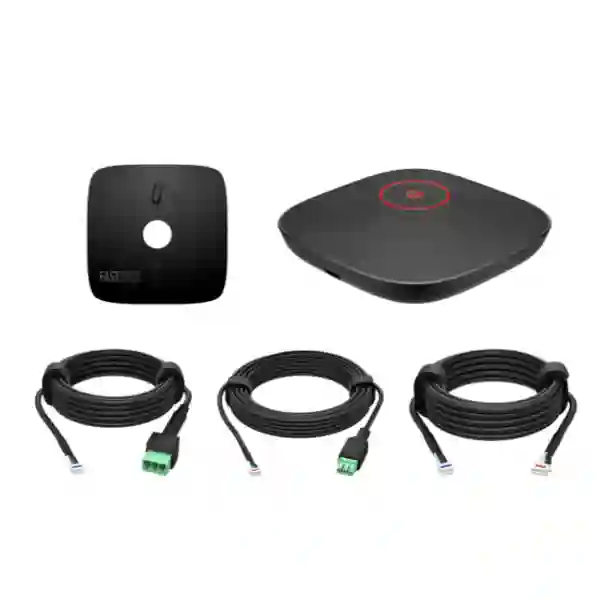
HP Poly Studio A2 Microphone Adapter — Audio Bridge Guide
Extend a compatible Poly meeting-room system with the official HP Poly Studio A2 Audio Bridge and supported table microphones. Get the model, cabling, PoE and accessory details right before purchasing.
The term “Microphone Adapter” is a buying description; HP officially names this central connectivity product the Studio A2 Audio Bridge. It does not replace a table microphone.
Quick buyer checklist
- Identify the exact supported Poly room system and software
- Plan microphone quantities and actual seating positions
- Verify the approved local-link network and PoE arrangement
- Check all microphones, adapters and cabling in the quote
Technical summary
| Official HP product | HP Poly Studio A2 Audio Bridge |
| Purpose | Connect compatible Studio A2 table microphones |
| Interfaces | 1 RJ-45 Ethernet port; 4 A2B bus ports |
| Connectivity | Poly StudioNet local-link network arrangement |
| Power | Suitable PoE+/PoE++ configuration |
| Dimensions | 147 × 103 × 24 mm; 330 g |
| Supported hosts | Poly G62, X72, V72, X52, V52, X32 |
| Procurement note | Verify separately required microphones, adapter and power equipment |
Poly system microphone limits
| Host | A2 microphones | Important note |
|---|---|---|
| Studio G62 | Up to 8 | Bridge required for described A2 configuration |
| Studio X72 / V72 | Up to 4 | Check host operating mode |
| Studio X52 / V52 | Up to 4 | Approved network adapter considerations |
| Studio X32 | Up to 2 | Approved network adapter and startup checks |
| Studio V12 | 1 directly | No Audio Bridge needed for supported single-mic connection |
Figures are manufacturer-documented platform limits, not quantities recommended for every room.
What is the HP Poly Studio A2 Microphone Adapter?
The HP Poly Studio A2 Microphone Adapter is a descriptive search name used for the connectivity hardware in an HP Poly Studio A2 conferencing arrangement. HP formally identifies the central connectivity device as the HP Poly Studio A2 Audio Bridge. That distinction matters because the Audio Bridge, the Studio A2 Table Microphone and the approved USB-to-Ethernet dongle used with certain video bars are separate items. The bridge links supported A2 table microphones to compatible Poly video systems; it does not capture speech by itself. Buyers should use the exact HP product name and the manufacturer’s package details when reviewing a quotation. For a Tanzania office, the most useful first step is to identify which conferencing system is already installed, how many speakers need coverage and what accessories are currently available. This helps determine whether the bridge is needed and whether any extra cabling, adapters or power equipment must be specified.
Who should consider this product?
A Studio A2 Audio Bridge makes the most sense for an organization using a compatible Poly conferencing platform and planning to install multiple supported table microphones. Common examples include long meeting tables, spacious boardrooms and rooms where seated participants are too far from the video bar for satisfactory pickup. A bridge-based layout may support more thoughtful microphone placement than relying only on the front-of-room device. However, the room’s acoustics and actual seating pattern still affect results. A small meeting room with adequate existing audio may not need additional hardware. The purpose is to solve an identifiable speech-coverage problem within a manufacturer-supported system, not to add components solely because they are available. An AV planner should consider how people speak, move and share tables, and then match the microphone arrangement to the host Poly system’s documented limits. This makes the quotation useful instead of generic.
The bridge is not the table microphone
The Audio Bridge provides connections for the Studio A2 microphone architecture and exchanges audio with the Poly room system. The table microphones are the devices placed near participants to capture sound. An audio bridge cannot replace the microphones because it has a different job. Conversely, ordering table microphones without the bridge may leave an intended multi-microphone arrangement incomplete, except for an expressly supported direct-connection configuration such as the single microphone permitted on Studio V12. This is a common source of confusion when quotations are shortened to terms such as ‘mic adapter’, ‘A2 box’ or ‘microphone kit’. Request itemized names rather than relying on those descriptions. A complete proposal should clearly distinguish the host video system, audio bridge, each table microphone, power accessories, network adapters and cabling. Understanding those separate functions makes it easier to prevent wrong-item orders and to estimate the equipment actually needed for a specific room.
Supported Poly room systems
HP lists Studio G62, Studio X72, Studio V72, Studio X52, Studio V52 and Studio X32 as compatible room systems for the Studio A2 Audio Bridge. That list should be treated as model-specific, not as confirmation that every device with Studio in its name supports this accessory. The planned operating mode is also relevant. A conferencing appliance used as a native meeting-room system may have different installation considerations from a USB video bar associated with a room computer. Record the actual model before asking for a quote. If purchasing for several offices, collect device identifiers from each room rather than using the model of one reference room for all. Confirm any proposed firmware requirements against HP’s current software documentation. Compatibility should be established before cable installation or purchase authorization because a superficially similar Poly product may use an entirely different microphone expansion system.
Microphone numbers depend on the host platform
The bridge has four A2B bus ports, but the maximum supported microphone total varies with the attached Poly video system. HP lists up to eight Studio A2 table microphones for Studio G62, up to four for Studio X72 or V72, up to four for Studio X52 or V52, and up to two for Studio X32. These are limits, not recommended quantities for every meeting room. Selecting the right number requires a seating sketch and listening assessment. A room with fewer carefully located microphones may be easier to use and maintain than one with excessive equipment. Equally, a very long table may benefit from multiple pickup positions within the permitted configuration. Plan the number of microphones for current use and check likely future requirements before deciding which host platform and audio topology will be suitable. Never assume that buying another bridge overrides the host system’s documented capacity.
Do not assume compatibility with older Poly systems
HP explicitly states that Studio A2 Audio Bridge is not backward-compatible with Poly Studio X70, X50, X30, the older Poly USB family or Poly G7500. These platforms continue using their applicable analogue or IP expansion microphone options. In an office with a mix of generations, ordering identical accessories for every room can therefore create avoidable expense. An older room may be better supported by its existing audio ecosystem, while a compatible newer room may use the Studio A2 architecture. Existing Poly IP microphones should not be presumed interoperable with Studio A2 table microphones. Compare the asset inventory with the manufacturer’s supported configurations before reusing hardware. A supplier should identify the exact video bar and microphone family in writing rather than basing compatibility on connector shape, visual similarity or an informal statement that both items are Poly products. A correct installation begins with a correct hardware match.
What the Ethernet and A2B ports do
The bridge combines one RJ-45 Ethernet network interface with four A2B audio bus ports. Those connections serve different purposes. The A2B side supports the microphone arrangement, including appropriate daisy-chain layouts, while the network side connects through the intended StudioNet local-link path to compatible Poly room equipment. The distinction is important because not every cable, network port or switch can be treated as interchangeable. A port that physically fits an RJ-45 connector may not be the correct port for the intended audio data path or power arrangement. The installer should follow a topology diagram for the actual host model and identify each connection by function. Do not improvise a generic office-network connection simply because both devices use Ethernet connectors. The most effective procurement document includes an equipment diagram alongside the item list so that the buyer and installer have the same understanding of how the parts work together.
Understanding HP Poly StudioNet
StudioNet is HP Poly’s connectivity approach for supported devices that communicate with compatible room systems over a designated local-link network arrangement. It should not be described as a universal microphone-over-Ethernet feature that works with arbitrary audio equipment. Some supported rooms can use a dedicated local-link network connection, while others require an approved adapter or carefully specified switching arrangement. This is one reason why the exact host model must be known. The corporate data network and the room’s local peripheral connection can have distinct roles even though they involve familiar Ethernet cabling. Have the IT team verify port assignment, approved switching hardware and the planned path before work begins. Avoid relying on guesswork or assuming that any existing network outlet will suit the bridge. Where a customer has multiple meeting rooms, a consistent network and labelling plan makes later support easier, but each individual room still needs a model-specific compatibility check.
Power over Ethernet needs a real power plan
The Studio A2 Audio Bridge uses a Power over Ethernet arrangement. HP identifies suitable PoE+/PoE++ support in its specifications, with power budgeting dependent on the intended configuration. This means procurement should specify an appropriate injector or power source, not merely a network cable. The video bar’s Ethernet socket should not be assumed to provide the required power. Ask where the PoE equipment will be mounted, how it connects to the host system and how the expected microphones will be powered. Confirm the planned load with the applicable HP instructions. Different devices and cables in the room may have separate power requirements. Where a site uses backup power for its conferencing systems, the AV and facilities teams can review whether supporting accessories should be included in that arrangement. That is a separate infrastructure decision and should not be described as a feature included in the bridge. Clear power planning avoids incomplete installations and confusing startup faults.
Cable selection is part of compatibility
HP’s Studio A2 documentation includes specific cabling guidance for the Audio Bridge and A2 table microphones. The standard bridge package is listed with a CAT 6A cable and a microphone extension cable, but a particular building may require different physical routes. Custom microphone cable runs must follow HP’s supported conductor, impedance, length and connector requirements rather than using arbitrary extensions. The installer should draw the route from the bridge to the first microphone and between microphones, measuring actual lengths around furniture and cable trays. Cables should be protected from chair legs, wheels and repeated table movement. Ethernet sections in relevant Poly configurations require the appropriate shielded cable type. A qualified technician should check terminations and the supported topology before energizing the system. Label both ends of each cable and keep the diagram with the room’s asset record. This small amount of planning can make future room changes much less disruptive.
Mounting and physical dimensions
HP specifies a compact Studio A2 Audio Bridge measuring approximately 147 by 103 by 24 millimetres and weighing 330 grams. Its described bundle includes a mounting plate, allowing the installer to place it away from the main speaking area while maintaining access. The bridge does not need to occupy the center of a meeting table. However, it should not be hidden in a location where connectors, power and status information cannot be checked. Plan a secure mounting point, cable strain relief and an accessible place for power accessories. If equipment is placed beneath furniture, ensure it is protected from impacts and accidental disconnection. Use the current manufacturer instructions for the mounting method rather than assuming any magnetic or adhesive surface is suitable. The result should be discreet but serviceable. A tidy room installation provides an improved experience for users while allowing technicians to diagnose faults without removing cabinets or moving heavy furniture.
Meeting-table microphone placement
The bridge is useful because compatible microphones can be positioned around the people who need to be heard. Start by locating the seats used in ordinary meetings rather than arranging microphones purely for visual symmetry. Consider long tables, side seats, laptop screens and the distance between quiet speakers and the nearest microphone. Avoid placing a microphone where it will routinely be covered by documents, cups or laptops. Where people frequently turn toward a presentation screen, test pickup in that speaking position. An A2 system offers a supported architecture for distributed table microphones, but it cannot guarantee good sound from poorly chosen locations. An acceptance test should include voices from the nearest and farthest seats, people speaking across the table and participants who speak more quietly. If a room is frequently rearranged, confirm that cable paths and microphone positions can accommodate those changes without exceeding manufacturer’s connection limits.
Room acoustics still matter
Microphones do not remove all acoustic problems from a meeting room. Hard walls, glass surfaces, loud ventilation, open doors and reflective ceilings can make speech harder to understand. Noise-processing features in supported Poly systems can be helpful, but the real result depends on the environment and operating configuration. Before adding microphones, listen to the existing setup from a remote participant’s perspective. Determine whether the challenge is distance, background noise, echo or incorrect audio-device selection. Some issues may benefit from microphone repositioning, while others call for changes to the room itself or to conferencing settings. After installation, perform a real call instead of relying only on indicators showing that the bridge is powered. Have people speak naturally from common seats and take notes on clarity and level. A well-designed system works for the way the organization meets, not merely for a laboratory-style equipment demonstration.
Install microphones before bridge power
HP’s installation guidance instructs technicians to connect Studio A2 Table Microphones to the Audio Bridge before supplying PoE power to the bridge. That sequence helps the system detect the microphones during startup. It is an important operational detail when different contractors handle the room’s cabling, power and video equipment. Agree on the work sequence before powering the installation. Check all microphone connectors, complete the intended topology and verify the host system’s local-link connection before startup. Once powered, check that the room system recognizes the intended number of microphones. If detection fails, review wiring, supported device counts and setup order before assuming that hardware is defective. Some host platforms have additional model-specific power-up considerations. A written commissioning checklist is valuable because a future technician may not know the original installer or remember the connection sequence. Follow the current HP administrator instructions for all resets and reconnects.
Studio X32 installations
Studio X32 is a supported host for the A2 Audio Bridge, with up to two Studio A2 table microphones according to HP documentation. Its setup requires attention to the approved HP USB 3.0 to Gigabit RJ-45 Adapter G2, which supports the necessary local-link connectivity arrangement. That adapter is a separate type of device from the Audio Bridge. HP also documents specific startup considerations for X32, so the complete installation must follow the X32 guidance rather than instructions copied from another Poly model. A small-room project should confirm that one or two microphone positions are sufficient before ordering. Check cable access behind the display or video bar, available USB connections and the planned PoE setup. If the quote mentions only the bridge and table microphones, ask whether the approved network dongle and any other required accessories have been included. This avoids discovering a missing connector on installation day.
Studio X52 and V52 installations
HP includes Studio X52 and V52 in the compatible A2 Audio Bridge range, with up to four A2 table microphones supported by the specified room platform. These systems require careful consideration of their network and room-computer arrangements. HP describes the need for an approved USB-to-Ethernet adapter in applicable X52 and V52 configurations. Confirm the precise approved adapter, host software and cabling topology before placing an order. V52 deployments used with a Windows room computer may have additional considerations involving the computer and meeting application. Audio should be validated in the workflow the organization actually uses, not solely through a configuration screen. An installer should also assess seating positions so that the proposed microphone count is justified. For several similar medium rooms, a shared bill of materials can be useful, provided every host system is positively identified and checked against the current manufacturer’s configuration guidance.
Studio X72 and V72 installations
Studio X72 and V72 are included in HP’s supported Audio Bridge list, with up to four Studio A2 table microphones per listed host configuration. These devices are often evaluated for larger room arrangements, where microphone placement and cable routes deserve special attention. A four-microphone limit does not mean that four microphones are automatically required. The installer should first map seats, distance from the front of the room, table obstacles and usual speaking patterns. The connection arrangement for X72 differs from the dongle-dependent configurations of certain smaller video bars, so use the correct diagram rather than assuming one wiring layout fits all Poly devices. V72 rooms may also involve a room computer and particular conferencing software. Confirm the entire system design, including PoE and management, before delivery. Where the room may later expand, compare the platform’s supported microphone capacity with the organization’s likely future seating plan.
Studio G62 installations
Poly Studio G62 is a modular video conferencing system. HP lists support for up to eight Studio A2 table microphones in a compatible G62 and Audio Bridge arrangement. This can make the architecture useful in larger or more complex meeting spaces, but the installation still needs a measured microphone plan. The four A2B audio-bus connections of the bridge and the supported daisy-chain structure provide layout options within the host’s limits. The room’s camera system, controllers, network arrangements and audio equipment should be planned together. Where an approved local-link network switch is needed, select it from applicable manufacturer guidance rather than relying solely on an ordinary Ethernet switch description. Record the installed microphone count, cable routes and bridge location during handover. A large conference room may change substantially over its service life, so clear documentation is especially useful when tables are rearranged or equipment is relocated.
The Studio V12 direct-microphone exception
A buyer planning an HP Poly Studio V12 room should not automatically purchase an Audio Bridge. HP documentation describes a configuration in which one Studio A2 Table Microphone connects directly to the V12, without an A2 Audio Bridge. Only one microphone is supported in that direct arrangement. This is a meaningful exception because purchasing a bridge for a simple V12 extension may be unnecessary. Before ordering, establish whether the actual requirement is one direct table microphone or a larger microphone arrangement supported by a different room platform. A V12 customer should ask for the complete recommended set of components rather than naming the bridge in isolation. If the existing room needs more coverage than that supported direct configuration can provide, the right discussion may be about the room system itself. The best quotation matches the intended system architecture, not simply the most familiar accessory title.
Software and firmware readiness
The Studio A2 range was introduced into supported Poly VideoOS configurations beginning with the 4.6 software family, and HP publishes further compatibility information for subsequent releases. Check the exact room system’s installed version and the latest applicable manufacturer instructions before deployment. Features and supported peripherals can differ by model, application and operating mode. A general claim that a feature exists in Poly VideoOS is not proof that it behaves identically in every room. IT teams should document the current version, change policy and testing plan before updating a production meeting space. After an upgrade, test microphone detection, mute handling and speech pickup during an actual call. If a project includes several rooms, avoid making changes to all of them before validating one representative installation. Software preparation is part of the equipment purchase decision because unsupported or untested configurations can create difficulties even when the physical connectors are correct.
Microphone selection and speaking transitions
HP’s Studio A2 documentation discusses automatic microphone selection in supported multi-microphone configurations. The system can choose an appropriate pickup source as participants speak, with behavior dependent on the connected Poly platform and software release. That is different from promising that all microphones always contribute simultaneously to the audio signal. In a room used for board meetings or rapid group discussions, test people taking turns, briefly speaking over one another and addressing different sides of the table. The remote listener should report whether changes in speaking position cause distracting level shifts or clipped speech. Review the supported settings and any noise-processing features that influence the result. A well-implemented microphone layout should serve normal meetings without requiring participants to learn unnatural speaking patterns. Describe the supported behavior accurately in the procurement specification, rather than treating general marketing terms as a guarantee of a particular audio-mixing method.
Using Poly Lens for administration
HP lists Poly Lens as management software for the Audio Bridge. The available information and administrative controls depend on the deployed system, software and account environment. For an IT-managed office, the main benefit of a consistent administration process is that equipment can be tracked, supported and updated more systematically. The team should record the room name, host model, bridge details, microphone count and firmware versions. Determine who is responsible for reviewing available updates and responding when users report missing microphones or poor audio. Do not promise that every diagnostic function can be completed remotely or that all settings are visible in every version. Keep local access and a simple wiring diagram available for physical troubleshooting. The bridge is one part of a managed room solution; sensible administration also covers the video bar, touch controller, room computer where present and the conferencing application used by employees.
Testing before room handover
After the hardware is connected, carry out a practical acceptance test with an actual meeting application and a remote participant. Confirm that all intended A2 microphones are recognized by the room system. Test the seats nearest and farthest from the camera, speakers facing the screen and people speaking across the table. Check mute and status behavior where applicable. Listen for excessive room noise and changes in audio level as different microphones are selected. If laptops are present, verify that their own microphone paths do not create duplicate or competing audio sources. Repeat essential checks following significant firmware changes or room rearrangement. Record the outcome, the expected operating mode and any limitations that remain. A room should not be considered commissioned just because the bridge’s power indicator is on. A documented test demonstrates whether the installed components meet the buyer’s actual need for clear and reliable meeting-room conversations.
If a microphone is not detected
Troubleshooting should begin with the basic configuration rather than immediate replacement of the Audio Bridge. Verify the host model and microphone family, then check the supported microphone count and the complete cable path. Make sure the bridge has a suitable PoE source and is connected to the correct local-link network arrangement. For X32, X52 and relevant V52 setups, check the approved USB-to-Ethernet adapter. Review whether all microphones were attached before bridge power was applied, as HP’s setup guidance requires. Inspect connectors and cable routing for accidental disconnection or physical damage. Use the host device’s diagnostics to distinguish a single missing microphone from a problem affecting the whole A2 arrangement. Follow current manufacturer instructions before resetting or changing software. Record each troubleshooting step so the support team can explain the failure and avoid repeating unsuccessful actions. Power alone does not prove that the audio topology has been recognized correctly.
If remote participants hear unclear audio
A poor audio report does not necessarily mean the bridge is defective. Check microphone placement, seating behavior, room noise and the audio input selected by the conferencing application. A laptop on the table may contribute an unintended second microphone source, while a hard-surfaced room can create reflections that make distant speech less clear. Test with more than one speaker and, where possible, more than one remote listener. Compare the problem across applications if the organization’s workflow permits it. Examine current noise-processing settings and the room’s physical environment before changing hardware. If the issue affects only certain seats, microphone location or obstruction may be more relevant than the central bridge. Change one variable at a time and document the result. Structured troubleshooting helps the customer avoid unnecessary costs while providing stronger evidence if manufacturer support is ultimately required. The goal is consistent speech intelligibility, not merely a functioning network connection.
What comes in the Audio Bridge bundle?
HP’s published package description for its Studio A2 Audio Bridge bundle includes the bridge, a mounting plate, a CAT 6A cable measuring 3.66 metres, an eight-metre microphone extension cable, safety information, quick-start instructions and a warranty card. This describes an official manufacturer package, not a verified promise about every regional or seller-specific quotation. The bundle description does not establish that compatible table microphones, video equipment, an approved USB-to-Ethernet dongle or all PoE hardware are included. Request an itemized list of the actual offered components. HP identifies manufacturer product number B22X2AA for the corresponding Audio Bridge bundle, but that is not an independently verified SKU for this FourTeck listing. A receiving team should compare the written quote with the physical package and the approved room design before installation begins. Precise item identification avoids confusing an Audio Bridge with a microphone or another accessory.
A boardroom deployment example
Consider a meeting room with a long rectangular table and a Poly video bar at the far wall. The participants nearest the video bar may sound reasonably clear, while remote attendees struggle to hear quieter speakers at the other end. A supported Studio A2 installation could place compatible table microphones nearer the distant seats and connect them through the Audio Bridge. The proposed microphone count should be based on the table layout and the host model’s capacity, not on a fixed number chosen in advance. The installer should measure cable routes, check the available local-link network connection and specify appropriate PoE equipment. Commissioning should include actual calls with people at both ends of the table. The desired result is that users can speak from ordinary seating positions without leaning toward the camera. If the room has noticeable echo, the project may also need acoustic attention; more microphone hardware alone is not a universal remedy.
A flexible training-room example
Training rooms may be arranged with one large table, several smaller groups or rows facing a presenter. A wired A2 table-microphone system can be appropriate for some layouts, but it must be planned for the configurations the customer actually uses. Identify where participants speak most often, whether tables move regularly and whether cables can be routed without trip hazards or damage. A2 microphones are not a replacement for a roaming wireless presenter microphone simply because both capture sound. If seating changes every day, another audio strategy may be more practical. For repeatable table layouts on a supported Poly system, the bridge provides an architecture around which a consistent wired design can be built. Ask the AV team to show how the microphone layout will work in the normal room configurations, how the equipment will be stored or protected and what a reconfiguration will require. This avoids a technically compatible but operationally inconvenient installation.
Planning a multiroom office purchase
Businesses with several conference rooms should create an inventory before placing a bulk order. Record the Poly host model in each room, installed microphone type, room layout, current software and the number of additional pickup positions required. A recent X32 installation may need an Audio Bridge plus an approved USB-to-Ethernet adapter, while a legacy X50 room must use a different expansion-microphone path. A V12 room may be able to use one directly connected A2 microphone without any Audio Bridge. Those differences mean that one generic accessory list is unlikely to suit every room. Group the rooms by supported platform and create a verified bill of materials for each group. A repeatable acceptance test and consistent device labels can still make support simpler across the estate. Standardizing the verification process is more valuable than assuming all room equipment is interchangeable.
What Tanzania buyers should verify commercially
This page is intended for buyers planning conferencing equipment in Tanzania, but it does not assert a local selling price, stock position, delivery time, installation area or warranty terms for a particular order. Those details need a current written quotation for the exact item and destination. Ask the supplier to list the manufacturer product description, each included accessory, any separate microphones, the required PoE hardware and the approved adapters for the selected room platform. If installation or support is needed, request a separate description of those services and their conditions. Plan coordination between the office IT team, AV installer and any furniture contractor so network access and cable routing can be ready together. Where a quoted amount is expressed in Tanzanian shillings, rely on the verified seller’s offer rather than an assumed conversion. A complete quotation is easier to approve, receive and troubleshoot than a one-line hardware price without an installation scope.
A useful pre-purchase checklist
Before approving the Audio Bridge, verify the host Poly system model and firmware, confirm that it belongs to HP’s supported range and choose the intended microphone count within that model’s limit. Determine whether the existing microphones belong to Studio A2 or a non-interoperable older family. Check the local-link network topology and whether the room needs the approved HP USB-to-Ethernet adapter. Specify a suitable PoE source, included and custom cables, bridge mounting and microphone locations. Ask whether the quoted bundle contains microphones or only the central bridge. Record who will install, test, manage and maintain the system. Finally, check the manufacturer’s exact product number against the items in the purchase order. These details should accompany any request for delivery or installation terms. The checklist turns a vague ‘microphone adapter’ enquiry into a workable room solution and protects against overlooking a small but essential accessory.
Long-term maintenance and expansion
An A2 deployment should remain understandable to the people who will support the room in future. Keep a labelled cable diagram, an inventory of the host and microphone components, installed software information and a short acceptance-test record. When the room layout changes, reconsider microphone placement and cable routes rather than assuming the original design will still be ideal. Confirm that the host platform has sufficient microphone capacity before adding devices. Review the PoE power budget and any custom cabling limits for the modified layout. Inspect cables where furniture movement could cause strain or damage. Keep equipment accessible for authorized service and include the room in the organization’s established update process. The bridge offers a modular path to a supported microphone arrangement, but that does not mean unlimited growth or compatibility with every future Poly device. Documented changes help maintain a predictable audio experience as the meeting space evolves.
When another solution is better
Not every meeting room needs an Audio Bridge. A small space may already provide satisfactory pickup using the installed video bar. A Studio V12 installation can support one directly connected A2 table microphone without the bridge under HP’s documented configuration. Older Poly X systems have their own compatible expansion-microphone families. Highly flexible spaces or unusual acoustic environments may require another professionally designed audio arrangement. Evaluate the problem first: are voices genuinely too distant, is room noise excessive, or is the wrong audio source selected in the meeting application? Buying an additional central accessory will not fix every workflow or acoustic issue. A good supplier should be able to explain the advantages and limits of the proposed A2 design and identify any other necessary products. The objective is a compatible solution for everyday conversations, not simply the maximum number of devices on a purchase order.
Next step: request a room-specific quotation
The right buying decision begins with the exact hardware identity. HP officially names the relevant connectivity device the Studio A2 Audio Bridge. Confirm that this is the item required when making an HP Poly Studio A2 Microphone Adapter enquiry. Share the installed Poly room model, usual seating arrangement, desired microphone count and any existing accessories. Ask the supplier to verify the supported A2 architecture, approved network connection, PoE equipment, required USB-to-Ethernet dongle if applicable and every component included in the quotation. Request commercial details for the intended Tanzania destination separately rather than relying on unverified availability claims. A quotation based on the full room design is more useful than one based only on an accessory title. With a supported host, carefully selected table microphones and proper commissioning, the Audio Bridge can form part of a clear, maintainable meeting-room audio solution.
Frequently asked questions
Is the A2 Audio Bridge the same as an A2 microphone?
No. The bridge is a connectivity device, while Studio A2 Table Microphones capture voices. They are separate products and may be quoted separately. Confirm that the proposed order contains the component actually needed for the room.
Which Poly systems are compatible?
HP lists Studio G62, X72, V72, X52, V52 and X32 as supported with the Audio Bridge. Confirm the exact device model, firmware and intended meeting-room operating mode before ordering or connecting hardware.
Does Studio X50 support this bridge?
No. HP states that the A2 Audio Bridge is not backward-compatible with Studio X50, X70, X30, older Poly USB or G7500 equipment. Use the applicable expansion-microphone architecture for those systems.
How many microphones can connect?
HP documents maximums of eight for G62, four for X72 or V72, four for X52 or V52, and two for X32. The actual quantity should reflect the table layout and compatible host, rather than treating a maximum as a recommendation.
Does Studio V12 need an Audio Bridge?
Not for the single A2 table-microphone configuration described by HP. Studio V12 supports one directly connected A2 table microphone. Check its specific accessories and connection instructions instead of automatically adding a bridge.
Do I need a USB-to-Ethernet dongle?
Some compatible room bars, including X32 and X52, require the approved HP USB 3.0 to Gigabit RJ-45 Adapter G2 in the documented connection arrangement. HP also describes this requirement for applicable V52 setups. It is separate from the bridge.
Is the bridge powered by Ethernet?
Yes, HP specifies Power over Ethernet support, with a suitable PoE arrangement required for the deployment. Verify the power source, class and complete microphone configuration instead of assuming that any video bar or network port supplies enough power.
Can I reuse older Poly IP microphones?
Do not assume so. HP identifies Studio A2 microphones and the older Poly IP microphone family as non-interoperable. Confirm the exact models currently installed and request an appropriate compatible equipment plan.
Does any Ethernet switch work?
No universal compatibility should be assumed. Poly StudioNet connections must follow the supported local-link network topology, using approved switches where a switch is part of that design. Ask for the correct host-specific installation diagram.
Can I extend microphone cables freely?
No. HP publishes supported cabling construction, length and connector limits for the A2 system. Custom cable runs should be designed and tested to those requirements. Avoid unverified generic extension cables and undocumented splices.
What setup sequence matters?
HP instructs installers to connect the table microphones to the Audio Bridge before applying bridge PoE power. Some room systems have additional startup guidance. Follow the applicable manufacturer instructions and confirm that the expected devices are detected.
Can Poly Lens help IT manage the equipment?
HP lists Poly Lens for management of the Studio A2 Audio Bridge. Exact functions depend on the installed software and room environment. Check the management options supported by the organization’s specific Poly configuration.
Does it guarantee clearer meetings?
It enables a supported distributed microphone design, but results depend on acoustics, placement, software and correct configuration. Test real seats and speaking patterns during commissioning. A bridge alone cannot eliminate every source of echo or background noise.
Are table microphones included in the bridge bundle?
Do not assume they are. HP’s documented Audio Bridge package includes the bridge, mounting accessories, a CAT 6A cable, an extension cable and documentation. Ask for an itemized quote identifying all separately supplied microphones and power parts.
What does B22X2AA identify?
HP uses B22X2AA as a manufacturer product number for an Audio Bridge package with cables and a mounting plate. It is not a confirmed SKU for the intended FourTeck Tanzania listing. Verify the exact quoted package.
What price or delivery is available in Tanzania?
No unverified selling price, stock level, delivery date or installation promise is stated here. Request the current written terms for the exact hardware, destination and any desired commissioning services.
What information makes an enquiry useful?
Provide the host Poly model, microphone count, seating arrangement, current accessories and the main audio problem. A room sketch and operating-mode information can help the supplier prepare a more complete compatibility and accessory check.
Request a configuration-specific quote
To plan a Tanzania conference-room audio installation, identify your Poly room system, seating arrangement, intended microphone count and any existing audio equipment. Ask for the official HP Poly Studio A2 Audio Bridge package and all required microphones, PoE equipment, approved network adapters and cabling to be listed separately. Request current commercial terms without assuming stock, price or delivery conditions.
Contact FourTeck Tanzania with your room details for a compatibility review and itemized quotation.
Technical information is based on published HP Poly documentation. Confirm the exact manufacturer’s product package and model-specific setup instructions before ordering.




Reviews
There are no reviews yet.