
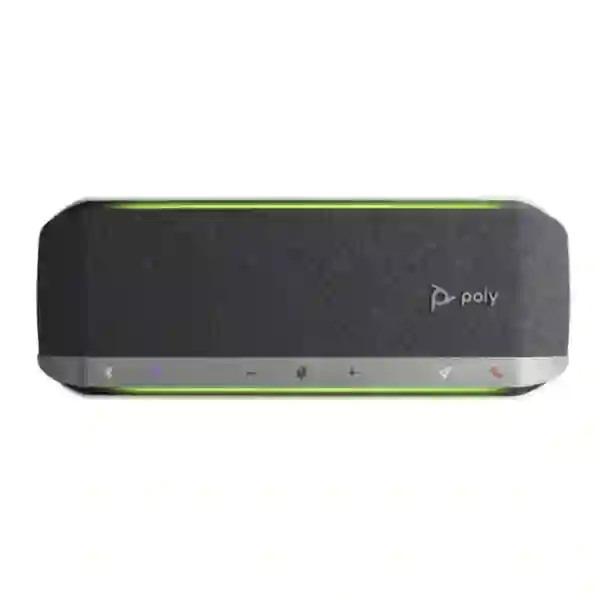
Certified Teams edition • Shared meeting audio
HP Poly Sync 40 Microsoft Teams Speakerphone
Make voices easier to share in compact hybrid meetings. The Poly Sync 40 combines a three-microphone array, full-duplex audio, USB computer connectivity and Bluetooth smartphone pairing in a portable tabletop speakerphone. For Tanzania buyers, confirm the Teams variant, the planned room and included accessories before requesting a current quotation.
Quick verified specifications
The published specifications provide buying guidance for the manufacturer-referenced model. Actual room results, exact package contents, and local commercial terms must be confirmed separately.
Who this conference speakerphone is designed for
The HP Poly Sync 40 Microsoft Teams Speakerphone is a portable tabletop audio device for businesses that need better participation in small, shared meetings. It is a fit to assess for huddle rooms, flexible desks, compact project spaces and hybrid meetings hosted from a computer. Local participants can speak into one shared microphone system while hearing remote colleagues through the built-in speaker. It is not a standalone video-conferencing room, a camera, or an internet connection. Buyers should begin with the number and location of speakers, rather than relying only on a product image or the label ‘conference phone’. For a Tanzania business purchase, first confirm the proposed room and Teams workflow, then obtain an exact-model quotation and verify its accessories and terms.
What Microsoft Teams certification changes
HP identifies a Microsoft Teams certified Sync 40 model with manufacturer reference 77P35AA. This version includes a dedicated Teams touch control, adding a convenient application-focused action to normal calling, mute and volume controls. HP’s user guidance specifies that the Teams button requires the Teams model and the Microsoft Teams desktop application to be open; it does not support the Teams mobile application in the same way. That distinction matters when employees use a phone one day and a corporate laptop the next. The audio device can still be relevant to several communication workflows, but certification should not be treated as a promise that all special controls behave identically in every browser, mobile app or conferencing service. Test the intended application before approving an organization-wide order.
Three-microphone array and everyday speech pickup
The model has a three-microphone steerable array designed to focus on voices during shared-table conversation. HP specifies a microphone bandwidth from 100 Hz to 7.8 kHz. The benefit of this arrangement is that a group can participate without everybody crowding around the built-in microphone of one laptop. The result still depends on how participants sit, how far they are from the speakerphone and how much noise the room generates. A distant speaker, loud fan or hard reflective walls may reduce intelligibility. During a trial, ask a remote colleague to listen to a quiet person, a normal speaker and someone at the farthest seat. That practical test will show how well the device fits a particular room more reliably than repeating a marketing claim.
Understand the recommended room and pickup range
HP describes the Sync 40 as suitable for meeting spaces of approximately 4 by 4 metres and quotes microphone pickup up to about 2.5 metres. These are useful design reference points, not unconditional coverage guarantees. A narrow table with chairs at both ends may create greater microphone distances than a compact round table in a room of the same size. Noise from nearby staff, ventilation and building acoustics can also change results significantly. Position the device in the middle of the people who are expected to speak, rather than close to a wall or an open laptop’s cooling fan. If voices are regularly outside the pickup area, evaluate a different room-audio solution. Buying a larger quantity of unsuitable speakerphones will not solve a room-design problem.
Full-duplex sound means more natural discussion
Full-duplex audio allows incoming meeting sound and local speech to be handled together, making it easier for a participant to respond before the previous speaker has completely finished. HP highlights this capability because natural group discussion often includes short interruptions, questions and overlapping voices. The Sync 40’s audio processing is also intended to reduce unwanted echo and distracting background sound. These technologies improve the conditions for collaboration, but they do not make any room acoustically perfect. Keep only one meeting audio path active in the space and avoid leaving other nearby laptops with live microphones and speakers. Use a comfortable playback volume instead of turning it to maximum. When the room has persistent echo, inspect its layout and sound reflections before assuming the device is defective.
The integrated speaker and speech listening
HP lists a 50 mm speaker driver and a published speaker bandwidth of 75 Hz to 20 kHz. Its product description also refers to a bass-reflex system and dual passive radiators. For the buyer, this matters because the device is intended to reproduce voices and presentation audio for the people sitting around it, rather than requiring everyone to listen through one person’s laptop speakers. It can be useful for a group listening to a remote trainer, client or presenter. A large, noisy room is a different application, however. The driver specification should not be interpreted as a guaranteed sound level across a hall or auditorium. In a trial, check whether quieter voices remain clear at a reasonable volume without disrupting neighboring work areas.
Connecting to Windows and macOS computers
HP specifies USB Type-A and USB Type-C computer connectivity for the referenced Teams edition and lists Windows 10, Windows 11 and macOS compatibility. A wired connection is often a straightforward choice for a laptop-hosted Teams meeting because the computer can recognize the device as an audio peripheral. After connecting, the meeting host should select the Sync 40 as both microphone and speaker in the operating system and within Teams. This is important when a laptop also has a docking station, monitor speakers or a headset. Verify the included cable arrangement on the current seller quotation. HP lists USB Type-A and Type-C cables for this referenced product, but specific packaging and regional offerings should still be checked. A predictable cable and device-selection routine reduces first-line support calls.
Bluetooth connectivity for smartphones
Bluetooth 5.1 enables pairing with compatible smartphones for calls and appropriate mobile audio workflows. HP lists common Bluetooth audio and hands-free profiles and indicates that up to eight devices can be remembered through pairing. Remembering several paired devices does not mean all eight can host the same call simultaneously. For a speakerphone shared across a department, it is sensible to know whose device is connected and to disconnect or clear old pairings when the unit is reassigned. Incoming mobile calls and other phone audio can also disrupt a shared session if a participant does not understand the connection state. When a company primarily uses Teams desktop, establish USB as a known working route and treat smartphone Bluetooth as a separately tested option.
Standard Sync 40 versus Sync 40 plus configurations
HP markets several Sync 40 family variants, including different collaboration editions and plus bundles. The specifically referenced Microsoft Teams certified base model is 77P35AA. Some Sync 40+ Microsoft Teams configurations include an additional BT700 Bluetooth USB adapter for computer connectivity, but this should not automatically be assigned to the standard model. The exact manufacturer reference and box contents matter more than a family photograph. If employees expect wireless computer audio, ask whether the proposed model and bundle contain the necessary adapter and confirm the intended connection path. If they mainly connect with USB, additional hardware may not be required. Ask the seller to identify optional accessories separately so procurement can compare equivalent configurations rather than mistakenly treating distinct bundles as identical.
Up to 30 hours of battery talk time
The rechargeable lithium-ion battery is specified by HP for up to 30 hours of talk time, with a stated charging time under five hours. That makes the Sync 40 a useful candidate for meeting areas where the tabletop device is moved during the day, although real battery life depends on volume, use patterns and battery condition. A shared-room plan should include a charging location, a person responsible for returning the device and a simple way for staff to check whether it is ready. A charging stand is marketed for some setups as an optional accessory, so do not assume one is included without written confirmation. For all-day use, establish a routine rather than relying on the theoretical maximum battery figure.
Call, mute, volume and Teams controls
The touch interface includes call-related actions, microphone mute, volume adjustment, Bluetooth pairing and a Teams control on the certified model. HP also lists a programmable function and separate power and wireless-link controls. These are practical during meetings because an employee can adjust common settings without searching through the application’s menus every time someone cannot hear. A dedicated mute action is particularly valuable before a confidential side conversation. Staff still need to understand whether Teams itself is muted and which device the software has selected. A basic room instruction card can explain the three actions users most often need: connect the host computer, select the speakerphone as the audio device and test mute before speaking. Clear controls are most useful when employees know what they do.
Linking two compatible speakerphones
HP documents a wireless linking feature for compatible Poly Sync speakerphones, potentially helping an organization place audio devices closer to speakers across a larger table. HP support material discusses linked Sync 40 and Sync 60 models and provides configuration instructions. That makes linking worth investigating, but the exact host, firmware, Teams workflow and arrangement should be tested before two devices are specified for one room. Do not presume that pairing two units produces a fully designed boardroom audio system or that every call-control feature operates exactly as with one device. If a room is consistently beyond the recommended pickup area, it may be better to consider a dedicated conferencing installation. The choice should follow a real listening test, not an unverified assumption about coverage.
Why physical placement matters
The speakerphone should sit near the center of actual conversation, not simply in the center of the furniture. A square table with evenly distributed participants is different from a long table with people speaking from distant ends. Keep the device clear of tall objects, laptop screens, papers and anything that obstructs direct voice pickup. Avoid placing it beside loud mechanical equipment or directly beneath a strong air-conditioning flow. Ask participants to speak naturally rather than shouting toward the microphone. Test the quietest expected speaking position and the farthest chair; both may reveal limitations a normal-volume presenter does not. If speech remains uneven, changing the table layout or moving the unit may help more than increasing playback volume. Good audio starts with sensible room geometry.
Private offices, flexible desks and small meeting rooms
A private office with one or two visiting colleagues can benefit from a single shared audio device when occasional group calls make a laptop microphone inadequate. Flexible desks add a different consideration: several employees may connect their own laptops to the same speakerphone over the week. In that situation, quick setup, a consistent USB connection and clear instructions are important. A compact huddle room can be another fit if its seating arrangement stays within a practical pickup distance. A wide training room with participants spread far apart is not equivalent merely because it is also used for meetings. Buyers should specify the real room type, usual number of people and whether the device will remain on the table or travel between locations.
How it supports hybrid meetings
Hybrid meetings succeed only when remote participants can follow the local conversation and be heard by everyone in the room. A dedicated tabletop microphone and speaker can improve the local audio path compared with the microphone on a single open laptop. However, the meeting still depends on the host computer, collaboration software, network and any camera or display that the organization chooses to use. The Sync 40 does not supply a complete video-room installation by itself. Before purchase, identify who normally launches meetings and whether users need a desktop Teams shortcut or mainly dependable audio. Use an actual hybrid test call rather than relying on a short speaker test. Ask a remote listener about every local voice, not just the meeting host.
Network reliability is a separate requirement
The Sync 40 handles local audio input and playback; it does not create broadband access or compensate for every unstable network connection. If Teams meetings regularly freeze, drop audio or exhibit delay, check the internet connection, Wi-Fi environment, host computer and application settings as well as the audio peripheral. In a Tanzania deployment, assess the specific office’s internet and power situation without assuming one provider or one connection quality applies everywhere. Test at the times meetings normally occur, especially when a network is heavily used. A wired USB connection to the speakerphone can simplify the local device path, but it cannot fix congestion between a laptop and the meeting service. Good conferencing requires the complete chain to work.
IT operations and device management
HP identifies Poly Lens management capabilities for the Sync 40 family, including support for inventory-related activities and device updates. The organization should verify which functions are available in its current software environment, which require administration rights and which apply to the exact model. IT can gain value even from a simple standardized process: keep model references in the asset register, agree an approved connection method, record the software versions used in testing and document where units are stored. If several departments share devices, establish who approves updates and who handles a failed pairing. A consistent configuration and a short user guide may prevent more disruption than a complicated deployment with no ownership. The product is only one part of a maintained workplace service.
Compatibility testing before a large rollout
Before ordering multiple units, test the exact quoted model with the company’s standard Windows or macOS workstation, its deployed Teams desktop version and any docking station normally used. Confirm that the device is selected correctly after a computer wakes from sleep, a USB cable is reconnected or a user moves to another desk. Check mute status both on the device and in Teams, and verify which microphone is active. Where mobile use is required, test a supported smartphone separately. Record the computer model, operating system and firmware used during acceptance. This baseline can speed troubleshooting after software updates. Avoid assuming a favorable result on one laptop proves compatibility with every workstation and meeting application used across the organization.
Privacy and responsible shared-device use
A speakerphone makes a local meeting audible to people near the table, which is useful for collaboration but can be inappropriate for sensitive discussions in an open office. If a call involves confidential information, choose an enclosed space or a headset according to organizational policy. When a shared unit has been connected to personal phones, staff should know how to disconnect and clear remembered pairings before handing it to another team. Keep meeting accounts, invitations, recording permissions and device access under normal company controls. The speakerphone’s Teams certification should not be described as a guarantee of data residency, call confidentiality or regulatory compliance. Such matters depend on the complete service and organizational controls, not the accessory alone. A simple end-of-meeting checklist is useful.
The IP64 rating and sensible care
HP lists IP64 among the referenced model’s specifications. This classification provides a defined level of protection related to dust and water splashes, but it is not permission to immerse the device, wash it under a tap or use it unprotected in any outdoor environment. It remains office electronic equipment. HP lists its weight at approximately 610 grams and dimensions around 273 by 102 by 38 millimetres, which help buyers plan storage and table space. Keep the unit on a stable dry surface, protect its cable from heavy chairs or sharp bends and store accessories together. A small carrying or storage arrangement can prevent lost cables when the speakerphone moves between rooms. Caring for a mobile device is part of maintaining meeting readiness.
Check the box contents and optional items
HP’s regional product information for reference 77P35AA lists the speakerphone, a quick-start guide and USB Type-A and USB Type-C cables. A particular quotation should still state what the seller is actually supplying, because product bundles and accessory availability can differ. A separate charging stand, computer Bluetooth USB adapter or other optional item should never be assumed merely because it appears in a family-level brochure. Ask for the precise manufacturer reference and a component-by-component quotation. If several sites need the same setup, use a consistent bill of materials to avoid receiving mixed packages. Confirm that existing laptop ports and docking stations can accept the proposed connections. This reduces post-purchase surprises, unnecessary adapters and avoidable differences between meeting rooms.
A portable unit or a dedicated room system?
A portable speakerphone is practical when a laptop usually hosts the call, a meeting space changes or a small group needs fast, shared audio. A permanently equipped room system may be more appropriate for large tables, formal boardrooms, dedicated meeting consoles, integrated video cameras and many hours of daily use. Neither approach is automatically superior. The Sync 40 should be evaluated against its intended pickup area, the room’s noise, the meeting-host workflow and the organization’s support capacity. If users consistently sit beyond its practical coverage or require central controls for cameras and displays, specify a different solution instead of stretching a portable device beyond its strengths. A pilot meeting and clear fit criteria produce a more defensible purchasing decision than selecting solely by price or brand.
Common business scenarios to test
Consider a project review with three colleagues around a table and two remote participants who need to hear every voice. Consider an interview panel in a compact room where mute control and clarity are essential. Consider a manager who carries the device from a shared desk to a focus room, then returns it for charging. Consider a short training conversation in which a small group listens to a remote instructor and asks questions. Each is a plausible use case, but suitability still depends on room size, seating position, connection method and application behavior. For each scenario, test one representative meeting, note anything that caused confusion and update the user instructions before deployment. Real workflows reveal buying requirements that feature lists often miss.
Procurement and pricing in Tanzania
For a local purchasing decision, request a written quote that clearly identifies HP Poly Sync 40 Microsoft Teams certified speakerphone, the exact manufacturer reference, quantity and included accessories. Confirm the current quoted currency and price, availability, delivery or collection arrangements, applicable taxes and support terms with FourTeck Tanzania. These are seller-specific, time-sensitive details; they are not established by an HP global specification sheet. This description makes no claim about live local stock or a fixed Tanzanian shilling price. If the order covers different office locations, ask the seller which arrangements actually apply to those destinations rather than assuming nationwide coverage. For comparisons, request quotations on the same configuration, not one standard model and another model with an extra adapter.
Step-by-step meeting-room acceptance test
Begin by verifying the model supplied and the accessories against the quotation. Place the device in its intended position and connect the computer using the appropriate USB route. Open the approved Teams desktop application, select the speakerphone as microphone and speaker and run a test call with someone outside the room. Have each participant speak from a normal chair position, including the farthest seat. Check incoming audio at a comfortable volume, test mute and any Teams-specific controls, and disconnect and reconnect the laptop. If smartphone Bluetooth is in scope, test that separately. Document any failures before the room enters daily service. Finish by agreeing where the device and cable will be kept and how staff can obtain assistance if the setup changes.
Troubleshooting issues that resemble a product fault
When a remote person cannot hear the room, first check whether Teams has selected the laptop microphone instead of the speakerphone. Confirm the device mute state and application mute state independently. When the local group cannot hear the remote end, inspect the playback selection and volume, not just the microphone. If echo occurs, check whether another nearby computer remains unmuted on the same call. If Bluetooth pairing causes confusion, identify which phone is currently connected and remove stale pairings using manufacturer guidance. Try a known working cable or computer before concluding the hardware is faulty. Record the operating system, application version, firmware and the steps needed to reproduce a persistent fault. That information makes technical support faster and more precise.
Preparing a deployment across multiple teams
Companies equipping several rooms should group the rooms by actual use, dimensions, acoustics and connection needs before placing a bulk order. Pilot one small private office, one representative huddle room and any other significantly different space. Observe how quickly a typical user can connect without IT assistance and whether remote listeners can understand quieter participants. Note the need for charging arrangements, printed instructions and accessory storage. Only then decide which room categories are suited to this speakerphone and where another solution is needed. Inventory each deployed unit and keep the manufacturer reference with purchasing records. This avoids ordering the same audio arrangement for an unsuitable room simply because an office belongs to the same department or occupies the same building.
What is not included in the product’s role
A Sync 40 is not a built-in camera, room monitor, Teams account, dedicated conferencing computer, network appliance or standalone office telephone system. Those elements must be planned separately when required. It should also not be treated as a guaranteed privacy solution for an open office or a substitute for a headset when only one person needs to take a confidential call. The product is intended to provide shared speaker and microphone functionality for compatible connected devices. Keeping that distinction clear protects buyers from underestimating the rest of the meeting-room setup. Before procurement approval, ask who will host the call, how video will be displayed if needed and whether the existing computer can run the conferencing application reliably. The best system is designed around the whole experience.
Manufacturer identifiers and the retailer SKU
HP lists 77P35AA as a product reference for the Microsoft Teams certified model. That reference is useful for comparing a seller’s quotation with the manufacturer-described variant, but it is not automatically the SKU of a FourTeck Tanzania listing. Retailer SKUs must be taken from the exact retailer-provided product data, not inferred from a manufacturer part number, barcode or another seller’s inventory record. Where no labelled FourTeck SKU was supplied, the field should remain unpopulated rather than risk an incorrect record match. When requesting a quote, show both the full model name and manufacturer reference, then ask the seller to confirm the exact configuration. This is especially important when several similar Sync 40 and Sync 40+ packages are available.
Warranty and support details to verify
Manufacturer specifications can refer to warranty arrangements, but a buyer needs to know what the actual local transaction provides. Ask the seller for the applicable written warranty terms, how claims are initiated, what proof of purchase is needed and whether optional accessories are covered separately. Do not infer local repair coverage, replacement time or technical response commitments from material published for another country. Keep the invoice, model reference, serial information and details of who manages the device. If a problem arises, record the connection method, computer, firmware and observable symptoms before contacting support. This documentation makes the process easier to follow, especially where equipment travels between departments or is deployed at several sites. A clear after-sales path belongs in the purchasing decision.
The next step for a considered purchase
Tell FourTeck Tanzania the number of speakerphones required, approximate dimensions and seating patterns of the meeting rooms, the host computer operating systems and whether Microsoft Teams desktop is the standard. State if employees need smartphone Bluetooth use, a computer Bluetooth adapter or a charging accessory, then request a model-specific quotation. If microphone coverage is uncertain, ask how to validate the exact proposed setup before committing to a larger order. The goal is a speakerphone that people can connect correctly, hear comfortably and maintain without confusion. The HP Poly Sync 40 Microsoft Teams Speakerphone may be a strong candidate for compact Teams-led meetings when those factors line up. A written configuration check and real meeting test are the soundest final checks.
Frequently asked buyer questions
Use these answers when comparing a Microsoft Teams speakerphone with your actual rooms, connection methods and procurement needs.
Is this the certified Microsoft Teams model?
HP identifies a specific Teams certified Sync 40 variant, including part reference 77P35AA, with a dedicated Teams touch control. Check that this exact model is the one being quoted. The Teams button is documented for use with the desktop application rather than an assumption of identical functionality on mobile.
Will it work with my Windows laptop?
HP lists Windows 10 and Windows 11 for the referenced model. Connect through the supported USB cable, choose the Sync 40 as the meeting microphone and speaker, and test with your organization’s actual Teams desktop software. Corporate device policies and docking stations can influence setup.
Does it support macOS?
HP includes macOS among compatible operating systems. Because application controls and firmware can vary, verify the chosen Mac, its USB connectivity and Teams desktop configuration in a practical test before buying for a larger team.
Can my smartphone connect over Bluetooth?
Yes. Bluetooth 5.1 is specified for compatible smartphones. This can help with mobile calls, but the dedicated Microsoft Teams desktop button is not a guarantee of equivalent functionality in a phone app. Disconnect personal devices when sharing the speakerphone.
How many microphones are built in?
The specification identifies a steerable array of three microphones. It is designed for shared speech pickup around a meeting table. Distance, room reflections and background noise still matter, so evaluate from every expected speaking position.
What is the recommended room size?
HP references spaces up to approximately 4 by 4 metres and microphone pickup of up to 2.5 metres. These are planning guides, not guarantees under every acoustic condition. Test long tables and noisy rooms carefully.
What does full-duplex audio provide?
Full-duplex operation supports simultaneous incoming and outgoing speech, allowing overlapping conversation to feel more natural. Keep other nearby microphones and speakers from joining the same call unmuted, because incorrect room setup can still create echo.
Is it a video conferencing system?
No. The identified Sync 40 is a speakerphone for audio input and playback. A video meeting may also require a compatible computer, camera, display, internet access and the relevant meeting application or account.
Does the battery last for 30 hours?
HP states up to 30 hours of talk time, not a guaranteed duration for all conditions. Usage, playback level and battery age affect real endurance. Establish a charging routine for shared devices and verify any optional charger on the quote.
Is a Bluetooth computer dongle included?
Do not assume so. HP has different standard and plus bundles, with some plus versions including a BT700 adapter. Check the exact manufacturer reference, proposed connection method and box contents before approval.
Can two units be used together?
HP documents compatible speakerphone linking features. The supported arrangement, host and firmware should be verified for the intended application before ordering two devices for one room. Linking is not automatically a replacement for professional large-room audio design.
Can I join Teams using a browser?
The speakerphone may be selectable as a computer audio device in suitable browser environments, but Teams-specific button behavior should not be assumed. HP directs the dedicated control to the Teams desktop app. Test the required browser and OS setup.
Is the device waterproof?
HP lists IP64 for the referenced model. This is not a claim that the unit can be immersed or washed. Use and clean it as office electronics and protect the charging connections and USB cable.
Is it suitable for confidential calls in an open office?
Consider a headset or private room when conversation must not be heard by nearby colleagues. A shared speakerphone deliberately makes the far-end audio audible around a table and can pick up nearby local speech.
Can the device be managed by IT?
HP describes Poly Lens device-management options, but available functions depend on software and the exact deployment. IT should verify current support, keep firmware and asset records, and standardize the initial Teams setup.
What if remote attendees cannot hear us?
Check the selected Teams microphone, device and application mute controls, USB connection, participant distance and nearby noise. A comparison on a known working laptop helps isolate software configuration from a genuine device fault.
Is the USB cable provided?
HP’s product information for reference 77P35AA lists USB-A and USB-C cables among the components. The seller should confirm the exact contents of the quoted package, as regional bundles and family variants can differ.
Do you have a Tanzania price?
No specific Tanzanian price or live stock status is stated in this description. Request a current written quote from FourTeck Tanzania for the exact model, quantity and optional accessories, including applicable commercial and warranty terms.
Is 77P35AA the FourTeck SKU?
It is the HP manufacturer product reference identified for the Teams certified variant. A FourTeck listing SKU must be verified from FourTeck listing data. Without such information, it should not be invented or inferred.
What should I provide to request a quotation?
Share quantity, room dimensions, seating pattern, computer systems, Teams desktop requirements and any Bluetooth smartphone or accessory needs. Request confirmation of the precise model, contents, current terms and a practical compatibility check where needed.
Request a Poly Sync 40 quotation for Tanzania
Ask FourTeck Tanzania to confirm the HP manufacturer reference, included accessories, current quoted price and availability, and the applicable terms for your specific order. Share your room size, number of units, host computer setup and any optional adapter or charging needs so the proposed configuration matches your meeting workflow.
Next step: Request an exact-model quote and a compatibility check.




Reviews
There are no reviews yet.