
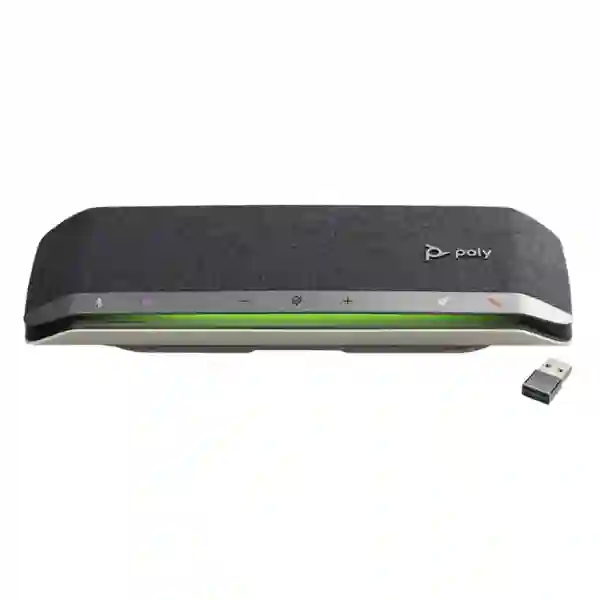
Flexible meetings • USB + Bluetooth • BT700 included
HP Poly Sync 40+ USB Bluetooth Speakerphone with BT700 Adapter
Make conversations easier for people around one small meeting table and colleagues joining remotely. The HP Poly Sync 40+ Bluetooth speakerphone combines a three-microphone array, full-duplex speech, wired USB connectivity and the included BT700 USB-A adapter for a wireless computer connection. Ask FourTeck Tanzania for the exact model configuration and a current quotation.
3-microphone array
Up to 30 h talk time
BT700 USB-A adapter
Bluetooth 5.1
Quick buying answer
Choose the HP Poly Sync 40+ Bluetooth speakerphone when a small group needs a portable shared microphone and speaker for laptop or smartphone calls, with a BT700 adapter supplied for a convenient wireless PC option. HP recommends a room of up to roughly 4 × 4 metres. Check the standard-versus-Teams variant before ordering; this listing brief does not establish a local SKU, current Tanzania price or stock.
Who this speakerphone is designed for
When several people sit around one table, a laptop microphone often favours the person nearest the keyboard. Remote participants may hear some voices strongly and others faintly. The Poly Sync 40+ is intended to improve this shared-room experience without requiring a permanently installed audio system. Place the unit where the group can speak toward it, select it as the meeting microphone and speaker, and hold the conversation through the computer or a paired phone. It is especially relevant to small huddle rooms, flexible meeting areas and bring-your-own-device discussions.
The design also suits an employee who moves between office locations and needs a single shared-audio device rather than wearing a headset for every group call. It is not a replacement for the acoustic planning required in a very large boardroom, an auditorium or a noisy production floor. Buyers should compare the room footprint, seating distance, background noise and preferred meeting software before assuming that one speakerphone will cover every situation. The goal is appropriate intelligibility for normal conversational meetings, not a promise that room acoustics cease to matter.
Start with the room, not the product name
HP describes the Sync 40+ as ideal for spaces up to approximately 4 by 4 metres, with a microphone pickup range of up to 2.5 metres. These figures are useful planning references rather than guaranteed boundaries. A conference table, soft furnishings, air-conditioning, hard walls and the loudness of individual voices all influence the result. A participant seated farther away or facing away from the device may be less intelligible even inside a nominally suitable room.
For a practical trial, measure the distance between the planned device position and the furthest regular speaker. Seat attendees where they will actually sit, then ask someone on a remote connection to rate the clarity of each voice. Repeat while the ventilation is operating and while multiple people exchange short comments. This is more informative than assessing the device only in a quiet, empty office. If the room regularly exceeds the intended coverage area, consider a linked second compatible unit or a purpose-designed room system after confirming the layout.
Three microphones built around the conversation
Inside the speakerphone is a steerable array of three microphones. The array is designed to focus on speech while reducing distracting noise in a typical workplace. For a small meeting, that can make turn-taking easier because the far end is not dependent on a single laptop microphone directed toward one chair. It can also help when several colleagues share a table during a project update, client discussion or hybrid planning session.
No microphone array can completely remove loud conversations behind the meeting, keyboard thumping beside the unit or people calling from another room. Good outcomes still begin with sensible placement and a reasonably quiet space. Keep the unit clear of stacks of documents, do not cover the microphone areas, and encourage participants to speak at a natural volume. If confidential side conversations are occurring nearby, move the meeting or change the room arrangement rather than relying on noise reduction to create privacy.
Full-duplex speech and echo handling
Full-duplex audio allows audio to travel in both directions at the same time. This matters when a remote participant asks a question while someone in the meeting room is still finishing a sentence. A half-duplex arrangement can cut off one side; a full-duplex design is intended to make interruptions and natural back-and-forth exchanges less awkward. HP also describes echo and noise reduction, which helps limit the feedback that can occur when microphones and loudspeakers share the same table.
It remains important to use one active room microphone and speaker path. If several laptops are all unmuted around the same table, their independent microphones and speakers can still produce echo, delay and feedback. A useful room practice is to designate one host computer for audio through the Sync 40+ and have other attendees join the meeting with computer audio disconnected or muted as appropriate. This simple convention can be more valuable than increasing speaker volume.
Three connection paths, one straightforward workflow
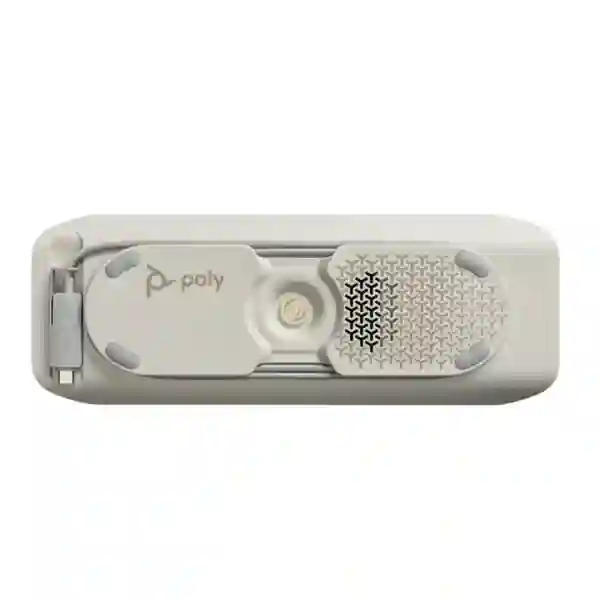
For a computer meeting, the simplest option is the wired USB connection. HP lists a combined USB Type-A and Type-C connection arrangement for the product family. The physical cable and supplied adapter support common laptop ports without requiring a separate Bluetooth pairing session. When a desk or meeting room has a reliable wired setup, this route can reduce uncertainty about which wireless device the computer has selected.
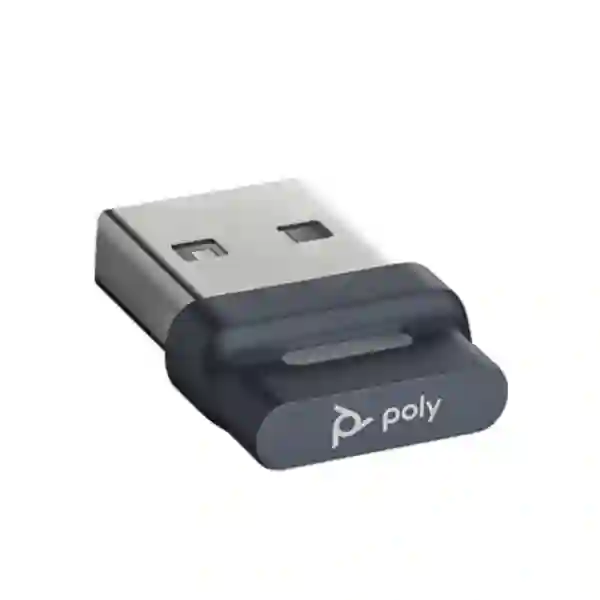
For a wireless computer connection, the Plus bundle includes the BT700 USB-A Bluetooth adapter. Insert it into a suitable USB-A port, then select the speakerphone in the operating system and meeting application. The adapter is intended for the matched Poly wireless experience, so the included accessory is part of the purchasing decision rather than a detail to overlook. For smartphone use, pair the handset over Bluetooth. A phone call and a computer meeting may each use the device, but buyers should not assume simultaneous mixing of unrelated calls without testing and confirming the supported operating mode.
Wired USB
Predictable computer audio, no Bluetooth pairing step.
BT700 to PC
Wireless placement flexibility with the included USB-A adapter.
Bluetooth phone
Use a compatible smartphone for shared mobile call audio.
What the BT700 adapter actually changes
The BT700 is a Bluetooth USB adapter for compatible computers. Its practical advantage is that a user can connect the Sync 40+ to the meeting computer without leaving a direct cable between laptop and speakerphone. This is useful when the host laptop sits at the edge of a table, when a shared room has a convenient docking station, or when a presenter needs a little more placement flexibility. The included adapter uses a USB-A connection, so check the available ports on USB-C-only machines.
Do not confuse the adapter with a second microphone, a mobile network modem or a standalone conference bridge. It does not place calls by itself and does not replace a computer, telephone or conferencing application. The wireless path still depends on a working paired connection and the host device's audio settings. Keep the adapter assigned to the correct speakerphone for shared-room deployments and document which user or room owns it. If the organization uses restrictive USB-device policies, ask IT to review approval before rollout.
Smartphone calling and Bluetooth expectations
A compatible smartphone can connect to the speakerphone over Bluetooth, making it possible to share a mobile call with colleagues gathered around a table. This can help with ad hoc supplier discussions or telephone meetings when the caller is not using a laptop application. The device supports Bluetooth 5.1 according to HP and lists common audio and hands-free profiles. The real connection range and reliability will vary with obstructions, neighbouring wireless devices and the host phone.
For a consistent result, first pair the device in the phone's Bluetooth settings, then confirm that call audio is routed to it. Make a short test call to check microphone pickup, incoming sound and button behaviour. When multiple people share one room device, remove previous pairings if privacy or device ownership requires it. A Bluetooth connection is not a cellular plan or a replacement for network service: the phone still needs its normal calling or data connection, and the meeting application must support the intended audio routing.
Meeting apps: check the variant and the workflow
The standard Sync 40+ with BT700 and the Microsoft Teams-certified Sync 40+ are not the same commercial variant. HP identifies the standard model by manufacturer reference 772C5AA and a separate Teams-certified configuration by 77P36AA. Both use the Sync 40+ family design, but their application-specific controls and certification language differ. The product title alone does not confirm that a particular supplied unit is the Teams edition. Therefore this description does not claim a dedicated Teams button or Teams certification for the unspecified Tanzania listing.
A device may work for ordinary microphone and speaker functions in many meeting applications without every platform-specific control or certification applying. Before ordering for a standardized fleet, confirm the exact manufacturer reference on the quotation, the collaboration service in use, supported operating systems and whether users expect call answer/end controls inside the application. An IT pilot should verify mute synchronization and call handling in the actual software version, not only that sound plays through the unit. If formal certification is a procurement requirement, have the supplier confirm the relevant edition explicitly.
Battery capacity for flexible workdays
HP rates the rechargeable lithium-ion battery for up to 30 hours of talk time and lists a charging time of under five hours under its specified conditions. That gives users freedom to move a meeting between desks without being permanently tied to a power point. The published figure is an upper limit, not a promise that every call will last 30 hours: volume, wireless activity, battery age and operating conditions can change the result. Regularly scheduled charging is still sensible for a shared device.
In a busy room, appoint a person or process to put the speakerphone back on charge after use. A quick battery check before an executive call avoids the distraction of finding power halfway through a discussion. HP describes a compatible charge stand as a separately sold accessory; buyers should not assume that the stand is in this bundle. Ask which charging arrangement is being supplied and ensure a suitable power source is available. Treat the rechargeable battery as a convenience for flexible use, not as an uninterrupted power supply for other equipment.
Controls that remain understandable to guests
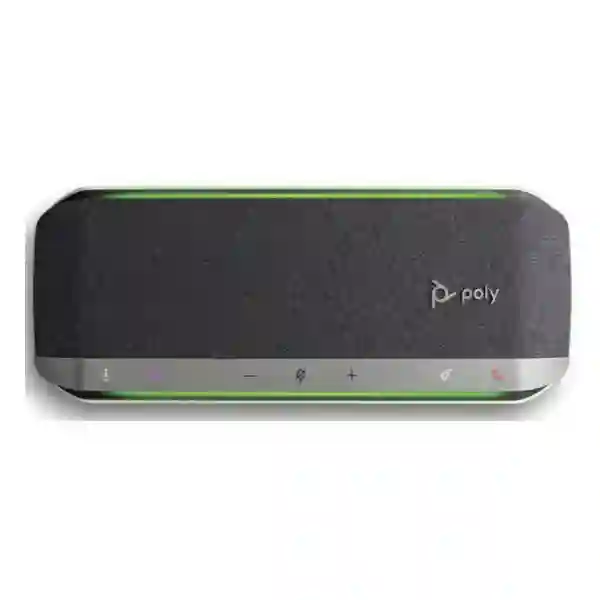
The speakerphone provides accessible controls for answering and ending calls, muting, adjusting volume, Bluetooth pairing and a programmable function. There is also a control for wireless daisy chaining. The visible status lighting helps a room understand whether the unit is active and how a call is progressing. Simple physical interaction is useful in visitor-facing rooms: a colleague can adjust level or mute without navigating a laptop's settings in front of clients.
The precise action of some buttons can depend on software, connection mode and model edition. Agree on a basic operating convention: one person controls the meeting, everyone knows where the mute function is, and a guest can see which device is supplying audio. Before sensitive discussions, verify muting at both the application and the speakerphone rather than assuming the light state alone guarantees the remote end cannot hear. In mixed-use offices, a small room instruction card can help first-time users operate the equipment without creating a complicated training exercise.
Wireless daisy chaining for a larger table
HP supports wirelessly linking two compatible Sync 40 speakerphones to extend audio across a meeting area. This can be relevant when participants sit along a longer table and placing one device at the centre would leave the end seats too distant. It is an expansion option worth evaluating before investing in a permanent room system, although two devices still need thoughtful placement, charging and configuration.
Daisy chaining does not mean an unlimited number of units can be added or that a very large hall becomes a supported room environment. Check the model compatibility, application settings and official pairing procedure for the exact equipment. A second speakerphone is a separate purchase unless an offer specifically includes it. Before relying on a linked pair for a critical meeting, test speech from both ends of the table, the remote-end audio mix and the behaviour when a participant mutes. If a link drops, use a known single-device fallback while IT investigates.
Useful management options for an IT team
HP describes Poly Lens as a way to support device inventory and management for Poly endpoints. For organizations deploying several speakerphones, this can be useful when tracking shared equipment, reviewing the installed device software and applying supported updates. The benefit is operational consistency: meeting-room audio devices are less likely to become forgotten peripherals with undocumented ownership and differing configurations.
The level of device visibility, policy control and remote administration available to an organization depends on the particular Poly Lens offering, software version, enrollment and IT permissions. Do not purchase on the assumption that a specific cloud-management feature or license is included without confirming the current requirements. A practical rollout record should capture the exact manufacturer reference, serial number, physical location, assigned BT700 adapter and person responsible for updates. Testing changes on one device before wider rollout helps identify any unexpected application or operating-system interaction.
A portable device with practical limits
At approximately 27.3 by 10.2 by 3.8 centimetres and 0.61 kilograms, the speakerphone can be moved between ordinary desks and meeting areas. Its relatively slim footprint helps keep the table available for laptops and notes. HP lists an IP64 rating, indicating protection against dust ingress and splashing water in the relevant test context. That can provide reassurance in a busy workplace, but it does not make the unit suitable for immersion, heavy rain or rough outdoor industrial handling.
Place the unit on a stable, dry surface and keep cables out of walkways. Do not use the IP rating as a reason to clean it with running water or to operate it in extreme conditions. In a shared office or public-facing room, consider secure storage when the unit is not in use. Buyers who need permanent wall or desk installation should ask about compatible accessories and physical security arrangements rather than improvising mounts that may block sound, controls or airflow.
A predictable setup for mobile calls
When a smartphone is the call source, pair the phone with the Sync 40+ and make sure it has selected the speakerphone for call audio. Set a moderate playback level and make a test call from the actual meeting location. Mobile operating systems may change audio routes when a headset, vehicle system or another Bluetooth device reconnects, so verify the selected device after moving from another location. If several employees share the speakerphone, maintain a simple pairing and unpairing practice.
For sensitive calls, an employee should confirm that a previously paired personal phone is not unexpectedly in control of the shared room device. If the meeting requires video, decide which device will handle the picture and confirm that the sound path does not create echo. Do not assume the speakerphone has an integrated cellular connection, SIM slot or video camera; it is an audio peripheral. The mobile phone, conferencing app and network continue to provide the actual communications service.
Standardize the room experience before buying a fleet
For an IT administrator equipping multiple shared rooms, consistent user experience is as important as an individual product specification. Select one connection method per room where possible, label the host connection clearly, decide who charges the devices and confirm the standard meeting applications. Document the acceptable seating layout and expected microphone distance. The same simple instruction should work for a staff member entering any room in the organization.
Pilot with a realistic mix of employees: quiet and loud voices, Windows and Mac hosts if both are used, and the conferencing services that matter. Check call control, mute indication, microphone permission, adapter handling and room acoustics. Record issues and resolution steps, then decide whether to standardize the BT700 wireless connection or retain wired USB in rooms with heavy shared use. This avoids a purchase based only on the battery figure or a general claim of compatibility. No speakerphone is universally ideal for every physical workspace.
Questions to ask when requesting a Tanzania quotation
For a purchase in Tanzania, request confirmation of the exact manufacturer variant, quantity, accessories included, supply availability, current quotation currency and total commercial terms. The standard model and Teams-certified edition should be described separately if both are offered. Ask whether the BT700 adapter is physically included in the quoted pack and whether any optional charging stand, mount or second speakerphone must be ordered separately. A clear line-by-line quotation prevents a useful accessory from being mistaken for a standard bundle component.
If the equipment will be deployed at multiple business locations, discuss receiving arrangements, asset labeling, system compatibility tests and after-sales support before issuing an order. Local delivery terms, taxes, import arrangements, warranty service routes and response times depend on the actual supplier quotation and should not be inferred from an overseas product page. There is no verified Tanzania selling price or stock statement in this description. Ask FourTeck Tanzania to provide the current commercial details for the intended configuration rather than relying on converted foreign prices.
Understand the included accessories
HP's standard product specifications identify the speakerphone, a BT700 Bluetooth USB adapter and a USB Type-A to USB Type-C adapter in the box. The unit provides the wired USB connection path, while the separate BT700 supports its wireless PC use. Make sure these parts are present at receipt and keep the small adapter in an identifiable place during storage or handovers. Loss of the BT700 can remove one of the main conveniences of buying the Plus package.
A charge stand, additional linked speakerphone, storage accessories, mounting solutions and any dedicated room computer should be treated as separate purchasing decisions unless the actual quotation states otherwise. Exact regional packaging can be confirmed on the supplier's offer. A good receiving checklist records the bundle contents, captures the serial number and tests a sample unit before broad distribution. This is particularly useful when several departments order similar-looking Sync 40 and Sync 40+ models, since they should not be assumed to contain identical accessories.
How Sync 40, Sync 40+ and Teams variants differ
The important difference between the standard Sync 40 and Sync 40+ bundles is the Plus configuration's included BT700 adapter for wireless PC connectivity. Both belong to the same general speakerphone family, and the appropriate choice depends on the required connection method. If a room always uses wired USB, a purchaser may prefer to evaluate the non-Plus configuration. If staff frequently reposition the laptop or want the computer connected over the supported adapter, the Plus package is more relevant.
A separate distinction concerns the Microsoft Teams-certified version of Sync 40+. HP identifies the Teams variant with its own manufacturer reference and Teams-specific control. A buyer should not assume that all BT700 bundles have identical platform certification, even where everyday audio behavior overlaps. State the required calling platform in the request for quotation and ask for the exact part number in writing. The manufacturer reference is not the same thing as a FourTeck listing SKU; a local SKU has not been supplied for this product request.
When another audio solution may be better
Choose a personal headset when one person needs speech privacy in an open office, must hear clearly amid close-by colleagues or spends most of the day in confidential individual calls. A shared speakerphone broadcasts the far-end conversation into the room and can capture other people, so it is not ideal for every employee. For an extra-large or highly reverberant space, a dedicated conference audio system with strategically placed microphones may be a stronger fit.
If the requirement includes room cameras, presentation switching, one-touch meeting launch or centralized room booking, remember that the Sync 40+ is an audio device rather than a complete video-conferencing endpoint. It can be one part of a wider setup, but software, camera, display, computer and networking decisions remain separate. Buyers should select the level of integration appropriate to the room and not assume that adding a BT700 adapter will turn a meeting table into a fully managed video room.
Technical specification summary
The specifications below describe the standard HP Poly Sync 40+ family configuration with the BT700 adapter, based on HP manufacturer information. Specific packaging, operating-system behaviour and application-specific certification should be checked for the exact offered variant. These figures help size an ordinary meeting deployment, but they are not performance guarantees for every room or device combination.
| Specification | HP-listed detail |
|---|---|
| Product family | HP Poly Sync 40+ with BT700 adapter |
| Connection options | Wired USB-A / USB-C arrangement; Bluetooth; BT700 USB-A for computer |
| Bluetooth version | 5.1 |
| Microphones | 3, steerable array |
| Microphone pickup | Up to 2.5 m (HP guidance) |
| Suggested room | Up to 4 × 4 m (HP guidance) |
| Speaker | 50 mm driver |
| Speaker bandwidth | 75 Hz – 20 kHz |
| Microphone bandwidth | 100 Hz – 6.7 kHz |
| Battery | Rechargeable lithium-ion; up to 30 h talk time |
| Charging time | Under 5 hours per HP specification |
| Protection | IP64 |
| Size | 27.3 × 10.2 × 3.8 cm (orientation reordered) |
| Unit weight | 0.61 kg |
| PC operating systems | Windows 10 / 11, macOS (HP listed) |
| Bundle accessories | Speakerphone, BT700 USB adapter, USB-A to USB-C adapter |
Frequently asked questions
Is the HP Poly Sync 40+ suitable for a small meeting room?
Yes, HP positions the device for spaces up to approximately 4 by 4 metres with microphone pickup up to 2.5 metres. Those values are design guidance, not a guarantee in every setting. For a small meeting table, put the unit near the participants, check that the furthest speaker is clearly audible and make a remote test call. Background noise and wall reflections can affect clarity. If the table or room is larger, evaluate whether a compatible second unit or a dedicated conference-room system is a better fit.
Does the Plus package include the BT700 adapter?
HP identifies a BT700 Bluetooth USB adapter among the standard box contents for the Sync 40+ BT700 configuration. The adapter is intended for wireless computer connectivity and uses USB-A. The wired USB path is also available, and an adapter supports USB-C connection arrangements. Always check that the exact supplier quotation includes the BT700, particularly when comparing the Sync 40 with the Sync 40+ or ordering accessories separately. Make the included parts explicit on a business purchase order rather than relying solely on a shortened product title.
Can it connect to a laptop without Bluetooth pairing?
Yes. A compatible computer can use the wired USB connection, and this may be the quickest and most predictable option in a shared meeting room. Connect the appropriate port, choose the speakerphone as the computer's microphone and speaker, and make the same selections in the meeting application. The BT700 wireless option is useful when users want to position the device away from the host laptop, but it is not required for wired operation. If corporate USB security policies are restrictive, have IT authorize the peripheral before deployment.
Does it work with USB-C-only computers?
The product family provides a USB Type-A and Type-C connection arrangement, and HP lists a USB-A to USB-C adapter in the bundle. Before procurement, confirm which host port will be used for the wired connection and, separately, how the BT700 USB-A adapter would connect to a USB-C-only laptop. A suitable port or adapter arrangement is needed for the BT700; it does not become a native USB-C dongle merely because the laptop has USB-C. If docking stations are involved, test device recognition after connecting and disconnecting the dock.
Can I use it with a smartphone?
Yes. HP specifies smartphone connectivity via Bluetooth, so a compatible phone can route call audio through the speakerphone. Pair the phone, select the device for audio and test the call controls. The phone remains responsible for the cellular or data connection; the Poly device does not supply its own mobile network service. If different employees use a shared unit, establish a sensible procedure for pairing and removing previous devices. This is especially important if the room is sometimes used for confidential calls or meetings.
Is every Sync 40+ Microsoft Teams certified?
No. HP lists a standard Sync 40+ BT700 configuration and a separate Microsoft Teams-certified version. HP's manufacturer references distinguish them, and the dedicated Teams control belongs to the appropriate Teams model. The product name in this request does not identify the Teams version, so it should not be represented as Teams certified without part-number confirmation. If Teams-specific certification or call-control integration is mandatory, request the exact certified configuration in writing and confirm its current application support before purchase.
How long does the battery last?
HP quotes up to 30 hours of talk time for the rechargeable lithium-ion battery, with charging in under five hours under specified conditions. Actual time may be shorter depending on volume, connection mode, usage pattern and battery condition. Charge the device before a day of scheduled meetings and assign charging responsibility in shared rooms. A separately available charging stand may make a permanent desk arrangement more convenient, but it is not automatically part of this bundle. Confirm the quoted accessories if a stand is required.
Can two speakerphones be linked?
HP supports wireless daisy chaining between compatible Sync 40 speakerphones. Linking two units can help cover a longer meeting table when a single centre position is not ideal. It is not permission to chain unlimited devices or an assurance that one setup will serve a very large venue. The second unit is a separate purchasing item unless specifically included. Check official compatibility and pairing steps, and test microphone and output behaviour from both ends of the room before relying on the arrangement for important meetings.
Does IP64 mean it is waterproof?
No. IP64 indicates a tested level of dust protection and resistance to water splashes; it does not mean that the unit is safe to submerge, wash under running water or leave outdoors in heavy rain. Normal care is still necessary, particularly near charging ports and cables. Use the product in an appropriate office environment and follow HP's safety instructions for cleaning and charging. An IP rating should not be mistaken for a ruggedized outdoor communications device classification.
Will it eliminate echo and background noise?
The three-microphone array, echo reduction and full-duplex processing are designed to improve conversational audio. They do not remove every source of noise. Loud nearby discussions, multiple open laptop microphones, strong room reverberation and poor speakerphone placement can still affect a call. The most useful improvements often come from using one active room audio path, closing unnecessary doors and putting the device where all participants can be heard. Test from the remote participant's perspective instead of judging sound only inside the room.
What can an IT department manage?
HP describes Poly Lens support for inventory and device management. Depending on the supported software, organization setup and permissions, an IT team may use relevant Poly management tools to maintain visibility and updates. The exact feature set, licensing and enrollment requirements should be checked against current HP documentation for the intended deployment. Even without centralized management, maintaining a simple asset list with serial numbers, assigned adapters, software versions and room ownership is a helpful way to keep shared audio devices dependable.
Does it include a camera or conferencing subscription?
No. The Sync 40+ is a speakerphone. It supplies audio input and output for a compatible computer or mobile device; it is not a video camera, room computer, video endpoint or conferencing-service subscription. A hybrid meeting that needs video will still need a camera and an application or service that runs the call. Buyers should budget for any missing components separately and test the complete setup together. This prevents a speakerphone purchase from being mistaken for a fully equipped hybrid meeting-room solution.
What should a Tanzania buyer confirm before ordering?
Ask for the exact manufacturer variant, an itemized statement of included BT700 and USB adapters, availability, quoted price and commercial terms. State whether a Teams-certified edition, charging stand, second unit or mounting accessory is required. For business deployment, clarify platform compatibility tests, support arrangements and delivery conditions directly in the written offer. Price, stock, local taxes and any warranty-service procedure have not been verified for this target listing, so they must not be inferred from an international manufacturer page or converted foreign-currency price.
Request the right Sync 40+ configuration
Tell FourTeck Tanzania how many speakerphones you require, the meeting platform used by your team, the size of the rooms, and whether you need the standard model or Microsoft Teams-certified configuration. Ask for a written quotation that identifies the exact manufacturer reference, confirms the BT700 and USB adapter contents, and separately prices any optional accessories. This helps make the procurement decision about real meeting needs rather than a generic compatibility claim.
Contact FourTeck Tanzania to confirm the current offer, availability, delivery terms, applicable warranty arrangements and a practical connection method for your intended room. No local selling price, stock status or service commitment is asserted here.




Reviews
There are no reviews yet.