
Business wireless audio · Tanzania buying guide
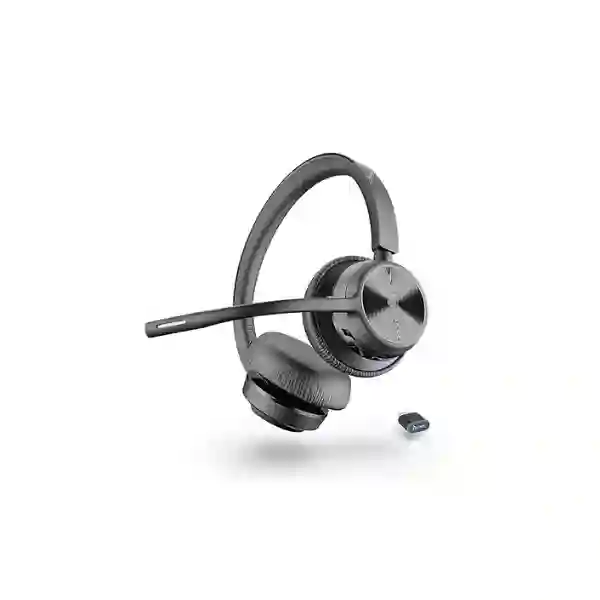
HP Poly Voyager 4320 UC Microsoft Teams Headset
Clearer professional conversations start with the right headset for the people, devices and meeting platform involved. The Poly Voyager 4320 is an on-ear stereo wireless headset family with a dual-microphone Acoustic Fence boom, a BT700 computer adapter and Bluetooth smartphone connectivity. Selected configurations are Microsoft Teams certified. The right choice depends on the exact USB connector and whether a charging stand is in the package.
For a Tanzania business evaluating the HP Poly Voyager 4320 UC Microsoft Teams Headset, request confirmation of the precise manufacturer variant, included accessories and compatibility before ordering. No unverified price, stock position or service promise is implied.
Quick feature overview
Stereo on-ear fit
Audio delivered to both ears, with a flexible microphone boom.
Acoustic Fence microphones
Dual-microphone processing focuses on the speaker’s voice.
BT700 computer connection
Choose the correct USB-A or USB-C package.
Teams-oriented options
Confirm certification and dedicated controls for the exact variant.
Important: microphone noise reduction is not active noise cancellation for the wearer. Manufacturer specifications and included accessories vary by exact model.
The business problem this headset is designed to solve
Meetings are not always taken at a fixed desk. A colleague may switch between a laptop meeting, a mobile call and a discussion with another team member in the course of a working day. A suitable business headset needs to make speech clear to the people at the other end, keep controls within reach and avoid unnecessary friction when moving between devices. The Voyager 4320 is aimed at that practical middle ground: an on-ear stereo design, a flexible microphone boom and a USB Bluetooth adapter for computer use. It provides wireless mobility without requiring users to learn a complicated audio system.
For a buyer in Tanzania evaluating headsets for an office, customer-facing team or hybrid-work group, the key question is not simply whether a headset says Bluetooth on the box. It is whether the exact version works with the team’s computers and meeting software, whether users are comfortable with an on-ear fit, and whether the microphone performs acceptably in the real workplace. The HP Poly Voyager 4320 UC Microsoft Teams Headset merits consideration where calls and online meetings are frequent and the buyer values a standardised deployment that can be checked before purchase.
Who should consider the Voyager 4320
This headset is especially relevant to staff who move between home and office, sales teams that spend much of the day on calls, project coordinators attending online meetings, trainers speaking to remote participants and administrative teams handling a mixture of video and voice communication. Its two-ear wearing style can help users hear meeting audio in both ears while keeping the headset relatively light. A flexible boom positions the microphone close to the mouth, and dedicated controls reduce the need to search for mute inside an application.
It is not necessarily the best option for every role. A user who must continuously hear colleagues talking nearby may prefer a one-ear model. Someone working beside particularly loud equipment may require stronger physical ear isolation or listening-side active noise cancellation. A telephony team that depends on traditional desk phones needs to check whether the appropriate Voyager Office base is offered and compatible. Assessing these differences before buying reduces the risk of choosing an attractive specification that does not match the work.
Microsoft Teams certification and UC naming explained
The Voyager 4320 family is sold in unified-communications and Microsoft Teams-oriented configurations. The label UC generally describes support for professional communication applications, while selected Microsoft Teams versions are specifically certified and include a Teams-focused control. HP documents Teams-certified USB-A and USB-C packages, but the buyer should not assume that every unit carrying the general Voyager 4320 UC family name has the same button behaviour or identical accessories. Certification should be established for the exact manufacturer variant, not inferred from a broad product title.
If an organisation uses Microsoft Teams as its main collaboration platform, ask for the precise Teams version and test call answer, mute status, notification behaviour and the application shortcut on the intended operating system. If the organisation uses several meeting tools, confirm how the selected headset works across those applications instead of assuming a Teams button controls every platform in the same way. A successful purchasing decision follows the actual software environment, not simply the number of compatibility logos shown in a product advertisement.
Choose between USB-A and USB-C before ordering
The USB connector on the included BT700 adapter is a small detail with a large operational effect. HP lists a Microsoft Teams-certified Voyager 4320 bundle with a USB-A BT700 adapter and another with USB-C. For example, HP describes its Teams USB-A headset under manufacturer product number 77Y98AA and its Teams USB-C headset under 77Z30AA. These numbers identify illustrative manufacturer variants; they are not a verified FourTeck listing SKU. A procurement team should confirm the precise offered part number on its quotation.
USB-A can suit existing office desktops and older laptops, whereas USB-C may be a more natural choice for newer laptops with fewer legacy ports. An adapter or dock can alter the physical connection and the user experience, so evaluate the actual workstation configuration. The headset can also be used with a smartphone over Bluetooth. That mobile connectivity does not make the USB port choice irrelevant: the included adapter is still the preferred starting point for predictable computer call controls and managed deployment.
Charging-stand packages are not all identical
Some Voyager 4320 offers include a desktop charging stand, while other packages use the supplied USB charging cable without a stand. HP publishes separate package descriptions, and the stand should never be assumed to be included merely because it appears in a photograph of the headset family. For shared office desks, a stand can give the headset a visible home and encourage regular charging. For mobile staff, a cable-only package may travel more easily and occupy less desk space.
Ask whether the proposed quotation includes the headset, travel pouch, BT700 adapter, charging cable, quick-start material and, where desired, a charge stand. If a stand is ordered separately, confirm that it is the correct accessory for the selected headset. Also distinguish a simple charging stand from an optional Voyager Office base: the latter is associated with additional desk-phone connectivity arrangements and is not the same purchase. Clear package wording prevents disagreements when a batch of devices is delivered to employees.
How Poly Acoustic Fence helps the people listening to you
The Voyager 4320 uses a dual-microphone arrangement with Poly Acoustic Fence technology. Its purpose is to make the wearer’s speech more prominent while reducing unwanted nearby sounds picked up by the microphone. That matters during video calls when a teammate in the same room is speaking, a family member is moving through a home workspace or office conversation is taking place nearby. The adjustable boom also gives the user a consistent microphone position for better capture of their own voice.
Noise reduction is not a guarantee that every distracting sound disappears. Results depend on the level and type of background noise, boom placement, environmental acoustics and the communication application. The best way to judge suitability is a test call in the intended environment, with the other participant asked specifically about clarity and intrusive sound. For procurement, this practical test is more informative than assuming that every product described as noise cancelling performs identically in an open-plan workspace.
Microphone noise cancellation is different from ANC
An important distinction is that the Voyager 4320 is designed to reduce background noise reaching the far-end listener through its microphone. It does not provide active noise cancellation, usually abbreviated ANC, to remove surrounding noise from what the wearer hears. These are separate features. Acoustic Fence is helpful when other people need to hear your voice; listening-side ANC is intended to reduce environmental sound reaching your ears, and is common in other headset classes.
For example, a remote colleague may hear you clearly through the microphone while you can still hear conversations or movement around your desk. The stereo ear cushions provide some physical coverage, but they should not be advertised as an ANC system. If the main objective is to block out sustained noise for the wearer, evaluate an explicitly ANC-equipped alternative. If the main objective is to transmit professional speech from a normal home or office setting, this microphone-focused design is more directly aligned with the requirement.
Stereo on-ear design and everyday listening
The 4320 is the stereo member of the Voyager 4300 UC family. An on-ear headset places cushions against the ears rather than surrounding them with large over-ear cups. HP describes 32 mm speakers and artificial-leather ear-cushion surfaces for the documented Teams variants. For calls, dual-ear playback can make remote participants easier to follow and can also support routine computer audio between meetings. The product is primarily a professional communication headset, so music listening should not be confused with a promise of specialist studio performance.
The choice between stereo and one-ear headsets is more about the work than about an absolute winner. Two-ear audio can be welcome during extended online training or meetings with several speakers. A one-ear device can be preferable in a reception environment where conversations with nearby people are constant. People who wear glasses or headsets for many hours should also test cushion pressure and headband adjustment; comfort is personal, and a stated low weight cannot determine the fit for every employee.
Bluetooth freedom with the BT700 computer adapter
HP pairs the relevant wireless computer versions with a BT700 Bluetooth USB adapter. This small component provides a defined connection route between the headset and a compatible computer, rather than relying only on the computer’s built-in Bluetooth implementation. Using the supplied adapter can make configuration and support more consistent across a fleet of laptops. The same headset can connect to a compatible smartphone through Bluetooth, helping users separate computer meetings from mobile calls while retaining a familiar wearing style.
IT teams should document which adapter belongs to which employee and establish a simple process for replacements. An otherwise functional headset may appear unusable if the adapter is lost, blocked by a dock or attached to a different machine. When users work with both a company laptop and a personal mobile device, they should know which device has control of the active call. Pairing two devices is not the same as merging two calls, and multipoint behaviour should be checked in the selected software and operating environment.
What the wireless-range figure really means
For the documented USB-A Teams version, HP specifies a wireless range of up to 50 metres when used with the BT700. This is a maximum stated under suitable conditions, not a minimum distance that every office will achieve. Walls, metal furniture, other wireless equipment, building layout and local radio interference can shorten the usable range. The ability to walk away from a desk is valuable for brief movement, but a headset is not a substitute for suitable meeting discipline and reliable network connectivity.
When assessing coverage, test the headset in the actual workplace rather than only in an open corridor. Walk the route a user might take, speak continuously and confirm that the far-end listener can still understand every sentence. Remember that Bluetooth coverage concerns the headset-to-computer connection; the quality of an internet meeting also depends on the laptop, the application and the network. A strong Bluetooth link cannot compensate for a disrupted broadband or Wi-Fi connection.
Battery life, indicator settings and charging
HP lists up to 24 hours of talk time with the online indicator switched off for the documented Teams variants. With the indicator on, its stated talk-time figure is up to 18 hours. The same product specifications list up to 47 hours of music listening, up to 50 days of standby and charging time below 1.6 hours. These are manufacturer figures under defined conditions, not a prediction of each employee’s daily result. Volume, connection mode, active features, battery age and usage patterns can change observed endurance.
For a business deployment, make charging part of ordinary desk or end-of-shift habits. Users who routinely forget to recharge may value a desk stand, if their chosen bundle includes one. Teams using the online indicator to signal that a person is on a call should plan with the lower stated talk-time figure. When a working day combines calls, pauses and audio playback, total usable time will vary. A short pilot with representative staff is the simplest way to confirm whether the battery cycle fits the organisation’s actual schedule.
Wearing comfort, adjustment and on-call visibility
HP lists a headset weight of approximately 162 grams for the referenced Teams USB-A and USB-C configurations. The on-ear stereo shape, adjustable headband and movable boom are intended to make the device practical for repeated meetings. Weight is useful for comparison, but user comfort also depends on head size, ear shape, cushion condition and whether the user wears spectacles. A short trial during a genuine meeting is more useful than deciding on weight alone.
The headset family’s on-call indicator can communicate to colleagues that a person is engaged in a call. In a shared office, this visual cue may reduce interruptions, provided employees understand what it means. It cannot guarantee privacy or prevent every interruption. Users should still choose an appropriate workspace for confidential conversations, keep meeting audio at a sensible level and avoid assuming nearby colleagues cannot hear them. Comfort, etiquette and sound quality work together; the hardware is only one part of a productive calling environment.
Controls that reduce meeting friction
The Voyager 4320 provides physical controls for familiar actions such as answering or ending calls, muting, changing volume, switching power and entering pairing mode. HP also documents voice prompts for conditions such as muted status, connection information and low battery. For a user who spends most of the day in meetings, the practical advantage is not having to locate a tiny application icon each time a call starts. The buttons are particularly useful when the application window is obscured by a presentation or another document.
Actual control integration depends on the version, computer connection and meeting software. A dedicated Microsoft Teams action is a feature associated with Teams-focused models; it must not be promised for every UC configuration. Before rolling out devices, have a sample user answer a call, mute, unmute, change volume, switch between meetings and confirm what the far-end person hears. If a physical button behaves differently in different applications, include the explanation in the employee’s quick-start instructions.
Using the headset with a USB cable
The Voyager 4300 UC documentation includes a corded audio-over-USB mode. This provides a useful alternative when a user wants a direct connection to a computer or needs to continue working while the headset is connected for charging. It also offers a practical troubleshooting path: an IT administrator can compare the behaviour of wireless and wired operation to isolate whether a problem is related to the Bluetooth path. The correct cable and operating mode should be confirmed against the selected package and HP guidance.
Wired mode does not mean that every phone, tablet or unfamiliar USB socket will support headset audio. Business applications still need the correct audio devices selected, and some computers may require the user to approve a peripheral or change system sound preferences. For a meeting-intensive environment, teach employees how to switch the application microphone and speaker to the chosen headset route. A simple written procedure can prevent a wireless issue from becoming a missed customer call.
Computer, smartphone and desk-phone considerations
The core use case is a computer connected through the included BT700 USB adapter, alongside Bluetooth connectivity for a compatible smartphone. HP lists Windows, macOS, Android and iOS among operating systems supported by documented Teams versions. These broad labels do not replace a compatibility check for an organisation’s precise operating-system build, security policy and communications application. For fleet purchases, validate the endpoint model, USB access, audio permissions and preferred meeting client before approving a large quantity.
Traditional office desk-phone connectivity is a different requirement. HP describes options involving a Voyager Office base that is sold separately, with compatibility depending on the phone and interface arrangement. A basic BT700 package should not be represented as a direct, universal desk-phone solution. Buyers who need computer, mobile and desk-phone use should identify the actual telephone model and ask for a confirmed accessory configuration. That requirement may change both the product bundle and the final cost.
The value of Poly Lens for support teams
HP’s Voyager 4300 documentation describes software-based device settings and update functions, including Poly Lens. In a business environment, the benefit of a supported management application is consistency: teams can review relevant settings, apply available device updates and follow an agreed configuration process. It may also help an IT desk investigate unexpected audio behaviour without relying entirely on verbal descriptions. The exact management features available depend on the software version, deployment and permissions.
Before requiring any management software, review the organisation’s device-management and security policies. Workstations may restrict application installation or peripheral firmware updates, especially when employees use managed company laptops. IT should test the chosen installation method, note whether the user must have administrative access and define a fallback for staff who cannot install software. A simple, repeatable configuration is more valuable than an ambitious management plan that cannot be implemented on the actual estate of endpoints.
A practical first-day setup process
Start by unpacking the selected bundle and checking the contents against the quotation. Confirm that the BT700 connector matches the computer, charge the headset as directed and identify the call, mute and volume controls. Connect the adapter to the intended computer and select the headset as the input and output device in both the operating system and Microsoft Teams or other chosen meeting application. Make a short test call from a quiet space to check both directions of audio before introducing background noise.
Next, pair a compatible smartphone only if that is part of the user’s work pattern. Practice moving between calls so users understand which device is active and how to regain control if audio appears on the wrong endpoint. If the headset is to be used in a managed organisation, complete any supported configuration and update checks according to IT policy. Finally, document the exact product variant, adapter location and support contact. These steps take little planning but can greatly reduce routine first-week support requests.
Hybrid-work scenarios and mobile professionals
For a hybrid employee, the practical task is to carry a dependable calling accessory between work locations without rebuilding the audio setup every time. The Voyager 4320’s travel-friendly stereo design and Bluetooth capability fit this pattern. A user may connect the BT700 to a work laptop, join a video meeting and later take a mobile call. The supplied travel pouch in documented cable-charging packages helps protect the accessory in a bag, although users should still avoid crushing the headset or leaving it exposed to moisture and extreme heat.
Hybrid teams benefit from consistent user instructions. Rather than assuming every employee can troubleshoot Bluetooth, provide a short guide that explains where the adapter belongs, how to confirm microphone selection and how to use wired mode when necessary. Staff working from shared spaces should be reminded that reducing microphone background sound does not create a private room. For confidential meetings, suitable room choice and company policy remain important, regardless of how effectively a headset handles everyday ambient noise.
Open-office calling and collaboration
Open offices create two different challenges: the caller needs to be heard clearly, and nearby colleagues need to avoid unnecessary distraction. The dual-microphone Acoustic Fence system addresses the first challenge by reducing unwanted sound reaching the remote listener. The on-call indicator and a shared understanding of call etiquette can contribute to the second. Neither feature removes the need for well-planned workspaces, adequate meeting rooms or sensible desk arrangements where several employees are speaking at once.
Before standardising on a headset for an open-plan team, conduct a pilot during normal business hours rather than in an unusually quiet room. Test conversations from surrounding desks, typing, air-conditioning and movement. Ask remote participants whether the speaker’s voice remains intelligible, and ask the wearer whether the listening environment is comfortable. The results may support the Voyager 4320 for most employees while revealing specialist groups that need a different wearing style or stronger listening-side noise isolation.
Customer service, sales and reception use
Sales and customer-service employees often need to answer calls quickly, maintain a clear speaking tone and record information while talking. Physical mute and volume controls, a boom microphone and the option to connect to a computer can support these tasks. However, an organisation using a browser-based contact-centre platform or a proprietary softphone should verify call controls with that exact application. Microsoft Teams certification does not automatically certify every third-party telephony workflow or every dialler function.
Reception environments present a different decision. A two-ear headset may help an employee hear callers clearly but may also make it less convenient to interact with people standing at the desk. For such work, a single-ear alternative could be a better ergonomic choice. For employees on back-to-back calls, a wearable trial should include actual shift duration, acceptable charging intervals and feedback from the far end. The best buying outcome is based on daily use rather than a generic label such as call-centre ready.
Online training and distributed team meetings
Training sessions require a participant to follow speech for extended periods, ask questions and occasionally share the computer screen. Stereo playback can make it easier to focus on spoken instruction, while physical mute helps reduce the risk of unintended interruptions. Trainers may also appreciate the adjustable microphone boom because their voice should remain relatively consistent when they look down at notes or move slightly at the desk. A headset supports delivery but does not replace good microphone technique or a stable meeting connection.
For a distributed organisation, standardisation can simplify onboarding. Teams can use the same instructions for joining a Microsoft Teams call, choosing the microphone, checking battery level and handling audio problems. Before ordering across multiple departments, gather feedback from trainers, frequent meeting participants and occasional users. Their needs may differ: a staff member in hour-long training sessions may prioritise comfort, while another who takes short calls between site visits may prioritise portability and fast, familiar controls.
Planning for a Tanzania workplace
Business users in Tanzania may operate from a central office, a home workspace, a training room or a mobile setup. The appropriate headset choice depends on the devices and environment in each case, not on an assumption about nationwide connectivity or the presence of a particular service provider. For a team that relies on online meetings, check computer compatibility, network reliability, access to charging and whether staff need to move around while speaking. These are practical deployment questions that can be answered without claiming a particular local stock position or service coverage.
Where meetings are business-critical, a headset pilot should include the actual workplace’s electrical and network conditions. Make sure users know what happens when the laptop loses an internet connection: Bluetooth audio may remain connected even though the meeting itself has dropped. If users work in rooms with fans, roadside sound or multiple conversations, test the microphone under those conditions. Buyers should request a written quotation for the required variant and confirm commercial terms, rather than rely on an unverified local price or delivery assumption.
Procurement checklist for a team rollout
A good purchase request identifies the intended users, the number of headsets, the operating systems, the meeting platforms and whether every workstation has USB-A, USB-C or both. It should state whether a Teams-certified package is required, whether a stand is desired and whether any staff need desk-phone integration. It should also specify that the BT700 adapter, charging method and supplied accessories must be described on the quotation. These checks are particularly helpful when several similar Voyager 4320 configurations are available from different catalogues.
The procurement and IT teams should agree on acceptance tests before ordering in volume. A sensible sample test covers microphone clarity, call control, mute indication, wireless range within the intended workspace, connection to a company mobile device where required and comfort during a representative call. Record the tested manufacturer part number and software environment, because results from one configuration should not automatically be transferred to another. Confirm pricing, applicable taxes, availability, shipping, local support arrangements and warranty handling through the actual offer; these cannot be assumed from a generic product description.
How to compare this headset with alternatives
A balanced comparison begins with the job. Against a basic wired USB headset, the Voyager 4320 offers wireless movement and smartphone pairing, but adds batteries, charging and a wireless adapter to manage. Against a mono headset, the stereo design provides audio in both ears, while a single-ear model may better suit staff who must remain aware of conversations in the room. Against an ANC-equipped premium headset, the Voyager 4320 is focused on communication microphone noise reduction rather than electronic suppression of ambient sound for the wearer.
It is also worth comparing the complete package rather than only the headset body. Does the alternative include the correct connector, a charging stand, compatible call controls or a desk-phone interface? Are employees expected to carry a travel pouch or leave the device permanently at one station? When offers use similar product-family names, ask for each exact manufacturer part number. That makes the comparison auditable and avoids decisions based on photographs or marketing phrases that may describe accessories not supplied with the quoted configuration.
Troubleshooting missing audio or a failed connection
If a user cannot hear the meeting, first check whether the computer and meeting application have selected the intended speaker. If colleagues cannot hear the user, check the microphone selection and physical mute setting. Confirm that the headset has power and that the BT700 adapter is connected to the correct computer. It is common for sound to continue through a laptop speaker when an application retains its previous audio preference, even though the headset is paired and functioning normally.
If the problem persists, make a test call in another supported application or try the documented wired audio-over-USB mode to narrow the cause. Check the selected software, computer permissions and any authorised device updates. A mobile phone connected to the headset can also change which device appears to have call control, so disconnect unused devices during diagnosis. For repeat incidents, log the exact headset variant, operating-system version, application and symptoms. This information is more useful to support personnel than a general report that Bluetooth does not work.
Caring for a shared professional headset
Headsets last longer when users handle them with care. Store the Voyager 4320 in an appropriate place, avoid bending the boom beyond its intended movement and protect the small USB adapter from loss. Wipe the headset according to HP’s current cleaning guidance, taking particular care with ear-cushion materials and electronic openings. Do not treat a headset as waterproof unless a specification for the exact model explicitly says so. For travelling users, protect the unit from pressure inside bags and avoid leaving it exposed to direct sun or high heat.
A business should also decide how accessories will be tracked. Spare charging cables, replacement ear cushions where supported and a clear return procedure for departing employees can reduce friction in managing a fleet. Where several people share devices, apply the organisation’s hygiene and equipment-allocation policy rather than assuming that shared ear cushions suit every workplace. Periodically check battery behaviour, adapter condition and supported firmware updates. These small operational routines can matter more to long-term adoption than an impressive feature list alone.
Technical reference: what has been verified
HP’s published specifications for the referenced Teams USB-A and USB-C packages describe a stereo on-ear headset with two noise-cancelling microphones, 32 mm speakers and an approximately 162 g device weight. The listed rechargeable lithium-ion battery supports a manufacturer maximum of 24 hours’ talk time with the online indicator off and 18 hours with the indicator on. HP also lists a music-time maximum of 47 hours and a charge time below 1.6 hours. These are reference figures for the cited configurations, not a substitute for the exact quoted variant.
The documented packages include a BT700 USB adapter that is selected as USB-A or USB-C, a charging cable, travel pouch and quick-start guide. Some other bundles include a desktop charging stand. HP’s older regional specifications for the referenced variants list Bluetooth 5.1, while newer family-level support entries may describe other combinations; confirm the hardware identifier if a particular Bluetooth revision is a purchasing requirement. Specifications and package contents can change, so the manufacturer part number on the final written quotation should be the controlling reference.
What is included, and what needs separate confirmation
The buyer should expect a headset and the accessories specifically named for the selected manufacturer package, not everything shown in promotional imagery. HP lists the BT700 adapter, USB charging cable, travel pouch and quick-start guide for its referenced non-stand Teams packages. A charging stand is included only where the exact bundle says it is. Similarly, the optional Voyager Office base for certain desk-phone workflows must be checked separately. The online indicator, controls and microphone are part of the product family, but the Teams shortcut should be matched to a Teams-specific version.
FourTeck Tanzania can use the requested configuration to prepare a quotation, but this page does not represent a verified local inventory count or promise of immediate dispatch. If an organisation needs many headsets of the same specification, request a single clear variant on the purchase order and an agreed approach for substitutions. That protects users from receiving a mixture of connector types or packages with and without stands. Any local warranty service, returns process and delivery terms should be confirmed in writing with the commercial offer.
Decision guide: when the Voyager 4320 is and is not the right fit
Consider this family when staff regularly attend Microsoft Teams meetings, need a microphone that reduces surrounding conversations for remote listeners, want wireless freedom around a workstation and would benefit from controls located on the headset. The stereo design and compact BT700 connection can suit repeatable office and hybrid-work deployment. It is especially sensible to shortlist when a company can pilot one exact Teams-certified USB configuration and then purchase the matching bundle for its users.
Choose a different configuration or alternative when wearing-side ANC is mandatory, when users need one ear consistently open, when a desk-phone connection is essential but the necessary base cannot be confirmed, or when a tightly restricted computer does not allow the intended adapter and device setup. A headset may be technically compatible but still be a poor operational fit. The ideal outcome is a tested device that meets user expectations, fits the organisation’s software and includes precisely the accessories the team requires.
At-a-glance specification table
| Item | Verified reference or qualification |
|---|---|
| Design | On-ear stereo, adjustable headband and microphone boom |
| Microphone | Two noise-cancelling microphones with Poly Acoustic Fence |
| Computer connection | BT700 Bluetooth USB adapter; connector depends on package |
| Phone connection | Bluetooth with compatible smartphones |
| Talk time | Up to 24 hours with online indicator off; up to 18 hours with indicator on |
| Music playback | Up to 47 hours under HP’s stated conditions |
| Charging time | Below 1.6 hours for documented Teams variants |
| Headset weight | Approximately 162 g |
| Speaker size | 32 mm |
| Desk-phone support | Requires confirmation of a compatible optional Voyager Office base |
| Charging stand | Available in selected packages; not universal |
| Listener-side ANC | Not included |
Specifications above refer to HP’s documented Voyager 4320 Teams packages and product-family guidance. They are reference values, not a claim that every variant or bundle is identical.
Frequently asked questions
Is the Voyager 4320 a wireless Microsoft Teams headset?
There are documented Microsoft Teams-certified versions of the Voyager 4320 family. These use a BT700 adapter for a compatible computer and support smartphone Bluetooth connectivity. Because UC and Teams configurations exist, verify the exact manufacturer’s part number and Teams-specific functions before purchase. A general family name does not establish what a particular box contains.
Does the headset remove office noise for the person wearing it?
No active noise cancellation is specified for the Voyager 4320 listening experience. Its Acoustic Fence feature addresses noise entering the microphone so people at the other end of a call can hear the speaker more clearly. Some passive isolation may come from the ear cushions, but do not confuse that with an ANC system.
Can I use the headset with a USB-C laptop?
Yes, a documented Teams variant ships with a USB-C BT700 adapter. Another version uses USB-A. Choose the connector that matches the actual computer and docking arrangement. When preparing a quotation, specify whether USB-C is a strict requirement rather than accepting a generic Voyager 4320 product family description.
Does the Voyager 4320 work with a mobile phone?
HP describes Bluetooth connectivity with compatible smartphones for the Voyager 4320 family. Users should pair the headset in accordance with the device instructions and test a call on their particular phone. Simultaneous connection and call-switching behaviour should be verified with the selected computer, phone and applications rather than assumed to merge multiple active calls.
How long does the battery last during calls?
For the referenced Teams variants, HP publishes a maximum of up to 24 hours of talk time with the online indicator off and up to 18 hours with it on. Those figures are not guaranteed for every workload. Actual endurance will depend on settings, connection conditions, battery condition and how the user alternates between calls and other audio.
Is a charging stand included as standard?
Not across every available configuration. HP publishes cable-charging packages as well as versions that explicitly include a stand. Ask for the exact package and an itemised quotation. Do not assume that a stand appears in the box because a product photograph shows one, and do not confuse a charge stand with a desk-phone connectivity base.
Can I use the headset while it is connected by USB cable?
HP’s Voyager 4300 UC guidance describes corded audio-over-USB mode. That can provide a useful backup for supported computers and a way to keep working with a direct connection. Users must still select the correct input and output devices in the computer and meeting application, and should check the specific cable and headset operating instructions.
What is the wireless range?
HP lists up to 50 metres with the BT700 for a documented Teams USB-A variant. Real performance depends on barriers, interference and the environment. Check the required movement route in your actual office. Wireless headset range should not be confused with the quality or coverage of the Wi-Fi or internet connection used by the meeting application.
Can it connect directly to an office desk phone?
A standard BT700 computer bundle should not be treated as a universal desk-phone headset. HP describes desk-phone arrangements using an optional Voyager Office base and appropriate interfaces. Buyers should identify their telephone model and ask for confirmation of the exact compatible accessory solution before ordering equipment for a desk-phone workflow.
How do mute controls and Teams controls work?
The headset family provides physical mute and call controls, and HP documents voice alerts for several statuses. Teams-oriented variants offer additional Teams-related behaviour. Actual results depend on the adapter, software and configuration. Test the intended application’s mute indicator and call controls during a pilot rather than assuming the same integration in every communications platform.
Is this suitable for a busy call centre?
It can be a candidate for staff using supported computer calling applications, particularly where microphone noise handling and wireless movement are important. But every contact-centre environment is different. Test the specific softphone, call controls, user comfort, battery routine and far-end audio quality before committing to a fleet. A reception user may prefer a mono alternative.
Can the headset be used for Zoom or other communication apps?
The wider Voyager UC family is built for professional communications, and different software platforms may support standard microphone and speaker operation. However, Teams certification and Teams-specific buttons do not establish equal functionality in every other application. Organisations should validate sound, mute and call controls with the exact platform versions they intend to use.
What should a Tanzania buyer confirm before requesting a quote?
Share the number of units, USB connector preference, primary meeting platform, whether a Teams-certified variant is required and whether a charging stand or desk-phone base is needed. Ask for the precise manufacturer part number, what is included, and written confirmation of availability, pricing, delivery terms and applicable support arrangements. No local price or stock claim is implied on this page.
Request a configuration-matched quotation
Tell FourTeck Tanzania how many users need the headset, whether your computers use USB-A or USB-C, and whether the requirement is for the specific Microsoft Teams-certified variant. Include any need for a charging stand, a mobile-phone connection or an optional desk-phone base. These details help ensure the quoted equipment matches the users and applications rather than merely a similar product-family name.
Ask for the exact manufacturer part number, package contents, price, availability, delivery terms and applicable support details in the written offer. A verified quotation is the appropriate next step before purchase.




Reviews
There are no reviews yet.