
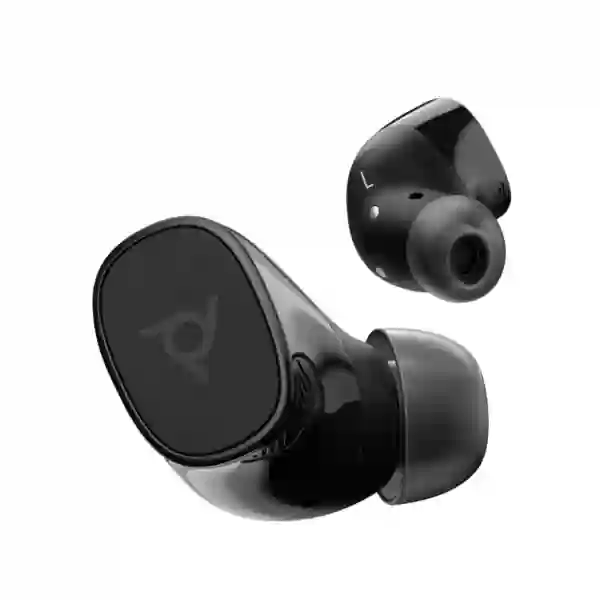
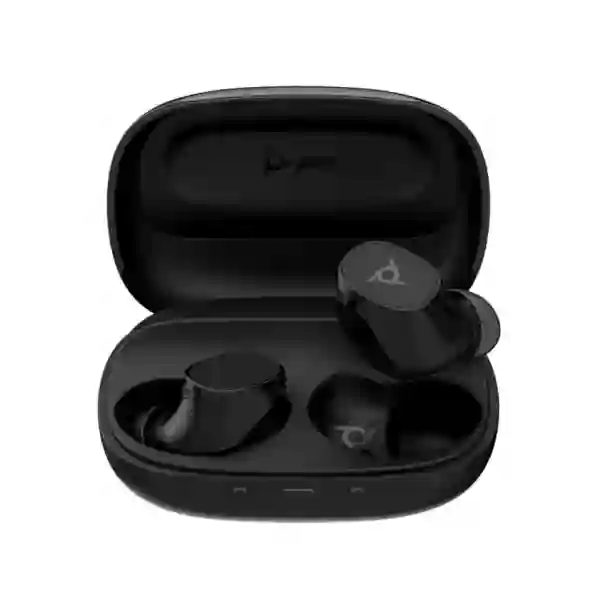
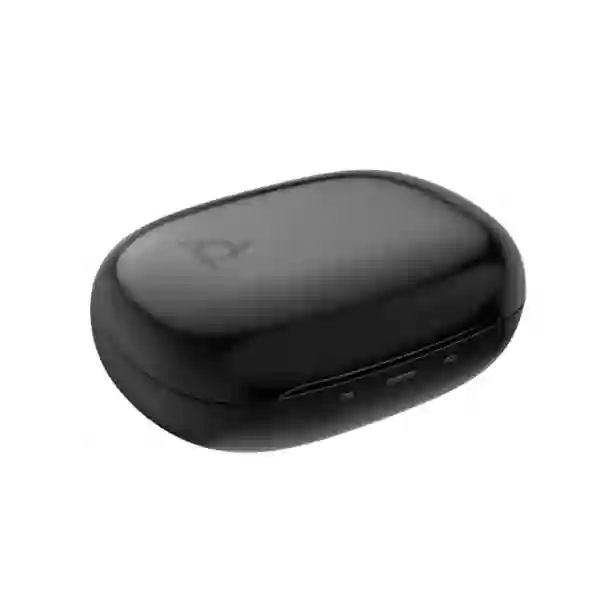
HP Poly Voyager Free 20 True Wireless Earbuds
Move between laptop meetings, phone calls and music with compact true wireless earbuds built around clear speech and listening comfort. The Voyager Free 20 combines adaptive active noise cancellation, six microphones across the pair, 10 mm speakers and multipoint Bluetooth, with a charging case that supports USB-C and Qi wireless charging. Compare the details below to see whether its fit and features suit your routine in Tanzania.
Why buyers consider this model
Calls first
Three microphones in each earbud and voice-oriented noise reduction make this a practical candidate for mobile conversations and mixed meeting days.
Focus when needed
Adaptive ANC and transparency modes let users choose between reduced distractions and greater awareness of surrounding activity.
Easy to carry
A light in-ear design, four tip sizes and a compact charging case suit routines that move beyond a single desk.
Useful power options
Rated listening battery life, fast charging and USB-C or Qi charging provide several ways to plan a working day.
Built for calls, meetings and everyday listening
The HP Poly Voyager Free 20 True Wireless Earbuds are compact Bluetooth earbuds made for people whose working day moves between conversations, focused tasks and personal listening. Their combination of adaptive active noise cancellation, multiple microphones and a portable charging case addresses a common problem: one audio accessory is often expected to handle a quick phone call, a laptop meeting and music between appointments. This model puts that flexibility into two independent in-ear pieces rather than a large headset. It is particularly relevant when desk space, carrying weight and a discreet appearance matter.
For a buyer in Tanzania, the useful starting point is the actual work pattern. Someone taking occasional smartphone calls and listening to training material may value easy pairing and portability above specialised enterprise controls. A person attending long meetings from a busy shared room may prioritise microphone behaviour, ear-tip fit and battery planning. These earbuds can be considered for both situations, but they are not an automatic substitute for a dedicated call-centre headset. Review the confirmed features below, check your device and meeting requirements, and request confirmation of the exact supplied configuration before placing an order.
A microphone system designed around the speaker’s voice
Each earbud uses three microphones, giving the pair six microphones in total. HP describes a two-microphone beamforming array and a third microphone that becomes active in windy conditions. Combined with intelligent noise reduction, this design is intended to help the person on the other end of a call hear speech more clearly when ambient sound is present. That matters in a corridor, co-working room or home office where voices, movement and environmental noise change during the day. The benefit is on the outgoing voice path; it should not be confused with simply turning down what the wearer hears.
Microphone processing is useful, but it cannot guarantee perfect intelligibility in every environment. A very loud crowd, unusually strong wind, poor mobile coverage, a congested data connection or a poorly positioned earbud can still affect a conversation. Call quality also depends on the phone, computer, meeting software and the communication network. For an important client call, make a brief test call in the intended location rather than assuming that a published microphone count predicts the exact experience. Keeping the earbuds correctly seated and using a quiet position when possible remains worthwhile.
Adaptive active noise cancellation: what it does
Adaptive Active Noise Canceling, usually abbreviated ANC, aims to reduce unwanted sound reaching the listener. On the Voyager Free 20, the system adjusts to surrounding conditions instead of relying solely on a permanently fixed setting. This can help when listening to a presentation in a shared office, reviewing recorded lessons at home or enjoying music while travelling. The earbuds also provide the passive isolation associated with correctly fitted in-ear tips. Together these can make an audio session less distracting without requiring the listener to raise the volume unnecessarily.
ANC does not erase all noise, and results vary by sound frequency, fit and movement. Sudden voices, warning signals and irregular high-pitched sounds may remain noticeable. The seal formed by the ear tips is important: a loose fit can allow more external sound through and change the listening balance. Evaluate ANC in the places where you normally work rather than relying on a general claim that all surroundings become silent. If you need to maintain awareness of colleagues, traffic or announcements, use an appropriate listening mode and keep the volume at a sensible level.
Transparency mode and awareness of your surroundings
Transparency mode serves a different purpose from ANC. Instead of concentrating only on reducing external noise, it lets the wearer hear more of what is happening nearby. This can be convenient when someone asks a short question, an announcement is made or you need to listen for your name without removing both earbuds. Having an accessible alternative to isolation is useful for workdays that move between private focus and quick face-to-face interaction. The mode is a practical feature rather than a promise that surrounding sound will be reproduced exactly as it would be without earbuds.
Consider your environment before selecting either mode. When walking beside vehicles, crossing roads, supervising equipment or handling a situation that demands full attention, removing the earbuds may be safer than relying on transparency processing. People using hearing protection for occupational noise must follow their workplace safety rules; consumer-style ANC earbuds are not a substitute for approved protective equipment. In a normal office or study area, the simple habit of changing modes deliberately can prevent missed conversations and make listening more considerate to people around you.
10 mm speakers for speech, media and music
The Voyager Free 20 includes 10 mm speakers, giving the same small device a role in communication and entertainment. Spoken instructions, meeting audio, podcasts, voice messages and everyday music all benefit from an earbud that is designed for more than a single kind of content. HP lists a media-mode speaker bandwidth of 20 Hz to 20 kHz and a narrower speech-mode range, reflecting the different needs of music playback and intelligible voice communication. These specifications describe the hardware’s operating parameters; they do not establish that one sound signature will suit every listener.
Listening preferences remain personal. Some buyers want prominent bass for music, while others place a higher value on clear narration and natural-sounding voices. Audio perception depends on ear-tip seal, source recording, application settings and volume. The product is therefore best evaluated as a balanced work-and-leisure device rather than advertised as a studio monitor, specialist gaming headset or high-resolution audio system. If accurate audio production, extremely low gaming latency or a particular wireless codec is a firm requirement, verify that separate requirement rather than inferring it from the driver diameter.
Bluetooth 5.4 and everyday pairing
HP’s technical specifications for a black basic-charge-case configuration identify Bluetooth Core 5.4. Bluetooth allows the earbuds to connect wirelessly to compatible computers and smartphones without an audio cable between the wearer and the source device. That makes it simpler to use a phone on the move and a laptop when seated at a desk. General support spans common personal computing systems including Windows, macOS, Android and iOS, although individual computer hardware and Bluetooth drivers can influence the available functions.
Before buying for a work computer, check that the machine has functioning Bluetooth audio support and that workplace policy permits pairing. A phone that has Bluetooth enabled is not necessarily configured to pass every meeting-software control through to the earbuds. Features such as mute indication, automatic source switching, call-answer controls and microphone selection may behave differently across operating systems and applications. If a computer lacks suitable Bluetooth support, do not assume a USB Bluetooth adapter is provided in the standard box. Confirm the exact package and any accessories required for your particular environment.
Multipoint connections without confusing two different limits
HP describes multipoint connectivity so the earbuds can remain connected to two devices and move between them for calls and music. A practical example is a laptop used for online meetings and a smartphone used for direct business calls. Rather than repeatedly forgetting one device to connect the other, the wearer can keep both in the usual workflow. This is especially convenient for managers, consultants and mobile professionals who alternate between browser-based conferencing and telephone conversations throughout a day.
The published specification also mentions the ability to remember up to eight paired devices. That does not mean audio can play from eight devices simultaneously. The number of remembered pairings and the number of active multipoint connections are different concepts. Source switching may also depend on whether a meeting is still holding the microphone or a device is continuing audio playback. For reliable results, pair the two most-used devices, select the earbuds explicitly in each calling application and test how incoming phone calls interact with ongoing laptop audio. Avoid promising seamless behaviour for every software combination.
Compatibility with meeting platforms and computers
These earbuds can serve as a standard Bluetooth audio input and output device on a compatible computer or phone. That makes them relevant to typical online meeting activities, such as hearing a colleague’s presentation, contributing to a remote discussion or joining a scheduled voice call. HP positions the Voyager Free 20 for flexible and hybrid workers and describes broad collaboration-platform compatibility. However, broad compatibility and a specific official certification are not interchangeable. A purchasing policy requiring a particular certified model should be checked separately before selecting the Free 20.
For an organisation, run a short pilot using the same computers, operating-system versions and software deployed to staff. Confirm that both speaker and microphone appear in the application’s settings, that the correct microphone is selected, and that an actual call sounds acceptable at both ends. A Bluetooth device can appear connected while an application is sending sound to the laptop speaker or receiving input from the built-in laptop microphone. This is often a configuration issue rather than an earbud fault. An initial test prevents needless troubleshooting when a meeting is about to begin.
The companion app and user customisation
HP describes software support for device settings and updates through its Poly software experience, with current product material referring to the HP Poly Studio App and some documentation referring to Poly Lens Mobile. The correct supported application can depend on the platform, software generation and device firmware. Relevant settings may include sound preferences, fit-related functions, device information and updating supported device software. A companion application can add value for buyers who want more control than basic Bluetooth pairing alone, but essential audio connectivity should be assessed on the intended device first.
Check current HP guidance for the exact application supported by your phone or computer before deploying a team-wide setup. App menus, available controls and update instructions can change over time, so it is better to verify them during installation than present an outdated sequence as universal. When updates are available, use official supported software and keep the earbuds charged during the process. Employees should also know whom to contact if company security rules restrict software installation. Choosing an accessory with understandable setup requirements can be as important as the number of configurable options.
Four ear-tip sizes and getting the seal right
The included ear tips come in extra-small, small, medium and large sizes. That is useful because ear shape differs from person to person, and the same size does not always suit both ears. A proper seal helps the earbuds remain stable and supports consistent listening and ANC performance. A poor seal can produce an impression of weak low-frequency audio or ineffective noise reduction even when the electronics are functioning normally. Taking a few minutes to try the supplied options is a sensible part of the initial setup.
Choose a tip that feels secure but does not create unnecessary pressure. Put the earbuds in place as instructed, move your head gently and listen at a moderate volume. If one side feels loose or uncomfortable, try a different tip for that ear instead of automatically using matching sizes. Long periods of listening should not involve pain, irritation or a persistent feeling of pressure. Allow breaks and clean the tips according to the manufacturer’s care guidance. A comfortable fit is especially important for people who alternate repeatedly between calls and other tasks.
Lightweight design for a portable working day
HP lists each earbud at approximately 5.25 grams and the charging case at approximately 50.96 grams for its documented configuration. The compact form avoids the headband, earcups and boom arm associated with traditional office headsets. For a user carrying a laptop bag or commuting between appointments, small accessories can be easier to pack and less visually prominent during short calls. The included case gives the earbuds a consistent storage location and makes it easier to keep the pair together when not worn.
Portability is not the only comfort consideration. In-ear designs depend on individual fit and personal tolerance, especially over consecutive meetings. Some people prefer the unobtrusive feeling of earbuds; others find a padded over-ear headset more suitable for extended sessions. The best choice comes from comparing actual daily usage rather than assuming that lower weight automatically wins. Anyone buying multiple units for staff should consider the range of user preferences, whether replacement ear tips are available and how easily a user can carry and maintain the case.
Battery life with ANC on and off
HP publishes up to 12 hours of listening from the earbuds with ANC switched off and up to 8 hours with ANC switched on. With the charge case included, the stated totals increase to up to 42 hours with ANC off and up to 28 hours with ANC on. These are combined listening-time figures for the earbuds and case, not an additional 42 or 28 hours on top of a full earbud charge. They provide a helpful planning reference for someone who uses the earbuds across multiple sessions instead of continuously.
Actual runtime varies with volume, call usage, signal conditions, battery age, environmental factors and whether ANC is enabled. Continuous microphone activity during calling may differ from a listening-only test. A buyer whose shift includes long daily meetings should plan around the lower, more relevant usage scenario and recharge opportunistically. For someone listening to training recordings during travel, the longer ANC-off figure may be more relevant when surroundings are quiet. The practical lesson is to compare the battery figures using the same operating mode rather than choosing whichever number sounds largest.
Fast charging and USB-C charging
HP states that a ten-minute fast charge can provide up to two hours of listening time. This can be useful after noticing a low battery shortly before a short meeting or while preparing to leave home. The published recharge figures are approximately two hours for the earbuds and three hours for the case. Fast-charge performance should be understood as a manufacturer-rated listening estimate under stated conditions, not as a guarantee that every short charging session will provide the same amount of call time.
The package specification includes a USB Type-C to USB Type-C cable, allowing the case to be charged from a suitable power source. Verify that your charger, port and cable are appropriate, and keep the charging contacts clear so the earbuds seat correctly. Where power access is intermittent during a working day, remembering to return the earbuds to their case between sessions can be more practical than leaving them loose in a bag. If the case is low as well, schedule a full recharge before a journey or a sequence of important calls.
Qi wireless charging: useful convenience, not a necessity
HP’s product material states that the Voyager Free 20 charging case supports Qi wireless charging. This creates another practical charging option for a desk or bedside setup already equipped with a compatible charging pad. Wireless charging reduces reliance on connecting a cable every time the case needs power, while USB-C remains useful when a suitable pad is not available. It is the case that supports this convenience; the earbuds still need to be seated correctly in the case to receive their charge.
Qi charging equipment should not be assumed to be included in the standard package. A buyer who wants to use a shared charging pad should confirm pad compatibility, placement and any workplace accessory policy. Wireless charging speed and behaviour can vary with the charger and alignment. For a team purchase, it may be simplest to standardise on the included cable for initial setup and treat wireless charging as an optional desk convenience. Neither method removes the need to check charge levels ahead of prolonged use.
Dust and water resistance: understanding IP56
HP’s Africa product features identify the earbuds as IP56 dust-and-water resistant. The designation describes a degree of protection against dust ingress and water jets under specified testing conditions. It is useful reassurance for ordinary incidental exposure encountered during daily movement, but it is not a reason to submerge the earbuds, wash them under a tap or assume they will withstand every environmental hazard. The rating should be applied to the earbuds described by HP, not automatically extended to the charging case.
For a buyer in Tanzania who moves between indoor workspaces and outdoor appointments, moisture awareness is still important. Dry the earbuds carefully as directed before placing them in a charging case, keep charging contacts free of contamination and avoid exposing the product to extreme conditions. Protection ratings are not permanent guarantees against damage from wear or misuse, and they are not statements about warranty coverage. If a role requires equipment for heavy rain, industrial dust or hazardous environments, select audio gear specifically approved for that duty instead of extrapolating from IP56.
Using the earbuds in a shared office
A shared office requires a balance between private listening and being available to colleagues. Adaptive ANC can make it easier to concentrate on a recorded briefing or meeting, while transparency mode provides a way to hear more of the surrounding room. The microphone system is designed to support outgoing speech when there is background activity. These capabilities are most valuable when combined with simple office habits: taking calls away from loud group conversations, keeping alert volume comfortable and switching back to ambient awareness when someone needs to speak.
If several colleagues use wireless audio in the same office, device identification and charging routines matter. Rename each user’s Bluetooth device where supported, avoid sharing charging cases without an appropriate policy and keep the earbuds stored safely rather than on a crowded desk. When a colleague complains of echo, check whether the laptop speaker is still active or whether the conferencing application has selected the wrong microphone. Such practical checks often provide a faster answer than replacing a working accessory. Earbuds support a flexible office, but room acoustics and call etiquette still count.
Home working and remote meetings
At home, work calls may compete with household movement, a fan, background conversations or sound from another room. The Free 20’s noise-reduction tools are intended to help, particularly when the wearer wants to listen closely and communicate clearly without a bulky headset. A comfortable fit and dependable Bluetooth connection become important when moving between a desk and a nearby room. The portable case also makes it easier to transition from working at home to a later appointment without changing audio equipment.
However, active noise cancellation should not be treated as a complete solution for unpredictable household noise. The microphone may still pick up some sounds, and the person speaking should use the meeting application’s mute control when not contributing. Position the computer within a practical Bluetooth range, reduce nearby sources of interference and ensure the correct audio device is selected after reconnecting. For a full day of frequent calls, alternate usage with charging periods and evaluate whether an over-ear headset offers better long-term comfort for the individual user.
Mobile professionals, travel and client visits
People who spend part of their day outside a fixed desk often prioritise portability and simple device switching. The Free 20 suits a workflow in which a short phone call, an audio message and a laptop-based discussion may happen in different places. Multipoint support can reduce repeated pairing steps, while the case keeps spare listening time available between sessions. The combination is appealing for consultants, sales staff, project coordinators and others who need communication equipment that takes little space.
Travel also exposes the limits of wireless accessories. Bluetooth range can be affected by walls, crowded radio environments and how the connected device is carried. ANC may reduce some travel sounds but does not make important announcements irrelevant. The safest practice is to put the phone or computer in a stable location during an important call, keep the case charged and remove the earbuds when a task requires undivided attention. Travel suitability should be judged on the full routine, including connectivity and charging opportunities, rather than on earbuds alone.
Studying, training and focused media playback
Online lessons, language practice, professional webinars and recorded training require speech that is easy to follow. In-ear stereo audio can make these tasks more personal when the listener shares a room with others. A portable design is also useful for learners switching between a phone and a computer. The 10 mm speakers, selectable listening modes and multiple ear tips offer a practical basis for these activities. The user can choose whether isolation or greater awareness of the surroundings is more helpful at a particular time.
For study sessions, reasonable volume and regular breaks are more important than attempting to block every noise by increasing loudness. Learners taking live classes should verify the microphone in their chosen video application and run a short test before a presentation. If recorded material is stored locally or streamed over the internet, connection quality and the source audio also influence clarity. The Free 20 is a useful multi-purpose candidate for mixed communication and learning needs, but specialised requirements such as assistive listening or laboratory-grade monitoring need separate evaluation.
Physical controls and everyday operation
HP lists controls for answering or ending calls, muting, media playback, track selection, voice assistance, Bluetooth pairing, checking status and changing ANC or transparency settings. These are the functions most users repeatedly need during a normal day. Learning a handful of controls can reduce the need to reach for a phone when a call starts or a recording needs to be paused. The available operations are important, but the exact gesture sequence should be confirmed from the current model guide and the installed software configuration.
Button-operated earbuds may feel different from touch-sensitive models. Some users appreciate the deliberate feedback of a physical press, while others prefer not to apply pressure to an in-ear device. Try the fit before practising controls and avoid pushing the earbud deeper simply to activate a button. In business meetings, always verify that mute has taken effect in the actual conferencing application; headset state and application state do not necessarily remain synchronised across every combination of operating system and software. A quick familiarisation session is valuable before the first important call.
How to get started on a phone or laptop
Begin by checking the package contents and charging the case and earbuds. Choose ear tips that fit securely, then follow the product’s current instructions to enter pairing mode. Open the Bluetooth settings on the intended phone or laptop and select the Voyager Free 20 when it appears. After connection, play a short recording and place a test call to confirm that both earbuds and the microphone are working as expected. If the device has multiple sound outputs, explicitly choose the earbuds rather than relying on the operating system to switch automatically.
Next, pair the second device if multipoint operation is part of your workflow and test an incoming call while another source is available. Try ANC and transparency in a safe setting, practise the main controls and check the current HP-supported companion application for any relevant configuration. If the Bluetooth connection behaves unexpectedly, disconnect unused competing devices and follow the official pairing or reset procedure instead of making repeated random changes. For business buyers, documenting this brief setup process can make first-day adoption easier across a team.
Getting clearer audio during online meetings
Before an important online meeting, test the microphone and speaker in the exact application you will use. Confirm the expected Bluetooth device appears in both input and output settings; this is especially relevant when changing between a built-in laptop microphone, a webcam and wireless earbuds. Check the battery level and keep the case nearby. If you will be presenting, ask one colleague to confirm that your voice level is intelligible before the session becomes formal. These preparations are quick and address common operational problems that specifications alone cannot solve.
If the person at the other end reports muffled speech, first move to a quieter location and confirm that the earbud microphones, not the computer’s microphone, are active. For distorted listening, check application volume, fit and the source recording. For broken audio, move the connected device closer and close unnecessary audio sessions on the second paired device. A workplace network issue can also cause dropouts even when Bluetooth itself is functioning correctly. Distinguishing local wireless problems from internet-call quality saves time and helps teams decide when to involve IT support.
Choosing between earbuds and an over-ear business headset
True wireless earbuds and traditional headsets solve overlapping but not identical problems. Earbuds excel when light carrying weight, minimal desk clutter and discreet everyday wear take priority. An over-ear business headset can be preferable when a user needs a boom microphone positioned close to the mouth, long continuous calling sessions, replaceable cushions or controls designed around a particular enterprise calling platform. The Voyager Free 20 should be considered on its verified capabilities rather than assumed to match every feature found on more specialised equipment.
Think about the length and nature of calls. Someone joining occasional meetings and taking mobile calls may benefit from a single pair of multipurpose earbuds. A reception desk, contact centre or support operator with near-continuous customer calls might be better served by a dedicated professional headset after a trial. If Microsoft Teams certification, a bundled proprietary USB adapter, centralised fleet administration or a specific accessibility requirement is mandatory, identify those conditions first. There is no advantage in buying an accessory that fits the budget but cannot satisfy a non-negotiable operating requirement.
Voyager Free 20 versus the Voyager Free 60 family
The Voyager Free 20 belongs to HP Poly’s Voyager wireless-audio family, but it should not be treated as interchangeable with every Voyager Free 60 configuration. HP positions the Free 20 as a compact standard true wireless option for flexible workers. The broader Free 60 family includes configurations that address different collaboration and accessory needs, including certain versions marketed with platform certification. Buyers should compare the exact variant and bundled equipment rather than drawing conclusions from the family name alone.
If your priority is a small Bluetooth pair for a personal laptop and smartphone, start by assessing the Free 20’s fit, microphone system, multipoint support and runtime. If an IT team requires a specific softphone certification or particular USB wireless adapter, review the exact Free 60 model and official specification instead. Do not infer that an adapter, touchscreen charging case or enterprise management feature comes with the Free 20 just because another Voyager product offers it. A line-by-line configuration comparison prevents procurement errors and makes quotations easier to evaluate.
Procurement questions for organisations in Tanzania
Before purchasing for a team, ask for the precise product configuration, colour and included accessories. A verified quotation should make it clear whether it covers earbuds and the basic charging case, what charging cable is supplied, and whether additional equipment is required for computers without Bluetooth. Check whether the organisation expects individuals to pair personal phones, company laptops or shared machines. Each environment can raise different security, account-management and support questions that are more important than a generic compatibility statement.
Also request current information about availability, lead time, invoicing, return conditions, applicable local warranty handling and after-sales assistance from the selling business. These are commercial details that can change and should not be inferred from specifications published for another country. Do not rely on a foreign online price as a Tanzanian selling price or assume that manufacturer documentation establishes local inventory. A buyer preparing a tender should ask for the exact item description and confirmation of any mandatory platform requirements before using this page as a procurement reference.
Rolling out several units with fewer support problems
A small pilot makes sense before purchasing a larger quantity. Select users with different daily routines: one who works mainly from a computer, one who often takes mobile calls and one who works in a shared environment. Ask them to test fit, microphone clarity, multipoint switching, charging routine and the applications used for normal meetings. Record practical feedback separately from marketing specifications. This is particularly helpful because ear comfort, local radio conditions and application integration are individual experiences that a datasheet cannot fully predict.
For wider deployment, establish simple instructions on Bluetooth naming, first pairing, selecting the microphone inside meeting applications, cleaning and storage. Decide whether staff will be allowed to install companion software and who will handle firmware updates when necessary. Provide a secure method to report connection problems without exposing personal devices or accounts. Plan for charging access and safe storage of tiny accessories. The result is a clearer buying decision and a smoother user experience, even when the earbuds themselves require little ongoing technical maintenance.
What the supplied package normally contains
HP’s documented box contents include the wireless earbuds, charging case, XS, S, M and L ear tips, a USB Type-C to USB Type-C cable, quick-start material, safety guidance and other product documentation. That set covers the basic physical needs for wearing, storing and charging the earbuds. It is still important to check the exact version being offered because manufacturer package details and regional bundles can differ. The presence of a charging case does not establish that every external charger or computer adapter is included.
Customers should also confirm the selected colour and part description in their quotation. HP publishes product information for both black and gray options at the family level, but that does not prove either finish is in stock in Tanzania. An external retailer’s catalogue identifier should not be treated as the seller’s own SKU. If accessories such as a spare cable, wireless charging pad or Bluetooth dongle are required for your workplace, list them separately so everyone understands the intended order. This avoids surprises during setup.
Care, hygiene and longer-term ownership
Regular care can improve comfort and help the case charge reliably. Wipe the earbuds and removable tips using methods approved in the manufacturer instructions, and keep moisture away from charging ports and electrical contacts. Store the earbuds in the case when not being used, especially in a shared bag where dust or small objects could enter the charging area. Avoid pulling forcefully on the tips or using sharp objects to clean the speaker openings. These simple habits are particularly useful for accessories that are handled and worn several times a day.
Consider the human side of ownership as well. Personal ear tips should not be exchanged casually between staff, and a shared device policy should address hygiene and device pairing. Recharge before prolonged storage and check the manufacturer’s advice on batteries if the equipment will remain unused for some time. If performance declines, inspect fit, charging contacts, Bluetooth settings and software before concluding that the earbuds are defective. For faults, use the applicable authorised support process and the actual terms supplied with the purchase rather than assuming a particular local warranty remedy.
A practical checklist before you choose
The easiest way to assess the Voyager Free 20 is to list the most important outcomes rather than count features. Do you need reliable basic Bluetooth calling from a phone? Do you alternate between a laptop and smartphone? Is adaptive ANC useful in the places where you listen? Can you tolerate in-ear tips for the duration of your typical sessions? Does the manufacturer’s stated battery life fit the pattern of calls and playback you expect? These questions connect the product’s documented features to real decisions instead of treating every specification as equally important.
Next, identify what must be verified externally: compatibility with a specific collaboration application, any formal device certification, a requirement for a USB adapter, local price, delivery details and the exact supplied variant. A good match is one that meets both technical and practical requirements without extra assumptions. The HP Poly Voyager Free 20 True Wireless Earbuds offer an attractive combination of compact form, adaptive ANC, six microphones and useful charging options, but each organisation and individual should confirm the fit for their own workflow before ordering.
Technical specifications at a glance
These manufacturer-published figures describe the Voyager Free 20 family and the referenced HP basic-charge-case specification. They help with comparison but should be checked against the exact configuration included in a seller’s quotation.
| Product family | HP Poly Voyager Free 20 true wireless in-ear earbuds |
|---|---|
| Wireless technology | Bluetooth Core 5.4 on HP-documented basic-case configuration |
| Multipoint | Two active device connections; up to eight remembered pairings |
| Audio | 10 mm speakers; adaptive ANC and transparency mode |
| Microphones | Three per earbud; beamforming and AI-assisted noise reduction |
| Battery, earbuds | Up to 12 hours listening with ANC off; up to 8 with ANC on |
| Battery, case included | Up to 42 hours total with ANC off; up to 28 with ANC on |
| Fast charging | Ten-minute charge for up to two hours of listening |
| Charging | USB-C cable; Qi wireless charging support on case |
| Earbud fit | XS, S, M and L supplied tips |
| Dust / water resistance | IP56 for earbuds, per HP’s product material |
| Weight | Approximately 5.25 g each earbud; 50.96 g case |
| Operating systems | Compatible Bluetooth devices running Windows, macOS, Android or iOS |
| Configuration notice | Confirm exact colour, package and regional ordering details |
Listening durations are maximum ratings, not guaranteed talk times. All commercial terms, supplied accessories and local purchasing conditions require verification for the actual order.
Frequently asked questions
Are the Voyager Free 20 earbuds suitable for laptop meetings?
Yes, they are designed to connect over Bluetooth to compatible computers, and HP positions them for flexible workers. Confirm the computer’s Bluetooth support, select the earbuds as both microphone and speaker inside the specific meeting application, and test an actual call. General compatibility does not establish a named collaboration-platform certification. Organisations with formal certification requirements should verify the exact product model and policy before procurement.
Can I use them with a phone and laptop at the same time?
HP describes multipoint support for two simultaneously connected devices, which is useful when switching between a phone call and laptop media. The earbuds can also remember more previously paired devices, but that is not the same as maintaining all of them as active connections. Source switching depends partly on device and application behaviour, so test the combination you actually intend to use.
How many microphones does the model have?
There are three microphones in each earbud, making six across the pair. HP describes a two-microphone beamforming arrangement plus a microphone that activates in windy conditions, supported by noise reduction processing. Their purpose is to improve outgoing voice clarity, but calling performance still depends on surroundings, network quality and the connected application.
Does active noise cancellation remove all background sound?
No. Adaptive ANC can reduce unwanted sound reaching the listener, but performance varies by environment, sound type and the quality of the ear-tip seal. Some voices and alerts may remain audible. Use transparency mode when more awareness is wanted and remove the earbuds in situations where full environmental attention is essential.
What is the maximum listening battery life?
HP states up to 12 hours from the earbuds with ANC off and up to 8 hours with ANC on. Including the case, the stated combined totals are up to 42 hours with ANC off and 28 with ANC on. These are maximum listening figures; actual use and calling conditions can shorten runtime.
Does the case support wireless charging?
HP product information identifies Qi wireless charging support for the case, alongside USB-C cable charging. A separate Qi charging pad should not be assumed to be inside the product box. Check the exact configuration and use a suitable charger; the earbuds charge while seated correctly inside the case.
How long does a quick charge provide?
HP quotes up to two hours of listening after a ten-minute fast charge. This is useful for short sessions when a full recharge is not practical, but the actual result can vary with conditions and usage mode. It is a listening estimate and should not be presented as two guaranteed hours of continuous calling.
Will the earbuds fit different ear sizes?
The documented package includes four silicone tip sizes: XS, S, M and L. Try the available sizes and choose a comfortable seal for each ear. Proper fit affects both comfort and how well audio and ANC perform. Different tip sizes for the left and right ears can be appropriate if one ear needs a different fit.
Can I use them while walking in light rain?
HP describes the earbuds as IP56 dust-and-water resistant, but that does not mean waterproof or suitable for immersion. Limit exposure to moisture, follow manufacturer care instructions and dry the earbuds before charging. Do not assume the charging case has the same rating, and avoid wearing earbuds when they interfere with awareness of traffic or other hazards.
Is a dedicated computer USB Bluetooth dongle included?
The manufacturer-published package list includes the earbuds, charging case, different ear tips, a USB-C charging cable and documentation. It does not establish that a dedicated computer Bluetooth adapter is included. If your laptop lacks suitable Bluetooth, confirm a compatible solution separately instead of assuming an adapter is bundled.
Are these officially Microsoft Teams certified?
HP describes broad compatibility with leading collaboration platforms for this standard model, but that is not equivalent to a verified Microsoft Teams certification for the exact device variant. If your employer or tender specifies certification, request current official evidence or compare a model explicitly marketed for that requirement.
Are both black and gray colours available in Tanzania?
HP has described black and gray finishes for the Voyager Free 20 family. That fact does not establish local inventory or the colour of the unit included in a specific quotation. Ask the seller to confirm the exact product variant, colour and current availability before ordering.
How can I get price and delivery information in Tanzania?
Request a quotation for the exact Voyager Free 20 configuration from FourTeck Tanzania. Ask for current availability, currency, applicable commercial terms, delivery arrangements and support conditions in the same conversation. Manufacturer specifications alone cannot establish a live local price, delivery date, warranty handling process or stock status.
Who should consider a different type of headset?
People who require a dedicated boom microphone, very long continuous shifts, a particular workplace certification, specialised hearing protection or a bundled proprietary USB adapter should compare purpose-built headset configurations. The Voyager Free 20 is designed for flexible Bluetooth calling and everyday listening; suitability should be confirmed against non-negotiable role and IT requirements.
Request a Voyager Free 20 quotation
Looking for HP Poly Voyager Free 20 earbuds for personal use, staff equipment or a planned business purchase in Tanzania? Ask FourTeck Tanzania to confirm the exact available configuration, price, delivery terms and any relevant accessories. Share your intended devices, meeting applications and quantity so the suitability questions can be checked before ordering. No local price, stock status or delivery commitment is stated on this page because those details require a current quotation.




Reviews
There are no reviews yet.