
Business audio | Tanzania buying guide
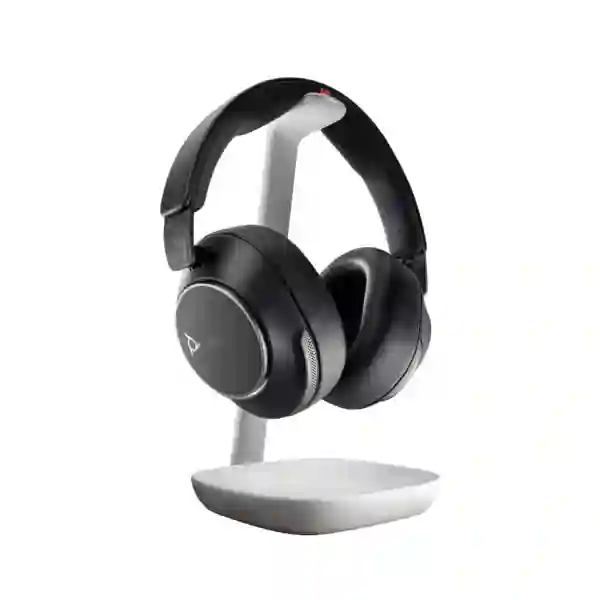
HP Poly Voyager Surround 85 UC Bluetooth Headset
For workdays filled with meetings, calls and focused listening, the HP Poly Voyager Surround 85 UC Bluetooth Headset combines a boomless over-ear design, adaptive active noise cancellation and convenient multi-device connectivity. Its business-oriented controls are intended to make individual audio easier to manage across desk, home and hybrid work.
Choose the exact UC or Teams-certified configuration that fits your calling software, verify included accessories and ask FourTeck Tanzania for a configuration-based quotation.
At a glance: verified product specifications
| Feature | Manufacturer information |
|---|---|
| Product family | Poly Voyager Surround 85 UC |
| Wearing style | Over-ear stereo, boomless |
| Wireless technology | Bluetooth Core 5.3 |
| Listening modes | Adaptive ANC and transparency mode |
| Battery figures | Up to 21 hours talk / up to 24 hours music |
| Wireless range | Up to 30 m under suitable conditions |
| Speaker drivers | 40 mm |
| Published weight | Approximately 275 g |
| Device operating systems | Windows 10/11, macOS, Android, iOS |
| Business setup | Poly Lens and BT700 adapter in specified bundles |
| Charging stand | Verify that the quoted configuration includes it |
| Teams certification | Only claim for the exact Teams-certified variant |
Figures describe referenced HP configurations, not guaranteed performance or a verified Tanzania offer. Package contents, exact variant and commercial terms must be confirmed on the supplier quote.
Who should consider the Voyager Surround 85 UC?
The HP Poly Voyager Surround 85 UC Bluetooth Headset suits people whose working day combines calls, collaborative meetings, concentration time and occasional music. It is particularly relevant to consultants, managers, project teams, customer-facing professionals and hybrid employees who want the microphone and collaboration features of a business headset without a visible boom arm. The over-ear construction creates a more enclosed listening experience than a single-ear headset. That matters when you need to hear a remote colleague clearly while working in a shared room or at a desk near conversations. It is not automatically the best choice for every employee: a receptionist who must hear the room continuously, for example, might prefer a one-ear design. Start with actual daily work rather than selecting purely from appearance.
For professionals who alternate between a notebook and a mobile phone, the ability to connect the headset to two devices at once can reduce friction. A user may participate in computer meetings for part of the day and take a mobile call at another moment without making a new pairing each time. This does not mean every application will exchange calls seamlessly; call routing, audio focus, operating-system behavior and the platform’s headset integration still matter. In a managed office, test the workflow users follow most often. A mobile-first worker may value quick Bluetooth pairing, while a desktop call agent may prefer the stability and controls of the supplied computer adapter. Both scenarios can be appropriate, but they call for different setup decisions.
This is a premium work headset rather than an inexpensive general-purpose accessory. Its practical value lies in combining several functions in one device: over-ear stereo sound, microphone pickup for meetings, active noise cancellation, configurable controls and convenient charging options. An organization should consider the purchase alongside its meeting workload, replacement policy, IT support process and employee comfort requirements. It is possible to buy an excellent headset that is poorly matched to a specific desk, software client or wearing preference. A good procurement decision checks the actual usage environment, confirms the exact manufacturer configuration, and gives a small pilot group a realistic opportunity to assess fit before a larger rollout.
A quieter listening environment with adaptive ANC
Active noise cancellation, usually shortened to ANC, is designed to reduce distracting environmental sound reaching the listener. HP describes adaptive ANC for the Voyager Surround Series. The over-ear cushions and electronic noise reduction work toward a more comfortable listening environment when a user needs to concentrate on a meeting or detailed document. This is especially useful with relatively steady background noise such as ventilation, commuting ambience or an air-conditioned office. Results depend on noise frequency, how the ear cushions fit and the listening mode selected. ANC does not create silence, and it should not be treated as an assurance that sudden speech, alarms or every other environmental sound will disappear.
The headset also provides transparency mode, which is useful when awareness of the nearby environment matters more than isolation. Someone at a shared desk may need to hear a colleague’s question, a visitor approaching or an announcement without removing the headset. Depending on settings, switching between ANC and transparency can be handled using the custom control and options in Poly Lens. This flexibility helps make an over-ear design practical in more than one kind of workspace. Teams should agree on safe listening habits, including removing the headset when full attention to a surrounding task is required. Neither noise reduction nor transparency technology replaces care in safety-critical environments.
It is important to distinguish noise reduction for the listener from noise reduction for people on the other end of a call. ANC helps the wearer hear better. Microphone processing helps the far-end participant hear speech more clearly. The two functions solve related but different problems. A buyer comparing headsets should test both directions rather than assuming that effective ANC means colleagues will hear no background activity. Ask test users to make calls from real desks, not only from quiet meeting rooms, and listen for changes in clarity when nearby voices, keyboard sound or office equipment are present. That simple evaluation provides information that a feature list cannot fully convey.
Professional conversations without a visible microphone boom
One of the distinguishing features of this model is its boomless design. Rather than placing a microphone arm in front of the mouth, HP uses built-in microphones and audio processing to collect the wearer’s voice. HP describes a six-microphone system for clear transmit audio in its Voyager Surround Series marketing. The outcome intended for the user is a cleaner headset profile while retaining capability for voice calls and conferences. A boomless shape can feel less visually intrusive during frequent video meetings and is convenient when carrying or storing the headset. Microphone results still depend on correct positioning, room acoustics, device firmware and the application processing the call.
For call-heavy employees, the ability to mute quickly may be more important than an elaborate feature list. The Voyager Surround 85 UC has a dedicated mute control, and HP documents touch-sensitive controls for audio and call handling. Participants can adjust volume and manage supported functions without continually searching for software controls on screen. The specific behavior of each gesture or button may differ between applications and configurations. During setup, test answering, ending, muting and unmuting in the organization’s actual calling software. If the software requires desktop integration, an administrator may need to install or configure Poly Lens. A button that works in one calling application should not be assumed to work identically in every browser or desktop client.
The user experience also benefits from visible availability cues. HP describes online indicator lights intended to show when the wearer is on a call, potentially discouraging unnecessary interruptions. Such indicators are most helpful when coworkers understand what they mean. They are not a substitute for an organization’s status or availability practices, and they cannot prevent all workplace interruptions. For frequently interrupted roles, consider using calendar focus blocks, status messages and appropriate office etiquette alongside the headset. This combination acknowledges that good audio equipment can support a better communication environment but cannot independently solve meeting overload or noisy office design.
A practical microphone trial should include more than one kind of call. Test a quiet room, a desk with routine conversation nearby, a mobile call and a software-based meeting. Ask the remote listener whether speech remains intelligible during pauses and when the user turns their head. Check whether automatic noise suppression within the meeting software conflicts with the headset’s own processing. The goal is not to produce a laboratory claim of perfect isolation; it is to find a reliable setting for the organization’s real conditions. If an employee regularly talks beside loud machinery or in a very noisy field environment, assess alternatives specifically designed for those circumstances rather than relying on a general office headset.
Comfort for repeated meetings and long work sessions
A headset may have capable audio electronics and still be unsuitable when its fit causes discomfort. The Voyager Surround Series uses an over-ear design with padded ear cushions, a shaped headband and slanted audio drivers. HP highlights a headband geometry intended to reduce pressure points. These details are relevant to people who remain in meetings for extended periods. The published weight for the referenced Voyager Surround 85 UC configuration is approximately 275 grams. That figure is useful for comparison but does not predict comfort for an individual; head size, glasses, hairstyle, heat and the position of the ear cups can all influence the experience. A real wearing test remains valuable.
Over-ear headphones often feel different in a warm office from the way they feel during a quick demonstration. Ear cushions create contact around the ears and may hold some heat over long sessions. Employees who wear glasses should check whether the cushion seal remains comfortable and whether the frame causes pressure. If staff work in hot spaces without consistent cooling, allow them to assess the headset under those conditions before committing to one model across an entire team. Comfort preferences are personal, so a professional evaluation should include a range of users rather than assuming that one well-reviewed design will work equally well for everybody.
People who move between office and home may appreciate a design that can support meetings, focused work and listening to training materials in one product. The carrying case supplied with listed manufacturer bundles helps protect the headset during transport, but the contents of a particular offer must be confirmed. A case does not make electronic equipment resistant to rain, drops or rough storage, and it is sensible to keep cables and adapters organized separately. Consider how frequently employees will carry the headset, where they will charge it and whether they have a secure place to leave it between calls. These ordinary details strongly influence long-term satisfaction.
Bluetooth, USB adapter and wired connection options
HP specifies Bluetooth Core 5.3 for the Voyager Surround 85 UC. Bluetooth makes it possible to connect with compatible phones and computers without keeping a cable attached to the headset. It does not guarantee an identical experience with every host device, because Bluetooth implementations, drivers and operating-system permissions vary. For a company using business calling software, the packaged Poly BT700 USB Bluetooth adapter can be an important part of the setup. HP’s user guide recommends the adapter for stronger integration with softphone controls and audio quality than some direct computer Bluetooth configurations. If an organization restricts USB devices, that policy should be checked before purchase.
The headset can remember multiple Bluetooth devices, and HP’s user guide says it can maintain connections to two devices at the same time, including the compatible USB adapter. This can be useful when an employee uses a laptop and smartphone throughout the day. However, simultaneous connection is not the same thing as playing independent audio streams from both sources together. Operating systems and applications decide which audio route is active and how an incoming call interrupts music or a meeting. Test a typical handover, such as finishing a phone call and joining a desktop meeting. If quick switching is essential, document the preferred connection method and educate users on audio output selection.
For computer users, confirm the port type before choosing a kit. HP lists USB-C BT700 adapters in specific packages and a USB-C to USB-A converter in the corresponding bundles. This offers flexibility for newer USB-C notebooks and computers with traditional USB-A ports. The USB connector on the adapter is not the same thing as using the headset as a wired USB audio device: the adapter still provides a wireless connection between headset and PC. It is worth explaining that difference to IT support teams, particularly when employees are troubleshooting connection failures. Also confirm any restrictions involving docking stations, shared workstations or desktop security software.
A wired operating mode adds another useful option when wireless operation is inconvenient. HP’s user guide describes audio over a suitable USB cable and notes that the headset can charge while connected by USB-C. It also discusses a USB-C to 3.5 mm cable, where the analog connection does not charge the battery. Cables must be compatible with the exact headset and intended host device. A wired fallback can be helpful when Bluetooth density is high, a battery needs charging or company policy limits wireless peripherals. Before relying on it for critical work, check whether call controls, audio routing and microphone behavior meet your requirements in that connection mode.
Wireless range is another specification that deserves sensible interpretation. HP lists up to 30 metres for the referenced headset configuration under suitable conditions. That is not a promise of clear calls through every wall or across a busy office floor. Furniture, partitions, human movement, other Bluetooth equipment and the computer’s location may reduce the usable distance. A pilot user should walk the real route between their desk, nearby meeting area and office doorway to determine whether the connection remains reliable. In dense environments, optimizing where USB adapters and host devices sit may be more effective than assuming a headline range will be available everywhere.
Battery life and charging: what the figures mean
For the Voyager Surround 85 UC, HP states up to 21 hours of talk time and up to 24 hours of music listening time. These are manufacturer maximums under defined test conditions, not guaranteed figures for every user’s schedule. Actual endurance depends on call duration, playback volume, ANC use, connection behavior, firmware condition and battery age. It is useful to distinguish talk time from listening time because conference calling and music playback create different power demands. An employee with several hours of meetings each day may have a different charging routine from someone who uses the headset mainly for short calls and occasional background audio. Planning around realistic use is better than assuming the maximum applies every day.
The Voyager Surround 85 UC family is associated with a wireless charging stand, a practical way to return the headset to a regular charging position on a desk. HP’s listed configurations with a stand include that accessory, but the bundle must be checked before purchase because listing titles can omit important details. A desktop stand may be particularly useful for staff who forget to connect a cable at the end of the day. It also creates a dedicated storage location, which can help keep a workstation tidy. The stand still needs a suitable USB power connection; placement should be planned around available ports, cable management and desk layout.
Charging time deserves careful wording because USB charging and stand-based charging are not necessarily identical experiences. Environmental conditions, power source and battery state may affect how long charging takes. Rather than promising a particular number for a locally supplied bundle, ask the supplier to confirm the manufacturer configuration, power arrangement and the correct operating instructions. The headset’s battery status information and Poly Lens tools can help users plan their charging. Establishing a simple habit—such as docking after a shift or checking the battery level before a long meeting—usually provides more practical benefit than focusing on a best-case charge figure.
For organizations buying multiple units, make charging part of the deployment plan. Employees who use shared desks may need labelled adapters or a designated place for the stand. People travelling between locations may want to keep an approved cable in their laptop bag. IT teams should also consider what happens when a user arrives with a depleted battery five minutes before an important call. A documented wired alternative, a charging cable at the workstation and clear support guidance can prevent unnecessary interruptions. Batteries gradually age; treat their long-term performance as a maintenance consideration rather than assuming that a headline runtime will remain identical throughout the device’s working life.
Meeting applications, operating systems and Poly Lens
HP lists compatibility with Windows 10, Windows 11, macOS, Android and iOS for the referenced configurations. Broad operating-system support does not mean that every headset feature is equally available on every platform. Basic audio playback and microphone input can work while advanced softphone controls, notifications or device management need additional software or a particular connection method. Procurement teams should make a list of the applications staff actually use and distinguish required capabilities from desirable extras. For example, it may be acceptable for a meeting to use the headset as an audio device without a hardware answer button, but not acceptable for a busy call centre where staff rely on that control hundreds of times a day.
The HP Poly Voyager Surround family is marketed for use with major collaboration platforms, including Microsoft Teams and other leading meeting services. There are, however, different product variants. An exact Microsoft Teams-certified configuration may include Teams-specific integration and controls that should not be assumed on a standard UC package. The distinction matters when an organization needs certification for a managed deployment. Confirm the manufacturer’s part number and the required platform certification on the final quote. Compatibility with a platform is not always equivalent to certification of every configuration, and certification does not imply that optional software features are enabled automatically.
Poly Lens is an important part of managing the user experience. According to HP’s user guide, Poly Lens can help with firmware updates, device configuration, equalizer settings, alerts, the selected softphone and supported call-control behavior. It can also provide battery information. Organizations should decide whether the application will be installed by each user or deployed centrally according to their IT procedures. Some employees do not have administrator rights, so the installation method and application permissions may need to be confirmed before rollout. Device configuration should be consistent enough for support personnel to troubleshoot while allowing sensible personal choices such as listening preferences.
Software updates are useful but should be managed thoughtfully. A new firmware version may improve compatibility or address issues, yet unplanned changes in a large environment can create avoidable support calls. An IT team can test firmware and application updates with a small group before applying changes more widely. Maintain a record of the connection method, approved software version and key settings used for the pilot. When a user reports that mute has stopped working, the first checks should include the selected audio device in the meeting app, microphone permission, connection method and any recent changes. This approach treats headset reliability as a combination of hardware and software rather than blaming one component immediately.
Use cases for Tanzanian offices and hybrid teams
Businesses in Tanzania may operate across different workplace arrangements, from shared desks and meeting rooms to home working and regular travel between sites. A wireless headset can support more consistent personal audio when staff move between those environments. The Voyager Surround 85 UC is most relevant where users need individual meeting privacy, effective listening isolation and hands-free calls. For example, a management team with daily video meetings may value an over-ear stereo format, while an employee who must constantly respond to people in the room may not. The right choice begins with workflow analysis, not a general promise that one model will improve every department’s productivity.
In a shared office, staff should pay attention to how many nearby people are speaking at the same time. Even well-designed microphones work within the limits of room acoustics and speech processing. If several colleagues run calls in one small area, acoustic panels, better seating arrangements and scheduled use of quiet rooms may make as much difference as the headsets. The Voyager Surround 85 UC’s ANC can make listening more pleasant, but it cannot eliminate the voice of every nearby coworker for either participant. A trial should include the typical level of office activity and should be evaluated by the remote listener as well as the wearer.
For hybrid employees using an employer-provided computer and a personal or company phone, dual-device connectivity may help reduce accessory changes during the day. Before deployment, clarify whether company policy permits the headset to be paired with privately owned devices. Some organizations require separation between business communications and personal equipment. The product’s Bluetooth capability does not override those policies. Where device management or call recording is required, validate the workflow with the actual application and organization settings. The headset provides an audio endpoint; it is not a security or compliance platform on its own.
Remote work introduces additional considerations such as available power, internet stability and background noise. A quality headset can improve local audio capture and listening comfort, but it cannot repair an unstable video connection or insufficient bandwidth. Users should test their internet connection, select the correct microphone and speaker in the meeting application, and close unnecessary sources of interference. In areas where electricity interruptions affect the workday, plan battery charging and computer power separately. The headset’s rechargeable battery may support continued local operation, but successful calls still depend on the connected phone or computer and network service.
For education, training and professional services, stereo audio can make it easier to follow presentations, recorded material and extended discussion. Participants may appreciate the ability to alternate between focused listening and transparency mode. However, a shared device in a training room introduces hygiene, pairing and storage concerns. Where the headset is assigned to a single employee, establish clear ownership and charging arrangements. Where equipment must be shared, ensure staff know how to remove previous Bluetooth pairings, select the correct output device and handle cleaning according to manufacturer guidance. These operational details can determine whether an otherwise capable product delivers day-to-day value.
Choosing between UC and Teams-certified configurations
A common purchasing mistake is to treat all products carrying the Voyager Surround 85 UC family name as identical. HP lists at least a standard USB-C UC configuration and a distinct Microsoft Teams-certified USB-C configuration, with different manufacturer part numbers. Those distinctions are important because accessory bundles, dedicated Teams interactions and procurement requirements may vary. In the manufacturer information reviewed, the standard bundle with charging stand is identified by 8G7T7AA and the Teams-certified bundle with charging stand by 8G7T8AA. These are manufacturer identifiers for referenced configurations, not a FourTeck Tanzania SKU or evidence of local stock.
An organization using a mixture of conferencing products may find the standard UC configuration appropriate if its requirements are ordinary computer audio and supported softphone controls. A Teams-focused organization may need the Teams-certified variant for a particular policy or user workflow. Certification should be checked against the exact supplied package, not inferred from a shared design or family-level marketing statement. Ask the requesting department which specific functions matter: call answer and end, mute synchronization, meeting notifications, desktop integration or a dedicated Teams interaction. Some features require both the correct headset variant and the relevant desktop application. Confirm those dependencies before signing off a purchase.
The charging stand is another item that should appear explicitly on a quotation. A retailer’s shortened title might say only “Bluetooth headset,” even when manufacturer packages commonly include an adapter or stand. Conversely, photographs and generic family descriptions are not reliable proof of what ships in a particular offer. Ask for an itemized package list covering the headset, case, BT700 adapter, USB-A converter where applicable, charging stand and cables. Check that each accessory is compatible with the target workstations. If the business already uses docking equipment or restricted USB ports, test the adapter in that setup rather than assuming a connector will fit and function without configuration.
How it compares with alternative headset types
Compared with a single-ear office headset, a stereo over-ear model can offer a more immersive listening experience and a stronger sense of separation from surrounding activity. That can help when someone is reviewing audio materials or joining long meetings. The tradeoff is that both ears are covered, which may not suit someone who needs continuous direct awareness of coworkers, visitors or announcements. Transparency mode provides flexibility but may not fully replicate an uncovered ear. Choose the wearing style based on the job’s communication pattern. For reception and walk-up service tasks, a mono or lightweight on-ear design might be the more practical option.
Compared with a traditional headset with a microphone boom, the Voyager Surround 85 UC provides a cleaner appearance and a simpler profile when moving between calls. A boom microphone sits closer to the mouth and may be preferable in some challenging acoustic environments or for users who prioritize predictable voice pickup over appearance. The better choice is not decided by microphone count alone. A side-by-side trial should use the same meeting software, comparable microphone settings and identical background conditions. Remote listeners can then judge speech intelligibility, room-noise pickup and naturalness. The best device is the one that meets the communication standard in the user’s actual workspace.
Compared with ordinary consumer noise-cancelling headphones, the Voyager Surround 85 UC places more emphasis on collaboration features, business-oriented call control, a computer adapter and configurable software support. Consumer headphones may still sound excellent for music, but a company should evaluate microphone consistency, firmware management, conferencing integration and how IT staff will support a fleet of devices. Conversely, a user who rarely makes calls may not need all of these business features. A needs-based comparison helps avoid paying for capabilities that will remain unused. Identify the top three requirements, assess them directly and let that evidence guide the final model selection.
When choosing between Voyager Surround 80 UC and 85 UC, focus particularly on whether the 85 UC’s wireless charging stand is useful for the intended workplace. HP presents the stand as a distinguishing feature of the 85 UC within the series. Avoid assuming that every other detail or included accessory is identical across kits. Check individual product documentation for the exact model and bundle under consideration. If users consistently leave the headset on a fixed desk, a stand can simplify daily charging. If they travel constantly, ease of packing, cable access and the intended place of use may matter more.
A procurement checklist before asking for a quote
Begin by confirming the precise model family and manufacturer configuration. Record whether the requirement is standard UC or Microsoft Teams-certified, the preferred host computer connection, and whether a wireless charging stand must be included. Ask the prospective supplier to show the exact manufacturer part number on the quote. A product-family name alone may not resolve these choices. If the buyer has an internal purchase-order reference, keep that separate from the manufacturer’s part number and any retailer SKU. This avoids confusion when finance, procurement and IT teams compare offers. The same discipline is useful if devices need to be reordered several months after the initial purchase.
Next, check the users and the environment. Confirm whether staff work in enclosed rooms, noisy open-plan spaces, from home or across several locations. Note the software used for calls and whether corporate laptops have USB-C or USB-A ports. For a pilot, include users with different head sizes and varying schedules so the assessment covers comfort and connectivity as well as microphone quality. A short checklist can record whether Bluetooth pairing, mobile switching, charging, ANC, transparency mode, mute and firmware management meet expectations. Test the functions that are genuinely important rather than asking pilot users simply whether they “like” the headset.
Commercial confirmation should cover the quoted currency, price basis, applicable taxes, delivery arrangements, accessory list and documented warranty terms for the specific supply. These are quote-level details rather than facts that can be safely inferred from global manufacturer pages. In particular, a manufacturer warranty statement for another market does not by itself establish how a claim will be handled locally. Ask for the relevant written terms and the process for requesting support. Also verify any claimed product availability at the point of ordering. A product being described online is not proof that it is immediately available for delivery in Tanzania.
Finally, agree who will handle setup and ongoing support. A single headset may be simple for a technically confident user to pair, but a business rollout benefits from a short guide explaining the recommended connection method, approved software, mute controls and charging routine. Decide who will update firmware and how lost adapters, damaged cushions or connection problems will be reported. Give purchasing and IT teams a shared record of the final approved configuration. That record makes future replacements and support conversations easier, especially where departments use more than one headset model.
Initial setup and common troubleshooting steps
On receipt, inspect the package against the quoted bundle before distributing the device. Charge the headset using the appropriate method and identify the power switch, mute control and relevant touch gestures. For computer deployment, connect the supplied BT700 adapter where included and follow HP’s pairing instructions. On a smartphone, use the device’s Bluetooth settings to complete pairing. If users work with both, connect and verify each host individually. A headset appearing in the operating system does not necessarily mean it is the selected microphone for a particular conference application, so confirm the application’s audio settings before the first important meeting.
If other participants cannot hear the user, begin with the simplest checks. Confirm that the headset is powered, the correct microphone is selected, mute is off and the calling application has permission to use the microphone. Look for an active Bluetooth or USB adapter connection, and test with another application if permitted. If the headset controls are not responding to a supported softphone, review Poly Lens configuration and the application’s integration requirements. When audio is intermittent, check the distance from the host, nearby interference and whether a wired connection produces more consistent results. These steps can separate a software-routing problem from a wireless or hardware issue.
For audio that sounds wrong to the wearer, check the volume controls, whether ANC or transparency mode is active, and whether the operating system has switched output devices. When switching between phone and computer, an unexpected call notification can change audio focus. Re-selecting the intended device and closing an unused application may resolve the symptom. If a firmware update is needed, follow approved organization procedures rather than improvising during a live call. Maintain documentation of repeated faults and discuss confirmed hardware problems through the proper supplier support channel. Troubleshooting should be systematic and safe, not a cycle of random settings changes that users cannot reproduce.
Frequently asked questions
Is the HP Poly Voyager Surround 85 UC a business headset or music headphone?
It is designed as a professional Bluetooth headset that supports calls, meetings and stereo listening. HP highlights collaboration controls, microphone performance, adaptive ANC and a boomless over-ear design. It may also be used for music, but it is sensible to assess the product primarily against your communications workflow.
Does this headset have active noise cancellation?
Yes. HP describes adaptive active noise cancellation and a transparency mode for the Voyager Surround Series. ANC helps the wearer reduce distractions; it should not be confused with microphone noise reduction for the remote caller. Performance varies with the environment and fit.
How long does the battery last?
HP specifies up to 21 hours of talk time or up to 24 hours of music listening, under its stated conditions. Actual runtime changes with volume, settings, use and battery age. Employees should check the battery indicator and establish a charging routine.
Can I connect it to both a laptop and a phone?
HP’s user guide supports concurrent connection to two devices, including the USB adapter when used. Switching behavior depends on the host devices and apps. Test the exact calling workflow before relying on it for busy desk or support operations.
Is the wireless charging stand included?
The Voyager Surround 85 UC is associated with a wireless charging stand and HP lists stand-inclusive bundles. However, the contents of a Tanzania offer should be verified by the exact manufacturer part number and supplier quotation. Do not rely solely on pictures or a shortened listing title.
What is the difference between UC and Microsoft Teams-certified versions?
The Teams-certified configuration is a distinct variant. Teams-specific controls and supported integrations may depend on the correct model and Teams desktop app. Ask for the manufacturer part number and confirm any certification required by your organization’s deployment rules.
Will it work with Zoom or other meeting applications?
HP markets the Voyager Surround Series for major collaboration platforms, but behavior and certification can differ by variant. Basic microphone and speaker use may work without all advanced controls. Verify the application, operating system and desired button functions with the exact headset configuration.
Does it need a USB dongle to work?
Bluetooth connection to a compatible device is possible, but the packaged BT700 adapter in applicable configurations can improve integration with computer calling. If a business laptop restricts external adapters, confirm the supported direct-Bluetooth setup and any software requirements before ordering.
Can it be used with a cable if wireless audio becomes unreliable?
HP’s user guide documents a corded audio option using a suitable supplied cable. Charging behavior differs between USB-C and 3.5 mm connections. Verify cable availability, compatibility and call-control behavior for your exact kit and host computer.
What should a Tanzania buyer verify before purchasing?
Confirm the exact UC or Teams variant, manufacturer part number, adapter and charging-stand contents, application compatibility, final price and tax treatment, availability, warranty handling and delivery terms. Request these in writing rather than assuming they match another market’s manufacturer listing.
Request a configuration-based quotation
Tell FourTeck Tanzania how the headset will be used, the number of users, the computer and mobile devices involved, and the collaboration platform your team relies on. Ask for written confirmation of the manufacturer part number, UC or Teams-certified variant, BT700 adapter, charging stand, cables, price, warranty terms, delivery conditions and availability for the intended order.
Request a quote for the HP Poly Voyager Surround 85 UC and confirm the exact package before ordering.




Reviews
There are no reviews yet.