
Business IP telephony · Tanzania buying guide
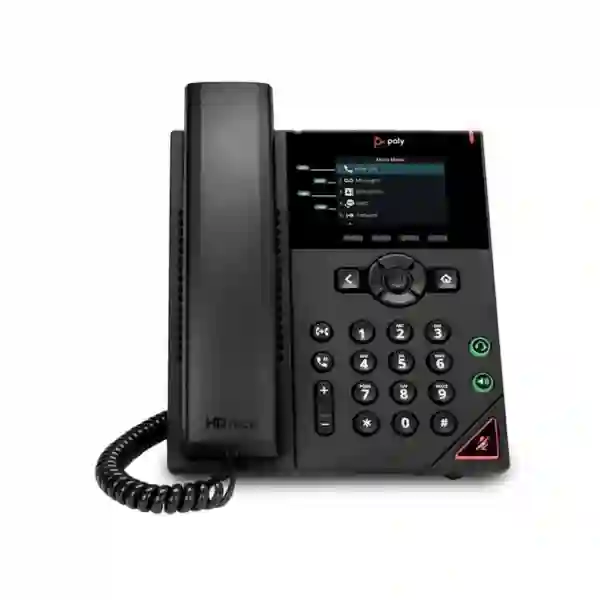
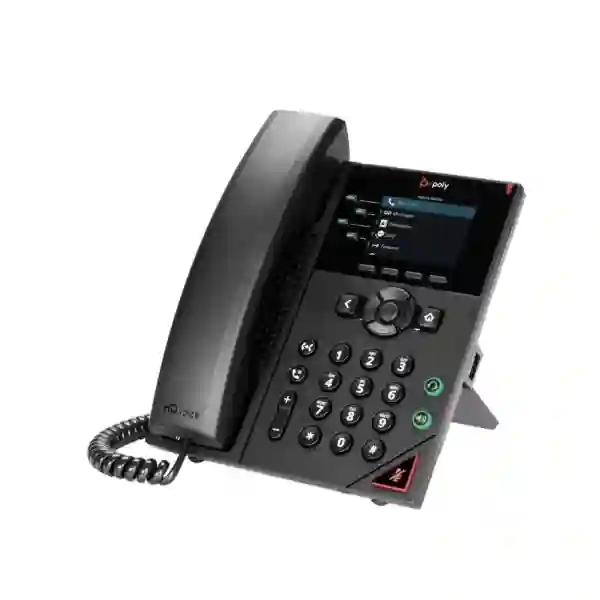
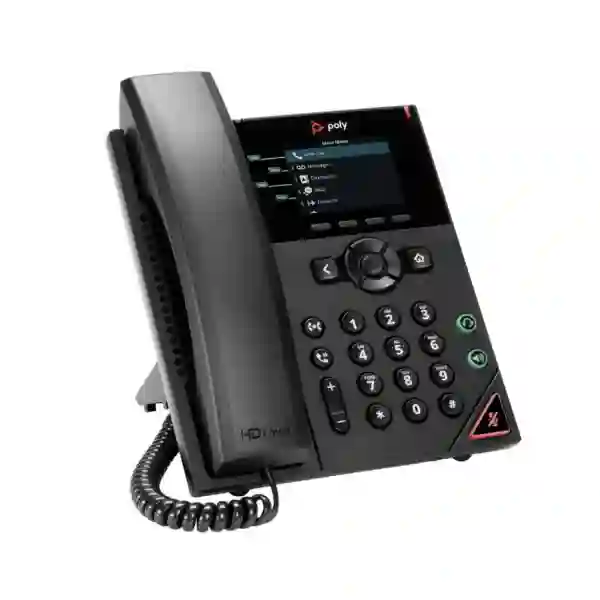
HP Poly VVX 250 IP Desk Phone
A compact, four-line wired desk phone for teams that want familiar physical call controls, a colour screen and manufacturer-documented HD voice. Consider it for office staff using a compatible business telephone system; confirm the exact phone edition, service support and power arrangement before ordering.
Next step: request an exact-model quotation and confirm compatibility with your intended IP PBX or hosted calling platform.
At a glance: what the VVX 250 offers
4 programmable line keys
Organise everyday calling functions in a compact desk-phone format.
2.8-inch colour LCD
Review supported call information and navigate settings using physical controls.
Poly HD Voice audio
Use manufacturer-documented HD voice and acoustic-processing technologies.
Dual Gigabit Ethernet
Connect to a wired network and, where policy allows, a nearby workstation.
IEEE 802.3af PoE
Power a standard VVX 250 from an appropriately configured PoE network.
USB and headset options
Select verified compatible audio accessories for different ways of working.
Verified technical snapshot
| Device category | Four-line business IP desk phone |
|---|---|
| Display | 2.8-inch colour LCD; original datasheet lists 320 × 240 pixels |
| Line controls | Four programmable line keys; assignments depend on configuration |
| Network | Two Gigabit Ethernet RJ-45 ports, LAN and PC |
| Power | IEEE 802.3af Power over Ethernet; optional external adapter varies by package |
| Audio | Poly HD Voice, Acoustic Clarity, Acoustic Fence; speakerphone and handset |
| Connectivity | USB 2.0 Type-A and a dedicated headset interface, subject to accessory compatibility |
| Calling technology | SIP for the standard supported configuration; platform compatibility must be confirmed |
| Provisioning | Manual and central provisioning capabilities, depending on edition and service |
| Security features | Manufacturer-documented 802.1X, TLS, SRTP and secure provisioning options |
| Working environment | Manufacturer datasheet specifies operation from 0°C to 40°C |
| Important limitation | No phone service, verified Tanzania price or third-party platform licence is included by implication |
Specifications describe the documented VVX 250 family and standard SIP-oriented device where stated. Package contents, firmware, optional adapters and service features require exact-part-number confirmation.
What this four-line phone is designed to do
The HP Poly VVX 250 IP Desk Phone is a fixed, Ethernet-connected business telephone for people who spend part of their day handling incoming and outgoing voice calls. It gives an employee a familiar handset and physical dial pad while participating in a compatible IP telephone system. A receptionist, administrative assistant, sales coordinator or office worker can reach essential call controls without needing to keep a computer application open. Its role is not to replace a complete PBX or provide a telephone service independently. The phone is one endpoint within a larger calling arrangement, and that distinction matters before a purchase is approved.
Four programmable line keys provide visible places for configured line appearances or functions, subject to telephone-system support. This does not mean that four separate public phone numbers, four simultaneous conversations or four provider subscriptions automatically arrive with the handset. Ask the administrator how the proposed PBX assigns identities, shared lines and keys. The VVX 250 is a sensible candidate when a conventional desk telephone remains useful, the workplace has wired networking, and staff need accessible everyday calling rather than a large touchscreen or an advanced operator console.
Why call clarity deserves attention
A desk phone has one central job: making speech easy to understand in the circumstances where business happens. The VVX 250 supports Poly HD Voice, Acoustic Clarity and Acoustic Fence technologies, according to HP and Poly product documentation. These address speech reproduction, two-way audio, echo and unwanted surrounding sound. They are relevant when employees take calls beside printers, office conversations or ordinary background activity. Handset, speakerphone and compatible headset use are different listening arrangements, so consider how the intended users actually communicate.
Audio performance also depends on the call path beyond the phone. The far-end device, service provider, selected codec, bandwidth and packet loss can change what the caller hears. Acoustic processing cannot restore a poor internet connection or eliminate every noisy environment. For a fair evaluation, place test calls over the actual business network and the intended PBX, with the same headset or speakerphone mode staff will use. Listen for intelligibility, dropouts, echoes and the ease of changing volume. That practical test is more meaningful than judging a phone solely by an audio feature name.
A display and controls for routine work
The 2.8-inch colour LCD gives the VVX 250 a clear visual surface for menus, call state and supported on-screen information. The screen is not promoted as a large touchscreen. Instead, employees use the familiar keypad, navigation buttons, line keys and context-sensitive controls. That combination can suit offices where workers prefer direct physical actions for dialling, answering, placing callers on hold and transferring a conversation. It is also useful where a phone sits beside a monitor and there is little reason for a second large interactive display.
A productive rollout starts with a short hands-on demonstration. Show employees how to identify the currently selected line, return from a menu, view missed calls and recognise when a call is held. Ask them to practise an attended transfer and a blind transfer if their service supports both. Configure key labels and directories consistently across a team. A familiar physical interface can reduce friction, but it does not remove the need for training, especially when the new phone replaces a different PBX or an older handset.
Four line keys versus telephone accounts
The phrase four-line IP phone can be misunderstood during procurement. Four visible programmable line keys describe part of the user interface. A configured line appearance may represent a personal extension, a shared number, a monitored colleague or another function depending on the selected phone software and the PBX. The final mapping is determined by provisioning and platform capabilities. HP’s original VVX 250 datasheet documents four programmable line keys and features such as shared appearances and Busy Lamp Field; the phone system must support the particular service.
For a small business, the correct starting question is not simply how many lines are printed on the specification. Ask how many extensions the organisation needs, which users answer shared calls, what happens during busy periods, and how voicemail and overflow are handled. Then have the administrator map those workflows to the keys. Staff who regularly monitor many colleagues or queues may prefer a different device or software interface. The VVX 250 is strongest when a compact set of visible calling functions is sufficient for the role.
Gigabit connectivity at the desk
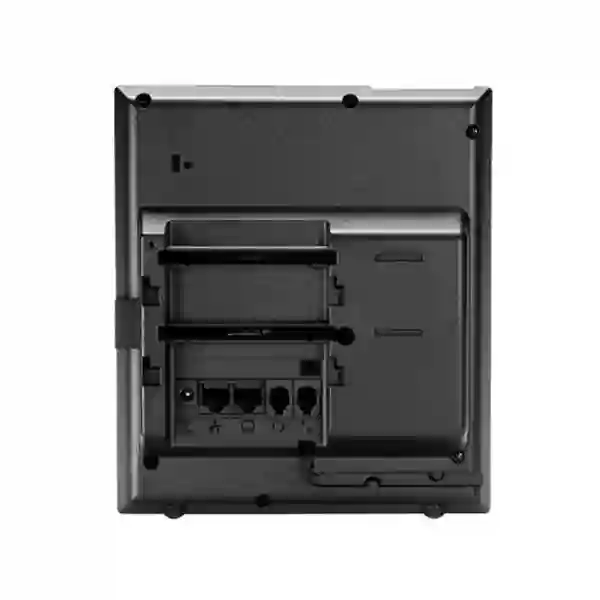
Two Gigabit Ethernet ports are a practical characteristic of the VVX 250. A typical arrangement connects the LAN port to the office network and the PC port to a nearby desktop computer. This can reduce the number of separate wall outlets required at a workstation, although network policy, cabling, switching capacity and local IT rules still determine whether that design is appropriate. The ports support 10/100/1000 Ethernet operation according to HP’s specifications, making the device more suitable for modern wired desks than a phone limited to older Fast Ethernet ports.
The PC pass-through connection should not be mistaken for a wireless bridge or a substitute for a network switch in every installation. Determine whether the phone’s voice VLAN, the computer’s data VLAN, authentication and quality-of-service settings can coexist as intended. Test the computer’s connection after the phone has registered, and test the phone after the computer has been restarted. Where a site depends on special endpoint security or network access control, involve the network administrator before declaring a shared cable run acceptable.
Power over Ethernet simplifies a planned installation
The manufacturer documents IEEE 802.3af Power over Ethernet for the standard VVX 250. With a suitable PoE network switch or injector, the phone can receive electrical power through the Ethernet cable used for network communication. That can avoid a separate mains adapter at each desk and create a tidier installation. The original Poly datasheet identifies a Class 2 PoE design. The actual project still needs sufficient switch power budget and working cable infrastructure, especially if many handsets are installed at once.
PoE does not automatically mean the phone keeps working during a building power failure. The upstream switch, router, firewall and IP telephony platform also require power. When uninterrupted calling matters, plan backup power for the relevant networking equipment and verify what happens to upstream links. Where a PoE connection is unavailable, check the exact power-adapter requirements and whether a compatible adapter is included with the specific package. Avoid assuming every seller provides one. Confirm the delivered configuration before installation day so staff are not left with unpowered devices.
Headsets and hands-free calls
Some users take only occasional calls and are comfortable with the handset. Others need both hands free while checking customer records or typing notes. The VVX 250 provides a speakerphone and a dedicated headset interface, and HP documentation identifies USB connectivity for supported headset applications. Electronic hook switch capability is also described for supported arrangements. These options are useful, but headset plug shape, power, firmware, call-control functions and actual compatibility can differ by accessory model.
Choose a headset around the real working pattern rather than treating every headset with a familiar connector as interchangeable. Decide whether staff need a single-ear or dual-ear design, background-noise isolation, wired reliability or freedom to move away from the desk. Verify the exact headset and, where applicable, the required EHS adapter with the phone software version. Test call answer, end, mute and volume controls. A headset that passes audio but does not perform expected call-control actions can become a recurring support problem in a busy office.
SIP and the wider phone system
The standard VVX 250 is associated with SIP-based business communications. SIP is a signalling protocol used by many IP PBXs and hosted voice platforms, but the presence of SIP support does not guarantee every provider supports every configuration. Service platforms can impose device lists, approved firmware versions, provisioning templates or account restrictions. The selected service also determines many features that appear on the phone, including voicemail indicators, directory behaviour, shared lines and transfers between users.
Before ordering, identify the exact calling platform, service edition, firmware or application profile, and desired user functions. Obtain confirmation from the PBX vendor or service provider that the exact VVX 250 variant is supported and can be provisioned. Do not assume a model that works on one SIP environment will behave identically on another. A successful trial should demonstrate not only registration and one outbound call, but inbound ringing, hold, transfer, voicemail access, emergency-call handling and a full restart. Compatibility is a deployment decision backed by tests, not merely a line on a sales sheet.
Check the Open SIP and OBi editions
The VVX 250 name appears in more than one software and product context, including a standard VVX IP version and an OBi edition. Those names are not cosmetic differences for an administrator. The intended platform, provisioning method, supported services and software path may differ. A buyer replacing existing phones should match the variant and manufacturer part number against the new telephone service rather than ordering solely by the family name shown in an online catalogue.
For purchasing teams, a useful quote should identify the full product description, exact part number, expected firmware family and included power arrangement. For IT teams, it should show that the proposed model is on the relevant provider’s currently supported device list. When discussing Google Voice, a hosted PBX or another specialised service, request confirmation for that specific edition rather than general assurances about the VVX family. If compatibility cannot be established, do not proceed on the assumption that a software conversion or update will always be possible. Selecting the correct edition at the beginning is generally easier than correcting a mismatch after devices arrive.
Call features that depend on the platform
HP’s VVX 250 documentation describes familiar business-telephony capabilities including call waiting, transfer, hold, forwarding, do not disturb, voicemail integration, shared line appearances and local three-way audio conferencing. These are useful starting points when evaluating a workplace phone. Yet some features require additional server or service-provider support and appropriate account permissions. They should be described as capabilities within a compatible configuration, not guaranteed functions of every installed handset.
Translate the feature list into real user tasks. A receptionist might need to transfer a caller and see whether another extension is occupied. A manager might want quick access to voicemail and the ability to redirect calls while away. An employee covering another desk might need a shared line. Ask the integrator to demonstrate each workflow with the actual service account and configured keys. Note who can change settings, which functions are controlled centrally, and how a user recovers after an accidental forwarding or do-not-disturb setting. That level of detail reduces surprises after deployment.
How to plan a small office deployment
For a small office with a handful of desks, begin by mapping the employee roles and the calling behaviour that matters. Count fixed workstations, shared reception points, meeting-room requirements and users who work remotely. Decide whether each desk truly needs a hardware telephone. The VVX 250 belongs where a permanent handset and dependable physical controls offer value. A worker who spends almost every call on a computer might make a different choice.
Next, confirm network readiness. Check the number of switch ports, PoE capacity, cable paths and whether the hosted or on-premises phone system is accessible. Prepare extension assignments, display names, voicemail settings, call groups and any required speed dials before connecting devices. Provision and test one reference phone before deploying the remainder. Write a short handover that explains how calls are answered, transferred and recovered. Even a modest phone rollout benefits from a clear owner for account credentials, network settings, firmware maintenance and future user changes.
How to plan a multi-desk rollout
A deployment of several dozen endpoints introduces different challenges from a two-phone trial. Teams need consistent configuration, an accurate extension inventory, a way to locate each handset and a repeatable method for replacing failed equipment. The VVX 250 offers web-based and server-based provisioning approaches described by HP, but the appropriate method depends on the phone firmware and the selected service. Treat automated provisioning as a project capability that must be set up securely, not as a guarantee of instant installation.
Define a standard profile for line keys, regional preferences, time settings, software version and security policy. Record the connection between desk location, extension, device identifier and user. Assign device naming conventions that are comprehensible to support staff. Pilot a few representative stations, including a desk with a connected computer and one with a headset. Then roll out in manageable groups and keep a rollback plan. A consistent deployment makes later moves and replacement orders easier because technicians can reproduce the configuration rather than re-entering it from memory.
Network quality and reliable conversations
Voice traffic is sensitive to network conditions in a different way from ordinary file transfers. A document download may tolerate pauses; a conversation exposes delays, jitter and missing packets immediately. HP documentation identifies adaptive jitter buffering and support for network quality-of-service mechanisms. Those features can help a properly designed network, but they cannot compensate for every congested internet connection or poorly configured switch. Calls should be tested during the same busy periods in which staff normally work.
An IT checklist should include internal switch health, cable condition, voice VLAN design where used, prioritisation policies, internet uplink stability and the location of the calling service. Test calls between extensions and to outside numbers. Listen for one-way audio, clipping, delayed speech and unexpected disconnections. Keep time synchronisation and DNS settings correct, since these can affect registration and diagnosis. If the network serves both telephones and computers, agree on troubleshooting ownership between the network team and the voice provider before a fault occurs.
Security and administrative controls
A business desk phone is a network endpoint and should be managed with the same care as other connected equipment. The VVX 250 supports security-related mechanisms documented by HP, including 802.1X authentication, TLS, SRTP and secure provisioning options. Exactly which protections operate in a live installation depends on the firmware, configured service and network design. It would be misleading to assume calls are encrypted simply because the device specification mentions encryption support.
During setup, review administrator credentials, provisioning access, service authentication and whether management interfaces should be reachable from ordinary user devices. Apply provider-approved firmware and maintain an inventory of versions. Confirm that the PBX and any intervening network components are configured for the selected transport and media-security modes. Protect provisioning files because they may contain sensitive account information. Document how a lost or replaced phone is de-registered. The goal is a managed communications endpoint with a clear operational owner, rather than a phone that is connected once and forgotten.
Directories, contacts and everyday efficiency
A useful telephone directory can save more effort than a long specification sheet suggests. Employees may need to reach colleagues, departments or frequent external contacts quickly. The VVX 250’s interface and software family support directory-related functions, with availability and behaviour shaped by the connected platform. Some organisations maintain a central company directory while others rely on local contacts or server-managed entries. The correct design depends on who updates the information and how frequently staff roles change.
Before deployment, decide which numbers should appear in the directory and which should remain private. Agree on sensible naming conventions for departments, internal extensions and service desks. Test how contacts are found through the phone’s screen and controls, especially for users who do not know every extension by memory. Clarify whether contact changes propagate automatically and how quickly. Directory quality can materially influence how helpful the phone feels. A well-configured four-line desk phone can be more efficient in daily use than a richer device with poorly organised contacts.
What reception teams should evaluate
A reception desk has different requirements from an ordinary office workstation. The employee may need to answer many calls, identify internal destinations, park or transfer conversations, and remain aware of which colleagues are available. The VVX 250 supports relevant telephony building blocks, including programmable line keys and platform-dependent busy-lamp or shared-line features. However, four visible keys can be limiting where an operator needs to monitor a large number of extensions or handle multiple complex call queues.
Begin with a realistic call-flow exercise. Ask the receptionist to answer a call, put it on hold, contact another person, complete the transfer and return to the first caller if the destination is unavailable. Then simulate two incoming calls and a busy manager. Check whether the proposed configuration gives enough visibility without forcing repeated navigation. If a receptionist relies on broad team presence information, consider a dedicated attendant console or a higher-capacity device. Choose the endpoint by workload, not solely by whether it can technically answer a call.
A good fit for administration and sales desks
Administrative staff and sales coordinators often split their attention between telephone conversations, documents and computer systems. For these users, a fixed desk phone provides a predictable place to answer callers without searching for a softphone window. The VVX 250’s physical dial pad, colour display and everyday call controls can suit this routine. Gigabit pass-through networking can also be relevant when the desk has a wired PC, provided the organisation’s network design permits it.
The most important buying questions are practical: how often does the user transfer a call, do they need a headset, must they monitor a shared line, and how will they access voicemail when away? Create a short scenario for each role instead of giving every employee identical key assignments. For example, a sales coordinator may prioritise redial and a central sales number, while an administrator needs a frequently used internal department. When the configured interface reflects actual work, users gain more from a modest, clearly organised phone than from a large list of unused options.
Shared desks and staff moves
Businesses sometimes use one desk across shifts or move employees between workstations. That raises questions about whether a phone is tied to a physical place, a personal extension or a temporary user. The VVX 250 can be part of a managed deployment, but hot-desking and account mobility depend on the chosen PBX and the endpoint software profile. Do not assume that moving a handset automatically carries a person’s extension and settings to another desk.
For a shared workplace, write down the desired identity rules before buying. Should every shift use one common reception number? Must staff sign in to a personal extension? Who clears call history or contacts between users? Can the provider support the required workflow on the exact variant? Test sign-in, sign-out and recovery after power loss, if such functions are part of the design. Where the phone remains permanently assigned to a desk, mark the extension clearly and make support instructions easy to find. Clear ownership avoids many small but persistent call-routing problems.
Meeting rooms and common areas
A compact fixed IP phone may be useful in certain common spaces where employees need to place routine voice calls. However, the VVX 250 is a desk handset, not a dedicated conference-room audio system. Its local three-way call capability, where supported, should not be confused with advanced room acoustics, large-group microphone pickup or full meeting-platform interoperability. If people regularly gather around a table, compare purpose-built speakerphones or conferencing hardware against the actual room size and use.
A shared-space decision should include privacy, ring volume, cabling, accessibility and who is responsible for the extension. Decide whether the phone should be able to dial outside numbers and what calling restrictions are appropriate. Check that staff can use it without knowing a personal login if that is the intended policy. In a common area, predictable placement and clearly documented operation may matter more than extra lines. Test a normal conversation from the position where users will stand or sit before approving the room design.
A Tanzania-oriented deployment checklist
For an organisation purchasing business IP phones for use in Tanzania, the immediate technical considerations are the local office network and the chosen telephony service. Confirm that the intended calling provider or PBX supports the exact phone edition, that the LAN is ready for PoE endpoints, and that staff have a practical way to reach their required external and internal numbers. The device alone does not supply a telephone number, broadband service or SIP subscription. Any commercial or regulatory conditions relevant to the selected service should be verified with the appropriate provider and authorities.
Think about business continuity at the installation location. If reliable calling is important during electrical interruptions, consider backup power for the phone’s upstream PoE switch, router and other necessary systems. Review how a loss of connectivity affects inbound calls, voicemail and call diversion, and agree on a fallback communication method. Avoid making city-by-city delivery or service assumptions without confirmed arrangements. These checks help Tanzanian buyers compare a telephone offer on the complete working solution rather than the visible handset alone.
Understanding cost beyond the handset
The purchase price of a desk phone is only one part of the communications budget. A company may also need a compatible IP PBX or hosted subscription, SIP service, switch ports, PoE capacity, cabling, compatible headsets, provisioning work and ongoing administration. None of these services should be assumed to be included with the VVX 250 itself. Local quotes should identify the exact hardware package, taxes and any optional power accessories rather than presenting an unverified general price.
Compare total cost against the role the phone performs. If the user needs basic calling at a fixed desk, the VVX 250’s practical controls may be sufficient. If the team requires extensive presence information, a wireless handset or a large touchscreen, a different solution may justify the additional expense. Ask for an itemised quote that distinguishes one-time hardware from recurring voice-service fees. Also identify who provides support when a call fails: the telephony platform provider, network administrator or hardware supplier. Transparent responsibilities are as important as the initial figure.
Confirm exactly what is supplied
HP’s published VVX 250 documentation describes a package including the console, handset and cord, desk stand or mounting hardware, a network cable and setup information. Specific commercial variants and reseller bundles can differ, particularly with respect to power accessories and regional package contents. Do not infer that a power adapter, compatible headset or provider subscription is included unless the actual offer expressly states it.
On receipt, check the product label against the purchase order. Confirm the model variant and manufacturer part number, verify that the handset and network cable are present, and inspect the device for transport damage. Record serial or asset information according to the organisation’s inventory policy. Before distributing dozens of units, power and provision one sample to establish that the package works with the planned switch and PBX. When accessory requirements are discovered early, they can be addressed as part of the deployment plan instead of generating help-desk incidents on the first day of use.
Installation sequence for IT teams
A clean installation begins before the phone is plugged in. Prepare a correctly configured network port and verify that the call server or hosted service is reachable. Establish the expected address assignment, provisioning mechanism, credentials and permitted firmware version. If voice VLAN discovery or port authentication is used, configure it consistently with the network policy. Connect the LAN and power source, and allow the device to complete its start-up process. The exact menus and provisioning screens depend on the software edition.
Once registered, check that the displayed identity, extension and line keys match the assignment. Make a test call inside the organisation, then an outside call if authorised. Test incoming calls, hold, transfer, voicemail access and headset controls where relevant. Finally, restart the handset and make sure its configuration persists. Record failures and their resolutions in the deployment notes. A technician should be able to reproduce the setup for a replacement unit without depending on undocumented knowledge or a single employee’s personal laptop.
Configuration and provisioning decisions
The VVX 250 supports established network provisioning approaches, including central administration methods described in Poly documentation. That can reduce repetitive setup when a company manages many phones. However, provisioning requires the right server, credentials, templates and firmware compatibility. It is not simply a button that makes all hosted platforms behave alike. A business with a single handset may choose a different administrative approach from a company managing phones across several buildings.
Before configuring, agree on who owns the source of truth for extension settings and software. Keep reusable templates for common roles, but allow controlled differences for reception and other specialist desks. Limit access to sensitive provisioning data and prefer secure management methods supported by the chosen platform. Test a change on a pilot phone before applying it widely. Document what happens if the provisioning server becomes temporarily unavailable, and how a replacement phone obtains its identity. Good configuration practices make future growth less disruptive and reduce the chance of inconsistent behaviour between otherwise identical phones.
Training users on call transfers
Call transfer is one of the tasks most likely to create frustration after a phone-system change. An employee may need to transfer directly, speak to the intended colleague first, or return to a waiting caller. The precise button sequence can vary with provisioning and service features. The VVX 250 provides an interface intended for these routine activities, but staff should be trained against the working configuration rather than handed a generic guide that does not match the screen.
Create two or three simple practice situations: transfer a caller to an available person, transfer when the destination is busy, and recover when the wrong extension is selected. Explain the difference between transferring a call and forwarding all future calls. Give staff a safe way to cancel an unfinished action. Keep instructions close to the workstation or in a shared internal knowledge base. A five-minute guided exercise can prevent unnecessary dropped calls, especially for reception or customer-facing roles where colleagues rely on predictable transfers throughout the day.
Voicemail, unanswered calls and continuity
Voicemail can be essential when staff are in meetings, already on a call or away from their desk. The VVX 250 supports voicemail-related operation in compatible systems, but the mailbox itself normally belongs to the telephony service. Its message storage, notifications, forwarding rules and remote access are not standalone guarantees provided by the phone hardware. During procurement, ask the provider what voicemail services are included in the proposed account and how they appear on the handset.
Test what an outside caller hears when an employee does not answer. Confirm whether calls go to a personal mailbox, a shared department mailbox or an alternative number. Review message retrieval and any security requirements for access outside the office. Decide how missed calls are handled during network or power interruptions; an on-screen missed-call list alone is not a continuity plan. A useful desk-phone deployment has a defined answer for unanswered calls, not merely the ability to ring when everything is working normally.
How to select among related desk phones
The VVX 250 occupies the four-line position in the VVX range. HP describes the VVX 150 as a two-line model, while the VVX 350 and VVX 450 address larger line-key needs. Those distinctions are useful as a starting point, not a complete performance ranking. A buyer should also consider screen readability, physical controls, headset requirements, compatibility with the selected calling platform and the number of colleagues or numbers that users need to monitor.
Choose the smaller model when a straightforward fixed desk is the priority and the work does not require a large collection of keys. Evaluate a higher-line model when employees repeatedly switch between many monitored appearances. Evaluate newer or specialised devices when wireless networking, advanced integrations or a particular service certification is important; those capabilities must be checked against the exact alternative, not inferred from its product-family name. The best choice is the least complicated device that meets the proven call-flow requirements and remains supportable within the planned telephone environment.
Where a mobile or softphone may be better
Not every employee needs a fixed handset. A person who works remotely, changes locations frequently or spends most conversations in a laptop application may be better served by a properly managed softphone or mobile calling solution. The VVX 250 is designed around a wired desk and therefore depends on an appropriate Ethernet connection and power arrangement. Its physical simplicity is valuable in the right environment but less useful if the employee rarely sits at that workstation.
Ask users where they actually handle calls and whether they need to move freely while speaking. Consider privacy, local noise, the type of calling service and the organisation’s support model. A hardware desk phone can still complement other calling options, but the PBX must define how devices share identities and route calls. Avoid purchasing a phone for every employee solely because a previous office did so. Assign fixed telephones where the workflow benefits from them and evaluate software alternatives where mobility, remote access or flexible work location is the dominant requirement.
Practical maintenance and firmware care
Once a phone is in daily service, it needs an owner and a maintenance process. Keep track of its location, assigned extension, software edition and support contact. HP provides product support documentation, while the chosen telephony platform may prescribe a particular firmware build or configuration. Updating without checking provider requirements can alter behaviour, so plan firmware maintenance deliberately. The compatibility of a given release should be verified before an organisation-wide change.
Set a schedule for reviewing account access, inactive extensions and unexpected configuration changes. Clean external phone surfaces according to applicable manufacturer guidance rather than using unverified solvents or excessive moisture. Keep cables secure so the handset is not accidentally disconnected. When a fault is reported, record whether the problem affects only one phone, a whole switch segment or all outside calls. That distinction quickly directs troubleshooting toward hardware, networking or the phone service. A simple maintenance record makes the device easier to support through staff changes and office moves.
Troubleshooting registration and calling problems
If the VVX 250 starts but cannot register, first confirm it has network connectivity, an appropriate IP address and access to the intended call platform. A powered display does not establish that the SIP service is working. Check network port assignment, VLAN configuration, DNS resolution, provisioning details and the configured account. Do not post credentials or server secrets in publicly visible support tickets. Escalate to the provider with the symptoms and non-sensitive diagnostic details.
If calls connect but audio is missing in one direction, investigate the network path and service configuration rather than immediately replacing the handset. If speech breaks up only at busy times, examine congestion and packet loss. If a headset works for audio but cannot answer calls through its button, re-check accessory and EHS compatibility. If settings disappear after reboot, look at central provisioning or conflicting profiles. A structured approach avoids unnecessary hardware replacement and reduces downtime by separating registration, signalling, media and accessory faults into distinct test cases.
Accessibility and ease of use
Telephone usability varies with eyesight, hearing, motor control and experience with office systems. The VVX 250’s physical keypad, adjustable listening volume and colour display may be helpful to some employees. HP’s legacy datasheet also documents hearing-aid-related features, but a responsible buyer should evaluate the exact working device and accessories with the intended user rather than assume a specification resolves every need. The display size and menu navigation may be insufficient for someone who requires large, highly legible controls.
Invite representative users to try the phone before standardising a department. Ask them to locate the hold control, read call information, adjust volume and complete a transfer. Where a headset is necessary, test comfort and compatibility during a normal-length call. Consider placement, cable management and reachable height. If an employee needs a specialised accessibility feature, have the provider demonstrate it on the proposed configuration. A small pilot focused on real use is more reliable than selecting a model solely from photographs or claims about ease of operation.
What to request when asking for a quotation
An effective quote request includes more than the phone model. Tell the supplier the exact intended telephone platform, number of users, whether the required edition is Open SIP or OBi, and whether the office has PoE-ready switch ports. Include headset needs, call-transfer requirements and any shared extensions. Ask the respondent to identify the full manufacturer part number, hardware package and any compatible power accessories that would be charged separately.
For a Tanzania-based project, request a commercial offer that clearly states the applicable local price and terms instead of assuming foreign retail listings apply. Ask whether the offer covers only the devices or also configuration and integration services. Confirm the scope of any support arrangement, warranty terms and delivery commitment in writing. If technical compatibility is not established, request a short proof-of-concept using the actual PBX before a large order. These questions help compare offers on like-for-like scope and reduce the risk of discovering after purchase that the phone cannot serve the intended user.
Acceptance testing before staff handover
A deployment is not complete merely because the screen turns on. Create a repeatable acceptance checklist with the extension identity, incoming and outgoing call tests, caller identification, hold, transfer, speakerphone and voicemail behaviour. Where the system uses a shared line or busy-lamp feature, validate it in the same test. Check the PC network connection on desks using the pass-through port and confirm that power returns normally after a planned restart.
Record the results for the pilot unit and for representative devices in each deployment group. Users should know where to report a fault and what information support staff need: extension, desk location, time of incident and the symptom observed. Avoid putting account passwords into the handover sheet. If a service feature has not been tested or is not included in the contract, mark it as pending rather than presenting it as active. A clear handover provides confidence that the installed phone, network and calling service function together in daily business conditions.
The buying decision in one practical framework
A buyer can evaluate the VVX 250 through five connected questions. Is a fixed wired phone appropriate for the employee? Does the chosen IP phone system support the exact device edition and firmware? Are four visible line keys and the 2.8-inch colour interface sufficient? Can the office provide dependable network connectivity and suitable PoE or approved alternative power? Finally, who will provision, maintain and support the entire calling arrangement? These questions are more useful than comparing marketing adjectives.
If the answers are positive, the VVX 250 offers a conventional business calling experience with the physical controls, audio technologies and network interfaces documented by the manufacturer. If the answers are uncertain, obtain clarification before purchasing, especially for the phone edition and platform support. The objective is not to select the phone with the longest feature list, but to provide employees with intelligible calls and predictable controls. Treat hardware, service configuration and user training as one solution, then request a quote for the precise package required.
Request a VVX 250 quotation
Tell FourTeck Tanzania the required quantity, your calling platform, the intended phone edition, headset requirements and whether PoE is available. Ask for a quote specifying the exact model and included accessories. Where compatibility has not yet been verified, request that it be checked before purchase. No price, stock level, local delivery promise or unsupported platform certification is implied by this page.
Enquire about the exact HP Poly VVX 250 configuration for your workplace.




Reviews
There are no reviews yet.