
UBIQUITI • ACB-AC • TANZANIA
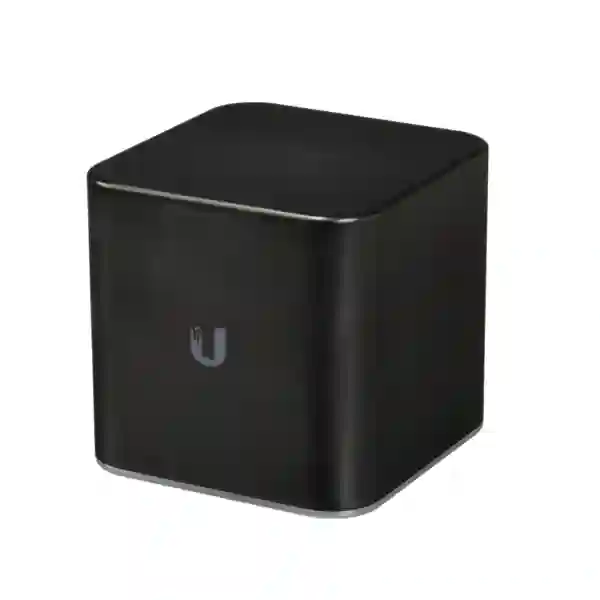
Ubiquiti airCube AC ACB-AC: Dual-Band Home Wi-Fi Access Point
Need reliable indoor Wi-Fi alongside a compatible airMAX broadband connection? The Ubiquiti airCube AC ACB-AC offers 2.4 GHz and 5 GHz wireless connectivity, four Gigabit Ethernet ports, and carefully specified 24V passive PoE capabilities. Explore the suitability checks below, then request a model-specific quotation from FourTeck Tanzania.
At a glance
| Model | ACB-AC |
|---|---|
| Product family | Ubiquiti airCube |
| Wi-Fi bands | 2.4 GHz and 5 GHz |
| Maximum radio link rates | 300 Mbps (2.4 GHz); 866.7 Mbps (5 GHz) |
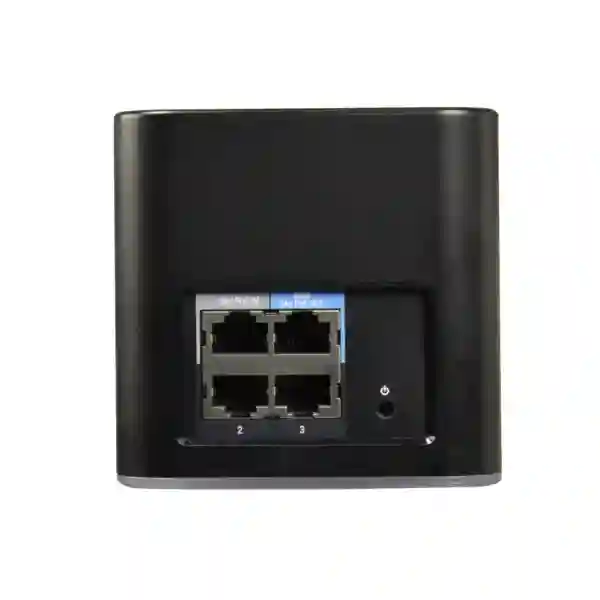
| Wired interfaces | 4 × Gigabit RJ45 |
| Power | Included micro-USB adapter or specified 24V PoE input |
| PoE passthrough | Controllable 24V passive PoE on WAN port |
| Maximum device consumption | 8.5 W |
| Dimensions | 87.8 × 89.5 × 89.25 mm |
| Weight | 280 g |
| Temperature range | -10°C to 50°C |
Radio data rates are theoretical link rates, not guaranteed internet speeds. Confirm firmware capabilities and installation requirements for the actual hardware.
What the airCube AC is designed to do
The Ubiquiti airCube AC ACB-AC is a compact dual-band Wi-Fi access point built for the customer end of a broadband connection, particularly when the incoming service uses a compatible Ubiquiti airMAX customer-premises device. It combines local wireless coverage with wired Ethernet connections in one small unit. For a home, a small office, or an internet-service-provider installation, that means the upstream connection can terminate near the customer while everyday phones, computers, and other devices connect through familiar Wi-Fi or Ethernet. Ask FourTeck Tanzania about the suitability of this exact model for your connection and equipment before selecting a deployment.
An important distinction is that airCube AC is not the outdoor radio that connects to a distant tower. Its main job is local connectivity inside the customer’s premises after suitable upstream equipment has supplied internet access. It is also not the same product as the 2.4 GHz-only airCube ISP model. ACB-AC adds a 5 GHz radio and Gigabit Ethernet ports, which matter when customer devices support newer Wi-Fi and when wired capacity must be preserved. The correct choice depends on the existing internet source, the installation environment, the powered equipment, and the kind of management the operator expects.
Who should consider this model
Households using a fixed-wireless broadband installation are a natural audience because a provider may already have an airMAX device that delivers an Ethernet handoff indoors. The airCube can provide nearby wireless connectivity without requiring an elaborate network cabinet or a large router. It can also serve compact offices, service counters, reception spaces, and similar small-site environments where a few wired devices and ordinary wireless clients need straightforward local access. These are deployment examples rather than a promise about the number of devices or the coverage area. Site layout and usage determine whether one access point is enough.
Internet service providers and installers may value the model because it is designed to work alongside airMAX customer-premises equipment and supports UISP remote management. That can make the subscriber-side network easier to understand within a compatible Ubiquiti workflow. However, management functionality still depends on the installed firmware, onboarding, network reachability, credentials, and operator configuration. A business seeking enterprise-scale roaming, advanced wireless security policies, or a large managed WLAN should compare alternatives instead of assuming this compact residential-style product will cover every requirement. Match the device to the operational objective, not only to the advertised radio rate.
Dual-band Wi-Fi explained
The airCube AC operates on 2.4 GHz and 5 GHz wireless bands using 802.11ac-class dual-band technology. The manufacturer lists a maximum radio link rate of 300 Mbps on 2.4 GHz and 866.7 Mbps on 5 GHz. These are radio capability figures under suitable conditions; they are not promised internet download speeds, guaranteed single-device throughput, or additive capacity delivered to one client. Actual performance varies with the connected device, radio channel, signal quality, interference, connection protocol, other users, and the provider’s internet service. Explain that distinction to customers comparing wireless devices using their packaging labels.
The 2.4 GHz band is often useful for older equipment and for situations where signal penetration through some interior obstacles is more important than peak radio link rate. The 5 GHz band can offer a higher link rate to compatible nearby clients, although attenuation through walls and distance can reduce its advantage. A sensible deployment may use both bands, choosing sensible network names and access controls for local needs. Selecting the band is not a substitute for a site survey. In dense homes and business premises, neighboring networks, building materials, and placement frequently influence the experience more than an impressive headline speed.
Four Gigabit Ethernet ports
Four Gigabit RJ45 Ethernet interfaces are a practical reason to choose the ACB-AC over a Wi-Fi-only endpoint. Ethernet can serve compatible desktop computers, printers, small network appliances, or a connection to other network equipment where a stable cable is preferred. A Gigabit port describes the Ethernet interface capability, not an assurance that every connected application will transfer data at a full gigabit. Total performance also depends on the attached endpoints, cables, switching and routing workload, and the upstream connection. Check the installation guide for the exact function and labeling of each port before wiring the unit.
An installer should plan the cabling first: identify which socket accepts upstream service, which connections serve local equipment, and whether the PoE-capable WAN port will be used to power a compatible device. Avoid treating every RJ45 socket as interchangeable where a network topology or power function is important. Label the cable ends, keep bends gentle, and test the final link negotiation. If the site needs more wired devices than the available sockets support, a separate suitable network switch may be required. This planning helps prevent an inexpensive home-network installation from becoming difficult to troubleshoot when a device is added later.
24V passive PoE input and output
The airCube AC supports 24V power input and controllable 24V passive Power over Ethernet output on its WAN port. Its Ethernet port 1 can accept the specified 24V PoE input, while the manufacturer also lists an included power adapter option. The official datasheet explains that a compatible 24V airMAX CPE can be supplied through PoE passthrough, reducing the need for separate customer-side power injectors in a suitable arrangement. This is especially useful when one installer wants a clean, compact indoor termination. Compatibility must be verified for the exact upstream radio and power budget before cables are connected.
Passive 24V PoE is not interchangeable with every power-over-Ethernet system. Do not assume an 802.3af, 802.3at, or 802.3bt device can safely be connected to a passive 24V output, or that any injector is suitable for this access point. Confirm voltage, pinout, supported input method, output capability, and the power needs of the attached equipment. The manufacturer specifies a maximum airCube AC consumption of 8.5 W, but this figure alone does not establish the available power for an external CPE. For PoE passthrough, follow Ubiquiti’s installation instructions and the compatible device’s requirements rather than guessing from connector shape.
Power options and continuity
Power planning matters just as much as radio selection. The manufacturer’s current technical specifications identify a micro-USB adapter and 24V PoE input, with the supported operating voltage range listed as 22 to 27V DC. Use the approved supply or a correctly specified 24V PoE arrangement for the installed device. Do not substitute a random phone charger, an unknown injector, or a different voltage simply because the plug can be made to fit. Where a powered upstream radio is connected through the airCube, loss of power may affect both local Wi-Fi and the internet link.
For a location where electricity is unreliable, consider whether the network requires backup power for the airCube, the upstream receiver, any network switch, and the provider’s nearby infrastructure. A UPS or suitable backup supply must be engineered for the complete installation rather than sized only against one device’s published wattage. Check startup behavior and PoE output after power restoration as part of acceptance testing. Customers should also understand that a battery-backed indoor access point cannot maintain internet access if the outdoor radio or upstream service has failed. This avoids promising continuity that the overall system cannot deliver.
Using airCube with an airMAX connection
Ubiquiti describes the airCube Home WiFi AP as a device made to interoperate with airMAX CPE equipment. In a common fixed-wireless arrangement, the airMAX radio handles the longer-distance wireless link and supplies Ethernet to the indoor network. The airCube then creates local Wi-Fi and provides wired connectivity at the customer premises. Depending on the exact hardware and power arrangement, passive PoE passthrough may simplify how the upstream radio is powered. The device does not eliminate the need for a properly aligned outdoor receiver, appropriate cabling, lightning precautions, and an active broadband service.
Before ordering, the installer should identify the outdoor radio model, its required voltage and PoE pinout, the network handoff method, and any configuration required by the service provider. Check whether the provider expects routing, bridge operation, DHCP, authentication, or a particular addressing arrangement. Those details cannot be inferred from the ACB-AC model number. A mismatch in addressing or power can create symptoms that look like poor Wi-Fi even when the radio itself is working. A short compatibility discussion before installation can save unnecessary visits, replacement parts, and disruptions to the customer’s connection.
UISP remote-management considerations
The airCube AC supports remote management through Ubiquiti’s UISP ecosystem, a feature that can matter to providers looking after multiple subscriber locations. The main practical benefit is the ability to bring compatible customer equipment into a more organized operations workflow instead of relying solely on a visit whenever settings need attention. Remote management is not automatic merely because the device is switched on. The operator must provision it correctly, maintain authorized access, and ensure that management traffic can reach the relevant service according to the deployed configuration and supported software.
Buyers should distinguish general vendor support for UISP from any particular feature they expect to see in their own account. The available controls and monitoring detail can depend on software versions, configuration, and supported integrations. Ask an installer to explain which tasks will remain local, how administrative credentials will be stored, and who is responsible for firmware maintenance. If a household will manage the unit without a service provider, ease of local setup and clear recovery procedures may be more relevant than central management. Management should reduce operating friction rather than create an unexplained dependency.
Indoor placement and wireless coverage
The compact enclosure makes placement easier than with large rack-mounted equipment, but location is still a major factor in usable Wi-Fi coverage. Position the access point in a dry indoor area, preferably on a stable surface with reasonable clearance and away from excessive heat, water, and mechanical damage. Avoid hiding it behind dense metal furniture or packing it tightly with power adapters and other electronics. The manufacturer provides a small enclosure measuring approximately 87.8 by 89.5 by 89.25 mm, so it can fit into many customer environments without requiring unusual mounting space.
Coverage cannot be estimated reliably from dimensions, advertised link rates, or antenna gain alone. Walls, floors, neighboring Wi-Fi networks, device sensitivity, and the building’s shape all influence signal conditions. For a multi-room residence or an irregular office, test representative locations before declaring the installation complete. If performance is weak at the far end of the building, relocating the access point may help more than changing a software setting. A second properly designed access point or a different class of networking system may be necessary for extensive coverage. Do not promise whole-building coverage without a site assessment.
Small-office and work-from-home use
In a small office, the airCube AC can act as a simple local connectivity point for laptops, phones, and suitable wired devices. The Gigabit interfaces make it possible to favor cables for equipment that rarely moves, while wireless access serves portable users. This can be attractive for customer-service desks, small trading offices, or temporary project rooms where conventional infrastructure would be excessive. It is important, however, to distinguish a convenient local Wi-Fi solution from an enterprise wireless design that demands dedicated redundancy, formal access segmentation, and coordinated coverage across many access points.
Work-from-home users should judge the installation by real tasks rather than a theoretical maximum rate. Video meetings, remote desktop connections, file sharing, and voice applications can all suffer from poor upstream connectivity, interference, or packet loss even when the wireless link looks strong. Test both wired and wireless devices, especially at busy times. Also confirm whether the internet package has the upload capacity and stability the workload needs. The airCube cannot increase a provider’s purchased bandwidth or repair an unstable external wireless link, but suitable placement and sound local networking can prevent avoidable indoor bottlenecks.
Choosing between airCube AC and airCube ISP
The names airCube AC and airCube ISP can be confusing because both belong to the same product family. The key verified difference is radio capability: the AC model offers 2.4 GHz and 5 GHz Wi-Fi with the manufacturer’s higher listed rate on the 5 GHz band, while the airCube ISP model is a 2.4 GHz 802.11n solution. The AC model is therefore worth evaluating when the customer has compatible 5 GHz devices and wants the additional band. The choice should not be made from a generic airCube photograph, because closely related model names can lead to wrong product selections.
Before committing to either device, record the full model identifier, expected wired speed, customer equipment, power requirements, and intended management platform. A low-demand subscriber may have different priorities from a small business with several simultaneous wireless users. Conversely, choosing airCube AC does not by itself ensure the internet package, upstream CPE, or network routing can use the full available radio capacity. Always compare the whole connection, including maintenance expectations. For this listing, the requested exact product is ACB-AC; do not substitute ACB-ISP or a similarly named accessory without explicit customer approval.
Technical specifications that matter
The manufacturer lists four Gigabit Ethernet ports, dual-band operation at 2.4 GHz and 5 GHz, radio link rates of up to 300 and 866.7 Mbps respectively, and antenna gain of 4 dBi at 2.4 GHz and 5 dBi at 5 GHz. The maximum transmit power in the current official specifications is 22 dBm. These figures describe hardware capability under specified conditions. They should not be interpreted as a guarantee of local coverage, provider throughput, or country-specific authorization. Exact frequency use and wireless settings must follow the rules applicable to the installation and its configured regulatory region.
The enclosure measures approximately 87.8 x 89.5 x 89.25 mm and weighs about 280 g. Ubiquiti lists an ambient operating temperature range of -10 to 50 degrees Celsius and humidity of 5 to 95 percent noncondensing. That does not make the device weatherproof. It should not be exposed directly to rain or installed outdoors without a manufacturer-approved protective solution and a sound thermal plan. The supplied power method, passive PoE requirements, and firmware capabilities should be checked against current installation documentation for the actual unit delivered. Specifications can change across published documentation and revisions.
Installation planning checklist
Good installations begin with a sketch of the network rather than an immediate power-up. Record the incoming service, the upstream CPE model, the indoor cable route, the main wireless-use areas, and the local wired equipment. Check Ethernet cable condition and whether the upstream connection requires special authentication or addressing. Verify that the selected power source meets the airCube’s requirements and that any PoE passthrough target is genuinely compatible. If the provider manages the connection, obtain approved settings from that provider rather than resetting a functioning receiver or changing credentials without coordination.
After physical installation, confirm that the airCube powers normally, Ethernet links negotiate correctly, and wireless clients can obtain the expected network address. Test a wired client first if practical, then compare wireless behavior at different points in the premises. Verify normal browsing, application performance, and any voice or video services the buyer uses. Document the administrator access procedure, network names, service details, and recovery steps in a secure customer record. A good handover explains who to contact for problems with indoor Wi-Fi versus the upstream internet connection, so customers are not left to diagnose the wrong part of the system.
Security and access management
A wireless network should be treated as part of the customer’s security boundary, not as an appliance that becomes safe just by using a brand-name access point. Use strong unique administrative credentials and configure appropriate wireless protection supported by the installed firmware and client devices. Change any installation defaults where applicable, keep recovery information secure, and limit who can alter network settings. Evaluate guest-network or segmentation needs separately; do not assume that every advanced policy available on a different Ubiquiti product family exists on the airCube AC or on every firmware version.
Remote management creates operational convenience but also makes account practices important. Grant access only to authorized administrators, review provider responsibilities, and remove credentials no longer required after a contract or staff change. Follow the manufacturer’s supported firmware-upgrade process and consider business downtime before applying changes. For a small office, discuss whether sensitive systems should be isolated from guest devices through an appropriate network architecture. The airCube can be one component of that architecture, but a complete security design may require other routing, firewall, switching, or access-control equipment. Keep claims proportional to the verified product features.
Troubleshooting weak or slow Wi-Fi
When users report slow internet, the first question is whether the fault is wireless or upstream. Test an Ethernet-connected device if available and compare the result with a nearby wireless client using the same service. If wired performance is also poor, investigate the provider connection, CPE, power, addressing, and external network before replacing the access point. If wired performance is healthy but wireless is weak, review placement, obstruction, interference, client radio capability, and the selected 2.4 GHz or 5 GHz connection. Repeat tests at more than one time to identify intermittent behavior.
Do not judge the installation solely by a single speed-test screenshot. Different test servers, background downloads, channel conditions, and device capabilities can create very different numbers. A client attached on 2.4 GHz may legitimately behave differently from a nearby capable client on 5 GHz. Check whether a device is stuck on a weak signal or whether a crowded channel is affecting service. Record symptoms and changes rather than making multiple untracked configuration edits. If an outdoor CPE receives power through passive PoE, verify the power arrangement carefully before concluding that an intermittent internet outage is a wireless-coverage problem.
Power and cable safety
Use suitable Ethernet cable and connectors, keep cabling away from avoidable damage, and prevent water ingress along routes entering the building. Where an outdoor airMAX radio connects to indoor equipment, follow Ubiquiti’s applicable grounding, surge-protection, and installation instructions for that outdoor system. The airCube technical sheet mentions ESD and EMP protection, but that rating does not replace a complete electrical or lightning-protection design. Qualified installers should choose the right protective components and route cables in accordance with the location’s electrical and telecommunications requirements.
Check the passive PoE path before connecting a new endpoint. A plug that physically fits is not evidence that its voltage or polarity is compatible, and mistakes can damage connected devices. Disconnect power before changing potentially powered connections as directed by the applicable equipment guidance. Keep power supplies ventilated and accessible, especially in small cabinets or crowded shelves. Do not install the airCube where condensation, corrosive exposure, or high temperatures are likely. These precautions protect equipment longevity and make maintenance safer. If power or cabling requirements are uncertain, request an installer review rather than experimenting on a live customer connection.
Considerations for buyers in Tanzania
For a Tanzania deployment, start with the actual connectivity method available at the premises. A fixed-wireless subscriber with a compatible airMAX outdoor receiver may find the airCube particularly relevant, while a customer using fiber equipment or a mobile broadband gateway should first check the handoff and configuration options. Ask whether the service provider allows the intended router or access-point arrangement and whether the indoor device can be managed independently. No specific local provider compatibility, office presence, installed-base figure, delivery promise, or stock claim is assumed here. Those matters require confirmation for the customer’s actual order.
Local purchasing decisions should also consider the installation environment, available electrical power, and the capability to obtain technical support when needed. In warm rooms, use sensible ventilation; in locations where service interruptions matter, plan backup power for every critical link. Confirm the correct voltage and any passive PoE pairing before ordering. Buyers may also want to know whether the requested firmware, regulatory settings, and accessories are included in the quoted supply. FourTeck Tanzania can be asked for a quotation and a compatibility review, but published page copy should not invent Tanzanian shilling prices, delivery times, warranty terms, or national certification status.
What to confirm before buying
First, make sure the requested equipment is the Ubiquiti airCube AC ACB-AC and not the similarly named airCube ISP or an outdoor airMAX radio. Next, confirm how the internet connection reaches the device and what the upstream hardware expects. Decide whether the installation will use the supplied power adapter or a supported 24V PoE input. If power must pass through to an airMAX unit, validate that unit’s power requirement, cabling, and output compatibility explicitly. Finally, consider the number of physical Ethernet connections needed and whether one access point can cover the occupied areas.
Ask what is supplied with the exact quoted unit, what configuration assistance is available, and who will maintain administrative access and firmware. Clarify whether any additional switch, cable, surge protector, or backup power device is needed. Compare the purchase decision against the cost of a practical working installation, not just the hardware price. For businesses, document service-critical activities, guest access expectations, and support ownership. If the site needs coordinated multi-access-point roaming or advanced controls, discuss a different architecture at the quotation stage. Careful pre-purchase checks keep the ACB-AC aligned with what the buyer actually needs.
A realistic performance expectation
The two published maximum radio rates are best understood as ceilings for individual Wi-Fi links under appropriate conditions, not as a combined guaranteed internet service. Even under favorable conditions, real application throughput is lower because of wireless overhead, shared airtime, signal conditions, and the limits of upstream connections. Gigabit Ethernet ports prevent a lower-speed Ethernet interface from being an automatic bottleneck in some topologies, but do not turn a slower broadband subscription into gigabit internet. The airCube’s exact role in the network also influences the achievable user experience.
Good customer guidance focuses on suitability: will the Wi-Fi reach the intended rooms, will wired equipment have enough ports, can the outdoor receiver be powered safely, and can the operator maintain the installation? A phone several rooms away has different conditions from a wired workstation beside the device. A provider serving a few light-use clients has different requirements from a busy office uploading large files. The ACB-AC can be a sensible endpoint in a compatible airMAX environment, but the final result depends on the entire system. This language avoids a performance guarantee that no single access point can responsibly provide.
Request a tailored quotation
To evaluate the Ubiquiti airCube AC ACB-AC for a home, business, or subscriber installation, share the existing internet connection type, upstream equipment model, approximate building layout, and the number and type of wired devices. If a 24V-powered outdoor radio is involved, provide its exact model so the appropriate PoE arrangement can be checked. Note whether the device will be administered by the customer or by an internet service provider. These details allow a meaningful suitability discussion rather than a generic product comparison based only on Wi-Fi specifications.
Request a current quotation from FourTeck Tanzania and ask for confirmation of the exact model, included accessories, installation requirements, and any commercial terms important to the purchase. Availability, price, delivery, and warranty should be confirmed for the individual offer instead of assumed from this informational page. If the proposed deployment needs broader coverage, different network controls, or a different power standard, ask for an alternative recommendation. The aim is to obtain a reliable, maintainable connection appropriate to the site, rather than simply selecting the device with the largest-looking headline speed.
Frequently asked questions
Is the ACB-AC a router or an access point?
Ubiquiti markets it as a home Wi-Fi access point. Its deployment depends on configuration and the upstream network. Confirm required routing or bridge functions against the installed firmware and service-provider settings rather than assuming it works like every consumer router.
Does it support 5 GHz Wi-Fi?
Yes. The ACB-AC supports both 2.4 GHz and 5 GHz bands. The manufacturer lists maximum radio rates of 300 Mbps and 866.7 Mbps respectively. Those numbers do not guarantee internet speed.
How many Ethernet ports are provided?
The manufacturer’s current specification lists four Gigabit Ethernet RJ45 interfaces. Check the port labels and topology, especially when using the WAN port’s controllable PoE output.
Can it power an outdoor airMAX radio?
It offers controllable 24V passive PoE output that can power a compatible airMAX CPE in a correctly designed installation. Check the radio’s exact voltage, pinout, and power requirement before connecting it.
Can I use a standard 48V PoE injector?
Do not assume so. This device specifies 24V input and passive PoE requirements. A standard 48V injector should not be connected unless current documentation explicitly establishes compatibility for the exact equipment.
Is the included adapter enough for PoE passthrough?
The manufacturer’s datasheet explains the specified included adapter or suitable 24V input arrangement for PoE passthrough. Confirm the actual adapter supplied and the external device’s consumption before deploying a combined power arrangement.
Can this be installed outdoors?
It is intended for protected indoor deployment. The temperature and humidity specifications do not establish weather resistance. The outdoor radio in a fixed-wireless system is a separate device.
Will it cover an entire house?
Coverage depends on building size, walls, interference, placement, and client devices. Test the site instead of assuming a guaranteed coverage area. A larger property may require more suitable access points.
Does UISP management work automatically?
No. UISP management requires a compatible software and network configuration, provisioning, access permissions, and operational setup. Ask the provider or installer how ongoing management will be handled.
Is airCube AC the same as airCube ISP?
No. ACB-AC is the dual-band model with 5 GHz capability, while ACB-ISP is a different product with 2.4 GHz Wi-Fi. Verify the model identifier before purchase.
What speed will my internet connection achieve?
The internet rate depends on the service package, upstream equipment, client device, network configuration, and wireless conditions. Published Wi-Fi link rates should not be treated as guaranteed broadband throughput.
How can I request a Tanzania price?
Ask FourTeck Tanzania for a current quotation for model ACB-AC. Confirm availability and included accessories, and discuss any required PoE equipment or installation support. This page does not assume a local selling price.
Request a quotation for ACB-AC
Tell FourTeck Tanzania about the internet handoff, required Ethernet ports, indoor coverage, and any passive PoE-powered airMAX receiver. Request confirmation of the exact model, availability, current price, accessories, and installation requirements before ordering.
Ask FourTeck Tanzania for a tailored product quote and compatibility check.




Reviews
There are no reviews yet.