
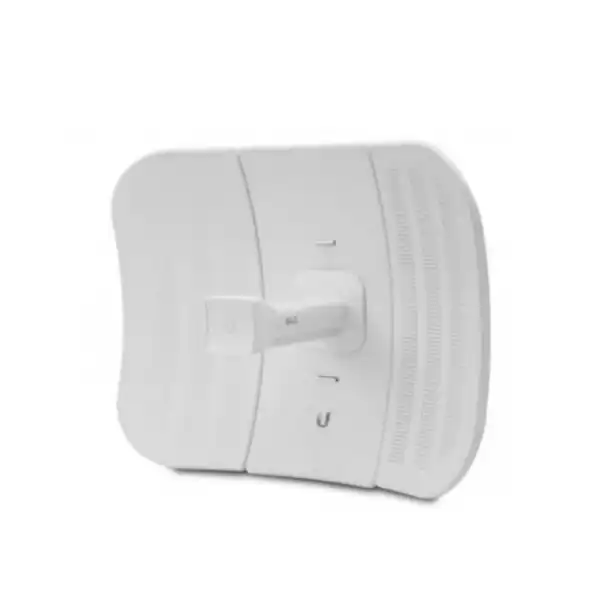
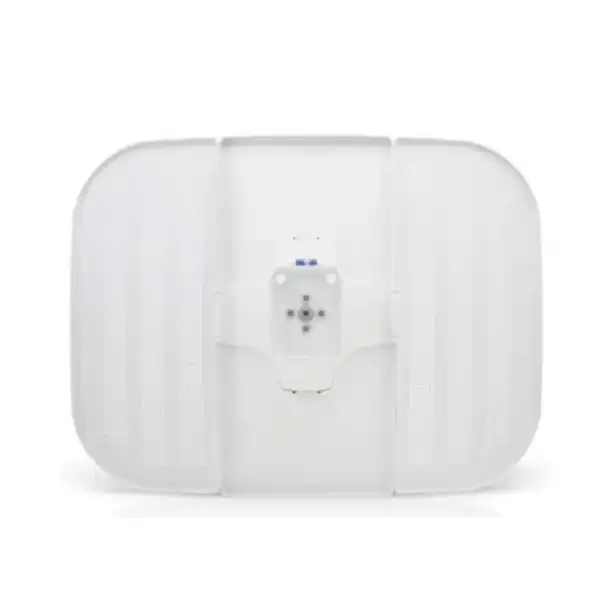
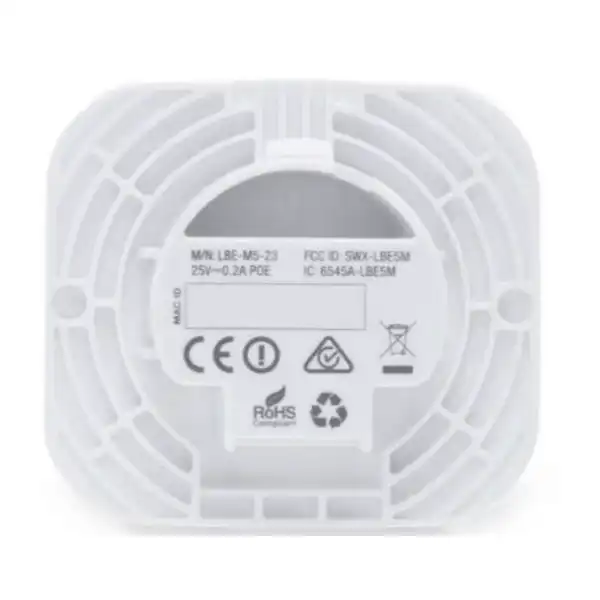
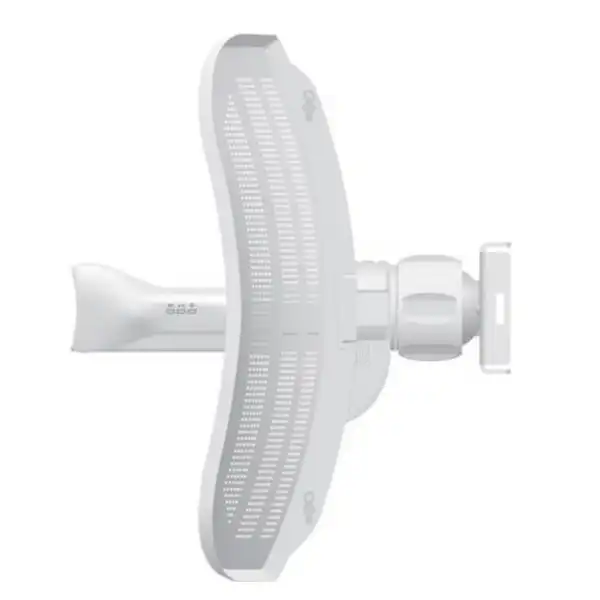
Ubiquiti airMAX LiteBeam M5 LBE-M5-23
The Ubiquiti LiteBeam M5 LBE-M5-23 is an outdoor 5 GHz directional wireless radio for planned building-to-building links and compatible airMAX M subscriber deployments. Its 23 dBi integrated antenna, compact pole-mount form factor and passive PoE power arrangement make it a practical candidate where a clear radio path is available. The model has one 10/100 Ethernet interface and uses airMAX M technology; it is not the newer airMAX AC generation. Before buying in Tanzania, check the remote radio, site clearance, capacity requirement, suitable power supply and locally permitted radio settings.
Typical fit
Planned outdoor point-to-point links and compatible airMAX M client sites
Critical check
Remote-radio compatibility, link clearance and Tanzania frequency rules
Wired capacity
One 10/100 Ethernet connection; do not assume Gigabit throughput
Next step
Share the installation use case and exact model to request a quote
Key LiteBeam M5 technical specifications
These values describe the identified manufacturer model, not a guaranteed local commercial bundle. Confirm country-specific radio permissions and the exact unit supplied for the project.
| Exact manufacturer model | LBE-M5-23 |
|---|---|
| Technology family | airMAX M; 5 GHz outdoor radio |
| Antenna gain | 23 dBi directional |
| Antenna arrangement | 1×1 SISO; vertical polarization |
| Wired interface | One 10/100 Ethernet RJ45 port |
| Maximum transmitter output | 25 dBm hardware rating; subject to local limits |
| Power input | 24 V passive PoE; 0.2 A adapter listed |
| Mounting | Pole-mount hardware listed by manufacturer |
| Dimensions without mount | 362 × 267 × 184 mm |
| Weight without mount | Approximately 750 g |
| Manufacturer international tuning range | 5150–5875 MHz; local permissions vary |
| Operating temperature | −40 to 70°C |
| Maximum power draw | Not stated here: manufacturer references differ |
What the LiteBeam M5 does and where it fits
The Ubiquiti LiteBeam M5 LBE-M5-23 is a focused outdoor wireless radio for moving network traffic between locations rather than broadcasting everyday indoor Wi-Fi throughout a building. Its integrated directional antenna concentrates energy toward another radio, making it appropriate for an engineered connection across a clear outdoor path. A typical project might connect a remote office to a main building, extend a provider connection toward a customer premise, or join two facilities without installing a cable along the entire route. A working link still requires suitable radio equipment and network configuration at the other end.
This model belongs to the established airMAX M family. It is not the airMAX AC version, and it should not be selected on the assumption that it has newer AC radio capabilities or a Gigabit Ethernet socket. Buyers evaluating a new installation should begin with bandwidth expectations, existing network compatibility, site geometry and local spectrum requirements. Those checks matter more than any headline distance claim. The result is a clearer purchase decision and fewer surprises when installation begins.
Who should consider this product
A small business with a second building may consider a LiteBeam M5 when it wants a dedicated outdoor route for ordinary IP data. A wireless internet service provider may consider it as customer premises equipment when the base station uses a compatible airMAX network. A school or training centre with separate structures can evaluate a directional bridge for access to a central internet connection, while an industrial site can consider it for selected network traffic where conditions allow. These are possible applications, not promises that every site can be connected.
The best candidate is a buyer who can control both ends of the proposed link, examine the propagation path and appoint somebody familiar with outdoor Ethernet and wireless alignment. The device is less appropriate when the requirement is merely to improve weak phone coverage inside a room or to provide direct public Wi-Fi to visitors. A business demanding high aggregate traffic capacity should also compare current-generation equipment before committing to a legacy radio platform.
Understanding the 23 dBi directional antenna
The integrated antenna has a manufacturer-listed gain of 23 dBi. This describes how the antenna directs radio energy relative to an ideal reference antenna; it is not an internet speed and does not reveal how fast a completed network will operate. A focused antenna can improve a carefully aimed outdoor link, but it also makes positioning critical. A small alignment error can consume useful signal margin, especially across a longer path or where mounting hardware moves with wind.
Before ordering, identify the intended remote site and check whether a suitable mounting location can face it. Avoid assuming that the dish will transmit through dense foliage, walls, hills or neighbouring buildings. Obstructions near the radio path can reduce performance even when the two sites appear visually close. Antenna gain must also be considered together with configured transmit power and applicable local radiated-power limits. For this reason, practical planning starts with path geometry and a compliant power budget rather than a simplistic claim that a certain antenna gain automatically provides a particular number of kilometres.
What 5 GHz means for an outdoor bridge
The LiteBeam M5 operates in the 5 GHz family of radio frequencies, with the manufacturer’s published international hardware range spanning 5150 to 5875 MHz. That technical range is not permission to use every channel in every country. The available channels, permitted power, indoor or outdoor restrictions and any licensing conditions must be determined for the specific deployment in Tanzania. The Tanzania Communications Regulatory Authority publishes spectrum and wireless-network guidance that should be checked before installation.
From a network-design perspective, 5 GHz is commonly used for directional outdoor wireless because it offers channel options suited to engineered links. It is not immune to interference, however. Nearby wireless installations, channel overlap and local noise can reduce the usable signal and cause inconsistent service. A site survey should identify what is already operating around each proposed endpoint. After installation, radio channel selection and power settings should be based on measured conditions and regulatory requirements, not simply left at arbitrary maximum settings.
airMAX M technology explained
airMAX is Ubiquiti’s wireless networking technology for coordinating communication among compatible radio devices. In a point-to-multipoint arrangement, its scheduled airtime approach helps an access point manage when client devices transmit. That is useful when several subscriber radios share one sector. In point-to-point work, the same product family provides a familiar management approach for planned outdoor links. The LiteBeam M5 implements the airMAX M generation rather than airMAX AC.
Compatibility therefore deserves explicit attention. Two devices may both operate around 5 GHz and still be unsuitable partners because they use different radio generations, operating modes or firmware capabilities. A matching frequency band alone does not establish interoperability. Ask the network designer to verify the proposed access point or opposing radio, firmware release, security settings, channel width and wireless mode before specifying a complete solution. Buyers replacing an older customer radio should record the existing access point model instead of assuming that a modern device or another vendor’s Wi-Fi radio will pair automatically.
A practical point-to-point example
Imagine a business whose administration office has the main internet router while its workshop occupies another building on the property. The business wants selected computers, printers or applications in the workshop to reach services in the administration office. A point-to-point outdoor bridge can provide a wireless network segment between the locations when the geometry, equipment and radio conditions are suitable. In such a design, a compatible radio is installed at each end and each radio is connected to the corresponding local network through Ethernet.
The installer should document which end provides access to the upstream network, how bridging or routing will work and whether traffic needs segmentation. The outdoor radios do not replace firewalls, switches or policy controls. If a voice system, surveillance system or business application must traverse the connection, the network designer should calculate the bandwidth and reliability needed at busy times. A successful demonstration with one laptop is not a substitute for a capacity assessment covering normal operating conditions and future growth.
A practical point-to-multipoint example
A local wireless service provider may operate an appropriate sector access point and install subscriber equipment at individual customer premises. In that model, a LiteBeam M5 can act as a directional client radio when the sector and configuration support the airMAX M device. Its antenna must be aimed at the serving base station. Unlike a sector antenna, it is not intended to provide wide-area coverage across many directions from one point.
Before accepting a new customer installation, the provider needs to evaluate line of sight, the sector’s operating frequency, expected customer traffic, airtime loading and the capacity of the shared uplink. A client radio with good signal cannot compensate for a heavily overloaded base station. The provider should also check whether the client’s equipment can be securely managed and whether the network design isolates customers as intended. This scenario illustrates a suitable role, not a guarantee of compatibility with every existing provider or base station in Tanzania.
The Ethernet interface is an important limit
The radio has one 10/100 Mbps Ethernet port. This is one of the clearest purchase considerations because it defines a hard wired-interface limitation that cannot be overcome by antenna alignment, a faster upstream internet plan or an upgraded switch. Real-world user throughput will also depend on the wireless link, protocol overhead, interference, channel configuration and receiving equipment. It is therefore unwise to translate the radio’s technical wireless rate directly into a promised customer download speed.
For sites with a moderate traffic requirement, the interface may be acceptable as part of an existing airMAX M deployment. For a business that expects high-capacity file transfers, frequent backups, many concurrent users or a future connection exceeding Fast Ethernet capability, a newer bridge with an appropriate Gigabit interface may be a better investment. Determine the expected peak traffic rather than only the average utilisation. This simple check helps avoid buying an otherwise functional radio that becomes the bottleneck immediately after installation.
Powering the radio correctly
The manufacturer’s current technical specification lists a 24 V, 0.2 A passive PoE adapter and a two-pair passive PoE power method. Passive PoE must not be confused with automatic standard-negotiated PoE. An incompatible injector, switch port or wiring arrangement may fail to power the device correctly or may damage hardware. Installation planning should therefore identify the exact injector and port arrangement before cables are connected. The manufacturer’s reference configuration describes an included adapter; confirm the contents of the particular local package before purchase.
A common installation places the power injector indoors or in another suitably protected location and runs appropriate outdoor-rated Ethernet cable to the radio. The radio needs a data connection back to a switch, router or other network device. Technicians should inspect cable paths, maintain bend radius, prevent water ingress and follow manufacturer guidance for outdoor protection. Where a project uses backup electricity or a UPS, account for the connected networking equipment as a complete system rather than considering the radio in isolation.
Mounting and mechanical planning
The LiteBeam M5 is a lightweight outdoor design with a pole mounting arrangement. Manufacturer reference dimensions are approximately 362 by 267 by 184 mm, and the listed weight is about 750 g without mounting hardware. Although its construction can simplify installation, correct mounting remains a structural task. The pole or bracket must be secure, appropriately positioned and capable of maintaining antenna alignment during expected weather. The design also provides adjustment flexibility so that a technician can aim the directional antenna toward its peer.
Confirm that technicians can safely reach the chosen mounting point to tighten fittings, inspect the cable and adjust the dish. Avoid mounting where routine access would require unnecessary risk or where new construction is likely to obstruct the signal. Outdoor equipment should not be placed in flood-prone locations, and cable penetrations should be sealed using suitable methods. Even a compact radio deserves a documented mounting and maintenance plan, especially when the link supports business-critical communication.
Line of sight and Fresnel clearance
Visual line of sight is the first screening question for a directional bridge, but it is not the entire radio-planning story. Signal propagation also depends on clearance around the direct path, including the Fresnel zone. Trees, roof edges, utility structures and terrain can intrude into this area even where one antenna is visible from the other. Inadequate clearance can make a link unstable, particularly when foliage grows or moves in wind.
A competent site assessment can use surveyed endpoint coordinates, mounting heights, distance and terrain information to estimate the necessary clearance. The chosen mounting height may need to be adjusted, or a different route may be preferable. Do not rely on a generic kilometre figure from a product advertisement to settle this question. The same model can behave very differently on two routes of equal length. A well-chosen shorter path with clean clearance and a quiet channel may deliver a more dependable result than an ambitious path that is blocked or poorly aligned.
Choosing the right link capacity
Capacity planning begins with the applications that will actually use the connection. Basic administration traffic, lightweight monitoring and occasional document access may have very different requirements from video backhaul, real-time collaboration or synchronising large data sets. Estimate the number of simultaneous users and the peak upstream and downstream demand. Add operational headroom rather than designing a link that works only during quiet periods. If several services share the bridge, decide how they should be prioritised and monitored.
The LiteBeam M5 should be treated as an airMAX M-class radio with a Fast Ethernet network interface, not as a current high-capacity replacement for fibre or modern Gigabit wireless bridges. Where the objective is a new high-throughput trunk connection, compare newer technologies before settling on this model. Where the objective is to maintain or extend a compatible existing airMAX M network, its role may be clearer. The right choice depends on the complete traffic profile, not on the appearance of the antenna or a claimed maximum link range.
What can affect reliability in Tanzania
Tanzanian outdoor installations can encounter a mix of practical challenges, including changing seasonal weather, moving vegetation, local power interruptions and differences in available mounting infrastructure. These are planning scenarios rather than claims about any particular customer’s location. A robust design considers the actual site conditions at both ends. Check cable exposure, mounting security, access to safe indoor power, and whether equipment can be inspected after severe weather.
For high-availability applications, an outdoor radio is one component of a wider chain. Its performance depends on the upstream internet service, switching hardware, electricity supply, security configuration and receiving radio. A power failure at either endpoint can interrupt the whole path. Where continuity matters, consider backup power, link monitoring, configuration backups and an alternative connection path appropriate to the business. Make these choices before installation rather than discovering the weakest part of the network during an outage. No wireless link should be described as unaffected by weather or guaranteed to remain available under every condition.
Channel planning and interference checks
A wireless link shares spectrum with other transmitters, so channel planning is not optional when consistent performance matters. Start by surveying both installation points and identifying nearby operating channels and strong competing signals. Use compatible equipment tools to assess the usable radio environment and verify that the selected channel is allowed for outdoor operation at the site. A quiet channel at one end may be busy at the other, which is why observations from both endpoints are useful.
Channel width should be chosen in light of available spectrum, noise and desired service capacity. Wider channel settings can increase potential data rates, but they also occupy more spectrum and may suffer when neighbouring systems are active. A narrower, well-selected channel can sometimes deliver steadier results. Power settings should be managed with the same care: more transmit power is not always beneficial and must remain within applicable limits. Record the final configuration so that a later technician understands why the link uses those settings.
Compatibility checklist before purchasing
The first compatibility check is the radio family: this is LiteBeam M5 and airMAX M, not LiteBeam AC. Next, confirm the exact model and management capabilities of the intended access point or peer radio. Verify frequency overlap in the locally permitted channels, supported channel widths, wireless operating modes, security configuration and firmware expectations. If the project connects into an existing provider network, obtain the provider’s approval and configuration requirements before selecting hardware.
Then examine the wired side. A 10/100 Ethernet interface may change how the bridge fits the network capacity plan. Confirm that the power supply is the correct passive PoE type and that the installation uses suitable outdoor cabling and protection. Finally, check physical mounting, alignment access and the distance and clearance of the proposed path. Compatibility is a project-level decision; a vendor’s statement that a product is a 5 GHz outdoor radio does not establish that it will integrate seamlessly into a specific live network.
Security and management responsibilities
A point-to-point or customer-premises radio is part of an IP network, so its management interface and credentials should be treated as security-sensitive. Before commissioning, change any default access details, choose supported secure management settings and restrict administrator access to authorised personnel. Keep a documented record of radio addresses, credentials in an approved secure vault, configured channels and firmware versions. Avoid publishing passwords or configuration files containing secrets in installation photographs or handover documents.
The wider network needs its own safeguards. A bridge does not create a firewall merely because traffic crosses a wireless link, and it does not automatically isolate departments or customer networks. Configure routers, switches, VLANs or other controls according to the intended architecture. Decide who will maintain firmware, investigate interference and restore the connection after a fault. A small organisation may overlook these operational questions because the hardware is compact. Clear ownership of management and backups is usually more valuable than an unverified promise of security from the radio alone.
Installation workflow from survey to handover
A disciplined deployment can be divided into survey, design, mounting, configuration, alignment and acceptance testing. During the survey, establish endpoint locations, line of sight, available power, cable routes and existing wireless activity. During design, choose the peer hardware, confirm airMAX M compatibility and estimate whether the required traffic is feasible. During mounting, secure the outdoor equipment and complete weather-conscious cable installation. During configuration, set the intended network mode, permitted frequency, security and management parameters.
Alignment should be performed with live signal measurements rather than visual guessing alone. After association, test real applications as well as basic network reachability. Record observed signal quality, stability, measured throughput under representative conditions and any error or retry indicators available from the equipment. A handover should include a simple network diagram, mounting details, safe access instructions and a recovery process. This workflow reduces the temptation to treat a successful connection light as proof that the full business requirement has been met.
How to test an installed bridge
Testing should answer whether the link meets the agreed business requirement, not merely whether it can exchange packets once. Begin by confirming stable association and access to both radio management interfaces. Inspect signal measurements and the channel configuration at each side. Check for unexpected retransmissions or sudden variation in link quality. Then run controlled traffic tests during quieter and busier operating conditions, using appropriate endpoints and avoiding disruption to other users.
Record both directions of traffic because uplink and downlink demand may differ. If the bridge is intended to carry video, voice or other real-time services, observe delay, jitter and packet loss under a representative load. Check that a temporary power interruption produces the expected recovery behaviour. Results should be compared with the design target; they should not be interpreted as a universal specification for every LiteBeam M5 installation. Testing provides an evidence-based answer to the practical question: does this completed link perform well enough for the applications it was built to support?
When a wired connection may be better
Wireless bridging is attractive when laying new cable would be disruptive, expensive or impractical, but it is not automatically the best option for every connection. Fibre may be more suitable for a permanent high-capacity path, an environment with difficult radio clearance, or an application that requires strong immunity to local radio interference. Copper Ethernet can also be appropriate over shorter properly designed routes, subject to applicable distance, electrical and safety considerations. The correct comparison includes civil works, maintenance, resilience and future bandwidth growth.
Consider a wireless bridge when there is a clear, controllable path and when performance expectations match the hardware. Consider cabling or a newer wireless platform when the current and projected traffic requirements exceed what this model can reasonably support. For business-critical operations, compare the cost of redundancy as well as the first installation. A modest purchase price alone is not a reliable measure of lifetime value. Good procurement evaluates the entire connection, including switches, power, protection, mounting, labour, spares and ongoing support.
LiteBeam M5 versus LiteBeam AC
The manufacturer’s LiteBeam family documentation distinguishes the M5 from the AC version in ways that affect procurement. The M5 is listed with a 23 dBi antenna using a 1×1 SISO radio arrangement and a 10/100 Ethernet port. The corresponding LiteBeam AC model in the comparison uses a 2×2 MIMO arrangement, supports airMAX AC and has Gigabit Ethernet. These differences explain why the two products should not be treated as interchangeable simply because their names, physical appearance and antenna-gain figures may look similar.
For an existing airMAX M network, the M5 may be considered when compatibility and network design support it. For a new deployment where greater capacity is a central requirement, the AC product family or another more recent solution deserves evaluation. Do not infer plug-and-play interoperability between generations from the model name alone. Check the complete base-station, client and firmware combination, and ask the network designer to recommend a system rather than choosing isolated components by specification headlines.
What the antenna does not replace
It is easy to see a directional outdoor antenna and expect it to solve every wireless networking issue. The LiteBeam M5 does not provide a complete internet subscription, does not create an indoor Wi-Fi coverage system by itself and does not eliminate the need for upstream routing and security. It also does not bypass the constraints of the 10/100 Ethernet interface. For an end-to-end link, the other radio, suitable power supplies, Ethernet cabling, mounting hardware and network devices must all be considered.
For a larger office, an indoor Wi-Fi access point may still be needed on the remote side after the bridge delivers network connectivity to that building. A separate router or firewall may be required depending on the design. If there are several remote sites, a point-to-multipoint plan and a compatible sector access point may be more appropriate than improvising links between independent client dishes. Identifying these supporting components before ordering avoids treating a single device as a full network installation kit.
Procurement questions to ask FourTeck Tanzania
When requesting a quotation for this model, specify that the requested item is Ubiquiti airMAX LiteBeam M5 with manufacturer model LBE-M5-23. Include the planned use, whether it is a new link or a replacement, and the model of the radio or base station at the other end. If possible, provide the approximate route distance and a description of the mounting locations. These details help frame a meaningful compatibility discussion without assuming that a particular site survey or service is automatically included in the product purchase.
Ask for confirmation of the exact supplied package contents, the applicable warranty terms, local price, order availability and any required accessories for your installation. Those commercial details should come from the quotation for the exact item, not from an unrelated international listing. If you already own an injector or switch, identify its power specification to avoid incorrect assumptions about passive PoE. The goal is a purchasing decision tied to a workable network design, not merely a request for the lowest-priced dish antenna.
A short pre-order site worksheet
Before committing to equipment, write down six essentials: the two endpoint locations, line-of-sight observations, approximate separation, the intended traffic, the existing peer radio and the available power source. Add the proposed mounting heights and any obstructions such as mature trees or new buildings. If the link replaces a failed radio, note the old hardware model, operating channel, wireless mode and any configuration backup that can be obtained securely. This information reduces guesswork and helps a technician recognise whether the M5 is the appropriate replacement.
For a new build, include a simple diagram showing where the upstream router or switch connects, where the outdoor Ethernet cable runs and where users or downstream switches will connect. Identify who owns the upstream internet service and whether a provider must approve the installation. If any part of the plan remains unknown, treat it as a question to resolve before purchasing. A clear worksheet can prevent unnecessary orders for incompatible accessories, incorrect radios or insufficient-capacity network components.
Outdoor cabling and electrical protection
Outdoor Ethernet needs to be treated as infrastructure rather than as an ordinary office patch lead placed in the rain. Select cable and connectors intended for the installation environment, support and route them properly, and protect entry points into buildings. Avoid cable runs that create water paths into equipment or expose connectors to repeated physical movement. Follow the manufacturer’s directions for surge protection, grounding and electrical safety, as well as applicable local installation requirements.
The passive PoE arrangement makes electrical planning particularly important. Do not assume that every PoE switch port supplies the expected voltage or that the injector intended for another Ubiquiti model is automatically suitable. Check the rated voltage, polarity, pinout and input supply before connecting hardware. In locations where electrical disturbances are a concern, consult a qualified installer about suitable protection. Protection measures reduce risk but are not a guarantee against every surge or lightning event. The network should also be configured so that one failed outdoor device does not expose unrelated systems to unnecessary administrative or security risk.
Maintenance after commissioning
An outdoor link should have a simple maintenance schedule even when it operates well. Periodically inspect the mounting for movement, corrosion or loose fittings where safe access permits. Look for damaged cable jackets, deteriorated seals and vegetation that has grown into the radio path. Review whether new wireless installations nearby have changed the interference environment. The frequency of inspection should reflect site exposure, network importance and the organisation’s ability to access the equipment safely.
Keep configuration backups and contact information for the person or team responsible for the radio. A useful incident record includes symptoms, observed signal quality, recent weather or electrical events, configuration changes and the results of basic connectivity tests. Avoid immediately increasing transmit power or changing multiple settings when a fault appears; these changes can conceal the cause or create new interference problems. A measured approach helps distinguish an RF problem from a faulty injector, damaged Ethernet run, upstream internet issue or network configuration error.
Troubleshooting a weak or unstable link
When a link becomes unreliable, begin with the obvious physical and electrical checks. Confirm that both radios receive the correct power and that the Ethernet interfaces show expected connectivity. Examine the mounting and aim, especially after maintenance or strong winds. Inspect for new obstructions such as vegetation, construction or relocated equipment. Then look at radio status information for signal changes, noise, channel occupancy or unusual retries. Avoid making several configuration changes at once because that makes diagnosis difficult.
If the wireless path appears healthy but applications are slow, check upstream internet service, switch port negotiation, router load and the devices used for testing. Remember that the LiteBeam M5 has a 10/100 Ethernet interface, so it cannot provide Gigabit wired throughput. If the link is associated with an existing airMAX sector, assess whether sector loading has changed. Reliable troubleshooting separates physical-layer, radio, Ethernet and application causes. A professional installer can establish a baseline at commissioning so that later failures can be compared against measured evidence.
Designing for future growth
Businesses often install a link for one immediate need and gradually add users, cameras, cloud services or applications. That growth should influence the original product choice. Estimate the likely demand over the planning horizon, not just the traffic visible on purchase day. Consider whether equipment at both ends can be upgraded without replacing the mounting arrangement, cabling or network architecture. An older Fast Ethernet-based device may be adequate in a narrow role but become restrictive as a shared trunk.
Future planning also concerns operational responsibility. Document who owns the link, who holds configuration backups and what should happen if a radio fails. If a site cannot tolerate downtime, decide whether a secondary path is justified. A strong system design does not depend on unverified promises that a radio will run forever or that all generations of wireless equipment interoperate. It makes room for staged improvement and maintains clear records of the installed model, channel plan, power method and network role.
Choosing between an upgrade and a direct replacement
If the objective is to replace a failed LiteBeam M5 in an existing, functioning airMAX M network, a like-for-like option may reduce the number of design variables, provided that the exact peer and firmware combination is compatible. Check that the fault is actually in the radio before buying another unit; damaged cable, incorrect power or a moved mount can look like radio failure. Confirm the configuration and record existing settings so that the replacement can be commissioned deliberately.
If the purpose is to build a new link, evaluate newer radios as well. A lower initial hardware cost may be offset by traffic limits, future upgrades or extra troubleshooting. The decision should balance proven compatibility, required throughput, availability of replacement units and the projected life of the installation. For a high-demand new business network, comparing a modern wireless bridge or a wired path is prudent. For a targeted legacy-network extension, preserving the existing technology may be reasonable. The best answer depends on context rather than the age of the model alone.
Questions for a network technician
Ask the installer what peer radio will be used and how its compatibility has been confirmed. Ask whether the intended frequency and operating power are permitted for the outdoor site. Ask how the radio path and Fresnel clearance will be checked, what mounting height is proposed and what will be done to reduce interference. Ask for a realistic throughput target based on a survey, not an unqualified marketing figure.
On the wired side, confirm the expected passive PoE injector, outdoor cable specification, surge protection and switch or router connections. Ask which passwords and management settings will be changed, where backups will be kept and what tests will be performed before handover. If the link is essential to daily operations, ask who will respond when either endpoint loses power or connectivity. These questions create a practical definition of a finished installation and encourage reliable documentation. They also make it easier for purchasing staff to compare quotations on the basis of complete scope rather than a radio price alone.
Environmental limits and expectations
The manufacturer lists an operating ambient temperature range of minus 40 to 70 degrees Celsius and non-condensing humidity limits of 5 to 95 percent in its technical references. These figures describe stated equipment conditions, not a promise that any mounting or cable installation will survive every local exposure. Actual durability depends on the mounting hardware, water management, cable routing, installation workmanship and environmental events. An outdoor enclosure is not a reason to immerse equipment or neglect electrical protection.
High temperature exposure can also affect the performance of associated injectors, routers and power supplies even if the outdoor radio is within its stated range. Review where each component will be installed. Indoor equipment should have appropriate ventilation and environmental protection. For facilities subject to dust, rain, severe weather or difficult maintenance access, ask a qualified installer to propose a sensible preventive-maintenance plan. A complete risk assessment considers the whole connection, not only the published operating range of the antenna unit.
Making an informed Tanzania purchase
The most useful product information for a Tanzanian buyer is the exact model, realistic application, compatibility and local implementation requirements. The LiteBeam M5 is a 5 GHz directional airMAX M radio with a 23 dBi antenna and Fast Ethernet. It can be part of a purpose-designed outdoor bridge or a compatible subscriber installation. It should not be purchased on the assumption that every 5 GHz network is compatible or that advertised long-distance capability is guaranteed at a particular site.
Request a product quotation that identifies the exact model and clarifies the supplied items, availability and commercial terms for the requested order. Provide the proposed use case and details of any existing peer equipment so that the technical fit can be reviewed. If a new high-capacity connection is required, ask that newer wireless options be evaluated alongside this model. This approach keeps the purchase focused on reliable connectivity and an appropriate network design rather than on unsupported speed, distance, price or coverage claims.
Frequently asked questions about the LBE-M5-23
Is the LBE-M5-23 an indoor Wi-Fi access point?
No. It is an outdoor directional radio intended for planned wireless links or suitable customer-premises applications. An indoor access point may still be needed to provide Wi-Fi coverage for phones and laptops inside the destination building.
Does this product include a 23 dBi antenna?
Yes. The integrated directional antenna is rated at 23 dBi by Ubiquiti. That is antenna gain, not a promised internet speed or a guarantee that any particular distance will be achieved.
Does LiteBeam M5 support airMAX AC?
No. The M5 belongs to the airMAX M generation. Confirm the remote access point and firmware before ordering. Devices that use the same 5 GHz band are not necessarily compatible wireless partners.
Does the radio have a Gigabit Ethernet port?
No. The LBE-M5-23 has one 10/100 Ethernet port. This wired interface is important when planning a connection that must carry substantial traffic now or in future.
Can I connect two buildings with it?
A purpose-designed point-to-point link can use a compatible radio at each end when the installation has appropriate clearance, channel conditions, power, configuration and mounting. One standalone radio is not a complete two-ended bridge.
Can a wireless internet provider use it as CPE?
It may be suitable for a customer-premises installation served by a compatible airMAX M network. The service provider must confirm the required radio mode, frequencies, firmware, access credentials and policy.
Is it the same as LiteBeam 5AC?
No. Ubiquiti’s product comparison distinguishes the M5’s SISO and Fast Ethernet characteristics from the AC model’s MIMO, airMAX AC and Gigabit features. Choose by network compatibility and capacity needs.
What powers the LBE-M5-23?
The current manufacturer technical page specifies 24 V passive PoE through the stated pair arrangement. Do not substitute an injector or switch output without confirming voltage, pinout and compatibility for the exact installation.
Will an ordinary PoE switch always work?
No. Passive PoE and standards-negotiated PoE are not interchangeable by assumption. Review the equipment’s specifications and use a correctly matched injector or supported power solution.
Can it be used outdoors in Tanzania?
It is designed as an outdoor radio, but legal channel selection, permitted power and any applicable approvals or licensing requirements must be verified for the deployment through current Tanzania Communications Regulatory Authority guidance.
Does a 23 dBi antenna guarantee a long-range connection?
No. Range depends on terrain, clearance, interference, antenna alignment, transmit-power limits, the receiving radio and the capacity target. Conduct a link survey rather than treating a marketing distance as a site guarantee.
Does it transmit through trees or buildings?
Obstructions can significantly impair a 5 GHz outdoor path. Survey line of sight and Fresnel clearance, allowing for trees that grow or move and for future construction near the route.
Can it provide internet without a subscription?
No. A wireless bridge transports network traffic. Internet access still depends on an upstream service and suitable routers or other networking equipment.
What accessories should I plan for?
Consider the compatible radio or access point at the other end, appropriate passive PoE supply, weather-suitable Ethernet cable, mounting provisions, protection and any required switching or routing. Confirm exact box contents with the quotation.
How should I decide between M5 and a newer bridge?
Compare existing radio compatibility, peak traffic, interface capacity, expansion needs, mounting conditions, management and cost of the full system. New high-bandwidth connections should be assessed against current-generation alternatives.
What information should I send when requesting a quote?
Send the exact model LBE-M5-23, intended application, peer radio if known, approximate route distance, mounting conditions, expected bandwidth and the quantity required. Ask for confirmed commercial terms for the exact item.
What is the product SKU on FourTeck Tanzania?
No listing-specific SKU was supplied for verification. The manufacturer model is LBE-M5-23, but a model identifier should not be represented as a verified FourTeck SKU.
Does the model include a warranty or delivery promise in Tanzania?
Warranty, price, delivery and stock depend on the exact commercial offer. These details must be confirmed with the seller for the requested item and should not be inferred from an overseas listing.
Request a LiteBeam M5 quotation for Tanzania
Ask FourTeck Tanzania about the Ubiquiti airMAX LiteBeam M5, model LBE-M5-23. Share your planned use, required quantity, existing access point or peer radio, approximate link distance and any power or mounting requirements. Request confirmation of local availability, the exact supplied package, applicable price and warranty terms. For complex or high-capacity installations, ask for a compatibility review or comparison before purchasing.
Contact FourTeck Tanzania to request an exact-model quote and discuss your installation.




Reviews
There are no reviews yet.