
OUTDOOR 5 GHz AIRMAX AC • TANZANIA PRODUCT GUIDE
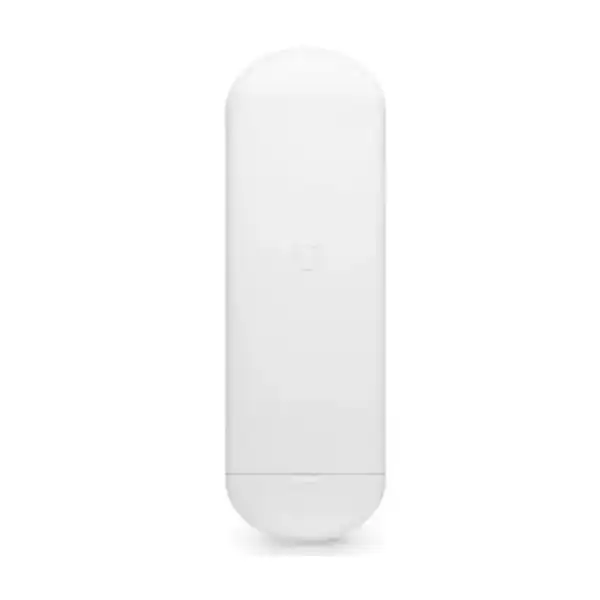
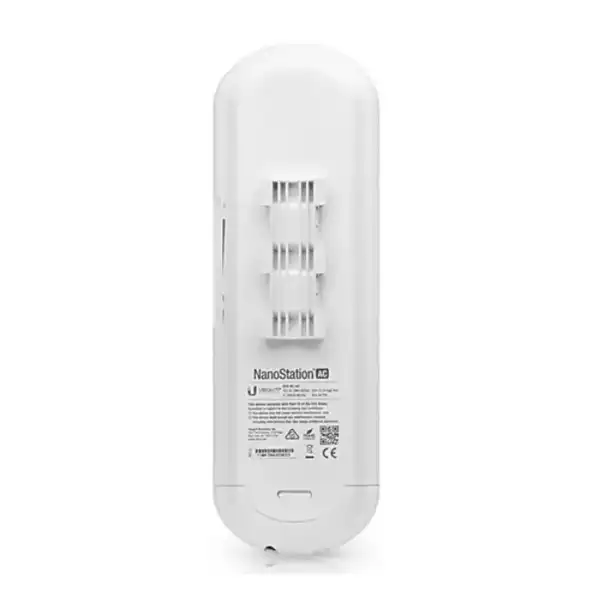
Ubiquiti airMAX NanoStation 5AC (NS-5AC)
Build a planned outdoor wireless connection between suitable sites with a compact directional 5 GHz airMAX radio. Evaluate the exact link, compatible endpoints and installation before buying.
Discuss your link requirements and request a FourTeck Tanzania quotation.
16 dBi directional antenna
Integrated dual-linear antenna for a planned outdoor path
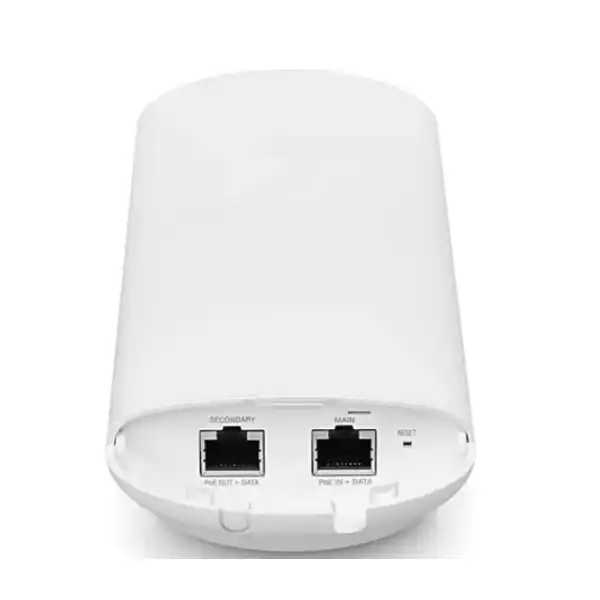
2 × Gigabit RJ45
Flexible wired network connections; not a wireless speed guarantee
5 GHz airMAX ac
Built for compatible outdoor wireless networking
24V PoE included
Simplified power and data cabling when correctly installed
Best fit at a glance
Choose this model for a compatible outdoor point-to-point bridge or airMAX customer-premises endpoint when the wireless path can be surveyed and correctly aligned. It is not a universal household Wi-Fi extender, a substitute for end-user access points, or proof of guaranteed link distance. A complete solution may require two radios, protected cabling, local network devices and site-specific installation work.
Verified technical specifications
| Manufacturer | Ubiquiti |
|---|---|
| Product family | airMAX NanoStation 5AC |
| Exact model | NS-5AC |
| Primary radio | 5 GHz airMAX ac |
| Listed hardware frequency range | 5150–5875 MHz worldwide; locally permitted channels may differ |
| Antenna | Integrated 16 dBi, dual-linear |
| Nominal antenna beamwidth | 45° in listed principal planes |
| Network ports | 2 × Gigabit Ethernet RJ45 |
| Operating roles | Access point / station |
| Separate management radio | 2.4 GHz |
| Supported selectable widths | 10/20/30/40/50/60/80 MHz, subject to mode and rules |
| Included power adapter | 24V DC, 0.5A Gigabit PoE |
| Power method | Supported passive PoE and 802.3af alternative-A arrangements; verify the input |
| Maximum consumption | 9W |
| Without-mount dimensions | 257 × 84 × 30 mm |
| With-mount dimensions | 257 × 84 × 41 mm |
| Weight | 233 g |
| Enclosure | UV-resistant polycarbonate |
| Mounting | Pole or wall; manufacturer-listed hardware included |
| Operating environment | −40 to 70°C; 5–95% RH, non-condensing |
Specifications are based on Ubiquiti model NS-5AC technical documentation. Verify power accessories, permitted channels and the commercial package for the exact order.
A practical answer for outdoor connectivity
The Ubiquiti NanoStation 5AC NS-5AC is a compact directional radio for carrying network traffic between suitable outdoor locations. It is most useful when a cable route is difficult, expensive or disruptive, and when two sites can see each other clearly enough for a carefully engineered wireless link. Instead of treating the unit as a general-purpose household Wi-Fi extender, assess it as part of a managed, directional network connection. That distinction affects equipment selection, mounting, configuration, and the experience users ultimately receive.
The NS-5AC combines a 5 GHz airMAX ac radio with an integrated 16 dBi dual-linear antenna. Its two Gigabit Ethernet connections and supplied 24V PoE injector make it a practical candidate for rooftop, pole and wall installations. Successful deployments still depend on suitable counterpart equipment, permissible spectrum, reliable power, sound cable protection and clear alignment. Ask for a deployment-specific quotation rather than choosing from the model name alone.
Who should consider this radio
This product suits network administrators, wireless installers, businesses with separate buildings, hospitality properties, institutional campuses and providers planning customer-premises connections. A building-to-building buyer might need to link a warehouse to an office network. An installer might need a dedicated wireless path for cameras on another structure. An access provider might use the NS-5AC as a station in a compatible airMAX ac distribution network. The underlying requirement is a stable Ethernet-style network path across open space.
It is not necessarily the right purchase for somebody who simply wants better smartphone reception in a room, more indoor Wi-Fi coverage or a universal repeater for a domestic router. The main 5 GHz radio is optimized for compatible outdoor airMAX operation. Its separate 2.4 GHz management radio serves installation and administration, not a promise of everyday client access. Start by naming the actual endpoints and the devices that will consume the connection.
Point-to-point versus point-to-multipoint
In a point-to-point arrangement, one suitable radio at the source communicates with a corresponding radio at the far end. This pattern is useful for connecting two structures, extending an existing network to an annex or bridging a physical gap without trenching. Plan for two endpoints when neither site already has a compatible wireless radio. Each endpoint must be powered, mounted, aimed and configured; a single box cannot create a complete two-ended link by itself.
In a point-to-multipoint arrangement, several subscriber stations communicate with a compatible access point that has been chosen for the site’s sector coverage and capacity requirements. The NS-5AC can be evaluated as an endpoint where its antenna pattern, airMAX compatibility and path conditions fit. Do not assume one NanoStation is automatically an appropriate wide-area base station for every collection of subscribers. Site geometry, shared airtime, subscriber count and future expansion determine the stronger design.
The directional 16 dBi antenna
The integrated antenna provides 16 dBi gain with dual-linear polarization, and Ubiquiti specifies a nominal 45-degree beamwidth in the principal planes. A directional antenna concentrates its energy toward the intended network partner rather than distributing coverage evenly in every direction. This is one reason the NS-5AC works well in planned wireless paths, but it also means mounting direction matters. An attractive mounting location is not useful if the antenna points away from the corresponding radio.
Gain does not turn an obstructed route into a clear route. Trees, metal roofs, walls, terrain and structures can still damage or block propagation. More gain can help with a suitable path and realistic link budget, yet it cannot replace alignment and interference analysis. For longer or noisier paths, compare the NS-5AC with a more directional antenna system before purchase. The best option is the one with appropriate signal quality and fade margin, not simply the highest headline specification.
What 5 GHz operation means
The manufacturer lists a broad hardware frequency capability from 5150 to 5875 MHz. That specification describes what the radio hardware can support across markets; it does not mean every channel in that range may legally be used at every installation. Available frequencies, transmit power limits, DFS obligations and other operating conditions depend on national rules and the country configuration. A Tanzanian installation should be checked against the applicable current requirements before configuration.
Compared with lower-frequency alternatives, a 5 GHz directional system can offer useful channel choices and concentrated coverage, although congestion and line-of-sight requirements remain important. The cleanest channel is not necessarily the one with the most impressive channel-width number. An installer should survey the operating environment, identify permitted choices, and select settings that serve the actual throughput and reliability requirement without causing avoidable interference to other users.
Line of sight and the Fresnel zone
A visible roof or mast is a helpful starting point, but a good outdoor wireless path also requires clearance around the direct line between antennas. Radio energy travels through an area around the central path called the Fresnel zone. If the zone intersects tree canopies, building edges or rising terrain, signal performance may deteriorate even when the opposite antenna can be seen. This issue becomes increasingly important as paths lengthen and where vegetation changes with seasons.
Before ordering hardware, assess the approximate separation, antenna heights, terrain, obstacles and permission to mount at both endpoints. Consider whether a higher bracket, a different pole position or an alternate roof would create a substantially cleaner path. Take note of future building activity and growing vegetation. If access to either rooftop is restricted, installation complexity and maintenance access may be as important as the radio’s nominal capabilities.
Distance is a design result, not a guarantee
Retail descriptions sometimes suggest long distances for the NanoStation family, but a fixed range figure is not a dependable prediction for a particular property. Achievable separation varies with antenna heights, alignment, allowed transmit power, noise, terrain, channel width and the performance expected from the connection. A link that connects at a given distance may still have too little capacity or fade margin for an important business application.
For a buying decision, request a path assessment that states the endpoints, target availability, required useful throughput, expected interference and assumptions about legal radio settings. Treat link estimates as engineering projections rather than guaranteed results. Where the route is unusually long, heavily obstructed or carries critical traffic, evaluate a more specialized outdoor bridge or a wired alternative. A measured test link is better evidence than a general distance claim on a product listing.
Capacity and application demand
Do not confuse the 1 Gbps rating of each Ethernet interface with a promised 1 Gbps wireless connection. The copper port speed describes the local wired connection. Useful over-the-air throughput is affected by radio conditions, modulation, channel size, overhead, direction of traffic and competing users. A wireless bridge serving a few cameras may have very different needs from one serving an office with cloud meetings, large file transfers and backup traffic.
Estimate the busy-hour demand in both directions. Allow for background applications, protocol overhead and future growth rather than designing exactly to today’s average speed. Video surveillance needs consistent upstream delivery; interactive voice and conferencing need appropriate delay and packet-loss behavior; file transfers may need higher burst capacity. When a link is shared among multiple premises, capacity planning must also account for airtime fairness and peak simultaneous use.
Choosing a channel width
Ubiquiti lists selectable channel widths including 10, 20, 30, 40, 50, 60 and 80 MHz, subject to the applicable operating mode, firmware and local restrictions. Wider channels can offer greater potential payload capacity under favourable conditions, but they consume more spectrum and may collect more interference. Narrower channels can sometimes provide a more stable practical link in a busy environment. There is no universally best width for every NS-5AC deployment.
Start from the minimum verified throughput requirement and the spectrum actually available at the site. Evaluate noise and signal quality rather than selecting the largest possible width by habit. If a proposed link works at a wide width only intermittently, reducing the width and retesting may yield a better user experience. Keep records of channel, width, transmit power and received signal metrics so later changes can be understood and reversed.
Interference and shared outdoor spectrum
Multiple outdoor links operating close together can compete for spectrum even when the equipment belongs to different organisations. Other nearby wireless installations, reflections from metal surfaces, poorly planned adjacent channels and changing radio conditions can reduce useful capacity. A directional antenna helps aim energy, but it does not remove every interference source. A new access point on a neighbouring rooftop may change the environment months after a link was commissioned.
A responsible design includes a channel survey, appropriate physical separation, sensible antenna placement and a plan for reviewing performance later. Where several radios share a mast or roof, document mounting orientation and channel allocation. Avoid assuming that maximum transmit power creates maximum reliability: excessive power can create unnecessary interference and may not improve reception of a weaker return path. Configure within both manufacturer guidance and applicable operating rules.
Two Gigabit Ethernet interfaces
The NS-5AC has two Gigabit RJ45 networking ports. This gives installers useful options for connecting the primary network feed and, where the selected topology and device configuration permit, an additional local Ethernet device. Gigabit interfaces help avoid a legacy 100 Mbps copper-port bottleneck, but they do not establish a guaranteed wireless capacity. Correct cable category, connectors and termination remain essential for stable operation.
Think through what each physical port will do before the device is mounted high on a wall or mast. Record which port receives power and where the network cable terminates. If a switch, camera or another accessory is planned at the far end, verify its power and networking requirements independently. Never assume the secondary Ethernet port will supply the particular voltage or power budget needed by another product without confirming its supported behaviour and configuration.
Power over Ethernet requirements
Ubiquiti specifies a supplied 24V DC, 0.5A Gigabit PoE adapter and a maximum power consumption of 9W. Manufacturer technical information also describes support for relevant 802.3af alternative-A power input and the associated voltage range. The specific supply arrangement must match the device’s supported input method; PoE standards and passive injectors are not universally interchangeable. An installer should check the actual injector or switch before connecting power.
PoE simplifies mounting because a single suitable Ethernet cable can carry data and power to the outdoor radio. However, a long or poor-quality cable can introduce voltage drop, water ingress and intermittent performance. Keep power equipment in a protected location and identify its outlet and breaker. When using a switch rather than the included injector, verify negotiation, pairs, polarity and rated power. A compatible configuration is more important than a convenient connector shape.
Outdoor mounting and physical dimensions
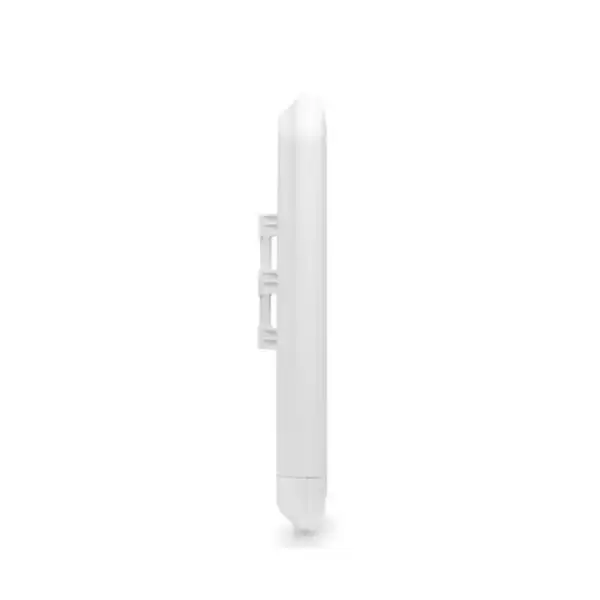
The NanoStation 5AC is relatively slim: Ubiquiti lists 257 by 84 by 30 mm without the mount and 257 by 84 by 41 mm with the mount, at approximately 233 grams. Its UV-resistant polycarbonate enclosure is designed for outdoor deployment. Pole and wall mounting hardware is listed among the supplied items, making it suitable for compact mounting positions where a large dish antenna would be impractical.
Small size does not eliminate mounting engineering. The bracket or pole must be sound, sufficiently high for path clearance and accessible for safe installation. Check for movement under wind, and avoid positions that turn routine maintenance into hazardous work. The cable should be routed with a drip loop and appropriate weather protection. Maintain enough physical clearance to inspect connections or replace the unit without dismantling unrelated building infrastructure.
Cabling, grounding and surge protection
Ubiquiti’s installation guide calls for shielded Category 5 or better cabling with an appropriate drain wire for outdoor Ethernet runs. It also recommends surge protection for outdoor deployments, including protection near the radio and at the building entry point. These details matter because the radio is often located on exposed walls, rooftop poles or other elevated structures. A working wireless link is not a complete installation if the cable run is vulnerable.
Use suitable outdoor-rated cable, properly installed connectors and a grounding approach consistent with manufacturer instructions and local electrical practice. Consider lightning exposure, cable entry, bonding and the location of network equipment inside the building. Surge devices reduce certain risks but cannot guarantee protection from a direct lightning strike. Have a qualified installer review protective measures, particularly on tall structures or sites with expensive downstream network equipment.
A dedicated 2.4 GHz management path
The NS-5AC includes a dedicated management radio operating in the 2.4 GHz band, separate from its primary 5 GHz airMAX link. This can make on-site setup and maintenance more convenient, especially before a remote connection is fully configured. Ubiquiti’s documentation describes airOS access through the management Wi-Fi facility. Management access should be treated as an administrative function and configured with appropriate controls.
This feature should not be mistaken for a conventional 2.4 GHz public hotspot covering an entire property. If customers, staff or guests need ordinary Wi-Fi access, plan a compatible indoor or outdoor access point on the wired network at the destination. Keeping the backhaul and client-access functions separate often gives clearer responsibilities: the NanoStation provides the link, while purpose-designed access points provide end-user wireless coverage.
Access point and station settings
Ubiquiti lists access point and station operating modes for the NS-5AC. In a two-ended link, the installer must decide which endpoint advertises the wireless service and which endpoint joins it, then configure the corresponding wireless settings and network bridge behaviour. The intended configuration should reflect how the source router, switches, VLANs and local networks are arranged. Mode selection alone does not guarantee that traffic will pass correctly.
Document the device names, addresses, management method and relationship between the endpoints. Plan whether the remote side should simply extend an existing Layer 2 segment or form part of a routed architecture supported by the overall design. Test DHCP behaviour, gateway reachability and any required VLAN tagging after the radios associate. Choose a management address scheme that still permits troubleshooting when the primary internet connection is unavailable.
airMAX compatibility before purchase
The main wireless link uses Ubiquiti’s airMAX platform rather than behaving as a universal companion to any consumer Wi-Fi extender. A purchaser should therefore confirm that the intended peer radio, access point, firmware and selected operating mode are mutually compatible. Product families, generations and country-dependent firmware options may differ. A matching brand name or the presence of a 5 GHz label is not enough to establish an interoperable link.
Send the existing network model numbers to the installer or seller before purchasing an additional station. For a new point-to-point deployment, specify both endpoints as one engineered system. For an existing point-to-multipoint network, confirm that the base station supports the planned client mode, that enough airtime remains available and that the antenna’s coverage fits the subscriber location. Interoperability should be verified for the exact device versions, not assumed.
airOS and operational configuration
The airOS interface provides the controls required to configure and observe the outdoor link, including supported wireless and network settings. Ubiquiti also documents features such as reporting of data rates, link status and packet errors. A reliable setup begins with changing administrative credentials, applying appropriate firmware, choosing the permitted country settings and recording the agreed configuration. Never use a default password on an exposed or business-critical installation.
Before making changes, save a verified configuration backup and agree how the link will be restored if remote management becomes unreachable. Where remote administration is enabled, restrict it to trusted networks and appropriate users. Avoid publishing management interfaces directly to the internet. Configuration discipline is especially important for remote sites, where recovering a misconfigured radio may require physical access to a roof or pole.
UISP and managing multiple links
The manufacturer describes the NS-5AC as UISP-supported, which is useful for organisations operating multiple suitable Ubiquiti wireless endpoints. A management platform can help teams organise devices, monitor status and maintain visibility across distributed outdoor infrastructure. Actual management capabilities depend on compatible software, firmware and network access, so the product should not be represented as providing a particular hosted service or monitoring subscription by itself.
Create consistent site names, inventory records and installation notes from the beginning. Record location descriptions without exposing sensitive access credentials, label the network cables and document who is authorised to change settings. For a small two-radio bridge, straightforward device management may be sufficient; for an expanding provider or campus, centralised operational practices can save significant troubleshooting effort. The aim is repeatable support, not a dashboard for its own sake.
Linking office and warehouse buildings
One practical scenario is an organisation with a main office network and a separate warehouse that needs internal applications, inventory systems and internet access. A point-to-point wireless bridge may avoid trenching a long cable route across a yard or private compound. The source-side radio can connect to the office switch, while the remote-side radio connects to appropriate local switching and access points inside the warehouse.
Before selecting the link, count the users and devices, identify any cloud applications and check whether warehouse machinery, trucks or stacked containers can obstruct the path. Consider what happens during a power outage at one building. A good design includes a reliable local network at each end and a wireless path sized for busy operational periods. Wireless connectivity solves the inter-building gap; it does not replace proper switching, Wi-Fi coverage or application planning.
Connecting a remote CCTV location
A remote camera cluster can be a good candidate for a dedicated bridge where Ethernet or fibre installation is impractical. The NanoStation link transports data between the camera-side network and the recording or monitoring network, subject to a suitable site survey. It should not be confused with a camera or video recorder. Estimate the aggregate camera bitrate, including changes from night scenes, motion and recording settings, before choosing the wireless capacity.
Plan for enough upstream performance, stable latency and adequate margin during adverse radio conditions. Camera switches, recording equipment and power systems all remain part of the solution. Consider secure network segmentation and whether footage must remain locally available during temporary link interruptions. If surveillance is safety-critical, determine the acceptable outage duration and evaluate redundant connectivity or local recording rather than relying on an untested single wireless hop.
Guest accommodation and hospitality networks
Properties with separate lodges, reception buildings or service blocks may need a network path across gardens or open space. A directional bridge can connect separate wired network zones where a clear outdoor path exists. At the remote end, dedicated guest Wi-Fi access points can deliver local coverage while the NanoStation handles the inter-building transport. This separation makes it easier to design guest coverage and outdoor backhaul for their different purposes.
Hospitality deployments also need guest isolation, appropriate bandwidth management and a support plan for busy periods. Do not assume that a successful radio association guarantees satisfactory video calls or streaming for a full property. Estimate concurrent usage, measure application performance and check whether the source internet service can support all locations. For complex grounds or many scattered buildings, a multi-link architecture may be more suitable than one bridge.
Small campuses and institutional sites
A school, training centre, medical office or other multi-building site may need secure connectivity between nearby structures. The NS-5AC can be considered as one component of that network, provided the installation satisfies local rules and site-specific reliability requirements. Network planners should determine whether shared printers, telephony, administration systems or other services need a single network segment or a deliberately separated network architecture.
Pay attention to access control, data sensitivity and traffic prioritisation. A wireless path should not bypass an organisation’s security boundaries merely because two buildings need connectivity. Where disruption would affect critical operations, define acceptable recovery time and consider redundancy. The right design may use multiple wireless links, protected fibre, or another technology instead. Hardware should be selected after requirements are documented, not before.
Remote work areas and temporary operations
An outdoor bridge may support a temporary field office, a project compound or a remote work area where a suitable network source is visible. Because the NS-5AC is compact and PoE-powered, it can fit into a planned temporary installation more easily than some larger radio systems. Temporary does not mean improvised: the mast, power and cable route still need to be secure and adequately protected from weather.
Check the planned duration, changes in the site layout and the position of moving equipment. Construction cranes, stacked materials and new structures may interfere with a once-clear path. If equipment will be moved, keep notes on the original alignment and settings. Confirm that any site owner approvals and relevant radio-operation requirements are in place. A small upfront survey can prevent repeated service interruptions later.
Planning the first site survey
Begin with a simple drawing that identifies the upstream router or switch, the source mounting point, the distant mounting point and the devices that require service. Note the approximate distance, roof heights and prominent obstacles. Photograph the view from both endpoints where it is safe to do so. Also record the cable path, power source, building-entry point and practical location for surge protection or an indoor network cabinet.
A site survey should answer whether the radio can be mounted in the right direction, whether the Fresnel zone is adequately clear and whether acceptable spectrum is available. For demanding projects, include an RF link calculation and interference assessment. Confirm property permissions and access arrangements before scheduling installation. The better the survey notes, the easier it is to compare equipment options and avoid surprise site work.
Preparing a realistic equipment list
A complete bridge bill of materials may include two appropriate compatible outdoor radios, the mounting hardware, suitable outdoor Ethernet cabling, surge protection, switching or router connections and a reliable power source at each end. Some items are included with the NS-5AC as specified by Ubiquiti, including a 24V Gigabit PoE adapter and mounting hardware; nevertheless, the supplied kit and local sales package should be confirmed before an order is accepted.
Do not assume the radio includes an internet subscription, camera, indoor access point, full mast, extended cable run or a site-specific electrical installation. The customer should ask which parts of the planned deployment are being quoted separately. If the site has several endpoint devices, plan the appropriate switch and power distribution. A clear equipment list makes it much easier to understand the total installed solution.
Mounting and initial alignment
Installers should follow the manufacturer’s mounting instructions and relevant safe-work practices. Once the unit is secured on its approved pole or wall bracket, orient the directional face toward the corresponding endpoint. Arrange cabling so that movement, strain and rainwater do not damage the connection. It is helpful to retain enough cable slack for service while keeping the outdoor run neatly supported and protected.
Alignment should be based on received-signal and link-quality information, not visual judgment alone. Make small changes, allow measurements to stabilise and compare the resulting quality in both directions. Tighten the mount after alignment, then verify that the act of securing it did not disturb the orientation. Repeat basic testing under normal application traffic. A link that merely shows a connected indicator may still need alignment or channel work before handover.
Commissioning and acceptance testing
Before the installer signs off, verify that the radios are operating on permitted frequencies and with the intended power settings. Confirm the primary Ethernet links are negotiating correctly and that devices at the far end can reach the appropriate network services. Record signal levels, noise or interference indicators, negotiated rates and actual application tests. A useful acceptance report states what was measured, when it was measured and any known limitations.
Test both uplink and downlink traffic where appropriate, including peak or representative business loads. Check packet loss and latency for applications that need consistent responsiveness. Verify that the link recovers cleanly after a controlled power cycle, and that administrative access works through the agreed management route. Capture a final configuration backup and provide basic network documentation to the party responsible for ongoing support.
Troubleshooting a weak connection
When a link slows down, look first for changes rather than immediately increasing transmit power. Has a tree grown into the path, a bracket shifted, a cable filled with moisture or a new radio appeared nearby? Review signal strength, quality, packet errors, Ethernet negotiation and recent configuration changes. Test the wired endpoints separately to avoid blaming the radio for a switch or upstream internet problem.
If the physical path is clear, examine channel congestion, channel width and compatibility settings. Compare conditions at both ends of the link. A lower, more stable rate may be preferable to an intermittent high-rate association. Keep one change at a time and note its effect so troubleshooting remains reversible. When the problem persists, an installer with suitable RF tools can distinguish interference, poor alignment and faulty hardware more reliably.
Security and network separation
Treat the bridge as part of the organisation’s network security boundary. Use supported secure wireless settings, strong unique administrative credentials and controlled access to the management plane. Review firmware updates through an approved maintenance process. Where guest devices, cameras and business systems share the physical link, apply the necessary VLAN or routing policies in the broader network architecture rather than assuming the radio creates security separation automatically.
Document who can administer the equipment and which network devices may reach it. Remote management should use trusted paths; avoid unnecessary open ports or publicly accessible interfaces. Back up working configurations after approved changes. If a device is replaced, ensure the old unit is handled appropriately and no credentials remain exposed. Secure wireless networking requires operational care after installation as well as correct equipment selection.
Routine maintenance for outdoor sites
Outdoor devices operate in changing conditions. Include periodic checks of brackets, pole stability, cable jackets, connectors, cable glands, grounding and surge protection. Review the path for vegetation growth or new obstructions. Look for unusual packet-error patterns, repeated restarts or declining connection quality. Maintenance frequency should reflect how exposed the site is and how important the connection is to business operations.
Use a documented method to assess firmware releases and apply changes during suitable service windows. Retain configuration backups and known-good settings. If the link supports critical services, identify the person responsible for response and the method for restoring connectivity when remote administration is not possible. A few minutes of planned inspection can prevent avoidable time spent troubleshooting from a difficult rooftop.
Power continuity and remote availability
Even an efficiently powered outdoor radio becomes unavailable when its local power source fails. The NS-5AC’s maximum consumption is listed as 9W, but backup-power planning should include the injector or PoE switch, local networking equipment and any other devices required for the service. A backup system that powers only the radio may not keep the network useful if the source router or remote switch is offline.
Choose an appropriate UPS or alternative backup arrangement based on measured loads and a defined outage target, not a generic battery-life promise. Protect electrical equipment from moisture and excessive heat. If the bridge is used for cameras or critical operations, agree how temporary power loss will affect recording, access and alarms. A practical continuity plan covers both endpoints and the equipment between the user and the internet or server.
Temperature, humidity and exposure
Ubiquiti lists an operating temperature range of minus 40 to 70 degrees Celsius and 5 to 95 percent non-condensing operating humidity for the NS-5AC. These published environmental figures support outdoor planning, but they do not excuse poor cable entry, standing water or an unsuitable power installation. Heat can become especially significant for enclosed injectors or switches installed in unventilated spaces, even when the radio itself is outside.
Mount the enclosure according to manufacturer guidance and make sure surrounding equipment is suitable for its location. In wet environments, pay particular attention to water running down cables toward connectors. In exposed coastal or industrial surroundings, check mounting hardware and connectors more frequently. Weather tolerance is a system property: it includes the radio, cable, mounting, power equipment and the quality of the installation.
When a different antenna system is better
The NS-5AC balances an integrated antenna, compact form and useful outdoor connectivity. It is not automatically the best choice for every point-to-point route. A longer, crowded or highly directional path may benefit from a model with a narrower beam or higher antenna gain. A provider covering many clients might need a purpose-selected sector access point. A property needing standard end-user Wi-Fi may be better served by dedicated access points.
Compare candidates using the actual link distance, path clearance, local spectrum conditions, throughput requirement, antenna pattern, mounting restrictions and future expansion. Avoid selecting the lowest-cost radio and discovering later that the installation needs major height or alignment changes. Where fibre can be installed affordably and protected well, it may also deserve consideration, especially for high-capacity or highly critical connections.
NanoStation 5AC versus Loco5AC
The NS-5AC and the smaller NanoStation 5AC Loco belong to the same broader Ubiquiti outdoor product family, but their physical specifications and connection options are not identical. Buyers should verify the full model code rather than relying on photographs or the general phrase NanoStation 5AC. The NS-5AC discussed here is the model with the integrated 16 dBi antenna and two Gigabit Ethernet interfaces.
A Loco model may make sense in another design, but substituting it without an engineering review can change the link budget, interfaces, mounting and power requirements. Similarly, a legacy NanoStation M-series unit should not be assumed interchangeable with an airMAX ac deployment. List each radio’s exact model at both endpoints and verify operating-mode compatibility. This prevents a common purchasing error: ordering a product with a familiar name but the wrong specifications.
Tanzania deployment considerations
For a Tanzania-bound project, begin by verifying the operating rules applicable to the particular location and wireless service. The radio’s worldwide hardware frequency range is not a statement of Tanzanian approval or permission to use every channel. Have the responsible installer confirm allowed settings and any relevant authorisation or coordination requirements with the applicable regulatory framework. Do not base a compliance decision on another country’s channel list.
Also plan for the physical site: power quality, roof access, rainy-weather cable protection, security of outdoor equipment and the availability of people able to maintain the connection. Urban rooftops, rural compounds and hospitality sites can present very different obstacles and interference conditions. FourTeck Tanzania can evaluate the product requirement through a quotation or enquiry, but no particular local stock, delivery coverage, warranty or installation service should be assumed without confirmation.
How many units to order
The required quantity is determined by the network topology. If you are joining two locations and have no compatible radio installed at either end, a point-to-point design typically needs a suitable unit at each end. If you are adding a subscriber to an existing compatible airMAX access point, the purchase may involve only the subscriber-side equipment, provided that the existing base station, capacity and configuration support the new endpoint.
A quantity decision should also include spares for sites where downtime is expensive, but spare stock is a business choice rather than a universal requirement. Confirm included injectors, mounting materials, cables and surge protection for each endpoint. If several remote buildings must be served, request a simple network diagram before ordering identical radios for every location. That diagram should show the base-station design, paths and total shared bandwidth requirements.
Questions to ask before receiving a quote
Give the supplier a short description of the two sites or the existing base-station network. Include approximate separation, whether there is clear sight between mounting points, the intended number of users or cameras and the target application performance. Mention any existing Ubiquiti equipment by its exact model code. Describe available power and network connections at both locations, plus any unusual cable or mast constraints.
Ask the seller or installer to identify the proposed compatible endpoints, included and additional components, safe mounting approach and any site survey assumptions. Request clarity about configuration responsibility, testing, support and the specific commercial terms that will apply. Confirm pricing, availability, delivery and warranty directly for the intended Tanzania order. This produces a more meaningful quotation than asking only for a single NS-5AC radio without installation context.
The purchase decision in one view
Choose the Ubiquiti NanoStation 5AC NS-5AC when you need a compact 5 GHz directional airMAX radio, have a feasible outdoor path, and can plan a compatible managed network connection. The verified 16 dBi integrated antenna, two Gigabit interfaces, outdoor mounting options and PoE power make it a practical component for many carefully designed links. Its strongest value appears when the link is engineered around a real network problem.
Choose a different approach when the route is obstructed, the intended peer equipment is incompatible, ordinary household Wi-Fi coverage is the primary objective or the capacity requirement exceeds what a sound link design can demonstrate. Before ordering, validate the path, radio settings, power, protection and responsibility for ongoing support. A well-matched pair of devices and a documented installation matter more than an impressive but unverified speed or range promise.
Frequently asked questions
Can one NS-5AC connect two buildings by itself?
Usually not when neither building has existing compatible wireless equipment. A dedicated point-to-point bridge needs a suitable radio endpoint at each side. The source side must connect to the existing network, while the distant side connects to the required local network devices. Confirm model compatibility and the full bill of materials before ordering.
Is the NS-5AC an ordinary Wi-Fi extender for phones?
It is primarily an outdoor airMAX ac directional radio rather than a general household coverage extender. Its 2.4 GHz facility is intended for management. For normal phone, laptop and guest connectivity at the far end, use a purpose-designed compatible Wi-Fi access point connected to the network provided by the bridge.
Does two Gigabit Ethernet ports mean 2 Gbps wireless speed?
No. The two Gigabit ports describe wired interfaces, not an aggregate wireless performance guarantee. Actual useful wireless throughput varies with the radio link, channel width, interference, counterpart equipment and traffic patterns. Size the link from measured or engineered application demand rather than summing Ethernet port ratings.
What is the antenna gain of the NS-5AC?
Ubiquiti specifies an integrated 16 dBi dual-linear directional antenna. The specified beamwidth is approximately 45 degrees in the listed planes. Its orientation matters because it directs energy toward the other end of the link. The antenna gain does not guarantee operation through walls, trees or obstructed terrain.
What power supply should I use?
The manufacturer lists a 24V DC, 0.5A Gigabit PoE adapter in the package and a maximum device consumption of 9W. Other supported PoE input arrangements require matching the technical specification exactly. Do not assume a random passive injector or switch port is safe merely because it uses an RJ45 connector.
Can it serve as a subscriber on a point-to-multipoint network?
It can be evaluated for use as an airMAX station in a compatible access-point network. Verify the access point’s precise model, software, supported modes, capacity and antenna coverage first. A subscriber should be positioned in a suitable directional path and should not be added to an overloaded sector without checking airtime and peak demand.
Will it work in heavy rain?
The device has an outdoor-oriented, UV-resistant enclosure and a published environmental operating range. However, the complete installation must be protected against water ingress, cable damage, unsafe mounting and electrical surges. Rain conditions and link reliability should be considered in the radio design. No installation can be promised outage-free solely from the enclosure specification.
How far will the bridge reach?
There is no defensible one-number answer for every property. Practical range depends on clear path geometry, Fresnel-zone clearance, legal operating power, interference, antenna alignment and required throughput. Ask for a site-specific path study and field testing rather than treating a retailer’s maximum-distance figure as an installation guarantee.
Can the NS-5AC power another Ethernet device?
It has two Gigabit Ethernet interfaces, but power delivery to any attached device should not be assumed. If you intend to connect a camera, access point or another PoE accessory, verify the secondary port’s exact supported functionality, software settings, power budget and compatibility in the relevant manufacturer documentation before cabling it.
Is the NanoStation 5AC the same as the Loco5AC?
No. The names are similar, but the devices have different hardware configurations. This product page describes the NS-5AC with a 16 dBi antenna and two Gigabit Ethernet ports. Confirm the exact model number, not only the appearance or generic family name, when comparing a quote or ordering a replacement.
Is there an advertised Tanzania price or stock status?
No confirmed price, inventory position, shipping promise or local warranty has been established for this specific FourTeck Tanzania listing. Commercial information should be requested and verified as part of a current quotation. Prices shown by unrelated sellers are not evidence of the conditions that will apply to a FourTeck order.
What should I provide for a useful quotation?
Share the approximate distance between locations, clear-path conditions, existing radio model numbers, expected applications, connected device count, power arrangements and mounting constraints. If possible, include a simple site diagram and photographs taken safely from prospective mounting locations. That context helps distinguish a single subscriber addition from a complete two-ended bridge.
Request an NS-5AC network quotation
Tell FourTeck Tanzania whether you need a complete building-to-building wireless bridge or an additional station for an existing compatible airMAX network. Include the approximate distance, clear-path information, connected devices and power arrangements. Request confirmation of the exact product package, price, stock, applicable warranty and any installation scope before ordering.
Contact FourTeck Tanzania for product and configuration guidance.




Reviews
There are no reviews yet.