
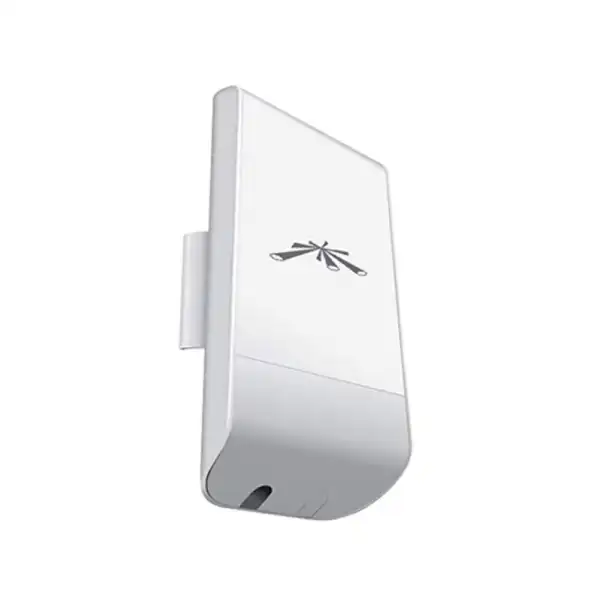
OUTDOOR 5 GHz WIRELESS CPE · LocoM5
Connect the right places with a planned wireless link
A compact directional airMAX radio for building bridges and compatible subscriber connections. Review the signal path, network capacity and power arrangements before selecting equipment.
Specifications at a glance
| Model | LocoM5 |
|---|---|
| Radio family | 5 GHz airMAX M-series CPE |
| Antenna | 13 dBi dual-linear; 45° nominal beamwidth |
| Ethernet | 1 × 10/100 Mbps RJ45 |
| Power | 24V passive PoE; 22–27V DC |
| Adapter listed | 24V, 0.5A |
| Maximum device consumption | 5.5W |
| Housing and mounting | Outdoor UV-stabilized polycarbonate; pole mounting |
| Dimensions and weight | 161 × 31 × 80 mm; approximately 180 g |
Device specifications do not guarantee a particular link range, capacity, price, legal approval or supply status.
Start with the network requirement
For a buyer considering Ubiquiti NanoStation loco M5 Tanzania, the important question is what the network must connect. The LocoM5 is a directional outdoor 5 GHz radio intended to form part of a fixed wireless arrangement. It can be considered for a building-to-building Ethernet bridge or a compatible subscriber connection to an existing airMAX network. It is not designed to serve as an ordinary household router or indoor mesh extender. The integrated antenna faces a chosen destination, so its placement is part of the engineering decision.
Before selecting equipment, record the locations of both ends, intended applications, power availability and existing devices. One unit alone does not create a complete bridge where the opposite location has no compatible radio. If a provider operates the distant access point, obtain its precise model and required station configuration. If you own both ends, design the complete connection rather than assuming a single product purchase will meet the need.
Where a compact directional CPE is useful
An outdoor CPE can extend a wired network to a second building when constructing a buried cable route would be difficult. It may serve an office, warehouse outbuilding, workshop or other site where there is a feasible line of sight. Fixed-wireless operators can use compatible subscriber stations to reach a properly configured access-point network. Other possible uses include connecting carefully designed camera or telemetry networks, provided their traffic and resilience requirements fit the radio.
The LocoM5 can help reduce the number of separate outdoor components because its antenna is integrated with the radio. However, a small unit is not always a better unit. A distant or heavily obstructed path, congested spectrum, higher required capacity or complex multi-user base-station design may justify different equipment. Assess the work the radio must perform instead of choosing it because a broad reseller description says it works over a particular distance.
Core manufacturer specifications
Ubiquiti identifies the model as LocoM5 and lists an integrated 13 dBi antenna with dual-linear polarization. The nominal beamwidth is 45 degrees in its specified planes. The device has one 10/100 Mbps RJ45 network interface, a UV-stabilized polycarbonate outdoor enclosure, and a pole-mounting arrangement. It measures approximately 161 by 31 by 80 millimetres and weighs about 180 grams. The small form factor simplifies some installations but does not determine whether a proposed pole or wall structure is suitable.
The specified power method is 24V passive PoE, with 22–27V DC supported and a listed 24V, 0.5A injector adapter. Maximum power consumption is 5.5W. Manufacturer environmental specifications indicate operating temperatures from -30 to 75 degrees Celsius and non-condensing humidity from 5 to 95 percent. These numbers are equipment ratings, not proof of a particular site’s throughput, usable range, local legal approval or resilience to lightning.
Understanding airMAX rather than ordinary Wi-Fi
airMAX is a wireless platform for planned outdoor connections. When operating as part of an airMAX network, an access point and its stations coordinate communication using the supported airMAX features. This differs from expecting a phone or laptop to discover a general-purpose home wireless network and join it without special equipment. Ubiquiti’s airOS documentation explains that enabling airMAX on an access point prevents ordinary standard Wi-Fi clients from simply joining that airMAX connection.
For a remote office, the practical result is that the bridge and local Wi-Fi service should often be separate devices. The outdoor link transports network traffic toward a router, switch or indoor access point. That local equipment then delivers internet access, client connectivity and the security policies users need. This division of responsibilities gives installers flexibility and avoids placing the directional outdoor radio where it has poor line of sight merely to improve indoor reception.
Building a two-endpoint wireless bridge
In a point-to-point arrangement, one radio is located at each side of an intended path. Their antennas point toward each other, and their compatible network roles and wireless settings establish a link. Each side connects its radio into a wired network through a correct power and Ethernet arrangement. Depending on the architecture, the resulting path can extend Ethernet connectivity or provide the transport needed for communication between separately routed networks.
Neither the link distance nor the appearance of the buildings guarantees success. An installer evaluates mounting height, the space around the intended signal path, nearby radio use, site power and the wired devices at each end. The design should state what success means: connection speed, average and peak traffic, acceptable delay, operating hours and reliability expectations. Recording these matters before ordering makes it easier to identify whether the LocoM5 has adequate capacity or a different system is justified.
Subscriber use in a point-to-multipoint network
A point-to-multipoint access network connects a suitably designed base station to several subscriber radios. A LocoM5 may be considered as a station when the access point and its operating mode support that particular M-series device. The access-point antenna, channel plan, number of clients and total capacity are significant. A LocoM5 configured as an access point is not automatically an ideal sector base station for a large customer population.
If replacing an existing subscriber unit, identify the provider’s base-station model, current software and supported wireless configuration. Simply matching frequency bands is insufficient. Ask whether that exact model can associate in the required airMAX mode and how access security is provisioned. Also consider that a new subscriber consumes shared airtime on an existing network. Performance for the whole site depends on link quality and total demand, not only the advertised capability of an individual subscriber radio.
Making sense of antenna gain and beamwidth
The 13 dBi integrated directional antenna concentrates its radio response toward a planned direction. This is helpful when the opposite endpoint occupies a known location and the installation can be aimed carefully. The specified nominal 45-degree beamwidth is an antenna characteristic, not a fixed service boundary and not a promise that every location inside that angle will connect equally well. The physical environment can significantly change useful performance.
Antenna gain is not the same thing as internet speed or transmitter output power. Signal levels at the far endpoint depend on propagation, obstructions, interference and the equipment used at both ends. Careful alignment should be verified by available radio diagnostics and actual traffic testing. If the path is blocked, increasing transmit power or choosing a higher antenna figure may not correct the underlying problem. Always comply with the radio settings permitted for the actual deployment location.
Why clear line of sight matters
A fixed 5 GHz link benefits from an unobstructed path. Rooftops, trees, growing vegetation, terrain ridges and nearby construction can degrade a path that seems possible on a map. The region around the direct path, often discussed as Fresnel-zone clearance, is also relevant. Merely seeing the distant building from one point does not establish that the installed antennas will have a suitable propagation path in all seasons and weather.
Collect the approximate endpoint positions, link length, proposed mounting heights and photographs looking toward each destination. Use this material for a preliminary survey, then verify conditions at the real mounting positions. A radio placed higher can improve clearance but may increase installation difficulty, wind exposure and cable length. Good design balances the usable path with structural safety and maintenance access. Avoid committing to a nominal distance until these practical details have been assessed.
The importance of Tanzania frequency requirements
The LocoM5 is a 5 GHz radio, but equipment capability does not equal permission to use every possible 5 GHz channel. Allowed channels, power levels, required procedures and equipment approval conditions depend on the current national framework and applicable regional device variant. For Tanzania deployments, the project should be checked against current telecommunications requirements before installation. No claim is made here that this precise device has a particular Tanzanian type-approval certificate.
Consult appropriately qualified personnel when selecting regulatory-domain settings and channels. Do not copy a foreign tutorial’s frequency, country selection or transmit-power adjustment as a shortcut. Some frequencies may be subject to additional conditions, and compliance must be assessed for the exact application. Proper channel planning protects the link and neighbouring systems. It should form part of the installation record along with device model, firmware version and the justification for selected radio parameters.
Planning the channel and interference environment
Outdoor 5 GHz spectrum can be affected by other fixed-wireless installations, reflections from nearby structures and changes in neighbouring networks. An apparently quiet channel at one instant can become crowded later. A site assessment can identify occupied channels and help select an appropriate channel width. Wider settings may increase available radio capacity under favourable conditions, but can also expose the link to more interference and use more spectrum.
Assess both endpoints rather than relying on measurements from only one roof. When the far end is managed by a wireless provider, coordinate settings with that operator. Avoid arbitrary frequency changes that may disconnect existing subscribers. Consider future growth and make a note of the final configuration so technical staff know what to inspect if service declines. Real stability is more meaningful than a maximum speed figure measured under conditions unlike those at the actual site.
Fast Ethernet is a real planning limit
The single LocoM5 port is rated at 10/100 Mbps, commonly described as Fast Ethernet. Wireless modulation or advertised radio rates should not be confused with the throughput available through the wired connection. Traffic that enters and leaves the unit through one Fast Ethernet port cannot turn into a Gigabit Ethernet connection merely because another component of the network uses Gigabit ports.
Estimate practical demand using the applications that need the link: file transfers, cameras, voice services, remote management and cloud applications. Include busy-hour concurrency, expected growth and protocol overhead rather than assuming an ideal link will deliver a constant round number. If a location needs sustained capacity beyond a Fast Ethernet design, compare another appropriate backhaul system before buying. A predictable engineering constraint identified early is better than a link that has to be replaced after installation.
24V passive PoE and compatible power
Ubiquiti specifies 24V passive Power over Ethernet for this model, not a blanket ability to accept every type of power supplied over an Ethernet cable. The manufacturer lists a 24V, 0.5A adapter and 22–27V supported DC range. The injector arrangement should match the supplied radio and the manufacturer’s installation instructions. The existence of an RJ45 connector does not make an arbitrary PoE switch output compatible.
Where a network uses standard negotiated 802.3af or 802.3at power, verify the exact approved conversion arrangement, if required, rather than connecting equipment experimentally. Plan a safe outlet for the injector and assess whether backup electricity is needed. Power continuity may matter more at a remote site than at a staffed office. The radio’s 5.5W maximum device consumption is not the total energy demand of attached switches, access points, cameras or any power-conversion equipment.
Cabling, grounding and electrical protection
Outdoor cabling needs deliberate preparation. Ubiquiti’s installation guidance calls for appropriate shielded Ethernet cabling and grounding. Cable routes should resist mechanical strain, avoid sharp bends and protect vulnerable connector locations against water entry. Drip loops, suitable supports and protection at building entrances deserve attention. A well-aligned radio cannot maintain service when its Ethernet cable is damaged or intermittently disconnected.
Power and data cabling can also be exposed to electrical events. A competent installer should select grounding, bonding and appropriate surge protection for the site and apply local electrical safety requirements. No installation technique can promise total immunity to severe lightning. Keep the injector and connected indoor network equipment in appropriate locations. Record the cable route for later inspection, and avoid improvised adapters or exposed joins that create preventable failure points.
Pole mounting and outdoor durability
The LocoM5 has a lightweight outdoor enclosure and manufacturer-listed pole mounting. Outdoor suitability, however, is not the same as an assurance that any mast, roof edge or fastener will work. Consider the strength and rigidity of the support, the effects of wind, unobstructed pointing and reasonable access for future service. A bracket that permits movement can gradually undermine antenna alignment and performance.
Select a position that allows the antenna to face the other endpoint without being shadowed by nearby structural metalwork. Keep wiring tidy and mechanically supported. Consider heat, rainfall, exposed connectors, maintenance safety and the effect of later building work. A location that provides slightly better signal but requires unsafe access for every adjustment may be a poor long-term choice. Have the installation hardware and fixing method selected for the actual structure rather than relying on a generic mounting photograph.
Network security and administrator access
A bridge extends the reach of a network, and with that reach come security responsibilities. Set unique administration credentials, use the security options available for the applicable airOS version, and restrict management access to authorised people. Avoid using default logins on a commissioned system. Keep configuration records securely so a replacement or recovery does not depend on one technician’s memory.
Decide whether traffic should be bridged directly or separated through routers, VLANs and firewalls. Staff devices, guests, cameras and management systems may need distinct security policies even when they share the same physical backhaul. A working radio association is not evidence that the network is correctly segmented. If the link belongs to an internet provider, document who owns configuration changes and who responds to alarms. Never publish operational credentials or private configuration exports with a public quotation request.
Choosing between bridging and routing
A transparent Layer 2 bridge can suit situations where the two endpoints are intended to behave as parts of one Ethernet environment. A routed design can offer clearer network boundaries and control over traffic between locations. The choice affects addresses, DHCP services, broadcast traffic, firewall rules and troubleshooting. It should be made while designing the LAN, not after the radio is mounted.
For more complex environments, verify required VLAN, multicast, device-discovery or specialist protocol behaviour end to end. A generic claim that a wireless bridge carries Ethernet does not guarantee that every uncommon application will operate without adjustments. Write down the service flows and constraints before configuration. This permits the installer to choose the relevant operating mode and test it with representative applications rather than guessing from an unrelated network diagram.
Commissioning and link alignment
Start by drawing a simple topology that includes upstream routers, switches, power injectors, each radio and all critical downstream equipment. Confirm the wireless roles, management addressing and credentials on a bench before mounting devices high above the ground. Use manufacturer guidance relevant to the installed software. Note the initial settings so the installer can return to a known state during troubleshooting.
After mounting, align both radios progressively while observing available signal and link-quality information. Check legal channel settings and secure the wireless connection, then verify the wired network on each side. Test reachability in both directions and assess throughput, latency and packet loss during representative traffic. Finally, document device locations, configuration, observed performance and the procedure for safe maintenance. A green link indicator is a starting point for testing, not the definition of a completed installation.
Monitoring quality instead of guessing performance
Good link monitoring distinguishes radio association from useful service. Where the firmware provides them, review received signal, noise estimates, errors, retries, negotiated radio behaviour and uptime. Then compare those values with application-level measurements. A link may remain connected while poor channel conditions reduce available throughput or create unacceptable delay during busy periods.
Set up a baseline immediately after commissioning. If users later report trouble, compare both ends with that baseline before changing parameters. Loose brackets, water ingress, weak power, deteriorated cabling, new obstructions and neighbouring radio changes can produce similar symptoms. Inspect them methodically. Randomly increasing transmit power or changing multiple settings simultaneously makes diagnosis harder and could breach regulatory restrictions. Consistent documentation often saves more time than replacing equipment without evidence of a hardware fault.
Cameras and continuous video traffic
Connecting remote cameras can be a reasonable use for a designed outdoor link, but camera traffic needs calculation. Bitrate depends on image size, compression, frame rate, motion and recording settings. Several streams, plus remote playback and administrative traffic, may share the same path. The LocoM5’s Fast Ethernet interface should be considered when deciding how much traffic can move reliably to a recorder or monitoring centre.
The radio does not automatically supply the electricity required by the cameras. A remote site may need a proper camera PoE switch, network enclosure, backup power and surge protection. Decide whether recording happens locally or depends completely on the backhaul. Security-sensitive installations may require redundancy or an outage-alerting mechanism. Specify these needs before recommending equipment, because keeping a link connected is not the same as guaranteeing uninterrupted evidence capture.
Wi-Fi access for people at the remote site
A bridge and an indoor access point solve different problems. The LocoM5 can transport the connection between suitably equipped locations, while a separate indoor Wi-Fi device provides ordinary client coverage within the distant building. This separation keeps the directional outdoor radio aimed at the correct endpoint instead of forcing it into an awkward position for the benefit of users indoors.
Consider whether the destination needs one access point, several access points, a local Ethernet switch or a router with its own security rules. Building materials, floor layout and user capacity determine the indoor Wi-Fi design. When explaining the project to a supplier, distinguish the phrase ‘connect the building’ from ‘provide Wi-Fi throughout the building.’ The second request requires additional coverage design even when the point-to-point backhaul is successful.
Real-time calling and business applications
Video meetings, voice calls and interactive applications are sensitive to delay variation and packet loss. A bridge that appears fast during a brief file transfer may not deliver equally good call quality under sustained interference or congestion. Define which applications must work, how much traffic they generate and how service degradation should be measured. Test representative workloads before signing off a critical connection.
The network also includes upstream internet service, routers, firewalls and local switches, so diagnose service issues end to end. If the link forms a primary business connection, establish who can access equipment, who receives fault reports and how repairs are coordinated. A backup connection should be tested during a planned failover rather than assumed to work. Operational reliability comes from the complete design, not a radio specification in isolation.
Remote sites and backup electricity
A small remote facility may need wireless connectivity even when its mains electricity is unreliable. The LocoM5’s maximum device consumption is stated as 5.5W, but the complete site budget can be significantly higher once the router, switch, cameras, any local Wi-Fi and conversion losses are included. A power plan should account for the required operating hours, recharge method and safe installation conditions.
A remote radio also needs a recovery and monitoring plan. If no technician is normally present, decide how interruptions will be detected and whether the local equipment should continue operating when the wireless path fails. Secure physical access and protect cabling against environmental damage. A low-power radio can contribute to a well-designed site, but low power consumption by itself is not proof that an off-grid installation will meet its autonomy target.
Evaluating interference in dense environments
The presence of other 5 GHz links can affect a proposed deployment even when the two buildings have good visibility. Interference, reflections and competing airtime may change with the time of day or with additions to neighbouring networks. Spectrum observations from the candidate site are therefore useful. An apparently free channel on one roof may be occupied when viewed from the other endpoint.
Where radio conditions are challenging, evaluate alternate mounting positions, appropriate antenna choices or a different technology that meets legal and application requirements. Avoid simply using the widest channel or highest possible power without assessment. If the other end belongs to a service provider, coordinate channel and configuration decisions with them. The objective is consistent usable throughput under realistic conditions, not the most impressive single measurement from an unrepresentative test.
Comparing older M-series and newer alternatives
A new link that needs substantial throughput should not automatically be designed around a Fast Ethernet radio. Compare prospective alternatives according to wired-port capacity, antenna pattern, achievable link design, power method, firmware capabilities, availability of matching units and installation requirements. Where the existing network already uses airMAX M-series equipment, maintaining interoperability may weigh more heavily than adopting a newer product in isolation.
Do not assume that two radios interoperate simply because they share a 5 GHz band or the Ubiquiti name. Some combinations of M-series and AC-generation equipment require particular modes or have compatibility limitations. The precise base-station model, software and role should be verified. A migration can also involve mounting changes, injector replacement or network redesign. Compare the cost of a complete working solution, not only the quoted price of each radio.
Firmware, support and lifecycle planning
The LocoM5 is an M-generation product, so long-term maintainability deserves consideration during a new purchase. Consult the manufacturer’s current guidance for the exact hardware and software before planning upgrades or expecting particular management features. Different distributors may describe the product’s lifecycle differently; do not turn an unverified third-party claim into a manufacturer status assertion.
Document what firmware is installed, which settings are in use and who is authorised to change them. Keep backups in a secure location and test significant configuration changes in a controlled way where possible. Consider replacement stock and compatibility with existing infrastructure. A site that relies on one difficult-to-replace component benefits from a spare or an agreed migration path. Procurement should include serviceability, not simply initial installation.
What comes with a complete project
The radio is one part of the solution. A complete two-endpoint connection may need another compatible radio, PoE supplies at both ends, outdoor-rated shielded Ethernet cable, mounting hardware, grounding and protection components, routers or switches, and sometimes a separate indoor Wi-Fi access point. Ubiquiti lists an adapter and pole-mounting hardware for the product, but an individual seller’s regional box and quotation contents should be confirmed.
Also decide whether the offer covers bench configuration, installation, antenna alignment, security settings, testing and documentation. A hardware-only item can be entirely suitable for an experienced installer, while a customer seeking a working network should request an appropriately scoped commissioning service. A quotation for one radio should never be mistaken for the cost of every component and service needed to connect two buildings.
A practical pre-purchase site checklist
Start with the approximate coordinates or addresses of both endpoints, link distance, proposed mounting height and clear photographs of the intended locations. State whether trees, rooftops or other obstacles appear along the path. Note available power and whether an existing pole or structure can be used safely. Identify the exact remote radio when connecting to a pre-existing network.
Next, describe traffic: number of office users, camera streams, planned applications, expected busy-hour load and the importance of service continuity. Indicate whether you need Ethernet connectivity only or indoor Wi-Fi at the destination as well. Request confirmation of compatible hardware and the legal operating configuration. These details allow a supplier to review whether the LocoM5 is a fit or whether a different approach better serves the site.
A sample two-office planning workflow
Imagine an office that needs to link a smaller outbuilding across a clear area. The network owner first lists the applications and estimates required bandwidth. An installer assesses candidate mounting positions, examines the path and confirms that safe electrical power and Ethernet connections are available at both ends. The installer then checks the proposed radios for compatible modes and determines the required injectors and accessories.
Before mounting, the radios are configured and tested together. Once installed, both antennas are aligned and the network is tested with realistic traffic. The final handover includes management details, measured performance and a simple fault checklist. This example illustrates an orderly process; it is not a statement that every two-office link will work with the LocoM5 or that a particular distance, speed or setup time is guaranteed.
Tanzania purchasing and installation considerations
For a project in Tanzania, verify the applicable radio rules and the exact regional variant of the equipment being offered. Consider the site’s weather exposure, available electricity, cable routing and access for maintenance. Commercial details such as actual stock, local price, delivery timing, installation coverage and warranty terms must be confirmed for the specific quotation. None of those details can be inferred from a manufacturer product sheet.
Avoid assumptions that a supplier has a local office or installation presence in a particular city unless confirmed. If installation is outside an easily serviced location, include the cost and practicality of repeat site access. Buyers should ask for a clear bill of materials, a description of who is responsible for legal configuration and details of the completed-link tests. This makes local procurement more transparent than comparing an isolated unit price.
Link ownership and maintenance responsibilities
A radio link that crosses between organisations needs explicit operational ownership. Decide which team controls the access point, station, channel settings and admin credentials. If a fixed-wireless provider owns the distant base station, their configuration and maintenance policies may govern what a subscriber can change. Agree how fault reports are exchanged and what information each party can access safely.
Keep a small maintenance record containing equipment model, radio roles, mounting locations, permitted settings, firmware versions, cable details and baseline test results. Inspect the support and cable routes when environmental conditions or building work change. A clear operational record reduces the chance that a well-intentioned adjustment takes down a working connection. Long-term service quality depends on these practices as much as on initial hardware selection.
Avoiding common purchasing mistakes
One mistake is ordering a single CPE for a completely new bridge that needs hardware at two sites. Another is expecting indoor smartphone coverage directly from an airMAX outdoor radio. Buyers also sometimes ignore the 10/100 Mbps port and plan for Gigabit traffic, or connect the unit to an incompatible PoE source. These errors are avoidable when the network diagram and electrical requirements are checked before procurement.
Other mistakes include treating a reseller’s maximum range as guaranteed, overlooking site obstructions, failing to plan mounting access and assuming that all Ubiquiti radios interoperate. A quote should identify the exact model and regional package, required accessories and scope of testing. If an installer cannot explain how the chosen device satisfies the site’s demand, ask for a clearer design rather than purchasing first and investigating the limits afterwards.
How to compare technical quotations fairly
When evaluating offers, compare like with like. Check how many radios are included, whether the power injectors match them, whether cabling and protection are allowed for, and who will configure and align the link. Determine whether quoted performance is an estimate, a lab specification or a site-specific commitment supported by measurements. Ask how the installer proposes to validate the service after installation.
Also compare warranty and support arrangements only when explicitly stated for each offer. An apparently inexpensive hardware-only quote may omit the labour and materials included in a commissioned solution. Separate necessary requirements from optional upgrades so the buyer understands both price and scope. A fair comparison should establish the cost of a reliable working network that meets the agreed applications, not simply the price of the smallest box.
What to request from FourTeck Tanzania
For a useful quotation, share where the network begins and ends, how far apart the sites are, what will travel over the link and what equipment already exists. Include photos of mounting locations, details of available electrical power, and any requirements for cameras, indoor access points, routing or backup service. If the link will join an operator’s base station, provide the exact model and approved station requirements.
Ask for confirmation of the LocoM5’s suitability, the required equipment quantity, regional compliance considerations and the complete accessories list. Request current stock, pricing, terms and installation scope for the actual transaction rather than relying on generic advertising. This information helps assess whether the Ubiquiti NanoStation loco M5 Tanzania requirement is best met by the specified radio or by a different compatible system.
Decision guide for a responsible deployment
Choose the LocoM5 only when a fixed outdoor 5 GHz link is appropriate, the remote equipment can communicate in a verified compatible mode, the path has suitable clearance and the required traffic fits the Fast Ethernet design. Plan safe 24V passive PoE, outdoor cable management and antenna alignment. Confirm all regulatory settings before operating the radio. Define who will own configuration and maintenance after commissioning.
If any of these conditions remain uncertain, obtain a link assessment rather than assuming the model will succeed. For a new capacity-intensive site, compare alternative equipment against the same design requirements. For an existing M-series installation, check interoperability before replacing components. A successful purchase is one that delivers the intended service safely, legally and maintainably, not simply one that matches a familiar model name.
Frequently asked questions
Can LocoM5 replace my home Wi-Fi extender?
It is an outdoor directional CPE for planned fixed links, not a general indoor mesh unit. Where ordinary phones or laptops need Wi-Fi at a remote building, use an appropriate outdoor backhaul and a separate indoor access point designed for client coverage.
How many radios are needed?
A new point-to-point bridge normally needs suitable equipment at both endpoints. One LocoM5 may be enough only when a compatible access point or other radio already exists at the far end. Confirm both ends and the configuration before purchasing.
Is it a Gigabit Ethernet radio?
No. The manufacturer specifies one 10/100 Mbps Ethernet interface. Wireless radio figures do not change that wired-port limit. Consider expected traffic and simultaneous applications when deciding if Fast Ethernet is sufficient.
Can I connect it to any PoE switch?
Do not assume so. The LocoM5 requires a compatible 24V passive PoE supply. Check manufacturer-specified power arrangements and conversion accessories when existing infrastructure supplies IEEE negotiated PoE at different voltages.
Will it link two buildings?
It may when a properly designed pair of compatible radios has suitable line of sight, legal operating settings, correct power and adequate capacity. A site assessment is needed to determine fit; a datasheet cannot guarantee a particular distance or throughput.
Does it give Wi-Fi to everyone at the far end?
It can transport a network connection to another location, but a separate indoor Wi-Fi access point will generally be needed for normal client access. The outdoor radio should be placed and aimed for the backhaul connection.
Can I use it for surveillance cameras?
It may carry camera network traffic if sufficient capacity and stability are available. Calculate aggregate camera bitrates and decide where recording occurs. Cameras need appropriate electrical supplies, and security-critical applications may require backup transport or outage monitoring.
Will it work with every airMAX AC device?
Compatibility must be checked for the exact devices, software versions and airMAX modes. Sharing the same manufacturer or frequency band is not enough. Ask the operator of the existing network to confirm approved subscriber equipment.
What distance can I expect?
There is no reliable universal distance promise. Path clearance, interference, installation height, the far-end antenna, legal transmit settings and required throughput all influence results. Have the intended link assessed using actual site information.
Is the device suitable for outdoor installation?
The manufacturer specifies UV-stabilized polycarbonate and pole mounting for outdoor use. Correct protected cabling, grounding, secure fixings and weather-conscious installation remain essential. The enclosure alone does not guarantee immunity to lightning or installation faults.
What comes in the box?
Manufacturer information lists pole-mounting equipment and a 24V, 0.5A PoE adapter. Ask the actual supplier to verify the contents and power plug of the regional item offered, along with any separately priced cabling and protection hardware.
Are all 5 GHz channels legal in Tanzania?
No such assumption should be made. Frequency, power and equipment requirements depend on current Tanzanian rules and the applicable device variant. Confirm the legally permitted settings before deployment; international specifications are not local approvals.
Does it include an internet connection?
No. It is network transport hardware. An existing internet service or private network and possibly routers, switches and indoor access points are needed to deliver the required end-user service.
How should the finished bridge be tested?
Validate correct Ethernet connectivity, radio quality, packet loss, delay, practical throughput and the real applications that will use the link. Record the final configuration and baseline so future performance changes can be diagnosed systematically.
What information should I include in a quote request?
Provide endpoint locations, approximate separation, mounting photos, existing radio models, power availability, application load and equipment required at each end. Ask whether the quote includes configuration, installation, testing, local suitability and support.
Request a suitability review and quotation
Ask FourTeck Tanzania to review the proposed link distance, both endpoint sites, intended applications, available power and existing radio models. Request confirmation of exact model suitability, all required accessories, permitted settings, present supply and full quoted scope before ordering.
Contact FourTeck Tanzania for a quotation




Reviews
There are no reviews yet.