
Outdoor wireless networking · Tanzania buyer’s guide
Ubiquiti airMAX NanoStation M5 (NSM5)
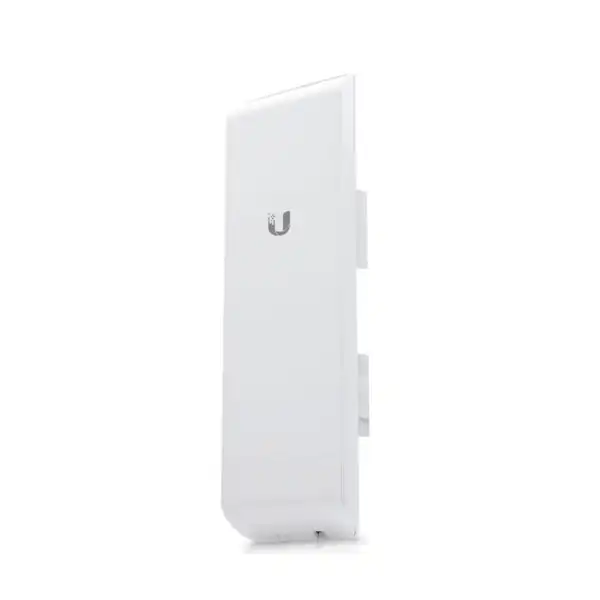
The Ubiquiti airMAX NanoStation M5 is a compact, directional 5 GHz outdoor radio for bridging compatible networks and serving as customer premises equipment. It is an option for connecting buildings or maintaining an existing airMAX M deployment when its Fast Ethernet interfaces and radio generation meet the project’s requirements.
Assess the line of sight, compatible endpoint, required data capacity and Tanzania operating rules before ordering. Request confirmation of the exact package, current availability and price rather than assuming those details from a product description.
Key specifications at a glance
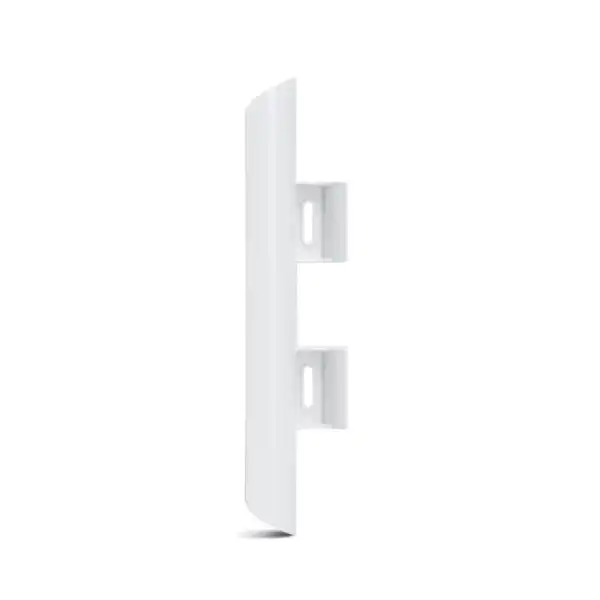
Other verified hardware details: 294 × 31 × 80 mm dimensions, approximately 400 g weight, 22–27 V DC supported input range, maximum 8 W consumption, UV-stabilised polycarbonate enclosure and manufacturer-listed pole mounting.
What the NanoStation M5 actually does
The Ubiquiti airMAX NanoStation M5 NSM5 is an outdoor wireless customer premises device built to carry network traffic across a directional 5 GHz radio link. It is useful where two buildings need to share an existing network but laying fibre or copper between them is impractical. It can also serve as a subscriber station in a compatible outdoor airMAX network. It does not create an internet subscription, and the name M5 does not mean a cellular 5G modem.
The best purchasing question is not simply how far the radio reaches. Ask what must cross the link, how much useful data capacity is required, whether the two endpoints can see each other, and what compatible equipment already exists. The answers determine whether this M-series unit is appropriate or whether a newer platform is a better investment.
Who should consider this model
This model can suit network technicians, small organisations, installers, estates, education facilities and operators maintaining an existing compatible airMAX M deployment. Typical requirements include connecting a nearby detached office to the main router, joining an outbuilding to a local area network or receiving service from an appropriately configured point-to-multipoint base station. A properly planned installation can avoid excavation while preserving familiar wired network services at the remote end.
Customers commissioning new high-capacity links should evaluate alternatives before ordering. The NSM5 has Fast Ethernet interfaces rather than gigabit ports, uses an older wireless generation and requires careful radio alignment. It is not the first choice for very fast fibre backhaul, broad indoor Wi-Fi coverage, automatic mesh networking or applications expecting unmanaged setup.
Understand the three common operating roles
In a point-to-point bridge, one radio is installed at each end and both are configured to form a dedicated wireless connection. On the building side, Ethernet connects the radio to a switch or router. At the far end, another switch or access point can distribute connectivity locally. Two suitable radios are normally required; ordering a single NSM5 does not create a complete two-ended link.
In a point-to-multipoint system, the unit may be configured as a client device associated with a compatible sector or other access point. The radio also supports access-point configurations, but its integrated directional antenna serves a particular coverage direction. This makes it a different tool from a centrally located omnidirectional indoor wireless access point.
Point-to-point building connections
Imagine two workspaces separated by a courtyard, road or privately managed open area. The main site already has an internet connection and network switch; the second location needs access to approved shared services. A pair of compatible, correctly configured directional radios can carry that traffic between buildings without a new long buried cable. The connection can be bridged or routed according to the network design.
Before committing, survey both mounting locations from the actual proposed antenna heights. Trees, metal roofing, nearby structures and changes in terrain can obstruct the path. Plan the Ethernet route at each end, suitable protected power, grounding and a maintenance route. Then decide whether the expected traffic can fit through this generation of hardware during busy periods.
Point-to-multipoint subscriber connections
In an airMAX multipoint deployment, a base station coordinates traffic for several remote client units. The NanoStation M5 can be considered as one of those clients where the radio generation, frequency selection and configuration are compatible. Its integrated panel antenna avoids the need to select and mount a separate high-gain dish for every modest subscriber installation. Local alignment still matters because the antenna focuses energy toward the base station.
Multipoint performance is shared rather than exclusive. Every additional subscriber, background transfer, weak link or retransmission may influence the available capacity for others. The central access point design, sector loading, channel width, interference environment and airMAX scheduling are as important as the client radio model. Confirm interoperability before mixing hardware generations.
Connecting a remote surveillance location
A remote camera enclosure or small monitoring point often requires network access without a trench back to the recording equipment. A wireless bridge can carry IP packets from an Ethernet camera, switch or recorder segment, provided the network route and traffic capacity are designed correctly. The NSM5 is the radio component of that solution, not a complete camera surveillance kit. It does not include a camera, storage or monitoring software.
Evaluate the camera bit rate under daytime and night-time conditions, codec settings, number of streams, recording schedule and expected simultaneous users. Allow spare link capacity for management traffic and bursts. A nearby 24 V peripheral must not be assumed compatible with every PoE output; always verify voltage, pinout and power budget separately.
Linking a school, clinic or office annex
Facilities spread across several buildings may have useful existing local services such as printing, file access, administrative applications or centrally managed internet access. A directional bridge can connect a smaller annex to the core network when site surveys support a clear radio path. The end-to-end design still needs sufficient switching, addressing, access controls and a plan for downtime. A wireless connection should not become an uncontrolled shortcut around information-security policy.
For education or healthcare settings, assess the importance and sensitivity of each application before relying on one link. Services that cannot tolerate interruption may need a backup route. The NSM5 should be evaluated as one element within an engineered network, not as a substitute for a resilient network architecture.
Farm, workshop and dispersed property scenarios
On a farm or large property, outbuildings sometimes sit beyond the reach of ordinary indoor Wi-Fi. A properly positioned radio may transport network access to an office, gatehouse or workshop that has a clear path to the main building. The remote side may then require a separate indoor access point for phones and computers. The NanoStation’s narrow directional link is not itself intended to blanket the surrounding property with general-purpose wireless coverage.
Environmental realities can dominate this use case. Seasonal vegetation growth, moving machinery, exposed cable runs, dust at connections, unstable power and difficult maintenance access all affect the practical outcome. Design for the most demanding operating season, not only for the visibility observed on the day equipment is purchased.
The meaning of 5 GHz on this device
The NSM5 uses the 5 GHz radio family, as distinct from a mobile network’s fifth-generation 5G service. It communicates with suitable wireless equipment over configured radio channels and requires existing network infrastructure at one end. A cellular SIM card, mobile tower registration or phone data bundle does not make this device operate. Buyers looking for a 5G SIM router or a smartphone signal booster need a different category of equipment.
The 5 GHz band can be useful for directional building links, but it is not automatically free of interference. Other networks, neighbouring radios, channel restrictions and local regulation can affect channel choice. The permitted frequency and transmitter settings depend on the deployment country and applicable rules, not merely on the full tuning range supported by the hardware.
Integrated antenna and alignment
Manufacturer specifications place the integrated dual-linear antenna gain between 14.6 and 16.1 dBi, depending on frequency. The published beam characteristics make alignment consequential: the unit should face the intended link partner rather than be mounted wherever cabling is easiest. Dual polarization and 2×2 MIMO support multiple radio streams under suitable conditions, but antenna gain is not a promise of a fixed distance or speed.
Installers should keep the two endpoints properly oriented and inspect the live receive signal, noise environment and connection statistics while adjusting alignment. Better signal is useful only when it accompanies clean reception and stable link quality. Increasing transmission power without a plan can worsen interference, breach a local power limit or mask a poorly aligned antenna.
Line of sight and obstruction checks
A direct visual path between buildings is a good starting point, but wireless path planning also concerns the volume of space around that line. Buildings, branches, raised ground and nearby objects may reduce signal quality even when the distant antenna is partly visible. Radio performance can also change when trees grow, structures are altered or new electrical equipment is installed near an antenna location.
Survey in both directions and record mounting heights, approximate path length and obstacles. Where a prospective link crosses someone else’s property or a public corridor, obtain any necessary permissions for the installation and cabling. For an uncertain site, a qualified installer should use a suitable link-planning method before quoting a performance target or placing an order.
Fresnel-zone clearance matters
The Fresnel zone describes the region around a radio path within which obstacles can affect signal propagation. A bridge can underperform when the apparent straight line is clear but the surrounding zone is obstructed by foliage, roofs or other structures. This helps explain why two sites that can see one another do not always achieve the expected data rate or reliability.
Antenna height is therefore not chosen solely to see the opposite building. The path geometry, safety of the mounting point, grounding approach, cable length and service access all contribute to a practical height decision. Raising a radio without considering these factors may introduce new safety and maintenance problems while providing little improvement to the actual link.
How to estimate usable throughput
Wireless headline rates, negotiated radio rates and real application throughput are three different measurements. Protocol overhead, retransmissions, channel quality, direction of traffic and the number of users reduce the data that an application can actually use. The NSM5 also has two 10/100 Mbps Ethernet ports, creating a wired-interface ceiling that a purchaser should recognise before planning a high-capacity connection.
Do not treat a seller’s quoted maximum distance or maximum wireless rate as a guaranteed combined result. Longer paths may require narrower channels, better antennas or slower modulation, while congested sites can struggle at much shorter distances. Establish the required sustained traffic and peak demand, then validate with a representative real-world test before depending on the link for important operations.
Latency, reliability and application suitability
Basic browsing, remote management, modest file transfers and selected camera streams can be reasonable uses when the link has sufficient headroom. Interactive voice, conferencing, terminal sessions and other delay-sensitive tasks require a more careful assessment. Retransmissions, interference and queueing can affect response time even while the nominal radio connection remains established.
Application requirements should be translated into measurable acceptance conditions. Consider maximum acceptable packet loss, throughput at peak periods, response-time variation and recovery after a power interruption. For critical use, define who monitors the equipment and what happens if the wireless path fails. No outdoor radio can guarantee continuous service without considering power, spectrum conditions and the rest of the network.
Powering with 24 V passive PoE
Ubiquiti specifies a 24 V, 0.5 A passive PoE adapter for the NSM5, with an operating input range of 22 to 27 V DC and maximum device consumption of 8 W. The manufacturer’s standard package information includes an adapter, but the precise contents of an offered unit or regional package must be confirmed before purchase. Passive PoE needs deliberate matching to compatible power equipment.
Do not connect the radio to an arbitrary active PoE switch port or assume that all devices labelled PoE use the same voltage. Confirm electrical specifications, cable arrangement and any converter before installation. The adapter location should be protected, accessible and supported by a safe power supply. Where outages are common, estimate backup-power requirements for the complete link, including switches and routers.
Using the secondary Ethernet port
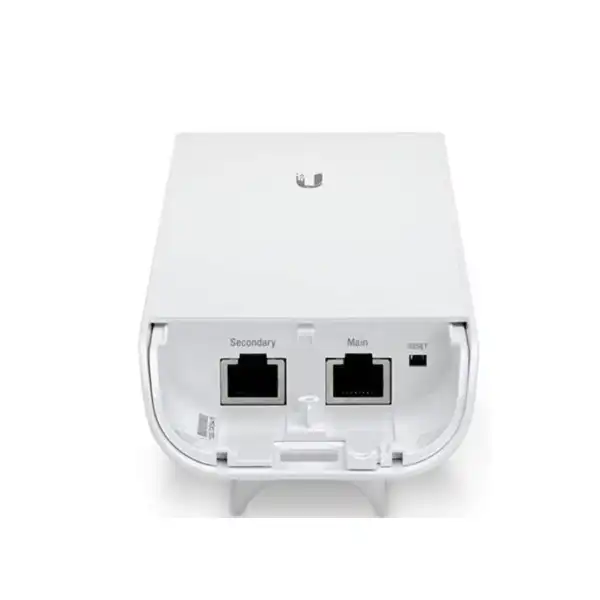
The hardware has two Fast Ethernet RJ45 ports. Depending on supported firmware configuration, the secondary port may be used for an additional wired device and may support software-enabled PoE output in specified circumstances. This feature can simplify some compact outdoor installations, but the extra port is not a built-in gigabit switch and it cannot automatically power any attached network camera.
Before using pass-through power, verify the attached device’s voltage, electrical pinout, consumption and the capacity of the upstream adapter. A conventional 48 V PoE camera should not be treated as compatible merely because its connector is RJ45. If there is any doubt, use an appropriate separate power source and a properly designed small network switch rather than improvising a power connection.
Bridge mode versus routed mode
An installation can extend a layer-two network across the radio link or use routing to separate networks, subject to what the firmware and topology support. Bridging may be convenient where both sites must share a deliberate subnet design, but it can also extend broadcasts and operational dependencies into another building. Routed links introduce clearer network boundaries while demanding intentional IP addressing and gateway configuration.
Decide the network role before mounting hardware. List required services, VLAN expectations, device management addresses and the location of DHCP and firewall functions. A radio link should transport authorised traffic according to the organisation’s design, not silently merge every connected network. If the topology is unfamiliar, have an experienced administrator review it before it carries production traffic.
Using airOS and airMAX
The NanoStation M family uses Ubiquiti’s airOS management environment and airMAX technology for outdoor wireless applications. Administrative setup involves more than entering a Wi-Fi password: the installer must select a suitable wireless role, compatible settings, a permitted channel and a defensible network-management configuration. airMAX scheduling can improve coordination in compatible multipoint environments; it does not remove physical radio limits.
Confirm the installed firmware version and obtain the correct model-specific release or recovery procedure from Ubiquiti resources before making changes. Maintain a record of management addresses and configuration backups, and avoid exposing the administrative interface directly to untrusted networks. This is an airMAX device rather than a UniFi access point intended for ordinary UniFi Controller adoption.
Security considerations before commissioning
A bridge can connect two trusted sites, but it also becomes part of the network’s security boundary. Use appropriately supported wireless encryption and strong unique administrative credentials. Change factory or reused passwords immediately, restrict who can reach the management interface and maintain an inventory of installed units. Sensitive traffic may need additional application or network-level encryption regardless of the radio link.
Security also covers physical access. Place the radio, power adapter, cable joints and network switch where tampering is difficult, while preserving safe access for maintenance. Record the equipment’s owner, support contact and configuration changes. Before reusing old stock or an existing device, examine firmware support and reset any unknown configuration rather than trusting the previous setup.
A sensible pre-installation checklist
Start by identifying both endpoints, the intended user services and the required quantity of radios. Confirm that the existing access point or subscriber equipment can work with an M-series client. Inspect the intended mounting surface, path clearance, cabling route and available power. Determine who will provide network addresses, firewall rules and authorisation for the connection.
Next, examine the wireless environment from suitable positions, including the legal channel options for the country. Estimate demand and decide how it will be tested. Purchase the appropriate mounting, shielded cable, surge protection and safe power accessories where required. A short written design at this stage prevents the common error of receiving two radios but discovering that the chosen mounting points cannot see each other.
Outdoor cable and electrical protection
Manufacturer installation guidance calls for shielded Category 5 or better Ethernet cabling and proper grounding. Outdoor cables should be rated for the installation environment and protected from water intrusion, ultraviolet exposure, strain and abrasion. Form suitable drip loops, protect indoor entry points and avoid leaving connectors exposed to runoff. Ethernet cabling is a system component, not an afterthought.
Outdoor installations can also face electrical surges and different ground potentials between buildings. A professionally designed protection and bonding approach is important for equipment safety and service continuity. Follow applicable electrical practice and the manufacturer’s current installation instructions. Never use the wireless radio itself as a substitute for a properly grounded structure or as protection against lightning.
Mounting the enclosure correctly
The NSM5 uses a compact outdoor enclosure of UV-stabilised polycarbonate. Ubiquiti lists dimensions of 294 × 31 × 80 mm and a weight of about 400 g, allowing practical mounting on a suitable pole. Check the actual offered accessories and mounting hardware before deployment. The intended antenna direction should guide pole position, rather than forcing a steep or obstructed angle later.
Choose a secure mounting point that resists vibration and allows adjustment without unsafe working practices. Keep cables supported and provide service access where possible. A roof-edge installation may deliver attractive line of sight but create difficult maintenance and fall hazards. Physical installation must be performed by competent personnel who can assess site-specific safety, weather exposure and grounding.
Alignment and initial setup workflow
On a workbench, identify and label each device before outdoor mounting. Configure management access securely, choose the correct wireless role for the planned topology and confirm Ethernet connectivity. Check firmware compatibility and local channel permissions. At the installation sites, mount the radios approximately toward one another, ensure protected power and confirm that each endpoint can be safely serviced.
Use live radio metrics to improve alignment in small controlled steps. Check receive levels on both ends, actual link negotiation and data stability; do not rely solely on a row of signal LEDs. Test realistic bidirectional traffic and confirm the applications intended to cross the link. Save final settings and record the position, channel, power level and measurements for future troubleshooting.
Commissioning and acceptance tests
A powered-up radio or a green association indicator is not sufficient proof that a link meets operational requirements. Test from the appropriate wired network points, not only from the management interface. Confirm that the expected services work, that addresses and gateways are correct and that unnecessary devices cannot cross the link. Verify link behaviour during sustained traffic and record both directions when possible.
Perform acceptance tests at a time representative of expected conditions. If the service is important, assess recovery from a controlled power cycle and ensure someone knows how to restore the saved configuration. Agree on the minimum acceptable measured performance before the project is considered complete. Documentation can be simple, but it should let a different technician understand the network later.
Working in Tanzania’s radio environment
Tanzania’s communications regulator, TCRA, publishes a WLAN and LPWAN frequency-band plan and minimum technical requirements. That guidance recognises defined portions of the 5 GHz band for WLAN uses subject to conditions, including restrictions that can depend on the precise frequency and deployment characteristics. A device’s technical tuning range is therefore not permission to operate every possible channel or at its highest supported power.
Before commissioning, check the currently applicable TCRA requirements, equipment approval obligations and channel or power limitations for the installation. Outdoor use, interference controls and the type of service may matter. This page does not assert that an individual NSM5 unit or proposed installation has received Tanzania-specific type approval. Regulatory verification belongs to the buyer and competent installer for the actual deployment.
Choosing a clean channel
A quieter channel can make more difference than an unnecessarily high transmitter setting. Survey nearby radio occupancy at the proposed mounting locations and identify which channels and channel widths are allowed and practical. Avoid assuming that a clean channel during a brief inspection will remain uncongested indefinitely. Shared spectrum involves other users and no installer can promise immunity from future interference.
Review both transmit and receive conditions: a noisy environment at one end may be invisible from the opposite end. Record the chosen channel and the reason for choosing it. If a change becomes necessary later, coordinate both endpoints and ensure the new setting remains compliant. When dynamic frequency selection or other regulatory functions apply, follow the specified operational requirements.
Which customers should look beyond the NSM5
A brand-new network that needs more than Fast Ethernet-class capacity should be evaluated against newer devices with suitable interfaces and radio capabilities. Similarly, a site with heavy multipoint demand, many high-resolution video streams or unusually difficult interference conditions may require a different antenna and radio design. Purchasing solely on the basis of claimed distance can create a costly bottleneck.
Different sites also demand different coverage shapes. A narrow point-to-point link, a sector-serving subscriber network and a room full of mobile clients are not interchangeable applications. Ask for a design that identifies the operating role and end equipment. If the use case is ordinary phone Wi-Fi throughout a building, a properly placed indoor access point is typically the more direct category.
NanoStation M5 versus locoM5
The names are similar but the full NanoStation M5 and the smaller locoM5 are distinct devices. Buyers should verify the exact model when comparing a quotation or receiving a shipment, because enclosure, antenna and Ethernet details can differ between versions. Manufacturer documents for the broader NanoStation M family often include both products in the same table; reading the wrong column is an easy source of specification mistakes.
Choose according to the actual link budget and deployment requirements, not only physical size or price. The NSM5 here is the full model with the two Fast Ethernet interfaces and the stated 14.6–16.1 dBi antenna gain. Do not assume accessories, mounting arrangements or power capacities transfer unchanged to every other model carrying the NanoStation name.
M-series versus more recent airMAX equipment
airMAX M equipment remains relevant to some established networks because replacing one endpoint does not always mean upgrading every radio. Nevertheless, a newer airMAX radio may offer different throughput and interface characteristics. Whether two devices can associate depends on their operating modes, firmware and supported protocols; a shared brand name is not sufficient proof of complete interoperability.
For a replacement purchase, record the existing base station model, installed software version, channel plan and radio role. For a fresh build, compare the total network requirement, including switches, antennas, power systems and maintenance, rather than comparing a single radio’s advertised gain. A careful compatibility check avoids purchasing a client that cannot join the intended base station.
Why this is not ordinary indoor Wi-Fi
The product is frequently described online as an access point, but that label can be misleading for non-specialist buyers. A NanoStation can be configured for wireless networking roles, yet its physical design and directional antenna target outdoor network links. It is not a drop-in substitute for a centrally managed ceiling access point that serves numerous roaming phones, tablets and laptops throughout rooms.
A practical design often has two layers: the NanoStation pair or subscriber unit handles the outdoor transport, while conventional access points provide indoor Wi-Fi at the remote building. Separating these jobs improves planning clarity and helps buyers specify the correct number of devices. It also keeps user-access security settings distinct from the management of the outdoor radio connection.
Common reasons a planned link underperforms
An underperforming bridge may suffer from obstructed line of sight, poor antenna alignment, a crowded channel, unsuitable channel width, incorrect network configuration or inadequate power. Incorrect assumptions about advertised speeds and Fast Ethernet limits are also common. Start with observable data: both devices’ radio statistics, port negotiation, error indications and the results of a controlled wired-to-wired test.
Do not immediately increase transmit power or swap equipment. Check whether the slow application is constrained by its internet service, switch, cable or remote server instead of by the wireless path. If problems appear only during certain hours or weather conditions, correlate those events with interference, movement and power quality. A systematic record is more useful than repeated guesswork.
Maintaining service after installation
Outdoor links should not be forgotten once they begin working. Keep a securely stored configuration backup, installation notes, the equipment model and firmware version, and a record of access credentials. Periodically inspect the mount, cable support and weather protection from a safe position. Review signal quality trends if monitoring is available, because gradual degradation can warn of vegetation growth or structural movement.
Plan a support path for outages. Identify who can reach each building, where adapters and switches are located and which upstream dependency may be responsible. When applying firmware changes, use a controlled maintenance window and consult current manufacturer instructions. A simple spare-equipment plan may be more appropriate than relying on a time-sensitive delivery during an outage.
What to verify in the sales quotation
A complete quotation should clearly say Ubiquiti NanoStation M5, model NSM5, and state the number of radios being offered. Buyers should ask whether the power adapter, pole-mount components and any required mounting accessories are included with the specific package. External cable, protection devices, remote switches and installation work may be separate items, and no automatic inclusion is implied here.
Confirm the proposed application, required compatibility, expected link path, responsibility for regulatory checks and the process for technical support. Request current local pricing and stock confirmation rather than relying on an old online figure. Where a two-building link is required, ensure the quote covers both ends and all essential parts so that there is no unexpected gap at installation.
How to decide whether to order
Start with the existing equipment and the service objective. If a compatible airMAX M network needs a replacement subscriber radio, the NSM5 may be a straightforward model to evaluate. If two buildings require a modest directional link and capacity requirements fit the hardware, a pair may be worth considering after the site survey. If gigabit-class performance is essential, this device is not the correct capacity class.
Bring the approximate endpoint distance, photographs of both proposed mounting points, an estimate of data demand, existing radio models and information about available power to the purchasing conversation. FourTeck Tanzania can then be asked for an appropriate quotation and product suitability discussion, with stock, pricing, accessories and deployment conditions confirmed rather than assumed.
Frequently asked questions
These answers address common buying, installation and compatibility questions for the NSM5. A real deployment still needs a site-specific network and regulatory review.
Is the NanoStation M5 a 5G SIM router?
No. The designation M5 identifies a 5 GHz outdoor wireless radio in Ubiquiti’s NanoStation M family. It does not accept a cellular data SIM or connect directly to a mobile operator’s 5G service. A network connection and a compatible radio endpoint are still required.
Can one NSM5 connect two buildings?
A complete dedicated point-to-point connection normally requires a compatible radio at each end. One NSM5 can act as a client within an existing compatible multipoint network, but a single unit alone cannot create an end-to-end bridge where no other radio endpoint exists.
What distance will the product achieve?
There is no reliable universal distance guarantee. Path clearance, antenna orientation, interference, permitted operating settings, channel width and the desired service capacity all matter. A site survey and link budget are more useful than adopting a generic distance claim printed on a reseller listing.
Does it provide Wi-Fi to phones inside a building?
Its primary application is a directional outdoor network link. A separate indoor access point is usually the appropriate choice for providing convenient roaming Wi-Fi to phones and laptops at the distant building. The NSM5 is not a general-purpose room coverage replacement.
Does the NSM5 have gigabit Ethernet?
No. Ubiquiti specifies two 10/100 Mbps Ethernet ports. When planning traffic, remember that negotiated wireless data rates and application throughput differ, and that the wired interfaces impose an important limit on how much traffic can pass through the radio.
What power adapter is specified?
The manufacturer’s specification lists 24 V passive PoE and a 24 V, 0.5 A adapter. Confirm the actual package contents before purchase. Other PoE systems should not be connected without checking their electrical compatibility, particularly when active 48 V PoE equipment is involved.
Can the second Ethernet port power a camera?
Some supported configurations permit software-controlled PoE output, but compatibility is not universal. Check the camera’s required voltage, pinout and consumption alongside the radio’s available supply. When these values do not match, a separately powered camera or suitable converter is needed.
Can I use it with newer airMAX AC radios?
Do not assume that every airMAX device is mutually interoperable. Compatibility depends on the exact access point and station models, their modes and firmware. For an upgrade or replacement, verify the intended pairing before ordering, especially when an existing network mixes equipment generations.
Is the product approved for use anywhere in Tanzania?
This page does not establish product-specific TCRA type approval or permission for every channel and transmit-power setting. The installer must review applicable current Tanzania requirements and any equipment-approval or deployment obligations before operating the radio.
Will the radio still work when power fails?
No network device can operate without suitable power. If the upstream router, switch or either radio loses power, the link may fail. A designed backup supply can help, but it must cover the necessary equipment and use the correct passive PoE arrangements.
What should I send when requesting a quote?
Provide the exact model NSM5, quantity needed, existing wireless equipment, rough link distance, required applications, power situation and any site photographs or survey notes. Ask for confirmation of current stock, price, package contents, installation accessories and expected compatibility.
How is the link protected from rain and surges?
The NSM5 is designed with an outdoor enclosure, but a complete installation still needs appropriate cable, weather protection, grounding and electrical surge precautions. Follow the manufacturer’s installation guidance and use qualified installation personnel for exposed or elevated mounting locations.
Request an NSM5 suitability and price quote
Tell FourTeck Tanzania how many radios you need, whether the project is a point-to-point bridge or multipoint client installation, which existing models you must connect to and what data services the link will carry. Include site photos, approximate distance, available power and any known cable or mounting constraints.
Ask for verification of availability, accessories, compatibility and the applicable regulatory steps. No price, stock status, delivery commitment, warranty entitlement or Tanzania type approval is asserted on this page.




Reviews
There are no reviews yet.