
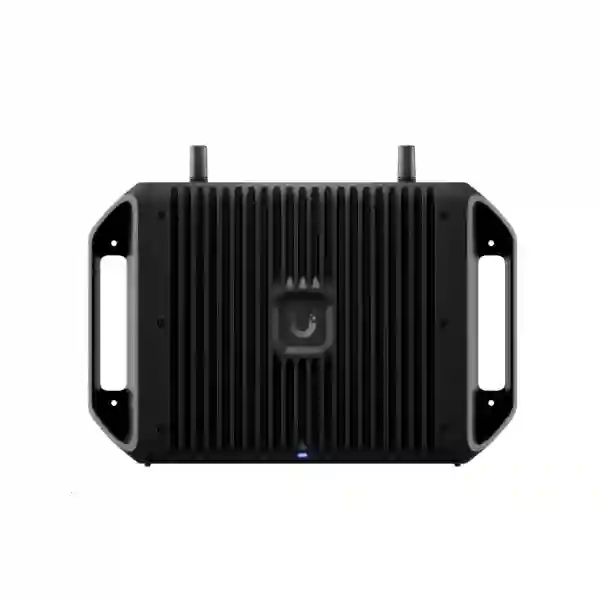
Ubiquiti Cloud Gateway Industrial UCG-Industrial
A fanless, 10G-capable UniFi gateway with dual-band WiFi 7 and high-power PoE, designed for protected operational spaces that need routing, security, networking, and straightforward administration together.
At a glance
Important compatibility notes
The published power budget depends on the power method. WiFi 7 is dual-band on this model and does not include 6 GHz. The SIM slots are not an integrated cellular modem. Ruggedized does not mean the unit is documented as waterproof. Confirm accessories, current software support, local suitability, and the complete installation design before ordering.
What the Cloud Gateway Industrial does
The Ubiquiti Cloud Gateway Industrial is a UniFi network gateway for sites that need more than an ordinary office router. Model UCG-Industrial combines wired routing, multi-WAN control, security inspection, integrated dual-band WiFi 7, power delivery to connected Ethernet equipment, and a UniFi application host. The practical attraction is consolidation: a compact installation may need fewer separate devices, less interconnection cabling, and fewer individually administered interfaces. A buyer should still confirm the total port, wireless, storage, and electrical requirements before choosing this integrated design.
Its industrial positioning matters where a conventional network cabinet is inconvenient. Consider a branch counter, sheltered warehouse operating area, equipment room, remote monitoring location, or small service facility. A fanless chassis can be useful when dust management and acoustic noise are concerns, while flexible mounting helps when floor or rack space is limited. Industrial does not mean weatherproof, explosion-proof, or safe for arbitrary outdoor exposure. Installation conditions, enclosure protection, cable routing, and power quality remain fundamental engineering decisions.
This device is also a management platform, not simply a device that converts one Internet connection into several LAN sockets. UniFi Network provides configuration and visibility for compatible UniFi network devices, while other supported applications can extend the deployment into video, access management, communications, and connected displays. That flexibility is valuable when a buyer wants a consistent interface across locations, but individual applications still need appropriately sized devices, storage, licenses or services where applicable, and a verified design.
For Tanzania-based buyers, the most productive first step is to describe the real installation: incoming Internet media, essential users, PoE loads, existing access points, camera plans, available power, and expected growth. FourTeck Tanzania can use that information for a configuration and quotation discussion without assuming stock, price, certification, service area, or installation terms not yet confirmed. The product should be evaluated as one part of a functioning network rather than as a promise that every site can operate from a single box.
Quick capabilities and key specifications
The gateway offers one 10G SFP+ interface, one 10 GbE RJ45 interface, and four 2.5 GbE RJ45 interfaces. Three copper interfaces can deliver the higher PoE+++ class and two 2.5 GbE interfaces provide PoE+. Manufacturer specifications list 5 Gbps IDS/IPS throughput, up to five configurable WAN ports, and three WAN interfaces by default: the SFP+ port, 10 GbE RJ45, and one 2.5 GbE RJ45. Port assignments should be checked in the actual UniFi configuration instead of assuming every physical socket is always a LAN port.
Integrated WiFi uses the 2.4 GHz and 5 GHz bands with a 2-by-2 radio design on each band and detachable external antennas. It supports WiFi 7 alongside earlier compatible wireless standards, but it does not have a 6 GHz radio. Ubiquiti quotes a nominal coverage area of 115 square metres; walls, metal shelving, device placement, channel conditions, and client capabilities can materially change real coverage. Separate access points may be a better design for buildings with divided rooms or long aisles.
Using the included 54 V DC, 350 W adapter, the stated PoE output budget is 270 W. Ubiquiti separately states 75 W when the device is powered through the supported 48 V ATX method. Maximum output is 90 W per PoE+++ port and 30 W per PoE+ port, subject to the shared budget. The distinction between a per-port ceiling and available total wattage is critical when powering multiple cameras, wireless access points, switches, or other Ethernet-powered equipment.
Official specifications identify a quad-core 2.2 GHz ARM Cortex-A73 processor, 3 GB of memory, a preinstalled 128 GB microSD card for NVR storage, and operating temperatures from minus 30 to 50 degrees Celsius. Dimensions are approximately 307.9 by 203.5 by 43.7 millimetres. Supported installation formats include wall and compact desktop placement with a table stand, while the rack-mount accessory is sold separately. These are design inputs rather than a substitute for checking a particular installation location.
Who should shortlist this gateway
A strong candidate is a small or medium site where the gateway will sit close to multiple powered endpoints. For instance, a gateway that powers a few suitable cameras or access points may eliminate an additional PoE switch. This can simplify wiring, reduce the number of power adapters, and create a straightforward management point. Whether it actually reduces cost depends on cable distances, port usage, power reserve, resilience requirements, and the price of alternative separate components.
Another candidate is an organization that needs centralized policy across distributed sites. UniFi offers mechanisms for site-to-site connectivity, traffic policy, monitoring, and multi-WAN behavior that can help an administrator maintain a consistent network design. A remote location still needs reliable connectivity, sound configuration, maintenance access, and an outage procedure. The phrase cloud gateway should not be interpreted to mean that the local Internet circuit or electricity becomes unnecessary.
Operational environments with limited ventilation can benefit from a fanless gateway, provided they remain inside the published temperature and humidity limits. Equipment rooms, protected workshops, enclosed retail back offices, and sheltered technical areas deserve consideration. Locations exposed to direct rain, pooled water, chemical sprays, or uncontrolled condensation require protective engineering, and the published information does not establish an ingress-protection rating for treating the unit as a sealed outdoor enclosure.
Choose a different architecture when the installation needs many more local Ethernet ports, extensive camera retention, distributed wireless coverage, a specialist industrial protocol gateway, or physical separation of network functions. A dedicated firewall, switch, access-point system, and recording platform may make future replacement or scaling easier. The UCG-Industrial is attractive when integration reduces complexity; it is not automatically preferable to modular networking for a large or critical site.
Understand the Ethernet ports before planning
The six main data interfaces do different jobs. The SFP+ port enables compatible 10G optical or direct-attach connectivity when the correct transceiver, medium, and peer equipment are selected. The 10 GbE RJ45 port provides multi-rate copper Ethernet, and the four 2.5 GbE RJ45 ports connect lower-speed devices and suitable uplinks. A cable being physically compatible does not prove the negotiated speed, transceiver interoperability, or correct electrical design; these should be verified during network planning.
Three interfaces are designated as WAN by default. This arrangement suits scenarios that require multiple Internet handoffs, but businesses using one ISP can assign ports according to supported UniFi settings. Reconfiguration should be planned before hardware is deployed because an interface assigned to WAN cannot simultaneously function as an ordinary LAN connection in the same role. Record which port connects to the ISP terminal, which feeds a downstream switch, and which powers each endpoint.
A common mistake is to count six physical network ports and assume six spare LAN connections. The active WAN configuration consumes connectivity, and any SFP+ uplink may serve an external aggregation or Internet function. Likewise, if the gateway powers two cameras and two access points, those connections may occupy most of the relevant copper ports. Count usable ports after WAN assignments, endpoint selection, management uplinks, and provision for expansion.
Plan the cable route for each connected device. Copper Ethernet runs must respect the cable category, length, bend radius, grounding and electrical separation appropriate to the deployment. Optical links may be useful where electrically isolated or longer-distance connections are required, but optics and fiber type must match. For exposed cabling, obtain qualified advice on surge protection and earthing; the chassis specifications do not eliminate the need for responsible site-level protection.
PoE budgeting: do the arithmetic first
Power over Ethernet is a standout reason to evaluate this model, but the combined load has to be calculated. Ubiquiti lists two 2.5 GbE PoE+++ ports and one 10 GbE PoE+++ port, each with a stated maximum of 90 W, plus two 2.5 GbE PoE+ ports each rated up to 30 W. These individual maximums are not permission to ignore the shared available budget. When operating from the included DC supply, the published total PoE budget is 270 W, not the arithmetic sum of every maximum port rating.
Start with the manufacturer-rated maximum consumption of every planned powered device. Include startup demand, heater or infrared operation where applicable, and equipment that might draw more power after a firmware change or added module. Sum those values, map each endpoint to a port supporting its required PoE class, and leave a sensible operating margin. If an endpoint needs 90 W, it must use a compatible higher-power port rather than assuming a 30 W PoE+ connection can supply it.
Take a hypothetical installation with an access point rated at 25 W, two cameras rated at 18 W each, and a downstream powered device rated at 55 W. The aggregate nameplate demand would be 116 W before reserve; it fits within a 270 W global budget, but only if each device is mapped to an appropriate port and other configuration constraints are satisfied. This is an illustration, not a claim about any specific accessory or expected consumption. Real product ratings should replace these sample numbers.
Power mode changes the calculation. Ubiquiti states 270 W PoE budget for DC input and 75 W for 48 V ATX power. A deployment designed for 200 W of connected PoE loads therefore cannot be assumed to behave identically after switching to the lower-budget power method. Confirm connector wiring, supply voltage, accessories, electrical protection, and the supported power method with the manufacturer instructions and a qualified installer. Do not improvise a DC supply simply because the voltage appears similar.
Integrated WiFi 7: useful, with clear limits
The built-in wireless function can reduce hardware at a small site. The gateway uses dual-band WiFi across 2.4 GHz and 5 GHz, with two spatial streams on each band. It can serve compatible client equipment and supports older WiFi generations alongside WiFi 7. Ubiquiti publishes nominal radio throughput figures of 688 Mbps for 2.4 GHz and 4.3 Gbps for 5 GHz. These figures describe radio capabilities rather than a guaranteed speed for any individual laptop, phone, or Internet connection.
WiFi 7 should not be interpreted as a guarantee of 6 GHz spectrum on this model. The gateway does not include a 6 GHz radio, so a buyer who specifically needs tri-band coverage or 6 GHz client operation should plan additional suitable wireless hardware. Wireless features are also shaped by country settings, channel availability, regulatory limits, client support, and software configuration. Do not assume all headline WiFi capabilities are usable in every country or with every endpoint.
A warehouse illustrates why nominal coverage is not a building survey. Tall metallic shelving, moving stock, machinery, walls, and neighbouring radios may create interference and coverage gaps. A well-placed gateway may serve a local work area effectively, while a larger floor often benefits from dedicated access points positioned after a survey. Mounting the device centrally for WiFi can also conflict with the best location for power, fiber termination, or protected cabling; treat placement as a combined design decision.
For customer areas or shared offices, consider separate wireless networks for staff, visitors, and operational equipment. Pair the SSIDs with appropriate VLANs and firewall policies rather than treating a different network name as complete isolation. Review device roaming, client density, expected simultaneous usage, and bandwidth-consuming applications. If wireless service is mission critical, include a validation test after installation instead of relying on the nominal coverage figure alone.
10G interfaces and real-world network speed
Both the SFP+ and copper 10 GbE interfaces help the gateway work with higher-bandwidth uplinks. A site with fast fiber service, a suitable distribution switch, or bandwidth-intensive local applications may benefit from these interfaces. However, a 10G socket does not make every routed, inspected, or Internet flow operate at 10 Gbps. Actual results depend on enabled security services, traffic pattern, client speeds, switching path, cabling, upstream service, and attached devices.
The published IDS/IPS throughput is 5 Gbps. This is a particularly important number for a business that intends to inspect high-speed Internet traffic. If an Internet subscription is faster than that, assess the precise security features and performance expectations rather than comparing the ISP package only with the port label. There is no contradiction between 10 GbE physical connectivity and a lower security inspection throughput; they describe different aspects of the system.
On the local network, a single access point connected through a 2.5 GbE interface cannot exceed that negotiated wired link speed, regardless of the sum of its advertised wireless radio rates. Similarly, a storage system, firewall policy, or legacy 1G device can constrain the effective path. Prepare a simple end-to-end diagram showing the source, every interface on the route, and the intended destination. That diagram usually exposes bottlenecks earlier than a specification comparison.
During commissioning, verify link negotiation and use realistic transfer tests rather than assuming performance from LEDs alone. Measure an internal file transfer separately from an Internet speed test, and test the firewall and VPN configurations expected in production. Results can vary with software versions and settings. The goal is not to reach a marketing maximum in every condition; it is to demonstrate that the purchased solution supports the application’s required service level.
Multi-WAN and business continuity
The gateway supports multi-WAN operation, load balancing, quality monitoring, and failover-related functions within UniFi. Ubiquiti lists a maximum of five WAN ports, with three designated by default. Multiple paths can help an organization design continuity for essential services, provided independent upstream connections really exist. Connecting two cables to the same provider handoff or shared upstream failure point may not deliver the resilience the site expects.
Before configuring failover, define which applications must survive an outage and what downtime is acceptable. Payment systems, operational dashboards, remote support, voice services, and security monitoring may have different requirements. Some sessions reconnect automatically after a path changes; others may drop because public IP addresses, latency, or NAT state change. Make those operational limitations explicit in the deployment plan and test them with actual applications.
Load balancing should not be confused with combining the bandwidth of unrelated circuits into one faster single download. Traffic distribution depends on how connections and routing rules are implemented, and individual sessions may remain constrained by one active route. If a site has a primary fiber line and an alternative access path, define prioritization, health-check behavior, routing exceptions, and notification rules before installation. A consistent policy is more valuable than an untested second line.
Consider the physical dependencies as well. If both ISP devices, the gateway, and the downstream switch lose electricity together, an available secondary provider cannot restore connectivity. Plan UPS capacity or another suitable power strategy, assess the size of the power adapter and connected PoE demand, and decide who receives outage alerts. Test planned failure conditions at commissioning and periodically thereafter to keep recovery procedures credible.
SIM slots are not an onboard cellular modem
The two onboard nano-SIM slots deserve careful explanation. Ubiquiti identifies them for Remote SIM integration with the separate UniFi 5G Max Outdoor device. They do not turn the Cloud Gateway Industrial into a standalone cellular router, and inserting a SIM card alone does not establish a mobile Internet connection. The manufacturer has described software support for this Remote SIM function as forthcoming, so purchasing decisions should verify the current release status rather than treating announced functionality as already deployed.
A buyer considering cellular backup needs to assess the complete system: a compatible external modem, supported software release, operator requirements, SIM plan, outdoor mounting if applicable, cable run, PoE needs, and coverage at the actual site. Mobile network service quality can change with buildings, towers, weather, demand, and placement. Those variables are separate from the gateway’s wired and wireless specifications, and none should be assumed to work without a practical site assessment.
For a Tanzania installation, request confirmation that any proposed cellular equipment, frequency support, operator plan, and connection method are suitable for the intended location. Do not infer local operator compatibility from a product listing tailored to another country. Also distinguish a 5G modem used for Internet backup from the gateway’s integrated WiFi 7 used by local clients. The technologies serve different parts of the network even when both include a number followed by a letter.
If cellular failover is essential on day one, ask for a complete tested design rather than relying on an unconfirmed Remote SIM roadmap feature. The gateway’s regular Ethernet WAN capabilities may support an external network handoff subject to configuration. Verify the chosen architecture, power budget, and current supported integrations before committing. This approach prevents a useful product feature from becoming an unexpected deployment dependency.
Security inspection and traffic policy
UniFi’s gateway security functions include a stateful firewall, application-aware filtering, traffic identification, intrusion detection and prevention, content filtering, and VLAN-based segmentation. A stateful firewall evaluates traffic in the context of a network connection, while IDS and IPS functionality can help detect or block recognized suspicious patterns. These features add layers of control, but their value depends on correct rules, maintenance, sensible access permissions, and attention to alerts.
An organization should begin with a clear network trust model. Which devices require access to accounting systems, cameras, building controllers, printers, and the Internet? Which devices should never communicate with one another? Design firewall rules around the required flows rather than allowing everything by default. After configuration, test authorized business functions and intentional denials. An accidental rule that disrupts a payment terminal can be as costly operationally as a missing security restriction.
Deep packet inspection and application identification can make traffic patterns more understandable, yet encrypted applications, network address translation, and device behavior create visibility limits. Staff should be told what monitoring is in use and why. Secure administration with strong credentials, restricted management access, appropriate account permissions, and supported updates remains necessary even when protective features are switched on. A firewall is not a substitute for endpoint protection, backups, or user awareness.
Ubiquiti also advertises additional threat-signature content through its CyberSecure offering. Where a feature or signature set depends on an added service, review the commercial terms and applicability before including it in the security specification. The published 5 Gbps IDS/IPS figure is a vendor benchmark, not a guarantee of equal results under every collection of policies. Establish performance and security acceptance criteria that reflect the site rather than relying on a single headline number.
VLANs and separation of operational networks
Segmenting the network is especially useful where multiple device types share the same site. One VLAN may contain ordinary business workstations, another security cameras, another guest access, and another management interfaces. Separate segments make policies easier to explain and can reduce unintended lateral access. However, VLAN creation alone does not prove isolation: inter-VLAN routing and firewall behavior must be explicitly configured, tested, and documented.
At a workshop or distribution site, for example, label operational controllers, staff phones, visiting contractor devices, and cameras according to their actual communication needs. Some industrial equipment uses discovery protocols or fixed addressing that may be sensitive to segmentation changes. Review vendor support requirements before moving an existing device. Avoid applying generic firewall blocks to a system without understanding its control traffic, safety dependencies, and support process.
When multiple UniFi switches or access points are connected, VLAN identifiers and tagged or untagged port settings must agree end to end. A mismatch can produce symptoms that look like random service outages. Maintain a port map with the configured network, device purpose, PoE role, and cable identifier. This small document becomes especially valuable when a technician needs to troubleshoot a site without knowing how it was originally commissioned.
Guest access should be separated from internal services and assigned appropriate Internet permissions. Cameras may need management or recording access but not unrestricted reachability to office computers. Remote support should use authenticated, authorized paths rather than exposing internal management interfaces to the public Internet. The design objective is straightforward: give each class of device the minimum practical connectivity required for its job while preserving reliable support and recovery.
VPN and connections between locations
Ubiquiti lists site-to-site technologies including Site Magic, IPsec, and OpenVPN, alongside VPN server and client options such as WireGuard and OpenVPN. These capabilities can support organizations with several offices, service sites, or remote technical teams. Choosing between them depends on the endpoint platforms, network topology, addressing, authentication model, throughput goals, and operational familiarity of the team responsible for maintaining the links.
Before a site-to-site connection goes live, check for overlapping private IP ranges. Two branches using the same subnet can complicate ordinary routing and make intersite access unreliable. Assign a documented addressing plan, identify the precise services that need cross-site connectivity, and apply firewall rules that reflect those needs. Test not only the tunnel establishment but also application access, DNS resolution, route preference, and behavior when one WAN circuit fails.
Remote user access is a separate requirement from branch-to-branch networking. Staff may need to reach a business system securely while travelling, but the design should avoid unnecessary exposure of every internal subnet. Apply individual accounts, suitable authentication, device access policies, and account revocation procedures. If a third-party contractor needs temporary access, document the permission scope and removal process before they connect.
VPN bandwidth is influenced by encryption, network latency, the ISP path, endpoint hardware, and traffic mix. Do not treat the gateway’s physical 10G interfaces as a guarantee that encrypted cross-border or intercity transfers will reach the same rate. For a business-critical link, include monitoring, backup access procedures, and ownership of the configuration. A predictable, supportable secure connection is often more useful than the most complicated available tunnel arrangement.
UniFi applications and centralized administration
The UCG-Industrial is designed to host Ubiquiti’s supported UniFi application suite, including Network, Protect, Access, Talk, and Connect. This broad capability can reduce the number of separate management consoles in a small deployment. It does not imply that every supported application includes all necessary endpoint hardware, accessories, calling services, or unlimited storage. Evaluate each application as a complete subsystem with its own devices, capacity requirements, and operational responsibilities.
For network administrators, the appeal of UniFi Network is consistent visibility into connected compatible equipment and central configuration of policies. Routine tasks may include reviewing uplink health, identifying ports and clients, updating supported devices, examining traffic patterns, and maintaining guest or staff networks. Administrative privileges should be separated by responsibility where available. A single control plane is convenient, but it deserves proper account security and recovery planning.
Ubiquiti publishes design-scale indicators of more than 50 managed UniFi devices and more than 500 simultaneous users connected. These are manufacturer-listed capabilities rather than a guarantee of satisfactory performance for every traffic profile. Fifty lightly used sensors and a network of bandwidth-intensive cameras present very different loads. When evaluating scale, count not only devices but also their services, simultaneous activity, security inspection, storage, and WAN demands.
Plan who will administer updates and configuration backups. Use a documented change process for firewall settings, SSIDs, firmware, application settings, and VPNs, especially where network downtime affects operations. Do not assume a cloud account removes the need for local recovery credentials or physical access. The practical objective is a service that ordinary authorized staff can understand and recover, not a collection of features configured once and then forgotten.
Cameras, local recording, and retention
UniFi Protect support can make the gateway attractive for a compact camera installation. Ubiquiti lists supported managed camera scenarios of up to 15 HD, eight 2K, or five 4K cameras, and specifies a preinstalled 128 GB microSD card for local NVR storage. Those camera numbers are indicative vendor-supported combinations, not an assurance that all resolutions, frame rates, detection options, and storage retention goals can be met simultaneously under any operating conditions.
Recording retention requires an explicit calculation. Consider how many cameras record, their resolutions, video compression, frames per second, scene complexity, recording schedule, and desired history. Continuous recording produces very different storage demand from event-based operation. A microSD card that is convenient for a few streams may not meet a business requirement for extended evidence retention or a larger security system. Avoid making retention promises without calculating them against the actual recording profile.
Camera power also affects port planning. A camera with heaters, infrared illumination, or motorized movement may draw more than a simple fixed model. Identify the device’s maximum PoE requirement and assign the correct gateway port or a suitable downstream switch. If cameras are distributed over a large compound, cable reach and protected pathways may matter more than the gateway’s raw number of powered sockets.
Video security includes operational policy. Decide who can view footage, who can export it, how access is removed when employees change roles, and how storage failures will be detected. Consider power continuity, privacy obligations, secure placement, and independent backup where appropriate. The gateway can host a useful smaller Protect deployment, but a high-retention or high-availability surveillance system may justify dedicated recording hardware and a separate storage strategy.
Physical installation, climate, and power
The manufacturer’s stated operating range is minus 30 to 50 degrees Celsius, with 5 to 95 percent non-condensing humidity. Those numbers give an environmental envelope for the unit, not a prediction of temperature inside a closed cabinet or a guarantee of survival when water enters connectors. Site owners should evaluate the hottest real operating condition, solar exposure, ventilation, dust accumulation, and any moisture risk before choosing the mounting position.
Fanless operation eliminates a moving cooling fan but does not eliminate heat. Leave the space required by the manufacturer’s mounting and ventilation guidance, avoid blocking thermal surfaces, and keep the power adapter within its own safe operating conditions. If installing inside a protective enclosure, calculate heat buildup from both the gateway and other equipment. The relevant temperature is the air around the operating electronics, which may be much warmer than the ambient weather reading.
The included DC adapter is rated to support the 270 W PoE budget as specified, while alternative 48 V ATX power has a smaller stated PoE allowance. Verify the actual AC supply, plugs, distribution board, surge protection, and UPS design with a qualified technician. The product specification lists 100 to 240 V AC input for its supply, but installation suitability and electrical safety depend on the complete local arrangement. Never represent a general input range as proof of local certification.
Wall and desktop placement are supported, with a table stand included, and a compatible rack-mount accessory is separately available. Consider human access, accidental damage, cable strain, antenna orientation, and service clearance. The 2.4 kg device weight is not enormous, but a secure mounting substrate is necessary, especially where people or machinery may contact the installation. Keep a photographic port record after commissioning so later support work does not disturb an unknown cable layout.
Tanzania planning: site conditions and Internet handoff
Buyers in Tanzania often have to match the network design to the real site rather than to a generic office diagram. Start with the specific connection delivered to the premises: fiber termination, Ethernet handoff, an upstream router, radio link, or another Internet access method. Ask the provider what addressing, authentication, VLAN tagging, and customer equipment settings are required. The gateway’s combination of SFP+ and copper interfaces provides options, but an exact handoff must be confirmed before installation.
Next assess the importance of uptime. A remote shop that depends on online payments may need a different backup plan from an office that can tolerate a brief outage. Document likely single points of failure: one mains circuit, one building entrance, one provider route, one external modem, or one overloaded power adapter. Decide whether a secondary WAN, UPS, monitoring, or spare equipment is justified by business impact. No specific Internet provider capability or geographic coverage is implied here.
Temperature and moisture planning deserve special attention for sheltered equipment installed near loading areas, production spaces, or outdoor-adjacent utility rooms. An industrial-looking chassis should not encourage open exposure to rain or condensation. Evaluate the cabinet, roof, airflow, cable entries, physical security, and periodic cleaning arrangements. Where long copper cable routes or lightning exposure create electrical risks, seek appropriate design advice rather than relying solely on built-in protective ratings.
Before ordering, request an itemized quotation that identifies the exact model, region-appropriate power supply, optional rack hardware, compatible optical modules, access points, cameras, and any required backup solution. Have the supplier confirm current stock, delivery arrangement, warranty terms, and any country-specific compliance matters in writing. This page does not assume a current TZS price or guaranteed availability; those are quote-stage details that need verification for the specific transaction.
Deployment example: a small operations site
Imagine a protected warehouse work area with one reliable Ethernet Internet connection, two desk workstations, an access point covering the receiving area, and two IP cameras. The gateway could provide the Internet boundary, VLAN policy, local wireless coverage or control of an additional UniFi access point, and power to appropriately rated connected devices. The installation would still need a sound plan for which interfaces remain available after the WAN and endpoint connections are assigned.
The first design step would be an inventory. Record the ISP handoff, expected Internet speed, number of wired clients, number of wireless users, camera resolution, video retention target, and full PoE consumption of each device. Then position the gateway where incoming cabling, protected power, service access, and ventilation are suitable. A wireless coverage survey would determine whether the integrated radios are adequate or if a separate access point is needed.
Next create an addressing and segmentation plan. Staff computers might use one trusted network, cameras another, and guest devices a third. Define the permitted traffic between them and confirm that monitoring and management still work. The gateway may host UniFi Protect for a small camera configuration, but the retention expectation must be checked against the supplied microSD storage. If longer video history is necessary, reconsider the recording architecture before purchasing accessories.
Finally test normal and failed conditions. Confirm port speeds, Internet access, camera operation after dark, wireless coverage during normal site activity, power use at maximum expected load, VPN connectivity if required, and recovery after a controlled power interruption. Document the final configuration and support contact. This example shows a possible design process, not a claim that a specific site will fit without a survey or that every accessory is included with the gateway.
Deployment example: branch office connectivity
A branch office connected to a headquarters may place more emphasis on VPN stability and management than on local camera storage. The gateway can provide multiple WAN options, firewall rules, WiFi for a small office area, and routes to central business services. The installation decision should begin with applications: inventory systems, remote desktop sessions, collaboration tools, printing, and any on-site equipment that needs access to corporate resources.
Ask whether the branch has overlapping network addresses with other locations. If it does, resolve the addressing plan before configuring tunnels. Determine which services must cross the VPN, which can operate directly over the Internet, and what should happen when the primary ISP is unavailable. Design authentication and network rules around those requirements. A managed site-to-site tunnel can simplify connectivity, but it should not become an unrestricted path into the wider organization.
The integrated wireless function may serve a compact branch adequately; larger or partitioned offices will need a coverage survey and possibly additional access points. With multiple wired endpoints, a downstream switch may be more sensible than consuming every available gateway port. At that point, compare the total cost of a consolidated industrial gateway with a modular firewall, switch, and access-point design. The right answer depends on maintenance, placement, capacity, and growth.
Use a handover checklist that captures WAN addressing, preferred route, alternate route, VPN settings, firewall change ownership, user access, and configuration recovery. Test link failure from the branch with the applications actually used by staff. When a busy operational day arrives, predictable remote access and clear troubleshooting procedures matter more than a specification chart showing the maximum number of WAN connections.
Deployment example: compact camera and monitoring station
A compact security monitoring point can benefit from one device coordinating network policy, PoE endpoints, and supported local recording. Before choosing hardware, identify the camera positions, power needs, intended video quality, retention period, and whether someone must view live video remotely. Camera counts alone are a poor sizing method because a handful of high-resolution streams with continuous retention can be more demanding than a larger number of lower-resolution intermittent streams.
Review which camera locations are reachable by suitable copper links and which need a downstream switch, fiber extension, or dedicated infrastructure. Long outdoor-adjacent runs may need specialist protection. The 90 W and 30 W per-port limits must be matched to the selected equipment while remaining within the total 270 W DC-input budget. Avoid assuming that the three high-power ports make every connected camera or accessory electrically compatible.
The preinstalled 128 GB microSD is convenient for supported UniFi Protect use, yet the storage requirement should be estimated rather than inferred. Define whether the footage is for occasional activity review, continuous operations, or evidentiary retention. Also consider access controls, storage wear, failed recording alerts, and privacy procedures. If the retention requirement exceeds the configuration’s practical storage capacity, select a more suitable recorder before deployment.
Commissioning should include footage checks under realistic conditions, not only when the first camera is plugged in. Confirm video capture at night or during expected activity, verify timestamp and network settings, test access permissions, and inspect power usage while cameras run their most demanding functions. A network gateway can simplify a small solution, but dependable surveillance remains a system-level responsibility.
How this compares with a modular UniFi setup
The main alternative is to separate routing, switching, WiFi, and recording into dedicated devices. A UniFi cloud gateway without integrated access-point or high-power PoE functions can be paired with a suitably sized PoE switch and one or more access points. This arrangement may offer better placement flexibility and simpler expansion, while requiring more inter-device links, rack or shelf space, and electrical outlets. Compare complete deployments rather than the sticker price of a single chassis.
The industrial unit is most compelling where its particular combination of fanless construction, broad operating-temperature rating, 10G connectivity, integrated wireless, and substantial PoE capacity all create practical value. If the site already owns reliable PoE switching and suitable access points, some of those integrated features may be redundant. Likewise, if the deployment needs many more powered sockets than this model provides, a separate switch may be required regardless.
Consider failure domains. With several functions inside one physical device, a gateway failure may disrupt routing, wireless access, and directly powered endpoints at the same time. A modular design can isolate some of those consequences, although it introduces additional equipment that can also fail. Critical operations should weigh replacement access, spares, recovery complexity, and the cost of downtime. There is no universally superior architecture for every business.
Ask whether the installation is expected to grow over the next two or three planning cycles. Additional cameras, VLANs, guest users, remote sites, and bandwidth-intensive applications may shift the balance. A compact branch might favor integration today, while a larger campus may be better served by scalable switching and separately positioned wireless infrastructure. Choose based on how the site operates, not on the industrial label alone.
Common buying mistakes to avoid
Do not confuse a 350 W power supply with a 350 W PoE output budget. The published PoE budget with the stated DC input is 270 W, and the alternate ATX power mode is listed at 75 W. Calculate equipment consumption using the correct mode. Similarly, the total individual port maxima do not override a lower aggregate budget. These distinctions matter for high-power wireless access points, camera accessories, and downstream PoE equipment.
Do not count the nano-SIM slots as built-in cellular connectivity. They relate to a separate supported Remote SIM ecosystem, and the manufacturer’s product information describes software support as forthcoming. Also do not assume integrated WiFi 7 includes a 6 GHz radio. This model provides 2.4 and 5 GHz operation. If a particular WiFi band or 5G backup function is a mandatory requirement, verify the complete supported configuration before placing an order.
Do not equate industrial design with outdoor waterproofing. The product’s temperature rating, fanless enclosure, and electrical protection figures do not establish that it can safely be exposed to direct weather. Plan protection against water, dust ingress at connectors, physical impact, cable damage, and overheating. A correctly selected protective cabinet can be just as important as the gateway itself in a demanding operational setting.
Finally, avoid skipping the application design because the device offers many features. Port allocation, policy testing, VPN addressing, storage retention, UPS sizing, and administrative handover remain necessary. A successful purchase is one that meets the intended workload in a maintainable way. Ask for a site-specific compatibility and cost review rather than treating any one headline figure as a guarantee of suitability.
A practical pre-purchase checklist
Document the incoming Internet connections and their connection types. Specify which link is primary, whether a second link is independent, and whether credentials or special provider settings are needed. Record expected download and upload speeds but also real application demands, latency sensitivity, and critical availability targets. Confirm which gateway port will serve each WAN and whether the remaining interfaces meet local device needs.
Inventory every powered Ethernet endpoint by model and maximum stated consumption. Assign devices to the 90 W or 30 W capable ports as appropriate, calculate the aggregate consumption, and preserve headroom. Check whether the included supply will be used or whether an alternate approved power approach changes the budget. Add a UPS requirement if uptime during power disturbances is important, and make sure the UPS design includes the actual connected equipment.
Map the physical space. Mark gateway position, mounting method, ventilation, cable paths, radio coverage goals, number of walls, metal obstructions, and any locations at risk of moisture or vibration. Include storage expectations for cameras and the number of additional access points required. A measured installation plan prevents disappointment when convenient wiring locations are poor for WiFi or when endpoints are too distant for the intended copper runs.
Prepare the support and buying details. Confirm the exact product variant, accessories, power adapter, optical modules, software feature status, and warranty or quotation terms. Designate an administrator, plan account access, identify configuration-backup responsibility, and schedule acceptance tests. A reliable purchase decision should leave the organization with both suitable hardware and a clear path to operate it.
Frequently asked questions
Is this a router or a switch? It is principally a UniFi cloud gateway that provides routing, firewall functions, wireless service, and a small set of switched Ethernet ports with PoE outputs. It can replace several components in a compact design, but it is not a substitute for a large dedicated access switch when many local ports are needed. Determine WAN assignments first because some physical interfaces will be used for upstream connectivity.
Can it provide 10 Gbps Internet speed with every protection feature enabled? It has 10G-capable interfaces, but the manufacturer lists 5 Gbps IDS/IPS throughput. Real throughput also depends on services enabled and other network conditions. Size the gateway against the actual inspection requirement rather than interpreting the 10G connector rating as a universal performance guarantee.
How much PoE power is available? The official specification states 270 W with DC input and 75 W with the supported ATX power method. Three PoE+++ ports are rated up to 90 W each and two PoE+ ports up to 30 W each. The overall budget still governs the total load, so prepare a port-by-port power schedule before installation.
Does the gateway have built-in 5G mobile data? No. The onboard SIM slots are for the separate Remote SIM feature associated with a compatible UniFi 5G Max Outdoor device, with software availability requiring verification. Cellular coverage, plan support, external hardware, and local suitability are separate decisions. An ordinary SIM card in the gateway does not by itself create a working mobile Internet service.
Does integrated WiFi 7 include 6 GHz? No. The built-in dual-band radios use 2.4 GHz and 5 GHz. A buyer needing 6 GHz service should evaluate additional compatible wireless equipment and applicable country settings. Real coverage also depends on building structure and radio conditions, so a survey is preferable to relying only on the nominal area figure.
Can I use it outdoors without an enclosure? The published ambient operating temperature range is broad, but the available specifications do not establish a weatherproof ingress-protection rating. Direct rain and moisture exposure should not be assumed safe. Choose a protected installation, suitable cable entries, and appropriate environmental controls for the actual conditions.
Can it run UniFi Protect and record cameras? Yes, it supports UniFi Protect and includes preinstalled microSD storage. Ubiquiti publishes different supported camera counts for HD, 2K, and 4K cameras. Storage retention and overall suitability depend on settings and workloads, so review the desired recording period and consider dedicated recording hardware for larger deployments.
Can a rack-mounted installation be used? Yes, a compatible rack-mount option is available as a separate accessory. The manufacturer also supports wall and compact desktop positioning with a table stand. Confirm the chosen accessory and available rack clearance in the quotation; do not assume that a separate mounting kit ships with every order.
Can two ISPs be connected for failover? Multi-WAN and failover-related functions are supported, subject to the chosen interfaces and UniFi configuration. True resilience depends on independent upstream links, power continuity, correct policy, and testing. A second ISP circuit does not automatically preserve an existing user session during path switching.
What should I supply when requesting a Tanzania quotation? Share the model name UCG-Industrial, intended site environment, available Internet handoffs, number of users and devices, desired cameras and recording period, PoE equipment models, expected network speeds, and any mounting or backup needs. Ask for confirmation of the actual local price, availability, accessories, warranty, and relevant compliance status before purchase.
Request a configuration-led quotation
The best next step is to request a FourTeck Tanzania quotation built around the actual network rather than an isolated hardware price. Specify whether the gateway will be used for a compact branch, a protected warehouse area, a monitoring station, or a distributed-site design. Include how many WAN connections, wired endpoints, WiFi users, cameras, and powered accessories the deployment must support.
Ask the quotation to distinguish the gateway, optional rack-mount kit, transceivers, cabling, access points, cameras, UPS, and any other required components. Request confirmation of current product availability and relevant commercial terms for Tanzania. Where secure remote access, local video retention, or cellular backup is a core requirement, ask for a design review and a clear statement of supported features before proceeding. This makes the purchasing conversation specific, verifiable, and useful.
Discuss the UCG-Industrial for your Tanzania network
Request a configuration-led quote from FourTeck Tanzania. Provide your ISP handoff, device and PoE counts, intended WiFi area, security requirements, and location conditions. Pricing, stock, delivery, warranty, and service arrangements must be confirmed for the exact offer.




Reviews
There are no reviews yet.