
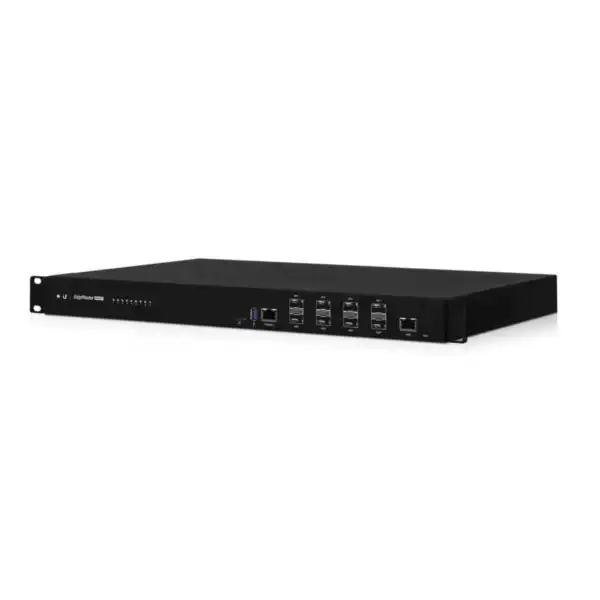
Ubiquiti EdgeRouter Infinity ER-8-XG
A rack-mountable EdgeOS routing appliance with eight 10G SFP+ ports, a Gigabit RJ45 data port and dual hot-swappable AC power modules. Assess your network handoffs, compatible optics and routing requirements before ordering.
Quick buyer check
Best evaluated for engineered 10G routing environments, not as a universal replacement for copper-only switches or specialised security appliances. Verify transceivers, topology, EdgeOS support, provider handoff, commissioning responsibilities and actual commercial terms.
Overview: a 10G routing platform for demanding networks
The Ubiquiti EdgeRouter Infinity ER-8-XG is designed for networks that need several high-speed fiber or direct-attach connections at the routing edge. Rather than treating it as a conventional small-office router, plan it as a rack-mounted network appliance for an experienced team managing interconnections, upstream connectivity and traffic policies. Its eight 10G SFP+ data ports create room for multiple high-bandwidth paths, while the separate Gigabit RJ45 data port supports an additional Ethernet connection. A dedicated RJ45 serial console is available for command-line access. These interfaces have distinct roles; the console is not an extra data port.
The headline 80 Gbps non-blocking throughput figure describes an aggregate platform specification, not a promise that every deployed firewall, NAT, VPN or policy configuration will run at that rate. Real throughput depends on packet size, enabled features, traffic profile, firmware and the surrounding network. Ubiquiti also specifies a forwarding rate of 18 million packets per second. Buyers should size the network around measured requirements and failure scenarios rather than a single headline figure.
For a Tanzanian organisation evaluating a 10G edge router, the practical questions are straightforward: what kind of carrier handoff is supplied, how many routed 10G links will be active, which optics or DAC cables will work, and who will manage the configuration? Establish those details before finalising a bill of materials. Request a compatibility and requirements review for the intended topology rather than assuming every SFP+ module or circuit will work without validation.
Where the ER-8-XG fits
The most useful deployments have clear routing requirements and staff who are comfortable with managed network infrastructure. An internet service provider or regional network operator may need a compact routing edge with several high-speed uplinks. A campus or enterprise network may need to route traffic between distribution networks and an external service provider. A data-centre environment may need a separate device to enforce an explicitly designed routing boundary. These are deployment possibilities, not guaranteed performance or provider-compatibility claims.
Before choosing the router, classify every attached circuit as WAN, private interconnect, core uplink, management path or service network. Draw a link diagram that names every port, its expected speed, network prefix, upstream device, optic type and owner. Then classify the protocols or security controls expected on each interface. This exercise usually exposes constraints earlier than an equipment-only comparison.
An ER-8-XG is not automatically the right choice for every office simply because it provides 10G ports. A site whose connections are entirely ordinary copper Gigabit Ethernet may need a different port mix. A business wanting a completely cloud-managed, wizard-driven user experience should review the operational differences between EdgeOS, UISP and other Ubiquiti product families before buying. Select the appliance for a documented routing job, not just for nominal capacity.
Port layout: eight SFP+ links plus Gigabit Ethernet
The model’s networking interfaces are eight 10G SFP+ ports and one 10/100/1000 Ethernet RJ45 port. The SFP+ interfaces are intended for supported 10G transceivers or direct-attach copper solutions. They can be used for network handoffs or interconnects when the media and peer equipment are compatible. The RJ45 Ethernet data port is not a 10G copper socket. A separate serial console allows administrative access without depending on an in-band IP path.
Make a port allocation table before installation. For example, reserve a port for the primary provider, another for a private network, and others for routed distribution or aggregation. Those assignments are design examples only; the device does not come preconfigured for a particular Tanzanian network provider. Preserve a clear management-access plan, especially when the production links are being reconfigured.
Do not assume that inserting a 10GBASE-T SFP+ copper converter will deliver every intermediate speed or that all third-party optics are interchangeable. Check the current EdgeRouter-specific SFP/SFP+ and DAC compatibility information against the exact part number and software version. Optical connector, wavelength, fiber type, distance and power levels must match the other end of a link. For short equipment-rack runs, a supported DAC may simplify cabling. For longer links, verify the correct fiber-optic design rather than selecting media by connector appearance alone.
Capacity planning without misleading throughput promises
Ubiquiti lists 80 Gbps total non-blocking throughput, 160 Gbps switching capacity and 18 Mpps forwarding rate in the technical specifications for the ER-8-XG. These numbers describe different measurement perspectives. They should not be added together, interpreted as broadband subscription speeds, or applied indiscriminately to encrypted or heavily filtered traffic. A circuit with 10G physical connectivity may carry substantially less application traffic because of upstream capacity, control overhead, packet distribution and configuration.
Start capacity planning with peak traffic by direction, expected packets per second, current utilisation and projected growth. A few large file transfers stress bandwidth differently from enormous volumes of small transactions. Include route scale, address translation, filtering and logging needs in an engineering test plan. If deep inspection, encrypted tunnels or specialised security services are mandatory, identify which appliance is responsible and test the whole service chain.
A proof-of-concept should reproduce the intended protocol mix and feature set. Measure latency, loss, interface errors, CPU utilisation and stable operation under realistic loads. Include failure and recovery testing rather than testing only the best-case path. Avoid quoting a maximum throughput number to stakeholders as though it were a service-level commitment. The relevant commercial outcome is stable, manageable delivery of your actual network services.
Processor, memory and storage
The manufacturer’s installation documentation identifies a 16-core 1.8 GHz MIPS64 processor, 16 GB of DDR4 system memory, 8 MB of NOR flash and 4 GB of eMMC NAND storage. These are hardware characteristics, not a direct formula for how many customers, firewall rules or simultaneous tunnels the router can support. Such limits depend on workload, EdgeOS version and design choices.
Memory headroom is relevant when a router is maintaining operating-system processes and complex state. Nevertheless, a large memory figure should not be used to justify uncontrolled route advertisements, excessive logs or unnecessarily complex policies. Keep configurations intentional, maintain audit-ready backups and assess capacity with monitoring rather than relying on assumptions.
For upgrades, verify firmware compatibility and available maintenance procedures first. Store configuration backups outside the router and keep a documented rollback approach. Check that supported management practices are compatible with the operating environment. Procurement should also ask about the software lifecycle and ongoing support arrangements instead of assuming that a model’s hardware specifications establish its future maintenance status. Firmware release availability and security fixes can change over time, so check current official notices at the time of deployment.
Power redundancy and electrical design
The ER-8-XG includes two hot-swappable AC/DC power-supply modules according to Ubiquiti’s current specification. Its maximum stated power consumption is 100 W. The supported AC input range for the included modules is 100–240 V AC. The manufacturer also describes a separately available DC/DC supply option with an input range of 38–54 V DC. The optional DC/DC module should not be assumed to be present in a standard shipment.
Dual power modules are useful, but redundancy requires careful integration. A rack with both modules plugged into the same unprotected power strip still has a common electrical point of failure. Where the site design allows, connect the supplies to independently protected power paths and document which upstream circuit serves each module. Confirm earthing, rack power distribution, surge protection and any UPS capacity with qualified personnel.
For a Tanzanian installation, design around the actual site power environment rather than an assumed citywide condition. Record measured power quality and the expected duration of battery or generator support. Include cooling and ventilation in the continuity plan: a stable power feed cannot protect an overheated equipment cabinet. Verify local electrical requirements and the exact delivered power cords before installation. No claim is made here about local electrical certification or supply configuration beyond Ubiquiti’s stated hardware specifications.
Physical dimensions and rack readiness
The EdgeRouter Infinity uses a 1U rack-mountable steel enclosure. Ubiquiti specifies dimensions of approximately 442.4 × 285.6 × 43.7 mm and a weight around 5 kg. Its compact height makes it suitable for planned rack integration, but the depth, power-cable routing, fiber bend radius and ventilation still need consideration. Do not treat one rack unit as a complete physical installation specification.
Check the actual rack’s usable depth, mounting geometry, grounding and available clearance. The manufacturer lists mounting brackets, screws, cage nuts, power cords and rubber feet in its quick-start package information; verify the specific delivery and condition against your supplier’s quotation. Label the router and every interface with durable identifiers, matching the network diagram and change-control record.
Optical cabling deserves particular attention. Fiber jumpers should not be sharply bent, strained by a heavy bundle or blocked by a cabinet door. The connection path should permit safe inspection and replacement without disturbing adjacent critical links. If many SFP+ connections are active, consider organised cable management and clear port-level documentation. Proper installation reduces troubleshooting time and protects the value of the hardware; it is not a substitute for compatibility testing or ongoing maintenance.
Environmental operating limits
Ubiquiti specifies an operating ambient temperature range of −5 to 40 °C and 5–95% non-condensing relative humidity for the ER-8-XG. These limits apply to the router’s immediate environment, not the outdoor weather report for the surrounding region. A closed rack with densely packed equipment can run warmer than the room. Humidity or condensation can also become a risk when environmental control is inconsistent.
Assess ventilation, air movement and heat loading before committing a high-speed router to a cabinet. Record air temperature near the unit during peak operating conditions, especially if other network equipment occupies the same rack. Leave the required airflow paths unobstructed and maintain a clean, accessible installation. If the device is placed in a remote or unmanned network room, determine who receives environmental alarms and how site access is organised.
The EdgeRouter is an indoor-oriented electronics appliance; it should not be described as outdoor weatherproof equipment. Ubiquiti’s installation guidance distinguishes suitable cabling practices from the need to protect the router itself in an appropriate enclosure. Outdoor cable runs, poles and building-to-building links need their own grounding, surge and fiber design. Design for measured local conditions and accepted installation practices rather than assuming a product’s operating range eliminates environmental risk.
EdgeOS administration and initial access
The ER-8-XG is an EdgeRouter device using the EdgeOS configuration interface. Ubiquiti’s quick-start documentation explains access through DHCP or a static address during initial setup and identifies the RJ45 serial console for command-line management. Default initial-access examples are deployment starting points, never a secure production configuration. Change factory credentials, establish access controls and follow the current official setup guidance before placing a device on a public or shared segment.
The first change window should establish interface naming, management addressing, administrator roles, time synchronisation, backup methods, and logging. Separate management access from customer or user traffic wherever the network design permits. Establish a recovery procedure that works if a routing policy or firewall rule interrupts normal management connectivity. Keep console access physically controlled and record authorised operators.
EdgeOS has a different management model from Ubiquiti’s UniFi gateways. The fact that both are associated with Ubiquiti does not make their firmware, feature interfaces or operational workflows interchangeable. Organisations standardised on UniFi should explicitly evaluate the administrative implications of using an EdgeRouter. For critical networks, appoint an owner for configuration review, patch assessment and emergency recovery before commissioning the device.
UISP monitoring and operational workflows
Ubiquiti’s quick-start guide states that the device can be managed with UISP to support activities such as monitoring, configuration, upgrades and backup. This can be useful where a network team maintains multiple suitable devices. However, exact management features, supported versions and deployment requirements should be verified against current documentation and the team’s intended UISP setup.
Monitoring should tell operators whether the service is healthy rather than simply whether the router is powered on. Useful observations include interface status, link errors, traffic utilisation, route stability, device resource trends, power-related events and configuration changes. Define a response process for a saturated link or flapping carrier handoff. A dashboard without ownership or escalation adds limited operational value.
Establish a change log for configuration updates. Record why a route, firewall rule or interface setting was changed and what rollback steps are available. Keep credentials and backup files in properly controlled systems, and test configuration restoration during an approved maintenance period. If remote management is planned, protect the management plane and avoid exposing administrative services unnecessarily. These practices are independent of any assumed FourTeck-managed service offering and should be tailored to the actual organisation’s tools and policies.
WAN handoff and ISP coordination
A fast SFP+ router is only one component of an internet or private-network connection. Before buying, ask the carrier or upstream provider to document its handoff medium, port speed, optics, VLAN tagging, IP addressing, routing requirements, authentication if applicable, and demarcation point. These details vary by service and contract. Do not infer that any named Tanzanian operator automatically provides an ER-8-XG-compatible 10G handoff.
Where a carrier provides single-mode optical fiber, validate wavelength, connector, distance, optical power and transceiver support. Where the provider presents copper Ethernet, confirm whether the connection should enter the router’s Gigabit RJ45 port or a supported SFP+ module. For provider-managed equipment, record which side owns optical diagnostics and who investigates a link-down event.
Test the handoff before moving critical traffic. Validate link establishment, addressing, routing reachability, maximum transmission unit, DNS dependencies and failover behaviour where a second link exists. Coordinate the change window with the network operations team and any carrier contact. Avoid committing to a particular throughput or response time without an agreement that defines it. A clear interface specification is more valuable than an unsupported claim that the router works with every internet provider.
Routing policy and network segmentation
In a routed enterprise design, the ER-8-XG may sit between service networks, aggregation switches and upstream connections. The useful outcome is the ability to direct traffic according to a documented design, not merely to provide a collection of high-speed sockets. Define which subnets should communicate, which paths are primary, and which services require isolation before writing configuration.
Consider routing requirements, VLAN architecture, firewall rules, network address translation and any dynamic routing dependencies as separate design decisions. EdgeOS configuration must be checked against the actual firmware and feature support; do not assume configurations copied from unrelated Ubiquiti platforms will apply. Complex policies should be reviewed for unintended paths, asymmetric routing and overlap between translation and filtering.
For a business with guest, operational, management and server networks, clarify whether the router, a firewall or a Layer 3 switch owns each boundary. The right answer depends on the topology and security model. Document permitted traffic flows rather than imposing untested blanket rules. For high-availability designs, test the result of a lost uplink, withdrawn route or unavailable upstream device. Security emerges from correctly designed and maintained policy, not the model name on the equipment.
SFP+ optics, DACs and cabling checklist
Transceiver selection is a common source of delay in 10G projects. Start with the exact ER-8-XG SFP+ interface, identify the opposite device, and choose a media type supported by both ends. Specify speed, connector, fiber category, transmission wavelength, distance and vendor compatibility. Do not substitute a visually similar module or assume a transceiver marketed for a different Ubiquiti family is automatically suitable.
Short links inside a rack may use compatible direct-attach cables. Fiber links can be appropriate for inter-rack or longer connections, but the required optic depends on the optical path. For copper conversions, check the supported interface speed and module interoperability, because multi-gigabit negotiation may not behave as expected. Verify heat dissipation and power implications where applicable. The current Ubiquiti compatibility information should be consulted before ordering modules in quantity.
Build an accessories schedule that lists each port, optic or DAC identifier, peer interface, cable length, spare requirement and installation owner. Check whether optics and cables are separately quoted rather than assumed part of the router package. During acceptance tests, log link speed, errors, optical metrics where supported and port stability. This creates a useful baseline for future troubleshooting and avoids blaming the router for a marginal optical installation.
Reliability planning beyond dual supplies
The ER-8-XG has a useful power-supply design for infrastructure deployments, but dual hot-swappable modules do not make a complete site redundant. A single router remains a single routing node unless the network architecture deliberately provides another operating path. Its two power supplies cannot compensate for a failed optical cable, an unavailable upstream carrier, a mistaken configuration or a building-level outage.
Identify the service’s recovery objectives. Determine what happens when an individual link goes down, when the router becomes unreachable or when a configuration change disrupts traffic. Consider alternate routing paths, spare equipment, tested backups and access to trained personnel according to business criticality. No high-availability or seamless failover claim should be made without a verified topology and successful testing.
Keep physical spare planning separate from claims of manufacturer warranty or local stock. Availability of a replacement unit, power module or optical component depends on actual procurement channels and should be verified at quotation time. For a mission-critical service, document how quickly a technician can reach the rack and what information is available to restore configuration. A practical recovery plan frequently contributes more to continuity than the largest nominal bandwidth specification.
Security and management-plane protection
A router at a high-speed network edge can become a sensitive point in the infrastructure. Management access, configuration backups and interface policies should therefore be treated as security controls. Begin with least-privilege administrator access and change all default login settings before production. Where possible, place administration on a dedicated trusted management network and restrict reachable services to authorised operators.
Keep software patching under an approved process. Check official EdgeOS notices, assess the compatibility of planned updates and keep a known-good configuration backup. Review firewall and NAT policies after material changes. Make a deliberate decision about logging so that useful security and operational events can be investigated without exhausting storage or overwhelming a monitoring system.
For business users, differentiate a router’s routing and filtering functions from the capabilities of a dedicated security inspection appliance. Do not advertise unverified malware inspection, threat subscriptions or next-generation firewall features for this model. If the deployment requires those functions, specify where they are provided in the overall design. The ER-8-XG should be assessed as one engineered component in a broader security architecture rather than as a complete replacement for every network security control.
Traffic growth and future network changes
When evaluating a 10G router, forecast not only present utilisation but also how the network may evolve. Growth might result from additional business sites, more service traffic, larger backups, increased interconnection demand or new internal applications. Each growth driver creates different routing and transport requirements, so a single generic percentage forecast is not enough.
Create scenarios for the current state, the planned state and an exceptional peak period. Record expected link speeds and packets per second, the number of distinct attached networks, likely policy complexity and any operational constraints. Then check how many of the eight SFP+ ports would remain unallocated. Reserving ports for realistic expansion can be sensible, but unused capacity alone does not guarantee a future product fit.
Track software support as part of long-term planning. Hardware capacity and lifecycle availability are different questions. Verify current EdgeOS support, available spare equipment and compatibility for the intended deployment before making a multi-year commitment. If the organisation expects a major architectural move, such as centralised security inspection or a new service-provider handoff, compare several routing designs rather than assuming the existing model will automatically remain optimal.
Typical enterprise deployment scenario
Consider an organisation with multiple internal networks and an external upstream connection. Its network design may place the ER-8-XG between high-speed distribution equipment and a service-provider handoff. The engineering team would allocate ports, document addressing, define access policies and identify a management path. This is a conceptual topology, not a statement that any particular business uses the router or that the described link speeds are available at a specific location.
The important design choice is which device performs routing at each boundary. If Layer 3 switches already route between internal VLANs, the ER-8-XG might be used primarily for upstream connectivity. If the router is assigned internal routing duties, those policies and traffic flows require additional validation. Security inspection may remain on a separate firewall, depending on the architecture.
During commissioning, compare measured throughput and latency with the intended application requirements. Test a disconnected uplink, a failed optic and a management-access recovery process. The project should conclude with an as-built diagram, configuration backup, port schedule and operator handover. These deliverables make the infrastructure understandable to the people maintaining it after installation.
Typical ISP or service-network scenario
A service-network operator might consider the ER-8-XG when several 10G interfaces and an EdgeOS-based operating model fit an aggregation or routing requirement. The purchase decision should be driven by subscriber architecture, routing policies, upstream contracts, interface density and operational tooling. It should not depend on an unsupported claim about the number of customers the device can serve.
List all planned network-facing and customer-facing functions. Determine whether authentication, traffic accounting, subscriber policy, address translation or other services are performed on this device or elsewhere. Establish route scale and protocol dependencies for the specific EdgeOS version. Assess how the router interacts with existing switches, firewalls, monitoring and configuration management.
An engineering pilot should use representative traffic and failure conditions. For example, validate the effect of a routing change while links are busy, measure small-packet behaviour and check whether monitoring alerts reflect the actual fault. Verify operator recovery procedures before introducing the router into a customer-facing path. In Tanzania, obtain handoff and support details from the actual providers involved; avoid assuming compatibility or commercial terms based only on geography.
Data-centre and campus considerations
Data-centre and campus networks often contain several layers of switching, routing and security controls. The ER-8-XG may be evaluated for an edge role where its 10G connectivity, rack format and operational model align with the design. It should not be described as an automatic substitute for a dedicated aggregation switch, a carrier-grade core platform or a full security appliance without comparing the actual feature and scale requirements.
Map east–west and north–south traffic separately. Determine which flows stay within switching domains and which must traverse a routed boundary. Where many servers communicate at high speed, a design that sends unnecessary traffic through an edge router can add complexity. Equally, a well-placed routing boundary may simplify segmentation and upstream control. These are architectural decisions requiring topology and traffic analysis.
Check the site’s physical constraints as well: rack depth, power diversity, fiber management, cooling and access control. In shared or critical facilities, document who has permission to install or service optics and who approves routing changes. The deployment should be evaluated as a complete operational solution rather than only as a hardware purchase. That perspective helps prevent expensive changes after equipment reaches the rack.
Practical pre-purchase verification
Before asking for a quotation, prepare a concise requirements pack. Include the exact model ER-8-XG; intended use as a routed edge, aggregation point or private interconnect; count and type of uplinks; required copper and fiber interfaces; preferred optics or DACs; routing and security requirements; management expectations; and the physical site details. This information allows a supplier or systems engineer to assess fit without guessing.
Identify what is included in the proposed package and what is separate. In particular, verify transceivers, DAC cables, fiber patch leads, installation labour, power distribution, optional DC modules and any support arrangements. Confirm the actual unit configuration and commercial terms in writing. A listing’s mention of a model does not establish current Tanzania stock, price, shipping, lead time or warranty conditions.
Include the acceptance criteria in the purchasing discussion. Define which ports must link, what networks must be reachable, how management will be secured and what measurements demonstrate successful installation. Ask for a proposed alternative if the requirements demand unsupported interfaces or features. A transparent no-fit recommendation can prevent procurement mistakes and is better than forcing an unsuitable product into the design.
Installation and commissioning sequence
Plan installation as a controlled sequence rather than connecting all cables and experimenting on a live network. Begin with asset identification, inventory confirmation, rack readiness and power-path inspection. Mount the appliance securely with appropriate clearance. Label each planned cable and verify that optics or DACs match the design. Confirm access to current manufacturer setup documentation before first configuration.
Establish administrative access and secure credentials before connecting untrusted traffic. Apply a reviewed baseline configuration and record the software version. Connect and validate one link at a time. Check interface link state, negotiated parameters and routing reachability, then test the relevant firewall or translation behaviour. Where a production service is being migrated, use a documented cutover and rollback procedure.
After migration, monitor both the device and connected networks. Examine interface error counts, packet-loss indicators and application-level outcomes. Compare those results with the agreed acceptance criteria rather than accepting a green link LED as evidence that the whole service works. Update diagrams and store configuration backups in a controlled location. Handover should explain what operators will see during normal operation, what alarms matter and who is responsible for escalating faults.
Operations, maintenance and lifecycle checks
A high-capacity router is a long-term operational responsibility. Establish an owner for software updates, inventory records, configuration standards and support escalations. Review official product and software lifecycle information periodically, particularly before a major network expansion. Avoid assuming that an available product page proves indefinite software maintenance or local replacement availability.
Routine checks should include configuration drift, interface health, routing stability, backup integrity and adequate power and cooling. Review whether monitoring thresholds match actual demand and whether alerts produce an actionable response. Keep an up-to-date list of attached circuits and escalation contacts. When the network topology changes, update documentation immediately rather than relying on institutional memory.
At least one approved recovery exercise should show how a replacement or reset device can be brought back into service using protected configuration records. Do not perform disruptive tests outside a maintenance window. For organisations with limited on-site staff, ensure the process does not depend entirely on a single specialist. The operational quality of the deployment determines whether the hardware can deliver useful service over time.
Common mistakes to avoid
A frequent mistake is to equate eight SFP+ ports with eight guaranteed 10G internet services. The ports provide physical interfaces; actual connectivity depends on purchased circuits, media compatibility and upstream services. Another mistake is to assume the RJ45 management console is a network data port, or that the Gigabit RJ45 data interface operates at 10G. The manufacturer’s port definitions distinguish these functions.
Another risk is relying on aggregate throughput figures without accounting for workload features. A routing design with complex policies, small packets or additional processing needs should be tested under representative conditions. Similarly, dual supplies do not eliminate common power failures or remove the need for a spare-path strategy. Avoid creating accidental single points of failure through poor power or cabling design.
Finally, do not order optics by price alone, connect a production network using default administrative credentials or skip configuration backups. Before committing money, confirm software maintenance expectations, actual product supply terms and the intended operating responsibilities. These checks are practical ways to reduce surprises, even when the selected router is technically well matched to the required port density.
Technical specifications at a glance
The confirmed hardware profile is eight 10G SFP+ data ports, one Gigabit RJ45 data port and one RJ45 serial CLI console. Ubiquiti states up to 80 Gbps aggregate non-blocking throughput, 160 Gbps switching capacity and an 18 Mpps forwarding rate. It uses a 16-core 1.8 GHz MIPS64 processor with 16 GB DDR4 memory, 8 MB NOR flash and 4 GB eMMC NAND storage. The unit is 1U rack-mountable, with approximate dimensions of 442.4 × 285.6 × 43.7 mm and a weight of about 5 kg.
Power is provided through two included hot-swappable AC/DC modules, with a stated 100 W maximum power consumption. Supported AC input is 100–240 V. A compatible optional DC/DC module is specified separately by the manufacturer and is not described as standard package content. Operating conditions are −5 to 40 °C and 5–95% non-condensing humidity. The official specification lists CE, FCC and IC certification; this listing does not infer separate Tanzanian approval from those markings.
Specifications are included to support evaluation, not as an unconditional performance guarantee. Confirm the exact delivered hardware, applicable software version, accessory compatibility and site requirements when obtaining a quotation. Network performance, local commercial availability and project-level outcomes must be validated independently.
Frequently asked questions
Is the ER-8-XG a 10G router? Yes. The model has eight 10G SFP+ data ports intended for compatible optical or direct-attach networking, along with one separate Gigabit RJ45 data interface. The presence of a 10G port does not establish a 10G service subscription.
Does it have redundant power? Ubiquiti specifies two included hot-swappable AC/DC power supplies. The rack’s upstream feeds and protection must be engineered separately to obtain meaningful power resilience.
Can it use any SFP+ transceiver? No universal compatibility should be assumed. Check the EdgeRouter-specific compatibility guidance and the exact link requirements, including fiber type, cable distance, connectors and peer equipment.
What does 80 Gbps throughput mean? It is the manufacturer’s aggregate non-blocking throughput specification. Actual routed application throughput varies with traffic and configuration. Use representative testing for procurement acceptance.
Is the RJ45 console an additional Ethernet data port? No. The serial console supports command-line administration. The networking interfaces comprise eight SFP+ data ports and one Gigabit RJ45 data port.
Can it be managed with UISP? Ubiquiti’s quick-start guide describes UISP management. Check current supported software and configuration features against your operational requirements.
Is it suitable for a small office? It can be considered when the network truly needs its interface and operational capabilities, but ordinary copper-based offices may have more suitable options.
Are SFP+ optics included? Do not assume so. Confirm the exact accessories and package content in the quotation. The standard guide separately documents router and mounting/power accessories.
Is there a Tanzanian price or stock guarantee? None is stated. Obtain a current quotation and verified local commercial terms before making a purchasing decision.
Does it replace a dedicated security appliance? Not necessarily. Match security inspection and policy requirements to a properly designed, supported network architecture rather than relying only on the router’s port count.
Request a model-specific quotation
The Ubiquiti EdgeRouter Infinity ER-8-XG is a serious candidate where an eight-port 10G SFP+ routing platform fits a documented network design. Its useful strengths are high-speed port density, a 1U rack form factor, EdgeOS administration and two included hot-swappable AC/DC power supplies. Those characteristics should be evaluated alongside the requirements for optics, support, software lifecycle, security and operational recovery.
For a Tanzania-focused purchase enquiry, prepare the intended handoff types, number of live ports, network diagram, rack power details and preferred commissioning arrangements. Ask for confirmation of the exact model, accessories, commercial terms and any service scope before ordering. Do not rely on assumed local pricing, lead time or stock position.
Request an ER-8-XG quotation and compatibility review from FourTeck Tanzania. Include the planned SFP+ modules, connection distances, upstream devices and routing requirements so the configuration and accessory list can be assessed accurately. A requirements-led discussion can identify missing components or a better-fitting alternative before the network change is scheduled.
Get the right ER-8-XG configuration
Contact FourTeck Tanzania to request a quotation and discuss the correct optics, cabling, power arrangement and networking requirements. Price, availability, warranty and service coverage must be confirmed in the specific offer.




Reviews
There are no reviews yet.