
Outdoor fixed-wireless infrastructure • Tanzania
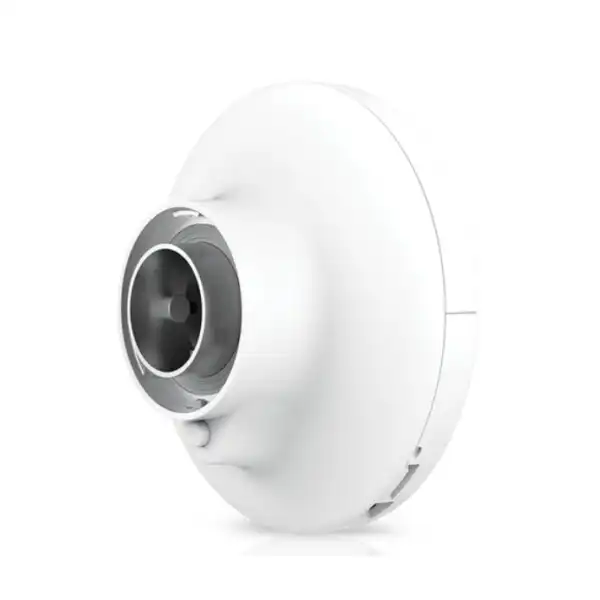
Ubiquiti airMAX PrismStation 5AC (PS-5AC)
Looking for an outdoor radio base to create a planned 5 GHz wireless link or access sector? The Ubiquiti PrismStation 5AC PS-5AC combines Ubiquiti airMAX AC with airPrism RF filtering and a choice of compatible directional antennas. For Tanzania buyers, the critical decision is selecting the right antenna, peer radios, frequency plan and installation accessories rather than purchasing the base radio in isolation. The PS-5AC is offered as a radio base; its coverage antenna is separate. Use the guidance below to evaluate the design, understand verified specifications and prepare a useful quotation request without assuming a local price or stock status.
Key distinction: Shielded 5 GHz airMAX radio base; compatible horn or dish antenna selected separately.
Specifications at a glance
| Product identity | Ubiquiti airMAX PrismStation 5AC; model PS-5AC |
|---|---|
| Intended role | Outdoor fixed-wireless airMAX AC radio base |
| Main radio band | 5 GHz; permitted local channels must be verified |
| Manufacturer hardware frequency range | 5150–5875 MHz worldwide capability; not a local authorization |
| Antenna options | Compatible Horn-5-30, Horn-5-45, Horn-5-60, Horn-5-90 or U-OMT-Dish; antenna not included |
| Ethernet | One Gigabit RJ45 interface |
| Power | 24V passive PoE; 24V 1A Gigabit adapter included |
| Maximum consumption | 10W |
| Device dimensions | 155 × 155 × 104 mm, excluding antenna |
| Device weight | Approximately 0.8 kg, excluding antenna |
| Operating temperature | −40°C to +70°C |
| Operating humidity | 5–95% noncondensing |
| Mounting | Pole-mount hardware included |
| Management | Separate 2.4 GHz management radio |
| GPS feature | GPS connection; synchronization requires supported firmware and correct configuration |
The published hardware frequency capability is not an assertion of local operating rights. Installation settings and accessory selection must be checked for the intended project.
Best fit
Planned outdoor airMAX links, focused access sectors and deployments where antenna beam shaping and RF coordination matter.
Check first
Antenna not included; compatible peers, site survey, power protection and permitted operating settings must be considered.
A radio base for deliberate fixed-wireless design
The Ubiquiti PrismStation 5AC (PS-5AC) is a shielded outdoor airMAX AC radio base designed for fixed wireless networks where antenna direction, interference management and a repeatable installation matter. It is intended to work with a separately selected compatible Ubiquiti horn or dish antenna. That distinction is important when comparing equipment quotations: buying the PS-5AC radio alone does not give an installer a complete directional wireless endpoint. The antenna determines the coverage pattern, and the mounting position, cabling, spectrum plan and peer radios determine how the completed link behaves.
This platform is a practical candidate for wireless internet service provider infrastructure, selected building-to-building connections and carefully planned site distribution. It should not be confused with a consumer Wi-Fi access point that directly provides ordinary phone and laptop coverage. The main link uses the airMAX AC wireless system, while a separate management radio assists device setup. Before placing an order, define the number and location of receiving sites, available mounting height, expected demand and surrounding radio activity. Those inputs are more useful than choosing hardware from an advertised distance or speed alone.
What the buyer should confirm before requesting a quote
A successful purchase starts with four questions: What is the intended topology, which directions must be covered, which compatible equipment is at the far end and what bandwidth is needed during peak activity? In point-to-multipoint networks the base station can serve several appropriately configured subscriber devices within its effective antenna sector. In point-to-point designs both ends need compatible directional systems and a clear engineering plan. The PS-5AC can support these architectures, but changing the antenna does not make it compatible with every wireless standard or every existing access device.
The customer should also establish whether the requirement is for the bare radio, a radio-plus-antenna assembly or a complete installation bill of materials. A deployment may require a horn or U-OMT dish, shielded Ethernet cable, grounding and surge protection, suitable pole hardware, a managed network connection and power continuity. Prices, stock, installation services and delivery terms need a separately confirmed Tanzania quotation. Making these choices before procurement prevents the common mistake of ordering a radio base and discovering on site that its coverage antenna or protective accessories were not included.
Why directional sector coverage is valuable
Wireless equipment transmits into a physical environment rather than an abstract circle on a map. A directional antenna concentrates the intended coverage into a chosen area instead of treating all directions equally. This can help a network designer focus service toward connected buildings and avoid wasting much of the radio pattern toward directions with no users. Directional design is particularly valuable when equipment shares a roof or tower with other transmitters and the antenna must coexist with nearby sectors. The actual benefit still depends on antenna pattern, alignment and installation conditions.
For example, a provider serving a row of customer premises might prefer a narrow horn to concentrate an access sector, while a wider group of premises may require a broader horn or several separate sectors. More coverage angle is not automatically better. A broad sector can bring more unwanted energy into the receiver and may split available airtime among a larger set of subscribers. A narrower sector may demand more access points and more careful physical planning. Selecting the pattern using a customer map, signal survey and capacity estimate is more reliable than relying on beamwidth alone.
Point-to-multipoint connectivity for service distribution
One common PrismStation application is a point-to-multipoint wireless access sector. In this design, a radio and suitable sector antenna are installed at the distribution site, and compatible customer-premises devices are aimed back toward the sector. The shared radio channel becomes a managed resource used by multiple subscribers. It is suitable for network operators that want to reach premises without laying a separate physical cable to every building, provided clear paths and suitable spectrum are available. The design is also subject to the regulatory requirements that apply at the installation location.
Sector planning should consider more than the number of client units on a drawing. The physical distance of each subscriber, its antenna, the clarity of its path, the selected channel width, active traffic and other radios can affect the experience of all users. A few poor links can consume disproportionate airtime. Plan sensible subscriber grouping and avoid promising the total radio capability as the guaranteed rate to each household or business. A practical rollout begins with a coverage and capacity model, continues with a small live trial and expands based on measured link health rather than assumptions.
Point-to-point links between sites
A point-to-point link connects two fixed locations using a focused wireless path. The PrismStation 5AC can be used in such a design with a suitable antenna at each end, subject to radio-mode and compatibility checks. Typical reasons include extending a local network between buildings, connecting an outlying facility to a central network or providing a dedicated path between two distribution points. The installer must check clear line of sight, adequate Fresnel-zone clearance, appropriate mounting height and the actual geographic profile before deciding whether the path is viable.
The attraction of point-to-point wireless is that the path can sometimes be established without constructing a new underground or overhead cable route. However, a wireless link is not inherently equivalent to fibre, and it should not be described as an automatically resilient replacement. Rain conditions, interference, cable faults, power outages, changes around the path and inadequate alignment can all affect availability. Where an organization depends on continuous service, assess redundant network paths, monitoring and a realistic service-level plan rather than making the new radio link a single unmanaged point of failure.
airPrism filtering and the interference problem
The PS-5AC incorporates Ubiquiti airPrism active RF filtering. Its purpose is to improve receiver behavior when unwanted signals occupy nearby parts of the radio spectrum. In a busy location, strong adjacent-channel transmissions can challenge a receiver even when the desired signal appears adequate. Better selectivity helps the radio focus on its operating channel and can make co-located sector planning easier. This capability is particularly relevant to installations with multiple sectors or other 5 GHz systems mounted in close proximity.
Filtering is not the same as making a site immune to radio interference. Signals occupying the same channel, severe overload, poor antenna positioning or insufficient separation can still create a problem. An installation with multiple airMAX radios should be designed using a channel plan, antenna orientation, sensible transmit levels and measured spectrum conditions. Where possible, verify the actual signal-to-noise and interference situation before adding another sector. airPrism is a useful design feature, but field measurement and disciplined RF engineering remain the foundation of a dependable service.
The 30-degree and 45-degree horn choices
Two compatible directional choices are the Horn-5-30 and Horn-5-45. Their nominal beamwidths are 30 and 45 degrees respectively. They are appropriate candidates when the desired wireless coverage occupies a comparatively concentrated direction or when a tower operator plans several deliberately separated sectors. Ubiquiti’s PrismStation documentation identifies these as symmetrical horn options. The narrower option can be attractive when premises are clustered in a limited angular area, while the 45-degree option may fit a somewhat broader group without immediately requiring a 60-degree sector.
The beamwidth number is not a promise of clean service to every customer inside a drawn wedge. Real coverage depends on antenna gain, sidelobes, mounting orientation, link distance and the height of each client. A narrow horn may serve fewer directions, but it does not automatically increase the traffic capacity available at the base station. If customers lie beyond the intended sector edges, the engineer should examine alternative mounting positions or another sector rather than hoping that transmit power will compensate for poor geometry. Confirm the antenna accessory selected in the quotation.
The 60-degree and 90-degree horn choices
The Horn-5-60 and Horn-5-90 offer broader nominal coverage angles of 60 and 90 degrees. Ubiquiti describes these models as asymmetrical horns designed with controlled side and rear radiation characteristics. They may suit installations where the customer locations span a wider direction and a single narrow sector would not match the physical layout. The wider choices can simplify some coverage maps, especially when a network is in an early stage, but they also require careful consideration of the number of subscribers and nearby interference sources.
Do not choose a 90-degree antenna only because the coverage shape looks more convenient on a map. A broader sector can receive unwanted signals from more directions, and a larger group of active subscribers still shares the available airtime. Check whether two narrower sectors, a different tower face or a different mounting point would give more manageable performance. For each candidate, assess the expected signal at the sector edges and the available antenna gain rather than comparing angle alone. The correct choice is the one that meets a measured coverage and capacity requirement.
Using a U-OMT-Dish for focused links
Ubiquiti also identifies the U-OMT-Dish as a compatible antenna accessory for the PS-5AC. The manufacturer datasheet specifies 27 dBi gain for this dish, making it a materially different choice from the horn sectors. A narrow dish pattern can be useful where a highly directional link is required, including selected point-to-point designs or an appropriate client role in a larger fixed-wireless architecture. It should be treated as a designed radio-and-antenna combination rather than an interchangeable part that provides the same coverage function as a sector horn.
Higher antenna gain does not waive local effective radiated power limits or guarantee that a long link will work. The engineer must consider the full link budget and any restrictions on operating frequency and transmitter power. Dish alignment is also less forgiving: small mounting or pointing errors may have a noticeable effect on signal quality. The physical load of an installed dish and its mounting arrangement require separate checking against the mast. Ask for the antenna’s exact model and installation requirements before treating a radio-only quotation as a complete long-distance system.
What is included and what must be added
The manufacturer lists the PS-5AC as a radio base with a pole-mounting solution and a 24V, 1A Gigabit passive PoE adapter. The compatible directional horn or dish antenna is not included with the PS-5AC itself. This is a central procurement point. A completed wireless link also needs an appropriately selected partner radio and antenna arrangement at the remote end. Depending on topology and location, installation material may include Ethernet cable, surge protectors, a grounding path, structural hardware and network equipment supplying or receiving the data connection.
Check the current supplier quotation against the exact order line because packaging, regional variants and accessory offers can differ. A bundled kit offered by a seller should identify its components separately. Do not infer that an antenna, extra mounting pole, Ethernet patch leads, spare power adapter or installation labor is included merely because an image shows an assembled station. Similarly, confirm whether the GPS antenna required for planned synchronization is present in the quoted package and whether the applicable software supports the intended feature. Clear itemization makes comparison between proposals easier and reduces costly site revisits.
Understanding the wireless frequency and management radio
The PrismStation’s main service radio is a 5 GHz airMAX AC system. The manufacturer publishes a worldwide-capable hardware frequency range of 5150 to 5875 MHz, but this is not permission to transmit anywhere within that range in Tanzania. The actual permitted channels and power depend on local rules, equipment configuration and any licensing requirements. Separately, Ubiquiti documents a dedicated 2.4 GHz management radio to help with setup and access to the device. That management function should not be mistaken for a general-purpose customer Wi-Fi hotspot.
When planning the network, separate three concepts: the fixed wireless backhaul or distribution channel, the short-range management path and the ordinary client Wi-Fi service inside a building. A customer who needs phones and laptops to connect locally will generally require appropriate indoor or outdoor Wi-Fi access equipment behind the fixed wireless receiver. Using distinct equipment for these roles improves clarity during troubleshooting and procurement. It also avoids a misleading purchase expectation that one PS-5AC alone can replace a conventional site router, subscriber radio and office wireless access point.
Compatibility with subscriber and peer equipment
The PS-5AC operates in Ubiquiti’s airMAX AC ecosystem. Choose subscriber stations or peer radios that support the operating mode, channel plan and necessary airMAX protocol of the proposed deployment. A radio sharing the nominal 5 GHz band is not automatically a compatible partner. The same caution applies to products marketed as Wi-Fi 5, Wi-Fi 6 or general outdoor access points: these labels alone do not establish compatibility with proprietary airMAX air links. Device generation, operating mode and firmware should all be checked before purchase.
For existing networks, record the currently installed access point, subscriber models, firmware branches and channel settings. A planned expansion may require a controlled compatibility test or a staged migration rather than immediate replacement of one tower component. If the existing endpoints are from a different vendor or a different proprietary system, budget for appropriate compatible equipment at both ends. This prevents situations in which a technically sound new base radio cannot associate with the units already installed at customer locations. Document the selected peer devices and configuration in the final deployment design.
GPS synchronization and its conditions
The PrismStation 5AC provides a GPS connection, and Ubiquiti’s manufacturer datasheet notes GPS synchronization support in airOS firmware version 8.3.0 and newer. Synchronization can be relevant when designing multiple co-located access sectors and coordinating radio activity. However, a GPS connector does not make every neighboring network synchronized or remove the need for RF design. All participating equipment must support the intended operating arrangement and be configured appropriately. An antenna with suitable sky visibility is part of a sensible GPS installation plan.
The installer should verify current device firmware, compatible synchronization settings and any deployment-specific constraints before describing GPS sync as a working feature of the proposed system. Position the GPS antenna according to installation instructions and check its status as part of commissioning. Where synchronization is unnecessary, it should not be used as a headline justification for a higher-cost design. For dense tower environments, compare the likely benefit against the complexity of coordinating all sectors. Record the intended radio timing, software version and antenna arrangement so later maintenance does not unintentionally disturb the deployment.
Realistic bandwidth and subscriber capacity
Marketing material for airMAX AC may discuss high aggregate throughput, but field performance is influenced by channel width, spectrum conditions, signal quality, selected modulation, frame overhead and traffic direction. The PS-5AC has one Gigabit Ethernet interface; that port specification is not a guarantee that every wireless link will deliver a gigabit of application traffic. Likewise, a theoretical wireless rate is not the guaranteed speed a customer will see. A useful capacity design starts with expected simultaneous demand rather than simply multiplying the number of clients by a maximum advertised data rate.
Assess the likely busy-hour traffic, per-user service objectives, upload and download mix, and the performance needed for voice or latency-sensitive applications. Use a design margin for interference and future customer additions. Consider how many active users share each sector and how weak subscriber links affect airtime. After installation, verify both directions with controlled tests and monitor the results under normal load. If the goal involves strict enterprise availability or very high sustained capacity, compare other wireless classes and fibre options instead of treating the radio as a universal solution.
A thoughtful 5 GHz channel plan
Channel selection is one of the most important steps in outdoor wireless engineering. Nearby radio systems may occupy adjacent channels, partially overlap the intended spectrum or create intermittent interference that is not obvious from a single test. Ubiquiti’s airOS platform offers relevant RF analysis and monitoring functions, and the PrismStation’s filtering helps manage certain adjacent-channel conditions. Neither feature replaces a site survey. A channel that looks clean at installation time may become busier as other operators change their systems.
Select a permitted channel and width by considering measured occupancy, desired capacity and link robustness. Wider channels can offer more raw capacity in favorable conditions but may be harder to place in congested spectrum. Narrower channels can make planning easier where usable spectrum is limited, though this reduces potential throughput. Set the transmit power and antenna combination within applicable rules and avoid the assumption that maximum output power always delivers the best network. Keep a record of assigned sectors and frequencies so additional equipment can be introduced without accidental self-interference.
Site survey and link-budget discipline
Before committing to a wireless path, document the coordinates or relative locations of both ends, approximate antenna heights, path obstructions and required service quality. Determine whether trees, nearby rooftops, hills or future building work could restrict the path. A line drawn between two rooftops does not prove the radio Fresnel zone is adequately clear. If a link must operate through partial vegetation or behind structures, do not assume a higher-gain antenna will solve the problem. The geometry and predicted radio conditions need to be acceptable first.
A proper link budget considers transmitter settings, antenna gains, cable and connector effects where relevant, path loss, receiver behavior and the wanted fade margin. For a point-to-multipoint network, repeat the analysis for representative subscribers at short, medium and difficult locations, not only the strongest nearby customer. Include both uplink and downlink requirements. The result should guide the selected antenna and mounting height, and it should identify sites that require a different access point or wired connection. Field measurements during commissioning should then be compared with these planning assumptions.
Mounting, aiming and structural considerations
The PS-5AC is designed for outdoor pole mounting, with the manufacturer’s mounting hardware included. Its documented bare-radio dimensions are 155 by 155 by 104 mm and its listed device weight is approximately 0.8 kg, excluding a separately attached antenna. Ubiquiti specifies a 200 km/h wind-survivability figure and a mounting arrangement that provides elevation adjustment. These are product characteristics, not a certification that any existing roof, tower, clamp or pole can safely carry an assembled installation in its actual exposure.
The complete antenna assembly has its own size and wind-loading implications. A qualified installer should evaluate mounting height, pole stiffness, available clearance, safe working access and the needs of nearby equipment. Avoid positions where parapets or roof plant block the intended beam. Plan a route for the data cable that does not create water-entry points or unsupported loops. Precise aiming matters, especially with narrow antennas, and alignment should be checked using link-quality readings rather than visual direction alone. Record the final angle and mounting position for future maintenance.
Power and Ethernet integration
The manufacturer’s current specifications identify one Gigabit RJ45 Ethernet port, 24V passive Power over Ethernet, a supplied 24V 1A Gigabit PoE adapter and maximum radio power consumption of 10 watts. The supported voltage range shown in current technical specifications is 20 to 27V DC. A buyer should pay close attention to the words passive PoE: not every generic PoE switch or injector automatically uses the same voltage or wiring arrangement. Verify exact power compatibility before connecting the device to an existing network cabinet.
Plan the full path from the radio to the data network. Check the cable grade, outdoor suitability, shielding, earthing, surge protection and the power source’s backup arrangements. Where the customer requires connectivity during mains interruptions, the radio alone cannot provide continuity; the router, switch, PoE supply and any upstream devices may also need protected power. Label ports and keep a network diagram showing where the passive injector sits. When troubleshooting later, verifying stable voltage and the physical Ethernet link is often faster than immediately changing wireless channel settings.
Grounding and surge protection deserve attention
An outdoor network radio is exposed to electrical conditions that differ from those in a sheltered data cabinet. Ubiquiti’s installation guidance calls for shielded Ethernet cabling, suitable grounding and surge protection for outdoor installations. It recommends installing Ethernet surge protection near the radio and near the cable entry to the building. These measures form part of responsible deployment planning, but they do not make a radio immune to a direct lightning strike or remove the need to follow local electrical safety rules.
Before installation, determine how the mount, cable shield, protective devices and power equipment will be bonded and grounded. The most appropriate arrangement depends on the structure and its existing protection system. Use trained personnel for work at height and electrical interfaces. Make the cable entry weather-resistant and allow for safe inspection after storms. Including protection equipment in the bill of materials from the beginning is more effective than adding it only after a preventable network fault. Record how the grounding was implemented so future technicians can inspect it rather than make assumptions.
Environmental ratings and outdoor durability
Ubiquiti’s technical specifications give the PS-5AC an ambient operating temperature range of minus 40 to 70 degrees Celsius and an operating humidity range of 5 to 95 percent noncondensing. These numbers describe the equipment’s design envelope; they do not promise that an installation will remain trouble-free in every exposed location. Solar heating, salt-laden air, accumulated moisture, cable seals and corrosion at metal connections can impose additional challenges. The correct mounting orientation and inspection routine still matter even when the radio itself is suitable for outdoor use.
For a Tanzanian deployment, examine the actual site rather than assuming a uniform climate across the country. A tower installation, exposed roof and sheltered commercial compound can have different environmental demands. Pay particular attention to cable entry, cable support, protective connections and antenna attachment. After significant weather events, inspect for movement, water ingress and changes in signal quality. Where the system supports an important business process, include proactive maintenance and a recovery plan. Environmental suitability is about the assembled installation, not only the published rating of the radio body.
Installation and commissioning sequence
A structured installation sequence prevents avoidable configuration mistakes. Begin with a design review and confirm every piece of the equipment list. Prepare the mounting location and protective cabling before raising the radio. Attach the chosen antenna according to its manufacturer instructions, secure the assembly, position the GPS accessory if the design needs it and connect the correct PoE arrangement. Configure management access in a controlled way and apply approved firmware and network settings. Only then should the technician bring the intended wireless link into service and perform precise alignment.
Commissioning should check the Ethernet connection, radio association, operating channel, channel width, received levels, signal quality and real traffic performance. For a shared access sector, test representative client locations and not merely the nearest endpoint. Confirm that management credentials are secured and that the site can be monitored. Preserve a configuration backup and record serial numbers or other installed-equipment identifiers in the operator’s own asset register. A short handover report with before-and-after test results is valuable to the person who must support the link months later.
Operations, diagnostics and visibility
Outdoor fixed-wireless infrastructure should be observable after installation. Ubiquiti’s software feature set includes reporting about wireless distance, link rate, packet errors and uptime, alongside management services such as SNMP and SSH. These functions can help an operator understand whether a problem is related to a subscriber link, an upstream network fault, a change in RF noise or a power event. The usefulness of these features depends on an organized monitoring design, supported software and appropriate access controls.
Define normal operating ranges for important measurements, then examine deviations rather than relying only on a device being online. A link with high error rates or worsening signal quality may still pass traffic while delivering a poor customer experience. Keep track of scheduled maintenance, frequency changes and physical alterations to the mast. If users report intermittent service, compare the timeline against monitoring records, power logs and conditions at the far end. This method is more effective than repeatedly rebooting radio equipment without identifying the underlying cause.
Secure network access and responsible management
A fixed-wireless radio is part of a broader network security boundary. Secure the management interface using unique administrator credentials, restrict who can reach it and maintain a documented process for firmware review and configuration backup. Select the appropriate security settings supported by the deployed airMAX software and compatible peers. Avoid putting management services on an unrestricted customer network. The available features and configuration names can vary by software version, so the installer should validate settings against the installed firmware rather than follow an outdated screenshot blindly.
Treat the subscriber data path, operator management path and back-office network as separate design concerns. Where appropriate, use upstream routing, filtering or VLAN arrangements to avoid unnecessary exposure between users and infrastructure. Track who is authorized to change radio parameters, particularly channel and transmit settings that can affect multiple customers. When a contractor completes the installation, ensure the operator receives access details securely along with the configuration record. Good wireless security is an ongoing practice and should not be reduced to the existence of an encrypted radio link alone.
What happens as a network becomes busier
A sector that performs well with a small group of early subscribers may need redesign as more users connect. Additional traffic can increase airtime use, and newly installed neighboring transmitters may change the interference environment. The PrismStation’s modular antenna concept allows a network planner to match different sectors to different directions, but it does not remove finite radio and spectrum capacity. Expansion should therefore be based on observed utilization, client distribution and the quality of existing links, not a simple count of spare association slots.
Possible expansion actions include changing a sector boundary, splitting a broad area into narrower sectors, moving a difficult customer to a better access point or adding a separate distribution site. Each change should be evaluated for frequency reuse and co-location interference. Adding power can make congestion worse if neighboring sectors already share constrained spectrum. Keep a capacity forecast and review it regularly. It is usually easier to build a clean channel plan before the tower is crowded than to redesign every sector after customer complaints have started.
Comparing PrismStation with other approaches
The PS-5AC is strongest when the buyer values a shielded modular airMAX AC radio base and the freedom to choose a focused compatible antenna. A conventional integrated outdoor CPE may be simpler for a single fixed endpoint because its antenna is already part of the assembly. A different tower radio may make sense if there is an established antenna system or a different required radio protocol. Fibre can be the preferable solution for highly demanding fixed links when installation is feasible, while other wireless frequency bands may fit specialized short-range or higher-capacity applications.
Compare complete designs rather than isolated radio prices. The fair cost includes the antenna, mounting, protective accessories, compatible remote units, cabling, commissioning and ongoing support. Performance comparisons should use practical throughput, link reliability, interference exposure and operational complexity, not only the largest number on a brochure. If a proposed alternative requires a change of subscriber equipment, account for that transition. The right choice is the one that satisfies the coverage map, service requirement, budget and support capabilities without assuming features that are not documented for the exact model.
Buying considerations for Tanzania
For buyers evaluating the Ubiquiti PrismStation 5AC in Tanzania, the most useful quotation will identify the exact PS-5AC model, the selected compatible antenna and each supporting accessory. Ask which radio topology the proposal addresses, how many links are expected and what installation assumptions have been made. Request confirmation of product availability, price, warranty terms, shipment arrangements and the supplier’s scope of assistance directly in the quotation. None of these local commercial details can be established merely from an international manufacturer datasheet.
Spectrum use is another important part of the purchasing decision. The equipment’s technical frequency capability must not be presented as blanket authorization for local operation. The network owner and installer need to confirm the applicable Tanzanian telecommunications requirements, any relevant licensing or approvals and the configured limits for the intended use. Clarify who is responsible for those checks before deployment. If the project spans several sites, ask for a schedule that separates survey, design, supply, installation and acceptance testing, rather than assuming that buying the radio automatically includes an operating network.
A practical bill of materials for a complete link
A useful equipment list begins with the PS-5AC radio base and the chosen Horn-5-30, Horn-5-45, Horn-5-60, Horn-5-90 or U-OMT-Dish where appropriate. Add the matching equipment for every remote endpoint. Include the documented power arrangement, outdoor-rated shielded cable, protective devices, secure mounting materials and a suitable connection to the existing router or switching network. If the architecture depends on synchronization, identify the GPS accessory and verify the software conditions. Do not order spare antenna or radio components without confirming exact physical compatibility.
The installation list should also account for labor, access equipment, site safety, spectrum analysis, alignment and testing. These elements may be excluded from a radio-only purchase, but they determine whether the product can be used successfully. Consider spare parts and replacement procedures when links support essential activities. For budget approval, split the proposal into required hardware, optional resilience items and professional work. The distinction helps decision-makers understand why two quotes listing the same base radio can still represent substantially different network solutions and levels of responsibility.
Illustrative deployment scenarios
Consider a small fixed-wireless operator with customers grouped along one side of a tower. A 30-degree or 45-degree sector might match that footprint more closely than a 90-degree horn, but only an actual survey and customer map can confirm the choice. At a multi-building industrial property, the same radio family may be considered for a focused link between structures, using antennas and peer devices suited to the path. In both examples, the important engineering question is where the signal must go and how the network will perform under load.
Another scenario involves a distribution point where multiple radio sectors need to coexist. Here the shielded radio base and airPrism filtering are particularly relevant, yet the installer still needs isolation, channel separation and careful mounting. Conversely, a site requiring ordinary guest Wi-Fi access alone is not a good reason to buy a PrismStation base radio; conventional managed access points would address a different task. These examples illustrate how the device can fit a design, not a promise of service coverage or specific performance at an unidentified Tanzanian location.
Acceptance criteria and project handover
Before a network installation is approved, agree on what successful delivery means. Define which locations should connect, the anticipated operating mode, the target service characteristics, the expected monitoring visibility and the evidence the installer should provide. Different sites may warrant different acceptance tests. For a point-to-point path, examine sustained bidirectional traffic and stability. For a subscriber sector, include representative endpoints and behavior under realistic shared traffic. Capture the radio configuration, physical mounting details and cable protection arrangement in the completion records.
The final handover should explain how an administrator reaches the management interface, where backups are stored, who maintains credentials and what steps are taken when a client reports a fault. Record firmware, antenna type, operating channel and settings relevant to synchronization. If the project requires continuity through power failures, demonstrate that the supporting network equipment is protected as intended. A clear handover reduces future downtime and helps a different technician support the network without relying on personal recollection of the original installer.
Care, maintenance and future changes
Fixed wireless links can be left untouched for long periods, but the environment around them changes. New construction, vegetation growth, additional radios and modifications to a mounting structure can influence a previously healthy path. Establish a simple periodic review of signal trends, error rates, power systems, grounding connections and physical integrity. Review firmware updates according to a controlled maintenance policy rather than making unplanned changes during a peak traffic period. Keep a current inventory of antennas and associated subscriber devices.
When relocating or adding a sector, revisit the original RF plan; do not assume the old channel, antenna angle and transmit configuration remain appropriate. Record any new frequency assignments and check impacts on nearby sectors. Where a customer’s bandwidth needs have grown, compare measured use with realistic network capacity and consider whether a redesigned link is required. The PS-5AC can be one building block in an engineered network, but ongoing operational discipline determines how successfully that network continues to meet its users’ needs over time.
Frequently asked questions
Does the PS-5AC include a horn antenna?
No. Ubiquiti identifies the compatible horn or dish antenna as a separate accessory for the PS-5AC radio base. Confirm the exact antenna in your supplier quotation. A product photograph showing an assembled radio and horn is not proof that the antenna is included in the radio-only order.
Is the PrismStation 5AC suitable for point-to-multipoint networks?
Yes, it can serve as a base radio in a properly designed airMAX point-to-multipoint deployment with an appropriate sector horn and compatible subscriber units. Coverage and usable capacity depend on sector design, clear paths, interference, the client population and the actual radio settings. A site survey is recommended before procurement.
Can it connect ordinary smartphones directly as a Wi-Fi hotspot?
It is not intended to replace an ordinary indoor Wi-Fi access point. Its principal service role is outdoor airMAX AC fixed wireless connectivity. The documented separate management radio is for device access and setup, not a promise of general customer Wi-Fi service. Suitable Wi-Fi equipment is usually needed on the local network.
Which antennas work with the PS-5AC?
The manufacturer’s PrismStation documentation identifies Horn-5-30, Horn-5-45, Horn-5-60, Horn-5-90 and U-OMT-Dish as compatible antennas. Select by coverage geometry, gain, link design and installation needs. Check availability and the exact accessory version when ordering; these components should not be assumed to ship with the radio.
What power supply does it use?
Ubiquiti specifies 24V passive PoE through the Ethernet connection and lists a 24V, 1A Gigabit PoE adapter as included. The radio’s current technical specifications give a maximum 10W consumption. Confirm power wiring and voltage compatibility; do not assume that any PoE injector or switch port is interchangeable with the required passive system.
How fast is a PrismStation 5AC link?
There is no single guaranteed field throughput for every installation. Actual results depend on antenna choice, channel width, signal quality, interference, protocol overhead, peer radios and competing traffic. The device includes a Gigabit Ethernet port, but the port speed is not a promise of gigabit wireless application throughput. Test the completed link against project requirements.
Does it have GPS synchronization?
The radio includes a GPS connection. The manufacturer’s datasheet states GPS synchronization support is available in airOS firmware version 8.3.0 and newer. The intended use still needs compatible settings and participating radio equipment, along with an appropriately placed GPS antenna. Verify the firmware and planned synchronization design before treating it as an installed capability.
Can I use any channel in the published 5 GHz range in Tanzania?
No. The manufacturer’s worldwide hardware range describes technical capability and does not establish legal permission to operate on every frequency or at every output level. Check the current Tanzanian regulatory requirements and any applicable equipment or spectrum permissions before deployment. Configure the radio only within the rules that apply to the specific project.
Is this a complete building-to-building link kit?
No. The PS-5AC is one radio base. A complete link needs a suitable antenna, a compatible radio-and-antenna arrangement at the other end, a verified path, correct powering, Ethernet infrastructure, mounting and protective equipment. Ask for a complete bill of materials and an installation scope when requesting a building-to-building solution.
What should I send when requesting a quotation?
Provide the model PS-5AC, the intended point-to-point or point-to-multipoint use, approximate site separation, number and distribution of endpoints, available mounting positions and desired capacity. Indicate whether you need an antenna, matching client radios and installation accessories. If a site survey has been completed, share its findings so the proposed hardware better matches actual conditions.
Request a PS-5AC project quotation
Ask FourTeck Tanzania for a quotation identifying the PS-5AC radio base, the compatible horn or dish, required remote endpoints, power and protection accessories, and any separately agreed engineering services. Share the proposed site layout, number of links and required performance so the equipment can be evaluated against your design.
Next step: Contact FourTeck Tanzania to confirm the complete configuration, current commercial terms and project suitability.




Reviews
There are no reviews yet.