
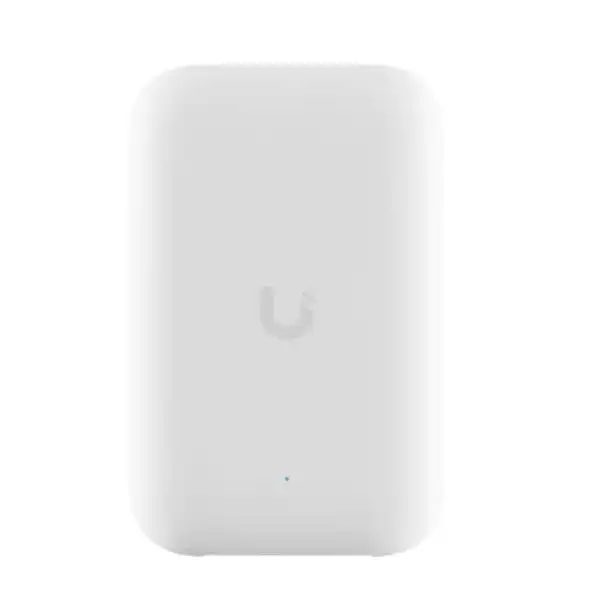
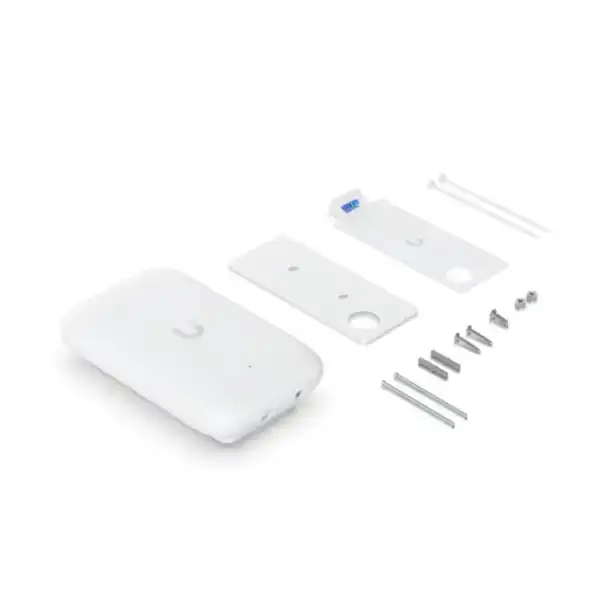
Ubiquiti Swiss Army Knife Ultra (UK-Ultra)
Need dependable wireless coverage on a veranda, in a courtyard, around a shop entrance or across a defined outdoor working area? The Ubiquiti Swiss Army Knife Ultra UK-Ultra combines dual-band Wi-Fi 5, PoE power, a Gigabit Ethernet uplink, flexible mounting and IPX6 weatherproofing in a compact UniFi access point. It can serve a planned indoor or outdoor wireless zone with its internal antenna, while two RP-SMA connectors provide options for compatible external antennas. It is designed to join an existing network; it is not a standalone internet router.
Where the UK-Ultra is worth considering
Courtyards and patios
Extend service toward guests and visitors where a building’s indoor router has poor reach. Check client density and outdoor cable protection.
Retail and service spaces
Create a defined wireless area for frontages, waiting zones and compatible operational devices, with appropriate separation from guest users.
Workyards and covered areas
Use flexible placement to serve a specific workspace, while treating mounting, obstructions and electrical protection as design requirements.
Technical specification at a glance
The specifications below describe the UK-Ultra hardware as published by Ubiquiti. Coverage, client count and data rates are manufacturer references, not promises for a particular installation.
| Wireless standard | Wi-Fi 5 (802.11ac), dual-band 2.4 GHz and 5 GHz |
|---|---|
| Spatial streams | Four total; 2 x 2 MIMO on each band |
| Manufacturer-stated coverage | Up to 115 m² with internal antenna; site-dependent |
| Manufacturer-stated client count | 200+; not a simultaneous-throughput guarantee |
| Maximum 5 GHz data rate | 866.7 Mbps at 80 MHz channel width |
| Maximum 2.4 GHz data rate | 300 Mbps at 40 MHz channel width |
| Network uplink | One Gigabit Ethernet RJ45 port |
| Power | PoE input, supported 44–57 V DC, maximum consumption 8 W |
| Weatherproofing | IPX6; not rated for immersion |
| Antenna options | Internal antenna plus two RP-SMA connectors for optional supported external antennas |
| Dimensions and weight | 137 × 84 × 34 mm; 173 g |
| Mounting | Wall, ceiling, pole; desktop stand available separately |
| Operating conditions | −40 to 60°C; 5–95% noncondensing humidity |
| Management application | UniFi Network version 7.5.187 or later |
A compact access point for spaces that ordinary indoor Wi-Fi does not reach
The Ubiquiti Swiss Army Knife Ultra UK-Ultra is a compact UniFi wireless access point for businesses and property owners who need a flexible Wi-Fi connection point indoors or outside. Rather than depending on a router inside a building to cover every veranda, courtyard, entrance or workspace, you can position this access point closer to the people and equipment using the connection. Its weather-resistant construction, Power over Ethernet input and flexible mounting options make it especially useful where cable routing and device placement matter as much as headline wireless specifications.
The UK-Ultra is not a router, internet modem or complete network by itself. It extends an existing wired network by broadcasting Wi-Fi, and it needs suitable networking equipment and a compatible power source upstream. For a Tanzania-based project, the important purchasing question is therefore not simply whether the access point supports Wi-Fi. It is whether its mounting, radio capacity, management method, power budget and expected coverage match the actual property. Start with the intended service area and number of active users; then decide whether one unit or a planned group of access points is appropriate.
What the UK-Ultra offers—and what its figures mean
The device supports dual-band Wi-Fi 5, also called 802.11ac, with four spatial streams in total: a 2 x 2 arrangement on 2.4 GHz and another 2 x 2 arrangement on 5 GHz. Ubiquiti lists an estimated coverage area of 115 square metres using the internal antenna and a maximum client count of more than 200. These are useful planning indicators, not promises that every connected device will receive the same signal or speed. Walls, concrete, vegetation, user density, interference and client capabilities can change results substantially.
Its radio link-rate ceilings are 866.7 Mbps on 5 GHz with an 80 MHz channel and 300 Mbps on 2.4 GHz with a 40 MHz channel. Those figures describe theoretical wireless signaling rates under particular conditions, not the throughput of an internet subscription. Multiple devices share available airtime, and application performance also depends on the gateway, WAN circuit, switching, client radios and channel conditions. Buyers should use the model’s figures to narrow the selection, then verify the final design through placement checks and an on-site wireless test.
Choose the right wireless band for each application
The 2.4 GHz band can be useful for devices that must operate through light obstructions or at the edges of a service area, including selected sensors, handheld terminals and older client devices. It also tends to be crowded because neighboring Wi-Fi networks and other radio equipment may use nearby frequencies. Its longer reach should not be mistaken for high capacity. A distant client with a weak connection can consume more airtime than expected, reducing performance for nearby users.
The 5 GHz band usually offers more room for channels and is often preferable for laptops, newer phones, conferencing and other traffic that benefits from higher data rates. However, range can decrease more quickly through walls, concrete and dense landscaping. The UK-Ultra supports band steering, which can help capable clients choose a suitable radio, but clients ultimately participate in roaming and band decisions. Configure channel width and placement around the real RF environment instead of selecting the widest channel automatically. In busy areas, a narrower channel may result in more predictable service.
Plan coverage around a site survey rather than a distance promise
Ubiquiti’s stated 115 m² coverage area is a useful starting reference for the built-in antenna; it is not a guaranteed circle on every map. An access point mounted beside an open courtyard may perform differently from the same unit positioned behind a reinforced wall. Elevation, antenna orientation, adjacent buildings, metal roofing, glass treatments and vegetation all influence where signals can travel. A design that appears sufficient from floor area alone may still leave areas with acceptable signal but weak upload performance.
Before ordering, mark the places where users actually need connectivity. Include seating zones, entrances, payment counters, workstations, service areas and roaming paths. Assess whether users will remain stationary or walk between areas while using calls and business apps. If indoor and outdoor coverage are both required, map wall boundaries separately; do not assume an outdoor-rated access point can solve weak indoor coverage through multiple structural barriers. A short field test using representative phones or laptops can reveal limitations that a paper specification cannot.
Understand the 200-plus-client rating in practical terms
A figure of 200+ connected devices does not mean that 200 people can simultaneously stream video, join meetings or perform high-bandwidth work at full speed. It represents a manufacturer-stated client capacity indicator. Actual experience depends heavily on the proportion of clients transferring data at once, the mix of 2.4 GHz and 5 GHz devices, radio interference, application requirements and available uplink bandwidth. A group of mostly idle devices places a different demand on the radio from a crowded guest network actively uploading media.
For a café, lodge or office, estimate the busiest period rather than average attendance. Separate the device count from the concurrent usage estimate, and consider service-critical systems such as payment terminals or operational tablets. Where many clients are active in a compact space, several carefully positioned access points may deliver better results than forcing every device onto one radio cell. Capacity planning should also include the internet connection, gateway processing capabilities and the switching network feeding the access point.
A single Gigabit Ethernet uplink keeps networking straightforward
The UK-Ultra has one Gigabit Ethernet RJ45 interface that carries data and accepts PoE input. In a conventional installation, a suitable cable connects the access point to a PoE-capable network switch or compatible power adapter, while the switch connects back to the local router or gateway. The wired link gives the access point a stable path into the existing LAN when the cable and equipment are correctly installed. This is especially valuable for Wi-Fi areas that would otherwise rely on a weak wireless repeating signal.
Because the unit has one Ethernet interface, do not plan to use it as a multiport switch for several wired devices. If a camera, terminal or additional access point needs a cable at the same location, provide suitable switching and network design separately. The Gigabit interface is also a practical upper bound on traffic traversing that port, regardless of theoretical radio-rate figures. For installation planning, check cable length, weather-rated materials, connector protection, routing and the position of the upstream switch before choosing a final mounting location.
Power over Ethernet: confirm the complete power path
Power over Ethernet helps keep installations neat because the network cable supplies both connectivity and power. According to Ubiquiti, the UK-Ultra supports PoE input, a 44–57 V DC range and a maximum device consumption of 8 W. The design therefore needs a correctly matched PoE switch port or injector with adequate remaining budget. A device drawing relatively little power can still fail to start when the upstream port, cable or injector is the wrong type or has insufficient capacity.
Check whether a switch has enough PoE budget for every connected device, not just the UK-Ultra. For an external mount, consider the route from the building network cabinet and whether an appropriate surge-protection arrangement is needed. Confirm whether the selected offer includes a power adapter or only the access point and mounting components; do not assume every accessory is in the box. Where a property experiences power interruptions, the continuity plan should address the router, switch, upstream connection and any backup supply—not the access point alone.
IPX6 weather resistance is valuable but has limits
The UK-Ultra carries an IPX6 weatherproofing classification, making it suitable for supported exposed outdoor installations when mounted according to Ubiquiti guidance. IPX6 relates to resistance against powerful water jets; it is not a submersion rating. The X also means that the code does not declare a dust-protection grade. Buyers should not read IPX6 as a promise that any mounting orientation, open connector, faulty seal or installation method will be safe through every environmental condition.
The enclosure uses UV-stabilized polycarbonate, and Ubiquiti specifies an ambient operating range of −40 to 60°C with 5–95% noncondensing relative humidity. Those device ratings are helpful, but the cable entry, connectors, pole or wall fixings and overall installation still require attention. Use the official installation guidance for orientation and sealing, avoid locations prone to flooding or standing water, and inspect exposed cabling periodically. An outdoor network is only as reliable as its weakest power or cable connection.
Wall, ceiling and pole mounting create deployment flexibility
Ubiquiti lists wall, ceiling and pole mounting, with mounting hardware included for supported configurations. A separate table stand can be considered when a desktop-style placement better fits a temporary indoor arrangement. This flexibility is useful for projects with limited space, where a conventional ceiling access point may be difficult to place. A wall mount may suit an entrance or courtyard; a pole may make sense in an open yard; a ceiling position can help serve a covered seating or circulation zone.
Location should be chosen for usable radio coverage and maintainable installation, not merely visual neatness. Avoid concealing the unit behind metal panels or placing it where cleaning equipment, service vehicles or routine activities could strike it. If a pole is used, confirm the appropriate mounting diameter and mechanical suitability; the manufacturer lists a 25–50 mm outer-diameter range for the pole mount. Consider safe working access, cable slack, strain relief, building rules and the visual appearance of the finished installation.
External antennas are an option, not a universal upgrade
Two RP-SMA connectors permit supported optional external antennas. This is one of the UK-Ultra’s distinguishing features: the same compact access point can operate with its internal antenna or be designed around an appropriate external antenna arrangement. Ubiquiti also offers related antenna accessories. Buyers considering a wider outdoor zone or a more directional service area should first decide the desired coverage pattern, then verify the selected antenna’s compatibility and the applicable mounting requirements.
An external antenna does not magically increase the speed of an internet connection, eliminate interference or guarantee a particular distance. Antenna shape matters: an omnidirectional pattern may be useful around a mounting point, while a more directional pattern can concentrate service toward a particular area. Cable losses, mounting height, client transmit power and regulatory limits remain important. Confirm whether antennas and their brackets are included in a quotation, and verify permitted configurations for the intended deployment rather than assuming that any RP-SMA accessory is suitable.
Wireless meshing is useful when cabling is difficult
The model supports UniFi wireless meshing, allowing certain deployments to use a wireless upstream connection instead of directly connecting every access point to Ethernet. This may help in a finished property where pulling new cable is difficult. The feature should be treated as a design option rather than an automatic substitute for wired networking. Wireless uplinks need reliable signal between access points and use radio airtime that would otherwise be available for clients.
Where possible, choose a wired backhaul for predictable capacity and simpler fault diagnosis. If a wireless mesh path is necessary, position the units so they can see a strong and stable upstream signal, then test client performance from the intended coverage area. Buildings, trees, weather conditions and changing interference can affect the path. Meshing also depends on the UniFi configuration and compatible infrastructure. Avoid presenting it as long-distance point-to-point bridge equipment without a model-appropriate design and suitable antennas.
UniFi Network management helps keep multiple APs consistent
The UK-Ultra is part of Ubiquiti’s UniFi platform. Manufacturer specifications list UniFi Network version 7.5.187 or later as the application requirement. Within a properly configured UniFi environment, administrators can organize Wi-Fi settings, monitor devices and apply supported network features without manually treating every access point as an unrelated product. This can be attractive to small businesses now and to larger locations planning gradual wireless expansion.
Management architecture deserves attention before purchase. A UniFi console, controller or other supported Network host may be used depending on the existing system; hosting and gateway functions are not interchangeable. Ubiquiti documents a limited standalone mode for UniFi access points, but it does not provide the same management and roaming capabilities as a coordinated installation. Ask how the network will be maintained, who controls administrator credentials, and how changes are approved. A sound operating plan matters just as much as the initial radio installation.
Roaming and multi-access-point layouts
When users move between a lobby, a hallway and an outdoor area, more than one access point may be needed. The UK-Ultra supports features including 802.11k, 802.11v and 802.11r in supported UniFi configurations. These can assist compatible client devices with transitions between access points, but they do not force all phones or scanners to behave identically. Client capabilities, security settings and the amount of coverage overlap still matter.
Avoid putting several access points very close together at maximum power. Too much overlap and poorly chosen channels can lead to contention rather than better coverage. Conversely, access points that are too far apart may leave gaps at doorways, stairs or pathways. Match transmitted power and channel plans to how people actually move. For applications that depend on continuous connections, such as voice calls or mobile point-of-sale workflows, test the handoff with the real application instead of relying solely on the presence of a roaming feature in a specification table.
Guest Wi-Fi, captive portals and access policies
For hospitality and visitor-facing locations, UniFi provides tools that can help separate public Wi-Fi use from staff or operational networks. The UK-Ultra feature list includes guest-network isolation, captive-portal options, voucher authentication, password authentication and other supported access methods. These features can support a more structured guest experience than sharing a single password with every visitor. Their use depends on the overall UniFi configuration and, for certain workflows, associated services or integrations.
Start with the practical questions: who needs access, how long should it last, which network resources must remain private, and who will handle support requests? A guest splash page can communicate acceptable-use terms and access instructions, but it does not automatically make a network secure. For staff, consider separate network identities and access policies. If the business plans to charge for connectivity, review the relevant external payment integration, operating requirements and legal obligations separately; the hardware capability alone is not a complete billing service.
Security should be planned beyond the access-point password
Ubiquiti lists features including private pre-shared keys, RADIUS over TLS, dynamic RADIUS-assigned VLANs, client isolation and Wi-Fi schedules. In a managed installation, these can assist with access segmentation and device policies. The right choice depends on the authentication system, network switching, gateway rules and the experience of the people operating the system. A VLAN label on a wireless network is not enough on its own if the upstream network is not configured to enforce the intended separation.
Keep administrative access distinct from everyday guest access and retain an inventory of installed devices. Use appropriate authentication, maintain firmware and management software, and review who can alter settings. For shops or accommodation businesses, payment terminals and back-office systems may require stronger isolation from visitor devices. Do not assume that an access point replaces a firewall, content-security service or endpoint protection. Wi-Fi is one part of the security boundary; the router, switches, credentials and operational procedures complete the picture.
Hospitality and visitor-facing sites in Tanzania
A small hospitality property may want dependable connectivity in a covered restaurant, courtyard, arrival area or outdoor sitting space. The UK-Ultra’s enclosure and mounting options make it a candidate for those locations, particularly when there is a practical cable route from an indoor network cabinet. Plan around where guests sit and use devices, not only the dimensions of the plot. A poolside or garden zone may have different requirements from indoor rooms separated by thick walls.
The internet plan, service quality and user behavior still determine the experience. Guests watching video or uploading photos create different traffic patterns from guests checking messages. Hospitality operators should distinguish guest internet from reservation, payment and property-management traffic. Where the property spans multiple buildings, the design may require several access points and appropriate backhaul; a single UK-Ultra should not be marketed as a whole-property guarantee. Use a site-specific quote to confirm device quantity, mounting hardware, power provision and the management approach.
Retail shops, offices and service counters
Small retail locations and offices frequently need wireless service in areas beyond the main router, such as a frontage, customer waiting area, loading entrance or nearby covered workspace. A suitably positioned UK-Ultra can provide a dedicated radio cell in these spaces while maintaining a wired connection to the local network. The form factor may be easier to place discreetly than a larger device. UniFi management can also help maintain consistent wireless settings when more coverage is added later.
Operational devices deserve explicit consideration. Barcode scanners, inventory tablets, customer-facing displays and card-payment equipment may have different Wi-Fi requirements and support policies. Confirm their supported bands and security modes before standardizing the network. Keep critical business traffic logically separated from public access, and investigate whether the gateway and internet service can sustain busy periods. A long-range signal is less valuable than a stable connection in the exact location where a transaction or workflow needs to complete.
Courtyards, workshops, service yards and covered outdoor zones
Outdoor working areas create a combination of wireless and installation challenges. Machinery, metal surfaces, vehicles and storage layouts can change reflection patterns and weaken signals. In a yard or workshop, position the access point to minimize unnecessary obstructions and protect the cable route from mechanical damage. Check the mounting surface and whether workers or equipment may come into contact with the unit. For a covered patio, think about user density, adjacent walls and nearby competing wireless networks.
An IPX6 enclosure does not remove the need for weather-aware workmanship. Cable bends, connectors, wall penetrations and grounding decisions can matter more over time than the access point’s advertised resistance. Ubiquiti recommends shielded cabling and surge protection for outdoor environments as part of a broader electrostatic-discharge strategy. Select these items according to the installation design and relevant local electrical practices. For exposed industrial sites, assess whether the environmental risks call for a different product or protected housing rather than assuming all outdoor deployments are alike.
Multi-building properties require backhaul planning
A business with detached structures might want Wi-Fi in a reception building and a nearby work area. The UK-Ultra can be considered as an access point at either location, but a reliable connection between structures must also be designed. If fiber, copper or an appropriate dedicated wireless bridge is required, that is a separate infrastructure decision. Do not confuse an access point’s client coverage specification with a guaranteed inter-building backhaul range. Network design must take into account distance, obstacles, power supply and service continuity.
When multiple buildings are involved, identify where the internet gateway lives, where network segments terminate and who owns each link. Long copper cable runs and outdoor cabling may raise additional protection and standards considerations. A dedicated point-to-point link may be more appropriate than relying on general-purpose Wi-Fi meshing for a demanding connection. Once suitable backhaul is established, the UK-Ultra can serve end-user devices in a defined area. This separation between transport and client access leads to clearer expectations and easier troubleshooting.
Practical deployment considerations for Tanzania
For a Tanzania-based purchase, treat the local site conditions as part of the specification. Heat exposure, seasonal rain, moisture, mounting height and the quality of available power can change the durability and usefulness of an outdoor installation. Ubiquiti’s published operating range and IPX6 designation provide manufacturer references, but they are not a substitute for checking whether a proposed location is safe and maintainable. Ask the installer to review cable protection, connector orientation, lightning and surge exposure, and any need for protected routing.
Wireless channel use and radio configuration should follow the rules that apply to the specific installation and hardware region. Do not assume that a certification listed for another market automatically establishes Tanzanian approval. Before final procurement, verify the region-specific unit, applicable requirements and the network’s intended outdoor operating conditions with the appropriate responsible parties. This listing does not assert local regulatory approval, service coverage, installation availability or stock status. Those commercial and compliance details should be confirmed against an actual quotation.
Should you choose Wi-Fi 5 or a newer Wi-Fi generation?
The UK-Ultra is a Wi-Fi 5 product. That is a practical choice for many ordinary browsing, handheld-device, guest-access and outdoor extension tasks, especially when mounting versatility and integration with an existing UniFi deployment are the leading requirements. It does not become Wi-Fi 6 or Wi-Fi 7 through a software update. Buyers expecting the efficiencies or features of newer standards should compare the device with a newer supported UniFi model before committing to a design.
The comparison should not focus exclusively on generation labels. Consider the number of simultaneously active users, client device capabilities, site interference, allowed channels, antenna needs, cable infrastructure and management compatibility. A well-positioned Wi-Fi 5 access point can serve a defined area more usefully than a poorly placed newer model, but a very busy environment may benefit from a more modern radio platform. If long-term capacity expansion is the priority, include future client counts and technology refresh plans in the quote.
An installation sequence that avoids common mistakes
First, document the service area, wired network location, intended client types and busy-hour usage. Second, check the router or gateway, switch ports, PoE availability and cable path. Third, choose an accessible wall, ceiling or pole location that supports the required antenna orientation and weather protection. Fourth, configure the AP through an appropriate UniFi management method and set the Wi-Fi networks, authentication and any segmentation policies. Fifth, test coverage and performance with actual devices in the places where people work or gather.
During testing, note both the download and upload experience, because a phone with a weak return signal can appear connected yet perform poorly. Walk between coverage areas where roaming matters. Check that guest clients cannot reach resources intended only for staff. Record the AP’s location, cable route, management credentials ownership and configuration details for future support. A small amount of documentation at installation time is valuable when a cable is damaged, a network changes or a second access point is added months later.
Troubleshooting weak or inconsistent outdoor Wi-Fi
If an installed UK-Ultra appears offline, begin with the physical path. Verify the PoE source, device power, switch port, Ethernet terminations and network addressing. If it powers on but users cannot reach the internet, check the upstream router, gateway configuration, DHCP service and WAN connection. A wireless device can broadcast a network name even when the rest of the network is unhealthy. UniFi status and client information may help identify the failing part of the path.
If connectivity works but feels slow, compare a wired test with Wi-Fi performance at several locations. Check whether only one band is affected and whether a small number of weak clients are consuming airtime. Look for sources of interference, unexpected mounting obstructions and inappropriate channel width or transmit-power settings. If using wireless meshing, examine the upstream link before blaming the client devices. Outdoor cables and exposed connectors should be inspected when failures coincide with rain or physical maintenance work. Changes should be documented so that any improvement can be measured.
Before requesting a quotation
Specify that the requested model is Ubiquiti Swiss Army Knife Ultra, identified by the manufacturer’s model code UK-Ultra. Share how many units you are considering, whether the installation is indoor or exposed outdoor, and whether the site already has UniFi management. Include a simple sketch, photographs or measurements where possible, but avoid sharing sensitive network passwords or credentials in an ordinary message. Ask which power and mounting accessories are included in the exact offer and whether optional external antennas are needed.
A useful quote should distinguish the access point from additional switches, PoE adapters, outdoor Ethernet cable, surge-protection components and installation work. Confirm the correct regional model and any relevant site-specific approvals or configuration requirements. Ask for the actual current price, local stock position, delivery arrangements and warranty terms rather than inferring them from an international product listing. If you are replacing an existing AP, identify the original unit, controller version and coverage problem so a replacement recommendation can address the real reason for the upgrade.
Frequently asked questions
Is the UK-Ultra a router or a Wi-Fi access point?
It is a Wi-Fi access point. It needs an existing network with a router or gateway to provide the normal internet and routing functions. You connect the UK-Ultra to that network using its Ethernet interface or use a supported UniFi wireless-meshing design. Buying it alone will not replace a fiber router, mobile-data gateway or internet subscription. If the site needs an entirely new network, include a suitable router, switching, power and management arrangement in the design. This distinction prevents an otherwise functional access point from being blamed for missing gateway services.
Can the Swiss Army Knife Ultra be installed outside?
Yes. Ubiquiti identifies it as an indoor/outdoor access point with IPX6 weatherproofing. That is useful for appropriately mounted exterior locations, but it is not permission to submerge the device or ignore installation details. Follow manufacturer guidance regarding mounting, connectors, cabling and any external antennas. An installer should consider rainfall exposure, cable entry, power protection and safe access for maintenance. The exact suitability of a particular exposed position should be assessed rather than inferred from the label alone.
Does it use Wi-Fi 6 or Wi-Fi 7?
No. The UK-Ultra uses Wi-Fi 5, also called 802.11ac, and operates on 2.4 GHz and 5 GHz. Phones and laptops using newer Wi-Fi standards may still communicate using a mutually supported older mode, but the connection does not gain the advanced radio features of a newer-generation access point. For high-density usage or a project expressly requiring newer Wi-Fi functions, compare appropriate alternative models before choosing this one. Think of the UK-Ultra as a versatile Wi-Fi 5 coverage device rather than a future-generation replacement.
How much area will one UK-Ultra cover?
Ubiquiti states approximately 115 square metres with its internal antenna. Real usable coverage depends on mounting position, walls, local interference, client devices and required application speed. A simple browsing device and a continuous video-call device may have different minimum signal requirements. The same coverage figure will also feel different in an open courtyard and a building divided by concrete rooms. Plan the intended usable area first and validate coverage with representative devices after installation. Multiple units may be required for a complicated property.
Can it support more than 200 devices?
The manufacturer’s published maximum client count is 200+, but this should not be used as a service-level promise for 200 simultaneously active users. Connected, mostly idle clients are different from many users streaming, uploading or participating in calls. Actual experience reflects radio airtime, available channels, interference, gateway performance and WAN bandwidth. If the location is consistently busy, design for active throughput and service quality rather than simply trying to maximize the number of associated devices. Multiple properly planned APs may be more appropriate.
Does the UK-Ultra need a PoE switch?
It needs suitable PoE power, which can come from a compatible switch or appropriate PoE adapter. Ubiquiti lists a maximum device draw of 8 W and a supported voltage range of 44–57 V DC. Confirm the precise power method, hardware compatibility and remaining power budget before installation. Do not assume the product package includes a separate injector. When an outdoor cable is involved, consider the approved protection approach and the state of the upstream power supply as part of the complete project.
Can I use an external antenna for greater reach?
The unit provides two RP-SMA antenna connectors for supported optional external antennas. A suitable antenna can change the coverage pattern and potentially improve service in the intended direction, but it does not guarantee an advertised distance or faster broadband. The correct choice depends on where clients are located, antenna pattern, cable loss, mounting and regulatory considerations. Confirm accessory compatibility and any additional hardware required for weatherproof installation before purchase. Test actual client performance rather than assuming more antenna gain always means better service everywhere.
Will it work without a UniFi controller?
Ubiquiti documents a limited standalone configuration method for UniFi access points, while full coordinated features are designed around UniFi management. In standalone mode, management and roaming capabilities are reduced. For one simple location, the limitations may be acceptable; for several APs, staff and guest policies or central administration, a suitable UniFi Network deployment is often more appropriate. Confirm which management features are required before choosing the setup method, and remember that an access point still needs an upstream router or gateway to deliver internet access.
Can the UK-Ultra provide public guest Wi-Fi?
Yes, the official feature set includes capabilities used in guest wireless networks, including client isolation and captive-portal options within a supported UniFi configuration. A business should still specify the guest authentication method, staff-network separation, bandwidth policies and support arrangements. Some portal workflows rely on additional services or integration. If the goal is paid guest internet access, verify the complete payment and access process rather than assuming the access point itself is a billing platform. Test that guest devices cannot reach private operational systems.
Can I use it to connect two buildings?
It may form part of a multi-building network, but the model is primarily a client-serving access point, not a substitute for a properly engineered dedicated building-to-building backhaul. For reliable connection between structures, first decide whether cable, fiber or an appropriate wireless bridge is needed. Consider distance, obstructions, radio conditions and electrical protection. The UK-Ultra can then provide Wi-Fi in a selected building or outdoor zone. Do not interpret its nominal coverage area as a guaranteed point-to-point transmission distance.
What is the difference between internal and external antennas?
The internal antenna supports the manufacturer’s standard compact deployment and published coverage reference. An optional supported external antenna lets an installer choose another radiation pattern that may better fit a particular area. A broad pattern can serve clients around a location; a more focused pattern can be useful when clients are concentrated in one direction. Neither approach removes the need to plan channels, mounting and backhaul. The correct decision comes from the geometry of the area and the intended client devices, not the accessory count.
How should I choose the right number of access points?
Start with a floor plan or site sketch and label the actual places requiring service. Include barriers, mounting choices, busy-hour active users and any existing network coverage. Separate indoor and outdoor areas in the design. One access point may be suitable for a modest, open area; multiple cells may be needed across larger or obstructed spaces. Consider the 5 GHz experience where higher performance matters and the 2.4 GHz needs of older equipment. Confirm the result through an on-site test and adjust locations or channels before expanding the device count.
What must be confirmed before buying for a Tanzania project?
Confirm the exact UK-Ultra model, proposed location, local installation needs, proper PoE supply and expected number of users. Request verification of the supplied regional version and any applicable approvals or radio-operating restrictions. Ask for actual current Tanzanian pricing, stock, delivery and warranty terms in the quotation; none should be assumed from an international specification page. Also check whether antennas, mounting extras, outdoor cable and surge protection are separate costs. A clear project brief helps compare quotations accurately and reduces the risk of missing essential installation components.
Request a UK-Ultra quotation for your project
Tell FourTeck Tanzania where Wi-Fi is needed, the approximate size of the area, the expected active-device count and whether a PoE network and UniFi management system are already in place. Request confirmation of the exact supplied model, region-specific suitability, accessories, current pricing, stock position and applicable terms before purchase.
Ask for a project-specific quote covering the access point and any necessary power, cabling, mounting or external antenna equipment.




Reviews
There are no reviews yet.