

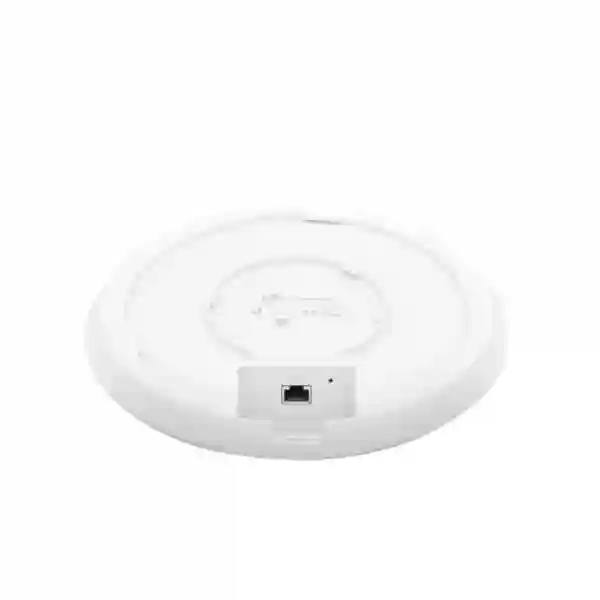
Ubiquiti U6 Long-Range U6-LR Wi-Fi Access Point
Build more dependable wireless coverage with a managed dual-band UniFi access point designed for thoughtful placement, wired PoE+ connectivity and central administration. The U6-LR is a candidate for offices, shared spaces and other sites that need more than a basic all-in-one router.
Important model detail: Wi-Fi 6 operates on 5 GHz; the 2.4 GHz radio uses Wi-Fi 4. Coverage and actual speeds depend on site conditions.
Key specifications at a glance
| Model | Ubiquiti UniFi U6 Long-Range (U6-LR) |
|---|---|
| Wireless bands | 2.4 GHz and 5 GHz; no 6 GHz radio |
| Wi-Fi generation | Wi-Fi 6 at 5 GHz; Wi-Fi 4 at 2.4 GHz |
| 5 GHz radio | 4×4 DL/UL MU-MIMO; up to 2.4 Gbps radio rate |
| 2.4 GHz radio | 4×4 SU-MIMO; up to 600 Mbps radio rate |
| Published coverage | 185 m² (2,000 ft²), environment-dependent |
| Published client count | 350+ maximum clients, not a performance guarantee |
| Uplink | 1 × Gigabit Ethernet RJ45 |
| Electrical power | PoE+; maximum consumption 18.5 W |
| Mounting | Ceiling or wall |
| Protection | IP54; indoor and covered outdoor use |
| Dimensions | 220 mm diameter × 48 mm |
| UniFi application | UniFi Network 6.0.45 and later |
The wireless rates, coverage reference and client count are manufacturer specifications rather than guaranteed speeds, radius or service capacity.
Who should choose the Ubiquiti U6 Long-Range U6-LR?
The Ubiquiti U6 Long-Range U6-LR is a managed wireless access point for buyers who need a planned, reliable Wi-Fi network rather than another consumer router. It is particularly relevant when an office, education facility, reception area, hospitality property or larger residence needs coverage across multiple rooms or a substantial shared space. The device is designed to connect to an existing wired network and work within the UniFi Network management environment. It does not replace a broadband subscription, internet modem, gateway firewall or routing service. Buyers should first establish which of those components are already installed and which still need to be supplied.
Choose this model for its combination of 5 GHz Wi-Fi 6 capability, four-by-four radios, ceiling or wall mounting, and centralised administration. A useful buying conversation starts with the building plan: how many floors there are, where the wired network is available, which rooms need consistent service, and what connected devices people use. If there are dense walls, several storeys, long corridors or outdoor spaces beyond a sheltered area, one access point may not be the appropriate answer. A measured design using multiple appropriately placed access points can outperform a single radio operating at high power.
The wireless technology explained without inflated speed promises
The U6-LR is a dual-band access point using 2.4 GHz and 5 GHz radios. An important model-specific detail is that its Wi-Fi 6 technology operates on the 5 GHz band, while its 2.4 GHz radio operates with Wi-Fi 4 technology. The two bands help serve different device types and conditions. The 5 GHz radio can deliver higher data rates to compatible clients in suitable conditions; 2.4 GHz often remains useful for older clients and locations where radio propagation matters more than headline speed. The product does not provide a 6 GHz radio and should not be described as a Wi-Fi 6E or Wi-Fi 7 access point.
Ubiquiti lists maximum radio rates of 2.4 Gbps on 5 GHz and 600 Mbps on 2.4 GHz. These are connection-layer figures under specified conditions, not promised download speeds. Real throughput depends on the client’s capabilities, channel width, signal quality, interference, encryption overhead, simultaneous traffic and the wired uplink. Because the unit has one Gigabit Ethernet port, the connection to the network can be a bottleneck before the advertised combined wireless radio rates are reached. It is better to assess actual applications, the number of users and the available internet service than to buy from a single combined megabits-per-second headline.
Coverage: interpret the 185 m² rating correctly
Ubiquiti’s published overview gives a nominal coverage area of 185 square metres, equivalent to 2,000 square feet. This is a planning reference, not a guaranteed footprint for every property. Signal strength and usable application performance can change substantially around reinforced concrete, metal doors, lift shafts, dense shelving, equipment cabinets, stone walls and interior partitions. A client behind several obstacles may connect but still receive disappointing upload speeds or unstable video calls. A site assessment is therefore more useful than dividing floor area by the manufacturer’s nominal figure and assuming perfect coverage.
In a large open room, a well-positioned ceiling access point may provide a more even signal than equipment hidden in an office corner. In a building divided into small rooms, separate access points can reduce the distance and obstacles between users and their network. Multi-floor installations should be assessed in three dimensions rather than treating all floors as one flat plan. For sheltered verandas or reception entrances, assess the signal at the actual user position and confirm environmental protection. The objective is usable coverage at the required places and times, not simply detecting the network name on a phone.
Understanding the 350+ client figure
The technical overview publishes a maximum client count of more than 350. This specification describes a supported connection-capacity class, not an assurance that hundreds of people can simultaneously make high-quality video calls or transfer large files. A network serving mainly low-traffic devices behaves differently from a venue where most attendees are streaming video, downloading content or using voice applications. Capacity planning should consider airtime consumption, devices per person, traffic patterns, radio interference, client roaming and the upstream connection. Treat the stated figure as a model capability indicator rather than a practical service-level target.
For a school, meeting hall or shared workspace, the useful question is how many actively transmitting clients will be present during the busiest period. It can be sensible to distribute users among several access points even where the raw association count suggests one unit might suffice. A design can be checked by reviewing real client signal levels, channel use and application behaviour after installation. Traffic shaping, separate guest access and properly configured radio channels may improve the experience, but they cannot create additional internet bandwidth. Set expectations around what people actually need to do, especially during busy periods.
5 GHz radio: what 4×4 MU-MIMO contributes
The U6-LR’s 5 GHz radio uses a four-by-four multi-user MIMO configuration and Wi-Fi 6 features aimed at more efficient use of wireless airtime. This gives the access point capabilities beyond those of a basic single-radio consumer device. MU-MIMO can help compatible devices share radio resources under suitable conditions. The benefit is not automatic for every client or every packet, and a client’s own antenna configuration matters. A two-stream phone, for example, does not become a four-stream receiver simply because the access point has four radio chains.
Channel width deserves equal attention. The maximum published 5 GHz radio rate assumes suitable channel conditions, including wide channels where supported. In a dense building, the widest available setting may not be the best practical setting because it can increase exposure to nearby networks and reduce opportunities to reuse spectrum. A technician should review neighbouring wireless activity, client capabilities and performance goals before selecting channels or width. Strong application performance is normally a result of sensible placement and channel planning, not simply choosing the largest number shown in a configuration menu.
2.4 GHz: valuable for compatibility and reach
The U6-LR includes a four-by-four 2.4 GHz radio with a published maximum rate of 600 Mbps. Its presence matters because many existing phones, printers and connected building devices still rely on 2.4 GHz. Some equipment needs this band for compatibility even when users with modern laptops prefer 5 GHz. At the same time, the 2.4 GHz spectrum is commonly congested and offers fewer independent channel choices, which can affect speed and reliability. For this exact model, describing the 2.4 GHz service as Wi-Fi 6 would be inaccurate; the manufacturer’s store distinguishes Wi-Fi 4 at 2.4 GHz.
A sensible deployment avoids overloading the lower-frequency band with traffic that more capable clients could carry on 5 GHz. Band steering is among the supported management features, but effectiveness depends on client behaviour and the broader network configuration. Some older or specialist devices may need a carefully planned dedicated wireless network or security setting. Confirm device compatibility before introducing new authentication rules or changing frequencies in a working environment. The practical goal is to keep essential legacy equipment functional without letting it dictate an unnecessarily slow or insecure configuration for everyone else.
Power and cabling: PoE+ is a real purchase requirement
The U6-LR requires Power over Ethernet Plus, commonly identified as 802.3at PoE+. The access point receives data and electrical power through its Ethernet connection, reducing the need for a mains socket at the mounting location. The manufacturer specifies a maximum power consumption of 18.5 watts and a supported voltage range of 44 to 57 volts DC. Before ordering, confirm that the existing network switch has the appropriate PoE+ capability and enough remaining total power budget. A switch with several powered ports can still be unsuitable if its overall electrical budget is too small for all attached devices.
If a compatible PoE+ switch is not available, the installation may need a suitable injector and its mains supply. Do not assume that every generic PoE adaptor is interchangeable: passive PoE equipment and ordinary 802.3af ports must not be treated as confirmed substitutes for the published PoE+ requirement. Check what accessories are included in the actual quotation rather than assuming an injector comes in the box. Consider cable routing, cable category, physical protection and surge risks as part of the project. A properly planned wired connection improves maintainability and avoids the reliability trade-offs of unnecessary wireless backhaul.
The Gigabit Ethernet uplink and end-to-end performance
The access point provides a single Gigabit Ethernet RJ45 network interface. That port connects the device to the switch or other local network infrastructure and supplies a path for wireless traffic. It is important to distinguish the speed of an individual wireless association from the total capacity available through this wired interface. Wireless rates quoted for two radios cannot simply be added together and advertised as a guaranteed internet connection. Real user performance is constrained by the slowest relevant link, as well as traffic contention and other equipment on the path.
Plan for the whole connection: access point, copper cabling, PoE+ port, switch uplinks, router, firewall, local servers and internet service. If the WAN is relatively slow, a high wireless radio rate cannot overcome that limitation. If a local workflow transfers large files over a LAN, server and switching capacity may matter as much as wireless design. When planning a new installation, determine whether most traffic goes to the internet or stays on-site. That distinction guides sensible budgets and helps avoid replacing the access point when the real bottleneck is somewhere else.
Wall and ceiling mounting for predictable coverage
The U6-LR is designed for wall or ceiling mounting; the manufacturer identifies a mounting kit in its overview. It measures approximately 220 millimetres across and 48 millimetres deep. These dimensions and the circular enclosure make it suitable for visible installations where the access point can be kept clear of storage and equipment. The precise location influences radio performance: placement directly above dense metal fixtures, behind decorative panels, inside cabinets or beside sources of electrical interference can undermine a theoretically strong device.
Before installation, identify a safe fixing surface, suitable cable route and access for future servicing. Mounting into a suspended ceiling may require checking the strength of the support and the position of services above the ceiling. Wall mounting may be useful in some layouts, but the coverage pattern still needs testing rather than assuming that any orientation performs equally well. Allow access to the Ethernet connector and reset function as appropriate. A tidy network plan should record the access point’s location, cable destination, switch port and management identity so future maintenance is straightforward.
IP54 is useful protection, not unrestricted outdoor suitability
The manufacturer gives the U6-LR an IP54 rating and describes use in indoor and covered outdoor environments. This can make the model relevant to sheltered entrances, covered terraces and other protected locations. However, IP54 should not be interpreted as waterproofing or permission for continuous exposure to driving rain, standing water, pressure washing or uncontrolled weather. An access point located under a roof can still encounter wind-driven moisture, condensation, direct sunlight and damaging cable entry conditions. The protective design of the full installation matters more than the rating alone.
For Tanzanian projects, assess the actual environment rather than making assumptions based on the country or city. A humid indoor lobby, exposed veranda, hot service corridor and open courtyard have different risks. The published operating range is minus 30 to 60 degrees Celsius and 5 to 95 percent noncondensing humidity, but outdoor protection must still respect the installation instructions. If the intended position has direct weather exposure, consider a product specifically designed for that duty instead of stretching this unit’s use case. Ask for a site-specific mounting and environmental assessment before purchasing for external locations.
UniFi Network management and the controller role
The U6-LR is managed through the UniFi Network ecosystem, which provides a central place to configure wireless networks, observe clients and coordinate access points. Ubiquiti’s current technical specification lists UniFi Network version 6.0.45 or later as the application requirement. For an existing deployment, check controller compatibility and supported firmware before making changes, because the version installed at a customer site may be older. Depending on the network design, management can run on compatible UniFi hardware or another supported UniFi Network host; the access point is not a substitute for the complete management system.
Central management becomes especially useful when more than one access point serves a property. Administrators can keep wireless network names, authentication policies and relevant configuration consistent across devices. They can also review radio conditions, client associations and problems without visiting each ceiling-mounted unit. The system still benefits from routine configuration backups, secure administrative accounts and controlled firmware updates. Confirm who will operate the management platform after installation. An unmanaged handover can undermine the value of buying a capable managed access point, particularly when guests, staff and operational devices share the same premises.
Security and guest-network separation
The manufacturer’s specifications include WPA-family wireless security support, guest network isolation and VLAN-related capabilities. These features are useful for organisations that need different trust levels for staff equipment, visitors and connected building devices. A guest wireless name should not automatically have the same access as accounting workstations or internal application servers. However, separation is an end-to-end design matter: the switch, gateway, firewall and network policy must be configured consistently. Turning on an option at the access point alone does not prove that the entire business network is secure.
Plan who needs wireless access and which services each group should reach. Use suitable authentication, protect administrative credentials and remove obsolete shared passwords when personnel change. For public or semi-public venues, guest isolation and appropriate access restrictions can reduce unnecessary exposure between users. Where an existing business relies on older equipment, validate its security compatibility instead of weakening every wireless network to accommodate one legacy device. Configuration should be reviewed periodically, especially after firmware updates or changes to routing. The objective is usable access with deliberate boundaries, not an impressive list of security acronyms.
VLANs, multiple SSIDs and network policy
The U6-LR supports VLAN functionality and a published maximum of eight BSSIDs per radio. Those figures create flexibility for organisations that need to separate traffic classes, but they are not a recommendation to create the largest possible number of wireless networks. Every additional SSID introduces management and airtime overhead. For many offices, a small, well-defined set of staff, guest and specialist device networks is easier to secure and troubleshoot than a complex collection of overlapping names.
A practical design identifies each network’s purpose, authentication method, VLAN assignment and permitted services before equipment is configured. The access point must be paired with a switch and routing platform that correctly carry and enforce those network segments. Staff wireless service might need printers or internal applications, whereas visitors may need internet access only. Building devices may benefit from restricted access to their approved destinations. Document these policies in plain language so the business can manage them after handover. More features do not automatically make the network safer; correct, tested policies do.
Roaming between several UniFi access points
The U6-LR supports technologies including 802.11k, 802.11v and 802.11r, alongside other UniFi roaming and radio-management functions. In a properly designed multi-access-point environment, these capabilities can assist devices moving between areas without unnecessary disruption. The exact result remains client-dependent: the phone, laptop or specialist terminal ultimately influences when and how it moves to another access point. Roaming is not the same as having a single access point transmit farther. Good coverage overlap, consistent network policies and effective channel planning remain essential.
For a hotel corridor, multi-room workplace or learning facility, place access points so users do not encounter sharp signal gaps while moving through important areas. Too much overlap at excessive transmit power can also create problems, as devices may remain connected to a distant access point. Validate handovers with representative devices, especially if staff use voice or time-sensitive applications. Avoid promising completely seamless handoff for every handset or application. The useful sales conversation is about the customer’s mobility patterns and tolerance for interruptions, followed by a deployment plan that can be tested on site.
Wireless meshing versus a wired access-point design
Wireless meshing is among the U6-LR’s listed capabilities. This can be helpful where a cable path is difficult, but it should not automatically become the first choice for a fixed business installation. A wired Ethernet uplink generally offers a more predictable foundation because it avoids using available wireless airtime for backhaul traffic. Any wireless uplink still depends on a suitable radio path and power at the remote access point. Meshing also does not remove the unit’s PoE+ power requirement; a wireless link is a data-path option, not a replacement for electrical power.
Before selecting a mesh arrangement, compare the cost and disruption of running cable against the expected performance and maintainability of wireless backhaul. For sites with many simultaneous users or critical applications, wired connections are often worth planning at the building stage. Where meshing is chosen, survey the path between nodes, account for walls and interference, and test the resulting connection under realistic activity. Keep network diagrams updated so technicians know which devices depend on an uplink that might fail if another unit is moved or powered down.
Offices, meeting rooms and shared workspaces
An office deployment may need stable access for video meetings, collaboration software, cloud applications and shared files. The U6-LR can be a strong candidate where users need managed dual-band coverage and the site already has, or plans to install, appropriate wired switching. Start by identifying the busiest meeting areas and locations where users actually work. A conference room filled with active clients may require a different density plan from a quiet corridor. Do not assume that a high published client count removes the need to assess peak use.
Separate staff and visitor access according to the organisation’s policies. Check that the gateway and internet service can support expected conferencing traffic, and consider resilience for critical workloads. If the premises span several floors or have many enclosed rooms, additional access points may offer better service than concentrating the investment in one unit. Document the network’s ownership and management process before handover. The right outcome for a business is not only faster Wi-Fi on installation day; it is consistent usability, clear troubleshooting responsibilities and a configuration that can adapt as the workforce changes.
Schools, training centres and learning spaces
In education environments, the most important variable is often the timetable of active devices. A classroom may be quiet for one session and highly congested when students all access digital lessons simultaneously. The U6-LR’s managed network capabilities can help a school organise its wireless service, but a site survey and capacity plan should determine how many access points are required. Coverage alone does not describe the experience of a room full of learners. The number of client devices, applications, network rules and internet provision all influence what can be delivered.
A useful design separates administrative systems from student or visitor access, with the rest of the network enforcing those boundaries. Consider device management, safe access policies and how technical staff will respond to complaints. Where rooms are close together, channel planning prevents adjacent access points from creating avoidable interference. Test representative devices at desks, not just in corridors. The purchasing decision should reflect the institution’s instructional needs, support capacity and available power infrastructure, rather than relying on a theoretical maximum of connected clients.
Hotels, lodges and guest-facing premises
Hospitality buyers often need Wi-Fi in reception areas, restaurants, offices and guest spaces that differ greatly in size and construction. The U6-LR can fit a managed access-point architecture in selected indoor or sheltered locations. Guest satisfaction, however, depends on usable performance at the place where guests connect, whether that is a desk, seating area or room. A single large coverage number does not guarantee service through multiple masonry walls or across separate accommodation structures. Site layout and density should guide the choice of access-point locations and quantities.
Guest-facing networks benefit from clear separation from operational systems, sensible usage policies and straightforward access instructions. The UniFi feature set includes captive portal and guest-management options, but the desired login experience should be tested with actual devices before launch. Evaluate internet capacity at busy times and plan how staff will identify faults quickly. If part of a property is open to rain, choose installation positions and equipment appropriate to that exposure. A good guest network design combines the right radios with sufficient backhaul, responsible administration and practical on-site maintenance.
Larger residences and multi-building properties
A larger home can benefit from professional access-point placement, particularly where consumer routers fail to reach working rooms or outdoor seating areas. The U6-LR suits buyers willing to provide Ethernet cabling and a compatible UniFi management arrangement. It can complement a gateway and switch in a centrally administered home network. Yet its long-range label should not be read as a promise to cover every room of every building. Multiple floors, solid walls, reflective surfaces and neighboring wireless signals remain important obstacles.
Think about where people conduct video calls, stream content, use smart-home devices or work remotely. Then plan signal quality and wired access-point positions accordingly. Some connected home products only use 2.4 GHz and may require careful configuration, while computers and modern phones can benefit from the 5 GHz service. For separate buildings, examine the available network pathways and environmental conditions before deciding whether this particular unit is suitable. A robust home design is one in which equipment can be maintained and expanded without confusing ad-hoc additions.
Power reliability and operational continuity
In any business environment, wireless availability depends on more than the access point. The PoE+ switch, network gateway, upstream link and internet service all need to function. If electrical power is interrupted to the switch, the ceiling access point stops operating even though it has no separate wall charger. For sites where connectivity is important, evaluate whether appropriate backup power is required for the switch, gateway and other network components. Backup capacity must be calculated for the combined equipment load and the desired operating period; it should not be inferred from the access point’s wattage alone.
Consider maintenance access as part of resilience. Label connections, keep configuration records and define who receives alarms or investigates outages. A business may also want procedures for internet-provider incidents, failed PoE ports or damaged cables. The manufacturer specifies an access-point maximum of 18.5 watts, which is useful for equipment budgeting but does not replace a complete electrical assessment. Designing for service continuity is a separate purchasing decision from selecting a wireless standard, and it should be discussed early when operations depend on connectivity.
Planning Wi-Fi channels and managing interference
Wireless performance varies with what other radios are doing nearby. Offices, retail centres and multi-tenant buildings may have many networks competing for airtime. A strong U6-LR signal does not remove that competition. A technician should assess local radio conditions, channel occupancy and client support rather than applying the same configuration to every site. Some environments benefit from narrower channels and more careful reuse, even if a product brochure highlights maximum radio speed with a wide channel. Radio settings need to suit the real building and the types of devices installed.
Interference can also come from devices unrelated to the organisation’s own network. Troubleshooting should distinguish weak signal from high channel utilisation, failed DNS, poor internet routing or a saturated upstream line. These conditions can feel similar to an end user yet require very different fixes. Establish a baseline after installation and keep a record of major settings, software versions and measured results. When a network grows, revisit the channel plan rather than simply adding access points at maximum power.
Choosing between one long-range AP and several smaller APs
A long-range model is attractive when buyers want to reduce dead zones, but there are limits to that strategy. Wi-Fi communication is bidirectional: the access point must hear the phone or laptop as well as the client hears the access point. Increasing access-point transmission strength cannot compensate for the weaker transmitter or antenna in a distant client. The right network design balances signal in both directions, available airtime, client density and interference. In complex buildings, several lower-power access points in suitable positions can offer a better and more consistent experience.
Ask for a floor plan and usage summary before buying multiple units. Identify walls, floors, occupied areas, network cabinets and feasible cable runs. Consider current requirements and plausible future changes without assuming today’s headline capacity will always be adequate. A small coverage test or professional survey can reduce the risk of purchasing too few devices or putting them in the wrong place. If the customer is upgrading an existing UniFi site, the project may involve adjusting other access points as well as installing the new unit.
A practical commissioning and acceptance checklist
A good installation concludes with testing, not just confirmation that the status LED is illuminated. First confirm the power source and wired uplink. Then adopt the U6-LR into the intended UniFi Network environment, apply approved wireless settings and check that each required network reaches the correct VLAN and security boundary. Validate access with a mixture of current and older client devices. Review the actual mounting position, cable termination and any environmental exposure. Confirm that the gateway, DNS and internet path work for each authorised user class.
Next, test coverage and applications in the locations that matter: occupied desks, teaching spaces, guest seating or work areas. Measure at a realistic busy period where practical and document noteworthy limitations. Review roaming where multiple access points are installed and verify that visitors cannot reach restricted internal services. Record switch-port assignments, device names, firmware, management ownership and support contacts. This is not a substitute for an installation standard or professional survey; it is a buyer-facing outline of the checks that turn a product purchase into a dependable network service.
Before ordering: confirm the complete equipment list
The product is a wireless access point, not a complete plug-and-play internet package. A functioning installation typically requires an upstream router or gateway, local Ethernet connectivity, compatible PoE+ power and a supported UniFi Network management environment. Depending on the site, it may also require an appropriate switch, injector, structured cabling, mounting work, protective routing and configuration services. The manufacturer lists a mounting arrangement for wall or ceiling installation, but package contents and accessory inclusion should be checked against the actual quoted item and market variant.
Before requesting a quotation, share the intended location, approximate floor area, number of active devices, building layout, existing switch model and internet service details. Explain whether guest access, network segmentation, roaming or outdoor coverage is required. If replacing an older device, provide the installed model and management software version. Ask the supplier to distinguish the price of the access point from any required power equipment, cabling and installation. No Tanzania price, stock level, delivery commitment or warranty term should be assumed from the technical specification alone.
Tanzania deployment considerations and buying confidence
For a project in Tanzania, practical suitability comes from the actual site requirements, not from generic promises about nationwide coverage or instant availability. Assess the power arrangement, cabling environment, humidity exposure where applicable, and the reliability of the chosen internet connection. Confirm that the intended radio configuration and regional hardware variant are appropriate for local rules before operation; the presence of foreign certifications on a manufacturer’s datasheet does not itself establish a Tanzanian regulatory approval. Where a project has formal compliance requirements, seek the relevant current evidence rather than relying on marketing shorthand.
Prepare an installation brief describing the premises, security needs, number of users, coverage priorities and current network equipment. If performance is critical, include acceptance criteria such as tested service areas and representative applications. An effective quote should clearly state the exact U6-LR model, included accessories, compatibility assumptions and scope of work. FourTeck Tanzania can then assess the requested product and associated requirements through its normal enquiry process without the page making unverified claims about stock, office locations, installation coverage or delivery dates.
Frequently asked questions about the U6-LR
Is the U6-LR a router or an access point?
It is a managed wireless access point. Its role is to extend a wired network to wireless users. You normally still need a suitable gateway or router to handle internet connectivity, routing and related network services, as well as a way to supply PoE+ power. A UniFi management environment is also required for configuration. If a buyer needs a complete new connection rather than Wi-Fi coverage for an existing network, the quotation should identify all required components instead of treating the access point as a complete standalone router.
Does the U6-LR provide Wi-Fi 6 on both bands?
No. According to Ubiquiti’s product listing, this model uses Wi-Fi 6 on 5 GHz and Wi-Fi 4 on 2.4 GHz. It is a dual-band unit, not a Wi-Fi 6E product, and there is no 6 GHz radio. This matters when comparing equipment for a fleet of newer client devices. Buyers who need specific next-generation band support should compare current UniFi models by their confirmed frequency and wireless-standard specifications rather than relying on the general name of the product family.
What does the 3.0 Gbps combined radio rate mean?
The familiar combined figure comes from the published maxima of 2.4 Gbps on the 5 GHz radio and 600 Mbps on the 2.4 GHz radio. It describes potential radio-link capabilities and is not an internet speed guarantee. Real traffic is affected by client hardware, signal, interference, protocol overhead and contention. The U6-LR also has a single Gigabit Ethernet uplink. For a business purchase, evaluate achievable application performance and end-to-end network capacity rather than treating an aggregate radio number as one user’s download speed.
Will one U6-LR cover my whole building?
Not necessarily. Ubiquiti publishes a nominal area of 185 square metres, but construction materials, floors, room layout, interference and the position of clients can change usable coverage greatly. Long-range equipment is not a substitute for an appropriate access-point design. A brief survey can help decide whether one unit will serve a mainly open space or whether multiple access points are better for several rooms. Buyers should specify where stable connectivity is essential, not just the total floor area.
Can I put the U6-LR outdoors?
Ubiquiti identifies the access point as IP54-rated and suitable for indoor and covered outdoor deployments. It should not be described as fully waterproof or suitable for unrestricted exposure to heavy rain. Sheltered mounting, suitable cable entry and the actual environmental conditions must be assessed. If the desired location is an exposed pole, roof or open courtyard, compare a purpose-built outdoor unit instead. Product selection should also account for operating conditions and the manufacturer’s installation instructions.
Does a PoE injector come with the access point?
Do not assume one is included. Ubiquiti’s technical documentation identifies PoE+ power and describes an external PoE adapter as not included. A compatible PoE+ switch or suitable injector may be needed, depending on the current network. Ask for the exact supplied accessories and confirm both the power standard and available budget before installation. It is particularly important to avoid assuming that any older PoE device or passive-power supply provides the required electrical method.
Can the U6-LR support hundreds of users?
The manufacturer quotes a maximum client count above 350, but that does not translate to guaranteed full-speed service for that many active people. Device count, wireless airtime, use of video or cloud applications and upstream bandwidth can all change the practical result. A busy training room or conference venue should be designed for its peak concurrent applications, sometimes using multiple access points. Capacity should be validated under realistic conditions rather than relying solely on the maximum association specification.
Can I manage several U6-LR devices together?
Yes. The U6-LR belongs to the UniFi Network-managed ecosystem and can be configured alongside other compatible UniFi network devices through a supported controller environment. This provides a consistent place to manage wireless networks and monitor operation. Compatibility and software requirements must be checked when adding equipment to an older deployment. A multi-access-point network also needs sensible radio planning and correctly configured wired infrastructure. Central management is useful, but it does not remove the need for testing.
Does it work with guest Wi-Fi and VLANs?
The official technical specifications list guest isolation, captive-portal-related capabilities, VLAN functionality and other enterprise wireless features. These can support separation of visitors from staff or operational systems. The surrounding switches, gateway and policies must also be configured to enforce that separation. Authentication choices and guest access experiences should be designed for the actual organisation and tested with representative devices. The presence of a feature in a specification is not proof that an existing network is configured securely.
Will the U6-LR improve my internet speed?
It can improve a poor wireless connection when the existing problem is coverage, old radio technology or overloaded Wi-Fi equipment and the installation is designed correctly. It cannot increase the broadband bandwidth purchased from the internet provider or fix unrelated faults in the router, switch or upstream link. Test whether the current bottleneck is wireless or elsewhere before buying. A good assessment includes both coverage measurements and comparison with the performance of a suitable wired connection.
Can it be installed without pulling a new Ethernet data cable?
Wireless meshing is supported, but that does not mean the unit operates without power. It still needs its required PoE+ supply, and a wireless uplink must be designed with a usable path to another network access point. Where practical, wired Ethernet backhaul is usually a simpler and more predictable basis for a fixed business network. If using mesh, account for the performance and reliability of the backhaul link as part of the overall capacity plan.
What details should I send when requesting a quote in Tanzania?
Provide the exact requested model U6-LR, intended indoor or sheltered installation location, floor plan or approximate room dimensions, number and type of active users, existing router and switch, available PoE+ ports and desired network services. Mention guest Wi-Fi, roaming, VLANs, power backup or environmental exposure when relevant. Ask the supplier to state the accessory and implementation assumptions separately. The listing should not imply a verified Tanzania price, stock position, delivery period or particular warranty without seller-specific confirmation.
Request a U6-LR quotation for your project
Share the building layout, approximate active client count, existing switch and router details, intended mounting environment and any guest-network requirements. Ask for confirmation of the exact U6-LR product, necessary PoE+ equipment and installation scope. Availability, pricing, warranty and delivery terms should be confirmed in the actual quotation rather than assumed from a product description.
A direct link is intentionally omitted because no relevant exact destination could be verified in the approved public sitemaps.




Reviews
There are no reviews yet.