
UniFi WiFi 7 • Room-level networking • Tanzania
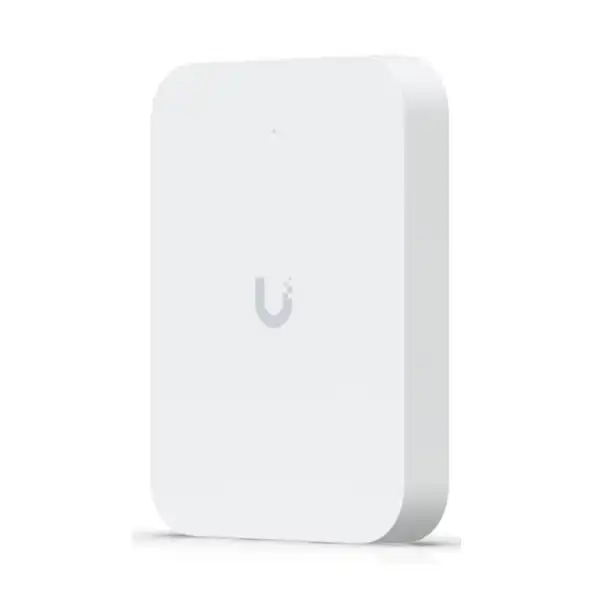
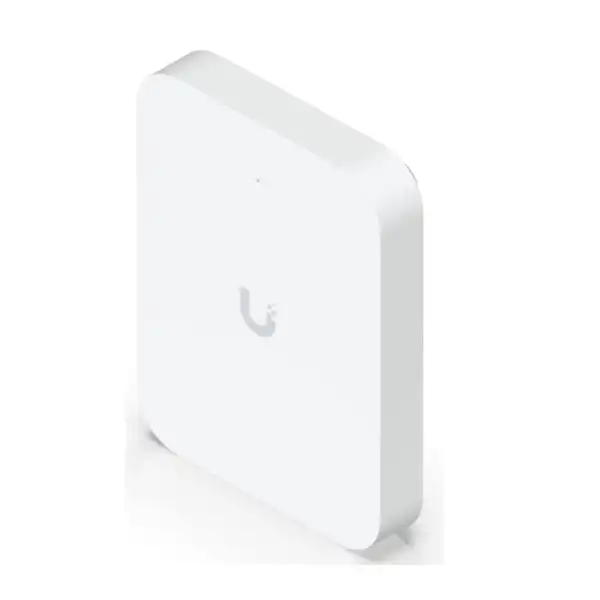
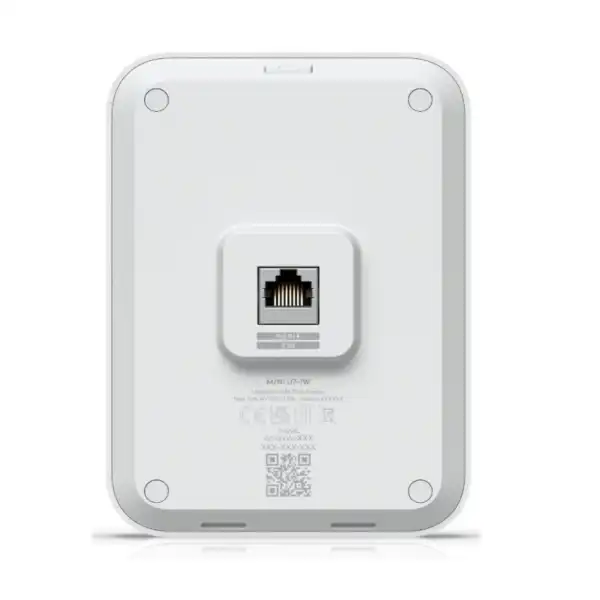
Ubiquiti U7 In-Wall U7-IW WiFi 7 Access Point
The Ubiquiti U7 In-Wall U7-IW brings dual-band WiFi 7 and two local 2.5 GbE data connections to a tidy wall-mounted form. It is a practical choice for planned hotel rooms, serviced apartments and office spaces that need dependable room-level wireless access and nearby wired equipment.
Key buying point: three 2.5 GbE ports in total, with one conditional PoE output; PoE+ input is required to power a downstream device.
At a glance: what to check before you buy
- Dual-band WiFi 7 on 2.4 and 5 GHz; not a 6 GHz access point.
- One 2.5 GbE PoE uplink plus two local 2.5 GbE ports.
- PoE+ input required if the single downstream PoE output will be used.
- UniFi management, appropriate routing and structured cabling still required.
- Check power, site layout and management compatibility before ordering.
Verified technical specifications
The following figures reflect Ubiquiti’s published model-specific technical specifications. Maximum radio rates and coverage figures are specifications rather than guaranteed user experience. The absence of a 6 GHz radio is an important selection criterion for this particular WiFi 7 model.
| Attribute | U7-IW specification |
|---|---|
| Manufacturer / model | Ubiquiti UniFi U7 In-Wall (U7-IW) |
| Wireless standard | WiFi 7, 802.11be |
| Radio bands | 2.4 GHz and 5 GHz; no 6 GHz radio |
| Spatial streams | 4 total: 2 × 2 MIMO per band |
| Maximum specified 5 GHz PHY rate | 4.3 Gbps at 240 MHz bandwidth |
| Maximum specified 2.4 GHz PHY rate | 688 Mbps at 40 MHz bandwidth |
| Network interfaces | 3 × 2.5 GbE RJ45 |
| Power input | PoE; PoE+ required for PoE output |
| Power forwarding | One downstream PoE output, subject to suitable input power |
| Device maximum power | 13 W excluding PoE output |
| Indicative coverage | 115 m² / 1,250 ft²; site-dependent |
| Manufacturer client-count reference | 200+; workload-dependent |
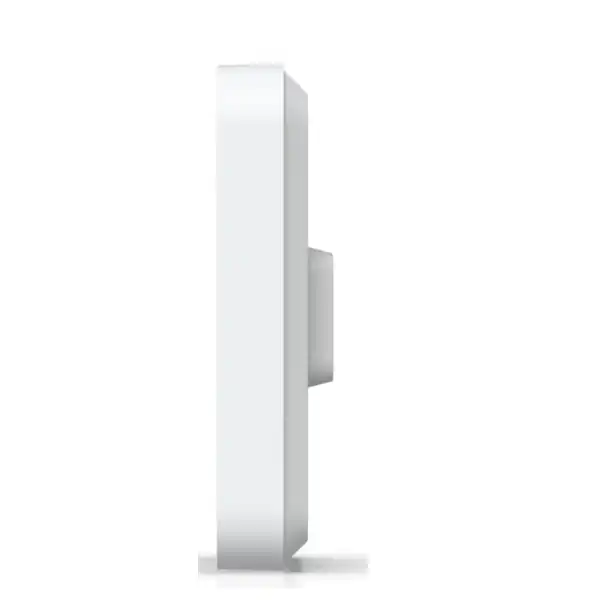
| Dimensions / weight | 137 × 98.7 × 30.2 mm / approximately 400 g |
| Mounting | Wall, metal wall mount included |
| UniFi Network application | 9.0.114 or later listed by manufacturer |
What the U7 In-Wall is designed to solve
The Ubiquiti U7 In-Wall U7-IW is intended for a very practical network problem: a room needs dependable WiFi, and the same location may need wired connections, but a ceiling-mounted access point and separate desktop switch would add clutter. This wall-mounted UniFi model combines a dual-band WiFi 7 access point with an integrated multi-gigabit Ethernet switch. Its shape and cabling arrangement suit planned room-by-room installations, particularly hospitality, serviced accommodation and offices with existing structured cabling.
Choose it when you can bring a suitable Ethernet cable to the intended wall location, provide Power over Ethernet from upstream equipment and manage the installation as part of a deliberate network design. The included metal wall mount supports a compact finish. A room-level access point also gives an operator control over which areas receive service, instead of relying on a distant router to transmit through several partition walls.
This is not an internet router, modem or replacement for an upstream network. You still need an appropriate internet connection, routing, switching, cabling and power budget. Before requesting a quotation, map the rooms, note the devices needing Ethernet and decide whether the U7-IW’s single PoE output will actually be used. Those decisions are more important than selecting an access point by headline WiFi speed alone.
Who should consider this model
A hotel or guesthouse with Ethernet wired to its rooms is a natural candidate. Guests often bring two or more phones, laptops, televisions or streaming devices, and room-level WiFi helps prevent one poor corridor signal from becoming a building-wide complaint. The U7-IW is also suitable for an office room where a laptop dock, desk phone or media player may need a nearby cable connection.
In an apartment, the case for this device is strongest when the home is being renovated or already has low-voltage wall cabling. It provides a neat alternative to a visible access point and a separate small switch. For furnished rentals and meeting rooms, its flexible SSID and guest network features can serve different user groups when the rest of the network is configured accordingly.
It may be the wrong choice for a hall, warehouse, outdoor terrace or open-plan floor that requires broad omnidirectional coverage from a ceiling or weather-rated unit. It is also unnecessary when a single ordinary access point can already cover a small area and no extra wired ports are required. A sound design chooses mounting position and radio pattern for the building rather than assuming that a wall-mounted product fits every floor plan.
A quick technical picture
The U7-IW supports WiFi 7 on two frequency bands: 2.4 GHz and 5 GHz. Its four spatial streams are divided between two 2×2 MIMO radios. Ubiquiti lists a theoretical maximum wireless data rate of 688 Mbps at 2.4 GHz using a 40 MHz channel and 4.3 Gbps at 5 GHz using a 240 MHz channel. These are radio link figures under supported conditions, not guaranteed internet or application throughput.
Ubiquiti specifies a 2.5 GbE uplink, three physical 2.5 GbE RJ45 interfaces in total, approximately 115 square metres of coverage and a maximum client count of more than 200. The coverage and client figures are planning references rather than commitments for every building. Room construction, interference, active client demand and channel allocation can substantially change what a deployment achieves.
The access point measures 137 × 98.7 × 30.2 mm and weighs approximately 400 g. Its maximum device power consumption is listed as 13 W, excluding any power supplied through the PoE output. That exclusion matters when selecting a switch: a working access point and a working power-forwarding access point are different electrical loads.
WiFi 7 without misleading 6 GHz promises
The most important specification distinction is that the U7 In-Wall is a dual-band WiFi 7 device, not a tri-band 6 GHz access point. WiFi 7 describes the wireless generation; it does not mean that every WiFi 7 device contains a 6 GHz radio. This model uses 2.4 GHz and 5 GHz only. Buyers specifically requiring a separate 6 GHz band should compare an explicitly tri-band UniFi model instead.
The 2.4 GHz band is useful for many established devices and can travel further through some building materials, though nearby networks and household electronics may make it congested. The 5 GHz band offers wider channels and generally better opportunities for high throughput, but its usable signal strength can fall quickly as walls and distance increase. A room-by-room deployment can exploit that tradeoff by keeping access points close to their intended clients.
A WiFi 7 phone or laptop may gain benefits from compatible WiFi 7 features, while an older WiFi 5 or WiFi 6 client can still use a supported band and protocol. Actual device compatibility depends on its wireless adapter, security settings and software. The U7-IW does not upgrade an older laptop’s own radio, and it cannot create 6 GHz connectivity simply through a firmware option.
Understanding the three 2.5 GbE ports
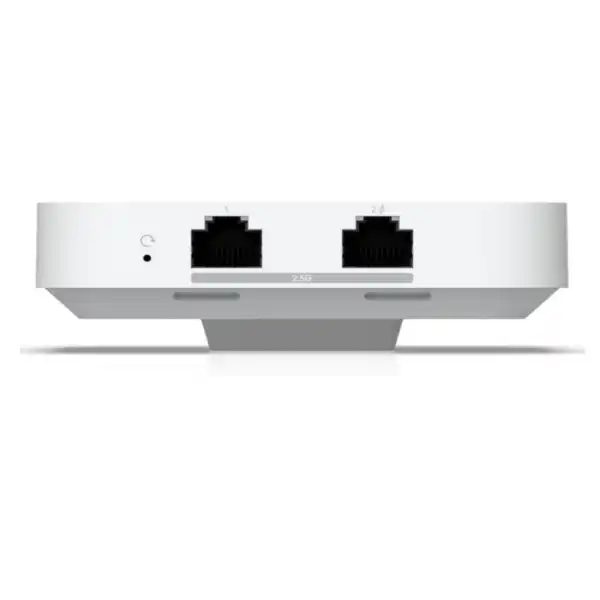
The three Ethernet interfaces have different physical roles. The rear interface is the 2.5 GbE uplink and PoE input, connecting the access point to the upstream network. Two additional 2.5 GbE RJ45 ports provide local wired network connections. One of those local ports also supports PoE output when the unit has suitable PoE+ input. This is especially helpful for a small number of room devices that benefit from a cable.
Think of a hotel room with a television and a desk-based device. The access point can deliver WiFi to guests while its local Ethernet ports connect compatible wired equipment. Another scenario is a small office with a desk phone and a laptop dock. Those are examples of possible topologies, not promises that any particular television, phone or dock will receive power or configure itself automatically.
A 2.5 GbE port denotes an interface capability; it does not prove that the upstream router, cable, connected device or internet service operates at 2.5 Gbps. If an upstream switch is only gigabit Ethernet, that link becomes a practical bottleneck for aggregate traffic. Verify the negotiated speed at both ends and assess whether traffic flows to the local LAN, internet or a remotely hosted application.
PoE input, PoE output and safe power budgeting
Power over Ethernet allows the U7-IW to operate without a separate power socket at the wall mount. Ubiquiti lists PoE as a power method, but specifies that PoE+ input is required to activate the single PoE output. That distinction should be shown on the bill of materials. A basic PoE source may run the access point yet be insufficient for the planned downstream powered device.
When planning PoE forwarding, verify the upstream switch or injector capacity, the Ethernet cable quality, the access point’s own consumption and the connected load. Ubiquiti’s 13 W maximum figure excludes PoE output, so do not treat it as a total allowance for the entire chain. The appropriate source has to support the combined load and the applicable power negotiation. Obtain the current downstream power limits from the official technical documentation before committing an installation.
Do not assume that a PoE-capable Ethernet socket is suitable for every powered product. Check the receiving equipment’s PoE standard and requirement independently. Never connect power by improvising passive wiring. Where power forwarding is unnecessary, the choice of input supply is simpler. Where it is important, specify and test both the access point and the downstream equipment before fitting multiple rooms.
Building a dependable wired backbone
A room-level design benefits from a proper cable route between the equipment rack and each access point location. Use suitable, tested structured cabling for the intended link speeds, run lengths and site conditions. A well-installed 2.5 GbE uplink is more useful than a theoretical high-speed radio whose wired backhaul is damaged, incorrectly terminated or sharing a congested path.
For larger buildings, think about aggregate demand. Individual room ports may be multi-gigabit while the distribution or core switches still have limited uplinks. Backhaul, switching capacity, firewall throughput and internet subscription should be evaluated together. Many client devices will not operate at their maximum simultaneously, but guest video calls, streaming, backups and conference activity can still create busy periods.
Document each cable by floor and room, label the switch port and record the access point’s location in the management system. This enables quicker troubleshooting when the front desk reports that one room is slow. It also reduces mistakes during future changes: staff can identify the correct device and port instead of disconnecting neighboring rooms to find the affected cable.
WiFi speed versus experienced performance
The headline 4.3 Gbps figure is the maximum specified 5 GHz PHY rate under particular channel-width and client conditions. It is not a guarantee of application speed and it cannot be achieved by every phone. Wireless throughput includes protocol overhead, traffic contention and time spent retransmitting frames. Real results depend on the client radio, number of devices, signal quality, allowed channels and wired uplink.
A client using a narrower channel can connect successfully while showing a lower link rate. A device behind several walls may have a strong enough connection for messaging but not for a sustained high-resolution video stream. The operator should measure real performance at the locations where people work or sleep, especially at a desk, bed, meeting table or guest entertainment area rather than only next to the access point.
For a meaningful acceptance test, compare wireless link information with a local wired test target and a separate internet test. The local test helps isolate WiFi and LAN performance from the service provider’s external speed. Conduct tests during a representative busy period if the network already has users. Keep results tied to the room and device so that future changes can be evaluated objectively.
Coverage claims need a floor plan
Ubiquiti’s coverage reference of around 115 m² is useful for initial comparison, but it should not be interpreted as a guaranteed diameter or a promise that one device will cover an entire partitioned building. Reinforced concrete, tile, doors, glass, metal-backed materials and neighboring networks all change radio behavior. Even two rooms with identical floor areas may require different access point positions.
For hospitality, the design question is not simply how far the access point transmits. It is whether the intended room receives strong service without creating excessive interference across adjacent rooms and floors. More transmit power can sometimes make roaming and channel reuse worse. A site survey or informed predictive design is preferable to distributing identical units by counting square metres alone.
Wall height, furniture placement and the device’s orientation also matter. Avoid burying the access point behind a cabinet or a metal television mounting plate. Verify whether the mounting surface and available space suit the supplied bracket. If the room has unusual construction or a long, narrow shape, test a representative installation before purchasing the entire building’s quantity.
Hospitality: designing for guest expectations
In a hotel, a functioning SSID is only the start. Guests expect a quick connection, predictable coverage, privacy between rooms and performance that supports video calls as well as entertainment. The U7-IW gives administrators the access point hardware for room-level service, while UniFi network settings and upstream security devices determine how guests are isolated and how their traffic is controlled.
Guest access may use an ordinary secured network, a managed portal or another policy appropriate to the property’s operation. Ubiquiti lists captive portal options, voucher authentication, guest isolation and speed limiting among supported features. Each requires correct software configuration and, where relevant, associated routing or authentication systems. A portal is not a substitute for actual network isolation.
Before opening rooms to guests, test connection using a new visitor’s phone, not only an administrator’s device. Check password or portal instructions, sign-in behavior, reachability of the internet and isolation from staff services. Review how a returning guest reconnects after moving between rooms. Provide staff with a short troubleshooting method that does not require sharing administrator credentials.
Guesthouses, serviced apartments and small properties
A small property may not need complex enterprise policies, but it still benefits from separating visitor connectivity from management systems. The U7 In-Wall can help deliver predictable WiFi where guests stay while offering Ethernet for a local wired device. Whether it is a cost-effective choice depends on existing cabling, room count, number of wired endpoints and the skill available to maintain the UniFi network.
If there are only a few rooms and no wall Ethernet, a different mounting style or smaller deployment may be more economical. Running new cable through finished walls can cost more than the hardware. On the other hand, where renovation already includes structured cabling, building the WiFi and local Ethernet plan together can avoid visible cables and repeated installation work later.
Write the guest network name and access process in a consistent format, keep management access restricted and document the switch ports. Set a sensible policy for visitor devices that stay online after checkout. The goal is not to offer the largest number of available SSIDs; it is to make the guest’s path to safe, reliable connectivity straightforward.
Offices, meeting rooms and workspaces
Offices often mix wireless laptops with equipment that still works best over Ethernet. A wall-mounted access point with two local data ports can be useful where the desk or meeting room has a single cable route back to the network. It can support everyday activities such as collaboration calls, business applications, screen-sharing and access to authorized internal services when the whole network is sized appropriately.
An office also has different security requirements from a guest room. Staff access might need enterprise authentication, while visitors should reach only the internet. Shared printers or displays may require controlled access from specific networks. The U7-IW supports UniFi features used to build these arrangements, but the final segmentation depends on switch VLAN handling, gateway policy and the applications involved.
Do not equate a high wireless link rate with trouble-free video meetings. Latency, packet loss, roaming interruptions, external internet quality and DNS behavior may matter more than a speed-test headline. A deployment should be validated using the actual calling and collaboration tools that the office relies on, particularly in rooms where several people may join simultaneous calls.
Apartments and residential upgrades
A residential installation can benefit from the tidy dimensions and integrated Ethernet ports of the U7-IW, especially when home offices, streaming boxes or game consoles sit near a planned wall connection. In these situations, its main appeal is an organized combination of fast wireless connectivity and local wired connections, rather than an unrealistic claim that WiFi 7 alone will eliminate every dead zone.
A home with thick interior walls may need more than one access point. A home with existing ceiling wiring may be better served by a ceiling model. Compare the cost of running cables, the number of rooms needing service and whether an existing UniFi setup already provides sufficient coverage. Also check whether local outlets and mounting positions make the in-wall form factor attractive.
If a household includes older smart devices, plan their compatibility carefully. Some devices only support 2.4 GHz or older WiFi security behavior. Testing them on a separate, suitably protected SSID may be more productive than changing the entire home’s security settings to accommodate one problematic accessory. The correct outcome is reliable connectivity without unnecessarily weakening other users’ access.
Wired phones, displays and downstream equipment
The integrated local ports are useful when a room includes equipment such as a managed IP phone, computer, compatible camera, TV or display controller. A wired connection reduces the need to share wireless airtime and can simplify troubleshooting. However, a device requiring internet access still needs the correct upstream network, authentication, addressing and firewall policy. Simply connecting a cable is not sufficient for every service.
Where the connected endpoint needs electrical power over Ethernet, check whether it can be powered by the U7-IW’s single PoE output and whether the upstream feed is PoE+. The other local port should be treated as a data connection unless the manufacturer explicitly specifies power for that port. Planning for two powered downstream products would therefore require a different solution or another power arrangement.
For business calling, verify that the switching and gateway design handles voice traffic appropriately. VLANs, quality-of-service policies, service-provider requirements and electrical continuity may affect the outcome. The U7-IW is not a telephone system and does not replace the voice service. It is a network endpoint that can form part of a correctly designed communications deployment.
Roaming between rooms and corridors
A building with several access points needs clients to move between them sensibly. Ubiquiti lists support for 802.11k radio resource management, 802.11v BSS transition management and 802.11r fast roaming on this model. These capabilities can help compatible clients make better roaming decisions when they are configured appropriately within a managed UniFi network.
Roaming is not solely controlled by the access point. The phone or laptop makes many of the decisions about when to leave one radio and join another. Excessively strong or overlapping signals can encourage a device to remain associated with a distant access point. Deliberate channel planning and realistic transmit-power settings may improve mobility more than simply increasing every radio to maximum output.
Test the spaces where movement is common: lifts and corridors, corridors to meeting rooms, reception to a guest room and adjoining office areas. Make a call or run a continuous connectivity test while walking. If a client disconnects, review its compatibility and the configured fast-roaming options before assuming hardware failure. A feature being listed in specifications is not the same as every endpoint supporting it.
Network separation and guest privacy
A useful hotel or office network commonly separates at least staff or management traffic from visitors. Additional networks may be appropriate for payment terminals, building automation or media equipment. The U7-IW supports features such as guest network isolation, client device isolation, RADIUS-related controls and VLAN assignment, but these controls must match the upstream architecture.
Network separation should be designed end to end. A wireless SSID mapped to a VLAN is not enough if the relevant switch port fails to carry that VLAN or a gateway permits traffic between supposedly isolated networks. Equally, isolating every client indiscriminately can break necessary services such as local printing or managed casting. Decide which communication paths are required and explicitly restrict the rest.
Document the intended segmentation in understandable terms: who can access the internet, who can reach staff resources and which devices must discover each other locally. Test those rules from real endpoints, including a guest device and an administrator-managed device. Where payment, healthcare or other sensitive systems are involved, engage an appropriately qualified network or security professional to review the overall environment.
MLO and modern security compatibility
Multi-Link Operation is a WiFi 7 capability that can allow compatible clients to use more than one wireless link. Ubiquiti describes MLO in UniFi Network, subject to supported hardware, firmware, client devices and configuration. On the U7-IW, the available radio bands are 2.4 GHz and 5 GHz; no 6 GHz link is present. Do not present MLO as an automatic performance upgrade for every connected device.
Ubiquiti also explains that enabling MLO uses WPA3-related security requirements, which can expose compatibility problems for older phones and Internet-of-Things devices. A property with a diverse client population should test before making MLO the default for every visitor. A separately configured compatibility network may help older equipment while keeping modern settings available for suitable clients.
Security planning also includes choosing appropriate authentication, passwords, administrative permissions and firmware maintenance. Consider the difference between a private staff SSID, a guest-facing SSID and a device-only SSID. Good configurations minimize unnecessary networks, prevent visitors from reaching management interfaces and protect the settings used to adopt and maintain all access points.
UniFi Network management requirements
Ubiquiti lists UniFi Network version 9.0.114 or later as the application requirement for the U7-IW, with specified minimum versions for its mobile apps in the product technical data. Verify current compatibility again before deployment, because controllers and firmware continue to evolve. A managed UniFi environment provides a consistent location to configure radio settings, networks and device updates across multiple access points.
A standalone setup path may suit a very small site, but a larger hotel or office should consider the operational benefits of central management. UniFi’s full feature set and roaming capabilities can depend on the adopted deployment architecture. Plan which gateway, controller or console will host management, who will have access and how configuration backups will be protected.
Management access must not be confused with customer internet service. Even with a UniFi console, the installation still needs routing, DNS, DHCP and suitable upstream internet access. Conversely, the access point can connect clients to local network resources even when an external internet connection is temporarily unavailable, provided the internal equipment remains running and the network is configured for that use.
Installation and wall-position planning
Installation should begin with verifying the intended wall location, cable entry, cable slack and mounting surface. Ubiquiti includes a metal wall mount and publishes an installation guide for the U7 In-Wall. Follow the current official instructions and appropriate local electrical and building practices. Use a qualified installer when the route passes through areas requiring building access, specialist tools or controlled services.
Check that the device remains accessible for future reset and service, and that its local Ethernet ports are not hidden by fixed furniture. Allow adequate clearance and do not cover ventilation or trap the product in an unsuitable enclosure. The manufacturer’s operating range is from -30 to 40 °C in non-condensing conditions, but the actual installation should avoid moisture and heat accumulation.
Before completing a batch installation, fit one unit in a representative room and test the mount, wireless signal, local Ethernet ports and power. That trial can expose inconvenient bracket positions or cable-routing issues before they affect an entire property. After installation, record room identifiers and the orientation of each unit so site staff can support it without guessing.
Channel selection and interference management
Dense buildings need disciplined radio planning. Several nearby rooms may contain access points whose signals overlap, while other tenants’ networks create additional interference. Assigning the same channel and high power to every device can reduce capacity even when coverage looks excellent on a signal-strength map. A design should consider channel reuse, client density and traffic patterns across each floor.
Ubiquiti’s general optimization guidance suggests 20 MHz channels on 2.4 GHz and commonly 80 MHz on 5 GHz for a sensible balance between compatibility, capacity and interference. The U7-IW advertises wider supported channel options, but the widest channel is not automatically the best deployment setting. Local radio rules, device support and nearby traffic may restrict useful choices.
Use a site survey, representative speed checks and controller observations to evaluate changes. If an area is crowded, a narrower channel and sensible power setting may deliver better aggregate performance than a maximum-width configuration. Review performance during peak occupancy; an empty hotel floor is not an adequate substitute for testing when many devices contend for airtime.
Rollout checklist for a multi-room project
Start with an inventory rather than an order quantity. Record the number of rooms, floors, meeting areas and wired endpoints. Mark existing cabling and switch locations. Identify zones where guest movement is frequent and others where clients remain stationary. Note special construction materials and any rooms where a wall access point would be obscured by furniture.
Next, audit upstream components: internet handoff, router, firewall, switch port counts, 2.5 GbE capabilities, available PoE or PoE+ budgets and any required backbone upgrades. Decide which rooms need the PoE output and identify the specific receiving devices. Match that list to official power specifications instead of using one assumed wattage for every room.
Finally, prepare a pilot acceptance checklist covering signal, network segregation, wired ports, power forwarding, client authentication, roaming, actual application performance and management visibility. Record the results and modify the plan before a building-wide installation. The resulting quantity and configuration should follow measurable requirements, not a blanket assumption that every access point covers the same distance.
Commissioning the first U7-IW
Once cabling and power are ready, connect the uplink and confirm the device starts normally. Adopt or configure it with the supported UniFi management method, then check that the controller recognizes the exact model and reports a healthy network connection. Apply appropriate current firmware through a controlled change process, preserving the ability to investigate any unexpected behavior.
Create only the required networks and SSIDs, select the correct wireless bands and check each intended VLAN path. Apply authentication and isolation settings according to the site’s policy. Where there is a locally wired device, verify its physical port negotiates correctly and receives the expected network configuration. If PoE forwarding is planned, test it with the actual supported endpoint.
Before handover, test multiple client types in the room, including at least one older device if your audience uses them. Check internet access, local services that should be accessible and protected systems that should not be accessible. Save basic commissioning evidence: device location, firmware version, switch port, power method, SSIDs and the date of testing.
Operating and supporting the network
A managed wireless deployment should be maintained after opening day. Periodically review device connectivity, client experience, switch power budgets, logs and any recurring disconnections. A sudden concentration of complaints in one room may point to cabling or power problems, while similar complaints across a floor can indicate an upstream bottleneck or radio-channel issue.
Use planned maintenance windows for firmware updates on properties where guests or staff depend on connectivity. Test critical applications after significant changes. Keep a current administrator access process and configuration recovery plan; a network that can only be maintained by one absent individual is an operational risk even if the radio hardware performs perfectly.
When troubleshooting, isolate the layer involved. Does the local wired port work? Is the uplink negotiated at the expected speed? Is the client connected to the intended SSID? Does it receive an address and DNS? Can it access a local resource? These simple checks help distinguish WiFi trouble from switching, authentication, internet-provider or application issues.
How to compare the U7-IW with other UniFi access points
The U7-IW’s distinctive benefit is the combination of an in-wall form factor, dual-band WiFi 7 and local 2.5 GbE ports including one conditional PoE output. Compare it with a ceiling-mounted UniFi access point when the job is broad room or open-area wireless coverage and there is no need for wired endpoints at the mounting position. Ceiling models can be easier to place for a clear radio path in some layouts.
Compare it with a tri-band wall-mounted model when 6 GHz connectivity is a specific requirement. The U7-IW does not offer that band, even though it is a WiFi 7 access point. Compare it with a simpler or older in-wall model when costs and existing client capabilities matter more than WiFi 7 features or multi-gigabit interfaces. The relevant comparison is total deployment fit, not merely the newest wireless generation.
Always compare mounting conditions, radio bands, Ethernet port count, PoE requirements, management compatibility and installed cost. A lower-priced access point may require a separate Ethernet switch; a more capable model may have extra features that will never be used. Ask for a design that explains the expected benefit of each chosen component.
Environmental and infrastructure considerations in Tanzania
For projects in Tanzania, the most relevant local questions are practical: what building materials surround each room, what cabling already exists, how dependable is electrical supply at the rack and what network skills are available for ongoing support? These factors determine whether a proposed deployment is workable far more directly than adding a city name to a generic product specification.
The access point uses Ethernet-supplied power, so it depends on energized upstream networking equipment. If the property needs connectivity during power interruptions, assess backup power for the router, switches, controller and internet access equipment as a complete system. A backup source attached to only one component will not keep the network available if another essential component loses power.
Radio-channel choices and operating parameters should be configured for the actual country and applicable requirements. The manufacturer’s international certification list must not be interpreted as evidence of a specific Tanzanian regulatory approval for a particular unit or import. Confirm any procurement, approval or installation obligations that apply before deployment; do not rely on a marketing description for legal compliance.
Commercial questions to resolve before ordering
A useful quote should identify the exact manufacturer and model, Ubiquiti U7-IW, and specify the intended quantity. It should distinguish the access point itself from PoE switches or injectors, structured cabling, gateway equipment, configuration and installation services. Without that distinction, two apparently similar offers may cover very different working systems.
Ask whether the intended source of power provides PoE+ when a downstream PoE device is planned. Confirm that any included accessories suit the mounting position. If the building needs cable runs, testing, equipment-rack changes or commissioning, request these as separately described project items. This makes it easier to compare total installed cost and responsibility for successful handover.
Local price, stock status, delivery terms and warranty details must be confirmed for the exact FourTeck Tanzania offer; none is asserted here. The model reference is not the merchant’s stock-keeping unit. A buyer seeking a complete solution should share a floor plan, room count, available switch details and expected wired devices so the quotation reflects the actual deployment.
Questions to include in a purchase request
Tell the supplier whether the objective is simply better WiFi or a combined wireless-and-wired room outlet. Mention how many devices normally use each room, whether guests move between multiple access points and whether any device must receive PoE power from the local port. Indicate what switching and routing hardware is already in use, especially if the installation must join an existing UniFi estate.
Explain the present failure mode: poor signal through walls, overloaded guest WiFi, a lack of Ethernet ports, or difficulty managing many access points. Different problems require different solutions. A badly positioned router may need a properly distributed WiFi design; a crowded WAN may need an internet service upgrade; a security concern may need segmentation and policy work. The U7-IW is only one component.
For a multi-room site, request a pilot layout and acceptance criteria before approving large quantities. Specify how coverage will be checked, how guest privacy will be tested and who will maintain firmware and configuration. A clear request improves the chance of receiving a quotation for a functioning network instead of a simple hardware list.
Frequently asked questions
Does the U7-IW have a 6 GHz radio?
No. This is a dual-band WiFi 7 access point operating on 2.4 GHz and 5 GHz. A buyer requiring the 6 GHz band should compare a different, explicitly tri-band model. WiFi 7 alone does not imply a 6 GHz radio.
How many Ethernet ports does the U7 In-Wall have?
Three 2.5 GbE RJ45 interfaces are specified in total. One is the uplink and PoE input, while two are local data ports. One local port has conditional PoE output. Confirm the physical port arrangement and intended connections before installation.
Can the access point power an IP phone or another device?
It has one PoE output, but Ubiquiti requires PoE+ power at the input for that output to operate. Check the upstream power budget and the receiving device’s supported PoE requirements before use; do not assume every connected endpoint is compatible.
Does the unit need a separate electrical adapter?
The access point receives power through Ethernet from suitable upstream equipment. Plan a compatible PoE source, such as an appropriate switch or injector. PoE+ is specifically required when you intend to use the downstream PoE output.
Is the advertised 4.3 Gbps an internet-speed guarantee?
No. It is a theoretical maximum 5 GHz wireless link rate under stated channel conditions. Actual throughput depends on clients, radio conditions, protocol overhead, the 2.5 GbE uplink, the rest of the LAN and the internet connection.
Is the U7-IW suitable for hotels in Tanzania?
It can be suitable for hotel and accommodation projects with room-level wired connectivity, planned management and appropriate power. A site survey, secure guest-network design and an infrastructure check are needed. This does not establish stock, service coverage or local regulatory approval.
Can older WiFi devices connect?
Many older compatible clients can use the supported 2.4 GHz or 5 GHz bands. Exact behavior depends on client software and security configuration. WPA3-only settings or MLO-related configuration may require a separate compatibility strategy for legacy devices.
Can it replace my router or internet provider equipment?
No. It is an access point with an integrated local Ethernet switch, not a stand-alone internet modem or full replacement for upstream routing. You still need suitable gateway, switching and internet equipment to provide the services users expect.
What UniFi software is required?
Ubiquiti lists UniFi Network 9.0.114 or later in the U7-IW’s technical specification and publishes mobile application requirements. Confirm current firmware and controller support before adopting the device, particularly in an existing UniFi network.
How many rooms can one U7-IW cover?
There is no reliable room count. Ubiquiti publishes an indicative coverage area of 115 square metres, but walls, materials, mounting position, clients and interference affect practical performance. Design by floor plan and measured signal, not by assuming a set number of rooms.
Is a quoted price or warranty included in this description?
No Tanzania selling price, stock statement, warranty commitment, shipping condition or installation promise has been verified for this specific FourTeck Tanzania listing. Request those commercial terms with your quotation.
What information should I provide to request a quote?
Share the U7-IW model name, quantity, room or floor plan, intended wired devices, upstream switch and PoE capabilities, any existing UniFi console and whether installation is required. That information helps distinguish the hardware request from a full network deployment.
Request a U7-IW quotation for your Tanzania project
For a more useful product quotation, provide the exact U7-IW model, required quantity, intended building or room layout, existing Ethernet and PoE infrastructure, any powered downstream devices and whether you need a complete installation plan. Ask FourTeck Tanzania to confirm the applicable price, stock, warranty and commercial terms for the specific requested supply. No unverified local price, delivery promise or availability claim is made on this page.
Contact FourTeck Tanzania to discuss fit, compatibility and a project quotation.




Reviews
There are no reviews yet.