
Ubiquiti • UISP infrastructure
Ubiquiti UISP Power (UISP-P) in Tanzania
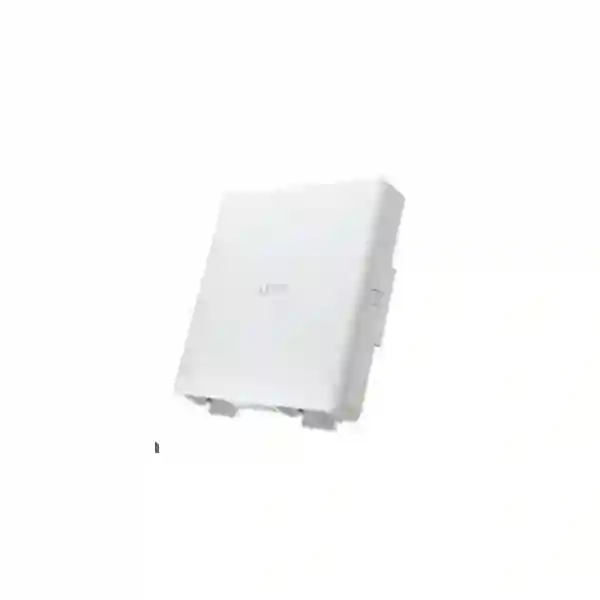
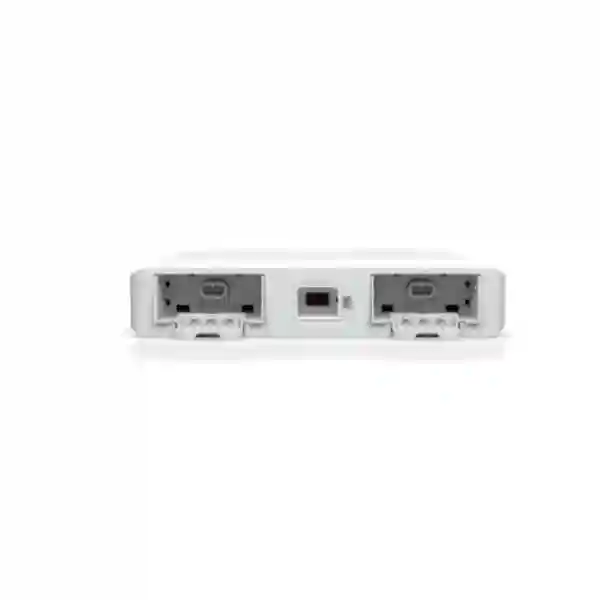
Maintain a planned DC power path for compatible UISP MicroPoP equipment with an integrated rechargeable battery, 27V Power TransPort connectivity and optional external lead-acid backup support. Request a configuration-specific quote to ensure all required adapters and compatible equipment are accounted for.
UISP-P specifications at a glance
| Model | UISP-P |
|---|---|
| Power output | 27V DC Power TransPort; 100W with one adapter or 200W with two |
| Adapter input | Two 27V DC, 4.4A adapter positions; 120W Power TransPort Adapter not included |
| Included backup pack | 25.2V DC, 7.93A rechargeable lithium-ion |
| Optional external input | 24V DC, 8.33A lead-acid battery input; battery not included |
| LAN | One 10/100 MbE RJ45 port |
| Management | Ethernet in-band and Bluetooth; UISP 1.4.5+ |
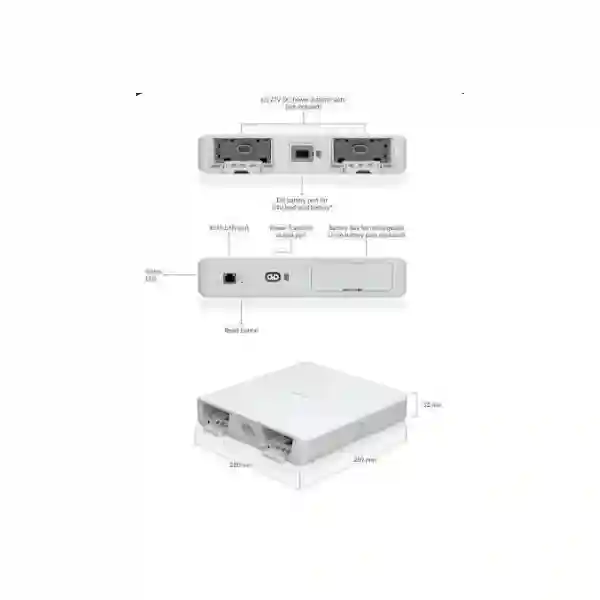
| Dimensions | 289 × 280 × 52 mm |
| Weight | 1.4 kg |
| Operating range | −5°C to 40°C; 5–95% relative humidity, non-condensing |
Verify the current manufacturer installation guide and package contents when specifying a complete system. Output ratings are not battery-runtime promises.
What UISP Power solves for a MicroPoP
A MicroPoP concentrates the network devices that keep subscribers connected. A power cut at that point can affect multiple downstream connections even when radios, cabling and routing configurations are healthy. UISP Power (UISP-P) is intended to provide battery-backed DC power for compatible Ubiquiti UISP equipment, helping an operator design for continuity rather than relying only on normal mains power. It is especially relevant when a small distribution site uses a supported UISP Router, Switch or Console and the operator needs a defined power path. The correct purchase decision starts with an inventory of the actual devices, their consumption, their cabling and the desired outage duration. Do not treat any UPS as a guarantee that the wider network will stay online: upstream links, radios, customer equipment and backhaul may have different power arrangements. The value of this product is its integration with the supported UISP Power TransPort ecosystem, not universal AC backup for everything in a cabinet.
How the 27V Power TransPort output works
The core output is a 27V DC Power TransPort connection. Ubiquiti specifies 100W output when the system uses one supported power adapter and 200W with two. Those figures describe the configured Power TransPort output capability rather than a promise of runtime, battery endurance or output to arbitrary devices. Plan against the real device load, including startup needs and reasonable operating headroom, instead of choosing an adapter count solely from the headline maximum. A compatible powered device and appropriate Power TransPort cabling are required. A standard Ethernet patch lead, a conventional PoE injector and an unrelated DC plug should not be assumed interchangeable with this power interface. The RJ45 LAN connector on the unit is listed as a 10/100 MbE network interface; it is not evidence that the product is a multiport Ethernet switch or a general-purpose PoE power source. Confirm the destination hardware’s supported power connection before ordering.
Power adapters and what must be ordered separately
Ubiquiti lists two 27V DC, 4.4A adapter positions as the power method and specifically identifies the 120W Power TransPort Adapter as not included. This is an important quotation detail: the UISP-P unit alone should not be priced as a complete ready-to-operate installation if the necessary external adapters, cabling and compatible network hardware have not been scoped. One adapter permits the specified 100W Power TransPort output; installing two supports the specified 200W configuration. The adapter rating is not the same as an assurance that any combination of loads is safe. Check the supplier’s current accessory model, local input-plug and power arrangements, manufacturer installation instructions, mechanical clearance and supported load. Confirm whether the quoted package contains one adapter, two adapters or neither. If the system will also rely on an external battery, that battery and its safe installation form an additional project line item.
Internal lithium-ion battery and backup expectations
The UISP Power specification includes a 25.2V DC, 7.93A rechargeable lithium-ion battery pack. This is an included backup component, not an operator-selectable guarantee of a particular number of hours. In practice, usable runtime depends on equipment demand, battery condition, ambient temperature, conversion losses and the configuration of the entire site. A lower DC load will generally require less stored energy than a higher load, but the exact supported runtime should be established through a documented load budget and real commissioning test. Do not simply divide a nominal battery figure by the power budget and advertise the result as field runtime. Battery ageing and repeated outages matter, particularly for unattended sites. Design an inspection process and establish alarm or maintenance procedures through the supported management environment. Where the continuity objective is demanding, review whether the internal backup alone is suitable before finalizing the topology.
Optional external lead-acid battery connection
The product provides an input specified for a 24V DC, 8.33A lead-acid battery arrangement. The external battery is not included. Ubiquiti explicitly warns to connect only a lead-acid battery to this port, because using another battery chemistry could be hazardous. Consequently the external connection must not be marketed as a generic solar-storage terminal, a universal lithium battery input or a substitute for a manufacturer-approved battery system. Before deployment, verify recommended batteries, protection and wiring against current installation instructions, and involve a competent installer where batteries, high currents or exposed conductors are involved. A separate battery bank adds questions about location, ventilation, secure mounting, maintenance and end-of-life disposal. It is also important to consider whether a chosen external battery system is appropriate for local operating conditions. Longer backup duration may be a design aim, but a specific improvement must be calculated and tested rather than asserted without a complete configuration.
Which UISP devices are supported
Ubiquiti’s published compatibility list includes UISP Console, UISP Router when installed with a UISP Box, UISP Router Pro, UISP Switch when installed with a UISP Box, and UISP Switch Pro. This is a more precise statement than saying the unit works with all Ubiquiti equipment. UniFi access points, arbitrary PoE radios, third-party switches and other appliances should not be described as natively compatible merely because they are network devices from the same broad category. Compare the exact model name and hardware configuration on the proposed bill of materials with the current Ubiquiti documentation. If using a UISP Router or UISP Switch that requires the UISP Box, account for that installation dependency. Where an existing site contains a mix of UISP and non-UISP equipment, the designer may need distinct protected power systems for different loads. Compatibility is ultimately determined by approved interfaces and configurations, not by brand similarity alone.
Management visibility and network access
The UISP-P provides Ethernet in-band and Bluetooth management interfaces. Ubiquiti lists a 10/100 MbE RJ45 LAN connection and UISP application support beginning with version 1.4.5. This allows the unit to be considered within the UISP management ecosystem, but it is still essential to confirm which status fields, alerts and settings are exposed in the software release used by the operator. Do not promise specific notification channels, remote restart actions or battery-health analytics without validating those functions in the relevant deployed version. An operator planning several sites should identify the operational procedures needed during an outage: whom to notify, how to diagnose loss of mains, which links need separate supervision and when a technician should travel. Management traffic itself depends on a functioning path between the site and management services. Network monitoring must therefore be designed as part of the wider architecture, not assumed to be infallible because the power unit is manageable.
Power budgeting before purchase
Begin with the manufacturer’s maximum and typical consumption figures for every device actually supplied over the UISP-P power path. Add those device figures, examine variable loads and retain appropriate design margin within the documented output limit. For a deployment requiring more than the 100W single-adapter allowance, the two-adapter configuration may be relevant, subject to the published 200W maximum and all compatibility requirements. Avoid evaluating only the nominal wattage of a router while overlooking switch loads and attached devices. Also distinguish total site electrical demand from the subset that UISP-P can feed. Wireless radios, security systems, site lighting and ancillary loads may require other supplies. A sound quote identifies the protected equipment, the excluded equipment and the tested failover behavior. It should also describe the minimum acceptable outage-support period without representing that period as a built-in UISP-P specification.
Practical Tanzania deployment planning
For a Tanzanian ISP or integrator, power continuity may be one element of a larger plan for maintaining service at distributed communications nodes. Begin by assessing the actual outage pattern at the intended site rather than assuming conditions are identical throughout the country. Record the source power characteristics, physical security, access for maintenance, cooling and the path of the upstream data connection. The published environmental range is minus 5 to 40 degrees Celsius and 5 to 95 percent non-condensing humidity. Keep a suitable installation environment within those limits, accounting for cabinet temperature rise and direct exposure. Ubiquiti describes the enclosure materials as polycarbonate and ABS, which does not by itself establish outdoor weatherproofing. Use an appropriate mounting location or compatible protective enclosure according to the manufacturer instructions. No statement about Tanzanian approvals, customs charges, local stock or delivery lead time should be inferred from the product’s international datasheet.
Choosing between battery backup and wider site resilience
A small MicroPoP may need more than a battery-backed power supply. Failures can arise from mains outages, network route problems, upstream power loss, damaged cabling, overheating or equipment faults. UISP Power addresses one part of this risk picture by supporting power continuity for compatible UISP hardware. An operator should draw a simple dependency diagram showing which services depend on each electrical and data path. If an upstream fiber termination or point-to-point radio loses power independently, the switch behind the UISP-P might stay on without maintaining internet availability. If a site has several device families, choose separate suitable power protection where necessary. Consider backup communications, safe shutdown plans and physical service access as well as initial hardware cost. This avoids buying a technically compatible power device while leaving a critical unprotected link in the same chain.
Installation readiness checklist
Before installation, verify the exact UISP-P model and the supported receiver device. Check the adapter count, required Power TransPort accessories, safe mounting position and any UISP Box dependencies. Inspect the site for condensation, excessive temperatures and accidental cable strain. Confirm that the proposed electrical work follows the manufacturer’s instructions and applicable local safety requirements. Do not improvise connectors, battery chemistry or fuse arrangements. If adding an external lead-acid battery, establish a documented battery and protection design and have the work performed by a suitably qualified person. Record labeling so future technicians can distinguish power connectors from network ports. Confirm a management connection if the operator intends to monitor the system. Finally, perform a controlled commissioning test that demonstrates which equipment remains operating when the normal supply is removed and restored, documenting observations rather than assuming desired behavior.
Commissioning and acceptance testing
A successful installation should be judged against a written acceptance plan. First verify that connected equipment is on the official compatibility list and that all cables and adapters are correctly placed. Check the status indicators, including the system LED, RJ45 link/activity LED and Power TransPort indication described in the technical specification. Where management is configured, establish visibility from the intended UISP environment. Confirm stable operation under a representative normal load and then follow an approved controlled power-interruption procedure. Observe what remains online, record the actual backup interval under the test conditions and inspect the return to normal supply. Do not conduct ad hoc tests that create a safety hazard or put live customer traffic at unacceptable risk. Retain a record of software version, accessory part numbers, battery information and the date of the test. Repeat appropriate checks after major device additions, battery changes or topology revisions.
Environmental and enclosure considerations
The hardware dimensions are 289 by 280 by 52 millimeters and the listed weight is 1.4 kilograms. These values help with panel layout, clearance planning and equipment-room allocation, but they do not replace mounting instructions. Review access for servicing adapters and the battery, routing of power connections and separation of cables where required by site standards. The specified operating range is minus 5 to 40 degrees Celsius, with 5 to 95 percent non-condensing humidity. A compact sealed cabinet in direct sunlight can exceed ambient conditions, so enclosure design and ventilation should be assessed before deployment. The material description alone does not provide an ingress-protection rating; do not present the device as weatherproof or suitable for uncovered exterior mounting without evidence. Where electrical distribution is shared, determine which protective measures are required for the installation rather than assuming the product’s stated ESD/EMP protection replaces grounding or surge planning.
Understanding the technical ratings
The published maximum unit consumption of 3W excludes the Power TransPort output and battery charger. It is therefore incorrect to treat 3W as the complete input requirement for a live MicroPoP. The output rating, adapter count, charger demand and actual connected loads must be analyzed separately. Ubiquiti states ESD/EMP protection of plus or minus 15kV in air and plus or minus 8kV contact and lists CE, FCC and IC certifications. These are manufacturer-published product details, not a guarantee of protection from every surge event or a claim of specific local regulatory authorization in Tanzania. The networking interface is 10/100 MbE, not Gigabit Ethernet, and the product should not be assessed as a throughput component in the same manner as a router. Its commercial purpose is controlled DC power delivery and backup for compatible infrastructure.
Selecting an appropriate system architecture
There are several meaningful decision paths. For one small compatible UISP load, evaluate the single-adapter arrangement against the total wattage and operational needs. For a larger supported load, examine the two-adapter arrangement within the published output constraints. For a more ambitious backup objective, investigate the approved external lead-acid battery input, but avoid committing to hours of protection until the battery and load plan is verified. When the proposed site requires general-purpose AC outlets, different PoE standards or a mix of unsupported devices, UISP-P may not be the right single solution. A conventional UPS, a dedicated DC plant or separate approved injectors may be needed for those other components. Compare solutions by compatible ports, actual protected loads, battery maintenance, installation complexity and total cost, not by a single power figure. This protects the customer’s investment and reduces deployment rework.
Questions to ask when requesting a quote
A useful quote request should identify the deployment as a UISP Power UISP-P project and list the exact models expected to receive its power. Include whether the site already has a UISP Box where needed, whether one or two supported external power adapters will be required and whether an external lead-acid battery system is contemplated. Share the expected typical and maximum load, approximate outage-continuity objective, indoor or protected cabinet conditions and any site access constraints. Ask the seller to distinguish included factory components from separately priced accessories. Confirm current local price, stock position and fulfillment terms directly; no such Tanzania-specific commercial values are established by the public Ubiquiti technical specification. If commissioning support is needed, request the installation scope separately from hardware supply. A structured quote makes different offers easier to compare and reduces the risk that an apparently lower hardware price excludes essential accessories.
How to distinguish UISP-P from UISP Power Pro
The UISP-P and UISP Power Pro are different product models. Do not transfer the Pro model’s port counts, output ratings, accessory assumptions or battery capabilities to the standard UISP-P. The standard product reviewed here specifies one Power TransPort output with 100W from one adapter or 200W from two adapters. Buyers who need a different port arrangement or larger output should compare the exact current manufacturer’s documentation for alternative models rather than basing the choice on a family name. If a site design was originally created around another device, review the wiring diagram and supported equipment before substituting UISP-P. Similar branding is not proof of drop-in replacement capability. A correct comparison examines every supported receiver, adapter configuration, installation requirement and management dependency. This is particularly important during network expansions when equipment is being standardized across multiple MicroPoPs.
Lifecycle, upkeep and maintenance responsibilities
Battery-based protection is an operational asset that needs inspection. The integrated rechargeable pack is part of the installed system and may experience wear with age and operating conditions. The documentation cited for this page does not establish a fixed lifespan, replacement interval or guaranteed number of charge cycles, so those figures should not be invented. Maintain records of the date of installation, accessory configuration, operating environment, commissioning observations and incidents involving extended outages. Make sure field technicians can identify who is permitted to isolate power and inspect battery connections. If an external lead-acid battery is used, include its specific manufacturer recommendations in the site maintenance schedule. Review the load budget after changing switches, routers or downstream devices. Retesting the backup arrangement is especially valuable after site expansion because a previously adequate power margin can narrow without any obvious change to the UISP-P enclosure.
Security and operations at an unattended site
A power solution at an unattended communications point should fit into the operator’s change-management and access-control procedures. Maintain physical security for the enclosure and restrict unplanned modifications to power wiring. Where UISP management is used, follow normal practices for administrative access, software management and inventory tracking. Record which upstream network path carries management traffic and whether it will remain usable during a local power disruption. Separate site uptime measurements from power-unit status: the unit may show normal operation while a radio link or external internet path is down. Conversely, a power event at one piece of equipment should be correlated with the broader site logs before it is treated as the sole cause of an outage. Plan alert responsibilities and maintenance escalation in a way that fits the actual network operations team. Avoid promising automated features that have not been checked against the deployed UISP software version.
Cost of ownership beyond the main device
The purchase cost of a UISP-P is only one element of the system budget. The supported Power TransPort adapters are separate accessories, and a lead-acid battery—if specified—is not included. Other potential costs can include the proper protective cabinet, mounting hardware, approved cabling, installation time, maintenance visits, battery servicing and commissioning tests. A bill of materials should explicitly mark which components are included, required, optional or already present at the site. A cost comparison against another UPS should use the same defined protected load and continuity objective; otherwise the apparent price difference may be misleading. It is also worth accounting for engineering time spent verifying compatibility and for any supported UISP Box needed with particular device models. FourTeck Tanzania can be approached for a quotation, but price, availability, shipping and service terms should be confirmed for the specific requested package instead of inferred from international listings.
When UISP-P is the right fit
UISP-P deserves consideration when the project uses officially compatible UISP infrastructure, needs battery-backed DC power, can accommodate the dedicated Power TransPort interface and has a load within the documented configured output rating. It is particularly logical when the operator wants consistent equipment planning across a group of small network distribution nodes. It may be unsuitable where the primary requirement is to back up ordinary 230V AC appliances, power unsupported PoE devices directly, operate at temperatures beyond the published range or achieve a specified long runtime without further battery engineering. In those cases, choose a solution that directly matches the electrical interfaces and outage target. The most reliable purchasing decision combines official compatibility, the full accessory package, an honest load calculation and a site-specific commissioning plan. Product naming alone should never determine the architecture.
FAQ: Is UISP Power a conventional AC UPS?
No. The UISP-P is a purpose-built DC power system whose supported output is a 27V DC Power TransPort interface. It should not be described as a conventional UPS offering general AC receptacles for office computers, servers or arbitrary devices. If an installation includes equipment that needs AC backup, engineer a separate compatible system. This distinction matters when comparing product quotations: a generic office UPS and a UISP-P may both protect against some power interruptions, but they serve different electrical arrangements. Evaluate the specific connected equipment and desired continuity before choosing either.
FAQ: Does the product include everything required to power a network?
No. The rechargeable internal lithium-ion backup pack is listed as included, but Ubiquiti states that the 120W Power TransPort Adapter is not included. The optional external lead-acid battery is also not included. Compatible receiving UISP equipment and suitable accessories are separate project considerations. Check every quotation for adapter quantity, wiring requirements, relevant UISP Box dependencies and installation materials. Do not assume a pictured adapter or accessory is part of the box unless the actual package contents and offer explicitly confirm it.
FAQ: Can I use an external lithium-ion battery?
Not through the specified external lead-acid input. Ubiquiti expressly states that only a lead-acid battery should be connected to this port and warns that another chemistry could be hazardous. The included rechargeable lithium-ion battery inside the UISP-P is a different component from the external battery connection. Do not confuse the chemistry of the built-in pack with the supported chemistry for the optional external input. Any battery installation should follow official instructions and a professionally designed safety and wiring arrangement.
FAQ: How long can a MicroPoP keep running during an outage?
There is no single universally valid runtime for all UISP-P sites in the verified product specifications used here. Actual behavior depends on the connected wattage, the battery configuration and condition, local temperature and the wider site architecture. Estimate the likely energy need during project design and validate it using a controlled test after installation. If an operator needs a minimum continuity period for a service obligation, that target should become an explicit engineering and acceptance requirement rather than a sales claim unsupported by the installed configuration.
FAQ: Can I connect any Ubiquiti router or switch?
No. Use the current published compatibility list for the exact UISP model. Listed devices include UISP Console, UISP Router and UISP Switch when installed with UISP Box, plus UISP Router Pro and UISP Switch Pro. The existence of a Ubiquiti logo or an Ethernet port is not enough to establish electrical compatibility. When the site includes unrelated UniFi, airMAX or third-party devices, establish their independent power requirements before placing them in the backup design. Confirm both model compatibility and required accessories before purchase.
FAQ: Does UISP Power itself offer Wi-Fi or routing?
No. The UISP-P is a power-management and backup unit, not a Wi-Fi access point, distribution router or general-purpose Ethernet switch. Its 10/100 MbE RJ45 interface is listed for networking and management, while the 27V Power TransPort connection supplies supported equipment. Radio coverage, routing capacity, subscriber management and traffic throughput are determined by the rest of the network architecture. Keeping these roles distinct helps purchasers avoid confusing a power accessory with the communications hardware it supports.
FAQ: Is it suitable for an outdoor tower site?
Suitability depends on the actual mounting environment and the complete enclosure design. The manufacturer lists an operating temperature range of minus 5 to 40 degrees Celsius and non-condensing humidity of 5 to 95 percent. These environmental figures do not establish a weatherproof or outdoor ingress-protection rating. Check the installation guide and provide an appropriate protective environment where necessary. Consider cabinet heating, condensation, physical access and electrical safety rather than assuming that equipment used at a tower can be exposed directly to rain or sun.
FAQ: What does one adapter versus two adapters change?
The official Power TransPort output specifications distinguish 100W with one adapter from 200W with two. That change concerns the allowable power output configuration, not a simple doubling of battery runtime or an unconditional guarantee of network continuity. Confirm actual supported adapter models and the total consumption of compatible downstream devices. Where the calculated load is close to a published limit, review the design with appropriate headroom. Buyers should also verify how many adapters are included in a particular commercial package, since Ubiquiti identifies the adapters as accessories.
FAQ: How is the device monitored?
Ubiquiti lists Ethernet in-band and Bluetooth management, with a 10/100 MbE RJ45 LAN port. UISP application support is specified from version 1.4.5 onward. Specific monitoring screens, alerts or administrative workflows should be confirmed for the actual UISP application version in use. A working management path remains necessary if the operator expects to see site status from a remote location. Consider how upstream outages might interfere with visibility even when the battery-backed power unit continues to operate locally.
FAQ: Can I get a price or delivery estimate for Tanzania?
The manufacturer technical sheet does not establish a current FourTeck Tanzania price, local stock quantity, delivery arrangement or installation service commitment. Those details should be requested through the site’s sales or quotation process for the exact UISP-P configuration and required accessories. A worthwhile quotation states whether it includes one or two Power TransPort adapters, whether external battery provision is in scope and which equipment will be powered. This avoids interpreting a base product price as the cost of a complete protected MicroPoP.
Before you request a UISP-P quote
Prepare a simple list of the routers, switches and consoles at the intended site, including their exact model names. Note whether a UISP Box is used, how much power the devices consume, the desired outage support interval and whether an external lead-acid battery is being considered. Indicate whether the installation is indoors or housed in a protected site enclosure and whether management integration is required. Ask for the UISP-P, appropriate adapters and any compatibility-dependent accessories to be itemized. The objective is a technically complete and appropriately scoped supply proposal—not a bare product description that leaves critical design details unresolved. Request a FourTeck Tanzania quotation for Ubiquiti UISP Power (UISP-P) and confirm the final configuration before ordering.
Request a UISP Power quotation
Ask FourTeck Tanzania about the UISP-P unit, required Power TransPort adapters, compatibility with your UISP networking hardware and the optional external lead-acid battery arrangement. Share your equipment list and power requirement so the proposed solution can be reviewed before purchase. Price, availability and fulfillment terms require confirmation.
Contact FourTeck Tanzania for a configuration-specific quote.




Reviews
There are no reviews yet.