
Business network gateway | Tanzania
Ubiquiti Dream Machine Pro Max (UDM-Pro-Max)
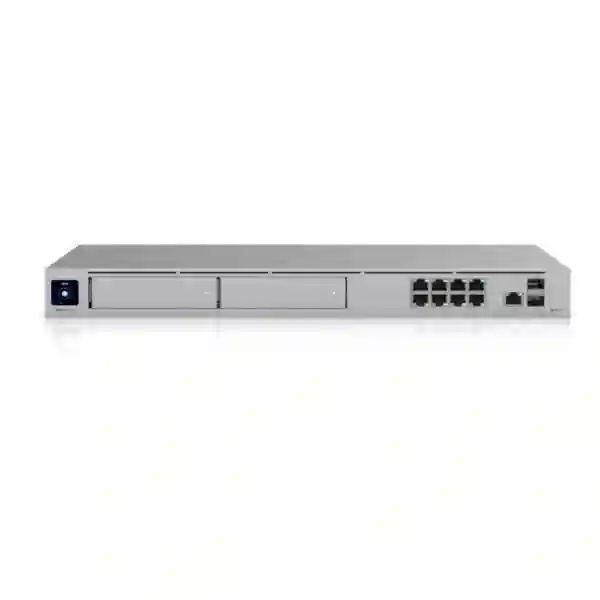
Build a more manageable business network with a 1U UniFi Cloud Gateway that combines 5 Gbps rated IDS/IPS throughput, 10G SFP+ connectivity, central UniFi applications and two NVR drive bays. Designed for organisations that need more headroom than a simple router while keeping network policies and infrastructure visible.
At a glance: the buying decision
Choose the UDM-Pro-Max when your business needs central UniFi management, serious network segmentation, faster inspected routing or dual-bay local camera recording. Add suitable access points and PoE switches for Wi-Fi and powered devices. A second gateway is necessary for Shadow Mode high availability, and storage drives must be checked against the exact sales package.
For Tanzania procurement, start with the network plan and request an itemised quotation. Confirm the internet handoff, existing switches, planned access points, camera retention, desired resilience and installation scope rather than buying on the basis of the port list alone.
Verified technical specifications
Published manufacturer values are planning references. Confirm the exact configuration, software and complete bill of materials for your project.
| Product type | Rack-mounted UniFi Cloud Gateway and application host |
|---|---|
| Model | UDM-Pro-Max |
| Form factor | 1U rack mount |
| IDS/IPS throughput | 5 Gbps manufacturer rating |
| Managed devices / users | 200+ managed UniFi devices / 2,000+ simultaneous users (published guidance) |
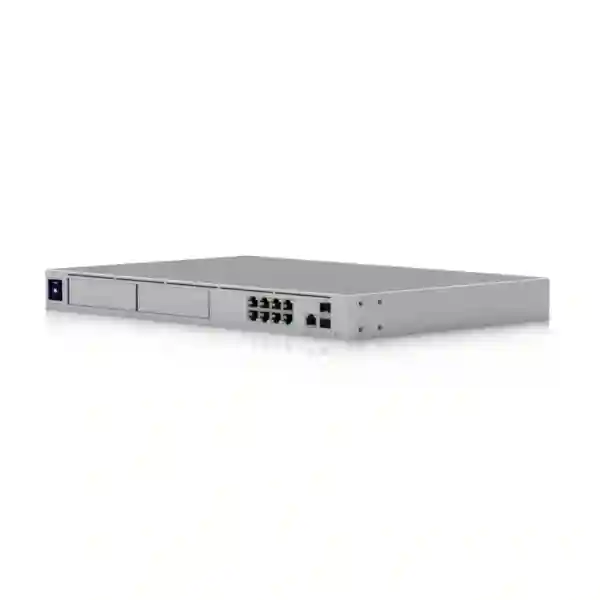
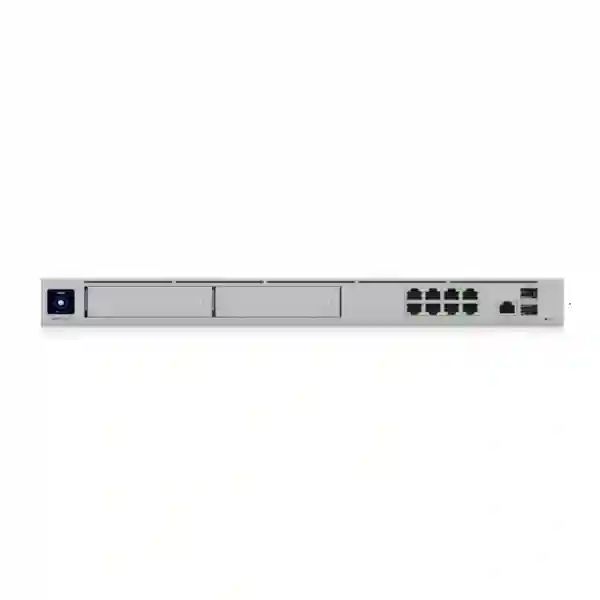
| Default WAN ports | 1 × 2.5 GbE RJ45 and 1 × 10G SFP+ |
| Other network ports | 8 × 1 GbE RJ45 LAN and 1 × 10G SFP+ LAN |
| NVR storage | 2 × 3.5-inch HDD bays; integrated 128 GB SSD |
| Processor / system memory | Quad-core ARM Cortex-A57 2.0 GHz / 8 GB RAM |
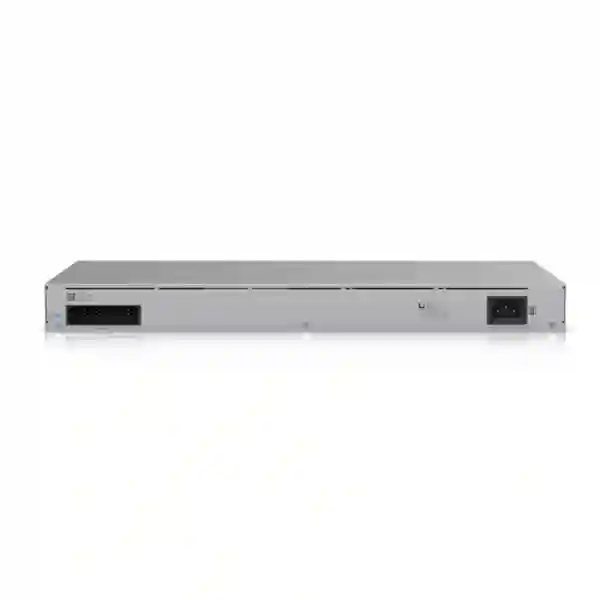
| Power | 100–240 V AC; 60 W maximum power consumption |
| Redundancy options | Shadow Mode gateway failover with second compatible unit; supported DC backup input |
| Wireless / PoE outputs | No integrated wireless access point; no PoE LAN output |
A serious network edge for a growing organisation
The Ubiquiti Dream Machine Pro Max brings routing, network security, UniFi device management and several UniFi applications together in one rack-mounted gateway. For an organisation moving beyond a basic internet router, the main advantage is operational visibility: administrators can see users, switches, wireless access points, networks and internet health from a consistent management environment. It is intended to sit at the edge of the business network, between internet services and the internal distribution switches.
The UDM-Pro-Max is particularly attractive when an organisation already uses UniFi equipment or plans to standardise on it. It should still be selected against a documented network design rather than on headline capacity alone. Internet speed, security inspection requirements, camera recording needs, switch uplinks, planned growth and the cost of supporting equipment all influence the result.
Who should shortlist the Dream Machine Pro Max?
Consider this model when a business operates numerous access points or switches, expects substantial simultaneous connectivity, needs a security gateway with higher inspection capacity, or wants a capable local controller for several UniFi services. Appropriate environments may include multi-floor offices, hospitality premises, education facilities, commercial sites and dispersed branches. The manufacturer lists support for 200-plus managed UniFi devices and more than 2,000 simultaneous connected users, subject to the actual mix of workloads.
These capacity figures are planning indicators rather than a promise that every combination of clients, cameras, rules and internet flows will behave identically. A smaller site with modest traffic may be better served by a simpler gateway. A very large security or surveillance deployment may benefit from dedicated appliances. The useful question is not simply how many users fit, but which services must operate at the same time.
What this product is—and what it is not
The UDM-Pro-Max is a UniFi Cloud Gateway and application host, not a wireless access point, an internet service subscription, or a replacement for every network appliance. It has no integrated Wi-Fi radio. Wireless coverage requires separate access points, suitable cabling and usually a PoE-capable switch or power injectors. Its eight built-in Gigabit Ethernet ports also do not supply PoE power to connected cameras or access points.
Similarly, the two surveillance drive bays are a provision for suitable recording storage, not evidence that hard disks are included in a particular seller’s package. Check the exact quote or carton contents before budgeting. The gateway provides important software functions, but experienced installation, correct security rules, power protection and regular maintenance remain essential to a dependable network.
Understand the physical network connections
At factory-default port assignment, the gateway provides one 2.5 GbE RJ45 WAN interface and one 10G SFP+ WAN interface. There are eight 1 GbE RJ45 LAN ports and a second 10G SFP+ interface for LAN connectivity. Ubiquiti also supports WAN and LAN port remapping through UniFi Network; the published maximum WAN port count is eight, but that does not mean eight dedicated multi-gigabit WAN sockets are present.
For a practical installation, identify which ISP device supplies copper Ethernet and whether any optical or direct-attach connection is compatible with the selected SFP+ module. Design high-speed uplinks deliberately: a 10G SFP+ port will not turn every downstream Gigabit port into a 10G port. Select aggregation switches and transceivers according to actual connection speed, distance, media and compatibility rather than assuming all ports are interchangeable.
Internet failover is different from internet aggregation
A dual-provider design can reduce dependence on one connection. UniFi gateway software supports WAN failover and load balancing, including health checks to determine whether a connection remains usable. In a failover configuration, selected traffic can move to a backup link when the preferred link fails. In load balancing, different network sessions can be distributed across available links according to policy and the supported software configuration.
Do not interpret load balancing as automatically combining two provider speeds into one faster single download. An individual session generally remains on one connection. It is also important to test how banking services, VPNs, real-time calls and applications tied to a public IP address behave when the exit connection changes. Confirm each internet provider’s handoff, addressing, contract, and routing restrictions before commissioning the design.
What the 5 Gbps security throughput figure means
Ubiquiti specifies up to 5 Gbps of IDS/IPS throughput for the Dream Machine Pro Max. Intrusion detection and prevention inspect selected network traffic for suspicious patterns and can generate alerts or block identified threats. This quoted figure is a manufacturer performance rating, not a guaranteed minimum for every application, packet size, security policy, firmware release or mixture of active UniFi services.
Performance planning must distinguish the speed of a physical port from the rate at which traffic is inspected and routed. A 10G SFP+ interface is valuable for uplink flexibility, but it does not establish that every protected flow will reach 10 Gbps. Determine the security policies that must remain enabled, estimate normal and peak utilisation, and plan headroom for growth. If uninterrupted inspected throughput above the model’s rated capacity is essential, assess a higher-tier gateway.
Layered security rather than a single firewall switch
The gateway includes stateful firewalling, application-aware filtering, deep packet inspection, traffic identification, content filtering and intrusion detection or prevention features. These capabilities help administrators set rules according to the way people and systems actually use the network, rather than treating every connected device as equally trusted. A useful security design starts by identifying business-critical systems, administrative access, guest users, devices of uncertain trust and the traffic each group genuinely requires.
Security tools must be configured and reviewed. Enabling a feature without understanding the effect on legitimate applications can cause outages, while overly broad allow rules can defeat segmentation. Some enhanced threat-intelligence capabilities, such as the larger CyberSecure signature offering, may involve separate service terms or subscriptions. Verify the current software and commercial entitlement instead of treating every optional capability as automatically included.
VLANs, guest access and traffic segmentation
VLANs provide a way to separate logical network groups while sharing appropriate physical infrastructure. An office might use distinct networks for staff computers, guest Wi-Fi, voice handsets, security cameras, building devices and management access. The Dream Machine Pro Max supports VLAN and subnet-based segmentation, and its zone-based firewall features can be used to define what traffic should cross those boundaries.
The design should explain which devices need local discovery, which require internet-only access and which need access to shared printers, authentication or application servers. A guest network should not acquire access to administrative systems merely because it uses the same access point. Be careful with inter-VLAN routes and multicast services. Write and test rules against actual use cases; a long list of VLAN names is not itself evidence of a secure deployment.
Wi-Fi coverage still needs dedicated design
Because the gateway does not broadcast Wi-Fi, wireless performance depends on the access points and switching that connect to it. That separation can be an advantage for growth: access points may be selected according to room layout, user density, interference and required wireless standards, while the gateway remains in the equipment rack. A multi-floor site can add wireless capacity where users actually need it rather than relying on one router’s radio.
Plan an on-site wireless survey where practical, especially around thick walls, meeting rooms and high-density public areas. Confirm PoE budgets, switch port speeds, cable quality, roaming expectations and channel plans. A powerful gateway cannot overcome poor access-point placement. Separate staff, visitor and device-oriented SSIDs only when the operational benefit justifies the extra configuration and airtime overhead.
Centralised UniFi Network management
One of the central buying reasons is the UniFi Network application. It provides a management interface for supported UniFi switches, access points and gateway services, allowing administrators to observe topology, connected devices, traffic patterns, alarms and site configuration. For an IT team replacing several disconnected management interfaces, this can make routine tasks more consistent and reduce the amount of configuration scattered across individual devices.
Centralised management should not be confused with unattended management. Establish named administrator accounts, appropriate privileges, strong authentication, documented backups and a predictable change process. Decide how off-site access will be approved and monitored. Keep network diagrams, upstream provider details and recovery instructions outside the device as well, so the team can respond if the gateway itself is unavailable.
More than a network controller: UniFi applications
Ubiquiti lists support for the UniFi Network, Protect, Access, Talk and Connect application suite on this model. This creates the possibility of managing networking alongside supported cameras, door-access hardware, telephony services or selected connected displays and devices. The attraction is a common ecosystem and a consolidated interface, particularly when a site wants consistent administration rather than several unrelated tools.
Applications are not identical in their hardware needs, geographic service availability or installation requirements. Cameras need storage and suitable switching, access-control deployments need compatible hubs and safe door hardware, and voice services require an appropriate calling environment. Confirm regional functionality, product compatibility and the exact software release before promising a specific deployment. Using several applications also consumes system resources, so assess the combined workload rather than every application’s headline limit in isolation.
Two drive bays for UniFi Protect recordings
The unit offers two 3.5-inch NVR HDD bays, allowing suitable hard disks to be installed for local UniFi Protect recording. Ubiquiti describes redundant NVR storage as a product benefit. This can be valuable to a business that wants its network gateway and a moderate camera environment in the same rack while reducing dependence on a separate recording appliance. The right storage design depends on how the supported application configures the drives and on its current software features.
Two drive bays do not mean that two drives are supplied, that all capacity becomes usable, or that footage can never be lost. For mirrored storage, usable space is lower than the sum of the two disks, and a failed unit, theft, accidental deletion or other incident can still affect recordings. Confirm drive compatibility, chosen protection mode, recording policies and appropriate backup or incident-export procedures.
Plan recording retention before buying disks
Surveillance storage should be sized from the camera plan, not from the largest drive advertised. Record resolution, frame rate, compression, scene activity, continuous versus event recording, number of cameras and the required retention period all matter. Ubiquiti publishes camera-management guidance for the gateway, including illustrative capacities of 50 HD, 25 2K or 15 4K cameras. Those figures describe different camera classes, not a licence to add all three maxima together.
Prepare a camera schedule by location and risk priority. Identify the retention period required by the organisation’s policies, estimate the storage required under realistic settings, and verify the supported HDD models. If continuous high-resolution footage or long-term retention dominates the requirement, a dedicated UniFi NVR may provide a more suitable expansion path than relying on the gateway’s two bays.
Use the built-in SSD for its intended role
In addition to the recording bays, the technical specification lists integrated onboard storage including a 128 GB SSD, together with 32 GB eMMC. This built-in storage is part of the console’s operating environment and should not be presented as a substitute for an appropriately sized surveillance recording disk. A shopper seeing the SSD figure should not assume that a full camera deployment can record for its required retention window without additional media.
For procurement, separate the gateway’s fixed hardware specifications from optional project components. Ask whether the quotation includes hard drives, drive capacities, SFP+ optics, cables, mounting hardware, PoE switches and wireless access points. Check the exact seller package rather than inferring contents from a generic product illustration. This helps avoid a technically capable gateway arriving before the other items needed to put it into service.
Deciding when a separate NVR makes sense
A consolidated gateway-and-recording arrangement can simplify the footprint of an office with an appropriate number of cameras. However, network security and video retention have different growth patterns. New cameras can rapidly increase storage, bandwidth and management load, even if the office’s number of staff remains unchanged. Combining functions in one console also creates a shared appliance dependency that should be considered in the continuity plan.
Choose a separate recorder when storage capacity, independent maintenance, prolonged retention or a substantial camera estate is more important than keeping the initial equipment count low. Ubiquiti’s guidance explicitly points larger UniFi Protect environments toward dedicated NVR products. The gateway can remain the network edge and controller while the surveillance design scales separately. This is a planning choice, not a limitation that can be solved merely by adding larger disks.
Shadow Mode high availability is a paired solution
The Dream Machine Pro Max supports UniFi Shadow Mode gateway failover, a high-availability arrangement that uses a second compatible gateway of the same model. The standby unit is synchronised with the primary and can assume gateway responsibilities when the primary fails, subject to correctly implemented topology, power and network connections. It is an option for organisations that cannot readily tolerate a single gateway becoming their only route to the internet.
Shadow Mode is not provided by buying one gateway. The second unit, connectivity, commissioning effort and maintenance need separate allowance. Ubiquiti’s implementation guidance also specifies a dedicated high-availability link and matching WAN/LAN connectivity; the details must follow the supported version of UniFi OS. The operational test should prove failover and recovery for real workloads, not simply show that both gateways appear online in the administration interface.
Understand the three different forms of resilience
Internet resilience, gateway resilience and recording resilience solve different failure scenarios. Multiple WAN links address the loss of an internet provider or circuit. A Shadow Mode pair addresses failure of the primary gateway. A suitable redundant drive arrangement reduces the consequences of certain disk failures affecting local recordings. None of these approaches alone protects the whole installation against every outage, misconfiguration, power event or physical damage.
A resilient business design maps dependencies explicitly: provider equipment, upstream cabling, gateway hardware, switches, storage and power. For example, two internet circuits connected through a single unprotected upstream power strip still have a common point of failure. Likewise, mirrored disks inside one device are not an off-site copy. Assess the likely failure modes, decide which services matter most and assign each risk an appropriate control.
Power, rack space and environmental planning
The chassis is a 1U rack-mounted appliance measuring approximately 442.4 × 43.7 × 285.6 mm and weighing about 4.7 kg. Ubiquiti lists a maximum power consumption of 60 W and a universal 100–240 V AC input. The model also has a compatible DC backup input for the UniFi SmartPower redundancy ecosystem, but this is not the same as receiving a complete external backup power system with the gateway.
Allocate secure rack space, ventilation, organised patching and a suitable power source. A UPS should be sized for the full operational chain, including modem or optical terminal, gateway, essential switches and any supported storage equipment. Consider cooling, dust control, cable strain and physical access restrictions. In environments where electricity or connectivity quality varies, these basics often determine reliability more than an additional software feature.
Remote work and secure VPN connectivity
The platform supports several VPN technologies and site-to-site connectivity options, including current UniFi implementations of WireGuard, OpenVPN, IPsec and Site Magic where supported. These features can help authorised workers reach business resources or link locations without making internal services openly accessible from the internet. A practical design distinguishes user access from permanent site-to-site tunnels and applies the minimum network permissions needed for each.
VPN quality depends on both endpoints, internet stability, routing rules, authentication and the traffic carried through the tunnel. Remote administration should be protected with strong account controls and tested recovery access. Avoid giving every remote user the same broad internal reach. For hosted business software, consider whether a direct cloud connection is preferable to routing all traffic back through a head-office VPN.
Multiple sites and branch networking
For organisations with a head office and smaller branches, the gateway can form part of a consistent UniFi approach to site connectivity, segmentation and monitoring. Administrators may want standard naming, predictable subnets, approved security policies and clear ownership of each site’s equipment. UniFi SD-WAN and site-to-site VPN options can simplify some tasks, but they still require sound addressing, internet access and an agreed approach to failure handling.
Before connecting branches, check for overlapping address ranges, dependencies on central authentication and the applications that must remain available when the link fails. Write down which locations host data and where internet traffic should exit. A branch design should not rely on a marketing phrase such as ‘cloud managed’ to guarantee application performance. Explicitly test file access, business systems, voice quality and support access over the chosen links.
Scenario: a multi-floor office
A medium or expanding office may have separate departments, meeting rooms, visitors, printers, CCTV and many wireless clients. Here the UDM-Pro-Max can be the central routing and policy point, while managed switches distribute wired connections and PoE access points provide wireless service on each floor. IT can monitor connectivity and create boundaries between ordinary staff devices, administrative systems and guest users.
The design should start with employee concurrency, cloud application traffic, wired workstation requirements and the number of wireless coverage areas. A fast fibre handoff is useful only when the distribution network and security settings can carry the expected traffic. Allow capacity for future staff, but avoid overspecifying every component. Specify a sensible uplink architecture, backup connectivity if warranted and a maintenance window for software changes.
Scenario: education and training facilities
An education environment may combine staff devices, student wireless access, teaching screens, examination systems, administrative records and security cameras. These groups have different privacy, service and bandwidth requirements. The gateway’s network segmentation and central management can support a clearly separated design, while appropriate access points provide classroom and common-area coverage. Traffic rules can prevent a general student network from reaching sensitive administration systems.
Peak demand may occur when many classrooms start streaming or taking online assessments at once. Wireless design and upstream internet capacity are therefore just as important as gateway client figures. Plan device onboarding, guest policies, scheduled maintenance, content access rules and emergency support procedures. Check the applicable institution’s privacy and retention policies before configuring cameras, access logs or other monitoring.
Scenario: hotels and hospitality properties
A hotel or guest property may need separate connectivity for guests, front-desk systems, payment terminals, staff, cameras and building automation. The UniFi ecosystem can help administrators maintain those boundaries and see the health of managed infrastructure. The Dream Machine Pro Max is a candidate where the scale and need for central security exceed the capabilities of a small office router.
Guest connectivity success depends heavily on wireless coverage and simultaneous activity in rooms, corridors and common spaces. Plan for peak occupancy rather than average weekday use. Payment, reservation and property-management systems should be isolated appropriately and protected by a documented security design. If two internet circuits are installed, confirm how their failover affects guest sessions, staff services and any business-critical connections that depend on a fixed provider address.
Scenario: shops, warehouses and commercial sites
Retail and warehouse networks can include payment terminals, point-of-sale systems, barcode scanners, handheld devices, stock-management computers, CCTV and staff wireless. Keeping those systems apart helps reduce unnecessary network exposure and supports better fault isolation. A central gateway with switch and access-point management can give IT a clearer picture of which infrastructure is responsible for a service disruption.
However, a reliable shop network is also a physical installation project. Verify coverage near shelving and metal racks, identify devices that require uninterrupted connectivity, and provide suitable power protection. Network segmentation alone does not establish compliance with payment-security requirements; the full system and operating procedures matter. Make sure staff can continue essential transactions under the documented contingency process when an internet provider is unavailable.
Scenario: clinics and professional service offices
Professional offices can have sensitive records, appointment systems, video calls, printers and customer-facing guest Wi-Fi on the same premises. The UDM-Pro-Max can support an architecture that keeps internal business systems separate from visitors and limits the pathways between networks. Security monitoring and consistent access policies may be especially useful when several staff members depend on digital services throughout the working day.
Hardware features do not make an organisation automatically compliant with privacy, medical or professional obligations. Protect access through device and identity controls, security updates, encrypted applications, approved data-handling practices and appropriate backups. Assess whether critical services must continue during outages, and test recovery processes. For a modest single-office installation, compare the operational benefit of this gateway with the cost and complexity of a smaller alternative.
Checklist before connecting a Tanzanian internet service
An internet connection may be delivered as Ethernet, through an optical network terminal or via other provider-managed equipment. Ask the provider exactly which customer-facing port is available, the agreed line rate, whether addressing is dynamic or fixed, and whether authentication, VLAN tagging or special routing is required. For services above Gigabit speed, check that the provider’s actual handoff and the gateway interface can negotiate a suitable speed.
Where two providers are planned, document the active and backup roles, DNS behaviour, public address expectations and how the business will recognise degraded service. A secondary connection is only useful when it has been activated and tested. Avoid claiming any particular provider compatibility or local bandwidth product without confirmation for the exact site. Provider quotations, local contract terms and physical installation details should be validated during project planning.
Plan the switching and cabling around real traffic
The included Gigabit LAN ports can support appropriate low- to moderate-speed connections, but larger deployments usually benefit from managed access and aggregation switches. Choose switch port counts, PoE budgets and uplink speeds according to the wired clients, access points and cameras that the design actually includes. A 10G SFP+ uplink between the gateway and a suitable aggregation switch can be useful when multiple lower-speed devices share the core.
Evaluate fibre versus copper runs, transceiver compatibility, cable distances, patch-panel organisation and spare capacity. Do not assume that attaching a high-speed switch fixes an underpowered wireless design or a slow internet circuit. The full data path matters: internet handoff, gateway processing, switch uplinks, access-switch ports, wireless airtime and the end device. Document the expected path for the most demanding applications.
Prepare a sensible addressing and security plan
Before installation, allocate IP subnets and VLAN IDs for the groups that genuinely need separation. Decide which networks require DHCP, reserved addresses, local name resolution, inter-VLAN access, management privileges and internet-only service. Put core infrastructure on an identifiable management network and specify who can reach its administration interfaces. This reduces the chance that a later change will unintentionally expose a system.
Apply firewall policies in logical stages and verify them with representative devices. A printer or door-access controller may depend on discovery protocols that do not cross VLAN boundaries automatically, so test the intended workflow before blocking every route. Maintain a current configuration record and keep secure, recoverable backups. Design for understandable rules and straightforward troubleshooting rather than creating unnecessary complexity.
Commissioning the gateway in the rack
Start with a documented inventory of the internet handoff, gateway, switch uplinks and power connections. Fit the appliance into a suitable rack position, connect the intended WAN and LAN interfaces, and verify the basic link status. Follow Ubiquiti’s current onboarding procedure, establish the authorised administrator account and adopt the appropriate UniFi network devices. Review the installed UniFi OS and application versions before implementing complex features.
Commissioning should include an acceptance test, not only a successful first login. Check internet access from each intended VLAN, access to necessary internal systems, isolation of guest and restricted networks, DNS behaviour and expected throughput under representative conditions. If WAN failover, cameras or VPNs are included in the project, test each service separately and record the outcome for the person responsible for operating the site.
Migrating from an existing router or controller
A migration plan must account for more than the replacement of the internet cable. Export or record the old network configuration, noting subnet ranges, DHCP reservations, static routes, VLAN tagging, VPN peers, DNS settings and firewall exceptions. Check where current UniFi devices are adopted and how they will be migrated to the intended controller. Ensure access to both old and new administrative credentials before cutting over.
Schedule a realistic service window and choose a rollback point. If a new gateway uses different addressing, printers, servers, terminals and remote-access tools may need explicit updates. Test one representative client per network after migration, then confirm business-critical services before declaring completion. Keep the old configuration and cabling notes available until the new environment has passed an agreed stability period.
Monitoring and maintenance after deployment
A network remains useful when staff can identify and resolve problems. Establish alert ownership for connectivity loss, storage health, significant configuration changes and device unavailability. Review internet performance over time, not only during an initial speed test. Keep contact details for the network administrator and internet providers in the operational documentation, including who may authorise changes during an incident.
Use planned maintenance windows for firmware and application updates, while remaining responsive to important security advisories. Back up configurations according to policy and verify that the organisation knows how to restore access to the controller. Monitor storage utilisation when cameras are used and adjust retention settings deliberately. For growth planning, compare actual use against the assumptions recorded during the original design.
Comparison: Dream Machine Pro versus Pro Max
The standard Dream Machine Pro remains a viable rack-mounted gateway for sites with moderate requirements, while the Pro Max offers more processing and memory headroom and an additional 3.5-inch recording bay. Ubiquiti positions the Pro Max for mid- to large-scale deployments where more clients, more managed devices or stronger local recording resilience are relevant. An organisation should not pay for the extra headroom simply because the name sounds more advanced.
Compare the models against actual and future internet rates, the number of adopted UniFi devices, expected concurrent clients and whether surveillance storage is part of the solution. The standard model may meet a smaller site’s needs with less hardware expenditure. The Pro Max becomes more compelling when its extra capacity and dual-bay recording are used, or when the network has a credible growth path toward those requirements.
Comparison: Dream Machine Special Edition versus Pro Max
The Dream Machine Special Edition and the Pro Max are not distinguished only by their model names. The Special Edition is relevant to buyers who value its integrated PoE capabilities and particular port configuration, whereas the Pro Max prioritises higher gateway processing capacity and two recording bays. That makes the choice dependent on the planned network topology, rather than a simple assumption that the higher model replaces everything offered by the other.
If a site needs to power a small collection of devices directly, compare the total bill of materials, including whether a separate PoE switch is necessary. If the site already uses dedicated PoE switches and expects heavier security inspection or recording needs, the Pro Max may align better. Check current specifications for both exact models before selecting one; do not compare only headline internet speeds.
Comparison: one consolidated gateway or separate appliances
Buying a gateway that also hosts applications can reduce the number of management touchpoints and rack devices for an appropriately sized site. It can be easier to operate when the network and camera estate fit comfortably inside the published guidance. The tradeoff is that maintenance and failure of one appliance may affect more than one function. A separate recorder or other dedicated application host can isolate workloads and permit different upgrade cycles.
Choose the architecture based on business criticality, recording retention, expected expansion and the people who will support it. There is no universal rule that every business should consolidate or separate services. A phased rollout is often sensible: use the gateway for essential network management first, then assess whether cameras and other applications belong on the same host after the traffic and retention requirements are known.
What determines the total deployment cost?
The gateway is only one line in a business network budget. Additional items may include managed PoE switches, wireless access points, optical modules, uplink cables, surveillance drives, a rack, a UPS, spare connectivity and installation materials. Design, configuration, migration, documentation and ongoing support can also affect the total investment. This product page does not claim a current Tanzania selling price, available stock, installation coverage or delivery time.
Request a quotation that lists each required component and states which labour or support activities are included. Ask whether the storage drives are included, whether a second unit is needed for Shadow Mode and what licensing or optional services apply to the chosen features. Verify warranty and commercial terms in the specific offer. Comparing complete, like-for-like proposals is more useful than comparing gateway hardware prices alone.
How to select the right design capacity
Begin with a count of existing and projected wired clients, wireless users, UniFi devices and cameras. Add the expected internet speeds, inspection policies, VPN usage and recording retention. Then consider peaks: a busy training day, a full hotel, a large meeting or a camera event may create a different load from ordinary office conditions. Size for a reasonable growth margin, but avoid relying on optimistic assumptions about every feature running at the maximum published capacity simultaneously.
Treat Ubiquiti’s device, client and camera figures as separate guidance for evaluation. Mixed workloads can change resource needs, as can future application updates. A network diagram, port inventory and short requirements schedule allow a supplier or technical team to explain why the Pro Max is the appropriate choice, or why a smaller gateway or dedicated appliance would be more economical.
Security configuration is a continuing responsibility
A gateway can enforce policies but cannot decide the organisation’s acceptable risk on its own. Agree on administrative roles, external-access rules, guest boundaries, update responsibilities and the handling of alerts before turning on complex filtering. Review VPN access when staff leave or change roles. Restrict management interfaces and treat configuration backups as sensitive materials because they may expose important network details.
Create a repeatable process for changing firewall rules and checking whether a security adjustment breaks legitimate work. Record rule owners and business reasons for exceptions. Where logging or video recording involves people, apply the organisation’s privacy notices, retention rules and applicable obligations. Do not infer certification or regulatory approval in Tanzania from the gateway’s international product specification alone.
What to ask before requesting a quotation
Prepare a short requirements note describing premises size, internet handoff speeds, number of users, wired and wireless device counts, camera quantity, desired video retention and any remote branches. State whether a secondary internet connection, Shadow Mode pair, rack or backup power already exists. Identify important services that should remain online during a provider outage and the acceptable maintenance windows for the business.
A supplier can then distinguish the base gateway from the extras genuinely needed for the installation. Ask for a port and uplink plan, a PoE budget, compatible recording storage where required, and a high-level network security design. Clarify responsibility for software setup, administrator handover, acceptance testing and support. This makes the Ubiquiti Dream Machine Pro Max purchase decision easier to explain and the finished network easier to manage.
A final fit check for Tanzania buyers
The Ubiquiti Dream Machine Pro Max is best treated as a capable foundation for a planned UniFi business network in Tanzania, not a promise that any ISP, camera combination or office layout will work without further checks. Its strongest proposition is the combination of higher-capacity routing and security, central UniFi management, flexible multi-gigabit uplinks and dual-bay local recording options. The benefits matter most when the surrounding network is designed to use them.
Before ordering, verify the exact package, interfaces, switching needs, Wi-Fi coverage plan and chosen security policies. Confirm the supplier’s current quotation and all local commercial terms instead of relying on prices from another market. The next step is a requirements-based quote that lists the gateway alongside the additional equipment and deployment services, if any, required for the intended site.
Frequently asked questions
Practical answers to common questions about buying, configuring and operating the UDM-Pro-Max.
Does the UDM-Pro-Max have built-in Wi-Fi?
No. It is a rack-mounted gateway, not a wireless access point. To deliver wireless coverage, add suitably placed UniFi access points and power them through a compatible PoE switch or injector. The number and location of access points should follow an assessment of user density, coverage and building materials. The router’s high device capacity does not replace proper wireless design.
Can its eight Ethernet ports power access points?
No. The integrated eight Gigabit Ethernet LAN ports are not PoE outputs. Budget for suitable PoE switching or power injectors for access points, IP cameras and other powered network devices. Choose a switch with enough total power budget and the required per-port PoE standard, not merely a sufficient number of empty ports. Check individual device requirements before buying.
Is 5 Gbps the internet speed guaranteed to every user?
No. Ubiquiti’s 5 Gbps figure describes the model’s rated IDS/IPS throughput. It does not guarantee a 5 Gbps internet subscription, 5 Gbps per client or fixed throughput with every possible policy and traffic type. Performance also depends on the internet circuit, routing configuration, downstream ports and applications. Plan according to measured requirements and the full path between users and their services.
Can it work with two internet providers?
The gateway supports multi-WAN features including failover and load balancing. Confirm the actual handoff and configuration required by each provider before deployment. Failover can redirect traffic after a connection becomes unavailable, while load balancing distributes sessions according to policy. Neither automatically provides a single combined-speed connection, and provider IP changes can affect active applications. Test the intended behaviour under realistic conditions.
Are hard drives included with the gateway?
The model provides two 3.5-inch NVR HDD bays, but the contents of a particular local sales package must be confirmed in its quotation. Do not assume drives are included. The integrated 128 GB SSD is part of the console’s hardware environment, not a substitute for right-sized recording media. Calculate capacity from camera recording settings, retention requirements and the selected storage protection mode.
Does it support redundant camera storage?
Ubiquiti describes redundant NVR storage capability for the dual-bay Pro Max. The result depends on installing suitable drives and configuring a supported storage arrangement. Redundancy may protect against a certain disk failure but is not equivalent to an independent backup. Review usable capacity, retention, alerting and recovery procedures. Sites with extensive camera requirements may be better suited to a dedicated UniFi NVR.
How many cameras can the Dream Machine Pro Max manage?
Ubiquiti’s published guidance lists approximately 50 HD, 25 2K or 15 4K cameras as separate capacity indicators. Real deployments depend on settings, resolutions, workloads and other applications. Those figures should not be added into one combined allowance. Estimate recording storage and network bandwidth separately, and evaluate a dedicated recorder when the camera estate, retention needs or resilience requirements grow.
What do I need for automatic gateway failover?
Shadow Mode high availability requires a second supported gateway of the same model, suitable software versions and the specific WAN, LAN and dedicated inter-gateway connections described in current UniFi instructions. One UDM-Pro-Max is not itself a redundant gateway pair. Plan compatible upstream connectivity, shared infrastructure, power and a tested failover runbook. Camera storage recovery requires separate attention during a hardware failure.
Can this gateway connect a head office to branches?
Yes, supported UniFi VPN and SD-WAN functions can form part of a site-to-site design. The correct option depends on the peer gateways, firmware, internet access, routing requirements and security policy. Avoid overlapping subnets, decide which services should use the tunnel, and test recovery after an internet failure. A site-to-site link does not remove the need for endpoint security or suitable application bandwidth.
Is the Dream Machine Pro Max suitable for a small office?
It can be, but it is not automatically the most economical choice. A small office with modest traffic and few managed UniFi devices may meet its requirements with a smaller gateway. The Pro Max is more compelling when higher security-processing capacity, two recording bays, substantial device growth or a rack-based architecture are needed. Compare the complete installed cost, including separate Wi-Fi and PoE equipment.
Can I use it without a UniFi switch?
A supported network can connect appropriate devices through the gateway’s built-in LAN ports, but larger or PoE-dependent deployments generally require separate switching. The gateway’s internal LAN ports are Gigabit and provide no PoE. If you need many clients, high-speed interconnections, multiple access points or cameras, plan suitable switches and uplinks. Check how each downstream device will receive power and connectivity.
How do I get a Tanzania price or availability confirmation?
Request a current quotation for the exact UDM-Pro-Max model and describe the intended installation. Ask the supplier to confirm whether the quote includes storage drives, transceivers, PoE switches, access points, taxes, delivery, installation or support. Prices and stock can change, so this page does not invent local figures. The purchasing decision should be based on an itemised, verified offer and an agreed scope of work.
Request a UDM-Pro-Max quotation for your network
Share your approximate user count, premises layout, internet speed, switching requirements and camera plan with FourTeck Tanzania. Ask for an itemised specification covering the UDM-Pro-Max and the additional equipment actually needed for the site. The product’s local price, stock status, warranty, delivery and installation terms must be confirmed in the resulting quotation.
Next step: request a verified, requirements-based quote from FourTeck Tanzania.




Reviews
There are no reviews yet.