
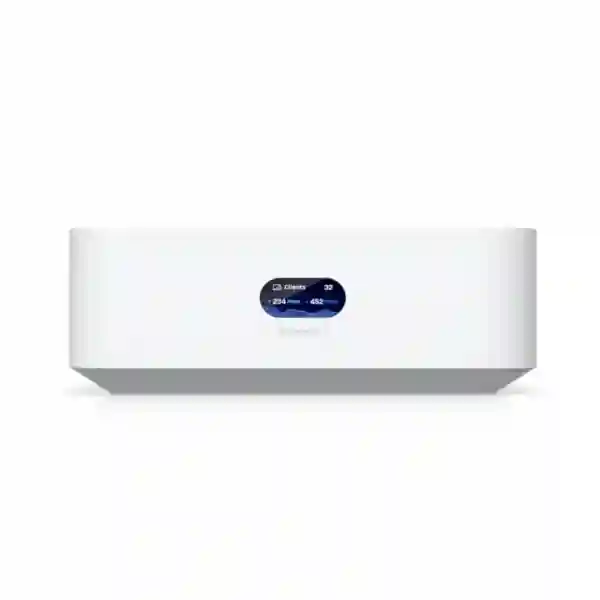
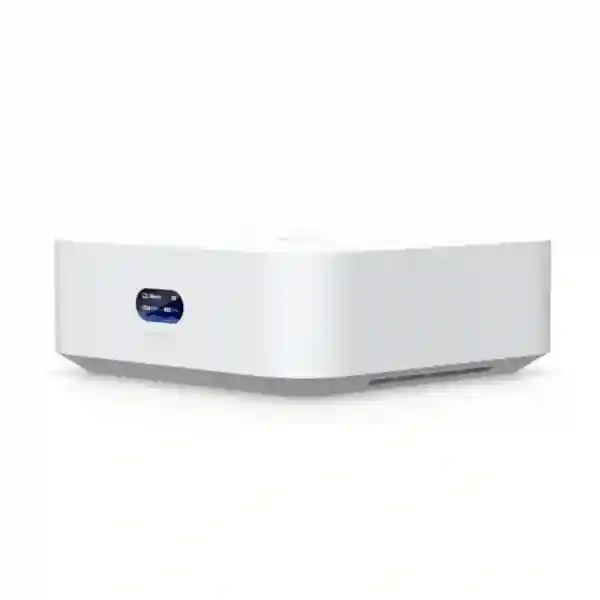
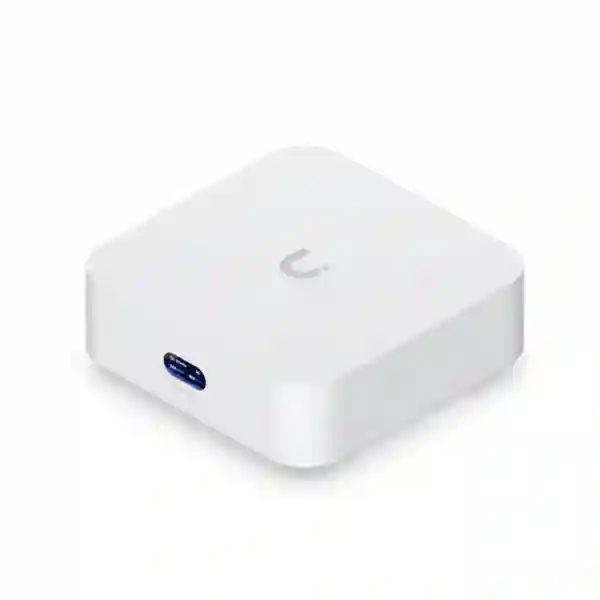
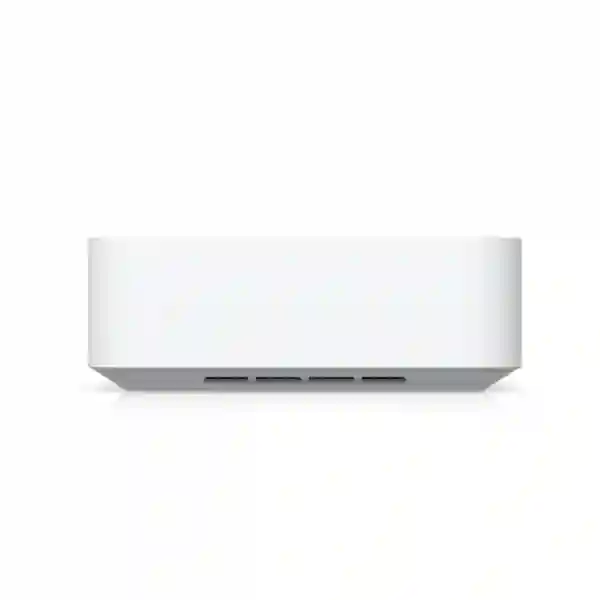
Ubiquiti UniFi Express 7 UX7 — WiFi 7 Cloud Gateway
Bring modern WiFi and unified network management together in one compact desktop device. The UniFi Express 7 UX7 is designed for buyers who need an expandable wireless-first gateway with a 10 GbE WAN port, a 2.5 GbE LAN port and familiar UniFi Network controls. It suits carefully scoped homes and smaller workspaces, while retaining clear options for adding compatible access points and switches.
For an accurate Tanzania quotation, confirm the required regional variant, available configuration, upstream internet connection, coverage plan and accessories. No local price, stock, delivery promise or regulatory approval is assumed here.
Quick verified specifications
| Manufacturer / model | Ubiquiti / UX7 |
|---|---|
| Type | Compact desktop UniFi Cloud Gateway with integrated WiFi 7 |
| Wireless bands | 2.4 GHz, 5 GHz and 6 GHz; regional availability applies |
| Published radio link rates | 688 Mbps / 4.3 Gbps / 5.7 Gbps respectively |
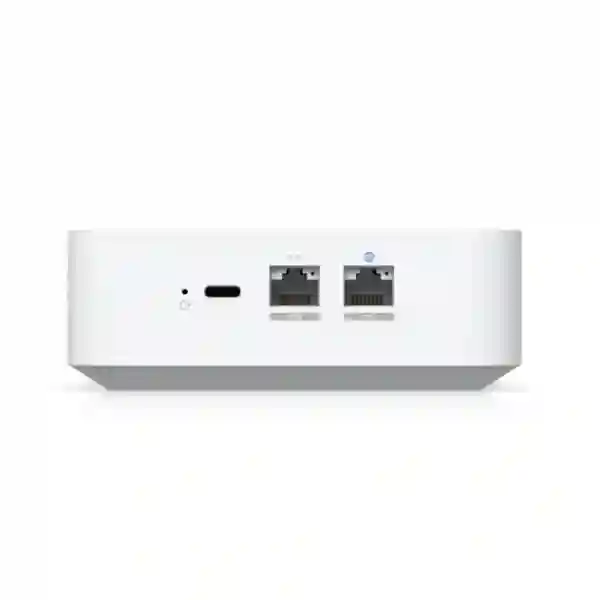
| Ethernet ports | 1 × 10 GbE RJ45 WAN; 1 × 2.5 GbE RJ45 LAN |
| IDS/IPS throughput | 2.3 Gbps (manufacturer specification) |
| Estimated coverage | 160 m² (building conditions affect results) |
| Management / capacity | UniFi Network; 30+ managed devices; 300+ connected users |
| Power | USB-C 5V DC / 5A; adapter included; 22W maximum |
| Dimensions / memory | 117 × 117 × 42.5 mm; 3 GB RAM |
| Application support | UniFi Network; not a full multi-application console |
Wireless link rates, connected-client capacities and coverage estimates are specifications under qualifying conditions, not guaranteed field results.
What the UniFi Express 7 actually does
The UniFi Express 7, model UX7, combines an internet gateway, a WiFi 7 access point and a UniFi Network console in a small desktop unit. For a buyer who wants to move beyond basic ISP-router controls, that combination is valuable: the same interface can show connected devices, wireless networks, traffic activity and adopted UniFi networking equipment. The UX7 can be the starting point for a new network rather than a wireless box that must immediately be paired with a separate controller.
The important qualification is scope. It is a compact, Network-focused gateway, not a substitute for every UniFi console or every enterprise router. Its two Ethernet ports make sense for a mostly wireless environment, but a site with many wired workstations will usually add a switch. A buyer should assess the internet service, number of rooms, walls, clients and applications before choosing this model.
A compact gateway for a defined deployment
A single UX7 is particularly appealing where equipment space is limited and the network has one internet connection, a manageable wired footprint and a meaningful number of wireless devices. A home office, studio, small retail workspace or compact professional office can benefit from unified routing and WiFi controls. Desktop placement also avoids the need for a ceiling-mounted access point in every simple installation. Its restrained physical footprint helps where a router must sit on a shelf or a desk.
Compact does not mean unlimited. Ubiquiti publishes capacities of 30-plus managed UniFi devices and 300-plus simultaneous users, but those are platform specifications rather than guarantees that any particular mix of applications will perform perfectly. Heavy file transfers, many VPN tunnels, congested radios and demanding security inspection can change practical capacity. Size the system around actual traffic, not only the number printed in a specification.
The 10 GbE WAN connection explained
The UX7 includes one 10 GbE RJ45 WAN port for its upstream internet or network handoff. This is useful where a provider supplies Ethernet at multi-gigabit link rates or where a buyer wants the physical WAN port to accommodate an eventual service upgrade. The port supports multiple negotiated Ethernet rates, so using the gateway does not require buying a 10 Gbps internet plan. An ordinary compatible Ethernet handoff can remain appropriate for a smaller connection.
A port labeled 10 GbE describes the interface’s link capability, not a promise of 10 Gbps end-to-end application throughput. Actual throughput depends on the WAN service, router processing, firewall and inspection features, LAN interface, cabling and endpoint capabilities. For many buyers the 10G input is best viewed as an upstream flexibility feature. Review the intended workload before claiming a ten-gigabit user experience.
Why the 2.5 GbE LAN port matters
One 2.5 GbE RJ45 LAN port is available to connect a desktop, server or downstream Ethernet switch. A suitable multi-gigabit switch can provide more local wired connections and allow several endpoints to share the gateway. This is a practical path for an office with a wired printer, network storage, telephones or several desks, provided the switch ports and connected devices are chosen for the required speeds.
The LAN interface is also an architectural constraint worth understanding before purchase. A single endpoint linked through that port cannot obtain a 10 Gbps wired connection through it. A 10G WAN subscription will therefore not transform that particular LAN cable into a ten-gigabit interface. In a wireless-first environment this may be acceptable; for a storage-intensive or highly wired site, compare gateways with more or faster LAN connectivity.
WiFi 7 across three radio bands
Ubiquiti specifies integrated wireless operation across 2.4 GHz, 5 GHz and 6 GHz, using modern IEEE 802.11be WiFi 7 capability and backward-compatible standards. Published maximum radio link rates are 688 Mbps on 2.4 GHz, 4.3 Gbps on 5 GHz and 5.7 Gbps on 6 GHz. Those rates describe ideal radio signaling under specified modes, not the download speed a customer should expect from a speed-test application.
Real wireless performance changes with channel width, device antenna capability, interference, signal strength, distance, walls and other users sharing airtime. A device with a WiFi 5 adapter will not suddenly become a WiFi 7 client just because it connects to this gateway. The better purchasing question is whether the UX7 brings a useful mix of coverage, management and modern radio capacity to the actual client fleet.
Choosing between 2.4, 5 and 6 GHz
The 2.4 GHz radio is often useful for older clients, low-bandwidth connected devices and locations where penetration matters more than peak speed. The 5 GHz radio is commonly the balanced choice for laptops and phones that need higher throughput while still maintaining practical range. The 6 GHz radio provides additional spectrum for compatible clients and can be attractive in a busy space when local regulation and firmware permit its use.
These bands are not interchangeable. Higher-frequency signals generally lose strength more quickly through obstacles, while the 2.4 GHz band can be crowded with neighboring networks and non-WiFi devices. A well-designed deployment may use different wireless networks or band policies for different device groups. Test performance from the locations where people actually work, rather than choosing a band simply because its specification has the largest number.
WiFi 7 client compatibility and expectations
The UX7 can serve a mixed fleet containing newer WiFi 7 products alongside WiFi 6, WiFi 5 and older supported clients. A family does not need to replace every telephone or laptop on installation day. Existing equipment can usually continue on a compatible band and supported security setting. This makes the device an incremental infrastructure upgrade that can remain useful as computers and phones are renewed over time.
Individual client support is crucial. To obtain features such as 6 GHz connectivity, the client itself needs a compatible radio, operating system and permitted regional settings. To see benefits from WiFi 7 capabilities, both ends of the connection and the enabled network configuration must support them. Ask which client models matter most, what bandwidth they can realistically use and whether the applications are sensitive to speed, latency or reliability.
Multi-Link Operation without exaggerated promises
WiFi 7 introduces Multi-Link Operation, often abbreviated MLO, allowing compatible equipment to coordinate links across radios under supported configurations. Ubiquiti positions MLO as part of its whole-home WiFi 7 approach, including relevant mesh functionality on supported software. The attraction is not just a headline rate; the design can provide additional flexibility in how a compatible wireless system uses available spectrum.
MLO is not a universal acceleration switch for every phone, laptop or mesh path. Both client and infrastructure support, software versions, radio settings, permitted channels and deployment topology influence what is available. A buyer should avoid interpreting combined theoretical band rates as a guaranteed single-client speed. Verify the current firmware feature set and test the intended client devices before making performance commitments to end users.
Understanding the published coverage figure
Ubiquiti publishes a coverage estimate of up to 160 square metres for the UX7. This is a planning reference for a suitable environment, not an assurance that every building of that floor area will receive strong 6 GHz service. Reinforced concrete, metal shelving, thick walls, electrical rooms, long corridors and adjacent networks may reduce useful signal or create uneven coverage. Different floors often need additional planning.
A practical site survey is more informative than the raw square-metre value. Identify rooms where video calls occur, fixed devices that must stay connected and any spaces where weak signals already cause problems. Consider the physical position of the gateway, client types and potential expansion paths. If coverage is inconsistent, a second access point or mesh node may solve the problem more effectively than increasing transmit power.
Where to position the desktop unit
Good placement can materially improve the value of an all-in-one router. Place the UX7 in a reasonably central, open location when possible, away from large metal cabinets, enclosed racks, thick walls and avoidable electronic interference. Keep it on a stable surface with unobstructed ventilation and access to the Ethernet and power connections. A beautifully hidden router is not always a well-performing wireless access point.
The installation location should also suit the internet handoff and any downstream switch. A modem situated in an awkward corner can force a poor WiFi location unless a longer Ethernet run is available. Where the best place for the gateway is different from the best place for wireless coverage, consider using a separate wired access point. Test signal and user experience before making the final mounting or cable-routing decisions.
Expanding with wired UniFi access points
If one device does not reach every room, the UX7 can form the basis of a wider UniFi network. Ubiquiti confirms that the Express 7 can manage additional UniFi networking devices and can itself be reused as a wired access point in a compatible setup. A wired uplink to another access point usually offers more predictable backhaul capacity than depending on a weak wireless signal through multiple walls.
Expansion should be planned around ports and power. The UX7 does not provide a collection of PoE-enabled LAN ports, so many traditional UniFi access points require a suitable PoE switch or injector and their own compatible hardware. Select additional equipment according to the installation, not simply the branding. A good cable path today can prevent wireless congestion and troubleshooting work after the network grows.
Wireless mesh and placement trade-offs
The UX7 also supports use as a mesh access point, and additional compatible nodes can help cover spaces where new Ethernet cabling is difficult. Ubiquiti describes the product as mesh-scalable and offers multiple-unit whole-home configurations in some markets. Mesh is especially appealing to a buyer who wants a consistent managed wireless environment without redesigning the entire property.
Wireless backhaul still consumes radio resources and depends on the quality of the link between nodes. Place a secondary unit where it has a strong connection to the primary network rather than at the very edge of a dead zone. Software capabilities such as MLO backhaul should be verified for the installed versions. For fixed business-critical equipment, choose wired backhaul where feasible and use mesh to solve specific placement problems.
The UniFi Network management experience
Unlike an ordinary router with a minimal configuration page, the UX7 runs UniFi Network for controlling wireless networks, clients, adopted devices and many routing features from a consistent interface. Administrators can monitor the network and investigate connected devices through UniFi’s management tools. This integrated view is useful when a small business has several access points or when a technically confident homeowner wants more visibility than an ISP box usually exposes.
The UX7 is a Network-focused console. It should not be advertised as a platform that independently runs every UniFi application, such as the full Protect video-recording environment, Talk or Access. Those workloads require an appropriately capable supported console or other architecture. Buyers seeking cameras, door access and unified application hosting should evaluate the wider UniFi product family before deciding that this compact gateway is their sole appliance.
Separate staff, guest and device networks
Segmentation is one of the most useful reasons to choose UniFi management. A business can plan distinct network access for staff equipment, visitor devices and suitable connected appliances. Ubiquiti lists VLAN and subnet-based segmentation, guest traffic isolation and configurable wireless networks among the UX7 capabilities. When implemented correctly, those controls can reduce unnecessary access between different device groups.
Separation is not automatic simply because several SSID names exist. Each wireless network should be mapped to an intended subnet and associated policy, and the firewall should allow only necessary communication. Printers, casting devices and other shared resources may need carefully considered exceptions. Create a straightforward network diagram before configuring restrictions so staff can still reach legitimate services without weakening the guest boundary.
Firewall and application-aware controls
The UX7 specification includes a stateful firewall, application-aware Layer 7 filtering, traffic identification, content filtering and zone-based firewall capabilities. These functions can give an administrator more precise control than a single all-or-nothing home-router firewall. For example, a business may want guest internet access without guest access to office devices, or a distinct group of managed equipment with limited outbound destinations.
Security controls require thoughtful configuration and ongoing maintenance. An incorrect allow rule can undo segmentation, while an overly broad deny rule can disrupt business tools. Define the users and services first, implement small changes, then verify expected access from representative devices. No gateway should be presented as making a network fully secure by itself; software updates, account protection, endpoint security and sensible administrative access remain necessary.
Intrusion detection and the throughput ceiling
Ubiquiti specifies 2.3 Gbps of IDS/IPS throughput for the UX7. That number is especially relevant when buyers see the 10 GbE WAN interface and assume the gateway can inspect ten gigabits of traffic without limitation. Intrusion detection and prevention involve processing traffic against security rules, so they introduce a different performance consideration from the theoretical rate of an Ethernet port.
Decide whether a security-inspected multi-gigabit connection is a requirement before buying. A modest internet connection may sit comfortably within the published inspection capacity, while a much faster circuit and aggressive security rules could justify a higher-capacity gateway. Features, subscriptions and signatures may evolve. Ubiquiti also identifies optional CyberSecure enhancements; do not assume every optional security feed or commercial service is included with the unit.
VPN access and remote connectivity
The official UX7 feature list includes several VPN capabilities, including WireGuard, OpenVPN, Teleport and supported site-to-site choices. These can be useful for an authorised employee connecting to office resources or a small organization linking supported remote locations. VPN selection should be based on client support, ease of administration, required access and the quality of the remote connection rather than protocol names alone.
Remote access must be designed carefully. Use individual identities where supported, limit reachable networks, keep software updated and avoid exposing administration unnecessarily. Connection success can depend on upstream provider arrangements, NAT, public address availability and local restrictions. If a customer is behind carrier-grade NAT or another gateway, the deployment plan may need additional consideration. Test a VPN from outside the premises before promising it as an operational service.
Understanding the ISP handoff in Tanzania
Before connecting the UX7, identify what the Tanzanian internet provider actually hands over: an Ethernet cable from an optical network terminal, an ISP router, another modem or a managed service. Ask whether the connection uses DHCP, PPPoE, static addressing, VLAN tagging or other configuration details. These are service-specific questions; it would be misleading to imply that all providers use the same connection method.
If the existing provider device also routes traffic, decide whether bridge mode is appropriate and supported. Double NAT may work for routine browsing but complicate certain incoming services and troubleshooting. Check provider credentials and any required hardware before changing the network. The UX7 has no built-in cellular modem and should not be sold as a direct SIM-card broadband device. A separate compatible modem or backup system is necessary where required.
Power, the supplied adapter and resilience
Ubiquiti specifies USB-C power at 5 V DC and 5 A, with an adapter included, and a maximum power consumption of 22 W. The compact unit is designed for desktop use and does not require a large rack power system. Its power arrangement matters when selecting surge protection, an uninterruptible power supply or a replacement adapter; use the specified electrical requirements rather than an arbitrary phone charger.
Network uptime depends on more than the UX7 staying powered. An optical terminal, modem, downstream switch and any mesh node may also need backup electricity for connectivity to continue during an interruption. Plan the critical devices as a chain, and choose backup capacity based on measured load and the desired duration. Confirm the supplied regional power plug and any local electrical installation requirements with the seller before purchase.
Ethernet switch and accessory planning
A frequent surprise with this model is that the gateway has just one user-facing LAN port. A home office with a desktop and wired printer, or a small shop with multiple point-of-sale terminals, should plan for an Ethernet switch. A properly selected unmanaged switch can expand basic connectivity; a compatible managed switch is better where VLAN segregation, monitoring or more sophisticated port configuration is needed.
Choose switch uplink speed and port count according to real traffic. A 2.5 GbE uplink may be valuable when several devices are active, but not every endpoint needs an expensive multi-gigabit interface. If adding PoE-powered access points, cameras or phones, determine the total power budget and compatible PoE standard separately. The UX7’s USB-C power input should not be confused with a PoE output facility for powering other equipment.
Can this gateway scale with a growing business?
The UX7 can be a useful initial investment because it introduces UniFi Network management and supports adoption of additional compatible networking products. A buyer can begin with one gateway and later add access points or a switch as the footprint grows. Ubiquiti’s published managed-device and client figures provide planning context, but application mix, traffic peaks and operational expectations are equally important.
Growth can also expose the limitations of an all-in-one unit. More WAN connections, extra high-speed wired ports, demanding inspection throughput or support for additional UniFi applications may call for a different gateway. It is sensible to decide in advance which event would trigger replacement rather than stretching a compact device beyond its intended role. One strength of the UX7 is that it can serve as an adopted access point in an appropriate later UniFi design.
Small-office scenario: people and shared resources
Imagine a compact professional office with staff laptops, a shared printer, a few fixed Ethernet devices and occasional visitors. The UX7 can provide the gateway and primary wireless service while a downstream switch serves wired equipment. Separate staff and guest networks can make access policies clearer, and UniFi Network offers a single place to review client activity and wireless performance. The architecture remains straightforward enough for a small team to document.
Before deployment, confirm the number of Ethernet ports needed, whether the printer requires cross-network discovery and whether a meeting room has a strong signal. If staff depend on a cloud phone platform or real-time video, test latency and stability under normal load. Do not size the office solely by the advertised connected-client count. A busy ten-person team can generate more demanding traffic than a much larger group of idle connected devices.
Home and apartment scenario: practical coverage
A household may want strong everyday wireless service, a separate network for visitors and a way to monitor connected devices without managing multiple unrelated products. The UX7 addresses that need with a compact device combining routing, tri-band WiFi and UniFi Network. Newer phones can take advantage of compatible radio features while older clients continue on supported bands. The display provides an additional quick status reference near the unit.
Plan the home around actual room usage. A study with video conferencing needs consistent upstream performance, while a television at the opposite end of a concrete building may benefit from Ethernet or an added access point. Connected appliances may need a simple 2.4 GHz network and compatible authentication. The most expensive wireless plan is not automatically the best; placement, channel conditions and reliable upstream service shape daily experience.
Retail, hospitality and visitor WiFi
A small customer-facing business may need an internal operational network plus a visitor wireless service. The UX7’s guest isolation and VLAN-oriented capabilities can support that design when configured correctly. The administrator can make customer access distinct from payment terminals, work computers and other sensitive equipment. A compact gateway can also fit neatly behind a counter when the radio position is suitable.
Busy public environments have additional planning needs. Consider expected concurrent activity, WiFi interference from neighboring premises, business-hour support, reliable power and the policy for guest access. Captive portal or identity workflows may depend on the installed UniFi software and associated services. Businesses should not assume that merely enabling a visitor SSID provides regulatory compliance, privacy management or sufficient coverage for an unusually crowded venue.
Cameras, storage and other UniFi applications
Ubiquiti’s wider platform includes camera management, door access and other applications, but the UX7 itself is identified as supporting the UniFi Network application. That is a key distinction for a buyer planning a full security-camera installation. The gateway can participate in the network architecture, but network routing is not the same as hosting video recording, providing storage or running all of the manufacturer’s other application suites.
If cameras, access readers, storage servers or many PoE devices are planned, draw the complete device and power layout before ordering the gateway. Determine which supported console or recorder will run the relevant software, how much Ethernet switching and PoE capacity are needed, and whether traffic should be segmented. This prevents a buyer from discovering after installation that an attractive compact router is not the complete application platform they assumed.
Initial setup and adoption workflow
Begin by documenting the current ISP service, the modem or optical terminal, administrative access and the networks that must be preserved. Connect the correct WAN interface and power the UX7 with its specified adapter. Follow the current Ubiquiti setup workflow using a supported management method, then apply available software updates before migrating critical users. Establish a strong administrator account and retain recovery information securely.
Create the main wireless network first, verify internet access and then introduce guest and device-specific networks with deliberate policies. If the site uses an additional UniFi switch or access point, adopt and update it in a controlled sequence. Test a wired client, a modern wireless client and an older device. Label important cables and save configuration notes; a small amount of documentation makes future troubleshooting much easier.
Post-installation tests that really matter
Successful setup is not complete when the router’s indicator shows that it is online. Run a representative test from a wired device, then from wireless locations that matter to users. Compare measured performance with the service purchased, remembering that wireless speed changes with environment and device capability. Check both upload and download performance when cloud collaboration and voice calls are important.
Verify network isolation using a visitor device, inspect the list of adopted equipment and confirm that authorized shared resources still function. Test restart behavior and the expected recovery of the modem, gateway and switch. If remote VPN access is part of the design, verify it from a separate internet connection. Record the baseline so a later complaint about speed or coverage can be assessed against known working conditions.
Troubleshooting slower-than-expected WiFi
A weak wireless result does not automatically indicate a defective router. First compare a wired connection with the same upstream internet service. If the wired result is good, check the client link, its supported bands, channel conditions, distance and any intervening walls. Older phones and low-cost adapters may negotiate substantially lower rates than a modern WiFi 7 client. Moving a device a short distance can reveal whether the problem is radio placement.
If multiple clients degrade at the same time, look at the gateway status, WAN quality and traffic activity. For one affected device, investigate its drivers, power-saving settings and wireless security compatibility. Review any recent changes to SSIDs, VLANs or firewall rules. Avoid repeatedly changing many settings at once; make a single controlled adjustment and retest. This approach can separate ISP faults from local-network bottlenecks.
Monitoring and maintaining the network
A managed network benefits from routine checks even when no one has complained. Review software release notes, plan updates at suitable times and watch for devices that unexpectedly disconnect. The UniFi interface can help staff spot changes in connected clients, wireless performance or upstream connectivity. Keeping a simple inventory of the gateway, switches, access points and important endpoints makes updates and replacements less disruptive.
Administrative practices matter as much as hardware capability. Restrict who can change network settings, use appropriate account protection and preserve safe configuration notes. When introducing new IoT equipment, place it in the intended network segment rather than automatically granting full internal access. If the office has no dedicated IT staff, keep the initial rules understandable. Complexity that nobody can maintain is not a security benefit.
Comparing the UX7 with a basic ISP router
A basic ISP router may be entirely adequate for a simple connection and a few nearby devices. Choosing the UX7 becomes more compelling when the buyer wants UniFi Network visibility, deliberate segmentation, an expandable managed wireless system, a 10 GbE WAN handoff and finer control over network policy. These are architectural benefits, not just differences in packaging or theoretical wireless speed.
Switching also introduces responsibility. An ISP may support only its supplied modem or router, and replacing that device can change how troubleshooting is handled. Advanced settings take time to understand, while the UX7 offers fewer physical Ethernet ports than some conventional consumer routers. Buy it for its management and deployment fit rather than assuming that every household will obtain higher speeds simply from a premium label.
Comparing the UX7 with larger UniFi gateways
A larger UniFi gateway may be the better match for a business that needs multiple wired LAN interfaces, greater security-processing capacity, more application hosting or extensive switching and PoE integration. The UniFi Dream Router 7, for example, occupies a different position in the product family, including broader application capabilities and a different port arrangement. Those differences matter more than headline WiFi generation when the network serves multiple systems.
The UX7’s advantage is its small, versatile form factor and the option to act as a gateway or an adopted wireless device in the right design. A small site does not necessarily gain value from purchasing more infrastructure than it can use. List must-have applications, connections, and power requirements first; then choose the smallest supported architecture that meets them with sensible room to grow.
Questions specific to a Tanzania purchase
For a Tanzanian deployment, ask the seller to confirm the exact regional hardware variant, compatible power adapter, quotation, tax treatment, availability, commercial warranty terms and delivery arrangements. Those are listing-specific facts that should not be assumed from an international product page. The model name UX7 identifies the product family, but regional packaging and regulatory radio settings can affect what is appropriate for an installation.
Wireless spectrum use is governed locally. The UX7 hardware supports a 6 GHz radio, but which channels and transmit settings may be enabled depends on the approved regional configuration and applicable Tanzania Communications Regulatory Authority rules. Do not rely on an overseas demonstration to establish local compliance. The buyer should verify the regional model and permissible deployment settings before operating the equipment.
A practical pre-purchase checklist
Confirm the intended number of wired devices, whether a switch is included, and whether existing cabling can support the desired Ethernet rates. Record the internet service speed and the provider’s handoff type. Ask which clients need 6 GHz or WiFi 7 features, identify rooms where extra access points may be necessary, and calculate power backup for all critical upstream components. Decide whether the Network-only software scope meets the project’s needs.
Review the required security and VPN policies rather than assuming they are set correctly out of the box. If a system includes cameras, access control or a dedicated recording service, specify their separate controllers and storage. Finally, request a quotation for the exact UX7 variant and any switches, access points or installation materials. This checklist makes a purchase decision auditable and reduces surprise costs after the equipment arrives.
Buyer questions answered
Is the UX7 a router or an access point?
It can act as an all-in-one gateway with built-in WiFi, and Ubiquiti also supports its adoption as an access point or compatible mesh node. The appropriate role depends on the existing network. If it is the primary gateway, the WAN connection and routing policies belong on it. If another suitable UniFi gateway already serves the site, using the UX7 as an adopted access point may be a more useful arrangement.
Does the 10G WAN port make my WiFi 10 Gbps?
No. A 10 GbE WAN port is the physical upstream interface. Wireless throughput depends on radio link rates, client capabilities, interference and real traffic conditions. The device also has a 2.5 GbE LAN interface and a published IDS/IPS throughput of 2.3 Gbps. End-to-end performance must be assessed across all of these components, not from one port label.
Will older WiFi devices connect?
The UX7 supports multiple WiFi generations and radio bands, so many older laptops, phones and connected devices can continue to work. Compatibility depends on the client’s actual standard, band and security settings. For a device that struggles to join a modern network, check its supported protocols and consider a suitable separate SSID rather than weakening settings across every device.
Does the gateway itself run UniFi Protect?
The official application listing identifies UniFi Network for this model. Do not buy the UX7 expecting it to operate as a complete UniFi Protect video recorder or host the full range of separate UniFi applications. A camera deployment may still use the UX7 for network connectivity, but recording and other applications need the correct supported hardware and design.
Is a switch necessary?
Not always. A mainly wireless household with one wired device may not need a separate switch. A business with several desktops, a printer, access points or other wired devices generally will. The UX7 provides one 2.5 GbE LAN port, so switch selection should reflect port count, required uplink rate, VLAN needs and any PoE requirements.
Can I install multiple UX7 units?
Compatible deployments can use additional units for broader wireless coverage, including supported mesh arrangements. Ubiquiti also positions the device for wired access-point use. The ideal number and location depend on room layout, wall materials and whether Ethernet backhaul is available. A reliable wired connection to an added access point is often preferable for important work areas.
What does the 160 square metre coverage figure mean?
It is the manufacturer’s planning estimate, not a blanket promise for every building. Signal strength and usable speed depend on construction materials, layout, interference and the chosen band. The 6 GHz band may deliver excellent nearby performance but can be limited by obstacles. Walk-test the intended property and add coverage nodes where needed.
Can the UX7 use a SIM card directly?
It is not an integrated cellular router and does not provide a built-in SIM modem. It accepts an Ethernet WAN connection. If the site uses mobile broadband or wants an alternate connection, a compatible external modem, gateway or supported backup solution is a separate design decision. Check how the internet service is handed off before purchasing equipment.
Does the UX7 have Power over Ethernet outputs?
Do not plan this model as a PoE switch. It is powered using its specified USB-C adapter and has one LAN Ethernet port. If additional access points or other devices require PoE, include a suitable PoE-capable switch or injector with the necessary standard and power budget. Power planning is distinct from Ethernet link speed.
Is the 6 GHz WiFi band available in Tanzania?
The hardware has a 6 GHz radio, but actual permitted operation depends on local spectrum regulations, the regional device variant and its installed configuration. Confirm the applicable Tanzania Communications Regulatory Authority requirements and the seller’s approved regional model. A specification from a different country does not by itself establish local authorization or enabled channels.
Can I use a VPN to reach the office?
The model supports several VPN-related functions through UniFi Network, including supported WireGuard and OpenVPN options. A working deployment also depends on internet connectivity, addressing, routing, client software and access policy. Configure the minimum required permissions and test from another connection before relying on VPN for daily operations.
Does the UX7 need a separate UniFi controller?
When it is operating as the Cloud Gateway, the UX7 runs the UniFi Network application and can manage supported UniFi networking devices within its capacity. In an adopted access-point role, the network has another suitable controller or gateway managing it. Which arrangement is appropriate depends on whether the customer is creating a network or extending an existing UniFi environment.
How do I choose between the UX7 and a larger gateway?
Start with application needs, port count, inspected traffic requirements and the number of sites. The UX7 is attractive for a compact, Network-focused deployment with integrated WiFi. A larger gateway makes more sense when extensive wired connectivity, higher sustained security throughput, additional UniFi applications or greater deployment complexity is essential.
Can the UX7 support guest WiFi for a small business?
UniFi Network includes configurable wireless networks and guest isolation features that can support a separate visitor service. A proper design should also define subnets, routing permissions, acceptable use and the resources guests must not reach. A separate network name alone is not proof of isolation. Validate guest access and internal-network protection after configuration.
What are the main details to request in a quotation?
Request the exact UX7 regional variant, unit quantity, necessary switches or access points, installation materials, compatible power plugs, warranty terms, expected delivery and any technical setup services. Ask whether the offered quote is for a single unit or a multi-unit bundle. Stock, price and service conditions should come from the specific supplier quotation, not an international product listing.
How can I tell whether the device is the right size for my site?
List the internet plan, busiest applications, number of wired endpoints, likely concurrent wireless activity, required VPN access, security controls and difficult coverage areas. Compare these needs with the UX7’s physical ports, published capacities and application scope. If a must-have requirement exceeds them, consider a different gateway or a larger planned UniFi network rather than improvising after purchase.
Request a UniFi Express 7 UX7 quotation
Ask FourTeck Tanzania for a quotation covering the exact UX7 variant and the accessories needed for your installation. Share the site size, internet handoff, required wired ports, number of users, guest-network requirements and any existing UniFi equipment so the solution can be scoped responsibly.
Pricing, availability, delivery, warranty and regional wireless suitability should be confirmed on the current offer before an order is placed. This page is a technical buyer guide and does not make unsupported commercial commitments.




Reviews
There are no reviews yet.