
Enterprise meeting-room audio and video processing
Yealink AVHub Audio Video Processor Tanzania
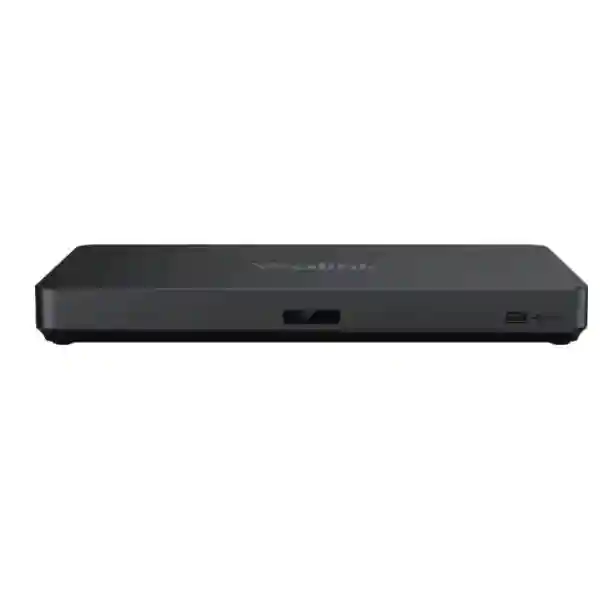
The Yealink AVHub is designed for large and extra-large collaboration spaces that need more than a single camera or tabletop speakerphone. It centralizes compatible cameras, microphones and speakers, supports multi-camera meeting experiences and helps room designers build cleaner, more scalable Microsoft Teams Rooms and BYOD environments. For Tanzanian organizations planning boardrooms, training rooms, divisible spaces or executive collaboration rooms, AVHub can become the processing and connectivity layer that keeps room audio and video organized as the deployment grows.
Model: Yealink AVHub
Role: Meeting audio & video processor
Room class: Large / extra-large rooms
Core use: Multi-camera, microphones, speakers, room processing
Quote: Project quotation on request
What is the Yealink AVHub?
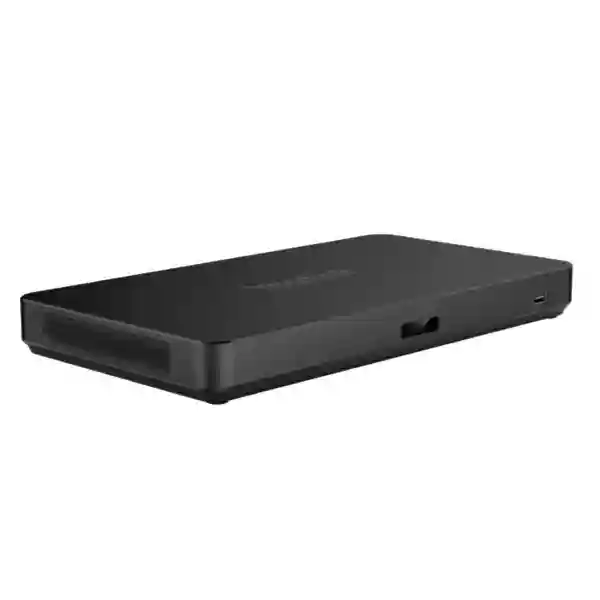
Yealink positions AVHub as a meeting audio and video processor for large and extra-large conference rooms. The unit supports multiple cameras, microphones and speakers while handling audio and video processing so that the room compute platform does not have to carry every processing task itself. Compatible conferencing devices can connect through Yealink room interfaces and Ethernet-based cabling, helping reduce cable clutter and making room architecture easier to manage than a collection of isolated USB peripherals.
The official Yealink specification lists multi-camera layout support, Multi-Camera IntelliFocus, Multi-Stream IntelliFrame on supported configurations, Divisible Room capability, BYOD support and audio/video processing. The AVHub datasheet also states support for up to four CM20/CS10 units, up to nine UVC84/UVC86 cameras, up to eight VCM34/VCM35/VCM38 array microphones and up to four MSpeaker II units. Those are platform capacities, not a recommendation that every room should use the maximum number of devices. Final quantities should be based on room geometry, seating, acoustic behavior, camera sight lines, required meeting modes and the intended Microsoft Teams Rooms or BYOD workflow.
For businesses in Tanzania, the practical benefit is design flexibility. A boardroom may need two camera angles to cover a long table. A training room may need a presenter camera plus participant coverage. A divisible room may need the system to behave differently when a partition opens or closes. AVHub gives integrators a conferencing-focused processing layer that can be planned around those operational scenarios instead of treating each peripheral as an independent device.
Verified AVHub features and interfaces
Multi-camera rooms
Supports multiple compatible Yealink cameras and customizable multi-camera layouts for rooms where one viewpoint is not enough.
Room audio scaling
Supports compatible microphone arrays and speakers so audio coverage can be designed around seating and room dimensions.
BYOD capability
Provides a path for bring-your-own-device collaboration scenarios when the room solution is designed around supported Yealink components.
Divisible Room
Supports room designs that may change between separated and combined layouts, subject to the wider room-system configuration.
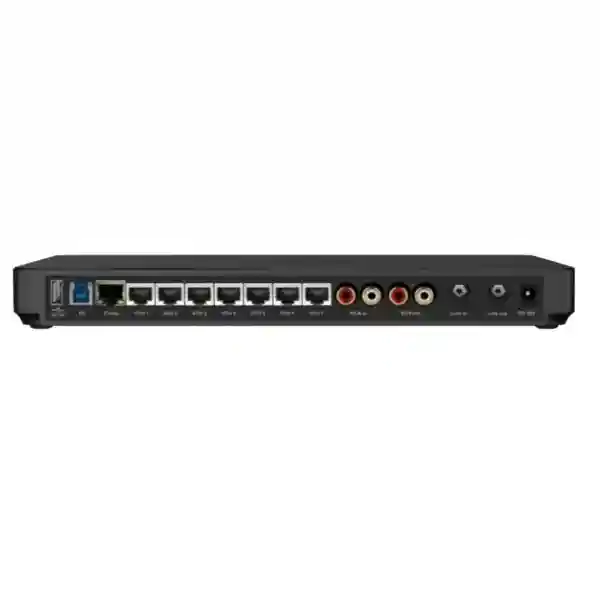
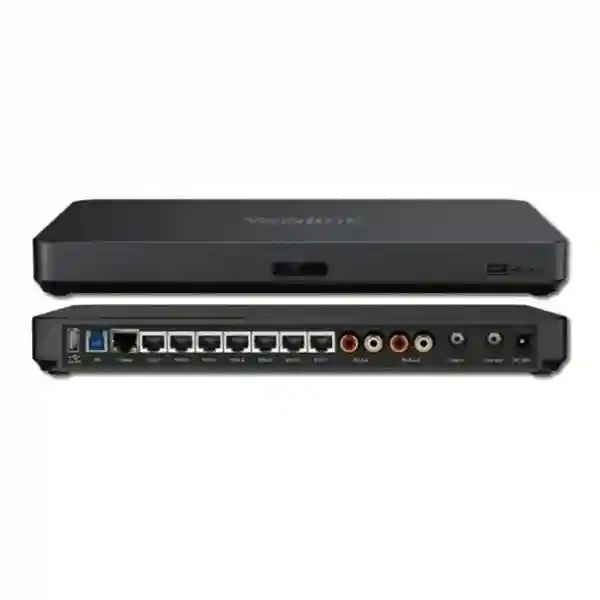
| USB | 2 × USB-A 2.0; 1 × USB-B 3.0 |
| Room interfaces | 1 × Codec port; 7 × VCH ports (RJ-45) |
| Audio interfaces | RCA in/out; 6.3 mm line in; 6.3 mm line out |
| Power | 48V 2A, 96W output power adapter specified by Yealink |
| Third-party audio | Broad compatibility with third-party DSP is stated by Yealink; final integration should be validated per DSP model and design. |
How to plan an AVHub room before ordering
AVHub should be specified as part of a complete room design. Start with the meeting behaviors that the space must support: standard video meetings, executive board sessions, hybrid training, town-hall participation, multi-camera production-style meetings, divisible-room operation, or occasional BYOD meetings. Then map those behaviors to the physical room. Record the room length and width, table shape, maximum participant count, presentation position, display locations, wall surfaces, ceiling height, cable routes and any partition that changes the room size.
Camera design comes next. Determine which participants must be visible, whether a presenter needs a dedicated view, and whether one front-of-room camera can maintain useful framing across the full seating area. In longer rooms, multiple cameras can reduce the compromise between wide coverage and participant detail. AVHub is valuable here because it is designed for multi-camera room systems rather than a single USB camera workflow. The correct camera count, however, should come from sight lines and required meeting views rather than from the maximum quantity supported by the processor.
Audio deserves equal attention. Microphone quantity and position depend on table dimensions, participant distance, background noise, HVAC, reflective walls and whether the room is frequently reconfigured. Where installed audio is preferred, AVHub’s line-level and third-party DSP compatibility can be considered in the signal design. The goal is predictable voice pickup and playback, not simply adding more microphones. A room with poor acoustic conditions may benefit more from acoustic treatment and thoughtful microphone placement than from increasing device quantity.
Finally, document the bill of materials and responsibilities. Note which Yealink room system, compute platform, controller, cameras, microphones, speakers, displays, cables and licenses are required. Identify what is included in the quotation and what remains part of the customer environment. This is particularly important for Microsoft Teams Rooms because hardware, Microsoft licensing, tenant policy and network services all contribute to the final user experience.
Useful FourTeck resources for an AVHub project
Start with the FourTeck Tanzania technology portfolio to place the conferencing room within the wider network, display and infrastructure environment. Buyers can also review the FourTeck Tanzania business technology shop for related equipment categories and procurement guidance. For cross-border projects, FourTeck Uganda, FourTeck Kenya and FourTeck UAE provide regional paths for organizations standardizing collaboration technology across multiple countries.
Regional procurement and deployment guidance
Yealink AVHub Audio Video Processor Tanzania
For organizations in Tanzania, AVHub is most relevant when the meeting-room requirement has moved beyond a compact all-in-one bar. Corporate headquarters, financial institutions, universities, government departments, hospitality groups, engineering firms and regional organizations often operate rooms where a single camera angle or single tabletop audio device does not provide adequate coverage. The AVHub architecture allows a project team to think in zones: front presentation area, participant table, side seating, training audience or combined-room layouts. This makes it easier to develop a room standard that can be reused across several sites while still adjusting camera and microphone quantities to each room.
Tanzanian procurement teams should request a room-based quotation rather than only a unit price. A practical request should state the number of rooms, room dimensions, seating capacity, preferred conferencing platform, display count, existing meeting-room hardware and the expected use of BYOD. Where Microsoft Teams Rooms is planned, the quote should clearly separate the Yealink hardware bundle from Microsoft licensing and tenant requirements. For rooms with existing installed audio, the DSP model and available line-level connections should be documented so compatibility can be checked before installation.
Infrastructure readiness is also important. Stable wired networking, suitable power, well-planned cable routes and UPS protection for critical room equipment can improve operational reliability. If cameras and audio endpoints are distributed around the room, cable routing should be verified against the supported Yealink topology instead of relying on improvised extenders. FourTeck can use the room dimensions, photos or floor plan, device quantities and target meeting experience to prepare a more accurate proposal. For multi-site projects, standardizing the room design, naming conventions, firmware approach and support documentation can simplify future operations and expansion.
Yealink AVHub Audio Video Processor Dar es Salaam
Dar es Salaam has a strong concentration of corporate headquarters, regional offices, logistics companies, professional-services firms, banks, NGOs and hospitality businesses, making it a natural market for larger collaboration rooms. AVHub suits boardrooms and training spaces where remote attendees need a clearer sense of who is speaking and where local participants are seated. A typical project may combine two or more intelligent cameras with distributed microphones and speakers so that people at the far end of a long table remain visible and audible without constant manual camera control.
For a Dar es Salaam deployment, room heat, power quality, network reliability and cable pathways should be considered early. The AVHub itself is only one part of the collaboration chain. Displays, room compute, controller, cameras, microphones, speakers and internet connectivity all contribute to meeting quality. If an office is moving to a new building, the best time to plan the conferencing system is during fit-out, when cable routes, display positions and equipment locations can be coordinated with furniture and electrical work. Retrofitting after interior completion may limit camera angles and create visible cable runs.
Procurement requests should include room photographs or drawings, the preferred platform, participant count, whether the room is primarily executive or training oriented, and any requirement for local presentation. If a business has several Dar es Salaam meeting rooms, classify them by size and function before buying hardware. Smaller rooms may not need AVHub, while large or flexible spaces may benefit from its multi-camera and processing capabilities. A tiered room standard helps avoid over-specifying compact spaces while still giving flagship rooms the architecture they need.
Yealink AVHub Audio Video Processor Mwanza
In Mwanza, AVHub can support regional headquarters, education institutions, healthcare administration, mining and industrial organizations, hospitality operations and public-sector meeting environments that collaborate with teams in Dar es Salaam or other countries. The business case is strongest where a room serves multiple purposes: management meetings during the week, remote training sessions, supplier presentations and periodic all-hands discussions. Multi-camera capability allows the design to follow those use cases more effectively than relying on a single fixed view.
Before ordering, map the room’s actual seating positions rather than sizing the system from nominal room capacity. A training room with thirty seats in rows behaves differently from a boardroom with twelve people around a long table. The first may benefit from presenter plus audience camera coverage, while the second may need cameras that provide useful participant framing from more than one angle. Microphone strategy must also reflect the room. Ceiling or distributed microphone systems can reduce table clutter, while table arrays may be simpler in fixed boardroom layouts. If third-party DSP is part of the design, the integration should be validated against the specific model and wiring plan.
For Mwanza procurement, include installation scope and post-installation testing in the project definition. A successful handover should verify camera presets or tracking behavior, microphone pickup, loudspeaker level, content sharing, platform sign-in, firmware state and user workflow. Staff should know how to start a meeting, select any supported room mode and recover from common issues. Clear documentation matters especially for sites supported by a central IT team in another city, because remote troubleshooting is easier when the room topology and device inventory are recorded.
Yealink AVHub Audio Video Processor Arusha
Arusha organizations often host regional meetings involving tourism, international development, government, education and cross-border business. These meeting patterns can place a premium on reliable hybrid collaboration because external participants may join from several countries and time zones. AVHub is relevant for rooms that need professional camera coverage and scalable audio rather than a basic webcam experience. A well-designed system can give remote attendees a more coherent view of the room while reducing the need for participants to crowd around one camera.
Meeting-room design in Arusha should start with the types of sessions the room hosts. A diplomatic or executive boardroom may prioritize discreet equipment, predictable operation and balanced participant views. A training room may prioritize presenter tracking, audience coverage and content sharing. A hotel conference environment may need flexibility for different seating layouts and guest devices. AVHub’s multi-camera and BYOD capabilities can contribute to these scenarios, but the surrounding system still needs correctly chosen cameras, audio endpoints, displays and supported room control.
When requesting a quotation, specify whether the room is permanently configured or frequently rearranged. Provide distances from the proposed camera positions to the farthest participant, identify any windows that may create backlight, and note reflective surfaces that may affect audio. For organizations serving international teams, confirm the conferencing platform and account model so the room experience aligns with existing corporate policy. Pilot testing a representative room before a wider rollout can reduce deployment risk and gives IT teams an opportunity to refine camera behavior, cabling and user instructions before standardizing the design.
Yealink AVHub Audio Video Processor Dodoma
Dodoma procurement often involves government, public administration, universities, professional organizations and enterprises that need formal meeting spaces for coordination with national and regional stakeholders. AVHub can be considered where a room requires multiple camera perspectives, broader microphone coverage or divisible-room behavior. In formal environments, predictability is especially important: users should not need to understand the technical signal flow in order to join a scheduled meeting and be seen and heard clearly.
For tender or institutional procurement, the AVHub line item should be accompanied by a clearly described bill of materials. Identify the room-system platform, camera models and quantities, microphone type, speaker configuration, controller, display connections, cabling and any installation services. Avoid treating maximum supported device counts as the project specification; the correct quantities should be justified by the room design. If the room uses an existing audio system, document how AVHub will interface with the DSP or amplifier chain and who is responsible for commissioning the complete audio path.
Project acceptance should include functional testing, not only confirmation that the hardware powers on. Teams should verify that every intended camera view can be selected or used as designed, microphones cover the expected seats, far-end audio remains clear, content sharing works, and the room remains usable after common events such as a restart. For multi-room institutions in Dodoma, keep a simple asset register containing room name, device model, serial number, firmware version, installed cable route and support contact. This turns the collaboration estate into a manageable IT service rather than a collection of undocumented rooms.
Yealink AVHub Audio Video Processor UAE
Organizations operating between Tanzania and the UAE often want comparable meeting-room experiences across headquarters, branches and regional offices. AVHub can support that standardization where large rooms in both markets require multi-camera layouts or distributed audio. The benefit of a common room architecture is operational: IT teams can standardize user instructions, firmware procedures, spare strategy and troubleshooting even when the physical rooms differ. The individual camera and microphone quantities can still be adjusted to each room while the underlying Yealink design remains consistent.
For UAE projects, procurement teams should align the local supply path with the corporate bill of materials and confirm current Yealink hardware revisions, warranty terms and delivery scope on the quotation. If the same organization is also deploying in Tanzania, share the intended room standard across both projects. Common naming conventions, documented camera positions and consistent controller workflows reduce training overhead for travelling staff. Where Microsoft Teams Rooms is used, tenant policy and account configuration should be standardized alongside the hardware so users encounter the same sign-in and meeting experience.
Cross-border projects should also distinguish what must be identical from what can vary. Core platform, controller workflow and camera family may be standardized, while displays, mounting, electrical fittings and cable pathways may differ by site. FourTeck’s regional network can help coordinate those requirements without assuming that every building should receive the same physical installation. A consolidated room schedule listing country, city, room size, seating capacity and planned peripherals makes commercial and technical review more efficient.
Yealink AVHub Audio Video Processor Uganda
Ugandan enterprises, NGOs, universities and multi-site organizations can use AVHub where large meeting rooms require richer camera coverage than a conventional video bar provides. The platform is particularly useful for headquarters rooms that connect frequently with branches or regional stakeholders. Multi-camera design can help remote participants follow discussion around a long table, while distributed microphone and speaker options can improve coverage when seating extends beyond the practical range of a small all-in-one device.
A Uganda deployment should begin with a room assessment. Record dimensions, seating arrangement, display positions, existing audio equipment and network availability. Decide whether the room must support Teams Rooms only or whether users also need BYOD access for other conferencing platforms. AVHub supports BYOD workflows, but the final user experience depends on the complete Yealink room architecture and associated accessories. If a third-party DSP is already installed, provide its manufacturer and model during design review so the integration can be verified rather than assumed.
For organizations with operations in both Uganda and Tanzania, consider a common conferencing standard. A standardized design can simplify staff training and remote support, especially when branch IT resources are limited. Keep room diagrams, cable schedules and firmware records centrally accessible. When requesting quotations, separate hardware, installation, configuration and licensing so procurement teams can compare proposals on an equivalent basis. That clarity also makes future room additions easier because the organization already understands the dependencies around AVHub instead of restarting the design process each time.
Yealink AVHub Audio Video Processor Kampala
Kampala is a major hub for corporate, financial, NGO and public-sector activity, and many organizations operate boardrooms that connect daily with international offices. AVHub can fit those higher-demand spaces where meeting quality depends on capturing several seating zones or combining cameras with installed room audio. In a long boardroom, for example, one camera may provide an excellent front view but insufficient detail for people seated at the opposite end. A properly designed multi-camera system can improve visual coverage while keeping the meeting workflow integrated.
The procurement process should focus on room outcomes: how many participants must be visible, whether a presenter needs dedicated tracking, whether local content sharing is frequent, and whether the room is used with guest laptops. These answers influence the camera and BYOD design. Audio coverage should be checked separately because camera count does not solve microphone problems. If the room has reflective glass, a high ceiling or strong HVAC noise, acoustic treatment and microphone placement may matter as much as the electronics.
Kampala IT teams planning several rooms should avoid buying identical bundles solely for administrative convenience. Instead, create two or three validated room profiles such as medium meeting room, large boardroom and training room. AVHub may be reserved for the profiles that genuinely need multi-camera or larger audio architecture. This approach controls cost while preserving a consistent user experience. During commissioning, test meetings with real remote participants and normal seating rather than evaluating the room only from the installer position.
Yealink AVHub Audio Video Processor Arua
For organizations in Arua, collaboration infrastructure may need to bridge local offices with national headquarters, international development partners, suppliers or training resources. AVHub is relevant where the main meeting space is large enough that a simple USB camera and speakerphone no longer provide equitable participation. A multi-camera design can capture the presenter and attendees separately, while compatible microphone arrays can be distributed to cover the seating plan more effectively.
Because support resources may be centralized elsewhere, design simplicity and documentation are especially valuable. Use supported cabling, label every room connection and keep a diagram that identifies AVHub, cameras, microphones, speakers, displays, network ports and power supplies. Avoid undocumented adapters or extenders that may complicate fault isolation. Where the room is important for scheduled external meetings, consider UPS-backed power for the conferencing system and network path so short power interruptions are less likely to disrupt calls.
Arua buyers should send the supplier a complete use-case description rather than only the product name. Explain whether the room is for management meetings, training, project coordination or community engagement; state the normal and maximum participant count; provide room dimensions; and note the preferred platform. That information helps determine whether AVHub is the right architecture and what peripherals are required. If the room is smaller than expected, a simpler Yealink solution may be more appropriate. Good procurement includes confirming when a complex processor is unnecessary as well as when it adds value.
Yealink AVHub Audio Video Processor Mbarara
Mbarara organizations in education, healthcare, financial services, agriculture and regional administration can use AVHub for larger collaboration spaces that connect specialists or management teams across locations. The product’s role is not simply to add more ports; it provides a conferencing-focused audio-video processing layer for systems that need several compatible room devices. That makes it appropriate for boardrooms and training rooms where camera coverage, audio pickup and future expansion must be considered together.
During design, measure actual cable paths through floor boxes, wall conduits or ceiling routes. Straight-line room measurements can underestimate installed cable length, especially when equipment is positioned in racks or credenzas. Confirm which devices can connect through the AVHub topology and whether any accessory or extension method is required. For installed audio, document line-level requirements and DSP routing so echo cancellation and microphone mixing responsibilities are clear. Ambiguous audio architecture is a common source of commissioning difficulty in complex rooms.
Mbarara deployments can also benefit from standardized support procedures. Record how the room should behave in a normal Teams meeting, a BYOD meeting and any alternative room mode. Train local users on the supported workflow rather than exposing every technical setting. If the organization has sites in Kampala or elsewhere, central IT can maintain a common firmware and documentation baseline. This reduces variation between rooms and makes remote support faster when a user reports an issue shortly before an important meeting.
Yealink AVHub Audio Video Processor Gulu
Gulu institutions and businesses may rely on hybrid meetings to reduce travel between regional and national offices. AVHub can support that strategy when the main conference room is large, has extended seating or serves as a training space. Multiple camera positions can provide better visibility of participants and presenters, while a distributed audio design can reduce the risk that people at the edge of the room sound distant. The correct configuration should follow how the room is actually used, not a generic bundle.
Procurement should include resilience planning. The collaboration system depends on electricity, network access, internet service, conferencing accounts and room hardware. AVHub cannot remove those dependencies, so critical rooms should be supported by sensible infrastructure such as managed network equipment, stable wired connections and protected power where appropriate. Keep spare common cables and document reboot or recovery steps that local staff can perform safely. More complex faults can then be escalated with useful information instead of a vague report that the room does not work.
For Gulu buyers, include expected deployment date, room photos, existing display details and any reusable audio equipment in the quote request. If the room will be used for training, state whether instructors move around, whether content is presented from a lectern, and whether participants need to be seen individually. Those details influence camera placement and tracking mode. Commissioning should include a real hybrid session with participants seated throughout the room so coverage gaps are found before formal handover.
Yealink AVHub Audio Video Processor Kenya
Kenyan organizations considering AVHub are often planning larger boardrooms, training rooms or multi-site collaboration estates. In Nairobi and other business centers, the challenge is rarely basic access to video conferencing; it is creating a professional, repeatable room experience that works for executives, guests and distributed teams. AVHub’s support for multiple cameras and audio endpoints can help designers move beyond the compromise of one wide-angle camera covering every participant from a distance.
A Kenya project should define the collaboration platform first. If Microsoft Teams Rooms is the corporate standard, confirm the chosen Yealink room bundle, compute platform and controller alongside AVHub. If guest-device meetings are important, include BYOD workflow testing in the acceptance criteria. For training environments, consider presenter movement and audience participation. For boardrooms, focus on participant framing, sight lines and discreet cable management. Different rooms can use the same AVHub core while varying the camera and microphone design.
Organizations operating across Kenya and Tanzania can benefit from a consolidated design standard and procurement schedule. List rooms by country, city, room type, seat count and target deployment date. This helps technical teams identify where components can be standardized and where local conditions require a different approach. Warranty, shipping and installation terms should be confirmed for each country rather than assumed to be identical. Central documentation should still use common naming and support processes so the meeting-room estate remains manageable across borders.
Yealink AVHub Audio Video Processor Kuwait
For Kuwait-based businesses and regional groups, AVHub can be considered for executive conference rooms, training facilities and larger collaboration spaces that require multiple viewing angles or installed audio. The architecture is useful when organizations want a dedicated room system rather than relying on employees to connect webcams and speakerphones each time. A designed room can provide consistent control, predictable device selection and a cleaner physical installation, which is valuable in spaces used by senior management or external clients.
Heat outside the building does not define the room design, but equipment location, ventilation inside cabinetry and power planning still matter. Keep AV equipment in a serviceable location with adequate airflow and organized cabling. If AVHub is installed with a third-party DSP, test the complete audio path for echo cancellation, mute behavior and level consistency. Avoid overlapping signal processing that can produce unpredictable results. Camera mounting should also account for sight lines, display height and the possibility of strong backlighting from windows.
Regional enterprises with offices in Kuwait, UAE and East Africa can use AVHub within a shared collaboration-room template. The technical standard should specify acceptable camera families, microphone architecture, display arrangement, room control and management procedures, while allowing physical adaptations for each site. Procurement teams should request separate quotations for hardware, installation and licensing, and should record the exact supplied models. That documentation protects the standard from gradually changing as different sites are deployed over time.
Yealink AVHub Audio Video Processor Ghana
Ghanaian enterprises, universities, financial institutions and development organizations can deploy AVHub where collaboration rooms need more flexible camera coverage than an all-in-one endpoint offers. A large Accra boardroom, for example, may require one view for the near end of the table, another for the far end and a presenter view. AVHub’s multi-camera capabilities allow the room system to be designed around those perspectives, while compatible microphones and speakers can be scaled to the seating plan.
Before buying, define whether the room is fixed or multifunctional. A boardroom with permanent furniture allows camera and microphone positions to be optimized once. A training room with movable tables requires more tolerance for changing participant locations. Divisible spaces introduce another layer because the system may need to support different operating states when partitions are open or closed. AVHub supports Divisible Room scenarios, but the total design should be engineered and tested for the intended room modes rather than assumed from the feature name alone.
For Ghana procurement, include network and power readiness in the project plan. Collaboration rooms depend on stable connectivity, and multi-camera systems can expose weaknesses in existing meeting-room cabling. Document every cable run and label ports at both ends. For multi-country organizations, use the same room acceptance checklist in Ghana and Tanzania: video framing, microphone coverage, far-end audio, local presentation, platform sign-in, supported BYOD behavior and restart recovery. Consistent acceptance criteria make service quality easier to compare across sites.
Yealink AVHub Audio Video Processor Nigeria
Nigeria has many large enterprises and multi-site organizations where collaboration rooms are business-critical. AVHub can support boardrooms and training spaces that need multiple cameras, distributed audio and a more structured deployment than standalone USB devices. In headquarters environments, the room may host executive meetings, partner calls, interviews and internal town halls. Designing around those varied scenarios helps determine camera count, microphone coverage and whether BYOD should be available alongside the dedicated room platform.
Power resilience deserves careful attention. Where outages or voltage events are a business concern, the conferencing system, room compute, displays and network path should be evaluated for appropriate power protection. AVHub itself does not provide continuity when upstream network or room compute power is lost. A UPS strategy should therefore be based on the complete room service and desired runtime. Network resilience may also include redundant internet or corporate WAN architecture, but those decisions sit outside the AVHub device and should be handled as part of the broader IT design.
Nigeria procurement teams should avoid comparing proposals solely by AVHub unit price. Compare the complete scope: cameras, microphones, speakers, controller, compute, displays, cabling, mounting, installation, commissioning and warranty terms. A lower hardware-only quote can become more expensive when necessary accessories are added later. For organizations standardizing multiple rooms in Lagos, Abuja or other cities, pilot one representative room and document the final accepted configuration before rolling out at scale.
Yealink AVHub Audio Video Processor Seychelles
In Seychelles, AVHub can support government, hospitality, financial and corporate meeting spaces that regularly connect with international stakeholders. Because many organizations work across islands or with overseas partners, a dependable hybrid meeting room can reduce travel while keeping decision-makers visually and audibly engaged. AVHub is most suitable where the primary room is large enough to justify multiple cameras or distributed audio rather than a compact all-in-one conferencing device.
Island logistics make pre-deployment planning especially important. A missing cable, mount or accessory can delay commissioning, so the bill of materials should be validated before shipment. Record every required Yealink peripheral, power component, cable and mounting accessory, and confirm whether existing displays or DSP equipment will be reused. Where a third-party audio system is integrated, provide model numbers and signal-flow information during design review. This reduces the risk of discovering incompatible interfaces only after equipment arrives on site.
For Seychelles installations, remote support readiness should be built into the handover. Keep a device inventory, room diagram, firmware record and simple user guide. Train at least one local technical contact to verify power, network link and basic cable connections before escalation. If the organization also operates in East Africa or the Gulf, a standardized AVHub room architecture can allow central IT to support multiple countries with a common troubleshooting method. The physical installation may vary, but consistent documentation and room behaviors make support more efficient.
AVHub quotation checklist
Frequently asked questions about Yealink AVHub
Is Yealink AVHub a complete video conferencing system?
No. AVHub is the meeting audio and video processor within a larger room solution. A complete deployment may include a Yealink room compute platform, controller, cameras, microphones, speakers, displays, cabling, network connectivity and conferencing-platform licenses. The exact bill of materials depends on the room design.
How many cameras can AVHub support?
Yealink’s current AVHub datasheet states support for up to nine UVC84/UVC86 cameras. That number describes platform capacity and does not mean every room should use nine cameras. Camera quantity should be determined by room geometry, required viewing zones and the meeting experience.
Does AVHub support microphone arrays and speakers?
Yes. Yealink specifies support for up to eight compatible VCM34/VCM35/VCM38 array microphones and up to four MSpeaker II units. The current datasheet also lists support for up to four CM20/CS10 units. Choose quantities based on the supported topology and room requirements.
Can AVHub work with a third-party DSP?
Yealink states that AVHub is broadly compatible with third-party DSP. Specific integration should still be checked against the DSP model, firmware, signal flow, input/output levels and the room’s echo-cancellation design before procurement.
Does AVHub support BYOD meetings?
Yes, BYOD is listed as an AVHub capability. The practical workflow depends on the complete Yealink room solution and accessories selected. If guest-device use is important, include it in the room acceptance tests rather than assuming every laptop and meeting application will behave identically.
What is Divisible Room support?
Divisible Room refers to meeting-space designs where one physical room can be separated into smaller rooms or combined into a larger space. AVHub supports this type of scenario, but the complete behavior depends on the broader room-system design, devices and configuration. A partitioned room should be engineered and tested in each intended operating state.
What should I send for a Tanzania quotation?
Provide the product name, quantity, city, room dimensions, seating capacity, collaboration platform, display count, existing conferencing hardware, camera and audio requirements, installation scope and target timeline. Room photos or a floor plan can make the initial design discussion more accurate.
Decision recap
Choose Yealink AVHub when the room requires a scalable conferencing architecture with multiple compatible cameras, distributed audio, professional room-system integration or divisible-room capability. It is particularly relevant to large and extra-large meeting spaces where the limitations of one camera or one tabletop audio device are already clear.
Do not choose AVHub only because it is the more advanced product. Smaller rooms may be better served by a simpler Yealink meeting bar or integrated room system. The right decision comes from room dimensions, seating geometry, meeting platform, camera views, acoustic conditions and the required user workflow. FourTeck can help turn those inputs into a bill of materials and quotation.
Plan your Yealink AVHub room with FourTeck Tanzania
For a useful recommendation, send the room dimensions, seating layout, number of rooms, preferred collaboration platform and any existing cameras, microphones, speakers or DSP equipment. FourTeck can review the requirement at a solution level so the quotation covers the processor and the supporting room components needed for a workable deployment.
The objective is a conferencing room that is easy for users to operate and manageable for IT after handover. That means validating compatibility, planning the cable topology, testing real participant coverage and documenting the final installation instead of treating AVHub as an isolated hardware purchase.




Reviews
There are no reviews yet.