
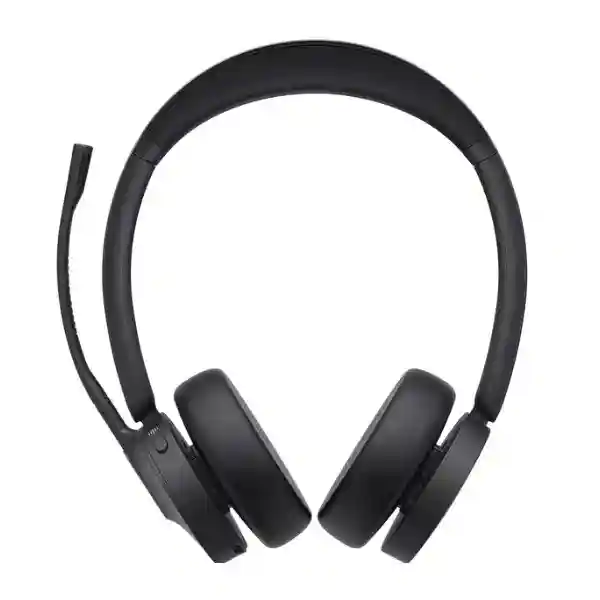
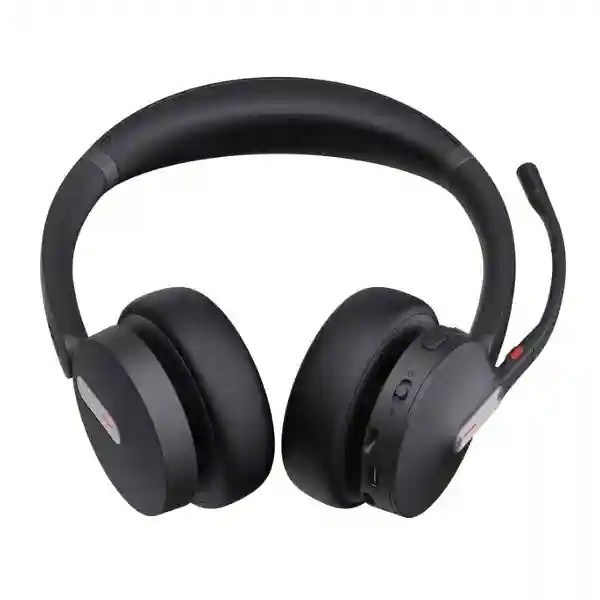
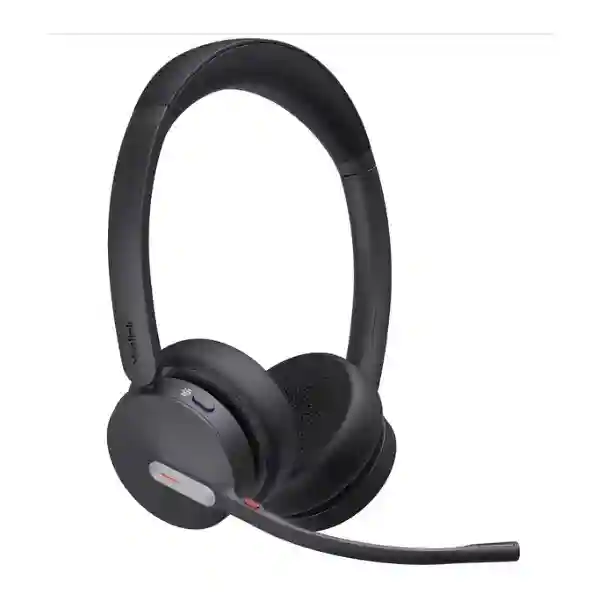
Yealink BH70 Bluetooth Headset
Yealink BH70 is an essential wireless business headset for professionals who need reliable voice pickup, long battery endurance and flexible connectivity across office, home and mobile work. Yealink specifies Bluetooth 5.3, a three-microphone MEMS array with Acoustic Shield call-noise reduction, 35 mm speakers, up to 35 hours of talk time with the busylight off, up to 43 hours of music playback, pairing for up to eight devices and two simultaneous Bluetooth connections. Mono and dual-ear variants are available, including Microsoft Teams and UC editions with USB-A, USB-C or combined USB-C/A dongle configurations depending on the part number selected.
Direct answer: BH70 is aimed at business calling and hybrid work where microphone clarity, wireless freedom, comfort and platform compatibility matter more than consumer-style active noise cancellation.
Active Noise Cancellation for listening is not listed on the BH70; Yealink instead highlights microphone-side Acoustic Shield noise reduction for clearer speech.
What is the Yealink BH70 Bluetooth Headset?
The Yealink BH70 is a professional Bluetooth headset built for business voice, unified communications and hybrid-working environments. It is positioned below more feature-heavy premium headsets while retaining the capabilities many business users actually need every day: reliable wireless operation, microphone noise reduction, comfortable long-session wear, dedicated call controls and centralized device-management options. The product is supplied in mono and dual-ear formats and is offered in Microsoft Teams and UC variants, so procurement teams should confirm the exact user role, preferred USB connector and collaboration platform before requesting a quotation.
For call quality, Yealink lists three MEMS microphones and Acoustic Shield technology. The microphone frequency range is 100 Hz to 8 kHz, while the 35 mm speaker covers 20 Hz to 20 kHz. The BH70 supports up to 50 metres or 164 feet of wireless range under the manufacturer’s stated conditions, although real-world range depends on walls, interference, device placement and the surrounding radio environment. Users can pair the headset with up to eight devices and maintain two simultaneous Bluetooth connections, which is useful for professionals who move between a computer and mobile phone during the workday.
Battery performance is another important buying point. Yealink specifies up to 35 hours of talk time with the busylight off, up to 28 hours with the busylight on, up to 43 hours of music playback, up to 22 days of standby and a charging time of up to 90 minutes. These are manufacturer maximums rather than guarantees for every usage pattern. Volume, call activity, wireless conditions and feature use can change real operating time. For organizations standardizing headsets across teams, the BH70 can also be managed with Yealink USB Connect on PC, the Yealink Connect mobile app and the Yealink Device Management Platform.
Key business benefits
Clearer business calls
Three microphones and Yealink Acoustic Shield technology are designed to reduce surrounding noise reaching the far end of a call. That can help open-office workers, home workers and customer-facing teams sound more consistent when background activity is present.
Long working-day battery
With up to 35 hours of manufacturer-rated talk time when the busylight is off, the BH70 is designed for multi-day usage patterns between charges for many users, reducing the need to keep a charging cable connected throughout the day.
Flexible connectivity
Bluetooth 5.3, the included BT51-family dongle according to variant, USB cable connectivity and multipoint operation make the headset suitable for users who divide work between PCs, laptops, compatible desk phones and mobile devices.
Workplace presence cues
Integrated busylight indicators can signal that the user is engaged in a call, helping reduce interruptions in shared offices. Dual versions provide indicators on both sides, while mono versions use a single-side arrangement.
Yealink BH70 verified technical specifications
| Product type | Professional Bluetooth business headset, mono or dual |
| Bluetooth | Bluetooth 5.3 on current Yealink specifications |
| Wireless range | Up to 50 m / 164 ft under specified conditions |
| Connections | Two simultaneous Bluetooth connections; pairing list up to eight devices |
| Microphones | 3 MEMS microphones; Acoustic Shield supported |
| Microphone range | 100 Hz–8 kHz |
| Active Noise Cancellation | Not listed; microphone-side Acoustic Shield is provided for call noise reduction |
| Speaker | 35 mm; 20 Hz–20 kHz frequency response |
| Talk time | Up to 35 hours with busylight off; up to 28 hours with busylight on |
| Music time | Up to 43 hours |
| Standby | Up to 22 days |
| Charging time | Up to 90 minutes |
| Management | Yealink USB Connect, Yealink Connect App, Yealink Device Management Platform |
Specifications can vary by exact BH70 part number and product revision. Confirm the selected Teams/UC, mono/dual and USB-A/USB-C configuration on the quotation before ordering.
How to choose the right BH70 variant
Start by deciding whether the user needs a mono or dual headset. Mono leaves one ear open to the surrounding workplace and can suit reception, supervisors or users who need to speak with nearby colleagues while remaining on calls. Dual provides stereo playback and greater acoustic focus for users who spend substantial time in online meetings, customer calls or concentrated individual work. Neither approach is automatically better; the correct choice depends on the person’s working pattern.
Next, confirm Microsoft Teams versus UC. Yealink publishes dedicated Teams and UC part numbers. A Teams-focused organization may prefer the Teams variant for its platform-oriented controls and certification path, while mixed softphone environments may choose UC variants. Compatibility should be checked against the exact operating system, calling application and desk-phone model in use. Yealink publishes a BH70 compatibility list covering PCs, mobile devices and several Yealink and third-party desk-phone scenarios, but supported call-control functions can differ by connection method.
Finally, confirm USB connector requirements. Current BH70 variants include USB-A, USB-C and combined USB-C/A configurations depending on part number. This matters for organizations standardizing new laptops with USB-C ports while still supporting desktops or shared PCs with USB-A. If a charging stand is required for desk-based users, specify the BH70 with stand or confirm the optional BHC70 stand separately. Procurement teams should request exact part numbers rather than relying on the name “BH70” alone.
Where the BH70 fits in a business environment
The BH70 fits naturally into hybrid offices, call-handling teams, sales departments, customer support operations, professional services and distributed organizations where staff regularly move between voice calls and online meetings. Its multipoint Bluetooth capability can be useful when a user receives mobile calls while also working from a PC. The long manufacturer-rated battery life also supports field-facing managers and mobile professionals who may not have convenient charging access throughout the day.
Headset performance is only one part of the communications experience. Microsoft Teams, Zoom and other cloud collaboration platforms depend on reliable internet, suitable Wi-Fi, correct audio-device selection and application configuration. For broader workplace planning, FourTeck Tanzania’s business technology overview explains how collaboration, telephony and network infrastructure fit together. Buyers can also review the Tanzania technology shop, technology services, company information and the verified Tanzania contact page when preparing a wider communications project.
Wireless calling quality also depends on the endpoint’s surrounding network. Organizations upgrading office Wi-Fi can review the Cisco Meraki CW9162I-MR indoor Wi-Fi 6E access point for general office wireless, the Cisco Meraki MR28 cloud-managed Wi-Fi 6 access point for mainstream indoor deployments, the Cisco Meraki CW9163E-MR outdoor Wi-Fi option for exterior coverage requirements and the Cisco Meraki MS130-12X PoE+ switch as an example of the wired access layer that can support modern office connectivity. These are infrastructure references rather than requirements for the BH70 itself.
Regional procurement guidance for Yealink BH70
For every market below, buyers should treat price, stock, delivery, warranty and service availability as quotation-specific details. The following guidance focuses on use case, compatibility, configuration and procurement planning rather than unsupported local-stock claims.
Yealink BH70 Bluetooth Headset Tanzania
Organizations evaluating the Yealink BH70 Bluetooth Headset in Tanzania should start with the people who will wear it and the applications they use. A headset purchase for ten managers is different from a standardization project for one hundred customer-service users. Identify whether calls are primarily on Microsoft Teams, another UC platform, a browser-based contact-center service, mobile phones or compatible desk phones. Then map each user group to mono or dual wearing style, Teams or UC variant, and USB-A or USB-C connectivity. This removes ambiguity from the quotation and helps avoid mixed accessories across a deployment.
Tanzania businesses with hybrid teams may value the BH70’s combination of Bluetooth mobility and long battery endurance. Yealink specifies up to 50 metres of wireless range under suitable conditions, but office partitions, reinforced walls, radio interference and device placement can reduce practical coverage. Users should therefore think of the range figure as a best-case technical reference rather than a guaranteed walking radius. The multipoint feature, with two simultaneous Bluetooth connections, can be particularly useful for staff switching between laptop meetings and mobile calls during the day.
For procurement, request the exact part number and quantity and state whether a charging stand is required. Also indicate the laptop models or port types in use, because the BH70 family includes USB-A, USB-C and combined adapter variants. If integration with desk phones is important, provide the desk-phone model and firmware information so compatibility can be checked against Yealink’s current support guidance. For a larger collaboration rollout, include internet quality, Wi-Fi coverage and meeting-platform details because call quality depends on more than the headset. FourTeck Tanzania can be approached through its verified quotation contact page for current commercial terms. The right Tanzania order is the one that standardizes user experience without assuming every employee needs the same headset configuration.
Yealink BH70 Bluetooth Headset Dar es Salaam
Dar es Salaam offices often combine headquarters staff, sales teams, support desks, meeting-heavy managers and mobile employees in the same building. For this mix, BH70 selection should be role-based. Dual-ear models can suit people who spend long periods in Teams meetings, cloud calls or focused desk work, while mono models may be better for reception or supervisors who need to remain aware of activity around them. Choosing by role also helps procurement avoid paying for inconsistent configurations that are difficult for IT teams to support.
In a dense commercial office, microphone-side noise reduction can be more valuable than consumer entertainment features. Yealink’s BH70 uses three microphones with Acoustic Shield call-noise reduction to improve voice pickup in surrounding noise. The product does not list active listening noise cancellation, so buyers seeking strong isolation from environmental sound should distinguish microphone noise cancellation from ANC before approving the model. The busylight can also be useful in open-plan layouts because colleagues have a visible cue that a user is occupied on a call.
For a Dar es Salaam deployment, IT teams should check how employees connect: native Bluetooth, the BT51-family dongle supplied with the chosen variant, USB cable or a supported desk-phone arrangement. Using the supplied dongle can simplify a standardized PC deployment, while native Bluetooth may suit mobile-first users. Where offices rely heavily on wireless cloud collaboration, Wi-Fi capacity and internet stability should be reviewed alongside headset procurement; audio problems caused by packet loss or congested Wi-Fi cannot be fixed by changing microphones. A useful quotation request should therefore include quantity, preferred wearing style, Teams or UC requirement, USB connector type, charging-stand requirement and any compatibility questions. For wider workplace projects in Dar es Salaam, the FourTeck Tanzania services page provides context on integrated IT, telephony and collaboration planning.
Yealink BH70 Bluetooth Headset Mwanza
Mwanza businesses looking at the Yealink BH70 may be planning for branch operations, professional offices, service teams, education environments or distributed staff who collaborate with colleagues in other cities. In these settings, a business headset should be evaluated for manageability as well as sound. The BH70 supports Yealink USB Connect on PC, the Yealink Connect application on mobile devices and Yealink Device Management Platform functions, giving administrators a clearer path to configuration and firmware management than a collection of unrelated consumer headsets.
Battery planning matters for mobile employees. Yealink lists up to 35 hours of talk time with busylight disabled and up to 28 hours with it enabled. This can support long work cycles, but organizations should still define a charging routine, particularly for shared headsets or shift-based users. The optional charging stand can be useful for fixed desks because it creates a consistent storage and charging location; mobile staff may prefer cable charging and the included drawstring bag. Replacement ear cushions are also listed as an optional item, which can be relevant for lifecycle planning in larger deployments.
Mwanza procurement teams should not approve a generic “BH70” line item without the exact variant. Yealink publishes multiple part numbers covering Dual Teams, Dual UC, Mono Teams and Mono UC models with different USB arrangements. Confirm whether laptops use USB-C, USB-A or a mixture. If users move between a PC and smartphone, the BH70’s two simultaneous Bluetooth connections may reduce daily re-pairing. If users connect to business desk phones, list those exact phone models for compatibility validation. Finally, consider the supporting network for cloud calls. Branches dependent on Teams, Zoom or hosted PBX need stable LAN, Wi-Fi and internet service. The headset improves the audio endpoint; it cannot compensate for a poor WAN path. A well-prepared Mwanza quotation request includes user roles, platforms, quantities, connector preference and any desk-phone integration needs.
Yealink BH70 Bluetooth Headset Arusha
Arusha organizations can include tourism operators, hospitality groups, professional offices, NGOs, education institutions and distributed service teams. These environments often have users who alternate between a desk, meeting spaces and mobile calls. The Yealink BH70 can fit that pattern because it combines Bluetooth mobility with a business-oriented microphone system, multipoint connectivity and long battery specifications. The main buying decision is not whether Bluetooth is useful, but which exact configuration best fits the workday.
For users who speak with guests, suppliers or remote colleagues while also interacting with nearby staff, a mono BH70 can preserve situational awareness. Users who spend most of the day in remote meetings may prefer the dual version for stereo playback and a more focused listening experience. Yealink’s 35 mm speakers cover 20 Hz to 20 kHz, making the headset suitable for both calls and general media. For voice transmission, the three-microphone system and Acoustic Shield are the more relevant features. Buyers should remember that the BH70 does not list active listening noise cancellation, so the product should not be selected on the assumption that it blocks surrounding sound like an ANC travel headset.
Arusha procurement requests should also identify the collaboration platform. Microsoft Teams variants are available alongside UC versions, and different part numbers provide USB-A, USB-C or combined adapter support. For hotel, tour or field operations where employees use phones more heavily than PCs, confirm the mobile workflow and whether call control meets the intended use. For centrally managed organizations with multiple branches, Yealink’s management tools can help standardize endpoint configuration. If Arusha is one site in a wider regional business, document a common headset policy covering supported variants, spare cushions, charging accessories, firmware responsibility and replacement rules. That is more scalable than allowing every office to purchase a different edition under the same BH70 name.
Yealink BH70 Bluetooth Headset Dodoma
Dodoma buyers may be equipping government-facing offices, institutions, professional services, project teams or corporate branches where reliable voice communication is part of daily work. The Yealink BH70 is suitable for consideration when users need a wireless business headset rather than a consumer entertainment headset. Its design centers on calls: three microphones, Acoustic Shield microphone noise reduction, call controls, busylight signaling, Teams or UC variants, and management through Yealink software tools.
A practical Dodoma rollout starts with a pilot group. Select representative users from reception, management, support and general office roles, then test comfort, call control, microphone performance and compatibility with the organization’s actual applications. The headset can pair with up to eight devices and connect to two simultaneously, but that does not mean every paired device will expose identical call-control features. Connection method, operating system and application support can affect what the buttons do. Where desk phones are involved, verify the exact phone model and firmware against Yealink’s compatibility information rather than assuming that Bluetooth alone guarantees full remote call control.
Battery specifications are strong for ordinary office use, with up to 35 hours talk time under Yealink’s stated conditions, but charging behavior should still be standardized. Shared-desk environments benefit from a clear charging location and asset labeling, while personally assigned headsets can follow individual charging routines. Organizations with several offices can maintain a small approved list: for example, dual Teams USB-C/A for collaboration-intensive users and mono UC for mixed-platform users. This reduces inventory complexity. When requesting a Dodoma quotation, include quantity, variant preference, user applications, USB port types, charging-stand needs and expected deployment date. Commercial details such as current price, stock and warranty should be confirmed on the actual quotation rather than inferred from another country or reseller listing.
Yealink BH70 Bluetooth Headset UAE
Businesses operating between Tanzania and the UAE can consider standardizing on the Yealink BH70 when employees use similar collaboration platforms across both markets. A cross-region standard can simplify training, spare accessories and support, but procurement should still control exact variants. Teams and UC editions, mono and dual models, and USB connector combinations should be mapped to job roles rather than purchased as an undifferentiated fleet. The exact part number belongs on every purchase order.
UAE offices often have high concentrations of cloud applications, online meetings and mobile employees, so multipoint connectivity can be useful for people carrying both laptops and smartphones. The BH70 can keep two Bluetooth connections active, while up to eight paired devices can be remembered. The manufacturer-rated 50-metre wireless range can provide mobility inside suitable office layouts, but glass, walls, interference and workstation design affect real performance. For Teams-intensive deployments, use the correct Teams edition and confirm the organization’s endpoint-management process before rollout.
Regional IT teams should also define whether firmware and device settings are managed locally or centrally. Yealink USB Connect, the mobile Connect app and the Device Management Platform provide options that can support a structured lifecycle. If the headset is paired with third-party desk phones, confirm compatibility by model and firmware. For UAE-specific infrastructure and broader workplace technology planning, organizations can review FourTeck UAE. A coordinated Tanzania-UAE procurement plan should separate local commercial terms from global technical standards: keep the approved headset variants, configuration expectations and user profiles consistent, while obtaining current price, stock, warranty and logistics details from the appropriate regional quotation at the time of purchase.
Yealink BH70 Bluetooth Headset Uganda
Uganda organizations considering the Yealink BH70 may include banks, NGOs, schools, healthcare administration, technology companies, contact teams and multi-branch businesses. The product is particularly relevant where employees depend on cloud calling or mobile communications and want a consistent business audio device. Its main strengths are the three-microphone call-noise reduction system, Bluetooth 5.3 connectivity, two-device multipoint support, long battery specifications and Teams or UC options.
For organizations with branches across Uganda, headset standardization can reduce support complexity. Rather than buying whatever Bluetooth headset is locally available at each site, define approved models by role. A dual BH70 can be assigned to collaboration-heavy staff, while mono may suit users who need environmental awareness. Decide whether Teams certification is required and whether USB-C/A flexibility is worth standardizing on for mixed computer fleets. When laptops are refreshed, connector consistency can become important because newer devices may have fewer USB-A ports.
Cloud-call quality should be evaluated from endpoint to internet. A good microphone can improve the audio captured from the user, but unstable Wi-Fi, congestion or poor internet can still create delay and dropouts. Branch offices should therefore review their network if users report inconsistent collaboration performance. IT teams should also check device management and firmware processes, especially when deploying dozens of headsets. For regional planning, FourTeck Uganda provides local technology context for communication and networking projects. A useful Uganda quotation request should include quantity, mono or dual preference, Teams or UC requirement, USB connector, charging-stand needs, user applications and any desk-phone models that require validation. This information turns a generic product request into a deployable business specification.
Yealink BH70 Bluetooth Headset Kampala
Kampala headquarters and larger offices frequently contain a mix of high-call users, meeting-heavy managers, reception staff and mobile employees. The Yealink BH70 can serve several of these profiles, but the headset edition should be selected deliberately. Dual-ear models suit users who want stereo playback and a more focused listening experience; mono models keep one ear open. Microsoft Teams editions can fit Teams-centered organizations, while UC editions may be preferable where users move among multiple softphone platforms.
Open-plan Kampala offices can also benefit from the visible busylight, which indicates when the wearer is occupied. The BH70’s three-microphone Acoustic Shield system is designed to reduce surrounding sound reaching remote participants, which is often more important in shared offices than simply increasing speaker volume. However, procurement teams should distinguish microphone noise cancellation from active listening noise cancellation: Yealink lists ANC as not supported on BH70. Staff who need strong acoustic isolation for travel or very noisy environments may need a different product class.
For a larger Kampala deployment, establish a headset onboarding process. Pair the headset through the approved method, confirm the default microphone and speaker in the collaboration app, test call controls, update firmware through Yealink management tools and label the assigned device where necessary. If the organization uses hot desks, define where headsets are stored and charged and how ear cushions are handled for hygiene. If staff use supported IP phones, test real call-control behavior before full rollout because capabilities can vary by phone and firmware. A Kampala quotation should therefore be accompanied by the user-platform matrix, not just the quantity. This helps suppliers recommend the right part numbers and helps IT teams receive a consistent shipment that can be deployed without last-minute adapters or platform mismatches.
Yealink BH70 Bluetooth Headset Arua
Arua organizations and branch offices may value the Yealink BH70 for a different reason than a large headquarters: it can provide a standardized professional audio endpoint that a central IT team can support remotely. For branches with limited local technical staff, reducing variation in peripherals makes troubleshooting simpler. If users across several sites have the same approved BH70 variant, help-desk instructions for pairing, muting, firmware updates and device selection can be repeatable.
The BH70’s up-to-35-hour talk-time specification can be useful in branch environments where staff want to avoid frequent charging, but a long battery should not replace good charging discipline. Assign charging cables or stands clearly, keep spares controlled and train users on the busylight’s impact on rated talk time. The headset’s ability to remember up to eight paired devices and maintain two simultaneous Bluetooth connections can help employees who use a business laptop plus mobile phone, but users should avoid pairing to unnecessary shared devices that could create confusion.
Arua deployments should also be planned around the branch’s real communications platform. If most calls use a browser-based system, test that system with the intended operating system and connection method. If a desk phone is part of the workflow, verify exact compatibility. If WAN performance is inconsistent, separate network problems from headset problems by testing local recordings and calls on a known-good connection. Procurement requests should list user roles, computer port types, software platforms and whether mono, dual, Teams, UC or charging-stand versions are needed. For multi-branch businesses, consider keeping one or two standardized spare units at an appropriate support location rather than introducing a different headset whenever a replacement is required. Consistency generally matters more to supportability than small differences in local purchase price.
Yealink BH70 Bluetooth Headset Mbarara
Mbarara businesses evaluating the BH70 may be equipping professional offices, education teams, service operations, healthcare administration, branch staff or hybrid workers. The core question is whether users spend enough time on voice and video calls to justify a dedicated business headset. Where the answer is yes, microphone performance, comfort, charging routine and platform compatibility become more important than consumer features such as entertainment-oriented ANC.
Yealink’s three-microphone array and Acoustic Shield are designed to improve transmitted voice clarity by reducing background noise. The 35 mm speakers support full-range media playback as well as calls, while the call-control buttons and microphone boom behavior can make daily meeting handling more convenient. The BH70 supports lifting the microphone boom for mute behavior and provides integrated controls for volume and calls. These functions should be demonstrated to users during deployment because even a well-chosen headset delivers poor value if employees keep selecting the wrong audio device or do not know how to mute quickly.
For Mbarara branches, the product can be deployed as part of a standard workplace kit alongside a business laptop, approved collaboration application and documented network connection. USB-C/A flexibility can be valuable when the organization has a mixed fleet of older and newer computers. Multipoint operation can help managers who alternate between laptop and smartphone communications. Before purchase, request the exact BH70 part number and confirm included dongle, cable and any stand requirements. If the organization expects to integrate with specific Yealink or third-party desk phones, provide the phone models and firmware levels for compatibility review. Commercial details should come from the current quotation, while the technical baseline should stay anchored to official Yealink specifications. This separation prevents temporary reseller claims from becoming permanent internal standards.
Yealink BH70 Bluetooth Headset Gulu
Gulu organizations can use a structured approach when selecting the Yealink BH70 for office or branch communication. First, classify users by call intensity and surrounding environment. General staff who join occasional meetings may not need the same configuration as supervisors, support agents or remote project coordinators who spend several hours per day on calls. Second, define whether users need awareness of the room around them. That decision usually determines mono versus dual more reliably than job title alone.
Third, standardize connection method. The BH70 can work over Bluetooth, through its BT51-family dongle depending on variant, and by USB cable. For centrally managed business PCs, using the supplied dongle can create a predictable setup; for mobile-first users, direct Bluetooth may be more practical. The two simultaneous Bluetooth connections can support laptop-plus-phone workflows. Up to eight paired devices are remembered, although simplifying the pairing list is often better in shared environments.
Fourth, plan lifecycle items. Headsets are user-touch devices, so hygiene, replacement ear cushions, cable loss and charging behavior deserve attention. Yealink lists replacement cushions and a charging stand as optional accessories. Maintain a record of which users receive which part numbers, especially if Teams and UC versions coexist. Finally, test the branch network if cloud-call quality varies. Voice clipping, long delay and dropped meetings may originate in Wi-Fi or WAN conditions rather than the headset itself. A Gulu quotation request should combine technical and operational details: quantity, wearing style, Teams or UC preference, connector type, stand requirement, software platform, desk-phone compatibility needs and desired standardization across other branches. That produces a purchasing decision that is easier to deploy and support after delivery.
Yealink BH70 Bluetooth Headset Kenya
Kenya has an active market for Yealink business communications products, and buyers can find BH70 listings from multiple resellers. That makes model verification especially important because reseller pages may mix older and newer specification details. The current Yealink product page lists Bluetooth 5.3 and a three-microphone MEMS system, so procurement teams should prioritize official current data when technical claims conflict. The exact part number should be the final reference for Teams/UC, mono/dual and connector configuration.
For Nairobi and other Kenyan business centers, the BH70 can suit hybrid offices, sales teams, contact operations and managers who move between desk and mobile calls. Its up-to-50-metre manufacturer-rated range and two active Bluetooth connections support mobility, while the busylight can reduce interruptions in shared spaces. Teams-centric organizations should select the appropriate Teams edition; mixed collaboration environments may prefer UC. Laptop fleet standards also matter. If the company is moving to USB-C, buying older USB-A-only variants without adapters can create avoidable support work.
Regional businesses operating in both Kenya and Tanzania can benefit from a shared headset standard, but prices, taxes, warranty terms and availability should be confirmed independently in each market rather than copied from one reseller listing. Keep the technical standard consistent and let commercial terms vary by quotation. For Kenya-specific infrastructure and communications context, review FourTeck Kenya. A cross-border organization should document approved BH70 variants, standard pairing method, firmware-update responsibility and spare-accessory policy. This makes onboarding predictable whether a new employee works in Nairobi, Mombasa, Dar es Salaam or another regional office, and it gives procurement a clear specification when comparing quotations from different markets.
Yealink BH70 Bluetooth Headset Kuwait
Kuwait businesses evaluating the Yealink BH70 may be looking for a lightweight business headset for corporate offices, service desks, project teams or hybrid staff. The product’s long battery specifications and professional call controls can be attractive where users spend much of the day in Teams, softphone or mobile conversations. Procurement should confirm the exact edition because the BH70 family includes numerous combinations of wearing style, platform orientation and USB connector.
Air-conditioned office environments and long meeting schedules can make comfort a critical purchasing factor. Yealink positions the BH70 around all-day wear and reduced weight, but headset fit remains subjective. For larger rollouts, sample testing with a representative group is preferable to assuming one design will suit every user. Teams handling high call volumes should also test microphone positioning, boom mute behavior and side-tone expectations during the pilot. The three-microphone Acoustic Shield system is intended to reduce background noise sent to other participants, but the headset does not provide active listening noise cancellation.
Kuwait organizations with regional branches can standardize administration using Yealink USB Connect and other management tools while keeping local commercial purchasing separate. If employees use desk phones, confirm the exact phone model and supported connection mode. If most users are laptop-based, decide whether the organization wants direct Bluetooth or the supplied dongle as its standard. For Kuwait-specific IT and communications planning, visit FourTeck Kuwait. A strong quotation request includes quantities by variant, user applications, connector preference, optional stand requirement and any integration questions. Avoid using another country’s advertised price as a Kuwait procurement assumption because taxes, warranty, logistics and availability are time-sensitive commercial details.
Yealink BH70 Bluetooth Headset Ghana
Ghana organizations can evaluate the Yealink BH70 as part of a workplace communications standard for offices, customer teams, distributed branches and hybrid employees. The headset’s most relevant business characteristics are the three-microphone noise-reduction design, Bluetooth 5.3, multipoint capability, long battery specifications and availability in several Teams and UC configurations. These features matter most when they are aligned with actual user roles rather than treated as a general accessories purchase.
For Accra headquarters or multi-site businesses, a pilot should include both high-call and moderate-call users. Measure practical comfort, meeting controls, microphone clarity and switching between laptop and mobile calls. If users need to hear colleagues around them, test the mono version. If concentration and stereo playback are more important, test dual. Teams environments should verify the dedicated Teams variant, while mixed softphone estates should compare the UC edition. USB-C/A models can reduce adapter problems in organizations operating a mixed generation of PCs.
Management is also worth considering. Standard business peripherals are easier to support when firmware, user instructions and replacement accessories are controlled. Yealink USB Connect and the Device Management Platform can support that discipline, depending on the organization’s deployment model. For Ghana-specific infrastructure and procurement context, see FourTeck Ghana. When requesting a Ghana quotation, include exact quantity, mono or dual mix, Teams or UC requirement, computer connector type, optional stand needs and any phone compatibility requirement. Confirm current commercial terms directly rather than relying on international listings, because availability and warranty conditions can differ between markets. Technical standardization should be based on official product data; commercial decisions should be based on the current local proposal.
Yealink BH70 Bluetooth Headset Nigeria
Nigeria’s large business and technology market creates many potential use cases for the Yealink BH70, including enterprise offices, contact teams, professional services, branch operations and remote workers. For organizations buying at scale, the key advantage of treating BH70 as a business endpoint rather than a generic Bluetooth accessory is control. IT can define approved variants, connection methods, collaboration platforms and management processes instead of supporting a mixed collection of consumer devices.
High-call users should evaluate the BH70’s microphone behavior carefully. Yealink lists three MEMS microphones with Acoustic Shield technology, designed to reduce background sound transmitted to remote participants. This can be valuable in shared offices, but organizations that specifically require active listening noise cancellation should note that ANC is not included. The 35 mm speaker and up-to-43-hour music specification also make the headset suitable for general workplace audio between calls. For battery, up to 35 hours talk time with busylight off provides strong manufacturer-rated endurance for normal business cycles.
Nigeria deployments should document the exact PC estate and collaboration stack. If users have newer USB-C laptops, choose the appropriate dongle configuration. If PCs are mixed, a USB-C/A variant can reduce support friction. Users who need laptop and smartphone connectivity can benefit from two simultaneous Bluetooth connections. If desk phones are involved, validate the phone model and firmware before rollout. For Nigeria-specific technology planning, FourTeck Nigeria provides regional context. A procurement team comparing quotations should make sure every vendor quotes the same BH70 part number and accessory set. This prevents a lower price from winning simply because one proposal excludes a dongle, stand or the desired Teams configuration.
Yealink BH70 Bluetooth Headset Seychelles
Seychelles businesses may use the Yealink BH70 in hospitality administration, financial services, professional offices, government-related work, customer support and hybrid collaboration. In island environments where regional coordination and remote meetings can be important, a reliable headset can improve day-to-day communication, but only when the wider network path is stable. Headset selection should therefore be paired with practical checks of Wi-Fi coverage, internet performance and the collaboration platform used by staff.
The BH70’s long battery specifications can suit managers and mobile staff moving among offices or operational spaces. Two simultaneous Bluetooth connections allow a laptop and smartphone to remain connected, reducing the need to pair repeatedly. For users who spend the majority of the day on calls, the dual version can provide a focused stereo experience; mono can better preserve awareness of nearby colleagues or customers. Teams and UC editions should be selected according to the organization’s software environment, and USB connector choice should reflect the deployed computer fleet.
Because Seychelles procurement may involve regional sourcing, specification discipline is especially important. Do not assume two BH70 listings from different distributors represent the same part number. Confirm whether the quotation includes the intended dongle, cable and stand, and verify the manufacturer part number against the approved user profile. Warranty and delivery terms should be explicitly written into the commercial quotation rather than assumed from another market. For organizations with regional operations, the broader FourTeck network can provide a reference point for integrated communications planning across locations. A good Seychelles order combines a clear technical configuration, accurate quantity, user-role mapping and a documented process for firmware, charging and replacement accessories after deployment.
Compatibility and integration planning
Yealink publishes a compatibility list for BH70 covering PC, mobile and desk-phone environments. On PCs, supported functions vary according to whether the headset connects by USB cable, the Bluetooth dongle or built-in Bluetooth. On mobile devices, common call-control functions are supported through Bluetooth. For Yealink desk phones and selected third-party phone workflows, supported call controls depend on phone model, firmware and connection method. This is why the safest procurement request names the exact phone rather than saying only “compatible with IP phones.”
For Microsoft Teams, use the intended Teams part number when platform-specific integration is required. For organizations using several calling applications, the UC edition may be a better fit, but application testing remains important. Before a large rollout, validate microphone selection, speaker selection, mute behavior, call answer/end controls and notification behavior on the actual corporate image and collaboration software version.
Related workplace and network planning
A headset is only the final audio endpoint in a much larger communications chain. A Teams or cloud PBX call passes through the user’s computer, operating system, collaboration client, wired or wireless network, firewall and internet path before reaching the remote participant. Organizations experiencing poor call quality should therefore avoid assuming that the headset is responsible for every audio issue. Local microphone recordings, controlled test calls and network-quality measurements can help isolate the source.
For multi-country projects, FourTeck regional sites can also provide adjacent planning context through FourTeck Uganda, FourTeck Kenya, FourTeck UAE, FourTeck Kuwait, FourTeck Ghana and FourTeck Nigeria. These links are useful when a company wants one communications standard but needs region-specific procurement and infrastructure coordination.
Quotation checklist
✓ Quantity by user type
✓ Mono or dual wearing style
✓ Teams or UC edition
✓ USB-A, USB-C or USB-C/A requirement
✓ Charging stand requirement
✓ PC operating systems
✓ Calling applications
✓ Mobile-device usage
✓ Desk-phone models and firmware
✓ Required delivery destination
✓ Spare ear cushions or accessories
✓ Device-management expectations
✓ Pilot quantity before mass rollout
✓ Warranty terms required on quotation
✓ Any regional standardization requirement
Yealink BH70 FAQs
Does the Yealink BH70 have active noise cancellation?
No. Yealink lists Active Noise Cancellation as not supported on BH70. The headset does include Acoustic Shield microphone noise reduction, which is designed to reduce background noise transmitted during calls. These are different functions.
How many microphones does the BH70 use?
Current Yealink specifications list three MEMS microphones with a microphone frequency range of 100 Hz to 8 kHz and Acoustic Shield support.
What is the Yealink BH70 battery life?
Yealink specifies up to 35 hours of talk time with busylight off, up to 28 hours with busylight on, up to 43 hours of music playback, up to 22 days standby and up to 90 minutes charging time. Actual results vary with use.
Can BH70 connect to two devices at once?
Yes. Yealink lists two simultaneous Bluetooth connections and pairing with up to eight devices. A common use case is staying connected to a computer and mobile phone.
Is Yealink BH70 suitable for Microsoft Teams?
Yealink offers dedicated Microsoft Teams BH70 variants as well as UC versions. Confirm the exact part number and required USB connector before ordering.
What is the wireless range?
The manufacturer states up to 50 metres or 164 feet. Practical range depends on walls, interference, device location and other environmental conditions.
Which BH70 version should a business buy?
Choose mono versus dual according to user working style, Teams versus UC according to the collaboration platform, and USB-A/USB-C according to the computer fleet. For desk-phone users, validate phone and firmware compatibility before purchase.
Decision recap
Choose the Yealink BH70 when the business priority is clear professional calling, Bluetooth mobility, long battery endurance, multipoint connectivity and a manageable Teams or UC headset family. Do not choose it on the assumption that it provides active listening noise cancellation; it does not. The strongest procurement process identifies the exact user role, wearing style, platform edition, connector and compatibility requirement before requesting price.
For Tanzania, send FourTeck the quantity, intended applications, mono/dual preference, Teams/UC requirement, USB connector and any desk-phone models. This enables a quotation based on the correct BH70 part numbers rather than a generic headset description.
Consult FourTeck Tanzania about Yealink BH70
FourTeck Tanzania can review the required BH70 variant in the context of your collaboration platform, user roles and broader communications environment. Share your quantity, preferred wearing style, Teams or UC requirement, computer connector type and any desk-phone integration requirement. Current availability, price, warranty and delivery scope should be confirmed in the quotation.




Reviews
There are no reviews yet.