
Yealink BLT60 Busylight
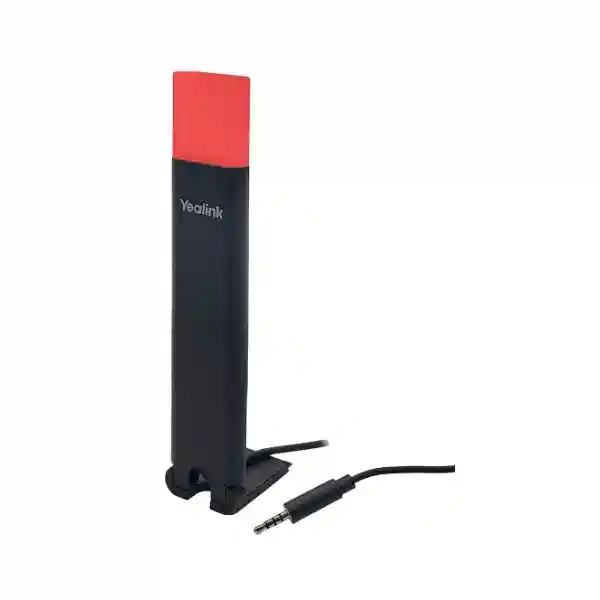
The Yealink BLT60 Busylight gives supported Yealink headset users a clear external visual indication of call activity and, on compatible combinations, presence status. It is intended for workplaces where people need a quick way to see whether a colleague is available, away, busy, ringing or already on a call without interrupting them. Yealink specifies a 1.8 metre cable, allowing the light to be positioned on a monitor edge, desk divider or another visible location rather than being hidden beside the headset base.
For Tanzanian organisations, the value is practical rather than decorative: the accessory can help call-centre agents, receptionists, sales teams, service desks, finance users and managers signal their working state to nearby colleagues. Compatibility should be confirmed before procurement because the BLT60 works through supported Yealink headset/base environments and some presence behaviours depend on the softphone and headset model. FourTeck can help buyers identify the exact headset base, software environment and quantity before a quotation is prepared.
Quick buying answer
Choose the BLT60 when you already use, or plan to use, a compatible Yealink headset/base and need a more visible call-status indicator around the workstation. Do not treat it as a universal standalone status lamp; confirm the exact Yealink base and softphone behaviour first.
Yealink positions the BLT60 as an easy-to-use accessory for supported base environments, keeping deployment straightforward.
The long cable makes it easier to place the indicator where colleagues can see it, such as a monitor corner or desk partition.
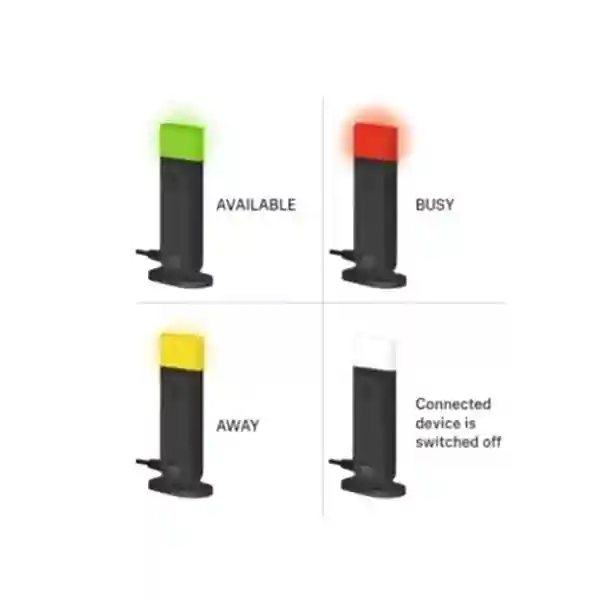
Supported setups can display call and presence states with colour and flashing patterns, reducing uncertainty around user availability.
Some status functions depend on the particular Yealink headset/base and softphone. Project buyers should verify the complete environment.
What the Yealink BLT60 Busylight solves
Headset users in open offices often look available even when they are speaking with a customer, joining a remote meeting or handling a sensitive call. A visible light can communicate status before a colleague walks over, starts talking or taps the user on the shoulder. This is useful where headset microphones are small, where users sit behind high monitors, or where a team handles frequent calls throughout the day.
The BLT60 is designed to extend status visibility away from the headset base. Yealink documents red as an important call/busy colour and lists additional supported states, including available, away, ringing and missed-call or voice-message indications in compatible environments. Some presence-state synchronisation requires softphone support, so businesses should not assume every colour state is available in every deployment. The right procurement question is therefore not simply whether the BLT60 fits physically, but whether the exact headset/base and application combination supports the operational behaviour the user expects.
For a wider endpoint project, the BLT60 can be evaluated alongside FourTeck Tanzania business telephony and workplace solutions, where IP phones, headsets, network readiness and related infrastructure can be considered as one user experience instead of independent purchases.
Verified Yealink BLT60 features and operating behaviour
| Item | Verified detail | Buying relevance |
|---|---|---|
| Product type | External Yealink busylight accessory | Adds a more visible indicator around a supported headset/base workstation. |
| Ease of use | Easy to use; plug-and-play | Suitable for standardised deployment where compatibility has already been confirmed. |
| Cable | 1.8 m | Provides flexibility for monitor, desk-edge or partition placement. |
| Light-guide shapes | Star, heart and square shape guides are documented by Yealink | Supports visible workstation status while allowing a choice of guide style where supplied. |
| Status behaviour | Call and supported presence indications use colour/flashing states | Confirm the required states against the chosen headset/base and softphone. |
| Package content | BLT60 and Quick Start Guide | Procurement teams should still confirm all headset/base components separately. |
Yealink support material also notes that the BLT60 must be used with a compatible base and reflects the base call state. For certain models, status settings can be adjusted through Yealink USB Connect. This distinction is important when replacing an existing busylight from another ecosystem: the BLT60 should be treated as part of a Yealink headset solution, not as a generic lamp that independently reads every collaboration application.
Compatibility, integration and deployment planning
Before ordering, record the exact Yealink headset and base model at each desk. Yealink documentation identifies BLT60 support across multiple WH-series products and also documents use with selected workstation products. However, support is not identical across every generation. The safest approach is to match the accessory against current Yealink documentation for the exact model and firmware rather than extrapolating from a similar-looking base.
Next, identify the calling application. A user may spend the day on a desk phone, Microsoft Teams, another softphone, or a mixed-device setup. Some presence indications require softphone support, and Yealink notes that manually changing presence on a compatible application does not necessarily trigger the same behaviour as an active call. For a project rollout, test one representative workstation first, document the observed states, then reproduce the approved configuration across the remaining users.
Businesses planning a broader voice environment can review the FourTeck Tanzania technology shop for business endpoints and supporting infrastructure, or discuss communication-system integration through the FourTeck Tanzania services page. These related pages are useful when BLT60 deployment is part of a larger headset, IP phone, PBX or collaboration refresh.
Who should consider the BLT60?
The most obvious users are contact-centre agents and service-desk staff because they receive frequent calls and are often seated close to colleagues. Receptionists can also benefit when they switch between visitor interaction and telephone work. Salespeople and account managers may use a headset for long customer conversations, while finance, HR and executive users can value a visible “do not interrupt” cue during confidential calls.
The accessory is especially useful when the physical office makes headset status hard to see. Large monitors, desk dividers, hot-desking arrangements and open-plan seating can make it difficult to tell whether somebody is simply wearing a headset or actively speaking. By positioning the light at the visual edge of the workstation, the team creates a shared and simple communication convention. That benefit is strongest when organisations explain the colour behaviour to users rather than assuming everyone will interpret it consistently.
Yealink BLT60 Busylight Tanzania
Businesses searching for the Yealink BLT60 Busylight in Tanzania are usually trying to solve a workplace interruption problem rather than buy a complex communications appliance. The accessory makes most sense for organisations that already standardise on compatible Yealink DECT headset bases or are preparing a wider headset rollout. In Tanzania, this can include banks, insurance teams, shared-service centres, professional-services offices, customer-support departments, hotels, logistics companies, healthcare administration teams, education offices and technology businesses where staff handle voice calls while working in shared spaces.
A Tanzania quotation should start with the exact headset model and the number of workstations. If the requirement is for twenty, fifty or several hundred users, procurement teams should also identify whether all users run the same softphone and whether the BLT60 status behaviour has already been tested in that environment. A pilot unit is useful for confirming placement, cable routing and actual visual coverage across the desk layout. The 1.8 m cable provides flexibility, but the indicator should still be positioned where colleagues naturally look before approaching the user.
For organisations combining headsets with desk phones, IP PBX or conferencing, the purchasing conversation should cover the whole user workflow. A busylight will not solve call quality, poor microphone performance, unstable LAN connectivity or incorrect softphone settings. It complements the headset system by improving local visual awareness. Buyers can use FourTeck Tanzania’s broader telephony and collaboration portfolio to coordinate headsets, phones, network connectivity and support expectations.
When requesting a Tanzania quote, include quantity, headset/base model, softphone or desk-phone platform, office layout and preferred deployment date. Avoid assuming local stock, fixed price or immediate availability until the quotation confirms those items. FourTeck can then check product fit and prepare the scope around the exact requirement.
Yealink BLT60 Busylight Dar es Salaam
Dar es Salaam has many office environments where frequent customer and supplier communication happens alongside face-to-face teamwork. In a busy sales floor, shared-services office or reception area, headset users can be interrupted simply because the person approaching them cannot see that a call is in progress. The Yealink BLT60 offers a small physical cue that can be placed above desk level, helping colleagues make a faster decision about whether to approach now or wait.
For Dar es Salaam deployments, desk design should be part of the planning. Open benches, cubicles, glass partitions and monitor arms create different sight lines. The indicator should be visible from the direction people normally walk toward the workstation. The supplied 1.8 m cable gives useful placement freedom, but cable management should remain tidy and should not cross walkways or create strain at the base connector. In larger call-handling teams, it is sensible to standardise one placement position so supervisors and nearby colleagues learn where to look.
IT teams should also confirm the exact Yealink base model and application in use. Some users may work mainly in a softphone, while others switch between computer and desk-phone calls. Because status synchronisation varies by supported environment, a one-desk test is better than relying on assumptions. Document which colours or flashing states occur for idle, ringing and active calls, then decide whether those behaviours meet the organisation’s workflow.
A Dar es Salaam buyer requesting project quantities should provide model numbers, quantity and the intended workstation profile. This allows a quotation to address compatibility rather than only unit count. If the project also includes IP phones, PBX or meeting-room devices, coordinate those items so users receive a consistent communication setup instead of a collection of unrelated peripherals.
Yealink BLT60 Busylight Mwanza
For businesses in Mwanza, the Yealink BLT60 can be useful in branch offices, service counters, administration teams and commercial operations where a smaller number of staff handle a large amount of telephone communication. A compact office may have fewer agents than a major contact centre, yet interruptions can be more noticeable because everyone works close together. A visible status indicator helps establish a simple etiquette around active calls without introducing another software tool that colleagues need to monitor.
The first procurement step is to verify that the BLT60 is being paired with a supported Yealink base. Buyers sometimes see the product described online as a busylight and assume it works independently from any headset ecosystem. Yealink’s documentation makes the relationship to supported base products important. The light reflects status delivered through that environment, and some presence indications depend on software support. This is why the exact model number should be included in the enquiry.
For Mwanza branches managed from another city, configuration consistency is valuable. IT teams can maintain a short standard that identifies supported headset model, approved firmware, preferred USB Connect settings where applicable, physical light placement and the expected status states. The same standard can then be used when additional desks are added. This makes troubleshooting easier because staff can compare a new setup with a known working workstation.
When requesting a quotation for Mwanza, provide the number of existing headset bases, any planned new headsets, the calling application and whether users need only call indication or also expect broader presence behaviour. This distinction keeps the scope realistic and avoids purchasing accessories based on unsupported assumptions.
Yealink BLT60 Busylight Arusha
Arusha organisations in hospitality, tourism, professional services, administration and customer support can use the Yealink BLT60 where staff move frequently between telephone conversations and face-to-face coordination. Reception and reservations teams are a clear example: employees may be speaking to guests or travel partners through a headset while coworkers need quick guidance about whether to interrupt. A visible light placed in a shared line of sight can reduce unnecessary verbal checking.
The accessory should be planned around how the desk is actually used. A light attached low behind a monitor may technically function but deliver little practical benefit. The 1.8 m cable makes it possible to position the indicator at the monitor corner, near a divider or another visible area. Teams should avoid locations where strong daylight or other illuminated signs make the signal difficult to distinguish. A small pilot across typical desks can show which placement gives the clearest visibility.
Compatibility remains more important than location. Buyers should identify the Yealink headset/base model and the calling software before ordering. Some states rely on supported softphone integration, and different headset generations expose different settings. If the goal is primarily to show active calls and ringing, confirm those scenarios. If the organisation also expects available, away or DND-style signalling, test those states separately rather than assuming they behave identically.
An Arusha procurement request can also include related headset or telephony requirements. This helps determine whether the BLT60 is simply an accessory addition to a stable environment or one part of a wider refresh. Quantity, workstation type, software platform and deployment schedule provide the most useful information for preparing an accurate quote.
Yealink BLT60 Busylight Dodoma
In Dodoma, administrative offices, institutions, service organisations and growing private businesses may have users who spend significant time on phone and online collaboration sessions. The Yealink BLT60 is relevant where a headset alone does not provide enough visual information to people nearby. Instead of colleagues guessing whether the wearer is listening to audio or speaking on an active call, the external light can provide a clear workstation-level indication.
A structured rollout is especially useful in offices with formal procurement and IT controls. Record the exact compatible Yealink headset/base product, the user group receiving the accessory and the application used for calls. If multiple departments use different softphones or desktop configurations, separate them into profiles rather than assuming one behaviour will appear everywhere. Yealink explicitly notes that some presence indications depend on softphone support, so testing should be part of acceptance.
Physical installation is uncomplicated, but placement matters. The 1.8 m lead supports practical positioning without forcing the light to remain beside the base. For executive desks, it can sit discreetly at a monitor edge. For shared office teams, it can be placed where status is visible from the aisle. The organisation can then explain the meaning of the observed states during user onboarding, making the signal part of daily etiquette rather than an accessory that only the headset wearer understands.
Dodoma buyers should request pricing with quantity and compatibility details and should confirm availability, delivery scope and any supporting installation requirements in the final quotation. No stock or delivery assumption should be made from the product description alone.
Yealink BLT60 Busylight UAE
UAE offices frequently combine open-plan seating, hybrid working and high call volumes, making visible headset status useful for customer service, inside sales, help desks, finance and administrative teams. The Yealink BLT60 fits this pattern when supported Yealink headset bases are already part of the communications standard. Its purpose is straightforward: extend call or compatible presence indication into a position where people around the desk can see it before interrupting.
For larger UAE rollouts, buyers should avoid mixing accessory procurement with assumptions about compatibility. Record the full headset and base model, firmware level where relevant, PC operating environment and primary softphone. Some Yealink bases support more configuration options than others, and some presence states rely on softphone integration. A pilot desk is the fastest way to validate what users will actually see during available, ringing, active-call and DND scenarios.
Workstation design can differ substantially between high-density support floors, executive offices and flexible coworking areas. The 1.8 m cable supports different mounting choices, and consistent placement can improve recognition across a team. In environments with several devices connected to a headset base, confirm which device’s state is represented and how the chosen calling workflow behaves.
For cross-border organisations standardising Yealink equipment in both Tanzania and the UAE, a common bill of materials and test procedure can simplify procurement. The FourTeck UAE technology site can support related regional technology requirements, while Tanzania enquiries can remain coordinated through the Tanzania contact channel.
Yealink BLT60 Busylight Uganda
Ugandan businesses evaluating the Yealink BLT60 are likely to find the greatest value where headset users share office space and handle a steady volume of customer, supplier or internal calls. The light can make a supported Yealink headset setup easier for nearby people to read at a glance. This is particularly helpful in service desks and branch operations where employees need to coordinate quickly but should avoid speaking to a colleague who is already engaged on a call.
The BLT60 should be specified as an accessory to a compatible Yealink base. It is not enough to know that a user owns a Yealink headset; the base model matters. Some product families expose presence settings differently, and some softphone-dependent states are unavailable without software support. For a procurement list, include the exact base model beside each user group. If the estate contains more than one Yealink headset generation, test a unit with each profile.
Project planning should also include where the indicator will be positioned. The 1.8 m cable provides useful reach across a workstation, but the light should remain visible from common approach angles. If users hot-desk, a simple placement standard and labelled cabling can make moves easier and reduce the chance that the accessory is disconnected or hidden behind equipment.
Organisations operating in both Uganda and Tanzania can standardise the evaluation process while purchasing through the appropriate regional channel. For wider Uganda requirements, FourTeck Uganda provides a regional reference point for related IT and communications solutions.
Yealink BLT60 Busylight Kampala
Kampala’s office, financial-services, technology and customer-support environments often place many users in shared work areas. When those employees wear headsets throughout the day, physical call status becomes difficult to interpret. The Yealink BLT60 can add a visual signal that extends beyond the headset itself, giving nearby colleagues a better chance of recognising that someone is ringing, busy or already talking before starting a conversation.
For contact-centre or service-team quantities, deployment consistency matters more than simply attaching a light to every desk. Decide on one visible mounting position, test the signal under normal office lighting and record the expected states for the chosen Yealink base and softphone. Users should know what red, flashing red or other supported indications mean in their actual setup. That shared understanding turns the busylight into a practical workflow aid.
Procurement teams should also distinguish existing-headset projects from complete headset refreshes. If the base is already installed, the requirement may be limited to compatibility validation and accessory quantity. If new headsets are being selected, evaluate user comfort, wireless range, calling platform and device connectivity first, then add the BLT60 where visibility is beneficial. This prevents the accessory from driving a larger headset decision that should be based on the user’s actual communication needs.
Kampala buyers requesting a quotation should submit headset/base model, quantity, softphone, expected status behaviour and any deployment constraints. Price and availability should be confirmed through the quotation rather than inferred from overseas listings.
Yealink BLT60 Busylight Arua
For organisations in Arua, the Yealink BLT60 may be most relevant for compact branch offices, administrative teams and customer-facing operations where several employees work in close proximity. Even a small team can lose concentration when calls are interrupted repeatedly. A visual indicator supports a simple office habit: look at the user’s status before approaching the desk.
Because branch offices may be supported remotely, standardisation is particularly useful. Head office IT can document a tested Yealink headset/base combination and the status behaviour expected from the BLT60. When a new accessory is installed, local staff can compare it with the documented sequence rather than troubleshooting from scratch. Yealink describes plug-and-play operation, but correct base connection and supported software behaviour are still necessary for the intended result.
The 1.8 m lead provides flexibility for desks where the base sits away from the most visible point. For example, the base can remain close to the user while the busylight is moved to a monitor corner facing the office. Cable routing should be secure and should not obstruct other ports, power leads or movement around the desk. If users change seats frequently, labelled accessories can reduce mix-ups during reconfiguration.
An Arua quotation request should include how many compatible bases are already installed and whether new headsets are part of the project. If the calling application is changing at the same time, complete software testing before mass rollout so the expected presence or call states are verified in the final environment.
Yealink BLT60 Busylight Mbarara
Mbarara businesses can use the Yealink BLT60 to improve visible call awareness around workstations that rely on supported Yealink headset bases. The accessory is small, but the workflow problem is common: a colleague sees somebody at a computer, assumes they are free and begins speaking while the user is already connected to a customer or remote meeting. A clearly positioned busylight can reduce that ambiguity.
The purchase should still begin with technical identification. Check the Yealink model on the headset base rather than relying on the appearance of the headset itself. Confirm the primary phone or softphone used at the desk. If broader presence states such as available, away or DND are important, verify that the combination supports them; some functions depend on software integration. If the only operational need is active-call and ringing visibility, test those scenarios and document them.
For distributed businesses, the BLT60 can become part of a repeatable workstation standard. A standard might define the headset model, base firmware, preferred application, busylight placement and user instructions. This gives IT teams a known configuration when adding staff or opening another office. Standardisation also helps procurement compare like-for-like quotations because the accessory is tied to an approved communications profile.
Mbarara buyers should include quantity and compatibility details when requesting pricing. The final quotation should confirm product scope, availability and logistics. Businesses should avoid relying on prices from foreign retail websites because regional taxes, shipping and supply conditions can differ significantly.
Yealink BLT60 Busylight Gulu
In Gulu, the Yealink BLT60 can support branch offices and organisations that want a simple visual indication around headset users without adding another screen-based notification system. Customer-service and administration staff often need to concentrate on calls while colleagues continue moving through the same workspace. The busylight makes the user’s call state more visible from a short distance.
A good deployment begins with one working sample. Connect it to the supported Yealink base, observe startup and call behaviour, test the softphone in normal use and check the light from several positions around the office. This confirms both software compatibility and physical visibility. If the organisation expects missed-call or voice-message indication, verify that function too because Yealink notes that some notification states require softphone support.
The long cable is helpful when the base sits behind a laptop dock or near the back of a desk. The indicator can be moved to a more prominent location without relocating the headset equipment. Users should avoid stretching the lead tightly or placing it where repeated movement could pull on the connector. Simple cable clips or existing desk cable-management channels can keep the installation neat.
When requesting a Gulu project quote, include existing equipment details and the number of users. If some employees use different Yealink headset generations, group the request by model. A compatibility-aware bill of materials is more useful than a single accessory quantity because it gives the buyer a clear record of which desks were validated.
Yealink BLT60 Busylight Kenya
Kenyan organisations with busy call-handling teams may use the Yealink BLT60 as a visible extension of supported Yealink headset bases. In open office environments, people often need to make rapid decisions about whether a colleague can be approached. A status light at eye level can communicate active-call conditions faster than trying to inspect the headset or application screen.
For Nairobi and other Kenyan offices with larger deployments, compatibility testing should be incorporated into the procurement process. Confirm the exact headset/base product, the main calling application and which status indications are operationally important. A call centre might care most about ringing and active-call visibility, while a project team may also want available, away or DND cues. Yealink’s support information makes clear that some presence behaviour relies on compatible softphone support.
The BLT60 can also be evaluated when standardising a regional headset estate. If Tanzania and Kenya offices use the same supported Yealink base and softphone, the company can document a common busylight profile. Physical placement may still differ by furniture layout, but the technical configuration and user instructions can remain consistent. This simplifies support tickets because teams use the same terminology when describing indicator states.
Businesses looking at broader Kenyan requirements can reference FourTeck Kenya for regional technology needs. Tanzania-based procurement can coordinate its local order separately while maintaining the same technical standard across branches.
Yealink BLT60 Busylight Kuwait
Kuwait offices using compatible Yealink headsets can consider the BLT60 where open-plan work, call-intensive roles or shared administrative areas create frequent interruptions. The accessory helps move the user’s status from a small headset or screen indicator to a more visible point on the workstation. That simple visibility can be useful for support teams, service counters, inside sales and office departments that handle customer calls throughout the day.
Before purchasing, identify the base rather than only the headset brand. The BLT60 relies on supported Yealink headset/base environments, and software integration affects certain presence states. Test one unit with the actual calling application and settings. This is particularly important when an organisation uses several collaboration platforms, because users may assume that every platform updates the external light in the same way.
The 1.8 m cable gives useful placement options around larger executive desks and multi-monitor workstations. Position the light where nearby colleagues can see it without distracting the user. If several units are being installed, define a standard location and explain the observed status colours to the team. Visual signals are most effective when everyone interprets them consistently.
For organisations with regional operations, procurement can standardise the approved Yealink headset and BLT60 combination across multiple countries while confirming commercial terms in each market. FourTeck Kuwait can be used for related Kuwait technology requirements, while Tanzania orders can continue through the Tanzania channel.
Yealink BLT60 Busylight Ghana
For Ghanaian businesses, the Yealink BLT60 is most relevant where compatible Yealink headset users work in shared offices and need a clear non-verbal way to communicate call status. Rather than forcing coworkers to look at a software screen or guess from body language, the external indicator can be positioned at the visible edge of the workstation.
A purchase evaluation should begin with the exact base model and the main calling application. Yealink documents support across specific headset/base families and notes that some presence indications depend on softphone support. Procurement teams should therefore separate verified call-status functions from desired but untested presence behaviour. This is particularly important for project quantities because a small misunderstanding repeated across many desks creates unnecessary rework.
The 1.8 m cable supports flexible positioning, but organisations should consider lighting, desk shape and employee movement when selecting the mounting point. A support-floor installation may favour visibility from the aisle, while an executive office may prefer a subtler monitor-edge position. In either case, a successful busylight is one that other people actually notice before approaching.
Companies coordinating technology across Ghana and East Africa can use a shared technical specification while handling supply region by region. FourTeck Ghana can support related local requirements. For any BLT60 quotation, include quantities, Yealink headset/base models, application details and the expected use case so compatibility can be reviewed before commercial confirmation.
Yealink BLT60 Busylight Nigeria
Nigeria has many call-intensive business environments, from customer support and financial services to technology, logistics and corporate administration. In teams where users wear headsets for much of the day, the Yealink BLT60 can make active-call status easier for nearby colleagues to recognise. The accessory is most useful when the organisation already uses a compatible Yealink headset/base platform and wants to improve visible workstation etiquette.
For a large Nigerian rollout, test compatibility before volume purchasing. Record which Yealink base is installed, the softphone or desk-phone environment and the specific states that matter. A team may require only ringing and active-call indication, while another may want supported presence states as well. Because softphone support influences some behaviour, a written pilot result should be part of the deployment record.
Physical placement is equally important on high-density floors. The 1.8 m cable lets the light move away from the base so it can remain visible despite large monitors or partitions. Consider sight lines from team-lead positions and shared walkways. If employees move between desks, standardised placement can reduce confusion and make it easier to identify whether a workstation is actively in use.
For regional technology requirements beyond Tanzania, FourTeck Nigeria provides a related market resource. Project buyers should still confirm price, stock, delivery and compatibility in the specific quotation rather than relying on generic product-page assumptions.
Yealink BLT60 Busylight Seychelles
Seychelles organisations in hospitality, travel services, professional offices and administration may find the Yealink BLT60 useful where small teams handle both digital communications and in-person coordination. In these environments, even a few unnecessary interruptions can affect concentration and customer conversations. A visible call-status accessory can help coworkers recognise when a headset user is already engaged.
The strongest buying approach is compatibility-led. Confirm the Yealink headset/base model at the workstation and the phone or softphone application used. Do not assume that every Yealink headset supports the accessory in the same way. Yealink documentation ties the BLT60 to supported base products and notes that certain presence states require software support. A single test unit can validate the actual experience before broader purchasing.
Desk placement can be adapted to reception desks, reservations offices, back-office administration or management workstations. The 1.8 m cable gives enough reach for many monitor-edge or desk-divider positions. Staff should be shown the actual indicator meanings used in their setup so the light becomes a shared visual convention rather than an unexplained device.
Seychelles procurement teams requesting the BLT60 should provide quantities, current Yealink equipment and the intended call platform. If supply is part of a wider communications refresh, include requirements for headsets, IP phones or collaboration devices at the same time. This gives the supplier enough context to recommend a coherent endpoint setup and to separate required components from optional accessories.
Selection and quotation checklist
Send the exact Yealink model number. Compatibility should be checked against the base actually installed or planned.
Identify whether users work with a desk phone, Microsoft Teams or another softphone, and whether more than one device is connected.
Clarify whether the project needs only ringing/in-call visibility or also expects supported presence states such as available, away or DND.
State the number of users and whether they have fixed desks, hot desks, shared workstations or different headset profiles.
For larger rollouts, test one representative desk and document the observed state behaviour before approving the full quantity.
Confirm price, availability, logistics, included items and final delivery scope in the quotation rather than assuming them from online listings.
Related FourTeck Tanzania resources
The BLT60 is an accessory, so many purchases sit inside a broader communication or workplace requirement. The FourTeck Tanzania Shop is relevant when the requirement includes business endpoints and related IT equipment. The FourTeck Tanzania Services page is useful when configuration, deployment planning or wider technology support is required. The FourTeck Tanzania home page explains the broader IT, telecom, networking and collaboration portfolio that can surround a headset rollout.
For buyers operating across borders, the regional FourTeck network can help keep similar workstation standards aligned across markets. Related resources include FourTeck UAE for UAE technology projects and the regional sites linked in the country sections above. These links are provided for related requirements; the BLT60 itself should still be quoted against the exact destination and compatibility profile.
Frequently asked questions
What is the Yealink BLT60 Busylight?
It is an external visual status accessory for supported Yealink headset/base environments. It can indicate call activity and, on compatible combinations, additional presence states so nearby colleagues can see whether a user is available or busy.
Does the BLT60 work as a standalone USB status light?
It should not be treated as a universal standalone status lamp. Yealink documentation describes it as working through supported headset/base environments. Confirm the exact base model and calling application before ordering.
How long is the BLT60 cable?
Yealink specifies a 1.8 m cable. This provides flexibility to place the indicator on a monitor edge, desk partition or other visible position while the headset base remains elsewhere on the desk.
What do the BLT60 colours mean?
Yealink documents states including green for available, orange for away, red for busy/DND or an active call, flashing red for ringing, and a slow green flash for certain missed-call or voice-message notifications. Exact support depends on the headset/base and softphone.
Will every softphone update the BLT60 presence state?
No blanket assumption should be made. Yealink notes that some presence and notification states require softphone support. Test the intended calling application with the exact headset/base before large-scale rollout.
Can the BLT60 help in a call centre?
Yes, when deployed with compatible Yealink bases, it can make active calls and supported status states more visible across a call-handling floor. Consistent placement and user education improve its value.
What information should I send for a quotation?
Provide quantity, exact Yealink headset/base model, calling software or desk-phone platform, city or destination, and the status behaviours you expect. For larger projects, mention whether a pilot is required.
Does FourTeck publish a fixed BLT60 Tanzania price on this page?
No fixed price is stated here. Commercial terms, availability and delivery scope should be confirmed in a current quotation for the requested quantity and destination.
Decision recap
The Yealink BLT60 is a focused accessory for organisations that want a highly visible call-status point around supported Yealink headset workstations. Its key strengths are simple deployment, a long 1.8 m cable and colour-based status indication. The most important buying condition is compatibility: verify the exact headset/base and softphone behaviour before ordering project quantities.
If your users are regularly interrupted while wearing headsets, the BLT60 can be a practical addition. If you are still choosing the headset platform itself, select the headset and base for call quality, comfort, connectivity and application compatibility first, then add the BLT60 where visual status will improve the working environment.
Talk to FourTeck about your Yealink BLT60 requirement
Send the headset/base model, quantity, calling application and destination. FourTeck can use those details to review fit, identify any compatibility questions and prepare a quotation around the actual requirement. For wider voice projects, include IP phones, PBX, conferencing or network dependencies in the same enquiry so the endpoint environment can be considered as a whole.




Reviews
There are no reviews yet.