
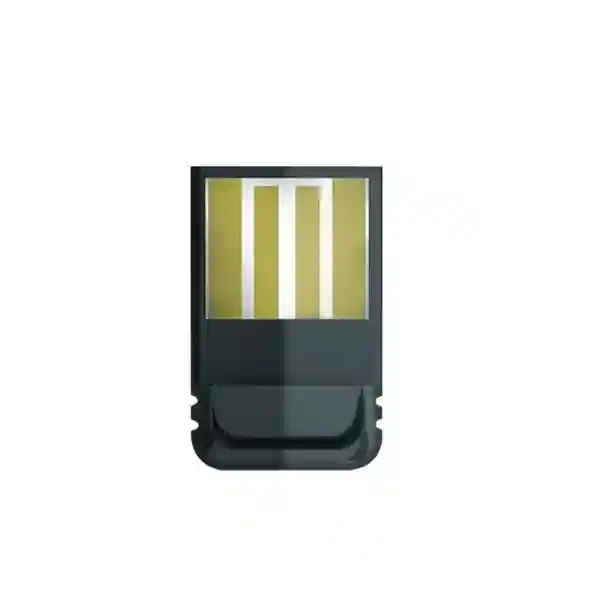
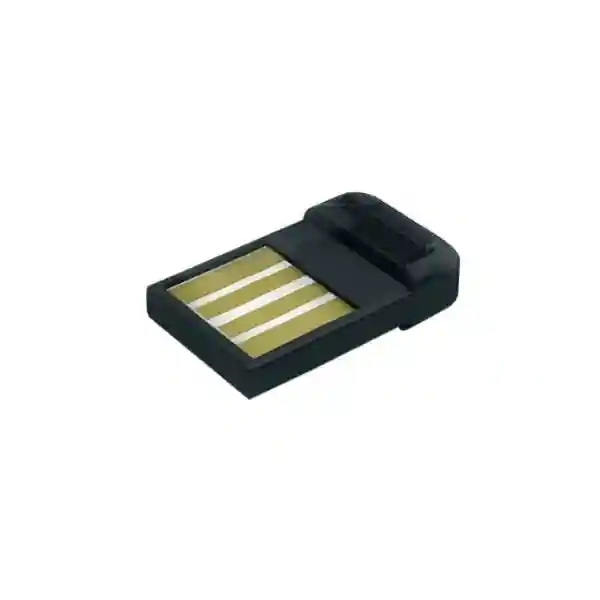
Yealink BT41 Bluetooth USB Dongle
The Yealink BT41 Bluetooth USB Dongle is a compact accessory for businesses that want to add Bluetooth headset connectivity to compatible Yealink IP phones. Yealink specifies Bluetooth 4.1, Enhanced Data Rate support, A2DP technology, a USB 2.0 interface and an operating distance of up to 10 metres. When used with a compatible phone and headset, users can answer and terminate calls from the wireless headset and adjust headset volume without remaining tied to the desk phone.
For organizations in Tanzania, the practical buying question is compatibility. The BT41 should be selected only after confirming the exact Yealink phone model, firmware generation, headset model and user requirement. Fourteck can help buyers prepare a quotation around the correct quantity, supported phones and related voice-network requirements rather than treating the dongle as an isolated accessory.
The BT41 is intended to bring Bluetooth headset support to selected Yealink IP phones through USB. It is best for users who need wireless movement around a desk or office while retaining call control from the headset.
What the Yealink BT41 does
The BT41 solves a specific workplace problem: a compatible Yealink desk phone may be perfectly suitable for business calling but still need an external Bluetooth adapter before it can connect to a Bluetooth headset. The dongle plugs into the phone’s USB interface and provides the Bluetooth radio function required for supported headset use. This can be useful for receptionists, customer-service staff, sales teams, supervisors and office users who need to move around a work area while remaining connected to calls.
Yealink’s current product and support information identifies Bluetooth specification V4.1, backward compatibility with earlier Bluetooth generations, Enhanced Data Rate support for 2 Mbps and 3 Mbps, A2DP technology, a 2.402 GHz to 2.480 GHz Bluetooth frequency range, built-in security and low power consumption. The manufacturer also specifies a 10 metre operating distance. Real-world usable distance can vary with walls, doors, furniture, radio interference and the headset itself, so the 10 metre figure should be treated as the published maximum operating distance rather than a guarantee for every office layout.
The BT41 is not a general-purpose promise that every Bluetooth device will work with every Yealink phone. Procurement should begin with the exact phone model. Yealink’s current BT41 support list includes SIP-T27G, SIP-T29G, SIP-T46G, SIP-T48G, SIP-T41S, SIP-T42S, SIP-T46S, SIP-T48S, SIP-T42U, SIP-T43U, SIP-T46U, SIP-T48U, SIP-T44U, SIP-T53, SIP-T73U, SIP-T74U and SIP-T77U, with the support material noting version 82 or later for the compatible phone environment. Because product generations and firmware evolve, buyers should still confirm compatibility at the time of purchase.
Verified BT41 features and specifications
Bluetooth 4.1 specification with backward compatibility to Bluetooth 1.1, 1.2, 2.0 and 3.0 according to Yealink’s current product information.
Published operating distance of up to 10 metres, suitable for movement around a desk, office bay or nearby work area where radio conditions permit.
USB 2.0 interface. The dongle is compact at approximately 18 mm × 14 mm × 5.5 mm and weighs about 2 g.
Supports answering and terminating incoming calls through a compatible Bluetooth headset, with headset-volume adjustment through the headset or phone.
A2DP technology, plus manufacturer-listed narrowband and wideband support for specified phone families. Audio capability depends on the connected phone and headset combination.
2.402 GHz–2.480 GHz Bluetooth frequency range, built-in security and low-power operation, with a 3 Mbps symbol-rate specification published by Yealink.
Compatibility planning before purchase
Compatibility is the most important step when ordering the Yealink BT41. A procurement team should record the exact model printed on each phone, not simply the visual appearance or a broad description such as “Yealink T4 series.” Phone generations can look similar while using different accessory requirements. Yealink’s current BT41 support list spans several T2, T4, T5 and newer U-series endpoints, but the correct decision still depends on the model and firmware deployed in the organization.
The headset also matters. The BT41 provides Bluetooth connectivity, but headset-side call control, volume behavior, multipoint features and audio performance vary by headset model. For a business rollout, it is sensible to test one representative phone-and-headset combination before purchasing a large quantity. A small pilot can confirm pairing behavior, user comfort, call-control functions, radio performance around desks and whether staff need mono or stereo headsets.
For broader telephony planning, Fourteck’s Tanzania business technology overview explains how IP phones, network switching, Wi‑Fi, conferencing and other systems fit into a coordinated workplace environment. Buyers who are sourcing the dongle as part of a larger telephony refresh can also review the Fourteck Tanzania technology shop for related product categories and procurement planning.
Who should consider the BT41?
The BT41 is most relevant where a compatible Yealink desk phone remains the primary calling device but the user wants wireless freedom. Reception staff can benefit when they need to step to a filing area or consult a colleague without immediately ending a call. Sales and account teams can keep both hands free while taking notes or accessing a CRM. Supervisors can move between nearby desks. Service teams can use a headset to reduce handset fatigue during longer conversations. In each case, the dongle is an accessory to the phone rather than a replacement for the phone or PBX.
It is less appropriate when the target phone already includes the Bluetooth capability required by the chosen headset, when users need a much longer wireless range than 10 metres, or when the actual requirement is PC-based unified communications rather than desk-phone Bluetooth. Those environments may call for a different Yealink adapter, DECT headset platform or native-Bluetooth endpoint. A requirement-led comparison avoids buying an accessory that duplicates functionality or does not meet the intended working distance.
Installation and pairing workflow
Deployment is straightforward, but a controlled process is useful for multiple users. First confirm that the phone model and firmware are supported. Insert the BT41 into the correct USB port on the Yealink phone. Yealink’s user guidance notes hot-plug support, so the dongle can be inserted or removed without rebooting the phone. Next place the chosen Bluetooth headset into pairing mode, enable Bluetooth on the Yealink phone, run a device scan and select the desired headset from the detected list.
After pairing, make a real call and test the functions that matter to the user: inbound call answer, call termination, microphone clarity, receive audio, volume adjustment and movement around the desk area. If the phone does not find the headset, check that the headset is powered on and in pairing mode. If audio is noisy, confirm the headset battery level, remain within the 10 metre working range and reduce physical obstructions or obvious interference between the phone and headset.
For larger rollouts, document phone model, firmware, headset model and assigned user. This simple record makes troubleshooting easier when several desk-phone generations are present. Organizations planning wider voice changes can use Fourteck’s Tanzania IT and telecom services page to frame requirements such as installation, configuration, network readiness and support around the endpoint deployment.
Buying guidance for business procurement
A good BT41 request for quotation should include more than a product name. State the required quantity, the exact Yealink phone model, the phone firmware version if known, the Bluetooth headset model already in use or being considered, the delivery location and whether the requirement is for a new deployment or an existing phone estate. If the organization is standardizing headsets for many users, include the user groups and their typical calling patterns so the accessory decision can be checked against the complete headset requirement.
Do not assume that every phone in an office is identical. Reception desks may use higher-feature phones, managers may use a different series and general users may have older endpoints. A mixed estate can require different accessory decisions. A quick inventory before ordering can prevent unused dongles and reduce repeated purchasing. It can also reveal when a broader endpoint refresh is more economical than adding accessories to aging phones.
For organizations with operations outside Tanzania, regional telephony needs can be coordinated through the wider Fourteck network. The Fourteck Uganda site is relevant for Ugandan procurement and branch requirements, while Fourteck Kenya supports planning for Kenyan business technology requirements. These links are useful for companies that want consistent phone and headset standards across East African offices.
Yealink BT41 Bluetooth USB Dongle Tanzania
Businesses searching for the Yealink BT41 Bluetooth USB Dongle in Tanzania are usually trying to solve a focused telephony problem: they have compatible Yealink desk phones and want users to work with Bluetooth headsets instead of remaining attached to a handset or corded headset. The BT41 is a small accessory, but its value depends on correct compatibility. Before procurement, record the exact phone model, firmware, headset model and number of users. That information makes it possible to distinguish a straightforward accessory purchase from a wider IP-telephony upgrade.
In Tanzanian offices, the use case can range from one receptionist to a multi-floor organization with many phone users. A 10 metre published operating distance can be practical for movement around a desk cluster, reception area or adjacent workspace, but office partitions, concrete walls, metal shelving and other radio sources can shorten usable range. For users who need to roam much farther, a DECT headset system or another wireless design may be more appropriate. This is why a procurement discussion should include working distance rather than only product model.
The BT41 can support a cleaner work pattern for teams that spend significant time on calls. Users can answer or end calls from a compatible Bluetooth headset, adjust volume and move naturally while speaking. This can be useful in customer service, account management, administrative functions, front desks and shared office environments. The headset itself should still be selected for comfort, microphone quality, battery runtime and acoustic protection according to the user’s workday.
For a Tanzania quotation, include quantity, city, phone models and headset requirements. If the BT41 is being purchased as part of a larger office rollout, also share the PBX platform, switch environment, PoE requirements and any planned phone replacements. This gives the supplier enough context to check whether the dongle fits the endpoint strategy rather than simply quoting units without verifying the surrounding system.
Yealink BT41 Bluetooth USB Dongle Dar es Salaam
For Dar es Salaam organizations, the BT41 can be a practical accessory when existing Yealink desk phones need Bluetooth headset capability for busy office users. Reception areas, professional-services firms, trading companies, logistics offices, hospitality back offices and support teams often handle sustained call volumes while staff also need to work on a computer or consult nearby colleagues. A wireless headset can make those workflows more comfortable, but the accessory decision should begin with phone-model validation.
Dar es Salaam offices vary widely in layout. Open-plan spaces may allow the published 10 metre Bluetooth range to work well around a user’s desk, while concrete partitions, meeting-room walls and dense equipment areas can reduce range. A pilot user can quickly establish whether the BT41 and selected headset provide adequate movement in the actual workspace. Testing should include voice quality, call control and the farthest distance the user expects to move during a normal call.
Procurement teams should also identify whether the phone estate is uniform. A company may have newer Yealink endpoints at management desks and older phones in general office areas. Ordering one adapter quantity based only on employee count can create compatibility problems. Instead, map each desk-phone model to the intended user, confirm firmware and then determine how many BT41 units are actually required. If some phones already have native Bluetooth or use another accessory, those positions can be excluded from the BT41 quantity.
A Dar es Salaam quotation should state site location, quantity, exact phone models, target headset and any installation requirement. If the project includes new IP phones, PBX changes or network upgrades, those items should be described together because endpoint selection, provisioning and voice-network readiness are linked. This produces a more useful quotation than treating Bluetooth dongles as unrelated commodity accessories.
Yealink BT41 Bluetooth USB Dongle Mwanza
Organizations in Mwanza considering the Yealink BT41 should focus on user role and supportability. The dongle makes sense for compatible Yealink desk-phone users who spend enough time on calls to benefit from a wireless headset and who need movement within roughly a 10 metre office area. Typical candidates can include reception, administration, sales coordination, customer-support positions and supervisors who move between adjacent workstations.
For offices where IT support is centralized elsewhere, standardization matters. Selecting one approved phone, headset and accessory combination reduces the number of pairing procedures and troubleshooting variables. The BT41 is compact and simple to install, but the user experience still depends on the headset and phone firmware. A documented standard—phone model, minimum firmware, approved headset and pairing steps—helps local staff resolve common issues without experimenting with unsupported combinations.
Mwanza buyers may also be replacing corded headsets rather than deploying new telephony. In that case, confirm what problem the wireless solution is meant to fix. If users only need hands-free calling at the desk, a wired headset may remain cost-effective. If users regularly stand, retrieve documents or consult colleagues during calls, the BT41 plus Bluetooth headset can provide more practical freedom. The decision should be based on working patterns, not simply the presence of Bluetooth as a feature.
When requesting pricing for Mwanza, provide the delivery destination and quantity along with the exact Yealink phone models. If headsets are also required, ask for the full solution rather than the BT41 alone. This enables compatibility checking and lets procurement compare total per-user cost. For multi-site organizations, include whether the Mwanza office must match standards used in Dar es Salaam or another branch so the same documentation and spares strategy can be maintained.
Yealink BT41 Bluetooth USB Dongle Arusha
The Yealink BT41 can suit Arusha businesses that rely on compatible Yealink IP phones and need wireless headset mobility for front-office and administrative calling. Hotels, tour operators, professional offices, education providers, service companies and other organizations may have staff who answer frequent calls while accessing booking systems, customer records or internal information. A Bluetooth headset can free both hands and allow limited movement without abandoning the call.
The most important procurement check is still the endpoint. The BT41 is designed for supported Yealink phone models, not for unrestricted Bluetooth use across every phone or computer. Verify the exact model labels and firmware before ordering. Where an Arusha office has phones purchased at different times, perform a desk-by-desk or department-level inventory. This avoids assuming that an accessory supported on one Yealink series will necessarily behave the same on another generation.
Workspace design also affects wireless usability. A published 10 metre operating distance is enough for many desks and nearby work areas, but partitions, walls and radio interference can reduce the practical distance. For a reception desk, test whether the user can reach nearby document storage or speak with a colleague without losing audio. For back-office teams, confirm that headset audio remains stable within the user’s normal movement area. If the required radius is larger, evaluate a different wireless technology.
An Arusha RFQ should list the number of BT41 units, phone models, intended Bluetooth headsets and whether pairing or user assistance is required. If the requirement forms part of a wider IP-phone or PBX project, include extension count, reception needs and branch connectivity. That additional context can reveal whether the accessory fits the long-term telephony design and whether standardized phones or headsets would simplify future support.
Yealink BT41 Bluetooth USB Dongle Dodoma
For Dodoma offices, the Yealink BT41 is relevant where supported Yealink desk phones need Bluetooth headset connectivity for users handling regular voice calls. Administrative teams, reception desks, project offices and service departments can benefit from moving within a small work area while keeping a call active. The product’s function is focused: it adds the Bluetooth interface to the compatible phone, while the paired headset provides the wearable audio experience.
A disciplined accessory rollout is particularly useful for offices with formal procurement or asset-management procedures. Record each phone’s model and firmware, assign BT41 units to specific desks and document the paired headset. Because the dongle weighs only about 2 g and is physically small, asset tracking can prevent accidental movement between desks or loss during phone changes. Labeling the phone or user record can be more practical than labeling the dongle itself.
Training should be simple but explicit. Users need to know how to place the headset into pairing mode, where Bluetooth is enabled on the phone, how to scan for devices and how to confirm that call-control buttons work. They should also know the limitations of Bluetooth range. Walking beyond the normal working area or placing several dense barriers between the phone and headset can affect audio. These are normal radio considerations and should not immediately be interpreted as a faulty dongle.
For a Dodoma quotation, provide quantity, phone models and the headset choice. If the organization is replacing an old phone fleet, ask whether native-Bluetooth Yealink models should be compared against retaining current phones and adding BT41 accessories. The best commercial decision can differ depending on device age, remaining service life, feature requirements and the number of users who actually need wireless headsets.
Yealink BT41 Bluetooth USB Dongle UAE
Companies with UAE operations may encounter the BT41 as part of a broader Yealink estate shared with East African branches. The accessory is useful when a compatible Yealink phone requires Bluetooth headset support and the user needs wireless movement around an office position. In multi-country organizations, the larger benefit can be standardization: using the same approved headset and adapter combination across locations reduces user training and gives IT teams a repeatable troubleshooting process.
Procurement should still avoid assuming that every regional office uses the same Yealink phone generation. A UAE headquarters may have newer endpoints with built-in Bluetooth while a branch retains compatible older models that require BT41. A simple asset list by model lets the business purchase accessories only where necessary. It also helps IT identify where future phone refreshes may remove the need for separate dongles.
For users in busy offices, test the wireless environment. The manufacturer’s 10 metre range is a useful planning figure, but dense meeting spaces, walls, glass partitions and many active wireless devices can influence actual performance. A controlled pilot with the exact headset is more reliable than assuming identical behavior across every floor. If mobility requirements extend across a department or warehouse, a DECT headset solution may be a better fit than Bluetooth.
When preparing a UAE or cross-border request, include quantities by site, phone models and headset standards. If the organization wants one regional bill of materials, identify which offices need BT41 and which phones have different Bluetooth capabilities. That approach supports consistent documentation without forcing identical accessories into technically different endpoint environments.
Yealink BT41 Bluetooth USB Dongle Uganda
Ugandan organizations using compatible Yealink IP phones can consider the BT41 when staff need Bluetooth headsets for wireless call handling. The accessory is most useful where the desk phone remains central to the workflow and users want to answer, end or manage call volume from a paired headset while moving around the immediate office area. This can improve convenience for reception, account teams, call-handling roles and managers who spend long periods on voice calls.
For a national or multi-branch rollout, begin with a phone inventory. Kampala headquarters and regional branches may not have identical hardware. Record the exact Yealink models at each site and compare them with the manufacturer’s current BT41 compatibility list. Where phones are supported, confirm firmware. Where they are not, do not attempt to solve the gap by assuming generic USB Bluetooth behavior; use the accessory specified for that phone generation or consider an endpoint change.
The headset should be selected with the user’s environment in mind. A quieter office may prioritize comfort and battery runtime, while a busy shared space may need stronger microphone noise control. The BT41 itself provides Bluetooth connectivity, but it does not determine all acoustic performance. A pilot call in the real office environment gives a better indication of user experience than accessory specifications alone.
For procurement in Uganda, list quantities by branch, phone models, preferred headset and whether the requirement must match Tanzania or Kenya standards. Centralizing this information allows an IT manager to create one supported configuration and one pairing guide for multiple offices. That reduces support complexity and keeps spare accessories aligned with the installed phone estate.
Yealink BT41 Bluetooth USB Dongle Kampala
In Kampala, the BT41 can be a practical way to add Bluetooth headset capability to supported Yealink desk phones without replacing the entire telephony endpoint. Offices with customer-facing teams, reception, finance, sales and support users may want staff to work hands-free while using business applications. The BT41 enables the phone-to-headset Bluetooth link for supported models, allowing compatible headset call controls and movement within the expected Bluetooth working area.
Large Kampala offices should treat headset deployment as an endpoint-management task. Before ordering dozens of dongles, sample the actual phone inventory. Confirm whether phones are T2, T4, T5 or newer U-series models, check firmware and identify users who genuinely require wireless capability. Some desks may be better served by corded headsets, while other users may already have phones with appropriate built-in Bluetooth. Matching accessory spend to role avoids unnecessary purchases.
Test radio performance in the real workspace. The published 10 metre operating distance is normally suitable for movement around a desk cluster, but walls, lifts, metal partitions and crowded wireless environments can influence range. Users should understand that Bluetooth is intended for nearby mobility, not for roaming throughout a large office floor. Where broader movement is essential, compare technologies before finalizing the bill of materials.
A Kampala quotation request should include the exact phone and headset models, quantity and expected user profile. If the project involves a new PBX, SIP trunk, network switch or phone replacement, include those requirements as one voice project. This allows accessory choices to be assessed in the context of the complete telephony design and makes future provisioning and support more consistent.
Yealink BT41 Bluetooth USB Dongle Arua
For organizations in Arua, a Yealink BT41 purchase should be driven by compatibility and ease of support. The dongle can add Bluetooth headset connectivity to supported Yealink phones, giving users a simple wireless option for call handling within a small office area. This can be useful for branch administrators, reception, coordinators and supervisors who need to speak while checking records or moving between nearby desks.
Where technical support resources are shared with a head office, keeping the branch configuration simple is important. Standardize the phone model, firmware, headset and BT41 pairing procedure whenever possible. A single documented combination is easier to support remotely than multiple untested headsets. If the branch already has mixed phone models, document those differences before ordering and avoid transferring dongles between desks without checking compatibility.
The BT41 is compact and hot-pluggable according to Yealink guidance, which makes replacement or reassignment straightforward. However, that convenience also means the accessory can be misplaced if equipment is moved. Include the dongle in the branch asset list and keep spare units controlled. When a phone is replaced, check whether the new endpoint still requires BT41 or has a different Bluetooth method.
An Arua quotation should describe the site, number of users, phone models and headset requirements. If delivery is part of a broader branch technology project, provide the full equipment list and expected deployment timing. Coordinating phones, headsets and accessories in one request reduces the risk that the branch receives compatible phones but incomplete user peripherals.
Yealink BT41 Bluetooth USB Dongle Mbarara
Mbarara businesses using compatible Yealink IP phones can use the BT41 to enable Bluetooth headset connectivity for selected users. The strongest use cases are roles with frequent calls and regular movement around the immediate workstation. A user can remain engaged in a conversation while opening files, consulting a colleague or working at a computer, provided the headset remains within the practical Bluetooth range and the phone-headset combination is supported.
A business should not automatically purchase one BT41 for every desk phone. Start by identifying who needs wireless headsets. Staff with occasional calls may prefer the handset or a simple wired headset, while high-call-volume users can gain more value from wireless mobility. This role-based approach can reduce cost and simplify support because the organization maintains fewer Bluetooth pairings and spare devices.
For branch environments, test one complete set before scale deployment. Confirm that the headset pairs reliably, call answer and end functions work, volume adjustment behaves as expected and voice quality remains acceptable throughout the user’s normal movement area. If the phone cannot detect the headset, place the headset back into pairing mode and verify Bluetooth is activated on the phone. These basic checks resolve many setup issues without replacing hardware.
A Mbarara RFQ should specify quantity, phone models, headset model and whether units are for replacement or expansion. If the branch must follow an enterprise standard used in Kampala or Tanzania, state that requirement so model selection and documentation can remain aligned. Consistent accessories are particularly valuable when one IT team supports several locations.
Yealink BT41 Bluetooth USB Dongle Gulu
In Gulu, the Yealink BT41 is suitable for organizations that already use supported Yealink desk phones and want a straightforward route to Bluetooth headset use. The accessory does not change the PBX or SIP service; it adds the phone-side Bluetooth interface needed for compatible wireless headsets. This makes it useful when the existing voice platform remains satisfactory but selected users need more freedom of movement and hands-free calling.
Branch procurement should emphasize repeatability. Choose an approved phone-and-headset combination, record the required firmware and keep a short pairing guide. Staff changes then become easier because the same process can be followed when a headset is reassigned. If replacement phones arrive in future, check their Bluetooth capabilities before automatically moving the BT41 across; newer endpoints may use different accessories or include Bluetooth natively.
The published 10 metre range should be interpreted in the context of the actual office. An open administrative room may provide useful coverage around several nearby desks, while thick walls or storage areas can shorten the effective distance. Where a user expects to move through corridors or between rooms during calls, conduct a live test. If the range is insufficient, another wireless headset architecture may be more suitable.
For a Gulu quotation, identify each compatible phone model and the number of wireless-headset users. Include whether headsets are already owned or should be quoted together. Combining the headset and adapter request is often useful because it allows the complete user solution to be checked instead of treating the BT41 as a standalone USB item.
Yealink BT41 Bluetooth USB Dongle Kenya
Kenyan businesses with compatible Yealink IP phones may use the BT41 to add Bluetooth headset capability without replacing otherwise suitable desk phones. The adapter is useful for users who handle many calls and need hands-free work or limited mobility around their workstation. It is especially relevant when phone fleets are standardized on supported Yealink models and the organization wants a common headset experience across reception, sales, support and management roles.
For Nairobi headquarters and regional offices, inventory accuracy is essential. Different branches may have purchased Yealink phones in different years, creating a mixed estate. The BT41 should only be assigned where the exact model and firmware are supported. Building a simple matrix of site, phone model, user role and required headset can prevent over-ordering and reveal where an endpoint refresh would simplify the environment.
Headset choice should reflect the working environment. Open offices can benefit from headsets with strong microphone noise reduction, while private offices may prioritize comfort and music performance. The BT41 supports A2DP and phone-side Bluetooth connectivity, but overall audio quality and battery performance depend substantially on the headset. A pilot deployment with the intended headset is therefore a sensible procurement step.
For Kenyan procurement, request the complete per-user configuration: BT41, headset if needed, compatible phone model and any required implementation support. Multi-country companies can also specify that Kenya should match the Tanzania or Uganda user standard. A consistent regional design simplifies training, support documentation and spare management while still allowing each site to use the correct accessory for its phone generation.
Yealink BT41 Bluetooth USB Dongle Kuwait
Kuwait organizations using compatible Yealink IP phones can consider the BT41 when specific users need Bluetooth headset connectivity and wireless freedom around a desk or nearby workspace. The product is compact, uses USB 2.0 and is designed around a 10 metre Bluetooth operating distance. This makes it suitable for normal office mobility rather than long-range roaming across departments.
The buying process should separate phone compatibility from headset preference. First verify that the Yealink phone is on the manufacturer’s current support list and uses the required firmware. Then select the headset according to user comfort, microphone behavior, battery life and acoustic environment. This two-stage approach prevents a buyer from choosing a premium headset and only later discovering that the desk phone requires a different adapter or connection method.
For companies with Gulf and East African offices, standardization can be useful but should not mean forcing identical hardware where endpoints differ. A Kuwait office with newer Yealink phones may need fewer BT41 units than an older Tanzanian branch. Standardize the user experience and support process while allowing the bill of materials to reflect the actual phone fleet at each site.
A quotation should include quantity, phone model, firmware if available, headset model and delivery location. Where the request forms part of a larger office telephony project, include PBX, extension and network requirements. This wider context helps determine whether adding BT41 units is the most appropriate path or whether newer endpoints with integrated wireless features would provide a cleaner long-term solution.
Yealink BT41 Bluetooth USB Dongle Ghana
Ghanaian organizations can use the Yealink BT41 with compatible Yealink desk phones where Bluetooth headset connectivity is required for business calling. The accessory is especially useful for users who need both hands free for computer work, note taking or customer records while remaining able to answer and end calls from a wireless headset. Its role is precise and should be evaluated as part of the phone-and-headset combination.
For Accra offices or multi-site deployments, check whether all Yealink endpoints are the same generation. Older and newer phones can coexist after years of phased purchasing. A model inventory ensures the BT41 is supplied only where supported. It can also identify phones nearing replacement, where spending on new accessories may not be the best lifecycle choice. Comparing accessory cost with endpoint refresh cost is useful when many users require Bluetooth.
Wireless range should be tested in the actual workplace. The 10 metre published distance is appropriate for many desk-based users, but partitions and radio conditions can affect performance. If users need to walk between rooms or across a large customer-service area, a longer-range DECT solution may better match the workflow. Procurement teams should describe the desired movement pattern, not simply request “wireless headset support.”
For Ghana quotations, include the phone models, number of users, intended headset and whether implementation support is required. If the same organization operates offices in Tanzania, Kenya, Uganda or the UAE, define whether a common headset standard is desired. A regional standard can simplify user training while compatibility checks determine the correct adapter at each location.
Yealink BT41 Bluetooth USB Dongle Nigeria
Nigerian businesses with supported Yealink IP phones may select the BT41 for users who need Bluetooth headsets at reception desks, sales teams, service desks, executive offices or other call-intensive positions. The dongle provides the phone-side Bluetooth connection and supports wireless call answering, termination and volume functions with compatible equipment. Its 10 metre operating range is designed for nearby office mobility rather than building-wide coverage.
In larger Nigerian deployments, avoid treating the BT41 as a generic USB accessory. Phone fleets can be diverse across Lagos, Abuja and regional sites. Create an asset list and compare the model names with Yealink’s current BT41 support information. Verify firmware where applicable. Once the endpoint is confirmed, test the chosen headset for call control and audio quality. This process is more reliable than assuming all Bluetooth headsets and all Yealink phones will behave identically.
Call-center-like environments deserve special consideration. Bluetooth can be convenient for lower-density teams, but organizations with many simultaneous headset users may prioritize acoustic performance, centralized headset management or longer wireless range. The BT41 can still be appropriate for specific positions, but the complete headset platform should be selected according to user density and operational requirements rather than accessory price alone.
For a Nigeria quotation, supply the exact phone model, quantity, headset choice and deployment locations. If the request is part of an IP-PBX or endpoint renewal, include the broader scope. A coordinated review can determine which users need BT41, which phones should be replaced and how headset standards can be maintained across departments without creating unnecessary accessory variation.
Yealink BT41 Bluetooth USB Dongle Seychelles
Organizations in Seychelles that use compatible Yealink desk phones may find the BT41 useful for reception, reservations, administration and management users who need wireless headset connectivity. Hospitality and service environments often require staff to interact with systems, documents and colleagues while remaining on a call. A Bluetooth headset paired through the BT41 can support that movement within the manufacturer’s published 10 metre range.
Island procurement can make correct specification especially important because unnecessary replacement cycles can add avoidable logistics. Before ordering, verify the exact Yealink phone model and firmware, then confirm the selected headset. A one-user pilot is valuable when the deployment will be repeated across a hotel, office or multiple properties. The pilot should check call-control functions, audio quality, comfort and usable distance in the real building.
The BT41 is physically small, so spare management should be intentional. Keep replacement dongles in a controlled IT inventory and document which phone types they support. When phones are upgraded, review whether the new endpoint still needs the adapter. This prevents older accessories from remaining assigned to equipment where they are no longer necessary or compatible.
For a Seychelles quotation, include quantity, exact phone model, headset model, site and expected project timing. If the organization operates several properties or offices, state whether the same telephony standard should be used everywhere. A consistent model strategy can reduce training and support effort while still allowing different quantities and accessories according to each site’s installed phone base.
Frequently asked questions
What is the Yealink BT41 used for?
It is a USB Bluetooth dongle designed to add Bluetooth headset connectivity to supported Yealink IP phones. With a compatible phone and headset, users can answer and end calls and adjust headset volume wirelessly.
What Bluetooth version does the BT41 support?
Yealink’s current product and datasheet information specifies Bluetooth 4.1 and backward compatibility with Bluetooth 1.1, 1.2, 2.0 and 3.0. Buyers should rely on current manufacturer documentation for the exact product revision being supplied.
How far can I move from the phone?
Yealink publishes an operating distance of 10 metres. Actual usable range can be lower when walls, doors, furniture, dense radio traffic or other physical conditions interfere with the Bluetooth link.
Which Yealink phones support BT41?
Yealink’s current BT41 support material lists SIP-T27G, SIP-T29G, SIP-T46G, SIP-T48G, SIP-T41S, SIP-T42S, SIP-T46S, SIP-T48S, SIP-T42U, SIP-T43U, SIP-T46U, SIP-T48U, SIP-T44U, SIP-T53, SIP-T73U, SIP-T74U and SIP-T77U, with version 82 or later noted in the support data. Confirm your exact model and firmware before purchase.
Can I use any Bluetooth headset?
Do not assume universal compatibility. The BT41 enables Bluetooth on supported phones, but headset behavior, call-control support and audio performance depend on the headset model. For business deployment, test or verify the exact headset before volume purchasing.
Does the BT41 need a phone reboot after insertion?
Yealink’s user guidance states that the dongle supports hot plug, so it can be plugged in or unplugged without rebooting the phone. After insertion, enable Bluetooth and pair the intended headset.
What information should I send for a quotation?
Send the quantity, exact Yealink phone model, firmware if known, intended headset model, city or delivery location and whether you need only the BT41 or a complete phone-and-headset solution. This allows compatibility to be checked before pricing is finalized.
Quotation checklist
Decision recap
Choose the Yealink BT41 when you have a supported Yealink IP phone, need Bluetooth headset connectivity and expect user movement within a normal desk or nearby office area. Verify the phone model and firmware first, then verify the headset. For larger deployments, pilot one combination before ordering in volume. If users need significantly more than 10 metres of mobility or the phone already includes suitable Bluetooth, compare other headset or endpoint options instead of purchasing the BT41 automatically.
The best procurement outcome is not simply obtaining the dongle; it is ensuring that the dongle, phone, headset and user workflow operate together. A clear quotation request helps confirm that fit before rollout.
Talk to Fourteck about Yealink BT41 requirements
Send the exact Yealink phone model, number of users, preferred headset and deployment location. Fourteck can use that information to frame the accessory requirement, identify compatibility questions and prepare a more meaningful quotation for a single office or a multi-site rollout.
If you are also replacing phones, planning a PBX, standardizing headsets or extending the same voice setup across regional offices, include those details in the same enquiry so the accessory decision can be checked against the wider telephony plan.




Reviews
There are no reviews yet.