
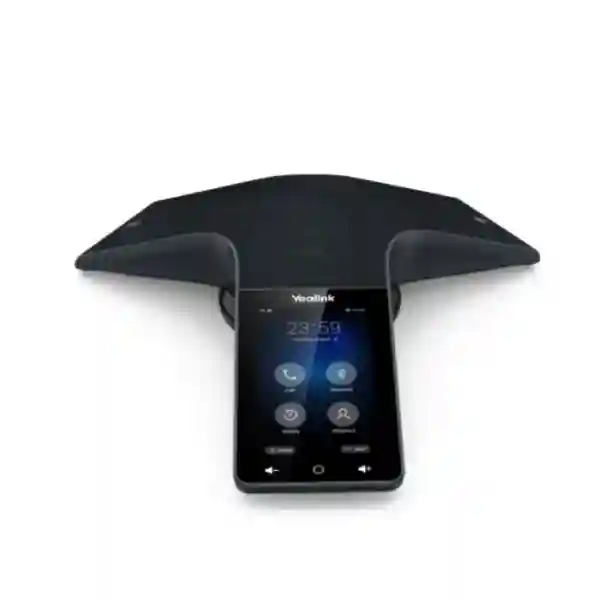
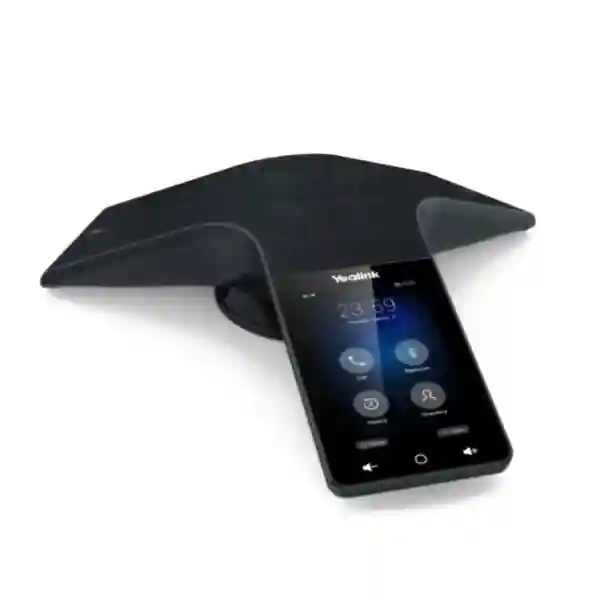
Yealink CP935W Wi-Fi Conference Phone
The Yealink CP935W is a wireless touch-sensitive IP conference phone designed for small to medium conference rooms. It brings together a 4-inch 480 × 800 capacitive touch display, six integrated microphones, 360-degree voice pickup to 20 feet / 6 metres, full-duplex audio, Yealink Noise Proof Technology, Smart Noise Filtering, dual-band Wi-Fi, Bluetooth 4.2 and USB-C connectivity. Its rechargeable 7800 mAh battery is specified by Yealink for up to 15 hours of talk time under ideal conditions, helping organisations create cleaner meeting spaces with fewer cables. Businesses evaluating a modern conference phone for boardrooms, project rooms, management meetings, hybrid working and SIP-based voice deployments can use the CP935W as a flexible endpoint that works over Wi-Fi and can also connect to PCs or mobile devices for hybrid UC scenarios.
A six-microphone array provides voice pickup around the table, with an official maximum pickup range of 6 metres.
Built-in 2.4 GHz and 5 GHz Wi-Fi lets the CP935W register a SIP account without a wired network connection.
Bluetooth 4.2 and USB-C connectivity allow the device to participate in hybrid meetings with computers and smartphones.
The 7800 mAh rechargeable battery is rated for up to 15 hours of talk time in ideal conditions, supporting flexible room placement.
Yealink CP935W overview and verified capabilities
The CP935W focuses on voice clarity, uncluttered installation and simple meeting control. Yealink specifies Optimal HD audio, full-duplex speakerphone operation with acoustic echo cancellation, background-noise suppression, Smart Noise Filtering and Noise Proof Technology. A 56 mm 5 W loudspeaker handles room audio, while the integrated six-microphone array captures participants around a table. The 4-inch touch screen presents the calling interface directly on the unit, reducing reliance on a separate controller. The phone supports one SIP account, call hold, mute, do-not-disturb, call transfer, call forwarding, call waiting, voicemail, call recording functions, redial and a five-way conference call.
For connectivity, the CP935W supports built-in Wi-Fi on 2.4 GHz and 5 GHz using 802.11a/b/g/n, Bluetooth 4.2, one USB 2.0 Type-C device port and a security slot. Its network stack includes SIP v1/v2, IPv4/IPv6, HTTP/HTTPS management, SNTP and standard security capabilities such as SRTP for voice encryption, TLS, HTTPS certificate management, secure boot and WPA2. Administrators can configure the unit from the phone, a browser, auto-provisioning services or the Yealink Device Management Platform. Before procurement, IT teams should confirm the intended SIP platform, WLAN security policy, coverage quality, firewall/NAT requirements and any corporate endpoint-management process.
Technical specification summary
| Display | 4-inch 480 × 800 capacitive multi-touch screen |
| Microphones | Built-in six-microphone array, 360° pickup |
| Pickup range | Up to 20 ft / 6 m |
| Wireless | Wi-Fi 2.4/5 GHz 802.11a/b/g/n; Bluetooth 4.2 |
| USB | 1 × USB 2.0 Type-C device port |
| Battery | 7800 mAh; up to 15 hours talk time in ideal conditions; approximately 4-hour charging time |
| Conference calling | 5-way conference call |
| Room type | Small to medium conference rooms |
Compatibility, deployment and buying guidance
A good conference-phone purchase starts with the room and calling platform rather than the device alone. For the CP935W, verify that the meeting room is genuinely within the small-to-medium size range, that participants normally sit within the six-metre pickup radius, and that the Wi-Fi signal is strong and stable at the intended table position. Because the endpoint can use a SIP account directly over Wi-Fi, buyers should confirm registrar details, extension policy, codecs, outbound proxy or NAT requirements and security settings with their PBX or hosted-voice provider. Organisations with central endpoint management should also decide whether the phone will be provisioned manually, via an auto-provisioning server or through the Yealink Device Management Platform.
The hybrid UC capability is particularly useful when the same room alternates between SIP calls and computer-based meetings. In that pattern, Bluetooth or USB can connect the CP935W with a PC or smartphone while the integrated microphones and speaker serve the room. Procurement teams should ask how frequently the room changes platform, whether users need a permanently installed conferencing appliance or a movable battery-powered unit, and whether local IT policy allows Bluetooth. The CP935W is not a substitute for a complete video-conferencing system when camera-based collaboration is mandatory, but it can be a strong choice for voice-first meeting rooms, audio bridge participation and hybrid meetings where the computer supplies the application layer.
Related FourTeck resources
For broader communications planning, businesses can review FourTeck IP phone solutions when comparing SIP endpoints, desk phones and voice architectures; IP PBX solutions for call-control planning; FourTeck Uganda for Uganda-focused procurement enquiries; FourTeck Kenya for Kenya-focused requirements; and FourTeck UAE for UAE business technology enquiries. For Tanzania requirements, the FourTeck Tanzania website is the primary regional point of reference.
Yealink CP935W Wi-Fi Conference Phone Tanzania
In Tanzania, the Yealink CP935W fits organisations seeking a professional audio-conferencing endpoint without permanently running a network cable to the meeting table. That can be useful for executive rooms, consulting spaces, training rooms, branch offices and shared meeting areas where furniture layouts change. The device registers a SIP account directly through Wi-Fi, so the first design question is WLAN quality: confirm reliable 2.4 GHz or 5 GHz coverage where the unit will sit, verify SSID and authentication policy, and check whether the voice platform is reachable through the organisation’s firewall and routing design. For larger offices, it is sensible to test real-world signal quality rather than relying only on access-point distance, especially where concrete walls, reflective surfaces or heavy wireless utilisation affect performance.
Tanzanian buyers should also map the room dimensions to the official 6 m, 360-degree microphone pickup range. A compact boardroom with participants around one central table is different from a long training room or hall. The CP935W is positioned for small-to-medium rooms, so buyers planning larger spaces should evaluate whether a different microphone architecture or complete room system is more appropriate. In day-to-day use, the 4-inch touch screen simplifies call control, while the six-microphone array, full-duplex design, echo cancellation and noise-management features are aimed at making conversation natural rather than forcing users to speak toward one fixed microphone.
For procurement, request a quotation that identifies the exact CP935W model, included accessories, power adapter, charging cradle, warranty terms offered by the seller, lead time, tax treatment and any configuration service required. If the phone will connect to an existing IP PBX, provide the PBX or hosted-SIP platform details so compatibility and provisioning can be checked before delivery. If the room also hosts laptop-based meetings, explain whether USB-C or Bluetooth integration is expected. The built-in 7800 mAh battery and rated talk time of up to 15 hours under ideal conditions can make the phone easy to reposition between meetings, but organisations should still define a charging routine. Tanzania buyers comparing conference phones should focus on acoustic fit, network readiness, user workflow and support requirements rather than headline specifications alone.
Yealink CP935W Wi-Fi Conference Phone Dar es Salaam
Businesses in Dar es Salaam often operate from offices where meeting rooms serve multiple purposes: customer meetings in the morning, management calls during the day and online collaboration later. The CP935W suits this mixed-use pattern because its Wi-Fi connection and rechargeable battery reduce dependence on a fixed Ethernet cable at the table. When planning a deployment, review the meeting room’s wireless environment before ordering. Busy office buildings may have many nearby wireless networks, so choosing the right band, access-point location and channel plan can be as important as the conference phone itself. Voice traffic should have stable connectivity and low latency, and the SIP service must be accessible under the organisation’s security policy.
For boardrooms and project rooms, the six built-in microphones provide 360-degree pickup within the manufacturer’s stated six-metre range. That makes seating layout an important factor: the phone should be placed near the centre of the participant area rather than at one end of a long table. The full-duplex speakerphone is designed to allow more natural two-way conversation, while acoustic echo cancellation and background-noise suppression support intelligibility in ordinary office environments. If the room sits next to a reception area, corridor or air-conditioning plant, buyers should still assess ambient noise because no conference phone can fully compensate for poor room acoustics.
Dar es Salaam procurement teams can prepare a more accurate quotation request by listing the number of rooms, expected users per room, SIP or PBX platform, wireless security method, preference for central provisioning and whether laptops or smartphones will connect through USB or Bluetooth. Also specify whether the phone must be mobile between rooms or remain assigned to a dedicated boardroom. The CP935W supports one SIP account and five-way conference calling, so organisations that need more complex bridge functions should distinguish between what the endpoint performs locally and what their PBX, cloud calling service or conferencing application provides. This simple planning step avoids buying an excellent endpoint for the wrong meeting workflow.
Yealink CP935W Wi-Fi Conference Phone Mwanza
For organisations in Mwanza, the CP935W can support regional offices, education administration, healthcare management, hospitality operations, logistics coordination and commercial teams that need dependable voice meetings without a complex tabletop installation. Its strongest deployment advantage is the combination of Wi-Fi and battery power. A meeting room that already has solid wireless coverage can host the unit without bringing a network cable to the table, which is useful where floor boxes or structured cabling are limited. Before installation, check signal quality throughout the room, particularly if the phone may be moved between several tables or adjacent meeting spaces.
The official audio design is intended for small-to-medium conference rooms. Six microphones capture speech in every direction up to the stated six-metre range, and a 5 W loudspeaker reproduces the remote side of the call. Full-duplex operation, Yealink Noise Proof Technology and Smart Noise Filtering support more comfortable conversation, but practical room conditions still matter. Hard walls, glass, empty rooms and high ceilings can increase reverberation, while generators, fans and open windows can add background noise. A short pilot call in the actual room can therefore be more valuable than relying solely on a spec sheet.
Mwanza buyers should consider how the phone will be managed after purchase. A single unit may be configured directly from the touch screen or browser, whereas a multi-branch organisation may prefer standardised auto-provisioning and central management. Ask the IT team whether firmware governance, configuration backups, logging and remote troubleshooting are part of the operating model. For commercial evaluation, request the exact package contents and written warranty conditions from the seller. If the conference phone is part of a wider voice refresh, document existing extension ranges, dial plans, voicemail requirements, call-transfer workflows and any VPN or firewall rules. The CP935W is easiest to deploy when these dependencies are known before the unit is placed in service.
Yealink CP935W Wi-Fi Conference Phone Arusha
In Arusha, the Yealink CP935W can be attractive to hotels, tour and travel operators, NGOs, professional services firms, education teams and corporate offices that regularly coordinate with colleagues and customers outside the city. The phone’s wireless design helps where meeting rooms need a clean, uncluttered appearance or where temporary meeting layouts are common. Because it can register a SIP extension over Wi-Fi, deployment can be straightforward when the organisation already has secure wireless coverage and an IP-based calling platform. The critical first check is not the phone’s feature list but whether the local WLAN and SIP service can deliver consistent call quality.
Meeting-room fit should be reviewed carefully. The manufacturer specifies the CP935W for small-to-medium rooms with up to six metres of 360-degree pickup. In a conventional boardroom, centre placement can help all participants remain within the microphone zone. The touch screen provides local meeting controls, while Bluetooth and USB-C allow the device to serve as a room audio peripheral for computers or smartphones. This can be valuable when one team uses a SIP PBX for internal calling but joins customer meetings through a laptop-based collaboration application. IT policies may restrict Bluetooth, however, so buyers should decide in advance which connection modes are permitted.
For Arusha procurement, consider room count, expected call frequency, preferred provisioning method and support model. The battery is rated up to 15 hours of talk time under ideal conditions, which gives flexibility but does not remove the need for disciplined charging. The supplied charging cradle should have a convenient power point, and users should know where to return the phone after meetings. If purchasing for a hotel or shared conference facility, define who controls SIP credentials and who can reset or reconfigure the device. A quote should clearly separate hardware from optional configuration, installation or voice-service work, avoiding ambiguity when budgets are compared.
Yealink CP935W Wi-Fi Conference Phone Dodoma
The CP935W can support organisations in Dodoma that need structured, professional audio meetings in government-adjacent offices, associations, training centres, educational institutions, project teams and private businesses. Its wireless network connection makes it suitable for rooms where running an Ethernet cable to the table is inconvenient. That convenience should be balanced by proper WLAN planning: confirm reliable coverage at the intended location, select the appropriate 2.4 GHz or 5 GHz band and make sure the SIP server, DNS, time service and any necessary outbound proxy can be reached from the voice device network.
For meetings, the six-microphone array is designed to capture users around the phone rather than from one narrow direction. With an official maximum pickup range of six metres and 360-degree coverage, the CP935W is best evaluated against actual seating arrangements. A U-shaped training layout or long rectangular room may need different planning from a compact executive table. The phone offers full-duplex speech, echo cancellation, noise management and a 5 W speaker, but good acoustic practice remains important. Soft furnishings can reduce reverberation, and placing the phone away from projectors, fans or open windows can improve perceived quality.
Dodoma buyers planning multiple units should standardise provisioning, naming and support. Decide whether each phone will receive a dedicated SIP extension, how authentication credentials will be stored, which firmware branch is approved and who can access the web interface. The Yealink management and auto-provisioning options can simplify consistent deployment when several rooms are involved. A procurement request should include the number of phones, room types, calling platform, Wi-Fi security, need for Bluetooth or USB use, desired configuration services and any requirements for user orientation. That information allows a seller to quote the relevant hardware and services without assuming needs that may not apply to the organisation.
Yealink CP935W Wi-Fi Conference Phone UAE
UAE organisations evaluating the Yealink CP935W often have mature meeting-room and unified-communications environments, so procurement should focus on how the phone fits the existing platform and user experience. The CP935W can register one SIP account through its built-in Wi-Fi and can also operate as an audio device for a PC or smartphone through USB-C or Bluetooth. This gives IT teams a practical way to support rooms that alternate between PBX calls and application-based meetings. Before deployment, verify SIP interoperability, WLAN authentication, VLAN or segmentation policy, firewall requirements and any endpoint-management standards used across the organisation.
The official design target is a small-to-medium conference room. Six microphones deliver 360-degree pickup over a stated range of up to six metres, while Yealink’s audio stack includes full duplex, echo cancellation, Noise Proof Technology, Smart Noise Filtering and background-noise suppression. In premium meeting spaces, room acoustics and user expectations may be demanding, so a pilot is valuable. Compare table length, seating count, ceiling height and hard reflective surfaces with the intended use case. For larger spaces or rooms where video is central to every meeting, evaluate a full room system rather than assuming an audio conference phone is the complete solution.
Commercially, UAE buyers should request the exact model, package contents, warranty offered, delivery terms, configuration scope and any support option as separate line items. The rechargeable battery supports up to 15 hours of talk time under ideal conditions and reduces cabling at the table, but facilities teams should still provide a convenient charging location. Buyers comparing regional options can visit FourTeck UAE for UAE-focused business technology requirements. When the CP935W is purchased for multiple sites, agree a common provisioning template so extensions, dial plans and security settings are consistent across rooms.
Yealink CP935W Wi-Fi Conference Phone Uganda
In Uganda, the CP935W can serve businesses, NGOs, education organisations, financial teams, healthcare administrators and distributed enterprises that regularly connect offices by voice. The built-in Wi-Fi and battery simplify meeting-room placement because the phone does not need a permanent network lead to the table. Successful deployment still depends on a reliable wireless network, so test the intended room at realistic busy-hour conditions. A strong signal indicator alone does not guarantee good voice quality; network congestion, roaming behaviour, upstream internet quality and SIP routing all influence the final call experience.
The phone is designed for small-to-medium rooms and offers a six-microphone array with 360-degree pickup to six metres. This means it can fit a boardroom or team space where participants cluster around a central table. Yealink’s full-duplex processing lets users speak naturally in both directions, while noise-management technologies help minimise distracting sound. If a Ugandan branch has frequent power interruptions, the built-in battery offers useful continuity for the endpoint itself, though the Wi-Fi access point, router, PBX and internet connection also require power if calls are to continue. Planning should therefore consider the complete communications path rather than only the handset.
For purchasing, document the current PBX or hosted SIP service, available Wi-Fi bands, security policy, number of rooms and need for mobile-device or laptop integration. Ask for the exact warranty, accessories and configuration scope in writing. Organisations with offices in several Ugandan cities may also want a standard naming and provisioning policy. For Uganda-focused technology enquiries, see FourTeck Uganda. Standardisation makes troubleshooting easier because every CP935W can follow the same firmware, extension, security and dial-plan conventions while still being assigned to a different branch or meeting room.
Yealink CP935W Wi-Fi Conference Phone Kampala
Kampala businesses often combine headquarters functions, client meetings and regional coordination in the same office, making a flexible conference phone useful. The CP935W supports this by joining the voice network over Wi-Fi and by operating with PCs or smartphones through USB-C or Bluetooth. An organisation can therefore use the phone for an internal SIP call in one meeting and as the room microphone and speaker for a laptop-based collaboration session in the next. The workflow should be defined clearly so users know which connection path to select and IT support can troubleshoot quickly when a meeting starts.
Because dense commercial districts can have crowded wireless spectrum, Kampala deployments should pay special attention to Wi-Fi design. Verify signal quality on both supported bands and, where possible, place the conference phone on a managed corporate WLAN with predictable security and quality-of-service policy. Check whether the SIP provider requires specific outbound ports, NAT handling or TLS settings. The CP935W supports modern security mechanisms including SRTP and TLS, but the correct configuration must be coordinated with the server side. A mismatch in certificates, encryption profiles or DNS can prevent registration even when the wireless connection itself is working.
Room acoustics remain equally important. The 6 m, 360-degree pickup range is intended for small-to-medium spaces, not a large auditorium. Position the phone centrally and keep it away from loud HVAC outlets, projectors or open windows. Procurement teams should include the room type and approximate participant count in quotation requests, along with PBX details and whether auto-provisioning is required. If several Kampala meeting rooms will use the same model, create a repeatable deployment checklist covering Wi-Fi credentials, extension assignment, firmware, security, test calls, Bluetooth policy and charging. A consistent process reduces setup time and makes support more predictable.
Yealink CP935W Wi-Fi Conference Phone Arua
For organisations in Arua, a wireless conference phone can be especially practical where meeting spaces are multipurpose and structured cabling is not available at every table. The Yealink CP935W connects to the network through Wi-Fi and uses an internal rechargeable battery, so its physical placement can be more flexible than a conventional wired conference endpoint. Buyers should, however, test the full communications chain: Wi-Fi coverage, router stability, internet or WAN quality, SIP registration and any VPN or firewall layer. The phone cannot compensate for unreliable upstream connectivity, so network readiness should be part of every deployment plan.
The acoustic specification is built around a small-to-medium meeting room, with six microphones providing 360-degree pickup across a maximum stated radius of six metres. Teams should measure the real seating area rather than room wall-to-wall dimensions. In a small boardroom, one centrally placed unit may cover the table effectively. In a longer room, participants at the ends may sit outside the intended pickup pattern, and a different system should be considered. Yealink Noise Proof Technology, Smart Noise Filtering, echo cancellation and full-duplex operation improve usability, but the physical room still affects sound quality.
Arua procurement requests should clearly identify whether the CP935W will be used only for SIP calls or also for laptop and smartphone meetings. USB-C and Bluetooth can extend its role beyond the PBX, but corporate security policy may determine whether Bluetooth is enabled. Ask the seller to state package contents, warranty terms, lead time and any configuration or support service separately. For non-technical users, arrange a short handover covering charging, mute, volume, call transfer and the correct way to switch between meeting sources. Good adoption is often less about adding features and more about giving users one clear routine for starting and ending calls.
Yealink CP935W Wi-Fi Conference Phone Mbarara
Mbarara organisations can use the CP935W to connect branch leadership, sales teams, operations staff and external partners from a dedicated meeting room without needing a wired network drop at the centre of the table. The Wi-Fi capability supports both 2.4 GHz and 5 GHz networks, and the battery gives the endpoint mobility within the office. Network administrators should decide which band and SSID are appropriate, verify that the voice VLAN or wireless segment can reach the SIP platform and ensure that DHCP, DNS and time services are available. If static addressing is preferred, document the address plan before deployment.
The six-microphone array and 360-degree pickup are intended to let participants speak naturally from around the table. With a stated maximum range of six metres, the CP935W should be matched to room scale and seating density. The full-duplex speakerphone reduces the artificial turn-taking common with lower-quality conference audio, while echo cancellation and noise-management features assist with clarity. For offices with tiled floors or bare walls, adding soft surfaces or changing the phone’s placement can improve results. A technical product should still be treated as part of a physical acoustic environment.
For Mbarara buyers, consider lifecycle management at the purchasing stage. Who will apply firmware updates? Who maintains SIP credentials? Is remote web access permitted? Will settings be standardised with other branches? Yealink supports browser management, phone-based configuration, auto-provisioning and its device-management platform, so the operational model can be scaled beyond one unit. If only one room needs a phone, manual configuration may be acceptable; if several branches will receive the same model, standardisation saves time. Request a quotation that separates hardware, deployment services and ongoing support so decision makers can compare offers on a like-for-like basis rather than relying on one bundled price.
Yealink CP935W Wi-Fi Conference Phone Gulu
In Gulu, the CP935W can support regional coordination for NGOs, education, healthcare, agriculture, logistics and commercial organisations that need a shared audio-conferencing point. Its battery-powered design is useful when a meeting room is not permanently equipped for voice, and Wi-Fi connectivity removes the need to run Ethernet across the floor. The best results come when the corporate wireless network is planned for real-time traffic. Test packet stability and call quality during normal operating hours, not only after hours when the network is quiet. If the SIP service is hosted elsewhere, upstream internet performance is also part of the user experience.
Within the room, the six microphones are designed for 360-degree voice pickup over a maximum six-metre range. Place the device near the centre of the speaking area and avoid blocking it with laptops, folders or decorative objects. The CP935W includes full-duplex audio, acoustic echo cancellation and noise filtering, but excessive environmental noise can still reduce intelligibility. For rooms used for training as well as meetings, check whether participants sit within the intended pickup zone. A room that regularly hosts a large audience may require a different microphone strategy even if the CP935W performs well in a smaller management meeting.
Gulu procurement teams should define the phone’s role: dedicated SIP conference endpoint, hybrid laptop speakerphone or a combination. That decision affects configuration, user instructions and security policy. Confirm whether Bluetooth is allowed and whether USB connectivity will be used. Ask for written details of included accessories, warranty, delivery terms and setup services. For multi-site organisations, record device name, MAC address, assigned extension, room location and firmware version in an asset register. This makes future support easier and helps IT teams distinguish a Wi-Fi problem from a SIP-account problem or a user-workflow issue when a call fails.
Yealink CP935W Wi-Fi Conference Phone Kenya
Kenyan organisations considering the CP935W may be replacing older analogue conference phones, adding meeting-room endpoints to a SIP platform or standardising voice equipment across branches. The phone’s Wi-Fi connection can simplify installation where Ethernet is not present at the table, while Bluetooth and USB-C give it a second role as an audio device for PC or smartphone meetings. This flexibility is most useful when the IT team documents the intended use cases in advance. Users should know whether to place a call from the SIP extension, pair a mobile device or connect a laptop, rather than experimenting at the start of an important meeting.
From an acoustic perspective, the CP935W is aimed at small-to-medium rooms with a six-microphone 360-degree array and a stated pickup distance of up to six metres. In a standard boardroom this may cover participants around a central table, but open-plan spaces and large training rooms should be assessed carefully. Network design also matters. Use a stable corporate WLAN, verify SIP reachability and consider QoS or traffic prioritisation where the network carries heavy data loads. Security teams should confirm the allowed encryption and management methods before provisioning.
A Kenya quotation request should identify the number of units, site locations, PBX or hosted-voice platform, Wi-Fi standards, preferred configuration method and any support expectations. Also ask whether firmware setup, SIP registration and user orientation are included or billed separately. Buyers can review FourTeck Kenya for Kenya-focused requirements and use FourTeck IP phone resources when planning related SIP endpoints. If the CP935W is part of a larger voice refresh, build a common dial plan, provisioning template and support process so conference rooms and desk phones operate under one manageable standard.
Yealink CP935W Wi-Fi Conference Phone Kuwait
For businesses in Kuwait, the Yealink CP935W offers a clean way to equip meeting rooms where a cable-free tabletop is preferred. Its integrated Wi-Fi handles SIP connectivity and its battery allows flexible placement, while the touch display keeps core call controls on the unit. The first technical step should be validating wireless and SIP compatibility with the existing voice environment. Confirm network authentication, supported security settings, SIP registration parameters, DNS and firewall policy. In centrally managed enterprises, decide whether configuration will be pushed through an auto-provisioning system or maintained through Yealink’s management tools.
Small and medium boardrooms are the intended environment. The six-microphone array captures sound in 360 degrees up to the manufacturer’s stated six-metre range, complemented by full-duplex processing, echo cancellation and noise filtering. High-quality corporate rooms may include glass walls, hard tables and ceiling speakers that affect acoustics, so a pre-deployment test is sensible. Place the phone centrally and confirm that every normal seating position falls within the pickup area. If the room is primarily used for video collaboration, determine whether the CP935W will function as an audio peripheral or whether a dedicated video room system is required.
Kuwait procurement teams should request clear commercial terms for the exact hardware, charging cradle, power supply, warranty, delivery and configuration services. The rated battery life of up to 15 hours talk time under ideal conditions enables long meeting days, but charging procedures should be built into room operations. Multi-room projects benefit from standardised extension naming, firmware and security profiles. If the phone will support visiting users, provide a simple laminated quick-start guide showing how to start a SIP call, mute, change volume, connect USB and end the session. Reducing user uncertainty often delivers more value than adding complexity to the room.
Yealink CP935W Wi-Fi Conference Phone Ghana
Ghanaian companies, professional firms, public-sector teams, schools and NGOs can consider the CP935W when they need a central room phone with modern SIP and hybrid-meeting connectivity. The built-in Wi-Fi makes physical installation simpler than a wired conference phone where the meeting table has no network outlet, and the rechargeable battery reduces the need for a permanent power cable during calls. The wireless advantage depends on a well-designed network, however. Check coverage, interference, authentication policy and bandwidth at the room location, and verify that the SIP platform can be reached securely from that WLAN.
The official microphone architecture uses six microphones for 360-degree pickup to six metres. That is well aligned with many management rooms and customer meeting areas, but not every conference space. Long rooms, classroom seating and open-plan areas may need another design. Yealink’s full-duplex audio, acoustic echo cancellation, Noise Proof Technology and Smart Noise Filtering are useful, yet they work best when the device is positioned correctly and the room does not have overwhelming ambient noise. A short live test with several participants can confirm whether the proposed placement supports natural conversation.
Before purchasing in Ghana, decide how the endpoint will be used and supported. If it is a dedicated SIP phone, capture server, extension and dial-plan details. If it will frequently connect to laptops, decide whether USB or Bluetooth is the preferred method and document that in user instructions. For several locations, adopt a standard configuration template and asset register. The quote should state the exact CP935W package, warranty terms, delivery assumptions and optional services. Buyers should avoid treating conference-phone procurement as an isolated hardware purchase; network, PBX, room acoustics and user workflow jointly determine whether the meeting experience is successful.
Yealink CP935W Wi-Fi Conference Phone Nigeria
In Nigeria, the CP935W is relevant to companies with branch networks, consulting teams, finance departments, healthcare administration, education, project offices and distributed operations that rely on frequent voice coordination. A cable-free conference phone can make deployment easier in leased offices and multipurpose meeting rooms, because the endpoint reaches the SIP platform through Wi-Fi and operates from an internal battery during calls. Organisations should still plan power continuity for access points, routers and WAN equipment because the phone’s battery alone cannot keep a network call active if the rest of the communications infrastructure loses power.
The CP935W is intended for small-to-medium rooms and provides six microphones with 360-degree coverage out to a stated six metres. Centre placement is generally the logical starting point, but final positioning should account for the actual seating arrangement. Its full-duplex speakerphone, echo cancellation and noise-management functions are designed to improve conversational quality. In offices with generator noise, air conditioners or street sound, conduct a realistic test during working hours. If participants routinely sit beyond the pickup envelope, a different audio solution should be considered rather than increasing the speaker volume and expecting the microphones to compensate.
Nigeria procurement teams should define the SIP service, network security, expected call patterns and support model before requesting pricing. The phone can be configured through its interface, browser, automated provisioning or Yealink management tools, so deployment can scale from one room to many branches. Ask sellers to separate the hardware price from configuration, installation and ongoing support, and request written warranty conditions. If laptop collaboration is a requirement, confirm the intended USB-C workflow and whether Bluetooth is permitted by policy. A concise deployment document covering Wi-Fi, SIP credentials, firmware, test numbers, charging and troubleshooting will make the phone easier to support across multiple sites.
Yealink CP935W Wi-Fi Conference Phone Seychelles
Businesses and organisations in Seychelles can use the Yealink CP935W for management meetings, hospitality operations, professional services, administration and remote coordination where clear voice communication is needed in a compact meeting room. Its Wi-Fi connection is helpful in rooms where a wired network socket is not conveniently positioned, and the rechargeable battery means the device can be moved or stored between sessions. Before procurement, check that the corporate WLAN provides consistent coverage and that the SIP or cloud voice service is reachable without restrictive firewall or captive-portal behaviour that could interfere with an IP phone.
Acoustically, the CP935W uses six built-in microphones for 360-degree pickup up to six metres and is marketed for small-to-medium rooms. Buyers should compare this to the actual table and seating layout. A hotel boardroom used by eight people may be well suited, while a banquet room or large training facility could need a more scalable microphone system. The device also supports Bluetooth and USB-C, enabling hybrid UC use with a smartphone or computer. This may be useful for meeting spaces that support different conferencing applications, but staff should have a simple, documented connection procedure.
Seychelles procurement teams should ask for a quotation that clearly identifies the device model, included charger cradle and power supply, warranty terms, delivery assumptions and any setup service. If the phone is intended to roam between rooms, establish responsibility for charging and returning it to a known location. If it remains installed, consider using its security slot according to site policy. For managed IT environments, standardise SIP credentials, firmware and administrative access. Good conference-room outcomes come from combining the correct endpoint with reliable networking, suitable acoustics and straightforward user instructions rather than viewing the device as a standalone solution.
Frequently asked questions
Is the Yealink CP935W fully wireless?
It includes built-in Wi-Fi for network connectivity and a rechargeable battery for operation away from a power lead during calls. It still needs to be charged, and the surrounding Wi-Fi, PBX or internet infrastructure must remain available.
What room size is the CP935W intended for?
Yealink positions it for small-to-medium conference rooms and specifies a 20-foot / 6-metre microphone pickup range with 360-degree coverage.
Can the CP935W connect to a laptop?
Yes. The unit includes a USB 2.0 Type-C device port and Bluetooth 4.2, supporting hybrid UC scenarios with computers and mobile devices.
How many microphones are built in?
The CP935W has six built-in microphones arranged for 360-degree room pickup.
Does it support direct SIP calling?
Yes. It supports one SIP account on the CP935W and can register through Wi-Fi, subject to compatibility and correct configuration with the intended SIP server or IP PBX.
Quotation checklist
For an accurate Yealink CP935W quotation, provide the number of units required, delivery destination, meeting-room size, approximate participant count, current PBX or hosted SIP platform, Wi-Fi security method, whether USB/Bluetooth hybrid meetings are required, any central provisioning requirement and the desired configuration or support scope. Ask the supplier to state exact package contents, commercial warranty, taxes, delivery terms and any optional service separately.
Decision recap
Choose the Yealink CP935W when you need a modern wireless SIP conference phone for a small-to-medium room, value 360-degree microphone coverage, want battery-powered placement flexibility and expect to use both SIP and computer/mobile meeting workflows. Before ordering, validate the room size, Wi-Fi quality, SIP compatibility, security policy and support model. Those checks are more important than purchasing on feature count alone.
Talk to FourTeck about the CP935W
Share your room dimensions, calling platform, number of units and location to prepare a more relevant quotation and deployment discussion. FourTeck can use these details to understand whether the CP935W aligns with the intended conferencing workflow and what configuration information should be confirmed before installation.




Reviews
There are no reviews yet.