
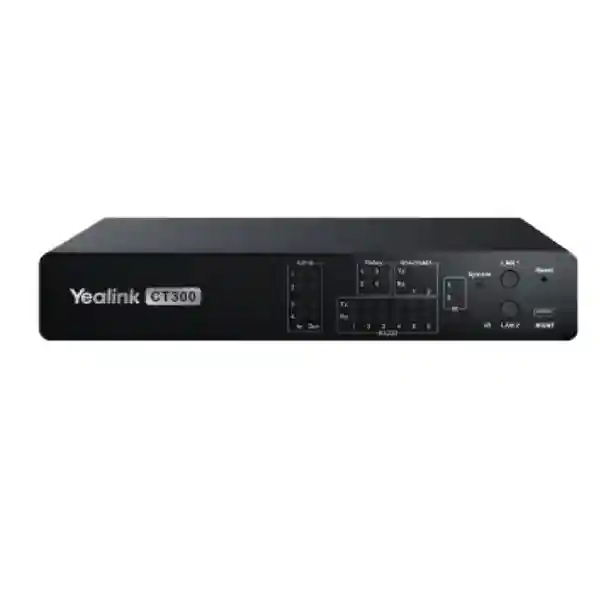
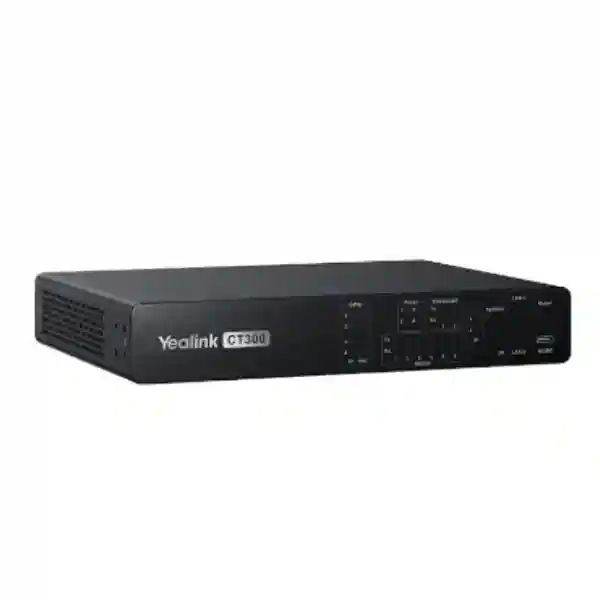
Yealink CT300 Room Device Navigator
The Yealink CT300 Room Device Navigator is designed for organizations that need a dedicated control layer for sophisticated meeting rooms, boardrooms, divisible spaces and professional AV environments. Instead of treating cameras, microphones, displays, processors, sensors and third-party devices as disconnected components, the CT300 gives integrators a platform for coordinated control, configuration, monitoring and automation.
Yealink positions the CT300 as its advanced room device navigator for AV-over-IP systems. It provides dual network connectivity, serial interfaces, relays, GPIO, infrared control and open API capability so room systems can respond to operational logic rather than relying on repeated manual actions. For buyers in Tanzania, the practical value is not simply the number of ports. The important question is whether the CT300 can become the dependable control center for the room design you are building now and the devices you may add later.
Direct answer
Choose the CT300 when a meeting room needs more than basic endpoint control: multiple wired control interfaces, room automation, third-party integration, central device management and a scalable path for Yealink ProAV deployments. It is especially relevant to larger or more complex spaces where control logic and connected equipment must work together predictably.
Two network ports support separation of management and device-control traffic in appropriate designs.
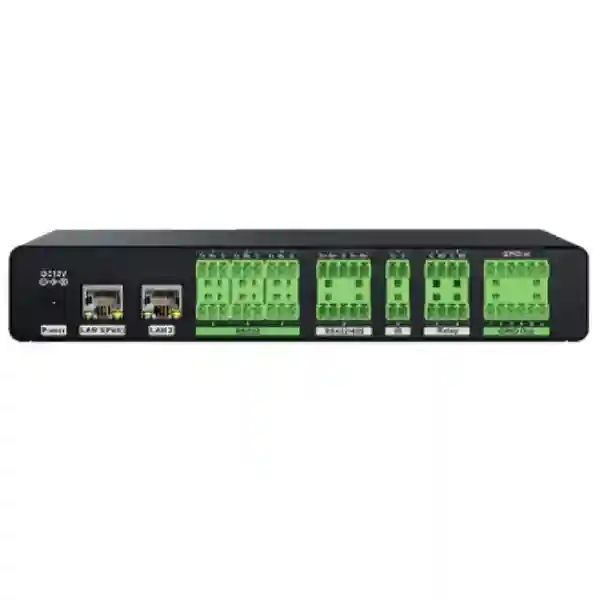
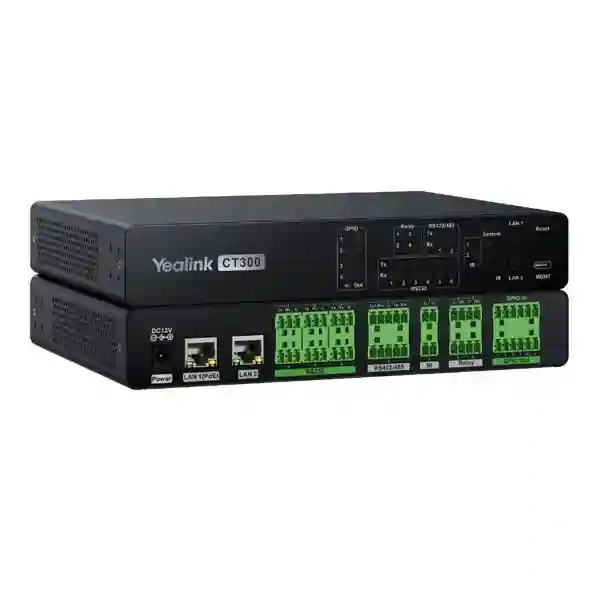
RS232, RS422/485, relay, GPIO, IR output and IR learning support diverse AV and room-control workflows.
Open API capability and custom device drivers help integrate third-party equipment into broader control logic.
The CT300 can be configured within Yealink Room Designer for device binding, automation and user-interface deployment.
What the Yealink CT300 solves
Modern meeting spaces often fail at the point where otherwise capable devices must operate as one room. A video-conferencing system can join calls, a display can show content, an audio processor can manage sound and a motorized screen can move, yet users still face several remotes, separate web interfaces and unclear startup sequences. The CT300 is intended to reduce that fragmentation by placing controllable functions behind a coordinated room-management layer.
The product is particularly useful when the room contains equipment that communicates in different ways. IP devices may use TCP, UDP or HTTP; installed AV products may use serial control; lighting or screen systems may depend on relay or GPIO actions; legacy devices may still rely on infrared. Rather than forcing every component to use one protocol, CT300 supplies several physical and logical paths that can be combined in one design.
This approach is valuable for boardrooms, training rooms, executive meeting spaces and divisible rooms where the room state can change. A good design can reduce the number of manual steps required before a meeting, provide a consistent control surface and give administrators a clearer view of connected Yealink devices. Automation should still be designed carefully: a successful project begins with a documented sequence of what should happen when the room starts, ends, combines, separates, changes source or enters an exception state.
Verified CT300 hardware and management capabilities
| Area | Verified capability | Planning relevance |
|---|---|---|
| Network | 1 PoE port, 1 RJ45 port, dual-network operation | Useful where management and device-control traffic should be separated. |
| Serial | 6 RS232 ports plus 2 RS422/485 ports in the hardware overview | Supports installed AV and control equipment that uses serial commands. |
| Infrared | 2 IR outputs and 1 IR learning port | Allows compatible IR-controlled equipment to be incorporated into room logic. |
| Relay | 4 normally open relays, rated 30VDC/2A | Supports contact-closure actions for suitable room equipment. |
| GPIO | 4 GPIO in/out supporting analog input or digital input/output | Useful for sensors, triggers and equipment states within designed limits. |
| Management | Device discovery, status monitoring, batch configuration and firmware upgrade for supported devices | Helps centralize room device administration. |
| Installation | Rack installation or flat installation | Allows placement in an AV rack or equipment area according to the project. |
Yealink lists average power consumption at 2.5 W, peak consumption at 3.3 W and standby at 1.7 W. The published chassis dimensions are 216 × 160 × 36.7 mm with a listed weight of 1.07 kg. Environmental guidance includes an operating temperature from -10°C to +45°C and operating humidity from 10% to 95%. These values help with rack, ventilation and power planning, but final project design should always use the latest Yealink documentation for the exact hardware and firmware being supplied.
Compatibility and integration planning
Yealink currently lists CT200/CT300 management compatibility with selected devices across cameras, microphones, speakers, touch panels, Microsoft Teams Rooms compute, DSP, AV processing, AV-over-IP and sensors. Examples in the published list include UVC86, SmartVision 80, CM20, CM50, CS10, CS10-D, MSpeaker II, MSpeaker Pro, CTP25, MTouch Plus, MTouch E2, MCore4, MCore Pro, AP08, AVHub, AVBridge, EN300, DE300 and YPS20. Compatibility is a living product-management topic, so a quotation should confirm the exact firmware and device combination rather than assuming that every Yealink endpoint can be managed in the same way.
Third-party integration is another important CT300 use case. Yealink Room Designer supports custom device-driver workflows for TCP, UDP and HTTP equipment as well as serial and GPIO-connected devices. That creates opportunities to link displays, switchers, screens, lighting interfaces or other controllable systems, but the presence of an interface does not automatically guarantee full compatibility. The integration team still needs command documentation, port mapping, network reachability, feedback behavior and a tested failure path.
When specifying a professional AV room, build the device list before building the control logic. Record every device, its protocol, IP address requirement, physical control interface, power source, mounting location and expected behavior. That preparation makes it easier to determine whether the CT300 has the right interfaces and whether additional network switches, converters or control accessories are needed.
Room control scenarios
Boardroom automation
A CT300 can act as the logic center for a boardroom where the user expects a single control experience for conferencing, display selection, room power and selected environmental actions. The design should prioritize predictable startup, clear manual overrides and documented recovery steps.
Divisible meeting rooms
Complex rooms may operate as one large space or as independent zones. CT300 is relevant where control behavior must change according to room state, and Yealink provides Room Designer workflows for divisible-room environments together with its broader ProAV components.
AV-over-IP deployments
The CT300 is positioned for professional AV-over-IP systems. Buyers should pair room-control planning with multicast-aware switching, VLAN design, PoE budgeting and endpoint compatibility so control and media networks remain supportable.
Before requesting a CT300 quotation
A useful quotation request should include the room type, number of rooms, meeting platform, existing Yealink equipment, third-party devices, intended control interface, network topology, rack location and any automation sequence you want to achieve. For each third-party device, provide the manufacturer and exact model. If the room already exists, photos of the rack and control equipment can help identify cabling and interface dependencies.
You can review the broader FourTeck Tanzania technology shop for adjacent conferencing, networking and infrastructure categories, or explore FourTeck Tanzania services when the requirement includes installation, integration or lifecycle support. The FourTeck Tanzania solutions overview also explains how meeting rooms connect with switching, displays, audio, structured cabling and wider business infrastructure.
Yealink CT300 Room Device Navigator Tanzania
For organizations evaluating the Yealink CT300 Room Device Navigator in Tanzania, the strongest use case is a meeting environment that has moved beyond a basic video bar and needs a dependable room-control layer. A CT300 project may involve a boardroom with multiple displays, ceiling microphones, dedicated speakers, a conferencing compute platform, camera control and third-party devices, or it may involve an AV-over-IP design where control must be coordinated across a wider set of endpoints. In either case, the purchase decision should be based on the entire room architecture rather than the controller alone.
Tanzania deployments can vary greatly by building age, rack availability, network maturity, power quality and the way meeting spaces are used. In a new corporate fit-out, it may be possible to design dedicated AV VLANs, equipment racks and structured cabling before walls and ceilings are finished. In an existing office, the integrator may need to work with installed switches, legacy displays, older control interfaces and limited cable pathways. The CT300 offers useful flexibility because its control options include IP, serial, relay, GPIO and infrared, but every interface should still be mapped to a specific device and tested against the actual command set.
Procurement teams in Tanzania should ask for a bill of materials that separates the CT300 from the other room components. Confirm whether the quotation includes compatible touch control, Yealink ProAV endpoints, PoE switching, rack accessories, cabling, configuration, commissioning and documentation. If the system must interact with third-party lighting, screens or displays, the quotation should also state who is responsible for obtaining the protocol information and validating control commands. This reduces ambiguity during installation.
The CT300 is not a substitute for good room design. Network capacity, switch features, acoustics, display placement, camera positioning, microphone coverage and user-interface design remain separate engineering decisions. For Tanzania businesses planning multiple rooms, standardizing naming, addressing, room templates and handover documentation can make future support much easier. A repeatable design also helps when branches are added later, because the next room can follow known control and cabling principles instead of being rebuilt from scratch.
Yealink CT300 Room Device Navigator Dar es Salaam
Dar es Salaam buyers are often designing meeting rooms for headquarters, financial offices, professional services firms, hospitality groups, logistics companies and organizations with regional teams. In these environments, the room frequently has a higher expectation of presentation quality and uptime than a casual collaboration space. The Yealink CT300 can be relevant when the room contains several controllable systems and users need a consistent way to start, operate and shut down the space without understanding the technical detail behind every device.
A practical Dar es Salaam deployment should begin with the network and rack. Identify whether the room devices connect to an existing corporate LAN or a dedicated AV network, which switch supplies PoE, how management access is protected and where the CT300 will physically reside. The controller supports rack or flat installation, so it can fit within an AV rack design or a suitably ventilated equipment location. Because professional rooms often accumulate converters, power supplies and adapters, cable management and labeling should be part of the project rather than an afterthought.
For executive boardrooms, automation should be designed around the real meeting sequence. A user may want to enter, wake displays, select the conferencing system, set the room to a standard presentation state and expose a simple control interface. At meeting end, the room may need to return equipment to a known state. The CT300 provides the control interfaces needed to build such logic, but the commands must be validated with the equipment actually installed. Where a display or peripheral is controlled by RS232, relay or IR, document that dependency so future replacements do not unexpectedly break the room workflow.
Organizations with multiple Dar es Salaam offices or floors should also consider template-driven deployment. A standardized room profile can define device naming, switch ports, IP ranges, supported firmware and touch-interface behavior. This creates a stronger procurement record and simplifies troubleshooting. When requesting a CT300 quotation, include floor plans or room photos, the preferred conferencing platform, all existing Yealink devices and the list of third-party equipment. That information enables a more accurate assessment than asking only for the price of the controller.
Yealink CT300 Room Device Navigator Mwanza
In Mwanza, the Yealink CT300 can suit organizations that need professionally managed meeting rooms in corporate offices, education, healthcare, mining-related operations, hospitality or regional administration. A major design concern is often serviceability: the room should be understandable and recoverable by local IT staff even if the original integrator is not standing beside the rack. The CT300’s role in centralized device management and control can support that goal when the deployment is documented correctly.
Start by separating what must be automated from what can remain manual. Not every device needs to be attached to control logic. Focus on tasks that improve reliability for users: selecting the right display source, controlling power states, activating a screen, changing room modes or exposing clear controls for conferencing. Complex automation that nobody can maintain may create more support risk than it removes. The CT300’s varied I/O provides flexibility, but a simple, tested control sequence is usually more valuable than a long list of unused integrations.
Network resilience also matters. If the room uses AV-over-IP, confirm the switching design, multicast handling, VLAN plan and PoE capacity for connected devices. Yealink’s current ProAV portfolio includes managed switch options designed around professional AV environments, and CT300 compatibility should be checked with the exact planned architecture. Where WAN connectivity is important for cloud meetings, internet redundancy may be considered separately from the local AV control network so the room remains manageable even when external connectivity is interrupted.
For procurement in Mwanza, ask the supplier to identify every included and excluded item. The CT300 package contains the controller and specific cables, power adapter, IR emitters, Phoenix connectors, mounting components and quick-start documentation according to Yealink’s published datasheet, but a complete room project may still require network switches, longer cables, touch panels, mounting hardware, displays or other endpoints. Clarifying those items before purchase is particularly important when equipment will be deployed away from the primary procurement office.
Yealink CT300 Room Device Navigator Arusha
Arusha organizations frequently host executive meetings, conferences, training sessions and regional collaboration. For hotels, NGOs, international offices, training facilities and businesses that receive external visitors, room usability can be as important as technical capability. The Yealink CT300 is relevant when the AV system includes enough controllable equipment that users would otherwise need several remotes or interfaces to prepare the room.
A strong Arusha design should give guests and staff a clear user path. The touch interface should expose only the controls they need, while more advanced settings remain with administrators. Yealink Room Designer can be used to create and deploy room-control interfaces associated with CT200/CT300 workflows. Depending on the supported room architecture, control can be presented through compatible touch devices or room-system interfaces. The exact deployment method should be validated against the firmware and endpoint models included in the project.
Hospitality and conference environments may also require rapid room reset between events. A documented automation scene can help return displays, audio and sources to a standard state after each session. Divisible spaces need additional planning because the room may operate as separate zones in the morning and as a combined hall later. The CT300 can form part of that control architecture, but partition state, audio routing, camera behavior and display logic should be tested under every supported room configuration.
When buying for Arusha, include operating staff in the design review. Their feedback often exposes practical requirements that are not visible on a technical diagram, such as the need for a physical override, fast source switching, clearer room labels or a simple recovery command. Procurement should request commissioning records, device names, network addresses and control mappings as part of handover. That information improves long-term maintainability and makes the investment more useful than a controller installed without operational documentation.
Yealink CT300 Room Device Navigator Dodoma
For Dodoma meeting-room projects, the Yealink CT300 can be considered where government, institutional, education, enterprise or administrative spaces need coordinated AV control. Such rooms may host formal meetings with multiple presenters, remote participants and strict schedules, so reliability and predictable operation matter more than novelty. The CT300’s combination of IP control, serial connectivity, relay, GPIO and infrared is useful when a room contains equipment from different generations or vendors.
Design the room around operational states. Define what equipment should be active for a video meeting, local presentation, hybrid session and room shutdown. Then map each required action to the correct protocol and interface. For example, an IP-controlled display may be handled through the network while a motorized screen may depend on relay contacts and another legacy device may use infrared. The controller can coordinate these actions, but each sequence needs timing, feedback and safe fallback behavior.
Security and administration should be considered from the beginning. The CT300 has web management and supports device management functions, so credentials, network access and management VLAN design should follow the organization’s IT policy. First-login password configuration should be treated as part of commissioning, and default or temporary credentials should not remain in the handover state. If remote administration is required, it should be provided through the organization’s approved secure access method rather than exposing management interfaces directly to the public internet.
Dodoma procurement teams can improve quotation accuracy by issuing a room schedule that lists quantity, room size, equipment type, preferred conferencing platform and existing infrastructure. Where several rooms are planned, note which rooms are identical and which require special control. This lets the integrator determine whether one template can be reused or whether each room needs unique programming. A well-defined schedule also makes it easier to compare proposals because bidders are working from the same assumptions.
Yealink CT300 Room Device Navigator UAE
The UAE market contains many sophisticated meeting-room and ProAV projects where the Yealink CT300 fits naturally into boardrooms, command spaces, training rooms and corporate collaboration environments. Buyers may be replacing legacy control processors, standardizing new meeting rooms or building AV-over-IP systems across multiple floors. In each case, the CT300 should be treated as part of an engineered room ecosystem rather than a standalone accessory.
A UAE project commonly involves coordination between IT, AV, interior fit-out, electrical and facilities teams. The CT300 can provide the control logic, but successful deployment depends on these teams agreeing on network segmentation, rack positions, display power, cable routes, touch-panel locations and third-party interfaces. Where rooms are handed over in phases, controller programming should be versioned and backed up so later changes can be traced.
For organizations with Tanzania and UAE operations, it can be useful to align room standards across both markets. The exact hardware count can differ, but the naming scheme, user-interface philosophy, supported conferencing platform and support documentation can remain consistent. That allows regional IT teams to understand a room more quickly when they move between offices. Buyers with UAE requirements can also review FourTeck UAE technology solutions as a regional reference point for broader infrastructure planning.
When sourcing a CT300 for the UAE, confirm the exact manufacturer part number, firmware requirements, included accessories and project scope. Avoid assuming that online reseller pricing includes professional commissioning, control-driver development or onsite integration. Those services can represent a meaningful part of a complex room project. A clear statement of work should identify device integration, user-interface design, testing scenarios, documentation and post-handover support responsibilities.
Yealink CT300 Room Device Navigator Uganda
In Uganda, the Yealink CT300 can support organizations building advanced meeting rooms where multiple devices need consistent control. Enterprises with regional branches, NGOs, financial organizations, education groups and hospitality operations may benefit when conferencing, display, audio and room functions are brought into a unified control workflow. The key is to start with room requirements rather than buying the controller first and looking for uses afterward.
Uganda projects should document network and power dependencies carefully. A professional AV room may rely on PoE devices, managed switching, WAN connectivity for cloud meetings and local control between endpoints. The CT300 itself can use PoE and also provides a 12V/2A power input. Decide which power method fits the rack and UPS strategy, then document it. If the meeting room is considered business-critical, the supporting switch and conferencing compute should be included in the same power-protection discussion.
Where a Uganda customer uses Yealink cameras, microphones, speakers, touch panels or ProAV components, check the current CT200/CT300 compatibility list before finalizing the design. Compatibility can depend on product generation and firmware, and new products may be added over time. Third-party integration should also be tested rather than inferred from protocol names alone. An RS232 port does not guarantee that a particular device’s complete command set is supported without correct driver configuration.
For regional coordination, the FourTeck Uganda site provides a related route for businesses with local communication, networking and collaboration requirements. Multi-country customers can standardize room templates across Uganda and Tanzania while still adapting each installation to local building, network and procurement conditions.
Yealink CT300 Room Device Navigator Kampala
Kampala has a strong concentration of corporate offices, development organizations, financial institutions, education facilities and hospitality venues that use hybrid meetings every day. In a simple room, an all-in-one meeting bar may be enough. The CT300 becomes more relevant when the room includes multiple displays, installed audio, third-party devices, dedicated room controls or automation requirements that exceed the capabilities of a basic conferencing endpoint.
A Kampala boardroom should be designed from the user’s point of view. A meeting participant should not need to know which network port controls the display or which relay operates a screen. Those details belong in the integration layer. The user should see a small number of obvious actions such as Start Meeting, Present, Room Controls and End Session. The CT300 can support this abstraction by linking underlying devices to automation logic and a suitable control interface.
The integrator should still preserve manual troubleshooting paths. If a third-party device stops responding, support staff need to know whether the problem is network reachability, serial cabling, an incorrect command, device power or the control processor. Proper labeling, port documentation and saved configuration reduce recovery time. For rooms used by external visitors, a visible quick-start card can complement the electronic user interface and reduce support calls.
Procurement in Kampala should compare proposals by scope, not headline hardware cost. One quotation may include only the CT300 while another includes touch control, room programming, switch configuration and commissioning. Ask each bidder to state assumptions, exclusions, firmware responsibilities and whether third-party control drivers are included. This creates a fairer comparison and helps the room reach a usable state rather than stopping at hardware delivery.
Yealink CT300 Room Device Navigator Arua
For Arua projects, the Yealink CT300 may be most valuable where a regional office, training center, institution or operational site needs a professional meeting room that can be supported with clear documentation. Distance from a primary integration center makes design discipline especially important. The control system should be stable, easy to understand and recoverable by local technical staff using a defined support process.
Avoid building unnecessary automation. Identify the few actions that cause the most user friction and automate those first. Common examples include powering the room, selecting display sources, changing conferencing modes and controlling compatible screens or environmental interfaces. Every automated function should have a reason, a tested command path and a fallback. This keeps the CT300 configuration focused and makes future maintenance less dependent on the original programmer.
For network-connected devices, reserve addresses or use documented DHCP assignments so endpoints can be found consistently. Keep CT300 management access on an appropriate administrative network and use strong credentials. If the room uses separate control and enterprise networks, document which interface connects to each segment. The CT300’s dual-network capability can help structure this design, but routing and firewall policy must still be configured according to the organization’s security model.
Arua buyers should also plan spares and lifecycle support for the overall room, not only the controller. Cables, touch devices, power supplies and network switches can affect availability just as much as the central processor. The handover pack should include the bill of materials, serial numbers, firmware versions, network diagram, room-control logic and supplier support contacts. That documentation is especially useful for regional sites where immediate onsite specialist access may not be practical.
Yealink CT300 Room Device Navigator Mbarara
In Mbarara, the CT300 can fit professional rooms for universities, healthcare organizations, businesses, public institutions and regional operations that need a more integrated AV experience. The controller is most appropriate when the room contains several systems that must behave as one. If the requirement is simply to join a video call from a small room, a CT300 may be unnecessary; if the requirement includes installed AV, room automation and multiple control protocols, its capabilities become much more relevant.
Planning should start with a room inventory. Record display models, conferencing endpoints, cameras, microphones, speakers, screens, lighting interfaces and any sensors. For each item, identify whether it is controlled over IP, RS232, RS422/485, relay, GPIO or IR. Then compare those needs against the CT300’s available interfaces. This prevents surprises after procurement and helps determine whether extra interface hardware is required.
The network team should participate before installation. Professional AV rooms can generate significant multicast and real-time traffic when AV-over-IP components are used. Managed switching, correct uplinks and appropriate VLAN design are therefore essential. The CT300’s control traffic is only one part of the room architecture. Conferencing media, content sharing and device management may follow different paths and need separate performance and security considerations.
For a Mbarara quotation, include expected room hours and support expectations. A room used occasionally by a small internal team can tolerate a different service model from a training facility that runs sessions throughout the week. Ask for clear acceptance tests: every button should trigger the intended action, room startup and shutdown should be repeatable, device status should be understandable and a recovery process should be demonstrated before final handover.
Yealink CT300 Room Device Navigator Gulu
Gulu organizations considering the Yealink CT300 should evaluate it as a room-management investment rather than a generic network device. Its strongest value appears where a meeting space combines conferencing equipment with installed AV and third-party control requirements. The controller can help turn these separate components into a defined operational workflow, which is particularly useful in training rooms, multipurpose spaces and formal meeting areas.
A resilient design should minimize dependencies that are difficult to troubleshoot remotely. Use stable cabling, label serial and GPIO connections, document switch ports and keep control programs under change management. If a device is replaced later with a newer model, verify that its protocol and command syntax still match the existing driver. Seemingly small substitutions can break automation if the new device expects different control behavior.
Room Designer can help integrators model and deploy Yealink ProAV environments, but the physical room remains the reference point. A technically correct control program cannot compensate for poor microphone placement, an undersized display or a congested network. Treat the CT300 as the orchestration layer sitting above well-designed audio, video and network components. When those layers are coordinated, users experience a simpler room even though the underlying technology is sophisticated.
Gulu procurement teams should request a configuration backup and as-built documentation before closing the project. The documentation should identify CT300 network settings, connected devices, interface assignments, automation scenes and administrator access procedures. If the room supports remote management, specify who is authorized to use it and how access is logged. These steps make the system easier to maintain as staff and suppliers change over time.
Yealink CT300 Room Device Navigator Kenya
Kenya organizations with sophisticated collaboration environments can use the Yealink CT300 as a central room-control processor for professional AV deployments. Nairobi headquarters, regional offices, universities, hospitality venues and conference facilities may need more control flexibility than a standalone Teams or Zoom room endpoint provides. CT300 is relevant when IP and physical control interfaces must be combined under customizable room logic.
For multi-room rollouts, create room types before creating bills of materials. A small meeting room, medium collaboration room and executive boardroom should each have a standard design. Only rooms that actually need advanced automation may require CT300. This avoids over-specification and helps procurement focus investment where the controller adds operational value. Once a standard room is validated, the configuration can inform later deployments while still allowing local adjustments.
If the project uses Yealink AV-over-IP components such as EN300 and DE300, review the network as part of the AV design. Managed switches must be selected for the expected traffic and feature requirements. Yealink’s current documentation identifies CT300 within its ProAV ecosystem and lists it alongside managed AV switches and other room-system accessories. Device compatibility and software versions should be confirmed when the bill of materials is finalized.
Companies with Kenya and Tanzania operations can compare regional technology requirements through the FourTeck Kenya site while maintaining a common room standard. Standardization can simplify training and support, but local installation conditions, availability and project scope should still be verified separately for each country rather than assumed from another market.
Yealink CT300 Room Device Navigator Kuwait
In Kuwait, the Yealink CT300 can be appropriate for enterprise boardrooms, government environments, training rooms and hospitality meeting facilities that require structured room control. Professional spaces often combine video conferencing with presentation systems, installed audio, multiple displays and environmental controls. A CT300 deployment can reduce the number of separate control methods by bringing supported devices into a coordinated workflow.
Thermal and rack planning should be treated seriously in equipment rooms. The CT300 itself has modest published power consumption, but it normally sits within a rack containing switches, processors, power supplies and other AV hardware. Ensure the rack has appropriate ventilation, cable organization and UPS strategy. The controller’s published operating range should be considered together with the requirements of every other component, because the room is only as reliable as its most vulnerable infrastructure layer.
For third-party integration, obtain command documentation before site commissioning. RS232, relay, GPIO and IR can control many kinds of equipment, but each device uses its own syntax and behavior. IP control can also vary between simple HTTP commands and authenticated API workflows. Testing these interfaces offsite or in a staging environment can reduce commissioning delays and reveal whether extra converters, licenses or vendor support are required.
Kuwait buyers should ask for a commissioning checklist tied to the intended user journey. Verify room startup, source selection, conferencing mode, presentation mode, audio state, display control and shutdown. Confirm how the system behaves after a power interruption or network switch reboot. If administrators will perform firmware updates, document the approved sequence and backup process. These practical controls protect the value of the system after installation is complete.
Yealink CT300 Room Device Navigator Ghana
Ghana businesses and institutions evaluating the Yealink CT300 should first determine whether the room requires a genuine automation processor. The product is designed for comprehensive control, configuration and monitoring in professional environments, and its capabilities are best used in spaces where several connected systems must be coordinated. That can include executive boardrooms, higher-education rooms, training centers and multi-purpose collaboration spaces.
A good Ghana deployment separates room-control requirements from conferencing-platform requirements. Microsoft Teams Rooms or another meeting platform handles the meeting application, while CT300 can orchestrate compatible room devices and automation. This separation helps technical teams understand which system is responsible when a problem occurs. If a meeting fails to join, the issue may be the conferencing platform or network. If a screen does not lower, the issue may be a relay path or control command.
Where rooms use a mix of Yealink and third-party equipment, build an interface matrix. Note the protocol, connector, command source and ownership of each device. The CT300 supports open API integration and custom device drivers through Room Designer workflows, but interoperability must still be proven. This is especially important for equipment that is already installed and may have limited documentation or proprietary control behavior.
Procurement in Ghana should also consider long-term change. Meeting rooms evolve as displays, cameras and conferencing platforms are refreshed. A well-documented CT300 control design makes these changes easier because the current interfaces and logic are visible. Ask the integrator to provide editable project files or an agreed support process, together with configuration backups and a final as-built diagram. This reduces dependence on undocumented knowledge held by one installer.
Yealink CT300 Room Device Navigator Nigeria
Nigeria has many enterprise, energy, finance, technology, education and hospitality organizations with complex meeting-room requirements. The Yealink CT300 can serve these environments where professional AV needs a flexible control processor capable of managing networked devices alongside serial, relay, GPIO and infrared equipment. Its value increases as the room contains more systems and more operational states that must be coordinated.
Power resilience is an important planning consideration for critical rooms. The controller itself consumes relatively little power, but the overall meeting system may include several devices that must recover cleanly after an interruption. Place the CT300, network switch, conferencing compute and other critical components within a coherent power strategy. Test restart order and verify that IP devices can be rediscovered or rebound as required after the network returns.
Large organizations may also want to standardize control interfaces across branches. CT300 supports customizable control logic, so the visual interface and room behavior can follow a corporate template. This improves user familiarity, but the template should be modular. A Lagos boardroom with multiple displays may need different controls from a branch training room with a single display. Standardization should define common principles without forcing identical hardware into every space.
For Nigerian procurement, request exact manufacturer identifiers and avoid relying on informal model descriptions. Yealink lists the CT300 part number as 1303169 on its product page. Confirm included accessories and ensure any professional services are shown separately from hardware. If quotation pricing includes configuration, identify the number of third-party drivers, interface screens and test scenarios included so scope changes can be managed transparently.
Yealink CT300 Room Device Navigator Seychelles
Seychelles organizations may use the Yealink CT300 in hospitality boardrooms, government meeting spaces, corporate offices and training facilities where room technology must be simple for users but flexible for administrators. In island environments, support planning is especially important: a room should not depend on undocumented configuration or specialized knowledge that is unavailable when a problem occurs.
The CT300 can help simplify the user experience by coordinating devices through room automation, but the installation should be designed for maintainability. Label all control connections, retain spare patch leads where appropriate and document the exact purpose of each serial, relay, GPIO or IR interface. If custom device drivers are used, preserve their configuration and the source protocol documentation. These practices make remote diagnosis much easier.
Network design should also support remote administration without compromising security. Keep management interfaces behind suitable firewall policy and use secure remote access methods approved by the organization. Because CT300 can separate network functions through dual ports in an appropriate design, integrators can structure management and device-control connectivity deliberately. The final topology should be documented so later network changes do not accidentally isolate room devices.
For Seychelles procurement, consider whether the project needs local spares or advance replacement planning for critical components. The CT300 package includes specific accessories, but a complete meeting room depends on many other items. A small stock of appropriate cables or power accessories may reduce downtime if shipping lead times are significant. The quotation should therefore distinguish the core controller, room endpoints, infrastructure, commissioning and optional spares so buyers can make informed lifecycle decisions.
Selection guidance: CT300 or a simpler room controller?
The CT300 is not required in every Yealink room. A small huddle space with one meeting bar, one display and no automation may already be easy to operate. CT300 becomes more compelling as the number of controlled devices, protocols and room states increases. If the room includes installed AV, AV-over-IP, motorized equipment, third-party devices, divisible-room logic or custom touch control, the business case becomes clearer.
When comparing CT300 with CT200 or another control approach, review the exact interface count, performance, automation complexity and future growth. Do not choose solely by price. The cost of replacing an undersized controller after cabling and programming are complete can exceed the initial savings. Conversely, buying a high-capability processor for a room with no automation requirement can add unnecessary complexity.
Ask the integrator to explain why CT300 is being specified. A strong answer should connect the product’s interfaces and management capabilities to specific room functions. If the proposal simply lists the controller without showing what it controls, request a clearer system diagram before approval.
Frequently asked questions
What is the Yealink CT300?
It is Yealink’s advanced room device navigator for professional AV and AV-over-IP environments, designed to control, configure and monitor in-room devices while supporting automation and third-party integration.
What interfaces does CT300 provide?
Yealink lists network, RS232, RS422/485, IR output, IR learning, relay, GPIO, MGMT and power interfaces. The hardware overview also identifies a PoE port and a separate RJ45 port.
Can CT300 control third-party devices?
Yes, Yealink documents open API capability and Room Designer custom-device workflows for IP, serial and GPIO-connected third-party equipment. Actual interoperability must be validated for each model and command set.
Does CT300 support rack installation?
Yes. Yealink lists rack installation and flat installation methods, and the package contents include mounting components.
Which Yealink devices work with CT300 management?
The current compatibility list includes selected Yealink cameras, microphones, speakers, touch panels, MTR compute, DSP, AV processors, AVoIP devices and sensors. Confirm the latest compatibility and firmware before ordering.
Is CT300 only for Microsoft Teams Rooms?
No. It is a room-control and ProAV device rather than a meeting application by itself. Yealink documents integrations with MCore-based rooms and MeetingBar scenarios, but the controller’s role is broader device management and automation.
What should I provide for a quotation?
Provide room quantity, dimensions, meeting platform, existing Yealink devices, third-party models, display count, audio design, network information, rack location and the automation behaviors you expect.
Does the CT300 include licensing?
Public Yealink product information emphasizes the hardware and control platform. Any software, service or third-party licensing required by a complete room should be confirmed in the specific quotation rather than assumed.
Quotation checklist
Quantity, room dimensions, seating, divisible-room requirement, rack position and expected operating hours.
Exact models of displays, cameras, microphones, speakers, touch panels, conferencing compute and third-party equipment.
PoE availability, switch model, VLAN plan, AV-over-IP requirements, UPS coverage and management access method.
Startup, shutdown, source selection, room modes, screen or lighting actions, overrides and failure recovery.
Decision recap
The Yealink CT300 is a strong fit when a room needs advanced control and automation across Yealink and compatible third-party devices. Its combination of dual network connectivity, serial ports, relay, GPIO, IR and open integration gives system designers several ways to coordinate room behavior. The controller is most valuable when its capabilities are tied to a clear room-control strategy, not simply added as another box in the rack.
For Tanzania projects, request a solution-level quotation that includes the complete room architecture, exact device compatibility, network requirements, programming scope and handover documentation. This makes it easier to compare proposals and protects the organization from discovering missing accessories or integration work after procurement.
Talk to FourTeck about your CT300 room design
Share your room size, device list, conferencing platform and automation goals. FourTeck can use that information to help frame the CT300 requirement alongside compatible conferencing equipment, switching, displays, audio and installation scope. For complex rooms, a system diagram and interface schedule are often the best starting points for an accurate quotation.
If you are planning multiple locations, include branch and country information so room templates can be considered consistently while still respecting local infrastructure and procurement conditions.




Reviews
There are no reviews yet.