
Yealink CTP25 Mount Kit Tanzania
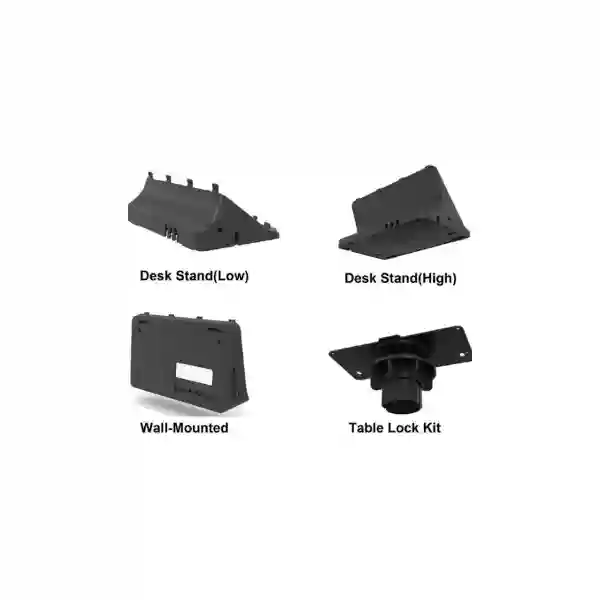
The Yealink CTP25 Mount Kit is a deployment accessory for organizations that want the CTP25 touch console positioned securely and neatly in a meeting room. Yealink documents three practical installation approaches for the CTP25 environment: place the controller on a table, mount it on a table, or mount it on a wall. The mount-kit family supports the physical installation choices that help a room designer place the touch interface where participants can reach it naturally without leaving the controller loose, poorly aligned or awkwardly positioned.
For buyers in Tanzania, the main decision is not simply whether a bracket is available. The useful question is how the CTP25 will be used in the room, where users will approach it, whether the controller needs to remain fixed, how cables will be routed, and whether the mounting surface is suitable. A properly planned installation improves usability, reduces avoidable cable clutter and helps the room feel like a permanent collaboration space rather than a collection of separate devices.
Quick answer
Yealink CTP25 Mount Kits are intended to provide secure installation options for the CTP25 touch console, with desk, table-lock and wall-mount approaches documented by Yealink. Choose the option based on room layout, user access, security, mounting surface and cable-management needs.
What is the Yealink CTP25 Mount Kit?
The Yealink CTP25 Mount Kit is part of the physical deployment ecosystem for the CTP25 touch console. Yealink lists CTP25 Mount Kits among its room-mount accessories and describes the mounting choices as a desk stand, wall mount and rotatable table-lock option. The CTP25 itself is a 10.1-inch collaboration touch console that Yealink supports for meeting-room use, and the mounting hardware helps determine where that interface sits in relation to users, furniture, cabling and room architecture.
In practice, a mounting kit is important because conference-room controllers are used repeatedly by many people. A loose controller placed at the edge of a table may be moved, disconnected or positioned badly. A fixed installation can create a more predictable interaction point. In rooms that require a clean tabletop, a wall-mounted controller can move the interface away from the main working surface. In rooms that still need flexibility, a controlled table-mounted approach can keep the device accessible while limiting unwanted movement.
The mount does not replace the need to plan the rest of the room. Display height, camera placement, microphone pickup, power, Ethernet, USB-C cable paths and furniture all influence the final experience. FourTeck Tanzania approaches the accessory as one part of a complete conferencing deployment, so buyers can discuss the mounting requirement alongside the room system rather than treating the bracket as an isolated purchase.
Yealink CTP25 mounting options
Desk placement
Desk placement is the simplest approach when the controller needs to remain movable and the room does not require a locked or wall-fixed installation. Yealink lists a standard high stand with the CTP25. The advantage is flexibility: the screen can be positioned where it is comfortable for users. The trade-off is that the device can be moved, and cable management needs attention so the controller does not become a source of clutter.
Secure table mount
Yealink documents an optional rotatable desktop mount with a 90-degree left-and-right rotation angle. This approach suits rooms where the controller should remain attached to the table while still being viewable from different seating positions. Procurement teams should confirm the furniture construction, drilling or clamping requirements, desired orientation and cable path before final installation.
Wall mount
The wall-mount approach is suitable when the controller should be placed away from the tabletop or installed at a consistent location near the meeting space. Wall mounting can support a cleaner table and may be useful where users should encounter the control interface at a predictable point. The wall structure, fixing method, cable route and user reach should all be checked before installation.
Verified CTP25 context that affects mounting
Yealink specifies the CTP25 as a 10.1-inch touch console with a 1280 × 800 display. The device has USB-A, two USB-C ports, an RJ45 Ethernet port with PoE support, a reset hole and a motion sensor. Those interfaces are relevant to physical deployment because mounting should leave appropriate access for required connections and allow cables to be routed without sharp bends or strain.
The CTP25 supports network and device-management functions used in meeting-room environments, and Yealink documents table placement, table mounting and wall mounting as supported installation approaches. The standard package is documented with a high stand and cable-management cover, while rotatable desktop and wall-mount options are optional mounting accessories. These distinctions matter when preparing a quotation: the required accessory should be identified from the intended installation rather than assuming every mount option is included with every controller package.
For purchasing accuracy, share the exact CTP25 deployment scenario with FourTeck: whether the controller will sit on a meeting table, be locked to a table, or be attached to a wall; the approximate mounting surface; the cable route; and the room system the CTP25 will be used with. That information helps reduce accessory-selection errors.
Why mounting matters in a professional meeting room
A conferencing controller becomes a shared user interface. Unlike a personal tablet, it may be used by employees, visitors, management teams, trainers and support personnel. Predictable placement reduces the time people spend searching for the control device at the beginning of a call. It also supports room standardization when several meeting spaces are deployed with similar layouts.
Physical stability is another consideration. Meeting tables are working surfaces, and controllers can be moved while people connect laptops, place documents or rearrange seating. A secure table mount can keep the CTP25 in a designated area. Wall mounting can reduce competition for tabletop space, especially in smaller rooms. The correct choice depends on how participants enter and use the room rather than on a single universal mounting rule.
Cable management also affects long-term reliability. A neat installation can reduce accidental pulling and help support teams understand where cables run. When the controller is mounted, cable length and direction should be planned before fixing the hardware. This is especially important when Ethernet, PoE or USB-C connections pass through furniture, floor boxes or wall channels.
Compatibility and room-planning guidance
The mount kit is intended for the Yealink CTP25, so the first compatibility check is straightforward: confirm that the room controller is the CTP25 and not a different Yealink panel or previous-generation touch console. Accessories designed for one panel should not be assumed to fit another device simply because the products have a similar appearance.
The second compatibility check is mechanical rather than electronic. For a table-lock installation, inspect the table construction, underside access and the location of power or cable channels. For a wall installation, confirm wall material, safe drilling zones, available cable entry and the desired screen height. In executive rooms, boardrooms and training spaces, the controller position should also avoid interfering with chairs, document areas or sight lines.
The third check is system context. Yealink’s CTP25 support materials identify the device within Yealink meeting-room solutions, with current support information including Android-based MeetingBar and MeetingBoard environments. Exact compatibility can change with product generations and firmware, so the safest purchasing workflow is to provide the complete room-system model when requesting the mount. This allows the controller, mounting hardware and room system to be considered together.
For broader meeting-room design, explore FourTeck Tanzania’s video conferencing and integrated technology portfolio. The site covers room systems, displays, networking and supporting infrastructure, which are often planned together when a controller is being installed.
Choosing between table and wall mounting
| Decision area | Table mounting | Wall mounting |
|---|---|---|
| User access | Good when participants control meetings from the table. | Good when a fixed control point is preferred away from the tabletop. |
| Security | A locked table mount can discourage casual movement. | Fixed wall installation can keep the controller in a defined location. |
| Cable routing | Plan entry through or under furniture. | Plan wall channel, conduit or concealed route where appropriate. |
| Room style | Natural for boardroom and conference-table interaction. | Useful where table space or fixed room-control placement matters. |
| Pre-installation check | Furniture material, mounting access and cable path. | Wall material, fixing method, height and cable path. |
Yealink CTP25 Mount Kit Tanzania
Organizations in Tanzania increasingly design meeting rooms as permanent collaboration environments rather than temporary laptop setups. In that context, the Yealink CTP25 Mount Kit is a small but practical component. A controller that is positioned consistently can make the room easier to use and can support a cleaner installation. Tanzania buyers should begin with the room type: a small huddle space, executive meeting room, training room, boardroom or larger conference environment may each favor a different controller position.
Before ordering, identify whether the CTP25 will be placed on the meeting table, secured to the furniture with a rotating mount, or installed on a wall. Then check the location of Ethernet, power and any USB-C path required by the room design. This matters because an attractive mounting location can still create problems if cables must cross walkways, stretch around furniture or remain exposed where they can be disconnected accidentally.
For new room builds in Tanzania, the mounting choice is best made before the furniture and cable routing are finalized. For upgrades, inspect the existing table and wall construction first. A retrofit may require a different approach from a new installation. If the room already has a display, video bar, camera or audio system, document those components so the controller accessory can be reviewed within the complete collaboration environment.
FourTeck Tanzania’s technology enquiry page can be used to share the CTP25 quantity, room type and preferred mounting method. Providing that context is more useful than requesting a generic bracket because the quotation can be aligned to the real installation requirement.
Yealink CTP25 Mount Kit Dar es Salaam
Dar es Salaam businesses often operate meeting spaces in corporate offices, financial organizations, hospitality environments, project offices, professional-service firms, training facilities and regional headquarters. For these rooms, the Yealink CTP25 Mount Kit can help convert the CTP25 from a loose tabletop device into a more deliberate part of the room design. The key is to match the mount style to how people actually use the space.
In a formal boardroom, a secure table mount may be attractive because the controller remains close to participants while staying in a predictable position. In a compact room where every part of the table is used for laptops and documents, wall mounting may free working space. In a flexible room, a standard desk placement may be adequate when physical security and fixed positioning are less important. There is no single correct answer; usability and infrastructure should guide the decision.
Dar es Salaam procurement teams should also consider how the installation will be serviced. The controller must remain accessible enough for legitimate maintenance while the cables should be protected from repeated movement. If a meeting table includes cable wells, floor boxes or concealed pathways, include those details in the requirement. If wall mounting is planned, a photo of the intended wall area can help clarify the likely cable route and mounting conditions.
When preparing a quotation request, list the number of CTP25 controllers, their associated Yealink room-system models, the preferred mount type and the room count. This helps distinguish between a single accessory purchase and a standardized multi-room deployment where consistent mounting and cable management are valuable.
Yealink CTP25 Mount Kit Mwanza
For organizations in Mwanza, the CTP25 mount should be selected with the full room environment in mind. Businesses may be equipping management rooms, training spaces, branch offices or operational facilities where video collaboration reduces travel and connects teams across locations. In these rooms, a stable controller position contributes to a predictable meeting experience because users know where to start, control and end sessions.
A table-mounted controller is often practical where the central meeting table is the main point of interaction. The optional rotatable mount documented by Yealink can support shared access around the table. Before installation, inspect whether the furniture can accommodate the required fixing method and whether cabling can pass cleanly to the controller. If the furniture is frequently rearranged, a fixed table solution may not suit the room’s operational pattern.
Wall mounting can be attractive where the controller should remain independent of furniture layout. That can be useful in rooms that are occasionally reconfigured for presentations or training. However, wall mounting also introduces decisions about screen height and user reach. The controller should not be placed so high that seated users struggle to operate it or so low that it becomes inconvenient. The physical wall construction and cable path should be confirmed before drilling.
For a Mwanza quotation, include room dimensions, approximate seating, controller quantity and existing Yealink conferencing equipment. If the project includes networking or display changes as well, mention those requirements so the mount can be planned as part of the room rather than added after other installation decisions have already been made.
Yealink CTP25 Mount Kit Arusha
Arusha organizations may use collaboration rooms for hospitality management, tourism operations, administration, NGOs, professional services, training and multi-site coordination. The Yealink CTP25 Mount Kit is relevant wherever a CTP25 needs a more deliberate installation position. The accessory does not improve network quality or room acoustics by itself, but it can improve the physical organization and usability of the meeting-room interface.
When designing an Arusha room, consider how many people normally sit at the table and who is expected to operate the controller. A central table position can make sense when multiple participants need access. A side position can be better when one meeting owner typically controls sessions. Wall mounting may suit a room where users should operate the panel on entry or where furniture space is limited. These choices are part of the user-experience design, not just hardware installation.
The cable route deserves equal attention. A CTP25 installation may involve Ethernet/PoE and USB-C connectivity depending on the system workflow. Avoid selecting a mount location simply because it looks clean from the front. Verify what happens behind the panel or under the table, whether connectors remain serviceable and whether cables can be secured without excessive tension.
Arusha buyers should provide the exact CTP25 model context and room-system details when asking for a mount kit. If several rooms are being standardized, identify whether each room has the same furniture and wall conditions. A consistent accessory strategy can simplify user training and support, but only when the physical environments are similar enough to accept the same mounting method.
Yealink CTP25 Mount Kit Dodoma
Dodoma meeting-room projects can involve government-related environments, administrative offices, education, professional services, project teams and organizations coordinating with other regions. The CTP25 mount kit can support a more permanent room-controller installation where consistency and tidy presentation are priorities. A well-positioned interface reduces uncertainty for occasional users who may not be familiar with the equipment.
For a formal meeting room, securing the controller to the table can help maintain a predictable location. If the room is designed with a central cable spine or integrated table connectivity, plan the controller mount together with those elements. Where the meeting table must remain uncluttered for documents or laptops, wall mounting can be considered, provided the wall location is accessible and cabling can be routed safely.
Procurement should separate the controller from the mounting accessory in the bill of materials when appropriate. Yealink’s documentation distinguishes the standard high stand from optional rotatable desktop and wall-mount options. That means buyers should not assume a particular optional mount is included unless it is explicitly listed in the quotation. A precise accessory description is especially important when several rooms are being deployed.
For Dodoma projects, share photos or a simple room sketch when the installation is not straightforward. The goal is to avoid buying an accessory that is mechanically correct for the CTP25 but unsuitable for the furniture, wall or cable route at the actual site.
Yealink CTP25 Mount Kit UAE
Organizations sourcing Yealink meeting-room accessories for UAE deployments often manage multiple offices, standardized boardrooms and high-usage collaboration spaces. In these environments, the CTP25 mounting decision should be documented as part of the room standard. A standard can specify whether controllers sit on a high stand, use a fixed rotatable table mount, or are installed on the wall according to room type.
A multi-room standard can reduce variation, but room conditions still matter. Executive boardrooms may use custom furniture where mounting points must be coordinated with the furniture supplier. Training rooms may need flexible layouts that make table locking less desirable. Huddle spaces may benefit from a wall-mounted controller that preserves a small working surface. Each room should be checked before copying a mounting choice from another site.
For UAE procurement, identify the exact CTP25 quantity and whether the order needs the rotatable desktop mount, wall mount or only the standard placement configuration. When the project includes complete Yealink room systems, it can be useful to align accessory quantities with the room schedule so every controller is paired with the correct mounting hardware.
For related regional technology sourcing, FourTeck’s UAE site at FourTeck UAE can support broader IT and collaboration requirements. For Tanzania-bound projects, use the Tanzania enquiry path so requirements remain associated with the correct destination and installation context.
Yealink CTP25 Mount Kit Uganda
Uganda buyers planning Yealink collaboration spaces can use the CTP25 mount kit to create a stable control point that fits the meeting-room layout. Before choosing the accessory, identify whether participants will operate the panel while seated, while entering the room, or from a dedicated host position. That behavior often determines whether table or wall mounting feels more natural.
A secure table mount can suit boardrooms and conference rooms where the controller belongs on the main table. Wall mounting can work well when the table needs to stay clear or when the controller should not move with furniture. For either approach, cable paths should be planned before installation. Avoid leaving connectors under repeated strain or routing cables where chairs and foot traffic may interfere with them.
If the Uganda deployment includes several branches, document each site’s room type and furniture before standardizing the same kit everywhere. A mount that works perfectly in one boardroom may not suit a smaller branch room. Group rooms by similar physical conditions and user workflows, then select the mounting style accordingly.
For broader Uganda technology enquiries, FourTeck Uganda provides a regional FourTeck point of reference. The important purchasing information remains the exact controller model, quantity, mount style and room-system context.
Yealink CTP25 Mount Kit Kampala
Kampala offices frequently combine local meeting-room collaboration with remote participation from branches, regional teams and international partners. In a dedicated Yealink room, the CTP25 controller is used repeatedly, so mounting can affect how quickly users understand the space. A controller that always sits in the same location can reduce setup friction and discourage ad-hoc relocation.
For high-traffic rooms, consider how the mount handles repeated interaction. The optional rotatable table mount can allow access from different seating positions while retaining the controller at the table. Wall mounting can make sense in reception-adjacent meeting rooms, training rooms or spaces where the panel should remain at a defined control point. The selection should follow the room workflow rather than a preference for one hardware style.
Facilities teams should confirm that the chosen surface can accept the installation. Tables with glass, composite cores or internal cable channels can require special care. Walls may contain electrical or data routes that should be identified before fixing hardware. For both mounting methods, the final panel height and angle should make the touchscreen comfortable to view and operate.
Kampala buyers preparing a quotation can improve accuracy by attaching room photos, furniture details and the Yealink room-system model. This creates a clearer basis for accessory selection than requesting a “CTP25 bracket” without defining whether a desk, table-lock or wall solution is required.
Yealink CTP25 Mount Kit Arua
For Arua organizations using video conferencing to connect with other offices, partners or project teams, a permanently organized meeting room can make remote collaboration easier to support. The CTP25 mount kit helps address one physical part of that organization: where the room controller is placed and how securely it remains there.
Smaller rooms may not have much spare table area. In such cases, wall mounting can be considered if the wall location is convenient for users and there is a sensible cable route. Where the meeting table remains the natural control point, a table-mounted configuration may provide more direct access. Users should not have to stand up repeatedly just to operate routine meeting functions unless that behavior is intentional in the room design.
For remote or branch environments, maintainability is important. The mount should secure the controller without making normal service unnecessarily difficult. Document where cables run and how the panel can be accessed so future troubleshooting does not require guesswork. If the room is being installed by one team and supported by another, clear documentation is particularly valuable.
Arua purchasing teams should confirm exact quantities and accessory type before ordering. If several branch rooms are involved, create a room-by-room schedule showing whether each location needs desk placement, a table-lock mount or a wall mount. This avoids assuming that all sites have identical furniture and wall conditions.
Yealink CTP25 Mount Kit Mbarara
Mbarara organizations evaluating the Yealink CTP25 Mount Kit should focus on how the meeting room will be used throughout the day. A controller may serve formal management meetings, training calls, supplier discussions and internal collaboration. The mount needs to keep the interface accessible without competing with laptops, notebooks and other equipment on the table.
When a fixed table installation is preferred, check the underside of the furniture and identify whether there are structural supports or cable trays that could interfere with mounting. If wall mounting is planned, confirm the position relative to doors, displays and user seating. The touchscreen should be visible and reachable without forcing awkward movement.
Cable management should be documented as part of the accessory decision. Because the CTP25 includes network and USB-C interfaces, installations can vary depending on the room-system design. Leave enough service allowance for connectors while preventing excess cable from becoming exposed. If a cable-management cover is used, ensure it does not create excessive bending at connector points.
For Mbarara deployments, the quotation request should identify whether the CTP25 controller is already owned or is being purchased as part of a larger conferencing project. If the controller is existing, provide its exact model details. If the entire room is new, include display, camera, audio and network requirements so the mounting position can be planned within the broader design.
Yealink CTP25 Mount Kit Gulu
Gulu meeting-room projects can benefit from a clearly defined controller location, particularly where the room is shared by many users. The CTP25 mount kit provides choices that can help make that location permanent or semi-permanent. The value is operational consistency: users encounter the same control point each time rather than searching for a moved device or untangling a loose cable.
For rooms with a fixed conference table, a secured table mount can be a logical choice. For multipurpose rooms where furniture changes frequently, a wall mount may preserve controller placement while the rest of the room is reconfigured. If neither fixed approach is appropriate, the standard desk placement remains available. The decision should be based on room behavior and furniture, not on the assumption that fixed mounting is always better.
Before drilling or attaching hardware, check cable reach and connector access. A mount location that is only a few centimeters away from the intended path can still create stress if cables must bend around furniture edges. For wall installations, plan whether the cable will be surface-routed, contained in a channel or concealed through the wall according to the site’s construction and policies.
Gulu buyers should include room photos and measurements when possible. These simple details help installers and procurement teams discuss the same physical environment and can prevent accessory changes late in the deployment.
Yealink CTP25 Mount Kit Kenya
Kenya organizations deploying Yealink room systems across corporate offices, schools, hotels, professional firms and branch networks can use a consistent CTP25 mounting strategy to improve room standardization. Standardization is most useful when it defines not just the product but also the intended user interaction, cable route and mounting height.
Table mounting can suit rooms where meeting control naturally happens from the center or head of the table. Wall mounting can support compact rooms, reception-linked spaces or environments where furniture layouts change. The optional rotatable desktop approach is particularly relevant when participants on more than one side of the table need to view the console while keeping it secured.
For larger Kenya deployments, create a room schedule that identifies each room name, size, CTP25 quantity, associated Yealink system and mount type. That document can be used during procurement, installation and handover. It also helps prevent accessory shortages caused by treating all controllers as identical line items without defining the physical deployment.
For regional Kenya technology requirements, FourTeck Kenya provides a relevant FourTeck regional site. For Tanzania installations, continue to use the Tanzania contact route so the enquiry includes the correct destination, room context and project requirements.
Yealink CTP25 Mount Kit Kuwait
Kuwait meeting-room deployments often emphasize clean interiors and standardized collaboration spaces. The CTP25 mount kit can support that objective by giving the touch controller a defined physical position. In executive spaces, the visual integration of the controller with furniture may matter almost as much as the functional mounting method, so coordination with interior and AV teams can be useful.
A rotatable table mount can keep the controller available to different participants while maintaining a controlled location. Wall mounting can reduce tabletop clutter, but it should be tested against the typical user workflow. If every meeting participant naturally sits at the table, placing the panel on a distant wall may reduce convenience. Conversely, a room designed around a presenter or facilitator may benefit from a wall control position.
Mechanical details should be resolved before final procurement. Check furniture thickness and construction for table installations. Check wall finish, substrate and concealed services for wall mounting. Confirm that cable routes remain compatible with the selected position and that the panel can be accessed for maintenance.
For multi-country organizations, maintain the same accessory naming convention in purchasing records so the CTP25 mount is not confused with mounts for other Yealink touch panels. Exact model association is a simple but important part of procurement control.
Yealink CTP25 Mount Kit Ghana
Ghana businesses planning Yealink collaboration rooms can use the CTP25 mounting choices to align the controller with local room layouts and user practices. The physical accessory is most valuable when it solves a defined need such as preventing movement, reducing table clutter, improving access or standardizing several rooms.
Start by observing how people use the room. If one chair position usually hosts the meeting, locate the panel there. If control is shared, a central or rotatable table mount can be useful. If the room is multipurpose or the table has little spare surface, wall mounting may be a better fit. These decisions should be made before final cable installation so the panel is not forced into a location simply because connectivity is already fixed elsewhere.
For larger deployments, mounting can also affect asset management. A secured controller is less likely to be moved between rooms, which helps keep each room’s equipment set complete. Documentation should note which mount type is used and how the panel is connected. This makes support easier when multiple sites or service teams are involved.
Ghana procurement requests should identify the CTP25 quantity, room-system model, preferred mount style and installation environment. Avoid assuming that a wall mount or table-lock kit is included unless the quoted line item explicitly states the accessory.
Yealink CTP25 Mount Kit Nigeria
Nigeria organizations may deploy collaboration rooms across headquarters, branches, training centers and customer-facing facilities. When the same Yealink room design appears in many locations, the CTP25 mount can become part of a repeatable room standard. A repeatable standard reduces variation for users and support teams, but each site should still be checked for furniture and wall compatibility.
In busy offices, securing the controller can help preserve the room’s intended setup. A table-lock solution can keep the panel available on the meeting table while allowing controlled rotation. A wall solution can maintain a fixed location independent of furniture movement. Standard desk placement can remain appropriate where flexibility matters more than permanent fixing.
For branch deployments, accessory planning should happen alongside network and power planning. The mount itself is mechanical, but the controller still depends on its required connections. A room should not be handed over with a neatly mounted panel and poorly routed cables. Include cable length, pathway and service access in the installation checklist.
Nigeria buyers can reduce quotation ambiguity by stating the exact desired accessory instead of asking only for a “Yealink CTP25 stand.” Use clear wording such as wall mount, rotatable table-lock mount or standard table placement requirement, and include the associated room-system details.
Yealink CTP25 Mount Kit Seychelles
Seychelles organizations in hospitality, administration, professional services and multi-site operations may rely on video collaboration to connect teams and external partners. In carefully designed meeting spaces, the physical presentation of technology matters. The CTP25 mount kit can help integrate the touch controller more deliberately into the room rather than leaving it as a movable accessory.
Hotels and guest-facing spaces may prefer mounting approaches that keep equipment tidy and predictable. Corporate rooms may prioritize shared access around the table. Smaller offices may prefer wall installation to maximize limited furniture space. In each case, ensure the controller remains easy to operate and that the selected location does not create a difficult cable route.
Environmental and building conditions can also influence installation planning. Wall finishes, custom joinery and imported meeting-room furniture can require coordination before drilling or attaching hardware. Photos, measurements and construction details can help determine whether the intended mount location is practical.
For Seychelles quotations, include destination, quantity, controller model and mounting preference. If the requirement is part of a complete room system, provide the room dimensions and existing collaboration platform so the accessory can be evaluated in context rather than treated as a stand-alone component.
Installation checklist for the Yealink CTP25 Mount Kit
Verify that the room uses the Yealink CTP25 and record the associated room-system model.
Decide whether standard desk placement, secured rotatable table mounting or wall mounting best suits the room.
Check the table or wall construction before drilling, fixing or selecting attachment points.
Confirm Ethernet, PoE and USB-C pathways as applicable to the room-system design, avoiding strain and exposed trip hazards.
Position the display where typical users can comfortably view and operate the touchscreen.
Record mount type, cable path and associated system for future support and room standardization.
Related meeting-room infrastructure
A CTP25 mount is only one component of the collaboration room. A complete room may also include a Yealink video bar or conferencing system, one or more displays, room audio, Ethernet switching, Wi-Fi, internet connectivity, structured cabling and suitable power. FourTeck Tanzania’s website describes video conferencing systems for meeting rooms as part of its integrated IT portfolio, with room controllers, displays, cameras and network considerations treated together.
This integrated view is useful because physical placement decisions affect other trades. A wall-mounted controller may require cable containment. A table-mounted controller may depend on floor-box connectivity or under-table routing. A display and video bar may need wall reinforcement or power relocation. Planning the full room reduces rework after the hardware arrives.
If your project includes switching, wireless or structured cabling in addition to conferencing, list those requirements in the same enquiry. The controller may appear simple, but its final placement is often connected to the network and furniture plan.
Buying guidance for procurement teams
When procurement receives a request for a “Yealink CTP25 mount,” clarify the exact physical outcome before seeking a quote. The term can refer broadly to the family of mounting options, while Yealink’s documentation distinguishes standard desk placement from optional rotatable desktop and wall-mount solutions. The request should therefore state what the installation needs to achieve.
For a single room, a short description may be sufficient: “one CTP25 wall mount for an existing CTP25 controller.” For a multi-room project, use a structured bill of materials. Include room name, controller model, associated conferencing system, mount type and quantity. If the room system itself is also being purchased, keep the mount line item clearly associated with the correct room so it is not lost during installation.
Do not base the decision only on price. A less suitable mount can create installation rework, damaged furniture or poor user ergonomics. Confirm that the mounting method is compatible with the actual site and that the installation team understands the furniture or wall construction before work starts.
Also avoid assuming stock, delivery schedule or local availability until these are confirmed in a current quotation. Accessory supply can change, and commercial information should be checked at the time of purchase.
Quotation checklist
To request a useful quotation for the Yealink CTP25 Mount Kit, prepare the following information:
- Exact controller model: Yealink CTP25.
- Quantity of controllers and required mount kits.
- Preferred mounting method: desk, secure rotatable table mount or wall mount.
- Associated Yealink room-system model.
- Room type, approximate table layout and seating arrangement.
- Table or wall construction where known.
- Existing cable route and available Ethernet/PoE or USB-C path as applicable.
- Whether the project is a new installation or retrofit.
- Destination city/country and requested commercial timeline.
- Any photos or drawings that clarify the intended mounting position.
Frequently asked questions
What is the Yealink CTP25 Mount Kit used for?
It is used to support physical installation of the Yealink CTP25 touch console. Yealink documents desk placement, a rotatable table-lock approach and wall mounting as relevant installation options.
Can the Yealink CTP25 be mounted on a wall?
Yes. Yealink lists wall mounting as an installation option for the CTP25 and identifies a wall mount as an optional mounting bracket.
Can the CTP25 be secured to a meeting table?
Yes. Yealink documents an optional rotatable desktop mount with left/right rotation. Confirm the table construction and cable route before installation.
Is the wall mount included with every CTP25?
Do not assume it is included. Yealink’s CTP25 documentation lists the high stand as standard and identifies wall and rotatable desktop mounts as optional. Check the exact quotation and package contents before purchase.
What should I check before wall mounting the CTP25?
Check wall material, fixing method, user reach, viewing angle and the cable path. Also confirm that drilling will not interfere with concealed electrical or data services.
What should I check before table mounting the CTP25?
Inspect the table material, thickness, underside access, structural supports and cable trays. Ensure the controller location remains practical for users and does not obstruct normal meeting activity.
Does the mount affect CTP25 network features?
The mount is a physical accessory; it does not add network features. However, mounting affects how cables reach the controller, so access to the CTP25 Ethernet and USB-C interfaces should be considered in the physical design.
How do I request a Yealink CTP25 Mount Kit quotation in Tanzania?
Provide the exact product name, quantity, associated room-system model and preferred mounting style through the FourTeck Tanzania contact page. Room photos and basic layout details can help when the installation is not straightforward.
Decision recap
Choose the Yealink CTP25 mounting approach based on how the room is used, not simply on which accessory looks best. Standard desk placement offers flexibility. A secure rotatable table mount can keep the controller attached while allowing shared access. Wall mounting can preserve table space and establish a permanent control point. All three approaches require sensible cable routing and user ergonomics.
Before buying, confirm the CTP25 model, associated Yealink room system, desired mounting method, installation surface and quantity. If the project includes a complete meeting-room deployment, discuss the mount at the same time as displays, conferencing hardware, networking and cabling so the room can be planned as one system.
Talk to FourTeck about your Yealink CTP25 deployment
FourTeck Tanzania can review a requirement for the Yealink CTP25 Mount Kit together with the room layout and related conferencing infrastructure. For the best starting point, provide the controller quantity, room type, associated system and whether you need a desk, table-lock or wall installation. For broader projects, include display, network and cabling requirements so the physical design can be coordinated.
Use the FourTeck Tanzania contact page to request current pricing, availability and compatibility guidance. Commercial details should always be confirmed in a current quotation.




Reviews
There are no reviews yet.