
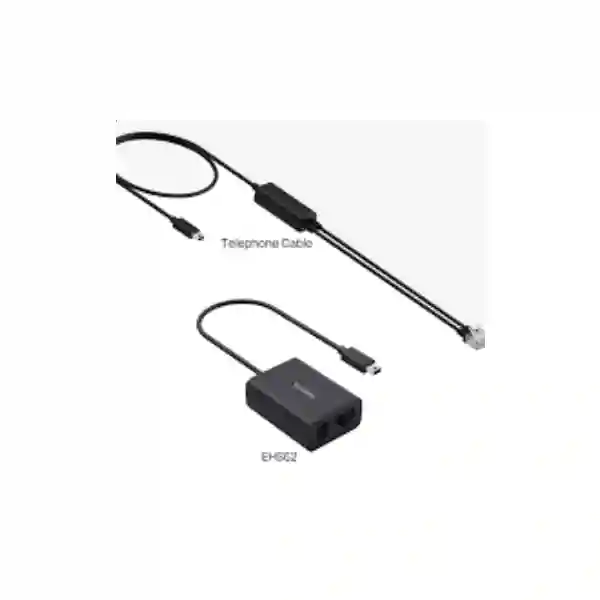
YEALINK DECT HEADSET CONNECTIVITY
Yealink DECT Headset Telephone Cable
The Yealink DECT Headset Telephone Cable is an accessory used to connect selected Yealink wireless headset bases to compatible desk phones. The most important buying point is compatibility: Yealink documents a telephone cable for the first-generation WH62/WH63 family and a different telephone cable for the WH63 E2/WH64/WH68 family. The older WH62/WH63 cable connects to the Micro USB port on the headset base, while the later WH63 E2/WH64/WH68 Series cable connects through the Aux interface on the corresponding base. Because the connection method and call-control behaviour depend on the exact headset, base, desk phone and firmware, procurement should begin with model verification rather than with the assumption that every RJ-style headset cable is interchangeable.
Yealink identifies a dedicated telephone cable for these first-generation DECT headset products, with the headset-base side connected at the Micro USB port.
Yealink identifies a separate telephone cable for these later-generation products, connecting at the Aux interface of the supported headset base.
Some combinations support audio only through the telephone cable, while particular phone/headset combinations can support call control when the required firmware and configuration are present.
What this Yealink telephone cable is designed to do
A DECT headset gives a user wireless movement away from the desk, but the base still needs a suitable path to the telephone system. Yealink’s telephone-cable accessories provide that physical interface for selected DECT headset bases and compatible desk phones. This can be useful when an organization is using a desk-phone connection that is not being made by USB, or when the selected phone/headset deployment specifically calls for the telephone-cable method. The cable itself does not add DECT radio capability to a phone; DECT communication remains between the headset and its base. The cable links the base to the telephone endpoint so audio and, in certain supported combinations, call-control signalling can be handled according to Yealink’s compatibility guidance.
Yealink’s own support documentation separates its current telephone-cable guidance into two families. The Telephone Cable for WH62/WH63 is intended for those first-generation headset products and uses the Micro USB connection on the base. The Telephone Cable for WH63 E2/WH64/WH68 Series is intended for those later-generation headset products and uses the Aux connection on the base. This distinction matters for replacements, spares and new deployments because a cable ordered only by appearance can be the wrong accessory even when the headset and phone brands are correct.
For business purchasing in Tanzania, the safest quotation request should therefore identify the headset model, the headset-base model if visible, the desk-phone brand and model, the required call behaviour, and the quantity. If remote answer/end control is essential, that requirement should be stated explicitly. Yealink’s documentation shows that telephone-cable connections can be audio-only on some desk-phone families, while supported T3X combinations can provide call control with specific headset models and firmware. Where a telephone cable is not the right control method, an EHS adapter or USB connection may be the more appropriate route.
Compatibility and buying guide
Telephone Cable for WH62/WH63
Use this cable family only where the deployment is based on a compatible WH62 or WH63 headset base. Yealink describes the headset-base connection as Micro USB. Before ordering, verify whether the phone connection provides the audio or call-control behaviour required for the chosen desk phone. Do not select it merely because the existing cable has a similar connector.
Telephone Cable for WH63 E2/WH64/WH68 Series
This later cable family is documented for WH63 E2, WH64 and WH68 Series headset products and connects to the Aux interface on the supported base. Yealink also publishes a dedicated support page and quick-start material for this accessory. Compatibility still depends on the desk phone, headset firmware and desired control functions.
When an EHS adapter may be different
Yealink separately lists EHS35, EHS60, EHS61 and EHS62 adapters for specific headset generations and phone combinations. These accessories should not be treated as interchangeable with a plain telephone cable. If remote call control, a particular phone family or a multi-vendor setup is involved, confirm the exact Yealink compatibility path before purchase.
Five details to send with a quotation request
State WH62, WH63, WH63 E2, WH64 or WH68 exactly, including any Workstation, Hybrid or Portable designation if present.
Provide the full Yealink or third-party phone model because support varies by endpoint family and generation.
Say whether audio-only connectivity is acceptable or whether remote answer/end control is a mandatory requirement.
Separate replacement-spare quantities from new-user deployments so compatibility can be checked consistently.
Mention any existing USB, EHS or telephone-cable connection so the proposed part does not duplicate or conflict with the current setup.
Related FourTeck resources
For Tanzania procurement and broader workplace-technology planning, visit FourTeck Tanzania for business IT, telecom, security and infrastructure requirements. Organizations operating across East Africa can also review FourTeck Uganda and FourTeck Kenya for region-specific technology sourcing context. Customers coordinating UAE-linked procurement can use FourTeck UAE, while multi-country requirements can be framed through FourTeck Africa. These references are useful when a headset-cable request is part of a larger IP telephony, contact-centre, conferencing or branch-standardization project.
Yealink DECT Headset Telephone Cable Tanzania
Buyers looking for a Yealink DECT Headset Telephone Cable in Tanzania are usually solving one of three practical problems: replacing a missing or damaged lead, connecting a Yealink DECT headset base to a desk phone, or standardizing a group of workstations where users need dependable headset audio. In all three cases, the exact headset generation matters more than the generic description “telephone cable.” Yealink publishes one cable family for WH62 and WH63 and another for WH63 E2, WH64 and WH68 Series. The first-generation cable connects at the headset base through Micro USB, while the later family uses the base’s Aux interface. A procurement team should record that distinction before raising a purchase order.
Tanzania deployments can range from a single reception desk to sales teams, customer-care desks, finance departments, dispatch operations and multi-floor offices. The cable is only one part of that workstation. The desk phone model, headset base, firmware, network and call platform determine the complete user experience. If the organization requires remote answer/end behaviour from the headset, state that requirement in advance. Yealink documentation shows that some telephone-cable connections are audio-only, while specific T3X and headset combinations can support call control with the correct firmware and configuration. A quotation should therefore be compatibility-led rather than quantity-led.
For organizations replacing an existing cable, photographing or recording the labels on both the headset base and phone can reduce errors. Do not assume that a WH63 E2 uses the same accessory path as an original WH63; the “E2” generation is specifically grouped by Yealink with WH64 and WH68 for the later telephone cable. Similarly, portable or hybrid headset variants may use different connection methods and should be identified by their complete product names. This is especially relevant in mixed fleets where equipment has been purchased over several years.
A well-prepared Tanzania quote request should list the headset model, desk-phone brand and model, number of users, whether the cable is for replacement or a new deployment, and whether audio-only operation is acceptable. If the deployment includes IP phones, PBX changes, PoE switching or new office cabling, include those requirements as separate line items so the workstation solution can be checked end to end. FourTeck Tanzania can then help frame the correct accessory requirement without making unsupported assumptions about stock, warranty or delivery dates before the exact part and scope are confirmed.
Yealink DECT Headset Telephone Cable Dar es Salaam
In Dar es Salaam, demand for a Yealink DECT Headset Telephone Cable is likely to come from office environments with concentrated calling roles: reception, customer service, inside sales, logistics coordination, hotel reservations, financial services, professional services and administrative teams. These users often spend enough time on calls that a wireless DECT headset becomes part of the normal desk setup rather than an occasional accessory. When the connection to the desk phone is disrupted by a missing cable, an incorrect replacement can leave the headset physically present but operationally unusable.
The correct Dar es Salaam purchasing approach is to classify the headset first. Original WH62 and WH63 products use Yealink’s Telephone Cable for WH62/WH63, which Yealink describes as connecting to the Micro USB port on the headset base. WH63 E2, WH64 and WH68 Series products use Yealink’s later telephone cable that connects to the Aux port on the corresponding base. That generation split should appear in the request for quotation because teams may own both families. A buyer replacing several cables should not combine the quantities until every base has been identified.
Call-control expectations are equally important. A user may expect the headset button to answer and end calls remotely, but Yealink’s desk-phone guidance indicates that telephone-cable behaviour varies. Some T4X connection scenarios are audio-only through a telephone cable, while selected T3X combinations can support call control when the phone and headset meet Yealink’s documented requirements. If call control is mandatory for a busy operator, specify it as a functional requirement rather than assuming the cable alone guarantees it. The correct solution may involve firmware, configuration, USB or an EHS adapter depending on the devices.
For a multi-desk deployment in Dar es Salaam, it is useful to build a simple equipment register with extension number, user, desk-phone model, headset model and connection type. That register makes replacements easier and helps avoid mixing first- and second-generation accessories. If the project includes a phone refresh, PBX migration, new switch or office move, review the headset connection at the same time. A small cable decision can affect daily call handling, so compatibility checks should be completed before ordering and quantities should be based on verified endpoints rather than broad assumptions.
Yealink DECT Headset Telephone Cable Mwanza
Organizations in Mwanza searching for a Yealink DECT Headset Telephone Cable may be supporting front-office desks, branch communications, sales teams, reservation staff, service coordinators or administrative users who rely on a desk phone throughout the day. In these environments, the value of the accessory is practical: it maintains the physical link between a supported Yealink DECT headset base and the telephone endpoint. The purchasing risk is equally practical because Yealink does not treat every DECT headset generation as using the same telephone cable.
For WH62 and the original WH63, Yealink publishes a dedicated Telephone Cable for WH62/WH63 and identifies the headset-base interface as Micro USB. For WH63 E2, WH64 and WH68 Series, Yealink publishes another telephone cable and identifies the headset-base connection as the Aux port. A Mwanza buyer should therefore confirm the exact model printed on the headset base before requesting a replacement. If the base says WH63 E2, do not classify it simply as WH63 because the E2 generation follows the newer cable family.
For branch locations where IT support is centralized elsewhere, documenting the phone-headset pairing is especially useful. A photo of the rear or underside product label, the phone model, and the current cable path can often provide enough information for a compatibility discussion without requiring staff to interpret connector names. The quotation should also indicate whether the need is simply to restore audio or to preserve remote call control. Yealink’s guidance makes clear that call-control support depends on the combination of headset, desk phone, connection method and firmware.
Mwanza businesses planning more than one workstation should consider ordering against a validated device list rather than a single generic line. This is helpful if some users have older WH62/WH63 systems and others have newer WH64 or WH68 platforms. The same approach applies when replacing phones: a new desk phone can change the preferred headset connection method even if the headset is retained. By confirming the full endpoint combination first, procurement can avoid unnecessary adapters, duplicate accessories and installation delays while keeping the quote focused on the actual business requirement.
Yealink DECT Headset Telephone Cable Arusha
Arusha organizations often combine offices, hospitality operations, travel services, professional firms, education, administration and customer-facing teams. A Yealink DECT Headset Telephone Cable can be a small but important component when staff use a Yealink wireless headset with a compatible desk phone. The cable does not determine the headset’s wireless range; it provides the wired connection between the headset base and the telephone endpoint. Choosing the right one begins with identifying which Yealink headset generation is installed.
Yealink separates its telephone-cable accessories into a WH62/WH63 cable and a WH63 E2/WH64/WH68 Series cable. The first connects at the base through Micro USB, while the later family uses the Aux interface on supported bases. This difference is important during office renovations and equipment refreshes because cables are easy to disconnect, misplace or mix between desks. Labeling each cable or keeping it with the matching base during a move can prevent confusion when equipment is reinstalled.
Arusha buyers should also decide whether the requirement is voice audio only or full call control. In a low-call-volume office, audio-only operation may be acceptable if users can still answer calls on the desk phone. In a reservation desk, reception position or service center, remote answer/end functionality can be much more important because users move around while handling calls. Yealink’s documentation shows that telephone-cable support is not identical across every phone family, so the quote should state the desired user behaviour. That allows the correct cable, EHS adapter or USB method to be evaluated.
For procurement, include the exact headset name, desk-phone model, quantity, current connection type and any firmware information available. If several branches use similar phones, do not assume they all have the same headset generation. A simple inventory spreadsheet can distinguish WH63 from WH63 E2 and reduce ordering errors. If the project includes upgrading desk phones or adding IP PBX features, confirm headset compatibility during that upgrade rather than after installation. That keeps the accessory choice aligned with the endpoint architecture and improves the likelihood that users retain the call workflow they expect.
Yealink DECT Headset Telephone Cable Dodoma
A Yealink DECT Headset Telephone Cable in Dodoma can be relevant to administrative offices, government-facing contractors, NGOs, education organizations, professional services and other teams that use desk telephony for structured daily communication. Where a Yealink DECT headset is already deployed, the cable is part of the workstation connection chain. If it is lost or damaged, replacing it correctly requires more than matching the shape of the plugs because Yealink documents distinct telephone cables for different WH-series generations.
The WH62/WH63 cable is intended for Yealink’s first-generation WH62 and WH63 products and connects to the Micro USB port on the base. The telephone cable for WH63 E2/WH64/WH68 Series is intended for those later-generation models and connects to the Aux port of the headset base. Procurement documents should preserve the “E2” suffix where present because WH63 and WH63 E2 do not belong to the same cable family in Yealink’s current support guidance.
In Dodoma offices with formal procurement processes, it is useful to make compatibility a line-item acceptance condition. The request can specify the exact headset model and desk phone, then ask for the appropriate Yealink telephone cable for that combination. If remote headset call control is required, include that as an operational requirement. Yealink’s support material indicates that some telephone-cable links provide audio only, while certain T3X deployments can support call control when the headset, phone firmware and configuration satisfy Yealink’s requirements.
For organizations with several departments, the same check should be repeated for each equipment type rather than assuming a universal accessory. A department that received headsets in an earlier procurement cycle may have WH62 or WH63, while a later rollout may use WH64 or WH68. Grouping confirmed models before requesting pricing makes the quote clearer and simplifies future spares planning. If the broader project includes IP phone deployment, PBX configuration or network upgrades, note those dependencies so the headset-cable requirement can be evaluated as part of the complete telephony environment.
Yealink DECT Headset Telephone Cable UAE
For customers coordinating a Yealink DECT Headset Telephone Cable requirement in the UAE, the same compatibility principle applies: verify the exact headset generation and the desk-phone model before ordering. Yealink’s published accessory guidance distinguishes a Telephone Cable for WH62/WH63 from a Telephone Cable for WH63 E2/WH64/WH68 Series. This is particularly relevant to organizations with larger fleets, multi-office standardization or long-running communications environments where several generations of Yealink equipment may coexist.
The WH62/WH63 cable connects to the Micro USB port on the first-generation headset base. The later WH63 E2/WH64/WH68 Series cable connects to the Aux port on the corresponding base. These descriptions should be used as a verification aid, not as a substitute for model checking. If the existing cable is missing, record the label on the base and the phone model. If the cable is damaged but available, retain it until the replacement is confirmed so its role can be compared against the new accessory path.
UAE businesses with contact-center, reception, hospitality, logistics or sales users may place greater emphasis on remote call control because the ability to answer or end calls from the headset can affect user workflow. Yealink’s documentation makes clear that a telephone cable does not guarantee identical control behaviour on every phone family. Some desk-phone combinations are documented as audio-only when connected by telephone cable, while particular T3X arrangements can support call control with the correct headset, firmware and setup. A quote request should therefore describe the expected user action, not only the cable name.
Where the UAE requirement forms part of a regional rollout, create one compatibility matrix covering headset model, base, desk phone, site and desired control functions. This allows the same accessory policy to be applied across offices while still respecting device differences. If some workstations use USB and others use EHS adapters, document those separately instead of forcing a single connection standard. Correct accessory selection is a low-cost step compared with the disruption caused by hundreds of desks using an incompatible or functionally incomplete connection method.
Yealink DECT Headset Telephone Cable Uganda
Organizations in Uganda looking for a Yealink DECT Headset Telephone Cable should start by identifying whether their wireless headset system belongs to the WH62/WH63 generation or the newer WH63 E2/WH64/WH68 family. Yealink publishes different telephone-cable accessories for those groups, so a generic “Yealink headset cable” request can be ambiguous. The first-generation cable is documented for WH62 and WH63 and connects through Micro USB on the base, whereas the later cable is documented for WH63 E2, WH64 and WH68 Series and uses the Aux interface on the supported base.
Uganda deployments may involve head offices, branches, call-handling teams, NGOs, schools, hotels, healthcare administration, retail operations and service desks. In each case, the user may need more than basic audio. If remote answer and end control is important, state that clearly in the request. Yealink’s support guidance indicates that telephone-cable connections provide different levels of control depending on the desk-phone family. Some combinations are audio only, while particular T3X models can provide call control with supported headsets and the required firmware or configuration.
For a distributed Uganda fleet, compatibility records are valuable because branch staff may not know the accessory part name. A simple process is to collect a photo of the headset-base label, a photo or note of the desk-phone model, and a description of what the user needs to do from the headset. Central IT can then group identical combinations and request the correct accessory quantity. This method reduces accidental mixing of WH63 and WH63 E2, which are visually related product names but belong to different telephone-cable groupings in Yealink’s documentation.
If the cable request is associated with a phone-system upgrade, review the preferred connection method at the same time. A new desk phone may support USB directly, or an EHS adapter may be needed for the desired control behaviour. The objective is not simply to replace a cable but to preserve a predictable calling workflow. FourTeck’s regional resources can support a broader discussion when the requirement also includes IP phones, PBX hardware, network switching, office cabling or branch communication standardization.
Yealink DECT Headset Telephone Cable Kampala
Kampala businesses frequently operate busy telephone desks in sales, customer support, reception, logistics, finance and professional services. A Yealink DECT Headset Telephone Cable can become a critical spare when those users depend on a WH-series wireless headset. The key procurement rule is that Yealink’s telephone cable is not a single universal accessory across every WH headset generation. Before requesting price or availability, identify the exact headset and base model.
For original WH62 and WH63 products, Yealink identifies a Telephone Cable for WH62/WH63 connected to the base’s Micro USB port. For WH63 E2, WH64 and WH68 Series, Yealink identifies a newer telephone cable connected to the base’s Aux port. The “E2” designation therefore matters in Kampala procurement lists; shortening WH63 E2 to WH63 can move the request into the wrong accessory family. This is especially important when old and new headset generations have been deployed in phases.
Busy users may also require remote call control. A receptionist who answers many calls can lose productivity if the headset provides audio but cannot answer or end calls as expected. Yealink’s desk-phone support material shows that telephone-cable behaviour is combination-specific. Some T4X scenarios are audio-only with a telephone cable, while supported T3X combinations can provide call control with the appropriate headset and firmware. The quotation should therefore state “remote answer/end required” when that function matters, allowing the cable, EHS or USB method to be selected accordingly.
For Kampala offices with multiple floors or departments, label headset bases and keep a small spare strategy based on the actual installed mix. One generic spare may not cover every desk. If a team has twenty WH62 units and ten WH64 units, the accessory plan should reflect two cable families. During office relocation, keep each base and its cable together where practical. These simple controls reduce troubleshooting time and allow procurement to order against verified device combinations rather than relying on assumptions about connector appearance.
Yealink DECT Headset Telephone Cable Arua
Arua organizations may need a Yealink DECT Headset Telephone Cable for a branch office, service counter, NGO administration team, education facility, retail operation or another workplace where desk-phone users benefit from a wireless headset. When support is coordinated remotely, the biggest challenge is often not the replacement itself but identifying the correct accessory from incomplete descriptions. Yealink’s documentation helps by grouping the telephone cables according to headset generation.
The first cable family is for WH62 and original WH63 headset products and connects to the Micro USB port on the headset base. The later cable family is for WH63 E2, WH64 and WH68 Series and connects to the Aux port on the supported base. That distinction should be captured in any Arua purchasing request. If local staff report “WH63,” ask them to confirm whether the label includes “E2,” because that suffix changes which telephone-cable family Yealink associates with the product.
Remote call control should also be checked rather than assumed. A cable can provide the required audio path without necessarily providing the same answer/end behaviour in every phone scenario. Yealink publishes separate EHS adapters for various headset generations and phone combinations, and its desk-phone guidance differentiates between audio-only telephone-cable use and supported call-control configurations. For a user who must move away from the desk while still answering calls, describe that requirement explicitly so the appropriate connection method can be validated.
For branch procurement in Arua, send the headset-base model, phone model, quantity and a brief description of current behaviour. If the replacement is being requested because calls stopped after an office move or phone change, mention that history because the issue may be a connection-method mismatch rather than a failed cable. Where the wider requirement includes new phones, PBX work or cabling, combine the information into one scope so the final configuration can be reviewed as a system instead of treating the headset cable in isolation.
Yealink DECT Headset Telephone Cable Mbarara
For businesses and institutions in Mbarara, a Yealink DECT Headset Telephone Cable may be required when connecting or restoring a compatible Yealink wireless headset base at a desk-phone position. The accessory is straightforward only after the equipment is identified. Yealink supports different telephone-cable families for the original WH62/WH63 generation and the later WH63 E2/WH64/WH68 Series, so model verification should happen before quantity, pricing or delivery discussions.
WH62 and WH63 use Yealink’s Telephone Cable for WH62/WH63 and the base-side connection is described by Yealink as Micro USB. WH63 E2, WH64 and WH68 Series use a different telephone cable that connects through the Aux interface on the appropriate base. This is a useful check for Mbarara IT teams maintaining a mixed fleet. If equipment has been sourced in several phases, create a count for each headset generation instead of assuming every Yealink DECT base uses the same spare.
The desk phone must also be included in the compatibility check. Yealink’s support information shows that a telephone-cable connection can be audio-only on some phone families. Specific T3X combinations can support call control when the headset and firmware are compatible, while other scenarios may require EHS or USB for the desired functionality. A user who only needs to hear and speak while remaining at the desk has different requirements from a receptionist or coordinator who expects to answer calls from the wireless headset while moving nearby.
A practical Mbarara quotation request should contain the exact headset model, phone model, quantity, connection requirement and whether any cable is already present. For replacement projects, note whether the old cable was working before it was damaged. For new deployments, state whether phones are already installed or are being purchased at the same time. This information helps align the accessory with the overall endpoint design and reduces the risk of ordering a cable that fits physically but does not provide the expected call workflow.
Yealink DECT Headset Telephone Cable Gulu
Gulu customers seeking a Yealink DECT Headset Telephone Cable may be supporting office administrators, service teams, project coordinators, hospitality staff or branch users who rely on desk telephony. A replacement cable can look like a simple purchase, but Yealink’s product structure makes precise identification important. The original WH62/WH63 products use one documented telephone-cable family, while WH63 E2/WH64/WH68 Series use another.
The Telephone Cable for WH62/WH63 connects to the Micro USB port on the matching headset base. The Telephone Cable for WH63 E2/WH64/WH68 Series connects to the Aux port on the later-generation base. Buyers should preserve the complete model name and avoid removing “E2” from WH63 E2 references. In a branch environment, a phone photo and headset-base label can be enough to support a useful compatibility discussion when technical staff are not physically present.
Functionality requirements should be written in business terms. If the user only needs reliable audio between the desk phone and headset, that is one requirement. If the user must answer, reject or end calls using the headset controls while away from the phone, that is another. Yealink’s current support guidance distinguishes telephone-cable audio paths from call-control scenarios and also lists EHS accessories where appropriate. The cable itself should therefore be selected as part of the complete phone-headset combination rather than as an isolated generic spare.
For Gulu organizations maintaining several sites, keeping a central list of headset and phone pairings can make future replacements much faster. Record which desks use WH62/WH63 and which use WH63 E2/WH64/WH68. If equipment is transferred between sites, update that list so spare quantities remain meaningful. During a phone-system refresh, revalidate the connection method before reusing old accessories. This structured approach supports cleaner procurement, easier troubleshooting and more consistent user expectations without making unsupported assumptions about compatibility.
Yealink DECT Headset Telephone Cable Kenya
Kenya buyers searching for a Yealink DECT Headset Telephone Cable may be supporting a single executive desk, a reception team, a contact centre, a hospitality environment or a larger multi-site communications estate. The part should be chosen by headset generation and desk-phone compatibility, not by a broad cable description. Yealink currently separates its telephone-cable guidance between WH62/WH63 and WH63 E2/WH64/WH68 Series products.
The WH62/WH63 telephone cable is intended for the first-generation bases and connects through Micro USB. The WH63 E2/WH64/WH68 Series telephone cable is designed for the later family and connects through the base’s Aux interface. In Kenya deployments with equipment acquired over several years, both types may exist within the same organization. A central purchasing team should therefore require the full headset model on every accessory request and avoid consolidating all cable demand into one SKU description without verification.
User workflow can also determine whether a telephone cable is the best method. Yealink documents some desk-phone scenarios where the telephone cable supports audio only, whereas specific T3X combinations can support call control when the headset and firmware requirements are satisfied. For high-call-volume users, remote answer/end control may be a mandatory productivity feature. State that explicitly so the proposed connection can be checked against Yealink’s compatibility information and, where necessary, compared with USB or an EHS adapter.
For multi-branch Kenya projects, build an endpoint matrix before ordering. Include site, phone model, headset model, number of users and desired control functions. This is particularly useful during standardization because the same headset may not use the same preferred connection method across every phone family. If the cable requirement is connected to an IP PBX migration, desk-phone refresh or office move, review the whole endpoint chain at once. That keeps accessory procurement synchronized with the broader communications architecture and reduces post-installation surprises.
Yealink DECT Headset Telephone Cable Kuwait
For organizations in Kuwait, a Yealink DECT Headset Telephone Cable is relevant when a supported WH-series wireless headset base needs a wired connection to a compatible desk phone. The accessory can be used as part of a new deployment or as a replacement for a missing or damaged lead. Because Yealink has revised its headset portfolio, the full model name is essential: the telephone cable for WH62/WH63 is not the same documented family as the cable for WH63 E2/WH64/WH68 Series.
Yealink describes the WH62/WH63 cable as connecting to the Micro USB port on the first-generation headset base. For WH63 E2, WH64 and WH68 Series, Yealink describes a later telephone cable connecting to the Aux interface on the base. Kuwait procurement teams managing corporate offices, customer-service teams, hospitality desks or branch locations should therefore include the headset model in every spare request. If the installed headset is WH63 E2, keep the E2 designation in the specification.
Telephone-cable use must also be evaluated against the desk phone and desired call control. Yealink’s current support material notes audio-only operation in some telephone-cable scenarios and identifies supported call-control combinations for certain T3X phones. If a user expects to answer and end calls from the headset, mention that workflow in the request. This allows the solution to be checked against the correct firmware and accessory path rather than assuming that physical connectivity automatically delivers every control function.
A good Kuwait quotation request includes exact headset and phone models, quantity, whether the requirement is replacement or new deployment, and any call-control expectations. For large estates, group identical device combinations and keep separate counts for each. If desk phones are being upgraded, do not automatically reuse the old cable without checking the new endpoint. Reviewing the connection method during the phone rollout can help maintain a consistent user experience and avoid duplicate procurement of cables, EHS adapters or USB accessories.
Yealink DECT Headset Telephone Cable Ghana
Ghanaian businesses and institutions may require a Yealink DECT Headset Telephone Cable when supporting employees who use WH-series wireless headsets with desk phones. Typical use cases include reception, sales, customer care, logistics coordination, hospitality reservations and back-office administration. The cable is a supporting accessory, but selecting it correctly is important because Yealink documents different cable families for different headset generations.
For WH62 and the original WH63, Yealink publishes the Telephone Cable for WH62/WH63 and specifies a Micro USB connection at the headset base. For WH63 E2, WH64 and WH68 Series, Yealink publishes another telephone cable and specifies an Aux connection at the compatible base. The Ghana quote should therefore state the exact headset model. Treating WH63 and WH63 E2 as the same item can create a mismatch because Yealink groups them with different cable generations.
The desk-phone model also determines what the user can expect. Yealink’s support documentation indicates that telephone-cable connections can be audio-only in certain phone families and that call control is supported in selected T3X combinations when the headset, firmware and configuration requirements are met. If remote call answering is important, specify it in the scope. The correct solution may be the telephone cable, USB or a model-specific EHS adapter depending on the installed endpoints.
For Ghana organizations with multiple offices, create a standard replacement process. Ask users to provide the headset-base label and phone model before a cable is ordered. Maintain separate spare counts for WH62/WH63 and WH63 E2/WH64/WH68 families. If headsets are moved between desks, update the equipment record so the cable remains paired with the correct base. These simple controls improve procurement accuracy and reduce downtime without relying on unsupported assumptions about universal compatibility, stock or delivery time.
Yealink DECT Headset Telephone Cable Nigeria
Nigeria organizations operating customer-service teams, sales desks, hospitality reservations, financial-services branches, logistics centers or corporate offices may use Yealink DECT headsets to give users freedom of movement during calls. When a telephone cable is required for the headset base, selecting the correct family is essential. Yealink publishes one telephone cable for WH62/WH63 and another for WH63 E2/WH64/WH68 Series, reflecting different headset generations and base interfaces.
The first-generation WH62/WH63 cable connects at the Micro USB port of the headset base. The later WH63 E2/WH64/WH68 Series cable connects through the Aux interface on the supported base. Nigeria procurement teams should preserve the complete model designation in RFQs and internal asset lists. If a headset says WH63 E2, do not shorten the name to WH63. Where several generations are deployed, maintain separate quantities and part descriptions for each accessory requirement.
Call-control expectations can be especially important in high-volume environments. A cable may successfully pass audio while the user still needs to press the desk phone to answer or end a call. Yealink’s compatibility guidance documents such differences and identifies EHS or USB connection methods for other scenarios. Before purchasing, state whether remote answer/end control is required, then verify the phone model, headset generation and firmware path. This avoids treating a physical connection as proof of complete functional compatibility.
For large Nigeria deployments, standardization should be based on validated endpoint combinations rather than cable appearance. Build a site-by-site matrix and group users with the same headset and phone. When phones are refreshed, revisit the headset interface instead of automatically moving the old cable to the new device. If a broader communications project includes PBX, network switching, SIP endpoints or cabling, add the headset-cable requirement to that design review. The result is a more predictable user experience and a cleaner spares strategy across offices.
Yealink DECT Headset Telephone Cable Seychelles
Seychelles organizations in hospitality, tourism, professional services, administration and customer-facing operations may depend on desk-phone users who need a wireless headset for mobility. A Yealink DECT Headset Telephone Cable can be the required physical link between a supported Yealink headset base and compatible phone, but the correct cable depends on the headset generation. Yealink’s official support guidance separates the WH62/WH63 cable from the WH63 E2/WH64/WH68 Series cable.
For original WH62 and WH63 bases, the dedicated telephone cable connects through Micro USB. For WH63 E2, WH64 and WH68 Series, the later telephone cable uses the Aux interface of the supported base. Seychelles buyers managing a small number of critical reception or reservation desks should still make this distinction because a wrong spare can be just as disruptive in a five-user environment as in a large call centre. Keep the exact headset model with the procurement record.
Service continuity can also depend on expected call-control behaviour. Yealink documents some telephone-cable scenarios as audio-only, while particular T3X combinations can support call control with the appropriate headset and firmware. If a user needs to answer calls while moving between a desk and nearby service area, note that requirement explicitly. The telephone cable should then be evaluated alongside other supported methods such as USB or an EHS adapter where relevant.
For Seychelles businesses where replacement logistics may require advance planning, keeping a verified spares list can be useful. Record the installed headset generation, phone model and cable family for each critical desk. Do not purchase large quantities based only on the phrase “Yealink DECT cable.” If an office or hotel changes desk phones, recheck the headset connection before the cutover. This disciplined approach protects the calling workflow, simplifies remote troubleshooting and ensures that the accessory purchased is tied to a known endpoint combination rather than an assumption.
Deployment and troubleshooting considerations
When a Yealink DECT headset does not work after connecting a telephone cable, do not immediately assume the cable is defective. Start with the documented compatibility path. Confirm the headset generation, base port, phone model and firmware. Yealink’s support material for desk phones includes model-specific connection guidance and, for some T3X situations, firmware and configuration requirements. A newly purchased cable cannot compensate for a connection method that is not supported by the selected endpoint combination.
Check whether the user has the correct expectation. If audio works but remote answer/end does not, the system may be behaving as an audio-only telephone-cable connection. If remote call control is essential, review Yealink’s compatibility center and the relevant phone/headset guide to determine whether a different connection method, EHS accessory or firmware is required. Avoid changing several variables at once; verify cable family, port and phone support in a controlled sequence.
For fleet deployments, standardize installation notes. Record which port on the headset base is used, how the phone is configured, and what functions have been tested. Keep model-specific spares separately labeled. This prevents an older WH62/WH63 cable from being mixed with a WH63 E2/WH64/WH68 Series requirement and helps support teams restore service faster when a user moves desks or an accessory is replaced.
Frequently asked questions
Is there one Yealink DECT headset telephone cable for every WH headset?
No. Yealink documents a Telephone Cable for WH62/WH63 and a separate Telephone Cable for WH63 E2/WH64/WH68 Series. The first-generation cable connects to Micro USB on the base, while the later family connects through the Aux interface on the supported base.
Does the telephone cable always support remote answer and end?
No. Yealink’s desk-phone guidance shows that telephone-cable behaviour depends on the phone and headset combination. Some scenarios are audio-only, while selected T3X combinations can support call control with supported headsets, firmware and configuration. Verify the exact endpoint pair before ordering.
Is WH63 E2 the same as WH63 for cable selection?
No for this accessory decision. Yealink groups the original WH63 with WH62 for one telephone cable, while WH63 E2 is grouped with WH64 and WH68 Series for the later cable. Keep the E2 suffix in procurement records.
When should I consider an EHS adapter instead?
Consider EHS when Yealink’s compatibility guidance specifies it for the headset and desk-phone combination or when the required remote call-control function is not available through the telephone-cable method. Yealink lists EHS35, EHS60, EHS61 and EHS62 for different headset generations and phone scenarios.
What information should I send FourTeck before requesting a quote?
Send the exact headset model, headset-base model if available, desk-phone brand and model, quantity, whether the request is for replacement or new deployment, and whether audio-only operation or remote answer/end control is required.
Can the same cable be reused after changing desk phones?
Do not assume so. A new phone can change the preferred or supported headset connection method. Verify the new phone against Yealink’s current headset compatibility guidance before reusing the old cable.
Quotation checklist
For the most useful Yealink DECT Headset Telephone Cable quotation, provide the exact headset model, exact phone model, quantity, connection method currently in use, whether the cable is missing or damaged, whether remote call control is required, and whether the order is a standalone spare or part of a new IP-telephony deployment. For mixed fleets, list each headset/phone combination separately. This gives the sales and technical teams enough context to identify the correct cable family and flag situations where USB or an EHS adapter may be more appropriate.
Do not rely on connector appearance alone. Do not omit the E2 suffix from WH63 E2. Do not assume that a working audio path guarantees call-control support. And do not specify a universal Yealink DECT cable when the organization has more than one headset generation. Those checks can prevent the most common accessory-ordering mistakes.
Decision recap
Choose the Yealink Telephone Cable for WH62/WH63 when the installed headset is an original WH62 or WH63 and the phone/headset combination supports the intended connection. Choose the Yealink Telephone Cable for WH63 E2/WH64/WH68 Series when the installed headset belongs to that later family. Then verify the desk phone and required control behaviour. If the user needs more than audio, confirm whether the selected combination supports call control through the telephone cable or requires USB, an EHS adapter, firmware updates or another documented method.
Consult FourTeck before ordering
A headset telephone cable is inexpensive compared with the time lost when the wrong accessory reaches a busy user. Share the full headset and phone models with FourTeck Tanzania so the requirement can be checked against the correct Yealink cable family and desired call-control workflow. For larger deployments, provide a device list so quantities can be separated by generation and connection method. The final quotation can then be built around verified compatibility rather than assumptions.




Reviews
There are no reviews yet.