
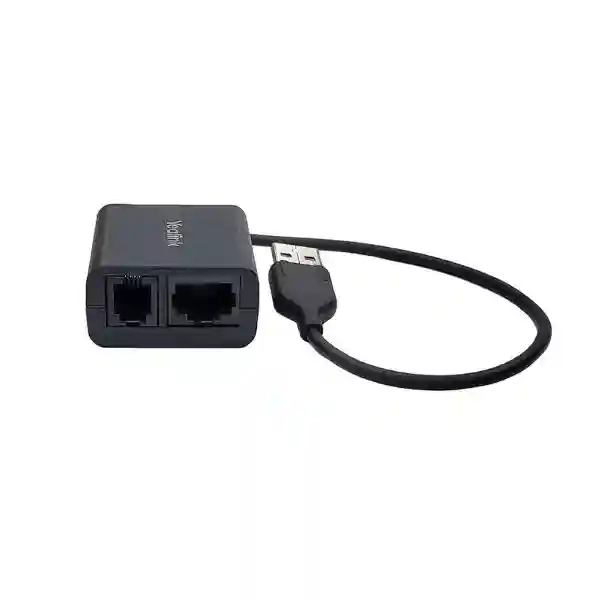
Yealink EHS40 Headset Adapter Tanzania
The Yealink EHS40 Headset Adapter is a compact business-telephony accessory that gives compatible Yealink IP phones a practical interface to selected third-party wireless headsets. It is designed for organisations that want staff to answer and end calls from a supported wireless headset rather than remaining beside the desk phone. That simple change can make reception, customer support, sales, operations and supervisory roles easier to manage, especially when users must move between a desk, printer, filing area or nearby workstation while staying available for incoming calls.
Yealink documents the EHS40 as supporting selected Yealink phones and compatible Jabra, Plantronics/Poly and Sennheiser wireless headset families. The adapter connects to the phone through USB and uses the appropriate supplied headset-side cable. Because compatibility depends on the exact phone model, phone firmware and headset model, FourTeck recommends confirming the complete combination before purchase rather than treating every wireless headset as interchangeable.
With a compatible phone and headset, the EHS40 allows users to answer incoming calls and terminate calls from the wireless headset control.
The adapter uses a USB 2.0 connector on the supported Yealink phone and provides headset-side connectivity through RJ45/RJ9 outputs.
The accessory is especially useful where call handlers benefit from mobility without losing the familiar desk-phone workflow.
What the Yealink EHS40 Does
The EHS40 sits between a compatible Yealink IP phone and a supported third-party wireless headset base. Instead of using a wireless headset only for audio, the EHS interface adds control signalling so the headset can notify the phone when the user answers or ends a call. Yealink also states that incoming calls can be signalled in the headset earpiece. For users who spend much of the day on calls, this can reduce the repeated movement back to the handset or desk-phone keys and support a more natural working rhythm.
This distinction matters during procurement. A headset may produce audio when connected to a phone but still lack remote electronic hook-switch control. The EHS40 addresses that control layer for specific combinations. It is not a universal adapter for every phone and every headset, and current Yealink support guidance specifically notes that EHS36 and EHS40 are intended for Yealink IP phones used with third-party wireless headsets rather than for connecting Yealink-branded wireless headsets.
Compatibility first: share the exact Yealink phone model, current firmware version and wireless headset model when requesting a quote. This allows the accessory choice to be validated before ordering.
Verified Yealink EHS40 Features
| Area | Verified detail |
|---|---|
| Product type | Wireless headset adapter for compatible Yealink IP phones and supported third-party wireless headsets. |
| Phone-side interface | 1 × USB 2.0 connector. |
| Headset-side outputs | RJ45 (8P8C) and RJ9 (4P4C) outputs documented for supported headset connections. |
| Call functions | Remote answer and call termination from a compatible wireless headset; incoming-call indication in the headset earpiece. |
| Supported headset brands | Yealink documentation references compatible Jabra, Plantronics/Poly and Sennheiser wireless headset models. |
| Package documentation | Yealink documentation lists the EHS40, Jabra Y-Cord, Plantronics Y-Cord, Sennheiser Y-Cord and user guide. |
Earlier Yealink EHS40 documentation identifies phone models including T58A, T57W, T54W, T53W, T53, T48S, T46S, T42S and T41S with stated firmware requirements. Yealink’s current compatibility resources should be checked at the time of deployment because headset and phone firmware support can change. FourTeck can help buyers review the intended device combination before purchase.
Who Should Consider the EHS40?
The EHS40 is most relevant when a business already uses, or plans to use, a supported Yealink desk phone with a compatible third-party wireless headset. Receptionists can benefit because they frequently answer calls while checking visitor details or coordinating with colleagues. Contact-centre and customer-service users may value the ability to stand, turn to another screen or reach nearby documents without interrupting a conversation. Sales teams and account managers can use wireless headsets to reduce handset fatigue during longer calls. Supervisors and office coordinators may also benefit when they must move within a small work area while remaining reachable.
The adapter should not be purchased simply because the words “wireless headset” appear on a requirement sheet. First identify the exact endpoint, headset manufacturer and headset model. Then verify whether the headset base exposes the appropriate EHS connection, whether the Yealink phone has the required interface and firmware, and whether the desired remote functions are supported. This small compatibility check is more valuable than ordering accessories by brand name alone.
Related FourTeck Communication Resources
For a wider communication project, review FourTeck Tanzania for integrated IP telephony, IP phones, networking and business IT planning. Companies managing East African branches can also review FourTeck Uganda and FourTeck Kenya for regional technology requirements.
For broader MEA coordination, FourTeck Africa can support multi-country planning, while FourTeck UAE is useful for organisations aligning communication infrastructure across Gulf and African locations. These links are included to help procurement teams place a small accessory such as the EHS40 inside the larger phone, headset, PBX and network environment.
Yealink EHS40 Headset Adapter Tanzania
Businesses looking for a Yealink EHS40 Headset Adapter in Tanzania are usually solving a very specific productivity problem: a member of staff uses a compatible Yealink desk phone, wants a supported third-party wireless headset, and needs remote call control rather than audio-only operation. That requirement commonly appears in reception areas, support desks, sales departments, clinics, schools, hotels, professional offices and operational teams where users need to move around a workstation while remaining available to callers. The EHS40 can be a useful accessory in this environment because it provides the control interface between selected Yealink phones and compatible wireless headset bases.
For Tanzania procurement, the best starting point is to record the exact phone model and the exact headset model already in use or being considered. Buyers should avoid assuming that any Jabra, Poly or Sennheiser wireless headset will work merely because the brand is listed in Yealink literature. Compatibility is model-specific and may also depend on phone firmware. A structured request should therefore include the quantity of adapters required, the phone model, firmware if known, headset make and model, site location, and whether the request is part of a new IP phone rollout or an upgrade to existing desks.
The Tanzania business case is often strongest where staff handle frequent calls and need mobility inside a defined office area. A receptionist may need to move between a visitor counter and desk. A service coordinator may need to consult a filing cabinet or second workstation. A sales user may prefer to stand during long discussions. In each case, remote answer and end-call functionality can remove unnecessary interaction with the physical handset. This can make a small accessory disproportionately useful compared with its size.
FourTeck can help review the accessory as part of the complete voice setup, including the Yealink endpoint, headset choice, PoE switching, VLAN planning, PBX compatibility and user role. The goal is not simply to sell an adapter, but to confirm that the adapter is the correct one for the intended phone and headset combination before it reaches the desk.
Yealink EHS40 Headset Adapter Dar es Salaam
Dar es Salaam organisations often operate busy front offices, customer-contact teams, logistics desks, professional-service environments and multi-department workplaces where telephone users need to remain responsive throughout the day. In such settings, the Yealink EHS40 Headset Adapter can help a compatible wireless headset behave more like an integrated extension of the desk phone. Instead of reaching for the phone to accept or finish every call, a user can perform supported call-control actions from the headset. This is particularly relevant at reception desks, service counters and administrative stations where attention is divided between callers and people physically present.
For a Dar es Salaam office refresh, the adapter should be specified together with the endpoint and headset rather than added at the end of the project. IT teams should list which desks use supported Yealink models, which users need wireless mobility, and which headset bases are already deployed. If a business is standardising new equipment, it may be more efficient to test one complete phone-headset-adapter combination before purchasing for many desks. This pilot approach helps confirm remote answer and end-call behaviour, audio routing, user comfort and cabling before the configuration is repeated.
Infrastructure also deserves attention. Although the EHS40 itself is a small accessory, the user experience depends on the wider voice environment. The Yealink phone should be correctly provisioned, the LAN should provide stable connectivity, and the PBX or hosted voice platform should be configured for the user’s call flow. Receptionists may need ring groups, transfer keys and queues, while sales teams may require direct extensions and voicemail. A wireless headset does not replace those functions; it makes them easier to use while the employee moves within the workspace.
When requesting a Dar es Salaam quotation, provide the number of EHS40 units, supported phone models, headset brand and model, and any planned new phones. This information helps avoid unnecessary accessories and allows the overall desk configuration to be reviewed as one working system.
Yealink EHS40 Headset Adapter Mwanza
Mwanza businesses considering the Yealink EHS40 typically need dependable call handling for staff who cannot remain seated beside a desk phone for every conversation. This can include administrative teams, trading offices, education providers, healthcare reception points, hospitality operations and regional offices coordinating customers or field staff. A compatible wireless headset paired through the EHS40 can give a user greater freedom around the workstation while preserving supported remote call-control functions on the Yealink phone.
The most important buying question is compatibility, not merely availability. The EHS40 was designed around specific Yealink IP phones and selected third-party wireless headsets. An organisation may already own a headset that works well with a computer but does not expose the correct electronic hook-switch interface for the phone. Another headset from the same manufacturer may use a different connection method. Mwanza buyers should therefore share exact model numbers before ordering. That simple step helps determine whether the EHS40 is appropriate or whether another connection method should be considered.
For branch deployments, consistency can simplify support. If several users have similar job roles, standardising a tested phone, headset and adapter combination can reduce cable confusion and troubleshooting time. Label the adapter and headset base during installation, document the phone model and firmware, and keep a record of the working cable arrangement. These small operational details are useful when desks are moved, staff change roles or equipment is replaced later.
Mwanza procurement teams can also treat the EHS40 request as an opportunity to review the voice environment around the user. Confirm that extensions register reliably, call transfers behave as expected, PoE switching has sufficient capacity where relevant, and the headset wearing style suits the employee. FourTeck can assist with model selection and quotation preparation so the accessory is specified as part of a complete working desk setup rather than as an isolated item.
Yealink EHS40 Headset Adapter Arusha
In Arusha, a Yealink EHS40 deployment may support offices serving tourism, hospitality, NGOs, professional services, education, healthcare and other organisations that rely on frequent inbound and outbound calls. Staff in these environments often need to coordinate with colleagues while remaining available to customers, suppliers or partners. A supported wireless headset can make that workflow easier, and the EHS40 adds the call-control bridge between compatible headset systems and selected Yealink desk phones.
For hospitality or guest-facing operations, the value may be concentrated at the reservation desk, reception counter or back-office coordination area. A user can continue a conversation while reaching for documents or moving between nearby screens. In an NGO or project office, an administrator may need to consult files or speak briefly with another team member without placing every caller on hold. In a professional office, account staff may simply prefer a more ergonomic calling posture during long conversations. These are practical workflow gains rather than headline technical features.
Arusha buyers should distinguish the EHS40 from more general USB or Bluetooth accessories. The EHS40 is designed for a specific electronic hook-switch purpose and uses documented cable options for third-party headset families. Before purchase, check the exact Yealink phone model, the current firmware release where relevant, the headset model, and the interface exposed by the headset base. If the organisation is migrating phones at the same time, test the final endpoint and headset combination before a broader rollout.
A good quotation request should include quantities, user roles and whether the equipment will be used at reception, call handling, management or general office desks. This helps FourTeck discuss whether every user genuinely needs an EHS40 or whether only selected high-call-volume roles will benefit, keeping the deployment aligned with operational need and budget.
Yealink EHS40 Headset Adapter Dodoma
Dodoma organisations evaluating the Yealink EHS40 may be planning communication upgrades for administrative offices, institutions, service desks, consulting teams or support functions where reliable telephone access remains important. The adapter is useful when users already have a compatible Yealink desk phone and want a supported third-party wireless headset to provide remote answer and hang-up capability. It can help reduce the dependence on the physical handset while retaining the familiar desk-phone call flow.
For institutions with formal procurement processes, the EHS40 should be described accurately in the bill of materials. It is a headset adapter, not a headset and not an IP phone. The request should specify the exact phone model and desired headset model so the accessory can be validated. This matters because the same procurement may include desk phones, PBX licences, switches, headsets and adapters, and similar-looking accessories can have different compatibility roles. Clear line-item descriptions reduce mistakes during ordering and installation.
Deployment teams should also plan user handover. Once the phone, EHS40 and headset are connected, users should understand how to answer and end calls from the headset and how to switch back to the handset or speakerphone when necessary. A short desk-side demonstration can prevent avoidable support tickets. The cable arrangement should be kept tidy, especially at reception desks or shared workstations where several devices already compete for space.
For Dodoma buyers, FourTeck can review the requirement in the context of the larger telephony environment. If the organisation is also selecting Yealink phones, upgrading an IP PBX or standardising headsets across departments, the EHS40 quantity can be planned by role rather than guessed. That keeps the purchase focused on users who need wireless call control and avoids equipping desks where a normal handset or wired headset is sufficient.
Yealink EHS40 Headset Adapter UAE
UAE businesses frequently standardise IP phones and headsets across reception, contact centre, sales and administrative teams. In these environments, the Yealink EHS40 can be useful when a supported Yealink desk phone must work with a compatible third-party wireless headset and users require remote call control. The accessory can help create a cleaner, more mobile call-handling workflow without forcing the user to rely on the handset for every incoming or completed call.
For multi-office organisations in Dubai, Abu Dhabi or other Emirates, compatibility control becomes more important as quantities increase. Procurement teams should avoid mixing headset models without documenting the differences. A tested combination of phone, firmware, headset base, correct Y-cord and EHS40 can be standardised for defined user groups. This approach supports easier deployment and replacement because support teams know exactly which cable arrangement and accessory belongs with each endpoint type.
The EHS40 can fit naturally into larger PBX and unified communications projects, but it should remain tied to the physical desk-phone requirement. Some users may take calls mainly through computers and softphones, while others rely on the Yealink phone throughout the day. The adapter is most valuable for the second group when a compatible third-party wireless headset is preferred. Role-based selection can therefore prevent unnecessary accessory spending.
UAE procurement requests should include the number of desks, existing Yealink models, headset brands, user roles and whether the deployment is new or an upgrade. FourTeck can then help confirm the practical accessory mix. Organisations operating both UAE and African branches can also use a consistent compatibility checklist across locations, which makes regional standardisation easier even when the commercial purchase process differs by country.
Yealink EHS40 Headset Adapter Uganda
Uganda buyers searching for the Yealink EHS40 are generally looking for a dependable way to connect selected third-party wireless headsets to supported Yealink IP phones while retaining remote call-control functions. This is relevant for businesses, NGOs, education providers, healthcare environments, hotels and service organisations where staff frequently handle calls and benefit from moving around a workstation. The adapter can be especially useful for reception, customer service and coordination roles where constant handset use becomes inconvenient.
A good Uganda deployment begins with an inventory of the phones and headsets already in use. Record the Yealink model on each target desk, check firmware where possible, and note the exact headset brand and model. If the headset is being purchased at the same time, select the complete combination together rather than ordering the adapter independently. Yealink compatibility information should be treated as the reference point because supported devices and software requirements can evolve.
For regional businesses with several branches, the EHS40 can also be part of a standard user profile. For example, reception desks may receive a premium Yealink phone, compatible wireless headset and EHS adapter, while ordinary office users may use a simpler wired headset or handset. This makes accessory spending more deliberate and gives support teams a clear configuration for each job role. Documentation of cable connections and headset settings also makes future replacements easier.
When requesting a Uganda quote, include quantity, deployment city, phone model, headset model and PBX platform if known. FourTeck can review the request alongside IP phone and voice-network needs so the adapter is not treated in isolation. Where a customer is expanding into Tanzania or Kenya as well, the same compatibility checklist can support consistent endpoint standards across East African offices.
Yealink EHS40 Headset Adapter Kampala
Kampala offices with busy phone users can benefit from carefully planned wireless headset deployments. The Yealink EHS40 is designed to bridge compatible Yealink IP phones with selected third-party wireless headsets, enabling supported remote call handling. This can be useful for reception desks, customer care teams, sales departments, clinics, education offices, logistics businesses and professional services where a user may need to reach nearby resources while remaining on a call.
The adapter should be selected based on the actual desk configuration. A buyer should not assume that all Yealink phones require the same EHS accessory or that every wireless headset base uses the same cable. For Kampala deployments, the safest process is to validate the phone model, firmware and headset model together. If the organisation has many desks, one complete pilot station can be assembled first and used to confirm remote answer, end-call behaviour, call indication and everyday user comfort.
Workstation layout is another useful consideration. Wireless headsets can reduce cable restrictions for the user, but the phone, EHS40 and headset base still require neat physical installation. Power adapters, network cables and USB connections should be routed so they do not create clutter or get disconnected during routine desk cleaning. For shared reception environments, labels can make troubleshooting easier when multiple devices sit close together.
Kampala procurement teams should also consider whether the project is a standalone accessory purchase or part of a wider telephony refresh. If new Yealink phones, PoE switches or PBX services are being introduced, the headset requirement can be planned by role at the same time. FourTeck can assist with quotation preparation and compatibility review, helping the organisation order the EHS40 only where it adds meaningful mobility and call-control value.
Yealink EHS40 Headset Adapter Arua
For organisations in Arua, the Yealink EHS40 can support a straightforward requirement: allow a compatible third-party wireless headset to work with selected Yealink IP phones for remote call control. The accessory is particularly relevant for users who spend much of the day answering calls but also need to move within a small office area. Administrative staff, receptionists, service coordinators and project teams can benefit from being able to accept or end supported calls without returning to the handset each time.
Arua buyers should prioritise certainty over guesswork. If existing phones are already installed, photograph or record the model number from each relevant desk and identify the headset model precisely. If firmware information is not immediately available, it can be checked during technical review. This is important because Yealink’s EHS40 documentation includes specific supported endpoint families and firmware expectations. Ordering by brand name alone can result in an accessory that is physically present but does not provide the intended control functions.
Where equipment must be distributed to a branch, standard packaging and documentation also help. Keep the correct headset cable with the EHS40, identify which phone it belongs to and provide simple installation notes. If several headset brands exist inside one organisation, avoid mixing Y-cords between workstations. A small amount of preparation can make installation much smoother and reduce repeated support calls after deployment.
FourTeck can help an Arua customer review the accessory as part of the voice endpoint. Share the phone model, headset model, quantity and user role when requesting a quotation. If the requirement also includes new IP phones or a PBX update, that context is useful because it may affect whether the EHS40 remains the best connection method for the final design.
Yealink EHS40 Headset Adapter Mbarara
Mbarara businesses and institutions may consider the Yealink EHS40 when they need wireless mobility for employees who continue to rely on a Yealink desk phone. The adapter enables supported call-control interaction between selected Yealink endpoints and compatible third-party wireless headsets. That makes it useful for reception, customer support, management and other roles where the employee handles regular calls but needs to turn away from the desk, consult a colleague or move within the immediate work area.
The key to a successful Mbarara deployment is selecting the correct combination, not simply the correct accessory name. Check the Yealink phone model, firmware level when applicable, headset manufacturer and exact model. Determine whether the headset base provides the required port and whether the correct EHS40 cable is available. If the organisation is buying new headsets, choosing them together with the adapter reduces the risk of discovering compatibility problems after delivery.
For organisations with constrained IT support resources, standardisation can be especially helpful. Use the same tested headset model on similar desks, document the working connection and keep spare accessories clearly labelled. This can simplify troubleshooting and onboarding when staff change. Users should also receive a brief explanation of the headset controls so they know which button answers or ends calls and how the phone behaves when the headset is active.
When preparing a quotation request, Mbarara buyers can include the intended number of users, desk-phone models and whether the setup will connect to an existing PBX or a new voice solution. FourTeck can use this information to review fit and to discuss any related IP phone, switching or communication requirements. The objective is a working user experience, not merely an adapter added to a purchase list.
Yealink EHS40 Headset Adapter Gulu
In Gulu, the Yealink EHS40 may suit offices where selected employees need to remain reachable while moving around their immediate workspace. A compatible wireless headset can make telephone work less restrictive, while the EHS40 provides the interface that allows supported third-party headset systems to control calls on specified Yealink IP phones. Typical users include reception staff, administrative coordinators, customer-service personnel and managers who spend significant time on calls.
For procurement teams, it is important to describe the requirement clearly. The EHS40 does not replace the wireless headset base, and it does not create wireless capability on its own. It is an electronic hook-switch adapter that works as part of a compatible phone-and-headset combination. This distinction helps prevent confusion in purchase orders and quotations. The exact Yealink phone and headset model should be listed beside the adapter requirement so technical compatibility can be reviewed before supply.
Gulu organisations with multiple sites or departments can also group users by call intensity. Not every desk requires a wireless headset or EHS adapter. Reception, call-handling and coordination roles may benefit strongly, while occasional phone users may be better served by a handset or wired headset. This role-based approach helps control cost and keeps support simpler. Where several EHS40 units are installed, consistent cable routing and workstation labels improve maintenance.
FourTeck can support Gulu enquiries by reviewing the intended device combination and preparing a quote based on actual quantity and deployment needs. If the customer is also considering Yealink phone replacements, the accessory decision can be revisited against the newer endpoint options and current Yealink compatibility guidance. That ensures the EHS40 is chosen because it fits the final system, not simply because it appeared in an older equipment list.
Yealink EHS40 Headset Adapter Kenya
Kenya organisations using Yealink desk phones may consider the EHS40 when employees need supported remote control from a third-party wireless headset. The use case is common in call-heavy roles such as reception, sales, support, reservations and operations. Instead of repeatedly touching the desk phone, a user can answer or end supported calls through the wireless headset control, giving more freedom to stand, move around the desk or reach nearby information while remaining connected.
For Kenya procurement, compatibility should be confirmed before price comparison. The correct question is not only “how much is the Yealink EHS40?” but “does the EHS40 match this exact Yealink phone and this exact headset?” The phone model, firmware and headset base all matter. A complete request allows the supplier to verify the intended combination and can prevent the cost and delay of returns or replacement accessories.
Businesses with offices in Nairobi and other Kenyan locations may also standardise accessories across similar user roles. A tested receptionist kit could include a specific Yealink endpoint, compatible headset and EHS40, while general users receive a simpler configuration. Standardisation makes installation, training and spares easier. IT teams can document the correct cable connection once and apply it consistently rather than troubleshooting a mixture of unrelated headset systems.
FourTeck can help Kenya buyers align the EHS40 requirement with the larger phone deployment, PBX platform and network environment. If the organisation is coordinating East African offices, the same endpoint policy can be used across Kenya, Tanzania and Uganda while local commercial arrangements remain separate. This gives users a more consistent experience and gives IT teams a clearer support baseline across branches.
Yealink EHS40 Headset Adapter Kuwait
Kuwait businesses that use Yealink desk phones in reception, sales, service and administrative roles may need a reliable method for integrating third-party wireless headsets. The Yealink EHS40 provides that interface for compatible combinations, allowing supported headset controls to answer or end calls on selected Yealink IP phones. This can improve day-to-day ergonomics for staff who spend long periods on the telephone and need to move around a workstation without breaking the call flow.
For Kuwait deployments, accessory standardisation can be valuable in larger offices. Procurement should identify which user groups actually need wireless mobility, select a compatible headset platform and validate it with the Yealink phone fleet. The EHS40 can then be assigned only to desks where it is required. This avoids buying adapters for users who primarily rely on USB softphone headsets or make only occasional desk-phone calls.
Technical teams should also check current Yealink compatibility information, especially if the organisation has a mixed generation of IP phones. A phone introduced after the original EHS40 documentation may support other headset connection methods, while older models may have specific firmware requirements. The correct choice therefore depends on the installed environment. A short test using the actual phone, headset base and cable can confirm behaviour before a larger order.
When requesting a Kuwait quotation, include quantities, Yealink model numbers, headset models and intended user roles. If the business is also planning a PBX upgrade, call-centre rollout or desk-phone refresh, FourTeck can consider the headset adapter inside that wider scope. This helps ensure that the final setup is convenient for users and maintainable for the IT team.
Yealink EHS40 Headset Adapter Ghana
Ghana businesses seeking the Yealink EHS40 are often trying to improve the experience of staff who answer many calls from Yealink desk phones. A compatible third-party wireless headset gives the user freedom from the handset, while the EHS40 provides the supported control path for answering and ending calls remotely. This can be helpful in front-office, customer-service, sales and administrative functions where the employee frequently turns away from the phone but still needs to respond quickly.
The purchase should begin with accurate device identification. Record the Yealink phone model and the headset manufacturer and model. Check whether the phone firmware meets the applicable requirement and whether the headset base has the correct EHS interface. This process is more reliable than purchasing by brand alone. Two headsets from the same brand can differ in connectivity, and two Yealink phone generations may use different recommended accessory methods.
For Ghana organisations with a central IT team, a tested workstation standard can reduce support effort. Define a preferred phone, headset and adapter configuration for high-call-volume users, document the connection diagram and keep replacement cables with the correct adapter. When users move desks, the complete kit can move together. This prevents a common problem where an adapter remains behind and the next user cannot understand why remote call control no longer works.
FourTeck can support Ghana enquiries with compatibility guidance and quotation preparation based on the intended quantity and device mix. If the requirement is part of a wider VoIP project, share the PBX platform, approximate user count and branch structure as well. The EHS40 is only one component, but specifying it correctly contributes to a smoother overall calling experience.
Yealink EHS40 Headset Adapter Nigeria
Nigeria organisations deploying business telephony at scale often have a mix of user types, from receptionists and contact-centre agents to executives and general office staff. The Yealink EHS40 is relevant to the subset of users who operate supported Yealink IP phones with compatible third-party wireless headsets and need remote call-control functionality. For those users, the ability to answer and end calls from the headset can make a practical difference during long working days.
At larger quantities, procurement discipline becomes particularly important. The EHS40 should be tied to a defined endpoint standard rather than purchased as a generic headset accessory. List the exact Yealink phone model, headset base, required quantity and user role in the bill of materials. If several branches use different phone generations, separate them during compatibility review. This avoids assuming that one adapter approach will suit every desk across the organisation.
A pilot deployment is useful for contact-heavy teams. Install one complete phone, EHS40 and headset combination, confirm incoming-call indication, remote answer and end-call behaviour, and collect feedback on headset comfort and range. Once the combination is proven, it can be rolled out more confidently. IT staff should also document cabling and configuration so support teams can reproduce the setup when equipment is replaced.
For Nigerian buyers, FourTeck can help review the EHS40 requirement alongside Yealink phones, PBX infrastructure and network readiness. If the request spans multiple countries, a common device-standard document can help keep phone and headset choices consistent. The commercial process may differ by location, but a shared technical standard makes training, support and spares much easier to manage.
Yealink EHS40 Headset Adapter Seychelles
Seychelles businesses in hospitality, professional services, administration and customer-facing operations may need phone users to remain accessible while moving around a reception or office area. Where a compatible Yealink desk phone is paired with a supported third-party wireless headset, the EHS40 can provide remote call-control functions that reduce the need to return to the handset for every answer or hang-up action. This can be especially useful in reception and reservations environments where staff often switch attention between callers and in-person tasks.
For island deployments, accurate pre-purchase validation is important because avoiding incorrect accessories can reduce unnecessary replacement logistics. Buyers should provide the exact phone and headset model before ordering. If multiple desks are involved, test a complete combination first and document the cable arrangement. This gives the deployment team a repeatable standard and helps ensure that every adapter is paired with the correct headset cable.
The EHS40 should also be assessed in the context of how users actually place and receive calls. A staff member who mainly uses a laptop-based collaboration application may need a different headset setup from a receptionist who relies on a Yealink phone and PBX queues throughout the day. Role-based planning prevents the purchase of accessories that remain unused and helps focus the budget on users who will gain real value from wireless call control.
When requesting a Seychelles quotation, include the number of users, endpoint models, headset choice and whether the requirement is for a new installation or an existing phone system. FourTeck can then review compatibility and discuss related communication products if required. This approach supports a clean, maintainable result rather than a collection of individually purchased devices that have never been tested together.
Deployment and Compatibility Checklist
Record the exact Yealink IP phone model and confirm the software/firmware level where relevant.
Record the manufacturer and exact wireless headset model, including the base station if the model family has variants.
Use current Yealink compatibility guidance rather than assuming that older compatibility lists cover every newer firmware or headset revision.
Confirm incoming call signalling, remote answer, remote end-call behaviour and normal handset/speaker operation before a large rollout.
Buying Guidance for Procurement Teams
A strong quotation request for the Yealink EHS40 should include more than a product name. State how many users need the adapter, which Yealink phone models are installed, which wireless headsets are used or preferred, and whether the project includes new phones. If the organisation has several branches, separate quantities by location. If users have different roles, identify which desks are reception, customer service, sales or management. This gives the supplier enough context to question unnecessary accessories and spot likely compatibility issues before the order is finalised.
Do not assume price should be compared independently from compatibility. A lower-cost adapter that does not work with the existing headset has no procurement value. Equally, some users may not need an EHS solution at all. The best purchase is the one that produces a repeatable, supportable workstation standard for the people who genuinely require wireless call handling.
Frequently Asked Questions
What is the Yealink EHS40?
The EHS40 is a wireless headset adapter that provides an interface between supported Yealink IP phones and compatible third-party wireless headsets. It is used to enable supported remote call-control functions such as answering and ending calls from the headset.
Does the EHS40 work with every Yealink phone?
No. Yealink publishes compatibility information for specific phone models and firmware levels. The exact phone and firmware should be checked before purchase.
Which headset brands are referenced by Yealink for EHS40?
Yealink documentation references compatible wireless headsets from Jabra, Plantronics/Poly and Sennheiser. Compatibility is model-specific, so the exact headset should still be verified.
Can I use the EHS40 with a Yealink wireless headset?
Current Yealink support guidance states that EHS36 and EHS40 are designed for Yealink IP phones working with third-party wireless headsets and do not apply to Yealink headsets. Yealink offers other connection methods and adapters for its own headset families.
What information should I provide for a quote?
Provide the required quantity, Yealink phone model, headset brand and model, deployment location and whether the project includes new phones or an existing PBX environment. Firmware information is also useful when available.
Is the EHS40 plug and play?
Yealink describes the EHS40 as plug and play for compatible combinations. In business deployments, it is still sensible to confirm compatibility, use the correct headset cable and test call-control behaviour before a larger rollout.
Quotation Checklist
For faster review, include: required EHS40 quantity; exact Yealink phone model; firmware version if known; headset manufacturer and model; whether the headset is already owned or also required; PBX or hosted voice platform if known; user roles; branch locations; and any planned phone refresh. This information helps FourTeck identify compatibility questions before final quotation.
Decision Recap
Choose the Yealink EHS40 when you have a supported Yealink desk phone, a compatible third-party wireless headset and a genuine need for remote call control. Do not choose it solely because the headset is wireless or because the phone carries the Yealink brand. Confirm the complete device combination first. For multi-desk rollouts, test one workstation, document the working setup and standardise the result by user role.
Talk to FourTeck About Your Yealink Headset Setup
Share the Yealink phone model, headset model and required quantity. FourTeck can help you prepare a practical quote and review whether the EHS40 is the correct interface for the intended workstation. For larger projects, include the PBX platform, user count and branch locations so the headset requirement can be aligned with the wider business telephony design.




Reviews
There are no reviews yet.