
Yealink EXP50 Expansion Module Tanzania
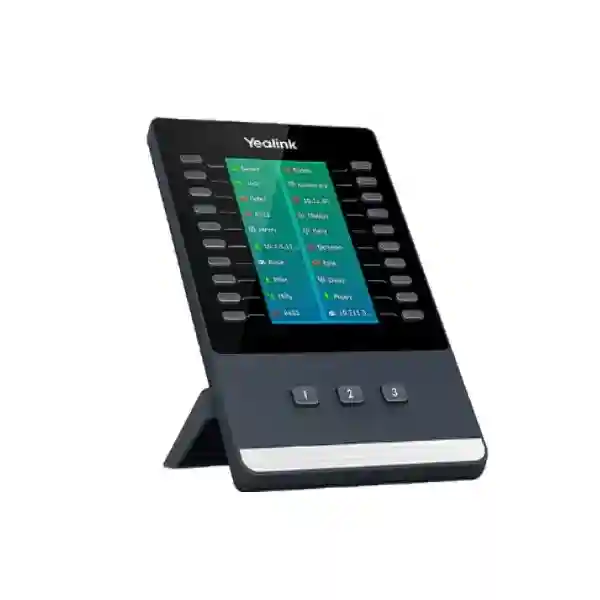
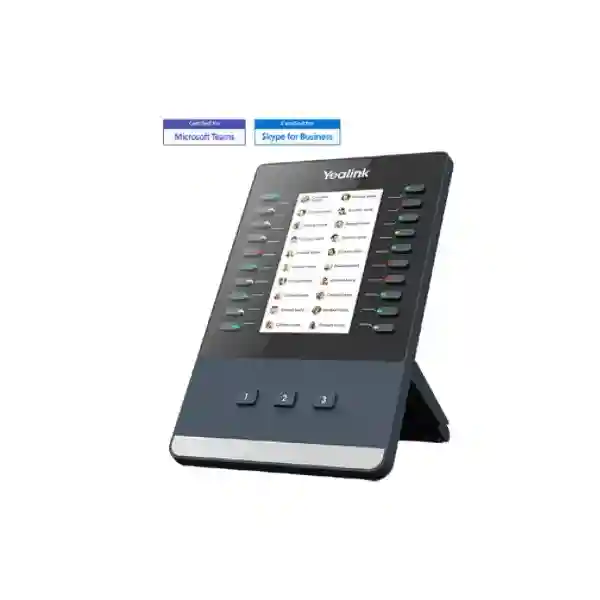
The Yealink EXP50 Expansion Module is built for business users who need more programmable controls than a standard desk phone can comfortably provide. It is especially useful at reception desks, executive-assistant stations, front offices, service desks and other high-call-volume positions where staff regularly monitor extensions, reach colleagues, transfer callers, park calls or trigger frequently used telephony functions. Yealink specifies a 4.3-inch 272 × 480-pixel color display with backlight, 20 physical keys on each page, three page views and illuminated page-control keys. Depending on the connected phone and software environment, those programmable keys can be assigned to functions such as BLF, speed dial, shared lines, call park, forwarding, conference, group pickup and other supported features.
A 272 × 480-pixel color display gives labels and functions a clear visual home beside the programmable keys.
Twenty physical keys across three selectable pages provide up to 60 programmable key positions on one module.
Supported Yealink phone models can use up to three EXP50 units, giving a large sidecar control surface for demanding roles.
What the Yealink EXP50 solves
Busy phone users often lose time navigating menus when they repeatedly need the same extensions or call-handling functions. The EXP50 places frequently used actions on a dedicated expansion surface. A receptionist can monitor important colleagues, a personal assistant can keep executive lines close at hand, and a service coordinator can dedicate keys to transfer destinations or pickup groups. This does not replace the phone or PBX; it extends the supported Yealink phone interface so everyday call control can become faster and more visible.
For Tanzania deployments, the most important buying step is compatibility confirmation. The EXP50 has been documented by Yealink for multiple T5-series SIP phones and for selected Teams and Zoom phone variants. Compatibility can vary with the exact phone model, hardware generation, firmware and platform edition, so procurement teams should provide the host phone model before ordering. Buyers planning two or three expansion modules should also verify power requirements because Yealink states that an external 5 V/2 A Yealink power adapter is required when supporting two or three modules.
Verified feature highlights
4.3-inch 272 × 480-pixel color display with backlight and multiple color icons.
20 physical keys per page plus three illuminated page-control keys for quick switching.
Depending on platform support, keys can be configured for BLF, shared line, speed dial, call park, transfer, forward, pickup and other telephony features.
Up to three EXP50 modules can be connected to supported Yealink phones.
The supplied stand supports two adjustable angles for practical alignment with the host phone.
The module uses USB connectivity with supported host phones and includes connection accessories in the documented package contents.
Compatibility and deployment guidance
Yealink’s current product positioning lists EXP50 support across selected T5-series SIP phones and selected Teams and Zoom desk-phone models. The official EXP50 datasheet specifically documents compatibility with SIP-T53, T53W, T54W, T57W, T58A and T58W, while Yealink’s product page also lists platform-specific combinations including T56A, VP59, MP56 and MP58-family devices for Teams or Zoom scenarios. Because model support can change by edition and firmware, the safest procurement method is to verify the exact host-phone model and collaboration platform before purchase rather than assuming that every Yealink handset accepts an EXP50.
The module connects physically beside the host phone and uses a supplied connecting sheet and USB cable. When more than one expansion module is planned, power budgeting becomes part of the design. Yealink documentation states that an additional 5 V/2 A power adapter is needed when two or three modules are connected. For large reception or operator desks, also consider available desk width, cable routing, handset position and the number of monitored users. A three-module arrangement can expose a very large number of programmable positions, but the configuration should remain organized so labels are understandable and operators can locate destinations quickly.
Yealink EXP50 Tanzania
Organizations looking for the Yealink EXP50 in Tanzania are usually not buying a stand-alone accessory in isolation; they are extending a business telephony workflow. Receptionists in corporate offices, hotels, clinics, schools, logistics operations, service companies and multi-department organizations may need to see whether key extensions are available and reach them immediately. The EXP50 can provide a dedicated key field beside a compatible Yealink phone, reducing dependence on on-screen menus for recurring actions. Before a quotation is prepared, the buyer should identify the exact Yealink host phone, whether the environment uses SIP, Microsoft Teams or Zoom, the number of extensions or contacts that need quick access, and whether one, two or three modules are required.
A Tanzania deployment should also be considered as part of the wider voice network. An expansion module does not correct packet loss, poor SIP routing, incorrect VLANs or an undersized PBX. For dependable operation, the underlying IP telephony environment should include suitable switching, PoE where relevant, stable addressing, correct QoS policies and a supported PBX or cloud calling platform. FourTeck’s Tanzania site describes an integrated approach to IP phones, IP PBX and network infrastructure, which is relevant because the EXP50 is most useful when the host phone, call platform and network are already planned as one system.
Procurement teams should avoid selecting the EXP50 simply because they need “more buttons.” Determine which buttons will be assigned, which extensions require presence monitoring, how call transfers are handled and whether operators need shared-line or pickup functions. That mapping determines whether a single 60-position module is sufficient or a multi-module arrangement is justified. It also helps the administrator create consistent labels and page layouts. In a growing organization, thoughtful key assignment can prevent the module from becoming a cluttered list that staff stop using.
Yealink EXP50 Expansion Module Dar es Salaam
Dar es Salaam organizations often operate busy front desks where incoming calls need to be directed rapidly across departments, branches or service teams. The Yealink EXP50 can be useful in this environment when the business already uses a compatible Yealink desk phone and needs a clearer, faster operator interface. A hotel reception may dedicate keys to reservations, housekeeping, finance and management. A corporate front office may monitor executive assistants, HR, accounts, sales and meeting-room extensions. A logistics company may assign keys to dispatch, warehouse, transport supervisors and customer service. These are workflow examples rather than fixed configurations; the actual key functions depend on the PBX and phone platform.
For a Dar es Salaam quotation, identify the host phone model first. This is especially important when upgrading an existing phone fleet because Yealink has several product generations and platform editions. Confirm whether the phone is running generic SIP firmware, Teams firmware or another supported environment. Then count the people or functions that the user wants visible. One EXP50 provides twenty physical keys per page and three pages, while compatible phones can support up to three modules. If two or three modules are planned, include the required external Yealink 5 V/2 A power adapter in the design.
The surrounding network matters too. Reception positions often carry a high volume of calls, so voice VLANs, QoS, PBX registration stability and internet quality for cloud calling should be checked. If the office is standardizing telephony, pair the expansion-module decision with handset standardization and clear provisioning templates. For regional coordination or UAE-linked operations, FourTeck’s broader FourTeck UAE technology portfolio can be relevant to organizations managing common communications standards across multiple countries.
Yealink EXP50 Expansion Module Mwanza
For Mwanza businesses, the EXP50 is most valuable where a single desk coordinates many internal contacts. Distribution, hospitality, healthcare, education, retail administration and regional offices can all create call patterns in which a receptionist or coordinator repeatedly reaches the same set of people. Instead of remembering extension numbers or opening contact directories, the user can work with labeled programmable keys beside the compatible Yealink phone. The color screen and presence LEDs make the sidecar easier to scan than a paper extension list, particularly when the telephony platform exposes BLF or presence information.
Sizing should be based on the number of destinations that genuinely require one-touch access. If the operator works with fewer than twenty essential contacts, the first page may cover most daily needs while other pages hold secondary departments or features. If the site has dozens of extensions, three pages can organize people by team, floor or function. In a larger multi-branch business, several modules may be justified, but usability should come before maximum button count. A concise layout with meaningful labels is often faster than filling every position.
Mwanza buyers should also provide details about their PBX or hosted telephony service. The EXP50 is not a PBX and does not create SIP accounts itself; it extends controls for a supported Yealink phone. If the existing phone model is not compatible, the correct solution may involve a supported handset rather than attempting to force the accessory into an unsupported setup. Network readiness—including switches, IP addressing and voice quality—should be considered at the same time. Buyers with linked East African sites may also review FourTeck Uganda for regional technology coordination.
Yealink EXP50 Expansion Module Arusha
Arusha has organizations with guest-facing, travel, hospitality, NGO, administrative and professional-service call flows where quick internal routing can matter. At a front desk, users may need to see key extensions and transfer calls without repeatedly navigating the host phone’s screen. The Yealink EXP50 addresses that task by adding programmable physical keys with LED indication and a color display beside a supported Yealink phone. This can be particularly useful where one person acts as a switchboard operator, office coordinator or executive assistant and must manage many internal destinations throughout the day.
A good Arusha deployment starts with a call-flow map. List the departments that receive the highest number of transfers, the managers who require direct monitoring, common pickup groups and any functions such as call park that operators use frequently. Then group related destinations across the EXP50’s pages. The device supports three page views, so page one can hold the most frequently used extensions while pages two and three cover lower-frequency contacts or functional keys. This reduces visual search time and helps new staff learn the layout.
Compatibility must still be verified before purchase. Yealink’s official documentation covers multiple T5-series models and selected Teams/Zoom phones, but exact support depends on the phone and edition. If an Arusha office is refreshing its wider communications platform, evaluate the expansion module together with PBX licensing, SIP trunks, PoE switching and headset needs. For companies with Kenya-linked branches or procurement, the FourTeck Kenya regional site can support a consistent multi-country technology conversation.
Yealink EXP50 Expansion Module Dodoma
Dodoma offices that handle frequent inbound calls can use the Yealink EXP50 to simplify call distribution when compatible Yealink phones are already part of the communications environment. Administrative offices, institutions, service desks, professional firms and organizations with several departments often need a clear way to locate colleagues quickly. The EXP50 creates a dedicated sidecar with programmable keys and visual indicators, allowing the operator to keep important destinations accessible without relying entirely on a touchscreen directory or memorized extension numbers.
The procurement conversation should include the existing phone inventory. Record the exact model printed on the phone or available in its system information, note the firmware/platform type and estimate the number of keys required. If the user needs only a small number of extra functions, one module may be enough. If a reception desk must monitor many extensions, supported phones can use up to three EXP50 modules. For two or three modules, Yealink specifies an external 5 V/2 A power adapter. Desk space and cable management should also be checked, particularly in compact counters or shared reception stations.
For larger Dodoma deployments, standardize key assignments and documentation. A consistent layout—for example, departments on page one, management on page two and operational groups on page three—can reduce training time and make replacement easier. Keep configuration records together with the host phone’s provisioning details. The goal is not simply to install an accessory but to make the operator’s daily call handling more predictable and efficient.
Yealink EXP50 Expansion Module UAE
Organizations with operations spanning Tanzania and the UAE may want a common Yealink desk-phone standard so reception and administrative workflows remain familiar across offices. The EXP50 can fit that strategy when both locations use compatible Yealink phones and the same or interoperable call platform. Standardizing page layouts, BLF conventions and transfer keys can make it easier for staff to move between offices and for IT teams to support users remotely. However, configuration should still reflect each site’s actual extensions and call routing.
For UAE deployments, verify the exact phone edition and collaboration platform before purchase because EXP50 support differs across SIP, Microsoft Teams and Zoom-oriented Yealink devices. Yealink’s current materials list selected T5-series phones and platform-specific models such as MP56, MP58 and VP59. A compatibility check should include firmware and hardware generation where relevant. Multi-module desks also need the documented external power adapter requirement when two or three EXP50 units are connected.
Cross-border procurement teams can reduce support complexity by maintaining one asset list with phone model, firmware, assigned user, extension, expansion-module count and page layout. For broader UAE IT, telecom and infrastructure requirements, FourTeck UAE provides a regional point of reference. The EXP50 itself should be evaluated as part of the complete calling workflow rather than as an isolated desktop accessory.
Yealink EXP50 Expansion Module Uganda
Uganda-based offices that use compatible Yealink phones can apply the EXP50 where receptionists and coordinators need rapid access to many extensions. A branch administrator may monitor sales, service, finance and management contacts; a hospitality front desk may require guest-service and operations destinations; a larger office may assign keys to departments and pickup groups. The three-page arrangement helps separate those workflows logically while preserving physical key access.
Before ordering, confirm the host phone model and determine whether the environment is SIP, Teams or Zoom. This avoids a common procurement mistake: buying a sidecar that looks physically compatible but is not supported by the particular phone edition. If multiple modules are required, include the power requirement in the bill of materials. Also check desk width, because a three-module operator station occupies substantially more space than a single phone.
For organizations with both Tanzania and Uganda operations, common configuration standards can simplify remote support. Naming rules, extension ranges, line-key templates and PBX policies can be documented centrally even if the underlying telecom services differ by country. Buyers can also use FourTeck Uganda when coordinating regional requirements. The most successful deployments begin with the operator’s workflow, then map that workflow to supported programmable functions.
Yealink EXP50 Expansion Module Kampala
In Kampala, call-heavy offices can use the EXP50 to make frequent transfers and extension monitoring more direct. Reception areas in corporate buildings, clinics, hotels, education providers and service organizations may need to route callers across many teams. With twenty physical keys per page and three page views, one module can be organized around everyday contacts without forcing the user through long menus. Presence LEDs can add useful visual context where supported by the phone and platform.
A practical Kampala configuration begins by ranking contacts according to call frequency. Put the highest-volume transfer destinations on the first page, reserve the second page for management or secondary departments and use the third page for operational groups or special call features. Avoid filling keys solely because capacity exists. A sidecar should reduce decision time, not create a larger search problem. Clear naming and consistent color/presence conventions help operators understand the layout.
Technical planning includes the host Yealink model, firmware, PBX support, USB connection and any required external power adapter. If the business is using Microsoft Teams calling or Zoom Phone hardware, confirm the specific model combination listed by Yealink. If the office uses a SIP PBX, confirm the phone’s supported EXP50 relationship and the availability of the required programmable feature types. This compatibility check should happen before pricing is finalized.
Yealink EXP50 Expansion Module Arua
Arua organizations may have smaller IT teams or branch environments where ease of operation is particularly important. The Yealink EXP50 can help a busy administrator handle calls by presenting frequently used contacts and functions on dedicated programmable keys. Instead of teaching every temporary or rotating front-desk employee a long list of extensions, the business can maintain a documented key layout that reflects the most common routing destinations.
Because branch sites often depend on centralized PBX or cloud services, the quality of the WAN connection can be as important as the desk hardware. The EXP50 only extends the phone interface; it does not improve voice quality if the network suffers from latency, congestion or packet loss. If calls traverse the internet or a site-to-site WAN, network quality, QoS and firewall rules should be reviewed separately. Locally, stable switching and correct voice VLAN settings help the host phone maintain dependable registration.
For procurement, provide the phone model, number of required monitored extensions and preferred key functions. Confirm whether one module is enough before adding more, because usability and desk space should be considered together. If two or three modules are needed, include the documented external 5 V/2 A Yealink adapter requirement. A clear bill of materials helps avoid receiving the sidecar without the accessories or compatible host hardware needed for the intended configuration.
Yealink EXP50 Expansion Module Mbarara
Mbarara businesses can use the EXP50 where one user coordinates communication across several departments or customer-facing functions. In a clinic, keys might represent reception, laboratory, pharmacy and administration. In a commercial office, they may represent sales, accounts, operations and management. The value comes from matching physical keys to repeated call-handling tasks, giving the operator an immediate control surface beside a compatible Yealink phone.
The 4.3-inch color display helps associate labels and icons with those keys, while the three page controls make it possible to separate groups. That page structure should be planned before deployment. If every page contains unrelated contacts, staff may spend time searching across pages. Grouping by department or workflow makes the system easier to learn. Where BLF or presence is supported, the LED status can help an operator decide whether to transfer immediately, park a call or choose another destination.
Technical validation remains essential. Yealink’s official datasheet lists EXP50 support for specific T5-series phones, and its newer product documentation includes additional platform-specific models. Buyers should not infer compatibility from the Yealink brand alone. Confirm the exact model, platform and firmware. Then verify expansion-module count and power. This sequence keeps the purchase aligned with the intended user workflow rather than relying on assumptions.
Yealink EXP50 Expansion Module Gulu
In Gulu, the Yealink EXP50 can support branch offices, institutions and service organizations where a receptionist or coordinator needs fast access to internal contacts. The module is particularly suitable when the base Yealink phone already meets voice requirements but lacks enough immediately accessible programmable keys. By extending the desktop interface, the organization can give users a clearer operational layout without replacing the PBX simply to gain more buttons.
The design process should distinguish between contacts that need visual monitoring and functions that simply need one-touch activation. BLF keys may be appropriate for colleagues whose status matters, while speed dial can be used for destinations where presence is not required. Call park, pickup or forwarding functions may be useful depending on PBX support. This role-based configuration gives the module a purpose beyond filling all available key positions.
If the Gulu site is part of a larger organization, keep the expansion-module layout in the same documentation set as extension plans, switch ports and phone provisioning. That makes moves and replacements easier. Where one user needs many monitored destinations, supported phones can attach up to three EXP50 units, but multi-module power and desk-space requirements should be planned in advance. A quotation request should therefore include both the accessory count and the exact Yealink phone model.
Yealink EXP50 Expansion Module Kenya
Kenya-based organizations with Yealink IP telephony can use the EXP50 for reception, executive-assistant and call-coordination positions that require a dense set of programmable controls. The same principles apply across Nairobi, Mombasa and other business locations: first confirm that the host phone supports the module, then map actual call workflows to page layouts. Twenty physical keys per page are available on each of three pages, so a single module can cover a substantial set of extensions or functions.
For companies operating in both Kenya and Tanzania, consistent handset and sidecar standards can simplify IT support. A common template can reserve similar key positions for departments such as reception, sales, finance and management while still adapting extension numbers to each site. Configuration consistency also helps with staff transfers and remote troubleshooting. Procurement records should include the phone model and platform because Yealink compatibility differs between SIP and collaboration-specific devices.
Regional buyers can consult FourTeck Kenya for Kenya-specific technology requirements. When requesting the EXP50, include the expected quantity, host phone model, required number of expansion modules per phone and whether the deployment needs related IP PBX, PoE switching or headset components. This gives the supplier enough context to validate the complete solution rather than pricing the sidecar alone.
Yealink EXP50 Expansion Module Kuwait
Kuwait organizations that operate Yealink-compatible desk phones can use the EXP50 where staff handle high volumes of internal transfers or need a large programmable key field. Corporate reception, hospitality, healthcare, facilities desks and administrative teams are common examples. The color display and multi-page design allow organizations to structure keys around departments and services while retaining physical buttons for fast operation.
Compatibility checking is especially important for multinational organizations that may have different Yealink phone generations across branches. A device purchased for one office should not automatically be assumed to work with another phone merely because both are Yealink. Record the exact model and software platform, then match it against current Yealink documentation. If a multi-module setup is planned, include the external 5 V/2 A power adapter requirement documented by Yealink for two or three EXP50 units.
For Kuwait-specific regional requirements, FourTeck Kuwait can be used as a related resource. A well-prepared request should explain whether the module is for a new phone deployment or an existing handset. For an existing handset, a clear photo of the model label or exact model name can help eliminate ambiguity during compatibility validation.
Yealink EXP50 Expansion Module Ghana
For Ghana offices using supported Yealink phones, the EXP50 offers a practical way to create a more capable operator position without changing the core call platform. Receptionists and administrative users can dedicate keys to frequently called colleagues, departments and supported call-control functions. The three-page structure means the layout can scale beyond the first twenty buttons while preserving quick physical access.
Planning should focus on how users actually work. A front desk may need immediate visibility into management and customer-facing departments, while a facilities or security desk may care more about operational teams. A customer-service coordinator might reserve keys for escalation points. These differences should drive the configuration rather than using a generic template. The most frequently used destinations belong on the first page, with less common contacts or specialist functions on later pages.
For regional procurement, FourTeck Ghana can support Ghana-specific discussions. Buyers should submit the Yealink host phone model, number of modules, PBX or collaboration platform and desired functions with the quotation request. That information is necessary because platform-specific support may differ and because multi-module configurations introduce additional power requirements.
Yealink EXP50 Expansion Module Nigeria
Nigeria organizations with large offices or high-call-volume front desks can use the Yealink EXP50 to expand supported Yealink phones with a substantial programmable key surface. Reception, hospitality, healthcare, multi-branch enterprises and customer-facing administrative teams may benefit when daily calls repeatedly move among the same departments. One module provides up to sixty programmable positions across three pages, while selected compatible phones can use up to three modules.
The number of available keys should not be confused with the number the user genuinely needs. An effective operator layout is curated. Put the most time-sensitive contacts on the first page and reserve later pages for secondary destinations, specialist departments or less frequently used features. Where the PBX supports BLF, presence LEDs can help users identify availability before transferring a caller. Where presence is not needed, speed dial or other supported functions may be more appropriate.
Nigeria-specific procurement can be coordinated through FourTeck Nigeria. For accurate compatibility guidance, provide the precise Yealink host model and platform, not just a general description such as “T5 phone.” Include expected expansion-module count and whether the organization needs related PBX, SIP, headset or switching components. This helps shape a complete bill of materials and avoids unsupported combinations.
Yealink EXP50 Expansion Module Seychelles
Seychelles businesses in hospitality, services, administration and multi-department operations can use the EXP50 where supported Yealink phones need more direct programmable access. Hotels and resorts, for example, may have front desks that repeatedly contact reservations, housekeeping, maintenance, food and beverage, security and management. A carefully organized expansion module can make those transfers easier while keeping frequently used destinations visible to the operator.
For island operations and distributed properties, centralized telephony or cloud calling can make extension management easier, but network connectivity still determines voice quality. The EXP50 does not alter the underlying call path; it provides controls on the desk. Therefore, deployment reviews should separate endpoint compatibility from network performance. Verify the supported phone model, then ensure the site’s voice VLAN, switching, internet and PBX configuration are appropriate for the calling service.
If the operator needs more than one module, check the documented external power requirement and available desk space. Also consider standardizing key labels across similar reception positions so staff can move between shifts or properties with less training. A quotation request should list the quantity of host phones, EXP50 units per phone and key workflow expectations. This creates a clearer basis for compatibility checking and configuration planning.
Technical specification summary
| Display | 4.3-inch, 272 × 480-pixel color display with backlight |
| Keys | 20 physical keys per page; 40 additional positions via page switching; 3 page-control keys |
| Expansion | Up to 3 EXP50 modules on supported host phones |
| Connectivity | USB 2.0 compliant interface for connection/data functions |
| Stand | Two adjustable angles |
| Multi-module power | External Yealink 5 V/2 A adapter required for two or three modules |
| Dimensions | 196.5 mm × 124.0 mm × 137.5 mm × 42.6 mm as documented by Yealink |
Who should consider the EXP50?
The best fit is a user who spends meaningful time managing calls and repeatedly interacts with a known set of extensions or telephony functions. Receptionists, executive assistants, administrative coordinators, contact-center supervisors and service-desk staff are strong examples. A general office user who only makes occasional calls may not benefit from the extra desk space and key capacity. The business case should therefore be tied to workflow frequency: if one-touch access saves repeated navigation dozens or hundreds of times per day, the module can improve usability; if the extra keys would rarely be touched, a standard phone interface may be sufficient.
Buying and quotation checklist
For a useful quotation, provide: the exact Yealink host phone model; SIP, Teams or Zoom platform details; number of operator desks; EXP50 quantity per desk; approximate number of monitored contacts; required BLF, speed-dial, shared-line, pickup, park or transfer functions; existing PBX or cloud calling platform; and whether related phones, headsets, PoE switches or configuration services are needed. For two or three EXP50 units on one host phone, include the appropriate Yealink 5 V/2 A power adapter in the requirement.
Frequently asked questions
How many keys does the Yealink EXP50 provide?
It has 20 physical keys per page and three page views, providing up to 60 programmable key positions on one module.
Can I connect more than one EXP50?
Supported Yealink phones can use up to three EXP50 modules. Yealink states that an external 5 V/2 A power adapter is required when using two or three modules.
Does EXP50 work with every Yealink phone?
No. Compatibility is model and platform dependent. Yealink documents support for specific T5-series SIP phones and selected Teams/Zoom models. Confirm the exact host model before purchase.
Is the EXP50 a PBX?
No. It is an expansion module for supported Yealink phones. The phone still depends on its configured PBX, SIP service or supported collaboration calling environment.
What functions can be assigned to the keys?
Depending on the host phone and platform, Yealink documents functions including BLF, shared line, speed dial, call park, conference, forwarding, pickup and related programmable features.
Decision recap
Choose the Yealink EXP50 when a supported Yealink phone needs a larger, more visible set of programmable controls for daily call handling. Its strongest use case is not simply “more buttons”; it is faster access to the people and functions that an operator uses repeatedly. Verify the host phone and platform, decide how many keys are genuinely needed, plan page organization, account for multi-module power requirements and keep the overall voice network stable. This approach turns the EXP50 into a practical productivity tool rather than an unused accessory.
Plan your Yealink EXP50 deployment
Share your Yealink phone model, number of reception or operator desks, PBX or calling platform and the number of contacts you want to monitor. FourTeck can use those details to help frame a compatible quotation and the surrounding IP-telephony requirements. For specialist IP telephony context, you can also review FourTeck IP Phone solutions.




Reviews
There are no reviews yet.