
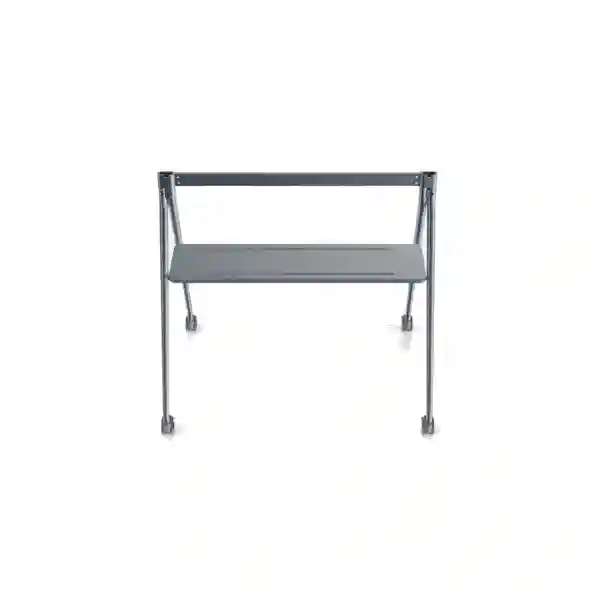
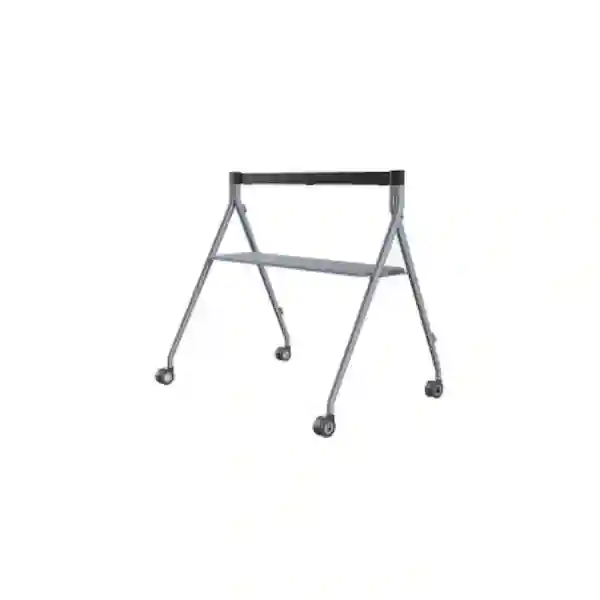
Yealink MB-FS-P650T Floor Stand
The Yealink MB-FS-P650T Floor Stand is the dedicated mobile floor-standing solution for the Yealink MeetingBoard 65 Pro. Yealink positions it as a purpose-built stand for organisations that want to move a MeetingBoard 65 Pro between collaboration spaces without relying on a permanent wall installation. The stand includes a built-in tray for accessories and equipment, uses swivel casters for mobility, and is designed for a clean fit with the MeetingBoard Pro platform.
For businesses in Tanzania, the practical value is straightforward: a MeetingBoard can become a movable collaboration resource rather than a screen tied to one wall. That can suit training rooms, executive meeting spaces, project rooms, hybrid classrooms, shared collaboration areas and organisations that reconfigure spaces frequently. FourTeck Tanzania can help procurement teams confirm the correct MeetingBoard model, floor-space requirement, room layout, network readiness and related meeting-room accessories before a quotation is finalised.
Yealink MeetingBoard 65 Pro, according to Yealink’s current product and accessory documentation.
1154 mm × 795 mm × 1034 mm (W × D × H), based on the official Yealink floor-stand datasheet.
19.8 kg for the stand. Yealink lists the packed gross weight as 23.6 kg.
Yealink part number 3311083 for the MB-FS-P650T.
What the Yealink MB-FS-P650T solves
A large interactive collaboration board is often purchased for a specific room, but many organisations later discover that meeting patterns are more fluid than the original room plan. The MB-FS-P650T addresses that problem by giving the MeetingBoard 65 Pro a dedicated mobile support structure. Instead of committing the display to one wall position, the board can be relocated to the part of the room where participants need it, or moved between compatible spaces when operational procedures allow.
The integrated tray is useful because mobile collaboration setups still need a place for small accessories, presentation devices, controllers or other meeting tools. Keeping these items with the display can reduce the clutter that appears when temporary tables, loose shelves or improvised storage are used around a conferencing system. Yealink also highlights simple deployment, a clean physical fit with MeetingBoard Pro and swivel casters as the core design characteristics.
For procurement teams, the stand should be treated as part of the meeting-room design rather than as a generic television trolley. The key compatibility point is the MeetingBoard 65 Pro. The floor footprint, route between rooms, door widths, lift access, floor transitions, cable reach and final viewing position should all be checked before deployment. Those practical checks matter especially in offices where the unit may move between boardrooms, training areas and multipurpose spaces.
Verified Yealink MB-FS-P650T specifications
| Specification | Verified value | Buyer relevance |
|---|---|---|
| Compatibility | MeetingBoard 65 Pro | Confirms this is the dedicated 65-inch MeetingBoard Pro floor-stand variant. |
| Stand dimensions | 1154 × 795 × 1034 mm | Useful for floor-plan, route and room-clearance checks. |
| Carton dimensions | 1145 × 840 × 173 mm | Helpful for inbound logistics, receiving and storage planning. |
| Net weight | 19.8 kg | Relevant when planning handling and assembly. |
| Gross packed weight | 23.6 kg | Useful for logistics and shipment planning. |
| Tray size | 1062 × 285 mm | Helps buyers judge the usable accessory surface. |
| Tray load limit | 5 kg | Provides an official limit for items placed on the integrated tray. |
| Yealink part number | 3311083 | Useful for procurement and model verification. |
Simple deployment
Yealink identifies simple deployment as a core feature. In practice, this means organisations can plan the MeetingBoard as a floor-standing collaboration asset instead of building the room around a fixed wall mount. Assembly, safe positioning and cable routing still need to be planned carefully.
Clean MeetingBoard Pro fit
The stand is designed for the MeetingBoard 65 Pro rather than as a universal third-party cart. This gives buyers a clearer compatibility path and helps preserve a coherent physical setup around the collaboration display.
Mobility with swivel casters
Swivel casters support controlled movement around suitable indoor environments. Before regular room-to-room use, check floor thresholds, ramps, cable paths, door openings and the way staff will move the combined MeetingBoard and stand safely.
Compatibility, room planning and installation guidance
The MB-FS-P650T should be specified when the display is a Yealink MeetingBoard 65 Pro and a floor-standing mobile configuration is preferred. It should not be assumed to be interchangeable with older MeetingBoard stands or the larger MB-FS-P750T and MB-FS-P860T variants. Yealink publishes separate floor-stand models for the 75-inch and 86-inch MeetingBoard Pro sizes, so a quotation should always state the screen model and the required stand model together.
Room planning should consider the combined installed footprint, viewing distance, camera sightline, seating arrangement and access around the display. A mobile stand is useful only when there is enough clear floor area to position it safely. In a small room, the depth of the stand can influence how close the unit can sit to a wall or how much circulation space remains behind the chairs. In larger boardrooms, the mobile format can be valuable when the display needs to move between presentation and collaboration positions.
Cabling should also be reviewed before the unit is moved routinely. Power and network connections can restrict mobility even when the stand itself is on casters. Where the MeetingBoard is expected to operate in more than one room, each destination should have suitable power, wired or wireless network availability, and any required room-account or conferencing configuration. Teams should avoid stretching cables across walking routes simply because the display can move.
For broader meeting-room projects, FourTeck Tanzania’s technology services page explains how video conferencing, audio, networking and displays can be planned as one connected environment. That is relevant because a floor stand solves the physical mounting problem, while the quality of hybrid meetings still depends on the collaboration platform, network, room acoustics, participant layout and overall user workflow.
Who should consider the MB-FS-P650T?
For executive rooms where the display may need to shift between collaborative work, presentations and conventional boardroom seating.
Useful when the front of the room changes based on class format, facilitator position or breakout activities.
A mobile MeetingBoard can serve several compatible rooms when booking, network access and safe movement procedures are coordinated.
Teams that alternate between whiteboarding, content review and video meetings can benefit from repositioning the collaboration display.
Buying the Yealink MB-FS-P650T in Tanzania
A good quotation request should identify the exact MeetingBoard model, quantity, deployment location and whether the requirement is stand-only or part of a complete collaboration-room rollout. For the MB-FS-P650T, model accuracy is especially important because it is intended for the MeetingBoard 65 Pro. If a business is ordering new MeetingBoards at the same time, the bill of materials should pair each 65-inch unit with the correct accessory configuration rather than relying on a generic floor-stand description.
Procurement teams should also decide whether the stand will remain in one room or move regularly. A fixed-room installation may prioritise exact display position, camera eye line and furniture layout. A mobile deployment adds route planning, floor conditions, destination-room readiness, cable access and staff handling procedures. These details affect the usefulness of the solution even though they do not change the stand’s core specification.
You can review FourTeck Tanzania’s broader product categories in the FourTeck Tanzania technology shop, which includes video-conferencing and display requirements, then use the verified FourTeck Tanzania contact page to request a quotation. For a useful response, include the MeetingBoard 65 Pro quantity, installation city, expected use of the stand, room type, preferred meeting platform and any known deployment constraints.
Yealink MB-FS-P650T Floor Stand Tanzania
In Tanzania, the Yealink MB-FS-P650T is most relevant to organisations that want the MeetingBoard 65 Pro to remain flexible after installation. Corporate offices, banks, professional-services firms, universities, training centres, NGOs, government departments and project organisations often use rooms for more than one purpose. A meeting space may host a management call in the morning, a training session later, and a project workshop the next day. A dedicated mobile stand allows the display to follow those changes without committing it permanently to a wall.
The buying decision should start with compatibility and physical planning. Yealink specifies this model for the MeetingBoard 65 Pro, and the published stand dimensions are 1154 × 795 × 1034 mm. Those dimensions matter when checking space around conference tables, corridors, doors and storage locations. Organisations that intend to move the system between rooms should confirm that each route is wide enough, level enough and free from cable obstacles. The combined system is a substantial collaboration device, so movement should be planned rather than treated like moving a lightweight office monitor.
Tanzania deployments can also vary considerably by building type. A modern office tower may have smooth floors, lifts and structured network points, while a training facility or multi-building campus may require more attention to thresholds, power outlets and wireless coverage. The stand itself does not provide network connectivity or power independence; it simply gives the MeetingBoard a mobile physical platform. For that reason, a complete deployment plan should map the rooms where the board will operate and make sure each location supports the collaboration workflow.
When requesting a Tanzania quotation, include whether you already own the MeetingBoard 65 Pro, whether you are buying the display and stand together, how many rooms will use the unit, and whether you require help with room layout or conferencing integration. This information helps separate a straightforward accessory purchase from a broader collaboration project and reduces the risk of ordering the wrong floor-stand size.
Yealink MB-FS-P650T Floor Stand Dar es Salaam
Dar es Salaam businesses often operate in offices where meeting spaces need to serve several teams, clients and visiting staff. For these environments, the MB-FS-P650T can be attractive because it turns the MeetingBoard 65 Pro into a floor-standing collaboration resource that can be repositioned when the room layout changes. A consulting firm might use the board near the main conference table for client calls, then move it toward an open area for a workshop. A training team may want the same display centred differently depending on whether participants sit classroom-style or in small groups.
Before purchasing for Dar es Salaam, measure the actual room and movement path. The official stand depth of 795 mm is important because it affects how far the system projects into a room. Check doorways, corridors, lift dimensions and any raised thresholds if the unit will move between floors or suites. Furniture should be arranged so participants have clear sightlines to the MeetingBoard without creating narrow passages around the stand. If the unit stays in one room, choose a resting position where the camera and display align naturally with seating.
Connectivity deserves equal attention. Many Dar es Salaam offices depend heavily on cloud collaboration, so the mobile display should not be moved into a room where the network is weak or where power and data cables must cross walking routes. If rooms rely on Wi-Fi, test conferencing performance at the actual positions where the board will be used. If wired connectivity is preferred, make sure network points are available without creating unsafe cable runs.
For procurement, specify MB-FS-P650T and Yealink part number 3311083 in the request so there is no confusion with earlier MeetingBoard stand models or the 75-inch and 86-inch Pro variants. Include quantity, target rooms and whether installation guidance is required. This is especially useful for multi-room office fit-outs where several MeetingBoards and stands may be ordered together.
Yealink MB-FS-P650T Floor Stand Mwanza
For organisations in Mwanza, a mobile MeetingBoard deployment can be useful where one collaboration device needs to support several functional areas. Regional offices, educational organisations, healthcare administration teams, logistics companies and project offices may not have a dedicated video-conferencing room for every group. Using the MB-FS-P650T with a MeetingBoard 65 Pro can let a shared device serve scheduled sessions in different spaces, provided the movement path and destination rooms are suitable.
The stand should be viewed as part of the room infrastructure. Its 1154 mm width and 795 mm depth influence how comfortably it fits near desks, training tables and conference seating. When rooms are compact, it is worth marking the intended footprint on the floor before ordering. This simple check can reveal whether the display will block a doorway, reduce circulation around tables or sit too close to participants. The integrated tray can help keep small meeting accessories with the board, reducing the need to move separate tables alongside it.
If the board will travel between departments, create a practical operating routine. Identify where it is stored, who is responsible for moving it, which rooms are approved for use and where power is available. If collaboration depends on wireless networking, verify that coverage remains stable in each room. A mobile stand does not compensate for weak wireless infrastructure, poor acoustics or unsuitable lighting, so these factors should be assessed wherever the MeetingBoard will be used.
A Mwanza quotation should state whether the requirement is for the stand only or a complete MeetingBoard solution. Buyers should provide the exact MeetingBoard model, quantity and deployment style. Where future expansion is expected, it may also be useful to standardise on consistent room layouts and accessory sets so staff can use different locations without learning a different physical setup each time.
Yealink MB-FS-P650T Floor Stand Arusha
Arusha organisations often host a mix of local teams, visiting partners, workshops and regional meetings. In hotels, training centres, NGOs, tour-sector offices, professional organisations and corporate branches, meeting spaces may change configuration frequently. The MB-FS-P650T suits this kind of environment when the selected collaboration display is the Yealink MeetingBoard 65 Pro and the objective is to preserve room flexibility instead of using a fixed wall mount.
The stand’s mobility can support changing room layouts, but the space should still be prepared deliberately. If a meeting room is reconfigured from boardroom style to classroom seating, the display can be repositioned for visibility. If a workshop needs open floor space, the unit can be moved to the side when appropriate. The integrated tray provides a dedicated surface for lightweight accessories within Yealink’s published tray load limit, helping keep the collaboration area organised.
For hospitality and event-related use, route planning becomes particularly important. A collaboration board may move through guest corridors, service areas or meeting-suite entrances, so door clearances and floor transitions should be checked. Staff should also understand that the combined unit is significantly heavier than the stand alone. The MeetingBoard 65 Pro and its floor stand should be moved carefully and only through suitable indoor paths.
When seeking an Arusha quotation, include the number of MeetingBoard 65 Pro units, whether each needs its own MB-FS-P650T, and whether the displays will remain in fixed rooms or move between event spaces. If conferencing quality is important, share the room types and preferred collaboration platform as well. That allows the discussion to include not only the physical stand but also the factors that make the complete room usable: camera position, acoustics, connectivity, presentation workflow and safe cable management.
Yealink MB-FS-P650T Floor Stand Dodoma
Dodoma buyers may consider the Yealink MB-FS-P650T for government offices, corporate branches, associations, education facilities and project teams that need a MeetingBoard 65 Pro without a permanent wall installation. The floor-standing approach can be useful during office changes, temporary project occupancy, training programmes or shared-room schedules where the organisation wants to preserve the ability to reposition the display.
Planning should begin with the exact use case. If the stand will stay in one room, identify a stable position that supports comfortable viewing and natural camera framing. If it will move between rooms, review the full route and prepare each destination. Power outlets, network access, furniture clearance and floor conditions need to be suitable every time the board is moved. This prevents a mobile system from becoming difficult to use because each room requires improvised cables or furniture changes.
Procurement teams should also keep the model distinction clear. MB-FS-P650T is the Yealink floor stand for MeetingBoard 65 Pro. The current official family also includes different floor stands for MeetingBoard 75 Pro and MeetingBoard 86 Pro. Those products have different dimensions and weights, so ordering by a generic description such as “Yealink MeetingBoard stand” can create avoidable mistakes. Use the model code and part number 3311083 on purchase requests and supplier communications.
For larger Dodoma deployments, consider creating a standard room checklist covering floor space, camera line of sight, lighting, wireless or wired network access, power and cable management. This approach makes each deployment repeatable and supports easier handover to users. It also makes it simpler to determine whether a mobile floor stand is genuinely better than a wall-mounted alternative in each location.
Yealink MB-FS-P650T Floor Stand UAE
In the UAE, the MB-FS-P650T can suit organisations that standardise on Yealink MeetingBoard 65 Pro systems across conference rooms, customer-experience centres, training suites and flexible offices. High-change workplaces can benefit from a mobile stand when teams frequently rearrange rooms for workshops, executive meetings or hybrid events. The key advantage is not simply that the display has wheels; it is that the stand is designed specifically for the MeetingBoard 65 Pro and includes an integrated accessory tray.
UAE office fit-outs often involve carefully planned interiors, so the clean appearance of a purpose-built stand may be preferable to a generic trolley. At the same time, physical design should not override practical checks. The 1154 × 795 mm floor footprint needs to fit the room without narrowing circulation paths. Buildings with raised floors, transitions between carpet and hard flooring, access ramps or lift movement should be reviewed before regular relocation is expected.
For multi-country organisations that operate in Tanzania and the UAE, standardising collaboration hardware can simplify procurement and user familiarity. However, each site should still validate room layout, power, network and support requirements separately. A consistent MeetingBoard platform does not mean every room should use the same mounting method. Some rooms may be better suited to wall mounting, while others gain more value from a floor stand.
FourTeck’s UAE technology solutions site provides a regional route for broader UAE IT and collaboration requirements. When requesting the MB-FS-P650T, identify the MeetingBoard 65 Pro, quantity, room type and whether the project requires only hardware supply or a complete meeting-room solution.
Yealink MB-FS-P650T Floor Stand Uganda
Uganda organisations considering the MeetingBoard 65 Pro may choose the MB-FS-P650T when the display needs to remain movable and independent of a permanent wall position. This can work well for head offices, training rooms, education organisations, NGO operations and distributed businesses that share collaboration equipment across rooms. A mobile stand may also help organisations that occupy leased premises and prefer to minimise permanent wall modification.
The correct buying process starts by confirming the exact MeetingBoard model. Yealink lists MB-FS-P650T specifically for the 65-inch MeetingBoard Pro. The stand dimensions, packed size and weight should be reviewed for receiving, assembly and the intended movement route. Organisations that expect to transport the board between floors should confirm lift size and safe handling procedures rather than assuming a wheeled stand can move everywhere in the building.
Network readiness is another important consideration. If the MeetingBoard moves between meeting rooms, each room should have dependable connectivity and power. Wireless conferencing may appear convenient, but actual room performance should be tested under normal business load. Where wired networking is required, cable routes should remain safe and tidy. The integrated tray can hold suitable lightweight accessories, but cables and external equipment should still be managed so they do not interfere with movement.
For broader regional requirements, FourTeck’s Uganda IT solutions site covers communication and IT infrastructure needs. For an MB-FS-P650T quotation, include quantity, MeetingBoard model, city, room profile and whether the unit is intended to remain in one room or serve several spaces.
Yealink MB-FS-P650T Floor Stand Kampala
Kampala offices often need to make efficient use of meeting rooms, especially where multiple teams share a limited number of collaboration spaces. The Yealink MB-FS-P650T can help when a MeetingBoard 65 Pro needs to shift between room positions or move to another compatible meeting area. This can support hybrid meetings, training sessions, project reviews and customer presentations without permanently dedicating the screen to one wall.
The mobility benefit should be matched with clear operating rules. Decide where the system normally rests, how it is powered, whether it connects by Wi-Fi or Ethernet and who is responsible for moving it. The route should avoid steps, rough transitions and areas where power or network cables would need to remain attached while the unit is in motion. Because the stand supports a large collaboration display, controlled movement is safer than treating it like a small wheeled monitor cart.
Room geometry also matters. The MeetingBoard should be placed where all participants can see the screen comfortably and where its camera can capture the intended seating area. A stand gives flexibility to adjust that position, but frequent movement may indicate that the room itself needs a defined standard layout for conferencing. Organisations can mark recommended positions in each room so users know where to place the unit before a call.
Kampala procurement teams should put the MB-FS-P650T model code and Yealink part number 3311083 on quotation requests. If the purchase is part of a larger MeetingBoard rollout, list the 65-inch units separately from other screen sizes so each display receives the correct accessory. This is particularly important where several branches or departments share one procurement process.
Yealink MB-FS-P650T Floor Stand Arua
For organisations in Arua, the MB-FS-P650T can provide a practical way to deploy a MeetingBoard 65 Pro in environments where a permanent meeting-room installation is not ideal. Project offices, education sites, administrative facilities and branch operations may use multipurpose rooms that switch between meetings, training and group work. A mobile stand allows the display to be placed for the current activity and moved when the space is needed for something else.
Because a mobile collaboration unit may serve more than one room, infrastructure consistency becomes important. Check that all planned rooms have power and reliable connectivity. If some rooms have weaker Wi-Fi, resolve that before relying on the MeetingBoard as a shared resource. It is also useful to define a storage position where the unit can remain safely when not in use, particularly in spaces with frequent public or staff movement.
The official dimensions provide a useful planning reference. At 1154 mm wide and 795 mm deep, the stand requires meaningful floor space. Marking the footprint with tape before ordering can help confirm whether a room can accommodate the board without obstructing entrances or walkways. The tray adds useful accessory space, but buyers should keep within the published 5 kg tray load limit and avoid using the tray as a general storage shelf for heavy items.
Arua buyers should provide the exact MeetingBoard model and quantity in their request. If the unit will travel between buildings rather than just rooms, discuss that use case specifically because a floor stand designed for indoor mobility is not the same as a transport case. The deployment plan should distinguish routine movement inside a prepared facility from vehicle transport or movement over uneven outdoor surfaces.
Yealink MB-FS-P650T Floor Stand Mbarara
Mbarara businesses, education organisations and regional offices can use the MB-FS-P650T when they want a MeetingBoard 65 Pro to support different collaboration scenarios in the same facility. The stand can make it easier to reposition the screen for management meetings, classroom-style sessions, interactive planning and remote calls. This flexibility can be more valuable than a fixed wall installation when room layouts change frequently.
The stand’s purpose-built design reduces the uncertainty that comes with choosing a generic cart, but buyers still need to verify the total room setup. Make sure the MeetingBoard’s installed position provides a comfortable viewing angle, does not block doors and leaves enough room for participants to move. Check that the floor is suitable for swivel casters and that transitions between rooms can be crossed without destabilising the system.
For hybrid meetings, mobility should not compromise connectivity. If the MeetingBoard will move regularly, each approved room should have known-good network coverage and accessible power. A short predeployment test in every destination can identify dead zones, awkward cable routes or furniture conflicts. This is more effective than discovering those issues just before an important meeting.
When requesting a quote in Mbarara, specify MB-FS-P650T, MeetingBoard 65 Pro and the required quantity. Note whether the unit will move daily, occasionally or remain mainly in one room. That detail can guide decisions about cable management, floor layout and user procedures. If the organisation later adds larger MeetingBoard Pro models, remember that the 75-inch and 86-inch versions use different stand models and should be ordered separately.
Yealink MB-FS-P650T Floor Stand Gulu
In Gulu, the MB-FS-P650T may be useful for organisations that need one high-quality collaboration board to serve different teams or learning spaces. A MeetingBoard 65 Pro on a dedicated floor stand can support video meetings, training, remote consultation, interactive whiteboarding and presentations while retaining the option to relocate the display inside the facility. This approach can be efficient when room demand changes across the day.
A mobile system should be deployed with the same care as a fixed conferencing room. Identify the preferred screen position, confirm that the camera faces participants naturally and make sure lighting does not create severe glare. If users repeatedly place the board in different locations, create simple floor markers or room instructions so the display returns to a known position that provides good visibility and camera framing.
The floor route is equally important. The stand uses swivel casters, but the environment still needs to be appropriate for movement. Avoid uneven outdoor routes, uncontrolled steps and areas where cables, rugs or thresholds create a tipping hazard. If the board is expected to move between rooms, power and network connections should be detached and managed before movement begins.
Gulu procurement requests should identify the MB-FS-P650T by model and Yealink part number 3311083. Include whether you already have the MeetingBoard 65 Pro and describe the intended rooms. This helps confirm that the requirement is for the correct floor stand rather than a wall mount, wall stand, lift stand or larger MeetingBoard Pro accessory. Accurate model pairing is the simplest way to avoid compatibility issues.
Yealink MB-FS-P650T Floor Stand Kenya
Kenyan organisations using the MeetingBoard 65 Pro can consider the MB-FS-P650T when they want a professional mobile alternative to wall mounting. Flexible offices, universities, training centres, meeting suites and regional head offices can benefit when the collaboration display needs to change position or serve more than one room. The dedicated stand keeps the deployment within the Yealink MeetingBoard Pro accessory ecosystem and includes an integrated tray for suitable meeting accessories.
For procurement, model matching should be treated as a mandatory check. The MB-FS-P650T is for MeetingBoard 65 Pro. Organisations buying a mixed estate of 65-inch, 75-inch and 86-inch MeetingBoard Pro systems should map each screen size to its correct stand model in the bill of materials. This reduces the chance of receiving a physically incorrect accessory when several similar model codes appear on one purchase order.
Kenya deployments should also consider how the unit will move inside the building. Open-plan offices and meeting suites may provide easy routes, while older buildings can have narrow doors, steps or uneven transitions. Measure the 1154 × 795 mm stand footprint against the actual path. Check storage and parking positions so the unit does not obstruct circulation when it is not in use.
For customers coordinating projects across Tanzania and Kenya, the FourTeck Kenya IT solutions site provides a regional route for broader collaboration and IT requirements. In a quotation request, include the exact MeetingBoard model, stand quantity, city, room type and any requirement for a complete video-conferencing solution rather than stand supply alone.
Yealink MB-FS-P650T Floor Stand Kuwait
Kuwait businesses can use the MB-FS-P650T to deploy MeetingBoard 65 Pro systems in meeting rooms that require a movable, floor-standing format. This can be helpful in corporate offices, training centres, education settings and multipurpose conference spaces where room layouts change regularly. The purpose-built design avoids the uncertainty of selecting a generic stand and keeps the physical installation aligned with Yealink’s MeetingBoard Pro accessory family.
In fit-out projects, the stand footprint should be considered early. A floor-standing display takes up space that a wall-mounted system does not, so furniture plans need to account for its 795 mm depth and 1154 mm width. In long boardrooms, the ability to shift the display slightly can help improve sightlines, while in compact rooms the same footprint may reduce circulation. The decision should therefore be based on the room, not simply a preference for mobility.
The integrated tray can support a cleaner meeting area by providing a designated surface for compatible lightweight accessories. Buyers should still follow Yealink’s published tray load limit and avoid placing heavy equipment on it. Cable routing should remain tidy and flexible enough for the intended movement pattern. If the board moves between rooms, power and network access should be planned at each destination rather than improvised.
A Kuwait quotation should reference MB-FS-P650T, part number 3311083 and MeetingBoard 65 Pro. Add the required quantity, building type and movement pattern. If the project includes several collaboration rooms, separate the rooms that need mobile stands from those that are better served by fixed wall mounting so the bill of materials reflects actual operational requirements.
Yealink MB-FS-P650T Floor Stand Ghana
Ghana organisations planning MeetingBoard 65 Pro deployments can select the MB-FS-P650T where mobility and flexible room use are important. Corporate offices, schools, training organisations and project teams may prefer a floor stand when a wall mount is impractical or when the display needs to serve different room configurations. The built-in tray and swivel casters are the main functional elements that distinguish this stand as a mobile collaboration accessory.
The first practical question is whether the unit will stay in a single room or move regularly. A mostly fixed installation can be positioned once for optimum viewing and camera framing. A frequently moved unit needs a defined path, appropriate floor surfaces, prepared destination rooms and safe cable procedures. The display should not be pushed while connected by taut power or network cables, and staff should understand where the unit can be parked when not in use.
Procurement teams should also use the official model code rather than a generic description. Yealink has multiple stand products across MeetingBoard generations and screen sizes. MB-FS-P650T identifies the current 65-inch MeetingBoard Pro floor stand with tray. Recording the model and part number 3311083 on quotations helps suppliers and internal purchasing teams validate that the correct accessory has been selected.
For multi-site organisations, it may be useful to standardise deployment checklists across offices: confirm the MeetingBoard model, stand model, screen position, network connection, power access, room layout and user workflow. Standardisation helps users move between offices with a familiar collaboration experience while still allowing each room to use the mounting approach that fits its physical constraints.
Yealink MB-FS-P650T Floor Stand Nigeria
In Nigeria, the MB-FS-P650T can be useful for organisations rolling out MeetingBoard 65 Pro systems across head offices, branches, training spaces and project rooms. A mobile stand supports environments where collaboration technology needs to follow changing teams and room layouts. This may be particularly relevant in flexible workplaces where conference rooms are not dedicated to one department and where training, customer meetings and internal workshops share the same spaces.
The stand should be chosen because it fits a specific operating model, not simply because it has casters. If the MeetingBoard will never move after installation, a wall-mounted alternative may use floor space more efficiently. If teams regularly reconfigure rooms or share the display between spaces, the MB-FS-P650T offers a purpose-built path to mobility. This decision is easiest to make by mapping how the room is actually used over a typical week.
Deployment planning should include physical and digital readiness. Physically, measure the stand footprint, doors and circulation paths. Digitally, confirm that each room has the network quality required for video meetings and access to the necessary collaboration accounts. The MeetingBoard can be moved, but the wider conferencing environment does not move with it unless the destination room is prepared.
Nigeria procurement teams should identify MB-FS-P650T and part number 3311083 in requests. If the purchase includes multiple screen sizes, separate the stand requirements by MeetingBoard size. For organisations operating across countries, maintaining a clear asset record for each display, stand and room location can simplify future support, relocation and expansion.
Yealink MB-FS-P650T Floor Stand Seychelles
Seychelles organisations may find the MB-FS-P650T useful in hotels, resorts, corporate offices, government facilities, training venues and professional meeting spaces that use the Yealink MeetingBoard 65 Pro. Hospitality and multipurpose environments can benefit from a display that is not tied permanently to one wall, especially when the same room alternates between conferences, workshops, private meetings and events.
For hospitality deployments, mobility should be coordinated with operations. The display may need to move between meeting rooms or event layouts, but it should have a defined storage area and approved movement routes. Door widths, ramps, floor transitions and lift access need checking. The stand’s 1154 mm width and 795 mm depth are useful figures for this planning. Staff should also know how to detach cables and secure accessories before moving the unit.
The tray can keep essential items close to the MeetingBoard, which is useful when the system changes rooms. However, the tray should not become a catch-all for heavy equipment. Yealink publishes a 5 kg tray load limit, and maintaining a light, organised setup makes the mobile system easier to manage. Any external accessory that requires its own power or network connection should be considered in the movement workflow.
When requesting a Seychelles quotation, identify whether the stand is for an existing MeetingBoard 65 Pro or part of a new collaboration-room package. Include the quantity, venue type and expected movement pattern. This information helps determine whether the MB-FS-P650T is the correct mounting solution or whether some rooms would be better served by a fixed installation.
Quotation checklist for Yealink MB-FS-P650T
A clear request helps suppliers confirm compatibility and reduces unnecessary back-and-forth. Include the following information when requesting pricing or project guidance:
- Exact product required: Yealink MB-FS-P650T Floor Stand.
- Associated display: Yealink MeetingBoard 65 Pro.
- Quantity of stands and MeetingBoard units.
- Deployment city and site type.
- Whether the stand will stay in one room or move between rooms.
- Any known door, lift, floor or storage constraints.
- Preferred conferencing platform and network method if the request is for a full room solution.
- Whether installation, room planning or other MeetingBoard accessories are required.
Related meeting-room planning
The MB-FS-P650T is only one part of a productive collaboration space. A good meeting room also needs reliable connectivity, correct display positioning, appropriate lighting, clear audio, sensible furniture layout and a straightforward joining workflow. If the MeetingBoard moves between rooms, these requirements should be validated in every destination rather than only in the room where the equipment is first installed.
For organisations planning several technologies together, the broader FourTeck approach described on the Tanzania services and shop pages can help connect the display, conferencing, networking and room-infrastructure decisions. This is particularly useful when a MeetingBoard rollout is part of a wider office fit-out rather than a single accessory purchase.
Decision recap
Choose the Yealink MB-FS-P650T when the display is a MeetingBoard 65 Pro and you want a purpose-built floor stand with integrated tray and swivel casters. Confirm the floor footprint, movement route and room readiness before ordering. If the MeetingBoard will move between rooms, prepare each location with suitable power, network access and safe circulation space.
For procurement accuracy, reference model MB-FS-P650T and Yealink part number 3311083. Avoid ordering based only on the phrase “MeetingBoard floor stand,” because different MeetingBoard Pro screen sizes use different stand models.
Yealink MB-FS-P650T FAQ
What is the Yealink MB-FS-P650T designed for?
It is Yealink’s purpose-built floor stand with tray for the MeetingBoard 65 Pro. It provides a mobile alternative to a fixed wall installation.
What are the official MB-FS-P650T dimensions?
Yealink lists the stand dimensions as 1154 mm × 795 mm × 1034 mm, with carton measurements of 1145 mm × 840 mm × 173 mm.
How much does the MB-FS-P650T weigh?
The official Yealink datasheet lists a net stand weight of 19.8 kg and a gross packed weight of 23.6 kg.
Does the MB-FS-P650T include a tray?
Yes. Yealink describes the product as a floor stand with tray. The MeetingBoard Pro datasheet lists the tray at 1062 × 285 mm with a 5 kg load limit.
Can it be used with MeetingBoard 75 Pro or 86 Pro?
No assumption should be made that the P650T is interchangeable. Yealink lists MB-FS-P750T for MeetingBoard 75 Pro and MB-FS-P860T for MeetingBoard 86 Pro.
What should I check before ordering?
Confirm the display is a MeetingBoard 65 Pro, measure the intended floor area and movement route, and decide whether the board will operate in one room or several. For multi-room use, confirm power and network readiness in every room.
How do I request a Tanzania quotation?
Use the FourTeck Tanzania contact page and include MB-FS-P650T, MeetingBoard 65 Pro, quantity, city, room type and whether you need stand-only supply or a complete collaboration-room solution.
Consult FourTeck Tanzania about your MeetingBoard deployment
If you are planning a MeetingBoard 65 Pro installation, share the room dimensions, seating arrangement, quantity, deployment city and whether the display must move between rooms. FourTeck Tanzania can use that information to discuss the MB-FS-P650T in the context of the complete collaboration environment rather than treating the stand as an isolated accessory. This is the best way to check that the mounting choice, network, display position and user workflow fit the space you are building.




Reviews
There are no reviews yet.