
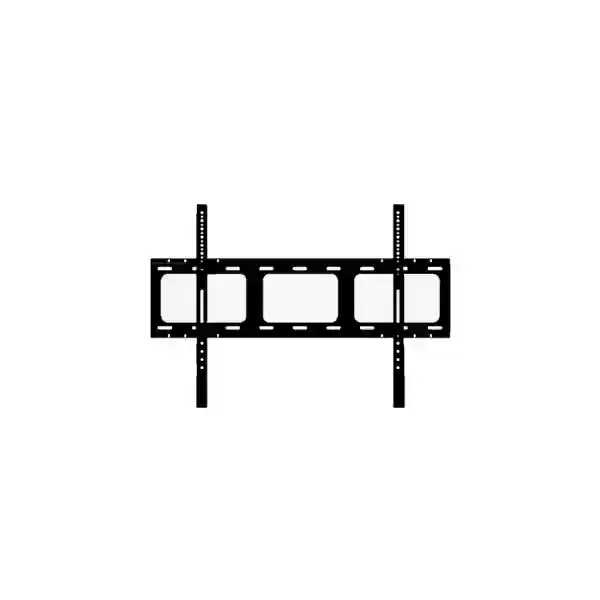
Yealink MB-WallMount-650 Tanzania
The Yealink MB-WallMount-650 is a dedicated VESA wall-mount solution for the Yealink MeetingBoard 65 Pro, created for organizations that want a secure, stable and visually clean fixed installation for their collaboration display. For Tanzanian businesses planning a boardroom, executive meeting room, training facility, hybrid classroom or collaborative workspace, the mounting method matters almost as much as the display itself. A correct wall-mount approach helps maintain a professional room layout, keeps the display positioned for consistent visibility and interaction, and reduces the clutter associated with improvised mounting arrangements. Yealink positions the MB-WallMount-650 specifically for MeetingBoard 65 Pro, emphasizing fit, installation simplicity, safety and stability. The manufacturer lists part number 3311073 for this model.
What the MB-WallMount-650 is designed to do
The MB-WallMount-650 is not a generic consumer television bracket marketed as a one-size-fits-all accessory. Yealink describes it as a dedicated VESA mounting kit for MeetingBoard 65 Pro. That distinction is important for procurement teams because collaboration displays are used differently from ordinary screens. People stand close to them, touch the interactive surface, write, present, join video meetings and move around the room. A purpose-built mount helps the installation team create a predictable position for the device while keeping the overall room presentation neat and business-ready.
Verified physical information
Yealink’s current support datasheet lists the MB-WallMount-650 at approximately 912 mm wide, 22 mm deep and 242 mm high. The carton measurement is listed as 1005 mm × 335 mm × 105 mm, while net weight per carton is listed as 3.45 kg. Installation teams should still evaluate the wall construction, fixing method, site conditions and MeetingBoard mounting requirements before work begins. A mounting accessory should never be selected from dimensions alone; the complete room, wall substrate and device configuration should be checked as part of the deployment plan.
Key benefits for professional MeetingBoard deployments
Purpose-built compatibility
The mount is designed around Yealink MeetingBoard deployment rather than being selected as an unrelated third-party bracket. This helps buyers reduce uncertainty during specification and gives installers a mounting path aligned with the manufacturer’s accessory ecosystem.
Stable fixed-room layout
Fixed wall installation can be useful where a MeetingBoard is intended to remain in one room. It keeps the collaboration surface in a consistent position and can simplify room planning around seating, sight lines, camera framing and walk-up whiteboarding.
Clean professional appearance
A correctly planned wall installation can create a cleaner presentation than a temporary support arrangement. This is especially useful in customer-facing meeting rooms, executive offices, training rooms and modern collaboration spaces where visual consistency matters.
Procurement clarity
Using the exact model name MB-WallMount-650 and Yealink part number 3311073 gives procurement teams a clear reference when requesting quotations, matching accessories to MeetingBoard hardware, preparing purchase orders and validating deliveries.
Compatibility and installation planning
Compatibility should be verified against the exact MeetingBoard model before ordering. Yealink’s current mount compatibility list identifies MB-WallMount-650 as bundled with MeetingBoard 65, optional with MeetingBoard 65 Pro and optional with MeetingBoard 65C EDLA. The same list shows a 600 mm × 400 mm VESA standard for these 65-inch MeetingBoard variants. Organizations should not assume that a mount carrying the “650” designation is suitable for every 65-inch display from every vendor. The value of the accessory is precisely that it is part of Yealink’s mounting ecosystem.
Before installation, the project team should examine the wall structure, intended mounting height, user reach, viewing distance, camera field of view, room furniture and cable routing. If the wall cannot safely support the complete installation, a different support method may be more appropriate. That decision should be made from site conditions and professional installation requirements rather than convenience. Meeting spaces with movable furniture may also benefit from a floor-standing option, while permanent executive rooms often prefer a fixed wall layout.
Cable planning deserves attention before the mount is fixed. Power, network connectivity, presentation inputs and any supporting room equipment should be routed so that servicing remains possible. A clean installation is not only about hiding cables; it should also allow technicians to identify and access connections when troubleshooting or upgrading the room. FourTeck can help buyers define the complete bill of materials and confirm whether the MB-WallMount-650 is the right mounting accessory for the selected Yealink MeetingBoard configuration.
Related FourTeck collaboration resources
Organizations planning a MeetingBoard deployment may also need IP telephony, video conferencing, room networking, secure remote access and collaboration infrastructure. Explore FourTeck Tanzania for regional technology solutions, FourTeck IP phone solutions for business voice endpoints, FourTeck IT services for deployment-oriented infrastructure planning, FourTeck Africa for broader African technology requirements, and FourTeck Uganda for Uganda-focused procurement and solution enquiries. For Kenya projects, FourTeck Kenya supports region-specific technology enquiries, while FourTeck Kuwait, FourTeck Ghana and FourTeck Nigeria provide additional country-focused routes for multinational organizations.
Yealink MB-WallMount-650 Tanzania
For organizations in Tanzania, the Yealink MB-WallMount-650 is most relevant when a MeetingBoard 65 Pro is being deployed as a permanent collaboration surface rather than a movable display. Businesses increasingly use interactive boards for hybrid meetings, sales reviews, management sessions, training, project coordination and customer presentations. The physical installation should therefore be treated as part of the room design, not as an afterthought. The MB-WallMount-650 gives procurement teams a manufacturer-aligned accessory reference that can be specified alongside the MeetingBoard itself, making it easier to prepare a coherent purchase request and avoid uncertain third-party bracket selection.
Tanzanian buyers should begin by confirming the exact MeetingBoard model and room type. A fixed wall mount can be appropriate for executive boardrooms, huddle spaces with a defined front wall, training rooms, private management offices and customer briefing spaces where the screen position will not need to change. The installer should assess wall strength, the fixing method, clearance, cable access, viewing height and user reach. Because an interactive display may be touched frequently, the wall and fastening method must be appropriate for the complete installation. FourTeck does not recommend relying on visual inspection alone; site conditions should be reviewed before mounting.
Procurement teams in Tanzania should also plan the supporting room infrastructure. The MeetingBoard may require reliable network connectivity, power availability, access to conferencing services and integration with other collaboration tools. If the room is being built or renovated, power outlets, network points and cable pathways can be planned before wall finishing. This helps reduce visible cabling and minimizes rework later. In existing rooms, installers can choose a cable routing approach that balances appearance with maintenance access.
When requesting a quotation, include the model name Yealink MB-WallMount-650, part number 3311073, the MeetingBoard model, quantity, installation city and whether installation support is required. If the display has not yet been purchased, mention that as well so the complete MeetingBoard and mounting combination can be reviewed together. For organizations standardizing meeting rooms across Tanzania, using the same approved mounting accessory can simplify documentation, room templates and future support. Contact FourTeck Tanzania to discuss compatibility, project quantities and a suitable bill of materials without assuming local stock, lead time or installation coverage until confirmed in the quotation.
Yealink MB-WallMount-650 Dar es Salaam
Dar es Salaam organizations often deploy collaboration technology in head offices, financial services environments, logistics operations, hospitality management offices, professional services firms, technology companies and growing corporate campuses. In these environments, the MB-WallMount-650 can support a fixed MeetingBoard 65 Pro installation where a consistent room layout is preferred. Rather than selecting a generic display bracket based only on screen size, buyers can specify the Yealink accessory designed for the MeetingBoard platform and coordinate it with the broader room design.
A wall-mounted MeetingBoard should be positioned for the people who actually use the room. In an executive boardroom, sight lines from the farthest seats and camera framing may be the primary concerns. In a training room, walk-up writing and presentation visibility may matter more. In a project room, the screen may be used for long collaborative sessions, making ergonomic mounting height important. The MB-WallMount-650 provides the mounting hardware reference, but correct height and placement still depend on room dimensions, furniture and workflow.
For Dar es Salaam projects, consider heat, dust control, power quality and network reliability as part of the complete collaboration-room design even though these are not functions of the wall mount itself. Stable power and properly planned data connectivity support the MeetingBoard, while the mount provides the fixed physical position. If the room includes other Yealink devices, speakers, microphones or room accessories, their placement should be planned so they do not obstruct the display or create awkward cable runs.
A useful request for quotation should state whether the project is a new meeting room, a replacement installation or an expansion across multiple rooms. Provide the required quantity, MeetingBoard model, expected room type and target site in Dar es Salaam. If installation is part of the requirement, describe the wall construction where known and whether cable containment is already available. These details help the supplier and installer identify risks before work begins. FourTeck can help review compatibility and the wider Yealink meeting-room bill of materials, while final stock, pricing, lead time and service scope should be confirmed formally rather than assumed from an online product page.
Yealink MB-WallMount-650 Mwanza
Mwanza businesses and institutions considering Yealink MeetingBoard deployments may use the MB-WallMount-650 in meeting rooms where a permanent installation is preferable to a mobile stand. Typical examples include regional management offices, training centers, healthcare administration, education facilities, financial service branches, manufacturing support offices and commercial organizations coordinating with teams in Dar es Salaam or outside Tanzania. A fixed wall layout can help create a consistent collaboration environment for recurring video calls, presentations and interactive whiteboarding.
The main purchasing question should be compatibility, not simply whether a bracket looks large enough. Yealink identifies the MB-WallMount-650 within its MeetingBoard mounting ecosystem and provides official dimensions and accessory compatibility information. This gives a procurement team a more reliable basis for specification. Confirm whether the MeetingBoard is a 65 Pro, standard 65 or 65C EDLA model, because accessory inclusion and optional status differ by product. Where equipment is being sourced for multiple branches, the exact product model should be recorded in the asset plan to avoid mixing accessories between incompatible displays.
Mwanza projects should also consider the practicalities of installation and maintenance access. A boardroom may look best with hidden cabling, but technicians still need to reach power and network connections when diagnosing a problem. Where walls are finished or difficult to modify, surface cable management may be preferable to extensive building work. The selected approach should preserve safe clearances and avoid placing stress on connectors. If room furniture could later be rearranged, confirm that a permanently wall-mounted screen will still serve the intended viewing positions.
When asking for a quotation, provide the number of rooms, the exact MeetingBoard model, the number of MB-WallMount-650 units required and whether you need only supply or also deployment guidance. If the organization operates several sites, include future expansion plans so the initial purchase can fit a repeatable standard. A consistent mounting and room template can simplify user training, maintenance documentation and support. FourTeck can assist with product matching and project planning; availability, transport, installation scope and commercial terms should be confirmed for the specific Mwanza project before purchase.
Yealink MB-WallMount-650 Arusha
Arusha has a broad mix of hospitality, tourism, nonprofit, international, education and commercial organizations that rely on video meetings and digital collaboration with teams in other cities and countries. For a Yealink MeetingBoard 65 Pro used in a permanent conference room, the MB-WallMount-650 can provide the physical mounting foundation for a tidy and consistent installation. A fixed wall position is especially useful when the room has a defined presentation wall and the display is expected to remain there for its full deployment lifecycle.
Room planning should start with users. A tourism operator may need a collaboration display for supplier coordination and management meetings. A nonprofit may use it for regional program reviews and remote training. A hotel group may use it in an administrative boardroom rather than a public guest space. Each scenario creates different expectations for seating, presentation distance and interactive use. The mount itself does not solve those layout questions, but choosing the correct mount allows the installation team to position the MeetingBoard according to the room plan with a manufacturer-specific accessory.
Before installing in Arusha, check the wall construction and fixing method carefully. Collaboration displays are heavier and more interactive than ordinary signage, so installations should be engineered for the real wall substrate and device configuration. The mounting height should balance seated visibility with touch access. Cables should be planned so they do not hang loosely below the screen, while service access should remain possible. If the room is leased or likely to be reconfigured, a movable floor stand may be worth comparing before committing to a permanent wall installation.
For procurement, quote requests should identify Yealink MB-WallMount-650 and part number 3311073, as well as the MeetingBoard model and project location. If a complete MeetingBoard solution is needed, specify conferencing platform requirements, expected number of users, room size and any microphone or speaker requirements. This enables a more useful discussion than requesting a bracket in isolation. FourTeck can support product selection and compatibility planning for Arusha projects, but final supply status, pricing and implementation arrangements should be confirmed through a formal quotation.
Yealink MB-WallMount-650 Dodoma
Organizations in Dodoma may deploy collaborative displays for administration, inter-office coordination, executive communication, education, project management and remote engagement with teams elsewhere in Tanzania. Where a Yealink MeetingBoard 65 Pro is intended to stay in a dedicated room, the MB-WallMount-650 provides a purpose-built wall-mount option. This helps procurement teams avoid a common mistake: treating the mounting accessory as an interchangeable commodity even though the display is part of a specific manufacturer ecosystem.
For institutional projects, documentation is particularly important. A project file should record the exact MeetingBoard model, the matching mount, planned wall location, network point, power source and any additional room devices. Standardized documentation helps facilities, IT and procurement teams work from the same information. If several rooms are being equipped, a repeatable template can reduce inconsistencies between rooms and make later support simpler. The MB-WallMount-650’s manufacturer part number 3311073 can be included in purchase specifications to reduce ambiguity.
Installation planning in Dodoma should account for safe wall fastening, device height, maintenance access and cable routing. The room may also need network switching, internet connectivity, conferencing accounts and endpoint management, which are separate from the wall mount but important to the finished user experience. If users will frequently annotate on the screen, check that the selected height is comfortable for standing interaction. If the display is primarily for seated video meetings, sight lines may take priority. Good room design balances both requirements where possible.
When seeking pricing, include the MB-WallMount-650 model, quantity, exact MeetingBoard model, site in Dodoma and whether the request is supply-only or part of a wider meeting-room deployment. If the building project is still in progress, share expected installation timing so infrastructure can be coordinated before completion. FourTeck can help review the accessory selection and related communication infrastructure. Stock, delivery schedule, installation resources and commercial conditions should always be verified for the specific project rather than inferred from generic web content.
Yealink MB-WallMount-650 UAE
For UAE organizations managing Yealink MeetingBoard deployments across offices, the MB-WallMount-650 can form part of a standardized room design for MeetingBoard 65 Pro. Multisite businesses often benefit from keeping accessory selection consistent because support teams can document the same mounting arrangement, cabling approach and room layout principles across locations. The UAE market includes headquarters, branch offices, hospitality groups, educational institutions and multinational companies that use collaboration rooms intensively, making thoughtful physical deployment important.
A fixed wall mount is particularly suitable where the display should remain in one room and the front wall is structurally appropriate. Before installation, facilities and AV teams should coordinate on wall reinforcement, fixing points, cable pathways and power locations. Where a room is still being fitted out, the mounting position can be designed alongside furniture and lighting. In an existing office, the installer should verify that the chosen location does not conflict with glass partitions, decorative panels, access doors or hidden services.
The MB-WallMount-650 should be procured using the exact model reference and Yealink part number 3311073. Buyers should confirm the MeetingBoard variant because Yealink’s compatibility list distinguishes among the 65, 65 Pro, 65C EDLA and larger MeetingBoard models. Larger 75- and 86-inch Pro models use different mounting accessories. This is a key reason not to substitute based only on visual similarity or screen size. The correct accessory reduces uncertainty and supports an installation consistent with the manufacturer’s product family.
Organizations coordinating UAE and Tanzania offices may also want a common collaboration-room standard. Using the same MeetingBoard family and documented room templates can make user experience more consistent across regions. For UAE-focused technology enquiries, visit FourTeck UAE. When asking for a quotation, specify quantity, MeetingBoard model, emirate or project site and whether mounting, room integration or broader IT services are required. Commercial details and site support should be confirmed per project.
Yealink MB-WallMount-650 Uganda
Ugandan organizations deploying Yealink collaboration equipment can use the MB-WallMount-650 when MeetingBoard 65 Pro needs a fixed, professional wall installation. This may suit head offices, training spaces, regional coordination centers, financial institutions, universities, healthcare administration and commercial meeting rooms where video conferencing and interactive whiteboarding are frequent activities. The mounting accessory provides a defined hardware reference, but successful deployment still depends on matching it to the correct MeetingBoard model and installing it on an appropriate wall.
Procurement teams should verify whether the MeetingBoard is supplied with a mount or requires the MB-WallMount-650 as an optional item. Yealink compatibility documentation indicates different accessory status across MeetingBoard models, which matters when preparing a bill of materials. Ordering a board and assuming the same accessory bundle applies to every variant can create delays at installation. Recording exact model names in the purchase order and asset documentation helps avoid that problem.
Room readiness should be checked before equipment arrives. Confirm the intended wall can support the installation, that power and network points are available, and that the screen height works for both seated participants and walk-up collaboration. Where external microphones, room audio or presentation devices are part of the design, map their cable routes in advance. Fixed installations look most professional when power and data are planned around the final display location rather than added afterward.
For Uganda-specific enquiries, organizations can use FourTeck Uganda alongside the Tanzania team when coordinating regional projects. A useful RFQ should include product name, part number, quantity, MeetingBoard model, destination city, installation requirement and expected project timeline. FourTeck can help validate the requested accessory and review related collaboration infrastructure; final stock, pricing, transport and service coverage remain subject to project confirmation.
Yealink MB-WallMount-650 Kampala
Kampala is a common location for regional headquarters, banks, NGOs, technology companies, professional firms and educational organizations that depend on structured meeting spaces. When Yealink MeetingBoard 65 Pro is chosen for a permanent room, the MB-WallMount-650 can support a clean fixed installation. A wall-mounted configuration reduces the floor space used by a stand and can create a more integrated visual result where the room has a clear presentation wall.
Planning should begin with the actual collaboration workflow. A room used mainly for executive video meetings may prioritize camera eye line and visibility from seated positions. A training or project room may prioritize touch interaction and whiteboarding height. Because the MeetingBoard combines display and collaboration functions, installation height should not be copied from a conventional television without considering how people will interact with the surface.
Facilities teams should confirm the wall material and fixing system before installation. If the wall is not appropriate, alternative mounting methods should be evaluated rather than forcing a wall deployment. Cable routes should be checked for network, power and any ancillary equipment. Good cable management should preserve service access and avoid unnecessary strain on ports. If the Kampala office is part of a larger regional rollout, document the chosen mount, height and room setup so future sites can follow the same standard where conditions allow.
When requesting a Kampala quotation, state whether MB-WallMount-650 is needed as a standalone accessory or together with MeetingBoard hardware. Include quantity, exact board model, room count and whether installation guidance is required. If multiple offices will use the same configuration, identify that early so procurement can be structured consistently. FourTeck can assist with compatibility and solution planning, while final availability and delivery terms should be confirmed in the commercial offer.
Yealink MB-WallMount-650 Arua
For organizations in Arua, a wall-mounted MeetingBoard can provide a permanent collaboration point for management meetings, remote training, project reviews and coordination with other cities. The Yealink MB-WallMount-650 is designed to support MeetingBoard 65-class deployments in the manufacturer’s accessory ecosystem, making it a more precise procurement choice than an unspecified universal mount. This is especially helpful for organizations that need clear documentation for donor-funded projects, institutional purchases or multi-site deployments.
Before ordering, identify the exact MeetingBoard model and confirm that the MB-WallMount-650 is the appropriate accessory for that model. Yealink’s compatibility documentation provides model-by-model guidance, which should take precedence over third-party assumptions. Include the manufacturer part number 3311073 in the request to reduce ambiguity. If the board is being purchased at the same time, ask the supplier to confirm the full mounting and room accessory list rather than ordering individual pieces independently.
Arua installation planning should consider wall suitability, power availability, internet and LAN access, display height and maintenance needs. Where connectivity is less predictable, the room network should be assessed as part of the wider deployment so video meetings are not compromised by infrastructure issues unrelated to the mount. The physical installation should still leave technicians a practical route to inspect connections, update cables or service the collaboration device when required.
For a useful quotation, specify destination, quantity, board model, installation environment and whether your organization needs only the mount or a complete meeting-room solution. If delivery or on-site work is important, request those items explicitly so they can be confirmed rather than assumed. FourTeck’s regional teams can help coordinate product selection for organizations operating across East Africa, but commercial and logistical details should be documented for the specific Arua project before purchase approval.
Yealink MB-WallMount-650 Mbarara
Mbarara organizations investing in modern meeting rooms may choose Yealink MeetingBoard for interactive collaboration, video communication and presentation workflows. Where the board should remain in a defined room, the MB-WallMount-650 provides a manufacturer-aligned fixed mounting option. This approach can suit corporate offices, educational institutions, healthcare administration, regional business centers and training spaces that want the display integrated into the room rather than positioned on a movable cart.
The decision to wall mount should be made before room fit-out is complete whenever possible. That allows power, network and cable routes to be placed near the final board location. It also gives facilities teams time to evaluate whether reinforcement is needed. In a completed room, installers should check for hidden utilities and the wall’s structural capability before drilling or fastening. The goal is a secure installation that remains accessible enough for maintenance.
From a procurement perspective, the exact Yealink accessory reference matters. MB-WallMount-650 is associated with 65-inch MeetingBoard models in Yealink’s documentation, while larger MeetingBoard variants use different mounts. Organizations should avoid writing vague purchase descriptions such as “65-inch TV wall bracket” because that can result in incompatible goods. Instead, identify MB-WallMount-650, manufacturer part number 3311073 and the exact MeetingBoard model that will be installed.
A quotation request for Mbarara should include quantity, location, MeetingBoard model, installation requirement and any related conferencing equipment. If the room also needs network switching, Wi-Fi, IP telephony or secure connectivity, combining those requirements into one project brief can improve planning. FourTeck can help validate compatibility and prepare a complete solution discussion. Prices, lead times and on-site service arrangements should be confirmed in writing for the specific project.
Yealink MB-WallMount-650 Gulu
In Gulu, organizations may use collaboration rooms for regional administration, education, project coordination, NGO operations, healthcare management and remote engagement with national or international teams. A MeetingBoard installed with the Yealink MB-WallMount-650 can create a fixed collaboration point where the display is always ready in the same location. This is useful for rooms with an established seating arrangement and a dedicated presentation wall.
The mount should be treated as one component of a complete room. A strong installation plan considers user reach, viewing angle, camera positioning, lighting, audio coverage, network connectivity and power. If people will use the touchscreen frequently, mounting too high can reduce usability. If the room is deep, mounting too low may reduce visibility for participants at the back. The right position should be selected from the room’s actual use case rather than a generic height recommendation.
For Gulu procurements, model clarity helps avoid costly errors. Yealink’s MB-WallMount-650 has a specific role within the MeetingBoard accessory range. Include the exact name and part number 3311073 in the purchase request, and confirm the associated MeetingBoard model. If the organization has inherited existing hardware, check the label or asset records before ordering a replacement mount. Do not assume all 65-inch interactive displays share the same mounting requirements.
Organizations should also ask suppliers to separate confirmed facts from optional services. The mount’s manufacturer specifications are stable product data, while stock, freight, installation availability and delivery timing depend on the commercial situation. When requesting a quote from FourTeck, provide enough project detail to receive an accurate response. This can include the number of rooms, destination in Gulu, board model, expected installation schedule and whether regional standardization is part of a wider deployment.
Yealink MB-WallMount-650 Kenya
Kenyan businesses deploying Yealink MeetingBoard solutions can use MB-WallMount-650 as a fixed mounting option for supported 65-inch MeetingBoard configurations. In Nairobi headquarters, branch offices, schools, healthcare facilities, hospitality groups and regional operations centers, a manufacturer-specific wall mount can support a cleaner room design and simplify purchasing documentation. The mount is especially relevant where the collaboration display will remain in one room for the long term and mobility is not required.
Regional organizations often benefit from a standardized meeting-room design across Kenya, Tanzania and Uganda. Standardization does not mean every room must be identical, but it can establish approved display models, mounting options, network requirements and support procedures. The MB-WallMount-650 can be documented as the approved wall-mount option for compatible Yealink 65-inch MeetingBoard units, while larger boards use their respective accessory families.
Installation planning should include structural review, cable pathways, screen height and future maintenance access. If a boardroom will be refurbished, coordinate the mounting point before wall panels or furniture are finalized. If equipment is being added to an existing room, confirm that the selected wall is suitable and that the installation will not interfere with HVAC, electrical or interior features. A permanent mount is most useful when the room layout is stable.
For Kenya-specific procurement and technology enquiries, visit FourTeck Kenya. Provide the exact product model, Yealink part number 3311073, MeetingBoard variant, quantity and delivery destination when requesting a quote. If the project includes installation or wider AV/IT integration, describe that scope clearly so it can be priced and scheduled appropriately. FourTeck can support solution planning, but current stock, taxes, freight and implementation details should be confirmed in the formal commercial response.
Yealink MB-WallMount-650 Kuwait
Kuwait organizations implementing Yealink collaboration rooms may select the MB-WallMount-650 when a compatible 65-inch MeetingBoard requires a fixed wall installation. This may suit corporate boardrooms, government meeting spaces, educational facilities, healthcare administration and professional service offices. A dedicated mount can help keep the room visually organized and gives procurement teams an accessory reference that aligns with the Yealink product family.
As with any interactive display installation, the room should be surveyed before mounting. Wall materials, decorative cladding, cable routes and access panels can affect the final installation method. If the MeetingBoard is expected to be used for touch interaction, test the intended height against users rather than positioning it solely for seated viewing. If the room includes additional cameras, microphones or speakers, coordinate those devices so their placement does not conflict with the board or mount.
Procurement documentation should use MB-WallMount-650 and manufacturer part number 3311073. Where an organization has multiple MeetingBoard sizes, the accessory should be matched to each model rather than ordered generically. This is particularly important in large projects where hardware can be distributed to different rooms. Clear labeling and site-by-site bills of materials reduce installation delays and make it easier to reconcile deliveries.
For Kuwait-focused enquiries, organizations can review FourTeck Kuwait. A complete RFQ should identify quantity, MeetingBoard model, project location, installation needs and any related collaboration equipment. If the Kuwait deployment is part of a regional program that includes Tanzania or East Africa, mention the wider scope so product standardization can be discussed. Commercial terms, delivery arrangements and local project support should be confirmed specifically for each site.
Yealink MB-WallMount-650 Ghana
Ghanaian businesses and institutions using Yealink MeetingBoard can consider the MB-WallMount-650 when they want a permanent wall-mounted collaboration display. A fixed installation can be appropriate for executive rooms, educational environments, training centers, project offices and customer-facing meeting spaces where the front wall is dedicated to presentation and video collaboration. The accessory provides a clear Yealink part reference rather than relying on a generic bracket selected without manufacturer compatibility information.
Organizations should confirm the exact MeetingBoard variant and review the official compatibility list before ordering. The MB-WallMount-650 is associated with supported 65-inch MeetingBoard models, while different display sizes require different accessories. This is a simple but important procurement control. When multiple systems are being purchased, a model-specific bill of materials helps ensure every room receives the correct bracket and reduces last-minute substitutions.
Installation quality depends on the wall and room environment. A technician should assess the substrate, fasteners, height and route for power and data. The final position should work for both seated participants and people interacting with the touchscreen. If the display is mounted too close to furniture or other room equipment, access and user comfort can suffer. Room drawings or photographs can help during planning when an on-site survey is not immediately available, but final installation decisions should reflect actual site conditions.
For Ghana-related enquiries, visit FourTeck Ghana. When requesting pricing, include the product name, part number 3311073, quantity, MeetingBoard model and destination. If you need a complete collaboration solution, also state the room size, conferencing platform and any microphone, speaker or network requirements. This helps the supplier prepare a more relevant response while avoiding assumptions about stock or installation scope.
Yealink MB-WallMount-650 Nigeria
Nigeria’s large enterprise, finance, energy, education, healthcare and professional services sectors often rely on video collaboration across cities and regions. For a Yealink MeetingBoard 65 Pro deployed as a permanent room system, the MB-WallMount-650 provides a manufacturer-defined mounting option that can support a professional fixed installation. This can be useful in executive meeting rooms, operations centers, training rooms and branch collaboration spaces where a mobile stand is unnecessary.
Large multi-site organizations should document the mount alongside the board rather than treating it as a separate miscellaneous accessory. The MB-WallMount-650 model name and part number 3311073 should appear in the room bill of materials so installers and receiving teams know what belongs at each site. If different MeetingBoard sizes are used in different rooms, confirm each matching mounting accessory before ordering. That simple discipline can prevent incompatible hardware from reaching remote locations.
The installation team should check wall structure, screen height, power and network cabling, maintenance access and interaction space. A well-designed room leaves enough clearance for users to work at the touchscreen without blocking entrances or furniture pathways. For video meetings, the board’s position should also support sensible camera framing and participant visibility. The mount provides physical support, but the room design determines how effectively the collaboration system is used.
For Nigeria-focused procurement, visit FourTeck Nigeria. A good quotation request should specify quantity, exact MeetingBoard model, installation city, whether the room already exists, and whether supply-only or full deployment assistance is required. If the project spans Nigeria and East Africa, mention that wider scope so standardization can be considered. Prices, availability and logistics should be confirmed for the specific order rather than generalized from public listings.
Yealink MB-WallMount-650 Seychelles
Organizations in Seychelles may use Yealink collaboration systems in hospitality management, financial services, government, professional offices, education and regional business operations. Where MeetingBoard 65 Pro is installed in a permanent room, the MB-WallMount-650 can support a fixed configuration that minimizes floor equipment and keeps the collaboration surface integrated with the room. This is particularly relevant in meeting spaces where available floor area is limited or where a clean executive appearance is important.
Because island logistics can make replacement or corrective shipments less convenient, product matching should be completed carefully before dispatch. Confirm the exact MeetingBoard model, accessory requirement and quantity. Use MB-WallMount-650 and manufacturer part number 3311073 in the quotation and purchase order. If the project includes multiple rooms, verify each room’s board size and mounting approach rather than assuming they are identical.
Room readiness should be reviewed before equipment arrival. Confirm wall suitability, power, network connectivity, cable routing and intended mounting height. If a MeetingBoard will be used for frequent interactive whiteboarding, ensure the installation allows comfortable touch access. Where rooms are compact, check that seating does not obstruct walk-up use. Maintenance access is also important because power or network connections may need to be inspected during the system’s lifetime.
When requesting a quote for Seychelles, provide the full destination, quantity, MeetingBoard variant and any installation or integration requirements. If freight arrangements, taxes or site services need to be included, request them explicitly. FourTeck can help evaluate the accessory in the context of the wider room solution, but commercial conditions should be confirmed per order. For regional coordination, FourTeck Africa provides an additional route for multi-country technology enquiries.
Buying guidance: wall mount or floor stand?
A wall mount is typically the better option when the MeetingBoard has a permanent room, the wall is suitable, the display position is unlikely to change and a clean fixed layout is desired. It can reduce floor clutter and create a polished meeting-room appearance. However, fixed mounting also means the display cannot easily be moved between rooms, and the wall must be appropriate for the complete installation. Room changes later may require new mounting work.
A floor stand can make more sense in shared training environments, flexible collaboration zones or organizations that need to reposition the MeetingBoard. Mobile or floor-based options may also be useful where walls are unsuitable for mounting. The correct choice should reflect room use, structural conditions, user interaction and future changes. Buyers should compare options before purchasing if the room design is not final.
For MeetingBoard 65 Pro specifically, Yealink lists multiple mounting options in its accessory family, including MB-WallMount-650 and compatible floor-stand solutions. If you are unsure which approach fits your room, provide FourTeck with the exact board model, room type, wall information and mobility requirement. A short pre-purchase review can avoid selecting an accessory that conflicts with the final room design.
Quotation checklist for Yealink MB-WallMount-650
To receive an accurate commercial response, prepare the following details before requesting a quote. This information helps confirm compatibility and separates product requirements from installation assumptions.
Frequently asked questions
What is the Yealink MB-WallMount-650?
It is a dedicated VESA wall-mount kit in Yealink’s MeetingBoard accessory range. Yealink positions it for MeetingBoard 65 Pro, and current compatibility documentation also identifies use with MeetingBoard 65 and MeetingBoard 65C EDLA in specified configurations.
What is the Yealink part number?
The manufacturer lists part number 3311073 for MB-WallMount-650. Including both the product name and part number in an RFQ helps reduce ambiguity.
What are the official dimensions?
Yealink’s current datasheet lists the MB-WallMount-650 at 912 mm × 22 mm × 242 mm, with carton dimensions of 1005 mm × 335 mm × 105 mm and net carton weight of 3.45 kg.
Can I use this mount with any 65-inch screen?
It should not be treated as a universal television mount. It is part of Yealink’s MeetingBoard accessory range, and compatibility should be checked against the exact MeetingBoard model before ordering.
Is MB-WallMount-650 included with MeetingBoard 65 Pro?
Yealink’s current compatibility table lists MB-WallMount-650 as optional for MeetingBoard 65 Pro, while it is listed as bundled with the MeetingBoard 65. Always verify the exact purchased configuration because bundles can vary by model and commercial package.
Can FourTeck provide a quote for Tanzania?
Yes, you can request a commercial quotation from FourTeck Tanzania. Include quantity, MeetingBoard model, destination and whether you require supply only or broader deployment support. Pricing, availability and service scope should be confirmed in the issued quotation.
Decision recap
Choose the Yealink MB-WallMount-650 when your supported 65-inch MeetingBoard requires a permanent wall installation and you want a manufacturer-specific mounting accessory. Confirm the exact board model, wall suitability, installation height and cable plan before ordering. For movable rooms or unsuitable walls, compare Yealink floor-standing alternatives instead of forcing a wall installation.
Consultation panel
FourTeck can help you match MB-WallMount-650 to the correct MeetingBoard model, review room requirements and prepare a quotation for single-room or multi-site projects. Share your MeetingBoard model, quantity, location and installation needs so the response can be based on the real project rather than assumptions.




Reviews
There are no reviews yet.