
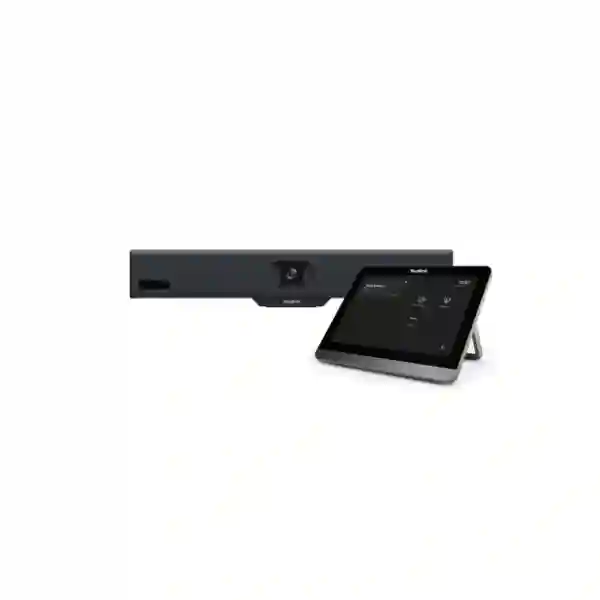
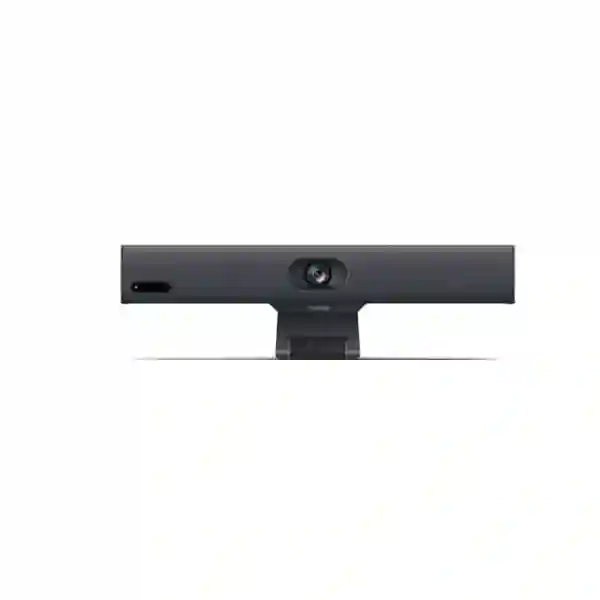
Yealink MeetingBar A10 Teams Rooms System
The Yealink MeetingBar A10 Teams Rooms System is a compact all-in-one collaboration appliance for organizations that want a straightforward Microsoft Teams meeting experience in home offices, huddle spaces and small meeting rooms. Yealink combines the compute platform, 4K camera, microphone array, loudspeaker, Wi-Fi, Bluetooth and mounting hardware into a single bar, helping reduce desktop clutter and the number of separate room components that must be installed and maintained. For Tanzania-based businesses evaluating a purpose-built Teams room endpoint, the A10 is especially relevant where ease of deployment, predictable user experience and centralized administration are more important than building a room from separate camera, microphone and mini-PC components.
What the Yealink MeetingBar A10 is designed to solve
Small meeting spaces often need the same reliable video, audio and content-sharing experience as larger boardrooms, but without the complexity or cost of a multi-device installation. The MeetingBar A10 addresses this by integrating the core conferencing components into one compact endpoint. Yealink positions the A10 for home offices, huddle rooms and small rooms, and its broad camera view helps cover participants seated close to the display. The integrated Android platform supports a native-room workflow rather than relying on a user to bring and connect a laptop for every scheduled meeting.
For IT teams, the practical value is standardization. A repeatable room design can simplify rollout across branches, project offices, customer-facing meeting areas and executive spaces. The same device family can be remotely monitored and managed through Yealink tools and Microsoft administration options, helping organizations create a support model that is easier to document than a collection of unrelated USB cameras, speakerphones and consumer displays.
Smart video
A 4K camera, 120° diagonal field of view, Auto Framing and Speaker Tracking are intended to keep small-room participants visible without constant manual camera adjustment.
Integrated audio
Eight MEMS microphones, full-duplex audio processing, echo cancellation, dereverberation and AI noise processing support clear conversation in suitably sized rooms.
Simplified room design
Compute, camera, microphone, speaker, Wi-Fi, Bluetooth and mounting functions are integrated into one compact bar, reducing the number of separate endpoints in the meeting space.
Remote administration
Yealink web management, Yealink device-management services and Microsoft Teams administration capabilities can support monitoring, configuration, updates and diagnostics.
Verified technical highlights
| Camera | 4K camera with 4× e-PTZ capability; 120° diagonal field of view |
| AI video | Auto Framing and Speaker Tracking; Multi-Focus support |
| Microphones | Built-in 8-MEMS microphone array with approximately 4.5 m voice-pickup range |
| Connectivity | Gigabit Ethernet, dual-band 2.4/5 GHz Wi-Fi, Bluetooth 4.2 |
| Ports | HDMI output with CEC support, USB-A, USB-C for content sharing, VCH port and power input |
| Security / network | TLS 1.2/1.3, AES 256-bit encryption, 802.1p/q QoS, VLAN, LLDP and IEEE 802.1X support |
| Management | Yealink HTTPS web portal, Yealink Device Management Platform / cloud management, Microsoft Teams Admin Center / Intune support |
Teams Rooms deployment and licensing guidance
A meeting-room appliance is only one part of a successful Teams Rooms deployment. Before purchasing, organizations should confirm the intended Microsoft Teams Rooms licensing approach, room-resource account design, display compatibility, network access, VLAN policy, firewall requirements and whether the device will be centrally enrolled and managed. Microsoft certification identifies the A10 as a supported Teams Rooms on Android device, but administrators should still use current Microsoft deployment guidance and their organization’s tenant policies when planning production rollout.
A useful quotation request should therefore include the number of rooms, approximate room dimensions, expected participant count, display quantity, wired or wireless network preference, whether a touch controller is required, and whether content sharing or BYOD workflows are expected. This helps distinguish a simple single-display huddle-room setup from a deployment that needs additional accessories, specialist mounting or broader collaboration-room integration.
Yealink MeetingBar A10 Teams Rooms System Tanzania
Organizations searching for the Yealink MeetingBar A10 Teams Rooms System in Tanzania are typically trying to standardize small meeting spaces without building a complex AV environment. The A10 fits this requirement because its core conferencing components are integrated into one device and the room can be designed around a display, the MeetingBar, network connectivity and the required room controls. For Tanzanian enterprises with multiple branches, this standardized architecture can make procurement documentation, user training and IT support easier to manage. The wide-angle camera is particularly useful where participants sit close to the display, while Auto Framing and Speaker Tracking reduce the need for manual camera operation during normal meetings. Before procurement, the buyer should document room size, table position, display mounting, cable route, available power points, network segment and the Microsoft 365 tenant requirements that apply to Teams Rooms.
Tanzania deployments also benefit from careful network planning. The A10 supports Gigabit Ethernet and dual-band Wi-Fi, but a wired connection is generally easier to control in managed office environments where QoS, VLAN segmentation, authentication and predictable latency are priorities. Organizations should confirm switch capacity, 802.1X policy, VLAN configuration and internet breakout before installation. Where multiple rooms are planned, administrators should decide whether the devices will be enrolled through Microsoft management, Yealink management tools or a combination appropriate to their support model. This is also the stage to confirm whether the room requires a touch controller, wireless presentation accessory, alternate mounting method or specific content-sharing workflow.
For procurement teams, a complete Tanzania quotation request should include the exact A10 model, quantity, expected installation location, desired Teams Rooms mode, number of displays, controller requirement, room dimensions and any deadline that influences deployment planning. FourTeck can also help buyers consider related collaboration and network requirements through FourTeck Tanzania technology solutions, where the meeting-room endpoint can be assessed as part of a broader workplace and connectivity design. The objective should be a room that is simple for end users but is still supportable, secure and consistent with the organization’s IT policies.
Yealink MeetingBar A10 Teams Rooms System Dar es Salaam
Dar es Salaam businesses often need compact conferencing rooms for management meetings, customer discussions, project coordination and regional collaboration. In these environments, the Yealink MeetingBar A10 can be a practical choice for huddle spaces where simplicity and fast user adoption matter. Its all-in-one format means the camera, microphone array, speaker and conferencing compute are not separate purchasing decisions. For offices that already rely on Microsoft Teams, creating a dedicated Teams Rooms space can reduce the repeated setup associated with laptop-based meetings and provide a more consistent experience for scheduled calls. Buyers should begin by confirming whether the room is genuinely small enough for the A10’s intended operating profile and whether the camera’s broad field of view can capture all seats without an awkward mounting position.
A Dar es Salaam deployment should be assessed in the context of the office network. Meeting rooms generate sustained real-time traffic, so IT teams should verify available bandwidth, firewall policy, VLAN assignment, DHCP or static addressing requirements and switch-port readiness. Wired Ethernet may be preferable for fixed rooms, while Wi-Fi can be useful in locations where cabling is impractical. If the organization uses 802.1X network access control, this should be incorporated into the deployment checklist rather than treated as an afterthought. Display placement also matters: the bar should be mounted at a height and distance that produces natural eye-line framing and keeps microphones reasonably close to participants.
Procurement teams in Dar es Salaam should request a quotation that distinguishes hardware from optional accessories and installation scope. A small room may need only the MeetingBar and display, while another room may require a touch controller, wireless presentation support or different mounting hardware. IT leaders should also plan room-account creation, Teams Rooms licensing, update management and ownership for ongoing support. Treating the purchase as a complete room solution rather than a standalone camera helps prevent last-minute compatibility surprises and ensures the delivered system aligns with Microsoft Teams governance.
Yealink MeetingBar A10 Teams Rooms System Mwanza
For businesses in Mwanza, the Yealink MeetingBar A10 can support branch-to-head-office communication, project meetings, supplier discussions, training calls and hybrid collaboration without requiring a large dedicated conference room. Its compact all-in-one design suits smaller spaces where several separate AV components would create unnecessary cabling and support overhead. The integrated 4K camera and wide field of view are relevant for huddle-room layouts, while the microphone array is designed for the close conversational distances typical of small meeting spaces. Auto Framing can help keep a group centered as participants join or leave, and Speaker Tracking can make remote meetings more dynamic when different people contribute.
Mwanza buyers should evaluate the room before ordering. Measure the distance from the display to the furthest seat, count the typical participants and check whether a single display is sufficient. Confirm cable pathways for power, HDMI and Ethernet, and determine whether wall mounting or another approved mounting arrangement is preferred. If the room is used for confidential meetings, network segmentation and access control should be included in the design. The A10 supports modern encrypted management and network features, but those capabilities are useful only when they are configured consistently with the organization’s policies.
A regional branch can also benefit from centralized management. Rather than treating the MeetingBar as an isolated appliance, IT can incorporate it into a broader device-management process that covers firmware, diagnostics and configuration. This becomes more valuable when several locations use the same room standard. Before purchase, buyers should identify who will administer the Teams room account, who will approve firmware updates and how faults will be escalated. A well-prepared quotation request should include quantity, room dimensions, display information, controller preferences, expected meeting platform and any content-sharing requirements. That information makes it easier to select the correct accessories and avoid buying hardware that does not match the intended workflow.
Yealink MeetingBar A10 Teams Rooms System Arusha
Arusha organizations in tourism, professional services, NGOs, education, project management and regional operations may need reliable small-room collaboration for frequent calls with partners outside the city or country. The Yealink MeetingBar A10 offers a purpose-built room endpoint that can reduce dependence on personal laptops and ad hoc USB peripherals. Because the camera, microphones, loudspeaker and compute platform are integrated, room preparation can focus on display position, network quality, user access and Teams Rooms configuration rather than on connecting multiple standalone AV components. The wide-angle camera is useful where the room is shallow and participants sit relatively close to the screen.
For Arusha deployments, user workflow should guide accessory decisions. A team that primarily joins scheduled Teams meetings may value a simple native-room experience, while a multipurpose meeting space may also need content-sharing or device-mode workflows. Yealink supports optional sharing accessories, but the correct configuration should be confirmed against the intended operating mode before purchase. A touch controller may also be desirable where users need a dedicated room interface rather than interacting through another device. These choices affect the final bill of materials and should be included in the quotation brief.
Infrastructure readiness is equally important. Real-time collaboration depends on stable internet access and a LAN configuration that handles voice and video traffic consistently. IT teams should check whether the meeting-room port belongs to the correct VLAN, whether required Microsoft services are reachable, and whether organizational security controls such as 802.1X are part of the network standard. The room should also have reliable power, sensible cable management and enough ventilation around the display and meeting bar. For organizations rolling out more than one room, standardizing the same installation template across sites can simplify documentation, training, support and replacement planning.
Yealink MeetingBar A10 Teams Rooms System Dodoma
In Dodoma, the Yealink MeetingBar A10 can support government-related offices, consultancies, education organizations, project teams and enterprises that need dependable small meeting rooms for internal and external collaboration. A dedicated room system is valuable where meetings are frequent and users should be able to enter a room, locate the scheduled call and join without assembling a temporary laptop-and-speakerphone setup. The A10’s integrated approach reduces the number of physical components in the room and provides a consistent platform for video, audio and Teams administration.
Before a Dodoma deployment, buyers should verify both the physical room and the Microsoft environment. Physically, confirm that the camera can frame all participants, the microphone pickup is suitable for the seating distance and the display has the required input capability. On the Microsoft side, confirm the room resource account, Teams Rooms licensing, conditional-access approach where applicable, device enrollment policy and administrative ownership. Meeting-room projects sometimes fail not because the hardware is unsuitable, but because licensing, tenant configuration or network approval was left until installation day.
A clear procurement specification should state whether the system is for a single room or part of a larger rollout. Multi-room projects benefit from a standardized naming convention, IP addressing approach, management policy and commissioning checklist. The A10 supports remote management and diagnostic tools that can help IT teams maintain a consistent configuration across locations. Buyers should also decide whether content sharing will be wired, wireless or both, and whether an optional room controller is required. Recording these requirements before seeking a quotation allows suppliers to propose a complete room bill of materials instead of an incomplete hardware-only list.
Yealink MeetingBar A10 Teams Rooms System UAE
UAE organizations evaluating the Yealink MeetingBar A10 often need compact Teams Rooms for executive offices, small meeting rooms, satellite offices and customer-facing collaboration spaces. The device’s integrated design is suitable where businesses want a clean room appearance and do not want to install a separate mini-PC, USB camera, speakerphone and multiple power supplies. The A10 combines these functions into a single platform with a 4K camera, wide field of view, built-in microphone array, loudspeaker and network connectivity. For companies operating across the Gulf and Africa, using a standardized room design can also simplify user training when employees travel between branches.
Deployment planning in the UAE should include the corporate network and security model. Enterprises with segmented networks may place room systems in a dedicated collaboration VLAN, enforce 802.1X access control and manage device settings centrally. The A10 supports enterprise networking features, but administrators should verify the exact policy requirements and test Microsoft Teams connectivity before full rollout. Large organizations may also want to define a firmware validation process so that updates are tested before broad deployment, particularly where room availability is business critical.
For organizations procuring across multiple locations, FourTeck’s UAE technology presence at FourTeck UAE can be relevant when coordinating collaboration, networking and related IT requirements. The quotation process should specify room size, number of seats, quantity of meeting bars, controller requirement, display arrangement, mounting preference and whether wireless content sharing is part of the workflow. A well-defined scope helps ensure the selected accessories match the room rather than relying on a generic package that may contain unnecessary items or omit something essential.
Yealink MeetingBar A10 Teams Rooms System Uganda
Ugandan enterprises can use the Yealink MeetingBar A10 as a repeatable small-room collaboration standard for branch meetings, management reviews, customer calls and hybrid project work. The device is purpose-built for compact spaces, combining the conferencing compute platform, video, audio and network functions into one bar. This approach can be especially valuable when IT teams support several offices and want to minimize variations in room technology. Users see a consistent Teams Rooms experience while administrators gain a defined device type that can be documented and monitored.
Network readiness should be part of every Uganda deployment plan. The A10 supports Gigabit Ethernet and dual-band Wi-Fi; for a permanent meeting room, wired connectivity can provide a more controlled path for QoS and troubleshooting. Teams should verify switch configuration, DHCP or static address policy, DNS, time synchronization and Microsoft service access. If a separate voice/video VLAN is used, the room system should be placed correctly and tested before handover. The organization should also decide how firmware and Teams application updates will be managed so the room remains supportable over time.
FourTeck’s Uganda site at FourTeck Uganda can provide a regional reference point for related technology requirements. For procurement, buyers should avoid requesting only “one A10” without room context. Include approximate room dimensions, participants, display details, controller preference, desired content-sharing method and whether installation or configuration assistance is expected. These details help distinguish a straightforward small-room kit from a room that may need additional design work, accessories or a larger collaboration platform.
Yealink MeetingBar A10 Teams Rooms System Kampala
Kampala businesses frequently coordinate across offices, customers, development partners and regional teams, making small Teams-enabled meeting rooms a practical workplace requirement. The Yealink MeetingBar A10 is designed for this compact-room use case. Its wide-angle camera can capture people seated around a small table, while Auto Framing adjusts to participant count and position. Speaker Tracking can highlight the active speaker, helping remote attendees follow the conversation more naturally. The built-in microphone array and speaker reduce the need to position separate audio equipment around the room.
A Kampala meeting-room project should begin with user behavior. If most meetings are scheduled in Teams, a native Teams Rooms workflow can improve consistency. If visitors frequently use other conferencing platforms, the IT team should evaluate how device mode or alternate workflows will be handled and whether users need additional instructions. Content sharing should also be defined before purchase: decide whether staff will use wired USB-C, an optional wireless presentation accessory or another approved method. These decisions influence both the final hardware list and the support documentation.
IT administrators should also build the A10 into their normal endpoint-management process. Decide who owns the device account, which administrative platform will be used, how software updates are reviewed and how the room will be monitored for faults. For multiple locations, create a commissioning checklist covering network, display, camera framing, microphone pickup, test calls and user instructions. This turns the purchase from a one-time hardware transaction into a manageable collaboration-room service that can be repeated as the organization adds more meeting spaces.
Yealink MeetingBar A10 Teams Rooms System Arua
For organizations in Arua, the Yealink MeetingBar A10 can provide a compact platform for meetings with headquarters, partners, field teams and external stakeholders. In branch environments, ease of support is often as important as camera resolution. The A10’s integrated architecture reduces the number of devices that local users need to connect, while centralized management options can allow IT staff to monitor and maintain the room without depending entirely on onsite troubleshooting. That makes the system relevant for offices where technical support resources are shared across locations.
Room suitability should still be confirmed carefully. The A10 is intended for home offices, huddle rooms and small spaces rather than large conference rooms. Buyers should measure the room, count the typical participants and check seating distance from the microphone array. Camera placement should capture the group naturally without excessive empty space. If the room is too deep or regularly hosts large groups, a different MeetingBar model or room architecture may be more appropriate. Making this decision before procurement is preferable to forcing a small-room device into an unsuitable space.
Connectivity and power should also be planned. A stable wired LAN connection can simplify diagnosis when meeting quality is affected by network conditions, and the room should have protected power and sensible cable routing. IT teams should confirm Microsoft account and licensing requirements before installation and prepare a test plan that covers sign-in, joining meetings, content sharing, camera framing and audio in both directions. A quotation request should specify whether the device will be supplied only or whether the project also needs configuration, mounting guidance and commissioning support.
Yealink MeetingBar A10 Teams Rooms System Mbarara
Mbarara offices that need dependable communication with customers, head offices and distributed staff can use the Yealink MeetingBar A10 to turn a compact room into a dedicated Teams collaboration space. A fixed room endpoint can reduce variability because users do not need to rely on whichever laptop, webcam or speakerphone happens to be available. The A10’s integrated 4K camera, microphone array and speaker are built around the small-room scenario, with AI framing features intended to keep people visible and conversations easier to follow.
For best results, the project should be treated as a room design rather than a product-only purchase. Confirm display size and height, seating layout, cable routes and room acoustics. Hard surfaces can create reflections and reverberation, so furnishings and basic acoustic treatment may influence call quality even with modern audio processing. Network testing is equally important. Measure real-world performance at the room location and confirm the chosen network segment supports the organization’s collaboration traffic and security policies.
Administrators should also plan operational ownership. Decide which team maintains the room resource account, who approves device changes and how users report faults. If Mbarara is part of a multi-branch deployment, standard room naming, installation photos, network details and configuration records can make remote support much easier. For procurement, list the exact room count, controller requirements, desired presentation workflow and any need for centralized management. This allows the bill of materials to be aligned with the actual operating model instead of relying on a generic meeting-room package.
Yealink MeetingBar A10 Teams Rooms System Gulu
In Gulu, the Yealink MeetingBar A10 can help organizations create a standardized small meeting room for regional coordination, education, NGO collaboration, internal management and remote stakeholder engagement. The compact device integrates conferencing compute, video and audio hardware into a single bar, reducing installation complexity in spaces where IT teams want a straightforward, repeatable design. Its wide field of view supports small tables placed close to the display, and its AI video functions can reduce the need for someone to manually operate the camera during routine meetings.
A successful Gulu deployment depends on preparation. First, confirm that the room falls within the small-room profile. Then determine whether the display has the necessary input and whether the bar can be positioned at an appropriate height. Check the Ethernet path and power location, and verify the organization’s Teams Rooms account and license before the hardware arrives. Where connectivity is constrained or variable, IT teams should assess network performance at peak business hours and avoid assuming that ordinary web browsing performance is a sufficient indicator for real-time video conferencing.
Operational planning should cover monitoring and support after installation. A room system is a shared business endpoint, so it should have a documented owner, update process and escalation route. Yealink and Microsoft management capabilities can support remote administration, but organizations should decide which platform will be authoritative for configuration and how changes are recorded. Procurement requests should include room measurements, typical participant count, display details, accessory requirements and whether the project needs only supply or also commissioning assistance. This helps produce a more accurate solution and reduces the risk of missing a required component.
Yealink MeetingBar A10 Teams Rooms System Kenya
Kenyan businesses evaluating the Yealink MeetingBar A10 often need reliable huddle rooms in headquarters, branch offices and customer-facing locations. The system’s all-in-one architecture is useful where organizations want a clean room layout and consistent Teams user experience without managing a separate Windows PC, camera and audio system. The integrated 4K camera and 120° field of view are suited to close-range seating, while Auto Framing and Speaker Tracking can make everyday meetings feel more natural for remote participants.
Kenya deployments should consider whether the room will be Teams-only or used by guests with different meeting services. If Teams Rooms is the primary workflow, IT should configure the room resource account, licensing and management policies before commissioning. Where users frequently need to present from laptops, the content-sharing method should be included in the design. Optional Yealink sharing accessories can support flexible workflows, but the exact accessory and compatibility should be verified for the planned mode before ordering.
For organizations coordinating technology purchases across East Africa, FourTeck Kenya can be relevant for related local-market technology requirements. A procurement specification should list the room quantity, expected occupancy, display arrangement, controller preference, network method and any installation constraints. Larger rollouts should also define a standard network template, firmware policy and support process so that each new room behaves the same way. The value of the A10 is greatest when the hardware is paired with disciplined room design and ongoing management rather than treated as an isolated AV purchase.
Yealink MeetingBar A10 Teams Rooms System Kuwait
Kuwait-based organizations can deploy the Yealink MeetingBar A10 in compact conference rooms, executive offices and branch collaboration spaces where a dedicated Teams Rooms experience is preferable to ad hoc laptop conferencing. The device combines the compute platform, camera, microphones, speaker and network connectivity into one bar, reducing visual clutter and making room standards easier to replicate. Its AI framing functions are useful in small rooms where participants sit close together and the active speaker can change frequently during discussions.
Enterprise buyers should evaluate the A10 in the context of their network and security standards. The device supports VLAN, QoS, LLDP, 802.1X and encrypted management protocols, but these capabilities need to be configured within the organization’s actual design. IT teams should document network ports, DNS and time settings, authentication requirements, device-management ownership and update policy before rollout. If meeting rooms are business critical, a pilot installation can help validate audio, video, content sharing and tenant configuration before purchasing larger quantities.
For Kuwait procurement coordination, FourTeck Kuwait is a relevant regional technology reference. Buyers should provide room dimensions, display count, expected users, preferred controller, mounting expectations and any presentation accessories when requesting a quotation. A detailed scope makes it easier to separate mandatory components from optional enhancements and helps ensure the final solution fits the physical room and the user workflow.
Yealink MeetingBar A10 Teams Rooms System Ghana
Ghanaian businesses looking to equip small meeting rooms can consider the Yealink MeetingBar A10 when they want a purpose-built Teams collaboration appliance rather than a collection of separate USB peripherals. The A10’s integrated design is appropriate for compact spaces used for daily management calls, customer meetings, interviews, project reviews and regional collaboration. Because the compute unit, camera, microphone array and speaker are housed in one system, installation can be more structured and support teams have fewer hardware components to identify when troubleshooting.
Room planning remains essential. Confirm that the participants will remain within a small-room seating radius and that the display position allows the 120° field of view to capture everyone without distortion from an extreme mounting angle. The approximately 4.5 m microphone pickup range published for the A10 provides a useful design reference, but real room acoustics, background noise and seating orientation still affect results. IT teams should also confirm network quality, VLAN assignment and Microsoft Teams service access before the room goes live.
For organizations purchasing several rooms, the best approach is to document a standard. Use the same device naming convention, room-account setup, network template, firmware policy and commissioning test across sites. If a touch controller or wireless sharing accessory is part of the user experience, include it consistently where the room type is the same. A quotation request should therefore contain more than a model name: include room count, room dimensions, number of seats, display information, connectivity preference and the expected support scope. This gives the supplier enough information to propose a complete and supportable room design.
Yealink MeetingBar A10 Teams Rooms System Nigeria
Nigerian enterprises with distributed offices often need small rooms that can be deployed quickly and supported consistently. The Yealink MeetingBar A10 is designed for this kind of compact collaboration space, integrating 4K video, an 8-MEMS microphone array, loudspeaker, Android compute, Wi-Fi and Bluetooth into one meeting bar. A native Teams Rooms approach can reduce the dependence on individual users bringing the correct adapters or choosing the right audio device before a meeting. This consistency is particularly valuable where meeting rooms are shared by many departments.
A rollout should begin with a small number of standardized room profiles. For example, a four-person huddle room may use the A10 with one display and a dedicated controller, while an executive office may use a simpler configuration. Defining these profiles makes procurement and support easier. IT teams should then validate network capacity, VLAN policy, 802.1X requirements and remote management. The A10 supports enterprise network controls, but successful deployment depends on integrating them with the organization’s actual infrastructure rather than leaving the device on an unmanaged segment.
For broader regional technology coordination, FourTeck Nigeria can be used as a reference for related requirements. Procurement teams should request the exact quantity, room dimensions, expected participants, display arrangement, accessory needs and desired management approach. If the organization intends to deploy many rooms, ask for a bill of materials that clearly separates core devices, optional controllers, sharing accessories and installation services. This structure makes comparisons easier and helps prevent under-specification.
Yealink MeetingBar A10 Teams Rooms System Seychelles
Organizations in Seychelles may need compact meeting rooms for hospitality management, finance, professional services, government, education and regional coordination. The Yealink MeetingBar A10 can suit these spaces where a simple all-in-one room appliance is preferred. Integrating the camera, microphone array, speaker and conferencing compute into a single bar can reduce the number of components that must be installed and supported, which is useful for offices where technical staff may cover several responsibilities rather than having a dedicated AV team.
A Seychelles deployment should be designed around reliability and maintainability. Confirm stable network connectivity at the room location, decide whether the system will use Ethernet or Wi-Fi, and document how the room connects to Microsoft Teams services. Wired Ethernet may be preferable for permanent meeting spaces because it is easier to segment and troubleshoot. The room should also have reliable power, appropriate display mounting and cable management that protects connectors from accidental movement. These practical installation details can be as important as the conferencing specifications.
Because the A10 is intended for small rooms, buyer expectations should remain aligned with that design target. If a room has a long conference table or regularly hosts a large group, another MeetingBar model or a modular room system may be more appropriate. Before requesting a quotation, provide the room size, seating plan, display quantity, controller preference and content-sharing requirements. This allows the proposed solution to reflect how the room will actually be used and avoids purchasing accessories simply because they appear in a generic bundle.
Compatibility and integration checklist
Microsoft tenant
Confirm the room resource account, Teams Rooms license, identity policies and administrative ownership before commissioning.
Display
Verify HDMI input, CEC expectations, display mounting and the physical relationship between the screen, bar and seating area.
Network
Plan Ethernet or Wi-Fi, VLAN, QoS, DHCP/static addressing, 802.1X and firewall access according to enterprise policy.
Accessories
Confirm whether the room requires a touch controller, wireless presentation accessory, alternate mount or another approved expansion option.
Quotation checklist for the Yealink MeetingBar A10
For a more accurate quotation, provide the exact model name, number of rooms, quantity of systems, room dimensions, typical participant count, display count and model if known, preferred mounting method, wired or wireless network preference, Teams Rooms licensing status, controller requirement, presentation-sharing requirements, installation location and whether configuration or commissioning assistance is needed. If the project covers multiple branches, include each site separately so the bill of materials can be checked against room differences rather than assuming every location is identical.
Frequently asked questions
Is the Yealink MeetingBar A10 suitable for Microsoft Teams Rooms?
Yes. Microsoft lists the Yealink MeetingBar A10 among certified Teams Rooms on Android devices. Organizations should still follow current Microsoft deployment and licensing guidance for their tenant.
What size room is the A10 intended for?
Yealink positions the A10 for home offices, huddle rooms and small meeting rooms. Buyers should confirm seating distance and participant count before selecting it for a specific space.
Does it include a camera, microphone and speaker?
Yes. The A10 integrates the conferencing compute, 4K camera, 8-MEMS microphone array and loudspeaker into a single bar.
Can the A10 be managed remotely?
Yes. Yealink documents support for its HTTPS web portal, Yealink device-management platforms and Microsoft management options, enabling monitoring, configuration, updates and diagnostics according to the deployment model.
What should I provide when requesting a price?
Provide quantity, room size, participant count, display setup, controller requirement, content-sharing preference, network method and whether installation or configuration assistance is required. This helps determine the correct complete-room bill of materials.
Decision recap
The Yealink MeetingBar A10 is best matched to organizations that need a compact, standardized collaboration endpoint for small rooms. Its primary strengths are the integrated design, 4K wide-angle camera, AI framing functions, built-in audio system, enterprise networking and centralized management options. The most important buying decision is not simply whether the A10 has the required features, but whether the room dimensions, participant count, Microsoft licensing, network policy and accessory requirements align with the A10’s intended small-room role.
Before purchase, complete a basic room survey and confirm how users will join meetings and share content. For multi-site deployments, standardize the room profile and administration process so each A10 behaves consistently. This produces a more supportable outcome and gives procurement teams a clearer basis for comparing quotations.
Plan your Teams room with FourTeck
Share your room dimensions, number of seats, display details, Teams environment and required accessories. FourTeck can use this information to help structure a suitable Yealink MeetingBar A10 quotation and identify the deployment items that should be considered before installation.




Reviews
There are no reviews yet.