
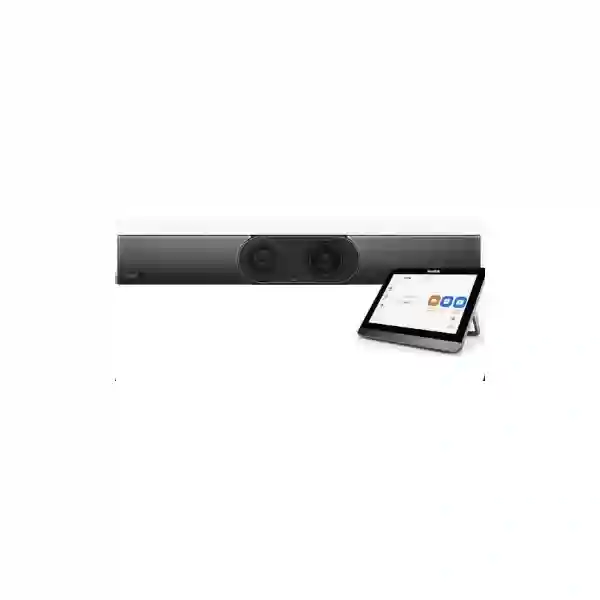
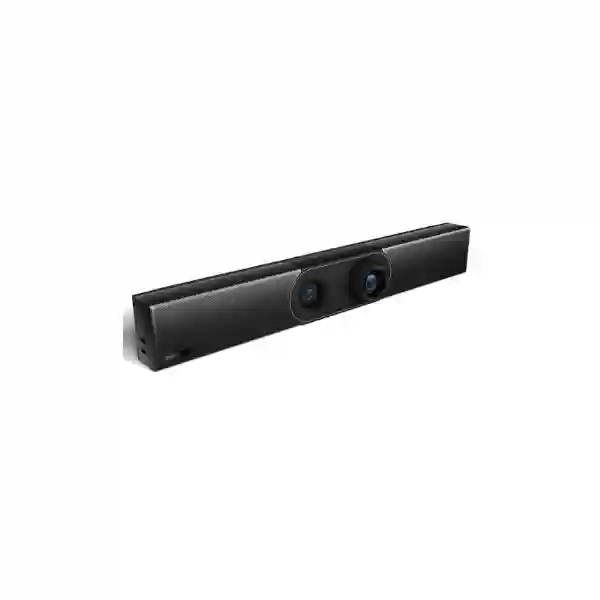
Yealink MeetingBar A30 Zoom Rooms System
The Yealink MeetingBar A30 Zoom Rooms System brings camera, microphones, speaker, computing and Zoom Rooms functionality together in one integrated video bar for medium meeting spaces. Its dual-camera architecture combines an 8-megapixel wide camera with a 120° field of view and a telephoto camera that supports 10× hybrid zoom, while AI functions such as auto framing and speaker tracking help remote participants follow the discussion naturally. The built-in 8-MEMS microphone array, full-duplex audio processing and Yealink noise-reduction technologies are designed to make speech easier to hear without filling the table with separate devices.
For organizations in Tanzania, the practical advantage is a room system that can be planned as a complete collaboration environment rather than a collection of unrelated components. Display size, seating position, room acoustics, network stability, Zoom Rooms licensing, room control, content sharing and optional microphone coverage can all be considered together before purchase. FourTeck can help buyers define those requirements and prepare a suitable room bill of materials without making unsupported assumptions about stock, licensing or site conditions.
Best considered for organizations standardizing a dedicated Zoom Rooms experience in a medium meeting room where a wide camera view, closer speaker framing, integrated audio and simplified appliance deployment are more important than building a custom PC-based conferencing system.
What the Yealink MeetingBar A30 Zoom Rooms System solves
A conventional conference room can become complicated quickly: a separate PC, USB camera, speakerphone, controller, cables, adapters and user-specific settings all create possible points of failure. The MeetingBar A30 is intended to simplify that experience by integrating the core room-compute, camera and audio functions into a dedicated Zoom Rooms appliance. Users can enter a properly configured room and work from a consistent interface instead of rebuilding the meeting setup for every call.
Dual-camera coverage
The wide camera covers a broad view of the room while the telephoto camera supports closer framing. This helps medium-room participants remain visible without depending only on aggressive digital cropping.
Integrated room audio
Eight built-in MEMS microphones, beamforming, echo cancellation and full-duplex audio processing support natural two-way conversation. Optional external microphone choices can be considered when seating extends beyond the built-in pickup area.
Dedicated Zoom workflow
As a Zoom Rooms appliance, the A30 is intended for a fixed meeting space rather than a personal laptop setup. That makes it useful where organizations want repeatable room operation, simpler handover and easier standardization across locations.
Verified Yealink MeetingBar A30 capabilities
| Room positioning | All-in-one video collaboration appliance for medium meeting rooms. |
| Wide camera | 8 MP camera with 120° diagonal field of view; 112° horizontal and 79° vertical field of view. |
| Telephoto camera | 8 MP camera with 10× hybrid zoom, including 3.5× optical and 3× digital zoom. |
| AI video functions | Auto Framing, Speaker Tracking, Picture-in-Picture and Zoom Smart Gallery support. |
| Privacy | Electric privacy shutter. |
| Microphones | Built-in 8-MEMS microphone array with published 6 m pickup range and support for external microphone options. |
| Audio processing | Yealink Noise Proof, beamforming, full duplex, AGC and acoustic echo cancellation. |
| Connectivity | Dual-band Wi-Fi, Bluetooth 4.2, Gigabit Ethernet, USB, HDMI outputs, line-in, line-out and Yealink extension connectivity. |
| Displays | Two HDMI outputs with CEC support, enabling dual-display room designs where appropriate. |
| Physical dimensions | 700 mm × 98 mm × 121 mm. |
Specifications should be validated against the exact package, current Yealink firmware and the intended Zoom Rooms deployment before final procurement. Optional controllers and accessories can vary by kit.
Room planning, content sharing and expansion
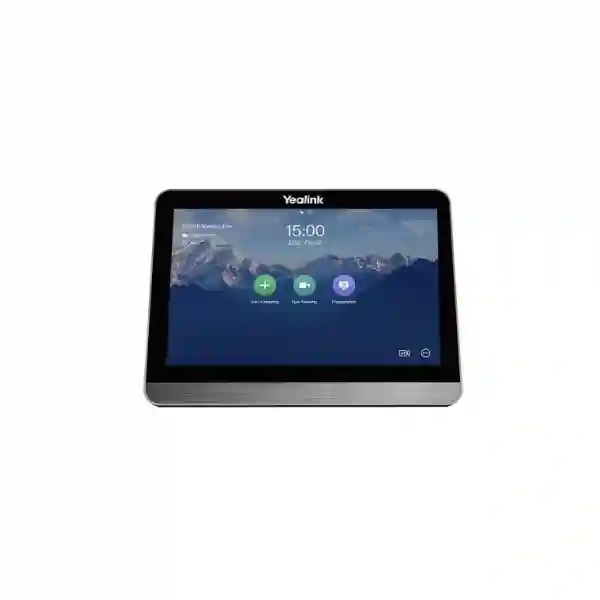
The strongest A30 deployments start with the room, not the device. Buyers should record the room dimensions, table shape, seat count, display wall, camera position, typical meeting behavior and preferred content-sharing method. Yealink positions the A30 for medium rooms, and Zoom publishes it in a conference-room scenario that can be paired with the CTP18 touch controller. Yealink also supports optional accessories for wired or wireless content sharing and microphone expansion, depending on the required workflow and current compatibility list.
For BYOD-style sharing or presentation workflows, accessories such as Yealink VCH51 or WPP30 may be relevant. For additional voice pickup, compatible external microphone options such as the VCM36-W can be evaluated. These should not be treated as automatic add-ons: the correct choice depends on the actual distance between seated participants and the bar, the acoustics of the room, cable routing, whether users bring laptops into the space and whether the organization wants a completely appliance-led workflow.
The network should also be part of the room specification. A dedicated Zoom Room depends on stable internet access, suitable LAN connectivity, correct firewall policy, reliable DNS and time services, and a supportable device-management process. A room that looks excellent on paper can still perform poorly if Wi-Fi is congested, uplinks are saturated or the display/camera positioning is wrong. That is why meeting-room deployment should be treated as a small integrated IT project rather than simply mounting a video bar.
Related FourTeck technology planning
A Zoom Room is only one part of the collaboration environment. For a broader Tanzania project, review FourTeck Tanzania’s integrated IT and meeting-room portfolio when the A30 must connect with displays, networking, Wi-Fi, room audio or other office infrastructure. Organizations standardizing multiple East African sites can also review the FourTeck Kenya collaboration and networking portfolio and FourTeck Uganda business communication solutions to coordinate similar room requirements across branches.
For projects extending beyond East Africa, FourTeck IT Solutions Africa provides a wider infrastructure context, while FourTeck Ghana business communication and IT solutions can support planning conversations for Ghana-based requirements. These links are provided to help procurement teams think about the full environment around the room system rather than treating the A30 as an isolated purchase.
Yealink MeetingBar A30 Zoom Rooms System Tanzania
Organizations searching for the Yealink MeetingBar A30 Zoom Rooms System in Tanzania are often trying to standardize hybrid meetings without the operational complexity of a custom conference-room PC. The A30 is well aligned with that objective because it integrates compute, camera, microphones and speaker functions into a dedicated appliance and provides a native Zoom Rooms path. For a Tanzania procurement project, the first decision should be whether the room is genuinely a medium room and whether the seating plan allows participants to remain within useful camera and microphone coverage. A boardroom with a long table, hard reflective surfaces and seats far from the display wall may need microphone expansion or a different architecture, while a compact medium room may work well with the integrated bar and a controller.
Tanzania buyers should also define how the room will be used during ordinary working days. If most meetings are scheduled Zoom calls with employees and customers, a dedicated Zoom Rooms workflow can reduce friction. If the room frequently hosts external platforms or presenters who insist on using their own laptops, content-sharing and BYOD expectations should be documented before the order. Optional accessories should be selected around those workflows, not simply added because they appear in a product brochure. Display size and quantity are also important. The A30 supports dual display outputs, but two screens are useful only when the room layout, viewing distance and meeting style justify them.
Network readiness is especially important for cloud video. Before deployment, the IT team should review internet stability, firewall policy, DNS, Ethernet availability, wireless congestion, VLAN strategy and power protection. Where business continuity matters, the conferencing bar, display and network edge may benefit from suitable UPS planning so short power interruptions do not immediately end an important call. The room should also be reviewed for lighting and acoustics because strong backlighting, bare glass walls and excessive echo can undermine even high-quality camera and microphone hardware.
When requesting a Yealink MeetingBar A30 quotation in Tanzania, include the room dimensions, seating count, number of displays, preferred controller, need for wired or wireless presentation, expected microphone expansion, Zoom Rooms licensing status, network connection method and target deployment date. This information helps distinguish a simple hardware request from a complete room-system requirement and makes the quotation more useful for procurement review.
Yealink MeetingBar A30 Zoom Rooms System Dar es Salaam
For businesses in Dar es Salaam, the Yealink MeetingBar A30 Zoom Rooms System is relevant to headquarters, professional-services offices, financial teams, logistics companies, project offices and customer-facing organizations that conduct frequent video meetings. The city’s concentration of multi-site businesses makes room standardization particularly useful: when several teams use the same meeting platform, a dedicated Zoom Room can reduce the inconsistency that comes from different laptops, webcams and speakerphones being assembled for each call. The A30’s integrated form factor also helps maintain a cleaner room design because the camera, microphones, speaker and compute platform are concentrated in the video bar rather than distributed across multiple devices.
A Dar es Salaam meeting-room assessment should begin with the physical room. Measure the distance from the display wall to the farthest seat and note the width of the table. The A30’s 120° wide camera is valuable when participants sit relatively close to the front of the room or across a broad table, while the telephoto camera and speaker-tracking functions can improve remote visibility for active speakers. However, camera capability does not eliminate the need for good mounting height, proper lighting and a clear line of sight. Rooms with glass partitions or strong daylight can require practical changes in blinds, display orientation or camera placement.
Audio deserves equal attention. The integrated 8-MEMS microphone array is designed for medium rooms, but actual room acoustics vary. A long table, high ceiling, strong air-conditioning noise or reflective walls can change the experience. If participants sit beyond the practical built-in pickup area, compatible expansion microphones should be evaluated. IT teams should also confirm stable wired Ethernet where possible, review firewall and QoS policy, and ensure the Zoom Room can reach required cloud services without unnecessary network restrictions.
For a Dar es Salaam quotation, procurement teams should specify whether the requirement is only the A30 appliance or a complete room package including controller, screens, mounting, presentation accessories, microphone expansion, cabling, UPS and installation. A complete scope produces a more realistic project comparison than comparing the price of the video bar alone.
Yealink MeetingBar A30 Zoom Rooms System Mwanza
Organizations in Mwanza considering the Yealink MeetingBar A30 Zoom Rooms System often need dependable collaboration between regional teams, headquarters, suppliers and customers without requiring every participant to travel. A dedicated medium-room system can be particularly useful for branch management meetings, training, operational reviews and project coordination. The A30 offers a consistent Zoom Rooms interface and an integrated hardware design, which can make the room easier to hand over to non-technical users than a setup that depends on connecting personal laptops to several peripherals at the beginning of each meeting.
The most important planning issue in Mwanza is not simply whether the A30 is available; it is whether the complete room environment can support reliable video collaboration. Internet quality should be assessed realistically. Where business links experience variable performance, IT teams should review available bandwidth, congestion periods, failover options and the behavior of other high-traffic applications on the same connection. A video bar cannot compensate for an unstable WAN, so network design and monitoring can be as important as the conferencing appliance itself.
Room design should also account for power protection and maintainability. The A30, controller, display and network path all rely on power. If short interruptions are common or the room is used for important management calls, an appropriately sized UPS strategy for the conferencing and networking equipment may be useful. Cable routes should remain serviceable, and mounting should allow technicians to access ports without removing major room fixtures. Where the room uses two displays, both screens should be positioned for comfortable viewing rather than installed simply because dual output is supported.
Mwanza buyers can make quotations more comparable by listing the exact room scope: seat count, room size, display requirements, touch controller requirement, content-sharing method, optional microphones, network connection, mounting and installation expectations. This avoids comparing one quote for a bare appliance against another that includes an entire functioning Zoom Room.
Yealink MeetingBar A30 Zoom Rooms System Arusha
The Yealink MeetingBar A30 Zoom Rooms System can suit Arusha organizations that host frequent remote meetings with regional offices, international partners, project teams, travel-sector stakeholders, NGOs, educational organizations and professional-services groups. In these environments, a meeting room is often shared by many users with different levels of technical confidence. A dedicated Zoom Rooms appliance helps create a repeatable workflow: the room remains configured for collaboration, users do not need to rebuild device settings on personal laptops, and the organization can standardize how meetings start, how content is shared and how room devices are managed.
Before selecting the A30, Arusha buyers should evaluate room geometry. The 120° wide camera helps cover groups spread across the near side of a medium room, while the telephoto camera supports closer views of speakers farther from the display. The automatic framing and speaker-tracking features can reduce manual camera handling, but they work best when seating and camera placement are sensible. If participants sit behind one another in a long narrow room or the bar is mounted too high, the experience may not match expectations. A quick site assessment can prevent those issues.
Acoustics can be equally important in rooms with hard floors, glass partitions or high ceilings. The built-in microphone array and noise-processing functions provide a strong base, but room echo and distance still matter. Optional microphone expansion should be considered for longer tables or seating beyond the normal pickup area. For presentations, buyers should decide whether users will rely on Zoom-native sharing, wired sharing or a wireless presentation accessory. This choice affects accessories, user training and cable design.
An Arusha procurement request should therefore describe the room as well as the product. Include dimensions, seat count, platform preference, screen quantity, presentation behavior, network readiness and whether the room needs installation, configuration or user handover. This enables a solution-oriented quote instead of an incomplete line-item price.
Yealink MeetingBar A30 Zoom Rooms System Dodoma
In Dodoma, the Yealink MeetingBar A30 Zoom Rooms System is relevant to government-facing organizations, administrative offices, institutions, NGOs, enterprises and project teams that need a consistent medium-room video conferencing experience. Dedicated room appliances are valuable where meetings need to begin quickly and be operated by different staff members throughout the day. Instead of depending on whichever laptop arrives first, the A30 is designed as a fixed Zoom Rooms platform with integrated camera, audio and compute functions, helping simplify routine room operation.
A Dodoma project should pay particular attention to procurement completeness. A conferencing appliance alone is not a complete room. The final bill of materials may include one or two displays, mounts, controller, network cabling, presentation accessories, optional microphones, rack or power components, UPS protection and installation materials. Organizations comparing bids should normalize these items so suppliers are quoting the same functional outcome. It is also useful to separate the Zoom Rooms service or license requirement from the hardware purchase because platform licensing can follow different commercial terms and renewal cycles.
The technical team should confirm network policy before the equipment reaches site. Wired Ethernet is often preferable for a fixed meeting room because it creates a more predictable network path, although the A30 also includes Wi-Fi. Firewall rules, DNS reachability, time synchronization and available internet capacity should be reviewed. If the room is part of a larger office project, conferencing traffic can be considered alongside voice, Wi-Fi, CCTV and general business applications so one service does not unexpectedly degrade another.
For Dodoma buyers, a strong request for quotation should identify room dimensions, expected participants, preferred screen layout, controller requirement, content-sharing method, microphone requirements, Zoom tenancy status, installation expectations and whether training or documentation is needed at handover. These details help transform the A30 from a product purchase into a usable meeting-room solution.
Yealink MeetingBar A30 Zoom Rooms System UAE
For UAE organizations, the Yealink MeetingBar A30 Zoom Rooms System fits the common requirement for standardized meeting rooms across corporate offices, free-zone locations, branch sites, professional-services firms and regional headquarters. The all-in-one appliance approach can be attractive where IT teams want to deploy multiple rooms using a repeatable design rather than supporting different webcams, speakerphones and PCs in every location. The A30’s dual-camera system, 120° wide view, 10× hybrid zoom, integrated 8-MEMS microphone array and Zoom Rooms workflow make it a strong candidate for medium rooms when the physical layout matches the product’s intended use.
UAE projects often involve precise fit-out coordination, so buyers should decide early how the bar will be mounted, where displays and controllers will sit, how cables will be concealed and whether the room requires one or two screens. If the meeting room is part of a new office fit-out, the low-voltage contractor, network team, AV installer and furniture provider should share the same room drawing. This prevents conflicts such as power outlets positioned behind inaccessible panels or network points terminating away from the controller and display wall.
Another important decision is the presentation workflow. Some organizations want users to walk into the room and use only Zoom-native functions; others expect frequent guest presentations from laptops. In the second case, compatible Yealink wired or wireless sharing accessories can be evaluated. Audio expansion should likewise be based on table length and acoustics. Large glossy boardrooms with hard surfaces may need more acoustic attention than smaller carpeted rooms, even when both are described as medium spaces.
A UAE quotation should clearly separate the A30 kit, controller, content-sharing options, microphone expansion, displays, mounts, cables, installation and Zoom licensing. That makes commercial comparison easier and reduces the risk of discovering missing accessories during commissioning.
Yealink MeetingBar A30 Zoom Rooms System Uganda
Uganda organizations looking at the Yealink MeetingBar A30 Zoom Rooms System may be planning collaboration between Kampala headquarters, regional branches, project sites, partners and customers. A dedicated room appliance is useful when video meetings are frequent enough that connecting a laptop, camera and speakerphone every time becomes disruptive. The A30 consolidates the main room functions and supports Zoom Rooms as a dedicated platform, making it easier for organizations to define a standard user experience across multiple meeting spaces.
The key technical question is whether the room behaves like a medium room in practice. Seat count is only one indicator. Camera distance, table length, ceiling height, acoustic treatment and display placement all affect performance. The wide camera helps include a group close to the front of the room, while the telephoto camera supports closer framing farther into the space. For audio, the integrated microphone array provides a useful base, but organizations should test or plan for expansion when participants sit beyond the practical pickup zone or when HVAC and hard surfaces create difficult acoustics.
Uganda deployments should also include network and power planning. Stable Zoom calls require predictable internet connectivity and a LAN path that is not routinely saturated. IT teams can review Ethernet availability, Wi-Fi congestion, firewall configuration and general WAN resilience. Power protection for the video bar, controller, display and relevant network devices can also reduce disruption during short interruptions. If the room supports important management meetings, documenting the restart process and providing a simple user guide can improve supportability.
When requesting a Uganda quotation, include room dimensions, location, display requirements, controller preference, content-sharing needs, microphone expectations, number of rooms and desired deployment schedule. This allows suppliers to quote a practical system rather than an isolated device with unknown dependencies.
Yealink MeetingBar A30 Zoom Rooms System Kampala
In Kampala, the Yealink MeetingBar A30 Zoom Rooms System can serve enterprises, financial institutions, professional-services firms, NGOs, education groups and regional offices that depend on frequent hybrid meetings. Kampala-based organizations often need meeting rooms that can be operated by executives, administrators and visiting users without technical intervention. A dedicated Zoom Rooms appliance helps by keeping the room configured around one collaboration workflow, while the integrated camera and audio design reduces the number of separate USB devices that staff need to understand.
A good Kampala deployment starts by matching the A30 to the room. The dual-camera design is intended to provide both broad coverage and more detailed speaker views. The 120° wide view is useful for groups seated across the room, while the telephoto capability can improve framing deeper into the space. Auto framing and speaker tracking are valuable for natural meetings, but they should be treated as enhancements to good room design, not replacements for correct camera height, lighting and seating geometry.
For audio, the eight built-in microphones and Yealink processing technologies support full-duplex conversation, but acoustic conditions still matter. If the room has a long table or highly reflective surfaces, an optional compatible microphone may be appropriate. Content sharing should also be planned deliberately. A room used mostly for scheduled internal Zoom meetings may need a simpler setup than a client-facing room where guests regularly bring laptops and request direct presentation access.
Kampala procurement teams should ask suppliers to itemize the complete room, including controller, displays, mounts, cables, microphone expansion, presentation accessories, network preparation, installation and licensing assumptions. Clear itemization makes lifecycle support easier and avoids surprise costs after the core appliance has already been purchased.
Yealink MeetingBar A30 Zoom Rooms System Arua
For organizations in Arua, the Yealink MeetingBar A30 Zoom Rooms System can support regional coordination where travel is not always the most efficient way to bring teams together. A properly designed Zoom Room can be used for management calls, training, partner discussions, interviews and operational reviews. The A30’s integrated approach is useful in this context because it reduces dependence on a dedicated room PC and combines the central camera and audio functions into a single appliance that can be documented and supported consistently.
Connectivity should be assessed before equipment selection. Video conferencing is sensitive to inconsistent bandwidth, packet loss and congestion, so organizations should understand the real performance of the available connection during working hours. Where a site has backup internet, the failover behavior should be tested so the room does not remain connected to a failed path. Wired Ethernet can provide a stable local connection for a fixed room, while Wi-Fi should be evaluated for signal strength and congestion if it is used.
The physical environment also matters. The bar should be mounted so the camera is close to normal eye level for seated participants, and the display should be large enough for people at the far end of the table to read shared content. Strong windows behind participants should be managed, and the room should avoid excessive echo where possible. If participants sit farther away than the normal integrated microphone coverage, compatible microphone expansion can be considered as part of the initial design rather than added only after complaints.
An Arua request for quotation should provide room measurements, number of seats, preferred Zoom workflow, display plan, available network connection, presentation method and expected installation scope. For organizations buying several rooms, standardizing accessories and cable layouts can simplify spare parts, training and future support.
Yealink MeetingBar A30 Zoom Rooms System Mbarara
The Yealink MeetingBar A30 Zoom Rooms System is a useful option for Mbarara businesses and institutions that need a permanent medium-room video collaboration setup. Rather than treating each call as a laptop-based event, organizations can create a room that is always prepared for Zoom meetings. That consistency is important where meeting spaces are shared by multiple departments and where remote participants expect reliable audio, camera framing and content sharing every time.
Room sizing should be based on geometry as well as participant count. A wide but shallow meeting room has different camera needs from a long boardroom with the same number of seats. The A30’s wide camera and telephoto camera help address this range, but the seating plan should still be reviewed. If the farthest participants sit a long distance from the video bar, microphone expansion may be as important as camera zoom. The room’s materials also affect performance: tiled floors, bare walls and glass can increase reverberation and make speech less comfortable for remote attendees.
Mbarara deployments can also benefit from careful power and network planning. A UPS for the collaboration equipment and network edge may help keep short power interruptions from terminating important meetings. Ethernet cabling should be tested, internet capacity monitored and firewall rules prepared before commissioning. Where a controller is used, its network and power method should be included in the cable plan so the tabletop remains clean and serviceable.
For procurement, specify whether the project needs only the A30 hardware or a complete Zoom Room. A complete scope may include the CTP18 controller, one or two displays, mounts, content-sharing accessories, external microphone options, structured cabling, UPS, installation, testing and handover. Making that distinction early gives decision-makers a more accurate total-cost comparison.
Yealink MeetingBar A30 Zoom Rooms System Gulu
In Gulu, a Yealink MeetingBar A30 Zoom Rooms System can help organizations create a stable collaboration point for meetings with offices, donors, suppliers, customers or project teams in other locations. The key advantage of a dedicated room system is predictability. The device remains assigned to the room, the camera and audio are fixed in place, and users can follow a defined meeting workflow rather than troubleshooting personal laptop settings at the start of every session.
That predictability still depends on correct design. The A30 should be installed where the dual-camera system has a clear view of participants, and the display should be positioned so people do not turn away from the camera while reading remote participants or shared content. The integrated microphone array can support a medium room, but organizations should consider compatible external microphones if seating extends well beyond the published pickup range or if the room has challenging acoustics. Speaker volume and echo behavior should be checked during commissioning with the room occupied, not only while it is empty.
Gulu sites should also plan for network resilience. Cloud meetings require stable connectivity, so it is useful to review bandwidth demand, competing traffic, failover internet where available and the path through the firewall. The A30 supports both Ethernet and Wi-Fi, but a fixed wired connection is often easier to troubleshoot and document. Power protection and secure cable routing are similarly important for a room expected to remain available day after day.
When asking for pricing in Gulu, provide enough context for a system-level response: room dimensions, seats, number of displays, controller requirement, presentation method, microphone expansion, network availability, mounting and installation expectations. This reduces the chance of receiving a quote that omits a necessary component.
Yealink MeetingBar A30 Zoom Rooms System Kenya
Kenya organizations evaluating the Yealink MeetingBar A30 Zoom Rooms System may be upgrading from portable speakerphones and webcams to a standardized room experience. For medium meeting rooms in Nairobi and other business centers, appliance-based collaboration can improve usability because the room no longer depends on an employee’s laptop for the core camera, microphone and meeting-compute functions. The A30 provides a purpose-built dual-camera architecture, integrated audio and native Zoom Rooms workflow that can be replicated across multiple offices.
The selection process should still be room-led. Procurement teams should capture dimensions, table shape, seating count, screen size and lighting conditions before confirming the model. The 120° wide camera supports broad room coverage, while the telephoto camera helps provide closer speaker views. For rooms where attendees sit beyond the integrated microphone pickup range, a compatible external microphone can be planned. If the room is used for training or customer presentations, content-sharing expectations should be clarified so the right wired or wireless accessory is included from the beginning.
Kenya deployments should also be integrated with enterprise networking standards. A fixed room benefits from a documented switch port, appropriate VLAN and stable internet path. IT administrators may want to include the room appliance in normal monitoring, firmware and asset-management processes. If the organization has several branches, a consistent naming and configuration policy helps support teams troubleshoot rooms remotely and maintain a repeatable user experience.
For a Kenya quotation, ask for clear line items covering the A30 kit, controller, presentation accessories, microphone expansion, screens, mounts, cabling, UPS and installation. Also verify the Zoom Rooms licensing responsibility and any subscription renewal separately from the hardware. This produces a cleaner commercial picture and prevents gaps between hardware procurement and room activation.
Yealink MeetingBar A30 Zoom Rooms System Kuwait
For Kuwait offices, the Yealink MeetingBar A30 Zoom Rooms System fits medium conference spaces where organizations want a purpose-built Zoom environment with minimal room-PC complexity. Corporate headquarters, engineering firms, professional-services organizations and multi-site businesses can use a standardized appliance design to create familiar rooms across departments. The A30 combines the main conferencing components in a single bar, while the optional controller and presentation accessories allow the room workflow to be adapted to local user habits.
Meeting-room fit-out quality is often as important as the conferencing hardware. Cable routing, display mounts, power points and network outlets should be planned before wall finishes and furniture are finalized. The bar should have a direct view of participants and should not be mounted so high that remote attendees see the tops of heads instead of faces. The displays should be sized for the farthest seat and positioned so local participants look approximately toward the camera when watching remote attendees.
Kuwait rooms can also have strong air-conditioning and hard interior finishes, which may introduce background noise or reverberation. The A30 includes noise-reduction and full-duplex audio features, but acoustic conditions still deserve attention. Longer rooms can benefit from compatible microphone expansion, and highly reflective spaces may require acoustic treatment rather than relying on DSP alone. The IT team should also confirm stable wired networking and the firewall path required for Zoom.
A Kuwait procurement package should clearly identify whether the buyer needs a bar-only purchase or a fully commissioned Zoom Room. Include controller, displays, wall or TV mounts, content-sharing method, microphone options, cables, network readiness, installation and licensing assumptions in the quotation request. That level of detail is especially useful when comparing proposals from multiple suppliers or planning several identical rooms.
Yealink MeetingBar A30 Zoom Rooms System Ghana
The Yealink MeetingBar A30 Zoom Rooms System is relevant to Ghanaian organizations that want a permanent medium-room collaboration setup for executive meetings, customer calls, training and multi-site coordination. An appliance-based room can reduce the number of user-dependent variables because the camera, microphones, speaker and meeting compute are fixed as part of the room. This makes it easier for facilities and IT teams to create a standard operating guide and maintain the same meeting behavior across rooms.
For Ghana projects, the most useful buying process starts with a room survey rather than a product list. The A30’s 120° wide camera and telephoto camera provide flexible video coverage, but the physical seating arrangement determines whether participants are framed naturally. If the room has a very long table, external microphone expansion may be necessary even when the camera can zoom far enough to see the speaker. Display placement, daylight and wall finishes should also be reviewed because poor visibility or strong echo can reduce the overall meeting quality.
IT teams should consider the A30 as a managed network endpoint. Stable Ethernet, appropriate firewall policy, internet capacity, time synchronization and secure administration all contribute to a dependable Zoom Room. Where bandwidth is shared with other critical applications, traffic monitoring and sensible QoS policies can help identify congestion. Power protection can also be useful where the room needs to remain available during brief supply fluctuations.
When Ghana buyers request a quote, they should include the room size, seat count, number of displays, desired controller, whether wireless sharing is required, microphone expansion needs, existing Zoom licensing and deployment expectations. This makes the commercial proposal easier to compare and reduces the chance that essential accessories or services are omitted.
Yealink MeetingBar A30 Zoom Rooms System Nigeria
Nigeria-based enterprises evaluating the Yealink MeetingBar A30 Zoom Rooms System often need to support frequent collaboration between headquarters, branches, partners and customers. A standardized dedicated room can help large organizations reduce the variability of personal-device meetings and create a consistent interface for executives and teams. The A30’s all-in-one architecture is particularly useful for medium rooms where the organization wants an integrated camera, microphone, speaker and room-compute platform instead of a separate PC-based AV stack.
For projects in Lagos, Abuja and other major business locations, procurement teams should avoid choosing solely by room capacity labels. The shape of the room, distance to the farthest seat and amount of reflective material can matter as much as the headcount. The wide camera helps capture groups close to the display wall, while the telephoto camera supports deeper framing. Audio expansion should be evaluated when the table is long or when participants sit outside the integrated pickup zone. In larger or acoustically complex rooms, a different architecture may be more appropriate than simply adding accessories.
Network resilience should be part of the design. A Zoom Room needs a stable route to cloud services, and organizations may already use multiple WAN links or enterprise firewalls. The room should be tested under normal business traffic, not only during an empty-office commissioning window. Where several rooms are deployed, standard switch ports, VLANs, naming and device-management procedures can make remote support faster and reduce configuration drift.
A Nigeria quotation should identify the exact A30 package, controller, screen arrangement, presentation accessories, microphone expansion, installation, network preparation and licensing responsibilities. Multi-room projects should also specify whether every room is identical or whether executive boardrooms require a different design. This prevents over-standardization where room conditions differ materially.
Yealink MeetingBar A30 Zoom Rooms System Seychelles
For organizations in Seychelles, the Yealink MeetingBar A30 Zoom Rooms System can provide a dedicated collaboration environment for management meetings, hospitality operations, professional services, public-sector communication, education and coordination with overseas teams. In island markets where travel between locations or to international partners can be costly and time-consuming, a dependable room system can support more frequent face-to-face interaction without requiring physical travel for every discussion.
The A30 is best evaluated as a complete room solution. The dual-camera design supports broad room coverage and closer speaker framing, but the camera position should align with the main display and seating direction. The built-in microphone array is designed for medium spaces, while compatible external microphones can be considered for longer rooms. Rooms with hard flooring, glass or open-plan spillover noise should be assessed acoustically so remote participants hear clear speech instead of reverberation.
Seychelles deployments should include logistics and support planning as part of procurement. Buyers may want to keep a clear record of the exact kit, adapters, mounts, cables and optional accessories used in the room so replacement parts can be identified easily. Firmware and Zoom Rooms administration should be assigned to a responsible IT role. Network and power conditions should also be documented; the appliance, controller, screens and network path all need to remain available for the room to function.
A useful Seychelles quotation request should include room dimensions, seat count, number of displays, controller requirement, presentation method, microphone expansion, mounting, installation and support expectations. If the project covers several properties or offices, list each room separately because dimensions and acoustic conditions may differ even when the organization wants one standardized collaboration platform.
Buying guidance: choose the complete room, not only the video bar
Room fit
Confirm dimensions, seating, viewing distance, camera height, lighting and acoustics. A room-size label is a starting point, not a substitute for physical assessment.
Zoom workflow
Decide whether the space will operate as a dedicated Zoom Room, how meetings are scheduled, who administers the room and how guests will present content.
Accessory scope
Controller, sharing accessories, external microphones, mounts, displays and cabling should be selected according to the actual user workflow rather than bundled automatically.
Network readiness
Validate Ethernet, internet stability, firewall access, VLAN policy, DNS and device management before commissioning. Collaboration quality depends on the network path.
Common Yealink MeetingBar A30 Zoom Rooms questions
Is the Yealink MeetingBar A30 intended for medium rooms?
Yes. Yealink positions the MeetingBar A30 as an all-in-one video collaboration bar for medium meeting rooms, and Zoom also references it in a conference-room deployment scenario. Final suitability should still be checked against the actual room dimensions and seating layout.
Does the A30 require a separate room PC?
The Zoom Rooms appliance design integrates room compute into the MeetingBar, so a separate Windows or Mac room PC is not required for the dedicated appliance workflow. A display and the appropriate Zoom Rooms setup are still needed.
What cameras are built into the MeetingBar A30?
The A30 uses a dual-camera system with an 8 MP wide camera offering a 120° diagonal field of view and an 8 MP telephoto camera supporting 10× hybrid zoom.
Can the MeetingBar A30 use external microphones?
Yes. Yealink documents support for external microphone options. The exact microphone type and quantity should be checked against the current compatibility list and the room requirement before purchase.
Does the A30 support two displays?
The hardware includes two HDMI outputs with CEC support, which allows dual-display room designs where the Zoom Rooms configuration and physical room layout justify them.
What should be included in a quotation request?
Include room dimensions, seat count, display quantity, controller preference, content-sharing method, microphone requirements, mounting, existing network connection, Zoom Rooms licensing status, installation location, quantity of rooms and target deployment schedule.
Quotation checklist for the Yealink MeetingBar A30
Decision recap
Choose the Yealink MeetingBar A30 Zoom Rooms System when you need a dedicated Zoom Rooms appliance for a medium meeting room and value an integrated dual-camera design, built-in microphone array, speaker, simplified room compute and flexible controller or sharing options. Do not choose by model name alone. Validate the seating layout, acoustic conditions, microphone distance, display requirements, network stability, content-sharing workflow and licensing before placing the order.
For organizations planning several rooms, standardization can reduce support effort, but every room should still be checked for physical differences. A repeatable design is most effective when the same mounting heights, network standards, controller positions, accessory sets and documentation can be applied without forcing an unsuitable layout.
Consultation panel
When contacting FourTeck about the Yealink MeetingBar A30 Zoom Rooms System, send the room dimensions, number of seats, photos or a simple floor plan if available, preferred screen arrangement, whether users need BYOD presentation, and any existing Zoom Rooms or network information. This enables the discussion to focus on compatibility and total room scope rather than only the price of the video bar.
Availability, commercial pricing, warranty terms, delivery timing, licensing and installation scope should be confirmed in the formal quotation because these items can vary by package, region and project requirement.




Reviews
There are no reviews yet.