
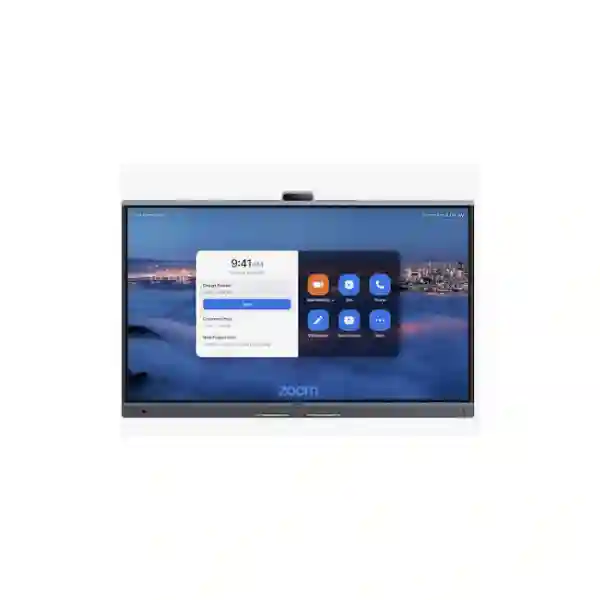
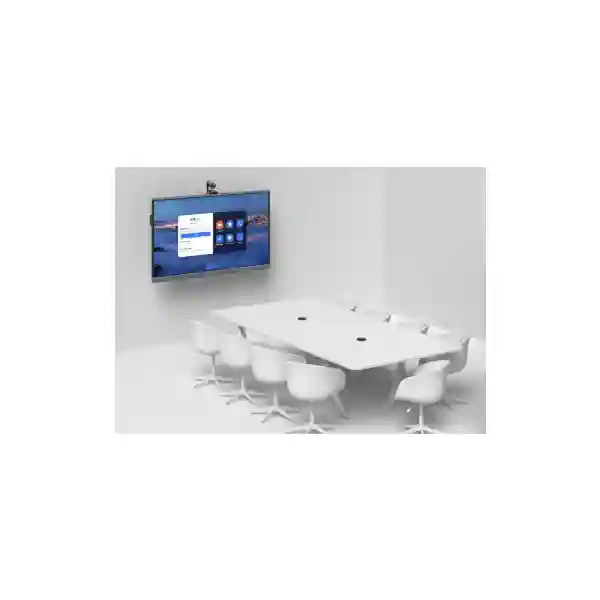
Yealink MeetingBoard Pro 65 Zoom Rooms System
The Yealink MeetingBoard Pro 65 is an all-in-one Zoom Rooms collaboration system created for organizations that want video meetings, a high-resolution interactive display, room audio and digital whiteboarding in one coordinated platform. It combines a 65-inch 4K anti-glare touch screen, a triple 50MP camera system, a built-in 16 MEMS microphone array, stereo speakers, AI-assisted participant framing and Zoom-certified room functionality. For Tanzanian businesses, education institutions, professional services firms, government departments and distributed teams, this type of appliance can simplify room design by reducing the number of separate devices that must be selected, cabled, managed and supported.
Quick fit
Display: 65-inch 4K interactive panel
Camera: Triple 50MP integrated camera array
Audio: 16 MEMS microphones with 12 m full-duplex pickup
Platform: Zoom Rooms certified, with multi-platform flexibility
One-room platform
Video, audio, touch collaboration and whiteboarding are integrated into one room device, helping reduce component sprawl and simplifying user interaction.
AI-assisted meetings
Auto framing, speaker tracking, IntelliFocus and video-fence features are designed to keep remote participants visually connected to the people who are actually contributing.
Room-ready audio
The integrated 16-microphone array supports full-duplex pickup across up to 12 metres, while expansion options can address more demanding room layouts.
What the Yealink MeetingBoard Pro 65 brings to a Zoom Room
A productive Zoom Room is more than a camera and a television. It needs a room interface that people can understand immediately, an audio system that captures speech clearly, a camera that frames participants without constant manual adjustment, reliable content sharing, dependable network connectivity and a practical management model for IT administrators. The MeetingBoard Pro 65 brings these requirements together in a single appliance. Its 3840 × 2160 display supports a 60 Hz refresh rate and a wide 178-degree viewing angle, while the infrared touch system supports up to 20 touch points with four-level stylus interaction. This makes the display suitable not only for calls but also for collaborative review, brainstorming, annotation and whiteboard-led workshops.
For video capture, Yealink uses a triple-eye camera arrangement built around three 50MP Sony sensors. The system supports a wide-angle horizontal field of view of approximately 98.2 degrees, electronic pan and tilt, digital zoom and AI-assisted viewing modes. Organizations that need additional optical reach can plan for the optional MB-12X Pro camera module. The built-in electronic privacy shutter provides a physical visual barrier when the camera is not in use, an important consideration for boardrooms, management spaces and classrooms where privacy expectations are high.
For room operations, the platform runs Android 13 with 8 GB memory and 64 GB flash storage, and it can be managed through supported platforms including the Zoom Device Management environment. Network connectivity includes dual-band Wi-Fi 6, Bluetooth 5.1, Gigabit Ethernet interfaces and standard enterprise mechanisms such as 802.1X, VLAN-related controls and secure web management. These details matter when a collaboration appliance is deployed as part of a managed business network rather than as an isolated consumer device.
Verified technical highlights
| Display | 65-inch anti-glare panel, 3840 × 2160 resolution, 60 Hz, 400 cd/m² brightness, 178° viewing angle |
| Touch | Infrared touch, up to 20 points, ±1 mm stated accuracy, four-level stylus support |
| Camera | Integrated triple 50MP camera system with Sony sensors, AI framing, speaker tracking, IntelliFocus and video fence |
| Microphones | 16 MEMS microphone array, 12 m full-duplex pickup, beamforming and AI audio processing |
| Wireless | Wi-Fi 6 dual-band and Bluetooth 5.1 |
| Content sharing | HDMI input plus supported wireless sharing methods including AirPlay and Miracast |
| Management | Web/device/touch configuration with support for Zoom Device Management and Yealink management tools |
| Mounting | Wall mount, wall stand and floor-stand installation options; appropriate accessories should be confirmed for the project |
Buying and deployment guidance for Tanzania
Before requesting a quotation, define the intended room size, typical number of participants, seating layout, mounting preference, existing network topology, Zoom Rooms licensing position and whether additional microphones, a room controller, stand or optical-zoom camera are required. The 65-inch model is particularly attractive where the screen needs to serve both as a collaboration surface and as the primary room display, but the correct choice still depends on viewing distance, wall dimensions and the number of participants who must comfortably read shared content.
FourTeck Tanzania can help frame a requirement around the room rather than around the device alone. This is useful because video-conferencing success depends on power, internet quality, LAN configuration, Wi-Fi conditions, acoustics, camera placement and user workflow. Explore the broader FourTeck Tanzania business technology portfolio when the meeting space also needs switching, Wi-Fi, firewall, structured cabling, displays or related infrastructure.
Yealink MeetingBoard Pro 65 Zoom Rooms System Tanzania
Organizations searching for the Yealink MeetingBoard Pro 65 Zoom Rooms System in Tanzania are usually trying to solve several problems at once: standardize hybrid meetings, reduce room complexity, improve the quality of remote participation and give local users a simple interface that does not require an IT technician at every meeting. The MeetingBoard Pro 65 is well suited to this objective because the display, camera, microphones, speakers and whiteboard functions are integrated into the same platform. In practice, this can simplify room design, but buyers should still prepare the surrounding environment carefully. A collaboration system depends on stable network access, suitable bandwidth, reliable DNS and time services, correctly configured VLAN or access policies where these are used, and an appropriate Zoom Rooms account and room configuration.
For Tanzanian offices, the 65-inch format is often relevant to huddle rooms, management meeting rooms, departmental collaboration rooms, training rooms and smaller executive boardrooms. The integrated 4K panel allows the same surface to display remote participants, shared presentations and whiteboard content. The triple 50MP camera design is intended to capture participants with more detail than a basic single-lens webcam, while features such as IntelliFocus, speaker tracking and auto framing reduce the need for users to manually control the camera. In rooms where participants sit farther from the display or where the layout is unusually deep, buyers can also consider the optional optical-zoom camera and microphone expansion accessories supported by the MeetingBoard Pro family.
Procurement teams in Tanzania should request a configuration-level quotation rather than assuming that every accessory is included in the base package. Confirm mounting hardware, stand requirements, room controller preferences, microphone expansion, screen-sharing accessories, cabling and any installation work needed at the site. Also confirm the Zoom Rooms licensing and administrative requirements separately from the hardware purchase. This approach produces a more reliable project budget and reduces delays caused by missing accessories. FourTeck Tanzania can assist with requirement discovery and product selection, and customers planning related network or security upgrades can also review the wider FourTeck Africa infrastructure portfolio for complementary business technology planning.
Yealink MeetingBoard Pro 65 Zoom Rooms System Dar es Salaam
In Dar es Salaam, demand for professional Zoom Rooms systems is commonly driven by corporate headquarters, professional services firms, hotels, logistics organizations, financial services teams, educational institutions and companies coordinating with regional or international offices. A MeetingBoard Pro 65 can be positioned as the central collaboration surface in a room where teams need dependable scheduled meetings, quick ad-hoc calls and on-screen collaboration without building a multi-vendor system from many separate endpoints. The all-in-one design is especially useful where aesthetics and cable reduction are important, such as executive meeting rooms and client-facing spaces.
Room assessment should begin with viewing distance and seating. A 65-inch display is large enough for many compact and medium collaboration spaces, but a long boardroom may need careful validation before hardware is ordered. Camera framing also depends on where the display is mounted relative to the table. The MeetingBoard Pro camera’s wide field of view helps capture participants seated across the room, while AI functions can highlight speakers and recent contributors. However, no AI feature can compensate for poor room lighting or a camera position obstructed by furniture. During planning, consider ambient light, reflections, acoustic surfaces and whether the screen will be wall-mounted or placed on a mobile floor stand.
Dar es Salaam businesses should also treat network readiness as part of the Zoom Rooms project. A wired Gigabit connection is normally the preferred foundation for a permanent room appliance when available, while Wi-Fi 6 support provides deployment flexibility. IT teams should verify firewall policy, addressing, VLAN design and quality-of-service expectations in line with their own network standards and Zoom guidance. Where the meeting-room rollout is part of a larger office modernization, the FourTeck Kenya unified communications and networking portfolio provides an additional regional reference point for integrated communications projects. For a local quotation, supply the room dimensions, expected participant count, preferred installation style and any accessory requirements so the proposed bill of materials is aligned with the real environment.
Yealink MeetingBoard Pro 65 Zoom Rooms System Mwanza
For organizations in Mwanza, a dedicated Zoom Room can reduce the friction that occurs when every meeting begins with a laptop, a loose USB camera and improvised audio. The Yealink MeetingBoard Pro 65 provides a purpose-built room endpoint that stays installed, configured and ready for scheduled collaboration. This can be useful for branch offices, regional management teams, education and training facilities, healthcare administration, distribution businesses and organizations that routinely coordinate with Dar es Salaam or offices outside Tanzania. Because the touch display supports whiteboarding and annotation, the system can also serve workshops and internal planning sessions where participants need to work on shared visual material rather than only talk on camera.
A Mwanza deployment should be planned around operational reliability. Confirm the quality of the site’s internet connection, the stability of local switching and Wi-Fi, power protection, room ventilation and physical mounting before installation. The appliance supports Gigabit Ethernet and Wi-Fi 6, but the best connection method depends on the site. Permanent meeting rooms generally benefit from structured cabling because it is easier to monitor and troubleshoot than a changing wireless environment. If the board is mounted on a movable stand for training use, wireless connectivity can be convenient, though it should be tested under real load rather than assumed to be adequate.
Buyers should also think about lifecycle and administration. Zoom Rooms devices require account-side configuration and should be incorporated into the organization’s device-management process. Yealink supports Zoom Device Management for the MeetingBoard Pro platform, helping administrators monitor and manage room appliances within the supported Zoom environment. Before procurement, identify who will own room settings, firmware policy, user support and incident escalation. This is particularly important for organizations with a small IT team supporting multiple locations. A well-documented room standard can make future rollouts in other Tanzanian cities much easier because the same mounting, network, account, naming and support practices can be replicated consistently.
Yealink MeetingBoard Pro 65 Zoom Rooms System Arusha
Arusha has a strong mix of hospitality, tourism, development organizations, education, professional services and regional administration, all of which can require dependable video collaboration with people who are not in the same city or country. The Yealink MeetingBoard Pro 65 is relevant where an organization wants a permanent Zoom Rooms experience rather than a bring-your-own-laptop setup. Its 65-inch touch display provides enough working area for presentations, participant video and collaborative whiteboarding, while the integrated audio and camera components reduce the number of external devices mounted around the room.
For guest-facing or executive environments, visual simplicity matters. A collaboration room with many loose cables, adapters and desktop microphones can be difficult to operate and difficult to keep tidy. The MeetingBoard Pro design brings core room functions into one chassis and supports wall or stand-based deployment. That said, buyers should not treat an all-in-one product as a no-planning product. Wall structure, VESA compatibility, power outlet placement, network cabling, safe mounting height and room acoustics all need to be reviewed. If the device will be mobile, the correct Yealink floor stand should be included in the quotation and the movement path should be checked for door clearances and floor surfaces.
Arusha organizations that hold multilingual or externally hosted meetings should also define how people will share content. The MeetingBoard Pro supports wired HDMI input and supported wireless casting options. A clear room-use guide can explain whether users should join through the native Zoom interface, share wirelessly, connect through HDMI or use BYOD functionality for a different conferencing platform. This reduces support calls and makes the room more accessible to visitors. When requesting a quote, provide the normal meeting platform, room capacity, expected presentation workflow and whether outside guests frequently connect laptops. These details influence accessory choice and training recommendations more than the product name alone.
Yealink MeetingBoard Pro 65 Zoom Rooms System Dodoma
In Dodoma, a purpose-built Zoom Room can support government-facing organizations, administrative offices, educational institutions, associations, enterprises and distributed teams that need repeatable video meetings with minimal setup time. The MeetingBoard Pro 65 can serve as a fixed collaboration point where users enter the room, start or join a meeting from a familiar interface and share content without assembling equipment for every call. This consistency is especially useful when the room is used by multiple departments with different levels of technical confidence.
Security and network governance deserve particular attention in managed office environments. The Yealink platform supports enterprise features including secure web access, encryption mechanisms, 802.1X, VLAN-related controls and standard network configuration methods. These capabilities should be implemented according to the organization’s own security policy rather than enabled arbitrarily. IT teams may need to coordinate with firewall administrators, identity/network-access teams and Zoom account administrators before go-live. A deployment checklist should include firmware, device naming, IP addressing, time settings, certificates where applicable, room ownership, Zoom activation, test calls, content sharing and a documented rollback or support path.
Dodoma buyers should also confirm the physical room experience. A 65-inch panel is highly visible at normal meeting-room distances, but presentation legibility depends on font sizes, table depth and participant seating. Test important content types such as spreadsheets, dashboards, engineering drawings or policy documents if these are frequently shared. Likewise, the integrated microphone pickup is designed for substantial room coverage, but highly reverberant rooms may still require acoustic treatment or microphone expansion. A professional room plan treats the display, camera, audio, network and physical environment as one system. This avoids a common procurement mistake: purchasing premium conferencing hardware but installing it in a room whose acoustics, lighting or connectivity prevent the hardware from performing well.
Yealink MeetingBoard Pro 65 Zoom Rooms System UAE
Organizations with operations between Tanzania and the UAE often need meeting rooms that present the same experience across offices. Standardizing on a Zoom Rooms appliance such as the Yealink MeetingBoard Pro 65 can help reduce differences in room behavior, user training and support procedures. Instead of equipping each site with a unique combination of display, USB camera, microphone and speakers, an organization can document a standard room profile and adapt only the mounting, network and accessory elements required by the physical space. This is valuable for businesses with management, procurement, finance or customer teams split between Dar es Salaam and UAE offices.
For UAE deployments, room aesthetics and integration are often important alongside technical capability. The board can be wall-mounted for a clean executive-room presentation or installed on a compatible stand when mobility is important. Buyers should confirm which accessories are included with the specific commercial bundle, because wall mounts and floor stands may be ordered separately. Organizations can also evaluate external microphone, controller and camera options when the room is larger or requires a different interaction model. The key is to size the room from actual user behavior rather than selecting accessories only because they are available.
Cross-border IT teams should align Zoom administration, naming conventions, network requirements and update policy before installation. This creates a support model in which a room in Tanzania and a room in the UAE can be monitored and documented consistently. If your project extends across the region, the broader FourTeck UAE technology portfolio can support planning for related collaboration, network and infrastructure requirements. When requesting a multi-site quotation, provide the room count and location for each board, because shipping, installation method, accessories and site readiness can differ even when the core Yealink model is the same.
Yealink MeetingBoard Pro 65 Zoom Rooms System Uganda
For Ugandan organizations that collaborate with Tanzania, Kenya and international teams, the MeetingBoard Pro 65 offers a practical way to create a standardized Zoom Room without assembling separate conferencing components. The large interactive display supports day-to-day video meetings as well as training, design review and whiteboard-led sessions. The integrated microphone array and camera system help create a more complete room experience than a standard laptop meeting, particularly when several people need to participate from the same physical space.
Deployment planning should start with the intended room role. If the board will be installed in a small meeting room, the integrated audio and camera capabilities may be sufficient without extensions. If it will serve a deeper meeting room or open collaboration zone, the optional microphone or optical-camera ecosystem may be relevant. Network design should also be reviewed before delivery. The device supports wired Ethernet and Wi-Fi 6, but organizations should choose the connection method that best fits their managed network and reliability expectations. A fixed room normally benefits from permanent Ethernet where practical.
Ugandan customers can review the FourTeck Uganda communications and networking portfolio when the video-conferencing requirement forms part of a wider business communications project. For procurement, prepare a bill-of-materials request that identifies the base MeetingBoard Pro 65, mounting method, controller requirements, microphones, optional camera, screen-sharing accessories and any installation or network work. Separating these line items makes it easier to compare quotations and understand which elements are required for day-one operation. The result is a room design based on actual needs rather than a generic appliance purchase.
Yealink MeetingBoard Pro 65 Zoom Rooms System Kampala
Kampala offices often coordinate with branches, customers, suppliers and leadership teams across East Africa. A dedicated Yealink MeetingBoard Pro 65 Zoom Room can give these organizations a repeatable meeting experience that is easier to manage than an assortment of USB peripherals. The screen’s interactive capabilities are useful for teams that need to review documents, annotate shared ideas or brainstorm visually, while the integrated camera and audio systems are designed to capture the room without requiring tabletop hardware for every seat.
A good Kampala deployment should include a room-readiness review. Measure the wall, identify screen height, assess table position and check whether participants closest to the display will block the camera. Review lighting behind the participants, because strong backlight can reduce the quality of any camera image. Evaluate room echo and HVAC noise. Then check the network path to the internet, including switch capacity, DHCP or static-address policy, firewall rules and any enterprise authentication requirements. The MeetingBoard Pro supports common managed-network capabilities, but the organization’s own policies determine how they should be configured.
IT administrators should also define how the room will be supported after handover. Decide who manages the Zoom Room account, who approves updates, who receives alerts, who can change the room settings and what users should do when a call fails. These operational questions often matter more than a long list of hardware specifications. A well-supported board can become a dependable shared workspace, while an unmanaged board can become another endpoint that users avoid. Include administrator onboarding and a simple end-user quick guide in the deployment plan so staff understand how to start meetings, share content, use the whiteboard and obtain help.
Yealink MeetingBoard Pro 65 Zoom Rooms System Arua
Arua organizations with distributed operations can use a dedicated collaboration room to reduce travel for routine coordination, project review, training and management meetings. The Yealink MeetingBoard Pro 65 is particularly useful where several people regularly join the same Zoom meeting from one site. Instead of placing a laptop in the centre of the table and relying on a small webcam, the room gains a large shared display, purpose-built microphone array, integrated speakers and intelligent camera functions designed around group participation.
Connectivity planning is important in any location where internet performance may vary during the day. Before installation, test the connection from the actual meeting room and review wired network availability. The appliance can use Gigabit Ethernet or Wi-Fi 6, giving designers options for fixed or flexible deployment. IT teams should also think about resilience outside the conferencing device itself, including suitable UPS protection for the board, switch and internet equipment. Power resilience does not increase network bandwidth, but it can prevent unnecessary meeting interruptions caused by short power events affecting the room infrastructure.
For procurement, avoid specifying only “MeetingBoard Pro 65” without describing the room objective. State whether the system is intended for Zoom Rooms, whether whiteboarding is a key requirement, how many users normally sit in the room, whether a mobile stand is preferred and whether additional microphones are expected. This gives the supplier enough context to check the correct accessory set. For organizations planning multiple rooms, create a standard deployment document covering device names, network configuration, account settings, mounting height, cabling and user instructions. Standardization makes remote support easier and helps future locations follow the same proven design.
Yealink MeetingBoard Pro 65 Zoom Rooms System Mbarara
In Mbarara, the MeetingBoard Pro 65 can support organizations that need a professional shared collaboration space for branch management, education, healthcare administration, training and commercial operations. Its value comes from combining multiple room functions into a single system. Users can join Zoom meetings, view shared content, interact with the touch display and collaborate on a digital whiteboard without moving between separate platforms or connecting several independent peripherals.
The display should be sized and positioned so every participant can comfortably read shared material. A 65-inch 4K screen provides high pixel density, but small spreadsheet text can still be difficult to see at a distance. During room design, identify the furthest seating position and the content type most frequently presented. A training room showing large slides has different needs from a finance room reviewing detailed tables. The touch function also works best when there is safe standing access in front of the board, so avoid furniture layouts that prevent users from reaching the screen.
Audio quality should be considered in the same way. Yealink specifies a 16 MEMS microphone array with full-duplex pickup reaching up to 12 metres under its product specification, but real-world speech clarity also depends on room acoustics. Hard floors, glass walls and bare ceilings can create reflections that make remote listening tiring. If the room is acoustically difficult or unusually large, investigate microphone expansion and acoustic treatment instead of assuming that range alone guarantees quality. A procurement request should therefore include room dimensions and surface details where possible. This gives the solution provider a more useful basis for recommending whether the built-in system is sufficient or whether accessories should be included.
Yealink MeetingBoard Pro 65 Zoom Rooms System Gulu
Gulu organizations can use the MeetingBoard Pro 65 as a central collaboration point for meetings with regional offices, partners, headquarters and remote specialists. The integrated 65-inch display makes the room more inclusive than a laptop-based setup because local participants can see remote speakers and shared material at a practical scale. The camera system can automatically frame speakers and groups, while the microphone array is designed for room-scale pickup rather than personal desktop use.
For sites with limited onsite IT resources, simplicity and remote administration are important. The MeetingBoard Pro platform supports Zoom Device Management, allowing the appliance to fit into a centrally administered Zoom environment. Before handover, administrators should verify the device is correctly assigned to the intended room, updates are controlled according to organizational policy, and monitoring responsibilities are clear. End users should receive simple instructions covering how to start a scheduled meeting, invite a participant, share a laptop screen, use the whiteboard and report a problem.
Physical planning should also include power and security. The display is a substantial piece of equipment, so mounting should use the correct supported hardware and an appropriate wall structure or floor stand. Cable routing should protect power and network cables from accidental disconnection. If the board is placed in a shared training area, consider how styluses and accessories will be stored and who is responsible for the room. These practical details help the system remain usable over time. Procurement teams should request the exact installation configuration, not just the core model, so the quotation clearly identifies all hardware needed to commission the room.
Yealink MeetingBoard Pro 65 Zoom Rooms System Kenya
Kenyan companies operating across East Africa can benefit from standardized Zoom Rooms in offices where teams regularly collaborate with Tanzania, Uganda and other markets. The Yealink MeetingBoard Pro 65 offers an appliance-style approach: the primary display, camera, microphones, speakers and touch collaboration surface are integrated, reducing the number of separate components that users need to understand. This can support consistent meeting-room behavior across branches and make documentation easier for regional IT teams.
For Nairobi and other Kenyan business locations, room selection should consider how the board will actually be used. A small management room may rely entirely on the integrated camera and microphone array. A larger collaboration room might add external microphones or the optional optical-zoom camera. A flexible training room may prefer a mobile stand rather than a fixed wall mount. These are not cosmetic choices; they affect camera angles, cable routing, user access and support. The best quotation therefore starts with the room profile and required workflow.
Regional organizations should also establish a standard network template for Zoom Rooms. Document whether room appliances use a dedicated VLAN, how 802.1X is handled, which DNS and NTP services are used, whether addresses are reserved, and how device monitoring is performed. This reduces deployment variance and simplifies troubleshooting. Where the project includes wider communications or networking, FourTeck’s Kenya portfolio can be considered alongside the Tanzania requirement, especially for organizations seeking one regional architecture. Before ordering, request confirmation of the exact bundle contents and optional accessories so the solution is priced on a complete room basis rather than a single hardware line.
Yealink MeetingBoard Pro 65 Zoom Rooms System Kuwait
Businesses connecting Kuwait with East African operations often need reliable meeting rooms for management, procurement, engineering, finance and customer collaboration. A Yealink MeetingBoard Pro 65 Zoom Room can provide a standardized endpoint for these cross-regional calls. Its integrated touch display and whiteboard capabilities are helpful when participants need to work through diagrams, proposals, schedules or project plans rather than simply attend a video call.
Room installation in Kuwait should follow the same disciplined planning used for enterprise AV systems elsewhere. Confirm mounting location, AC power, cable containment, network access, viewing distance and room acoustics. If the board will be used in a glass-walled meeting room, consider reflections and acoustic treatment. If it will be installed in a larger boardroom, determine whether additional microphones or camera reach are needed. The optional accessories available for MeetingBoard Pro allow the solution to be adapted, but they should be selected against actual room measurements.
For multi-country procurement, maintain a common configuration record that identifies the Yealink model, firmware policy, Zoom account structure, room naming, network settings and accessory list used in each location. This reduces confusion when support teams troubleshoot from another country. The hardware should be treated as part of a service environment that includes licensing, connectivity, user training and ongoing administration. A complete quotation request should therefore state both the physical hardware requirement and the desired outcome, such as “standard Zoom Room for eight participants with interactive whiteboarding and mobile stand.” This is more precise than requesting only a model number and allows the supplier to validate the complete solution.
Yealink MeetingBoard Pro 65 Zoom Rooms System Ghana
Organizations in Ghana that work with regional offices can use the MeetingBoard Pro 65 to create a permanent, professional Zoom Rooms space. The device is designed for collaborative touch environments and combines meeting, display and whiteboard functions. This gives users a larger shared visual surface and room-oriented audio than a typical personal conferencing setup. For businesses with hybrid work policies, that can improve the experience of meetings where several people are physically together while others join remotely.
When evaluating the product, separate verified hardware capability from room design. The board provides a 65-inch 4K panel, triple 50MP cameras, 16 microphones, stereo audio and AI framing functions, but the quality of the complete meeting still depends on room conditions. Lighting should make faces visible without severe backlighting. The table should fit within the camera view. The network should deliver stable access to the Zoom cloud. Power protection should support both the collaboration appliance and the surrounding network equipment. User workflows should be documented.
Ghana procurement teams should request a clearly itemized scope. If a floor stand, wall mount, room controller, microphone expansion or optical camera is required, list it explicitly. Ask whether installation, configuration and training are included or separate. Confirm any Zoom licensing separately rather than assuming it is bundled with the device. This disciplined approach makes vendor comparisons more meaningful because each quotation can be evaluated against the same room specification. Where several locations will use the same standard, create a template bill of materials and adjust only the accessories necessary for each room’s dimensions and seating arrangement.
Yealink MeetingBoard Pro 65 Zoom Rooms System Nigeria
Nigeria’s large corporate, education, professional services and technology sectors create strong demand for dedicated collaboration rooms that can serve distributed teams. The Yealink MeetingBoard Pro 65 is designed for this kind of environment, offering a large touch display, room-scale audio, intelligent camera functions and whiteboarding in one appliance. Organizations with multiple offices can use a standard board configuration as part of a repeatable Zoom Rooms design, making user training and support more consistent.
A reliable deployment should begin with room categorization. Decide whether the room is a huddle space, standard meeting room, executive room, training room or multipurpose collaboration area. Then identify the expected maximum participant count, the furthest viewer from the screen and how often touch whiteboarding will be used. These decisions affect screen placement and accessory needs. In a deep room, camera reach and microphone pickup require more scrutiny than in a compact room. In a training room, a movable stand may be more useful than a permanent wall installation.
Network administrators should plan the MeetingBoard Pro like any other managed endpoint. Validate Ethernet or Wi-Fi capacity, addressing, network-access controls, firewall policies and monitoring. Zoom Device Management support helps central administrators include the room in their wider Zoom environment, but responsibilities should still be defined internally. Procurement should also include a support pathway so users know where to report issues. This combination of proper room design, network preparation and operational ownership is what turns the MeetingBoard Pro 65 from a hardware purchase into a dependable collaboration service.
Yealink MeetingBoard Pro 65 Zoom Rooms System Seychelles
In Seychelles, businesses in hospitality, government, professional services, education and multi-island operations often depend on remote collaboration to avoid unnecessary travel. A dedicated Zoom Room based on the MeetingBoard Pro 65 can provide a high-quality shared meeting space for teams that need to communicate with regional headquarters, suppliers, consultants and customers. The 65-inch interactive display can serve both video meetings and collaborative workshops, making the room useful even when no external call is taking place.
Island deployments should pay careful attention to network resilience and onsite support. The device supports wired Gigabit Ethernet and Wi-Fi 6, but permanent rooms should use the most stable connection available at the site. Test internet performance from the actual meeting room and consider the reliability of the upstream router, switch and power supply. If technical support is managed remotely, document the device configuration and make sure local staff know basic recovery steps such as checking the room display state, network connection and scheduled meeting assignment before escalating an incident.
Shipping and procurement planning should also account for the physical size and weight of a 65-inch collaboration display. Confirm installation hardware and handling requirements before the device arrives at the site. A compatible stand can make positioning easier where wall construction is unsuitable, but the exact accessory must be included in the project scope. For organizations operating multiple properties, it may be useful to standardize one room design and maintain spare common accessories. This reduces variation and helps remote IT teams support different locations using the same documented process.
Compatibility, accessories and room expansion
The MeetingBoard Pro family supports multiple mounting and expansion options. For the 65-inch model, Yealink lists compatible wall-mount, wall-stand and floor-stand approaches. Audio expansion options include wired or wireless microphones and compatible ceiling audio accessories, while the optional MB-12X Pro camera module provides 12× optical zoom for rooms that need additional visual reach. The CTP25 touch panel is available for projects that require a separate room controller, and content-sharing options include wired HDMI input and supported Yealink sharing accessories.
Not every room needs every accessory. A compact collaboration room may work well with the integrated camera, microphones, speakers and touch panel alone. A longer boardroom may need additional pickup or optical zoom. A training space may benefit from a movable stand. A customer-facing room may prioritize a clean wall installation. FourTeck can help translate the room profile into an accessory list so procurement is based on actual deployment needs rather than on a generic bundle.
Quotation checklist
✓ Room dimensions and maximum participant count
✓ Table layout and furthest viewing distance
✓ Wall mount, wall stand or mobile floor stand
✓ Wired Ethernet or Wi-Fi deployment
✓ Zoom Rooms account and licensing status
✓ Need for microphone expansion
✓ Need for optical zoom or external camera
✓ Content-sharing workflow and guest laptops
✓ Controller preference
✓ Installation, configuration and user-training scope
Frequently asked questions
Is the Yealink MeetingBoard Pro 65 certified for Zoom Rooms?
Yes. Zoom lists the MeetingBoard Pro 65/75/86 family among its certified Collaborative Touch Space devices. Certification status and supported software should still be checked during deployment planning because platform requirements can change over a product lifecycle.
Does it need a separate camera and microphone?
No for standard use. The MeetingBoard Pro 65 includes a triple 50MP camera system and a 16 MEMS microphone array. Optional expansion cameras and microphones are available when room size or layout requires more coverage.
Can users share content from a laptop?
Yes. The platform supports wired HDMI input and supported wireless sharing methods. The exact workflow should be standardized for employees and visitors so the room is easy to use.
Is the floor stand included?
Do not assume it is included. Yealink lists mounting accessories separately in its product information. Confirm the exact commercial bundle and required mounting accessory in your quotation.
What information should I send for a quote?
Send the room dimensions, expected participant count, location, preferred mounting method, network connection, Zoom Rooms status, accessory needs and whether you require installation or configuration. This enables a room-level rather than device-only quotation.
Decision recap
Choose the Yealink MeetingBoard Pro 65 when you want a Zoom Rooms certified 65-inch collaboration appliance that brings a 4K interactive display, intelligent camera system, room microphone array, speakers and whiteboarding into one platform. It is especially compelling for organizations seeking simpler room deployment and consistent user experience across multiple sites.
The right buying decision still depends on the room. Confirm display size, seating, acoustics, network readiness, mounting, accessories and Zoom administration before placing the order. A properly planned room gives the hardware the conditions it needs to perform as intended.
Talk to FourTeck Tanzania about your Zoom Room
Share your room size, location, participant count and preferred mounting approach. FourTeck Tanzania can help you structure the Yealink MeetingBoard Pro 65 requirement, identify practical accessory needs and prepare a quotation around the complete meeting-room objective rather than an isolated product line.




Reviews
There are no reviews yet.