
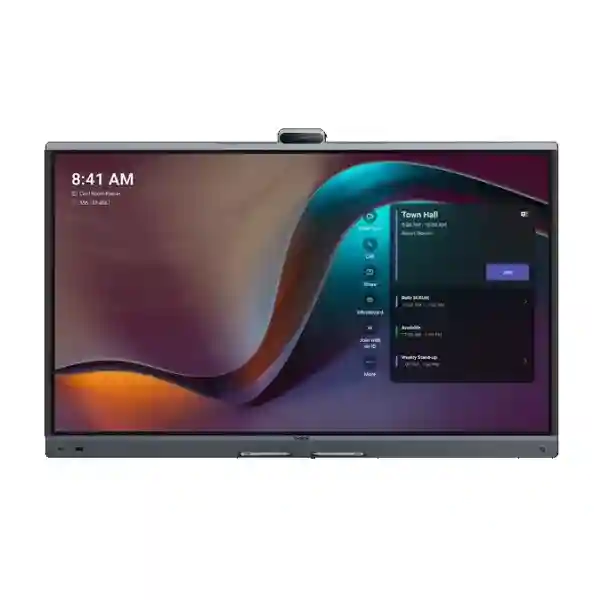
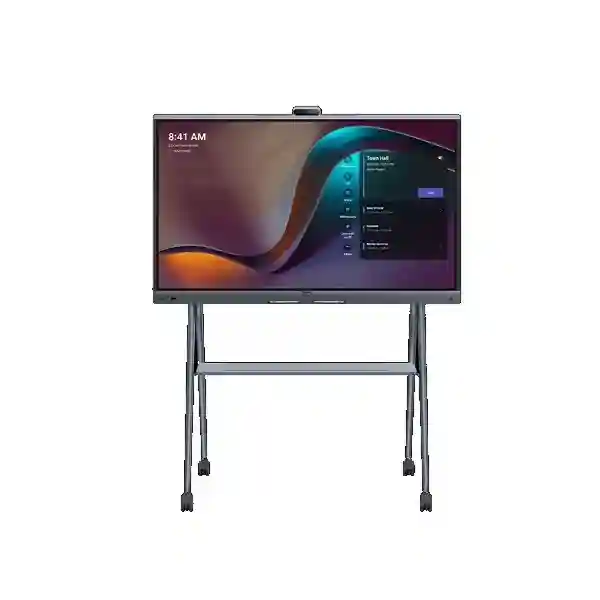
Yealink MeetingBoard Pro Zoom Rooms System
The Yealink MeetingBoard Pro Zoom Rooms System brings display, camera, microphones, speakers, wireless content sharing and interactive whiteboarding into one purpose-built collaboration device. Yealink offers MeetingBoard Pro in 65-inch, 75-inch and 86-inch sizes for small, medium and large meeting spaces. The platform supports native Zoom Rooms, Microsoft Teams Rooms and General Mode for BYOM-style use, giving organizations a flexible path for standardizing meeting spaces without filling rooms with separate cameras, USB peripherals and display hardware.
What the Yealink MeetingBoard Pro solves
Many meeting rooms grow into complicated combinations of wall displays, USB cameras, table microphones, speakers, presentation cables and separate whiteboards. MeetingBoard Pro is designed to simplify that architecture. The 4K multi-touch display becomes the visual centre of the room, while integrated cameras and audio reduce the number of separate devices that users need to understand. For businesses running Zoom Rooms, the result can be a more consistent join, share and collaborate workflow.
The system is particularly useful where hybrid meetings need both high-quality video and active in-room collaboration. Teams can present documents, annotate ideas, use digital whiteboarding, frame speakers with Yealink camera intelligence and hear participants across a larger table without passing around a speakerphone. Choosing the correct model should still be based on room dimensions, viewing distance, seating layout, wall structure, acoustic conditions and the way meetings are actually conducted.
Professional video
Yealink specifies a triple-eye camera system using three 50MP cameras. AI-powered functions include IntelliFocus and Video Fence, helping frame active participants and reduce distracting activity outside the intended meeting area.
Room-scale audio
A built-in 16-MEMS microphone array supports up to 12 metres of full-duplex pickup, with noise cancellation and reverberation suppression intended to improve speech clarity in larger collaboration spaces.
4K interactive display
MeetingBoard Pro uses a 4K anti-glare multi-touch LCD. The integrated whiteboard experience supports pen writing, touch navigation, palm rejection and digital ink workflows for collaborative sessions.
Flexible deployment
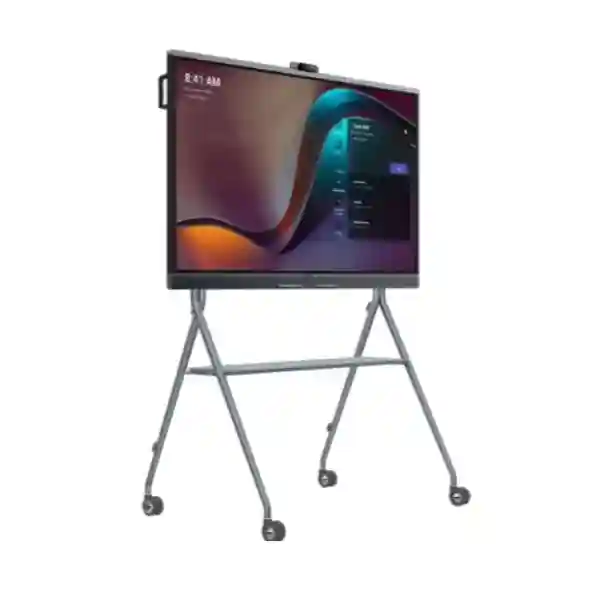
Wall-mounted and mobile floor-stand deployment options allow the same platform to serve permanent conference rooms, flexible collaboration zones, training spaces and executive areas.
Verified MeetingBoard Pro specifications and options
| Display sizes | MeetingBoard 65 Pro, MeetingBoard 75 Pro and MeetingBoard 86 Pro |
| Display resolution | 3840 × 2160 4K multi-touch LCD |
| Camera | Integrated triple 50MP camera system with AI framing functions |
| Audio pickup | 16-MEMS microphone array, up to 12 m full-duplex pickup |
| Platforms | Native Zoom, native Microsoft Teams and General Mode |
| Collaboration | Wireless content sharing and intelligent digital whiteboarding |
| Expansion | Optional accessories include compatible floor stands, wall mounts, CTP25, MB-12X Pro and supported audio expansion products. |
Choosing 65, 75 or 86 inches
Yealink positions MeetingBoard 65 Pro for smaller spaces, MeetingBoard 75 Pro for medium rooms and MeetingBoard 86 Pro for larger rooms. The vendor also provides indicative people ranges of 1–6, 6–12 and 12–20 respectively. These ranges are useful starting points rather than room-design guarantees. A narrow six-person room can have different viewing requirements from a wide six-person room, while a long boardroom may need stronger camera reach, different mounting height or an optional optical zoom module.
Before ordering, confirm wall dimensions, table-to-screen distance, the nearest and furthest seating positions, glare sources, available power, Ethernet location and whether the board will be fixed or moved. Businesses that need a mobile collaboration surface may prefer a compatible floor stand. Fixed rooms often benefit from wall mounting because it preserves floor space and creates a clean front-of-room design. For large meeting spaces, discuss whether MB-12X Pro or external audio expansion is appropriate.
Zoom Rooms deployment planning
A MeetingBoard Pro used as a Zoom Room requires more than mounting the display. The room must have appropriate network access and a valid Zoom Rooms account or activation workflow. Yealink documentation supports Zoom sign-in using web pairing, email or an activation code. During commissioning, the room should be assigned correctly in the Zoom administration environment, the camera view should be checked from every seat, microphone pickup should be tested from the far end of the table and screen sharing should be verified from common user devices.
Network quality matters. Video meetings are sensitive to unstable WAN links, congestion and poor Wi-Fi design. Where practical, the conferencing appliance should have dependable wired connectivity and the network should be evaluated for available bandwidth, firewall policy, DNS, time synchronization and segmentation. If wireless screen sharing is important, test the actual corporate laptop security policies and guest-device workflow before handover.
Related FourTeck Tanzania infrastructure
MeetingBoard Pro performs best as part of a planned room and network environment. FourTeck Tanzania provides broader business technology integration, while the FourTeck Tanzania technology shop can be used when planning related equipment. Customers can also review IT and integration services for deployment coordination, FourTeck Tanzania company information for solution context and the verified contact and quotation page when preparing a meeting-room request. The same site also covers video conferencing, business displays, network switching, Wi-Fi, meeting-room audio, structured cabling and lifecycle support as related solution areas on its main solution portfolio.
For regional projects, FourTeck network resources include FourTeck UAE, FourTeck Uganda, FourTeck Kenya, FourTeck Ghana, FourTeck Nigeria and FourTeck Kuwait. These links are useful when procurement spans multiple countries and the customer wants a consistent room-design standard.
Yealink MeetingBoard Pro Zoom Rooms System Tanzania
Organizations evaluating Yealink MeetingBoard Pro in Tanzania are often trying to solve two problems at once: improve hybrid meeting quality and reduce the complexity of the room itself. That makes an all-in-one collaboration board particularly relevant for head offices, project rooms, training facilities, higher-education spaces, professional-service firms and organizations coordinating teams across multiple regions. A Tanzania deployment should start with the physical room. Measure the wall, seating distance and table length, then decide whether 65, 75 or 86 inches offers comfortable viewing without overwhelming the space. For boardrooms with longer seating layouts, camera reach and microphone pickup should be tested rather than assumed from nominal room capacity.
The network is the second design layer. Zoom Rooms depends on stable internet access and consistent LAN performance. If the office already experiences congested Wi-Fi, packet loss or inconsistent video calls from laptops, installing premium room hardware alone will not correct the underlying connectivity issue. A deployment can therefore include switch-port planning, wired Ethernet, business Wi-Fi review, firewall policy checks and sensible traffic segmentation. Tanzania sites should also consider power quality and UPS protection so the collaboration room is not repeatedly affected by brief power disturbances or hard shutdowns.
Procurement should identify the intended Zoom Rooms license, wall-mount or floor-stand requirement, number of rooms, preferred screen size, installation constraints and whether optional accessories are needed. Businesses rolling out several branches can standardize naming, account setup, firmware management and user handover. This makes support easier than treating every room as a separate installation. FourTeck Tanzania can help structure the bill of materials around the meeting objective instead of simply quoting the largest available display.
Yealink MeetingBoard Pro Zoom Rooms System Dar es Salaam
Dar es Salaam buyers often need collaboration rooms that connect local teams with regional offices, customers, suppliers and international partners. MeetingBoard Pro fits this use case by combining the main front-of-room components into one platform. For a corporate office, the decision should begin with meeting patterns: executive calls, daily operational reviews, customer presentations, training and workshops all place different demands on camera framing, screen size and whiteboarding. A 65-inch model can suit compact rooms, while 75 and 86-inch variants become more attractive as table length, viewing distance and participant count grow.
In busy office environments, acoustics deserve specific attention. Hard walls, glass partitions and air-conditioning noise can make remote participants struggle even when microphone specifications appear strong. MeetingBoard Pro provides a 16-MEMS array and Yealink audio processing, but practical commissioning should still include a far-end test from multiple seats. If the room is exceptionally large or acoustically challenging, investigate supported external audio options rather than expecting software processing to overcome every physical limitation.
Dar es Salaam projects should also plan cable routes and mounting early. A wall-mounted board requires a suitable structure, correct height, nearby power and network access, and enough service clearance. Mobile-floor-stand installations need stable floor space and safe cable management. Zoom Rooms activation and administrator access should be ready before the installer arrives. For multi-room offices, keep a repeatable naming and configuration standard so users see the same operating pattern in every space. The objective is a room that staff can join confidently without calling IT for basic camera, audio or display selection before each meeting.
Yealink MeetingBoard Pro Zoom Rooms System Mwanza
For businesses and institutions in Mwanza, a dedicated Zoom Room can reduce the friction of conducting important meetings from individual laptops. MeetingBoard Pro is suited to spaces where teams want a permanent collaboration endpoint with a large shared display and integrated whiteboard. This can be valuable for management meetings, project coordination, training, healthcare administration, education and organizations communicating regularly with Dar es Salaam or other regional offices.
Connectivity planning should reflect the actual site rather than a generic office assumption. The conference room may have adequate internet service but still suffer from weak wireless coverage, overloaded access points or competing traffic from backups and cloud synchronization. A wired network connection to the room system is generally easier to control and troubleshoot. IT teams should document the switch port, VLAN, gateway, DNS and firewall rules used by the room so future support does not depend on memory. If the organization uses dual internet links, it is also worth confirming how Zoom traffic behaves during failover.
The physical deployment should consider heat, dust management, electrical reliability and the security of the room itself. UPS protection for collaboration hardware and associated network equipment may help avoid abrupt interruptions. Where the MeetingBoard is mobile, the floor stand should be positioned so movement does not strain power or Ethernet connections. A procurement request should specify expected participant count, room measurements, screen-size preference, mounting style, Zoom Rooms licensing status and whether whiteboarding is central to the workflow. That information gives a supplier a better basis for recommending the correct configuration than asking only for “a video conferencing screen.”
Yealink MeetingBoard Pro Zoom Rooms System Arusha
Arusha has a wide variety of meeting environments, including hospitality, tourism, NGOs, international organizations, professional offices, training spaces and project operations. These environments frequently host participants who are not all in the same building or even the same country. MeetingBoard Pro can provide a standardized front-of-room Zoom experience while also serving as an interactive surface for presentations and workshops. The most useful model size depends on whether the room functions primarily as a six-seat meeting area, a medium boardroom or a larger training and collaboration space.
For hospitality and training use, room flexibility can matter more than a permanent executive-boardroom appearance. A supported mobile floor stand can make the system useful across different spaces, provided power, network access and safe movement have been planned. For fixed boardrooms, wall mounting can provide a cleaner result and protect cables from daily movement. Lighting is also important: windows behind participants or direct glare on the display can reduce meeting quality, so camera position, blinds and screen orientation should be part of the room review.
Organizations with international calls should test the end-to-end experience at the times of day when the room will actually be used. Internet performance that looks adequate during quiet hours may behave differently during peak office traffic. Zoom Rooms administrator access, room calendar integration and user policies should also be prepared in advance. A structured handover should show staff how to start and join meetings, share content, use whiteboarding and recover from common issues. This operational preparation turns the device from an impressive screen into a dependable business meeting tool.
Yealink MeetingBoard Pro Zoom Rooms System Dodoma
Dodoma organizations considering a Yealink MeetingBoard Pro often need dependable communication between administrative teams, branch offices, consultants, project partners and remote stakeholders. A dedicated Zoom Rooms appliance can create a more consistent meeting experience than connecting a new combination of laptop, webcam and speakerphone for every session. MeetingBoard Pro also adds interactive whiteboarding, making it relevant for planning workshops, presentations and decision sessions where participants need to work with visual content.
Room sizing should be deliberate. A screen that is too small creates eye strain for people at the far end of the table, while an oversized board can dominate a compact room and make close viewing uncomfortable. Yealink’s 65, 75 and 86-inch options make it possible to match display size to the space. Camera framing should then be tested with the actual seating arrangement. Features such as IntelliFocus and Video Fence can improve participant presentation, but good camera height, lighting and furniture placement remain important.
For public-sector, education or corporate deployments with formal procurement processes, the quotation request should clearly separate the core MeetingBoard Pro unit from mounting, accessories, installation, network work and any software subscriptions. Zoom Rooms licensing is a platform requirement that should be budgeted independently from the physical board. Where several rooms are planned, consider a pilot installation first, document the working configuration and then repeat it. That approach helps standardize network rules, mounting heights, room naming, administrator ownership, user instructions and support procedures across the estate.
Yealink MeetingBoard Pro Zoom Rooms System UAE
UAE projects frequently involve multi-site offices, regional headquarters, customer briefing rooms and executive spaces where collaboration standards need to be consistent across locations. MeetingBoard Pro can support that standardization because the same product family spans three display sizes while retaining a common operating concept. Organizations can deploy 65-inch units in smaller rooms, 75-inch units in mainstream conference rooms and 86-inch units where larger viewing areas are required, reducing training variation for staff.
A UAE deployment should also consider the broader AV environment. High-specification offices may use glass walls, architectural lighting and longer boardroom tables that affect acoustics and camera performance. The integrated triple-camera design and 12-metre full-duplex audio provide a strong baseline, while optional expansion can be considered for rooms with demanding layouts. Designers should coordinate the board with furniture, cable containment, wall backing and network points before interior fit-out is completed.
For companies operating between the UAE and Tanzania, a standardized Zoom Rooms platform can simplify cross-border support. IT teams can use consistent room names, account ownership, change-control procedures and user documentation. Procurement should still verify the exact regional model, accessory compatibility and subscription requirements for each site. FourTeck’s regional network can assist customers who want the same collaboration architecture considered across multiple markets rather than buying isolated hardware in each country.
Yealink MeetingBoard Pro Zoom Rooms System Uganda
Ugandan businesses with distributed teams can use MeetingBoard Pro to establish a dedicated meeting-room endpoint rather than relying on staff laptops and ad hoc USB devices. The integrated approach is useful for headquarters, branch networks, education, NGOs, financial services and project organizations that host recurring Zoom meetings. Screen size selection should be tied to the room rather than job title: measure the space, count regular participants and consider the furthest viewing position before choosing 65, 75 or 86 inches.
Connectivity resilience is a key design question. If cloud meetings are business critical, organizations should understand how internet outages or failover events affect the room. Network teams may need to review primary and secondary internet links, firewall policy, VLAN design and switch capacity. UPS support for the room endpoint and relevant network equipment can also reduce disruption from short power events. For mobile installations, ensure that moving the display does not create unmanaged cable runs or unreliable Wi-Fi dependence.
Operational ownership matters after installation. Assign a Zoom Rooms administrator, document the room’s account and network details, and establish a firmware and support process. Users should receive a short orientation covering one-touch join, content sharing, whiteboarding and basic troubleshooting. Organizations that deploy several units can make this training repeatable and reduce the number of support calls generated by unfamiliar meeting-room interfaces.
Yealink MeetingBoard Pro Zoom Rooms System Kampala
Kampala offices often have a high density of customer, partner and regional meetings, making meeting-room availability and reliability important. MeetingBoard Pro is well suited to rooms that need to turn over quickly between users because the display, video, audio and whiteboard are integrated. Instead of asking each presenter to connect multiple peripherals, the room can remain configured as a Zoom Room with standardized controls.
Room acoustics and network congestion are common causes of poor user experience and should be checked during deployment. The device’s integrated microphones are designed for long pickup distances, but reflective surfaces and background noise still influence intelligibility. A live test call should be conducted from the nearest and furthest seats. On the network side, verify that the conferencing traffic is not sharing an overloaded wireless link when a reliable wired connection is available. Documenting switch ports and firewall rules makes future troubleshooting faster.
For procurement teams in Kampala, quotations are more useful when they state the room count, estimated users, required display size, mounting choice, Zoom Rooms licensing status and any accessory needs. It is also helpful to include expected installation dates and whether existing displays or room-control systems are being replaced. A clear scope reduces the risk of discovering after delivery that the wall requires reinforcement, the Ethernet point is in the wrong position or the organization has not yet prepared the necessary Zoom administrator access.
Yealink MeetingBoard Pro Zoom Rooms System Arua
For an Arua deployment, the value of an all-in-one Zoom Rooms system is often operational simplicity. Branch offices, NGOs, education and project organizations can use a single collaboration board for meetings, presentations and interactive planning without building a complex rack of AV components. The correct unit should be selected from actual room geometry and participant needs, not from a generic capacity label alone.
Sites outside major headquarters should pay particular attention to supportability. The installation should be documented clearly, including network settings, mounting details, cable paths, administrator contacts and any optional accessories. If remote IT teams need to assist the room, predictable network addressing and access policies are especially useful. Stable internet connectivity remains essential for Zoom Rooms, and businesses should confirm how their service performs during normal operating hours rather than relying only on headline bandwidth.
Power protection and physical installation are equally important. A brief power interruption can terminate an active meeting and force equipment to restart, so organizations may consider UPS protection for the collaboration device and network path. Mounting should account for wall strength, ventilation, viewing height and safe cabling. Training a few local users to handle basic room operation and first-line checks can also improve uptime, especially when central support is located elsewhere.
Yealink MeetingBoard Pro Zoom Rooms System Mbarara
Mbarara businesses and institutions can use MeetingBoard Pro for recurring collaboration with headquarters, remote specialists, suppliers and distributed teams. The combination of 4K display, camera system, integrated microphones and whiteboard makes the platform particularly useful where meetings include both discussion and visual work. Planning sessions, training, design reviews and remote presentations all benefit from having a shared large-format canvas rather than asking participants to follow content on small laptop screens.
A practical site assessment should examine table length, seating direction, available wall area, glare, room noise, power and network access. The largest display is not automatically the right choice. A smaller room may work better with the 65-inch unit, while larger rooms can justify 75 or 86 inches. Camera features should be tested with the intended seating layout, and whiteboard use should be checked at a comfortable writing height.
For dependable daily use, the room should have clear ownership. IT administrators need control of the Zoom Rooms account and should document how the room is activated, updated and supported. Users need a short set of instructions for joining meetings and sharing content. If the system is part of a broader branch rollout, using the same configuration template across sites can reduce troubleshooting time and make future replacements or expansions much easier.
Yealink MeetingBoard Pro Zoom Rooms System Gulu
A Gulu organization considering MeetingBoard Pro may be trying to create a professional communication link to remote management, donors, partners, technical teams or customers. A dedicated Zoom Room is useful when meetings are frequent enough that setting up temporary equipment wastes time. The integrated board keeps core meeting components together and provides an interactive surface for training, reporting and workshops.
Because cloud collaboration depends on the network path, the deployment should include a realistic internet and LAN review. High nominal speed does not guarantee consistent video quality if there is packet loss, Wi-Fi congestion or an overloaded firewall. Wired connectivity to the room endpoint is often preferable where available. If the organization has backup internet, test a real meeting during failover so the team understands what users will experience.
Procurement should also account for installation details that are easy to overlook: wall mounting hardware, floor stand where required, cable lengths, power outlets, network points and Zoom Rooms licensing. For larger rooms, ask whether optical camera or microphone expansion is appropriate. A full test call before handover should verify audio from distant seats, camera framing, content sharing, whiteboarding and basic user control. Documenting the successful setup gives future support teams a clear reference point.
Yealink MeetingBoard Pro Zoom Rooms System Kenya
Kenyan organizations often operate across several offices and need collaboration rooms that feel consistent from site to site. MeetingBoard Pro supports this strategy because its 65, 75 and 86-inch sizes allow the same product family to be applied to different room sizes. A smaller branch room can use the compact option while Nairobi or regional boardrooms use larger displays, yet staff continue to see a familiar collaboration workflow.
The design process should include network, acoustics and mounting rather than treating the unit as a consumer display. Enterprise Zoom Rooms benefit from stable wired connectivity, documented firewall access and predictable account management. MeetingBoard Pro’s 16-microphone array provides strong built-in pickup, but large rooms with unusual layouts may still need optional expansion. Likewise, AI framing works best when the display and camera are positioned sensibly relative to participants.
For multi-country companies using Kenya and Tanzania offices, standardizing the Zoom Rooms platform can reduce training overhead. IT teams can create one deployment checklist covering room naming, licensing, activation, network settings, display placement, test calls and user handover. Procurement should verify exact model identifiers and accessory compatibility for each order and avoid assuming that every bundle contains the same mounting hardware or optional components.
Yealink MeetingBoard Pro Zoom Rooms System Kuwait
Kuwait deployments frequently involve executive boardrooms, customer meeting spaces, education, project offices and multi-site corporate environments. MeetingBoard Pro offers an integrated alternative to building each room from separate displays, webcams and tabletop audio hardware. The all-in-one design can also simplify interior coordination because fewer visible devices and cables are required at the front of the room.
High-quality room finishes should be evaluated for acoustic impact. Glass, stone and other reflective materials can increase reverberation, so a test call remains important even with advanced noise and reverberation processing. Screen placement should consider viewing distance and lighting, particularly where large windows create glare. For very long rooms, investigate whether optional optical camera expansion gives a better result than relying only on digital zoom.
Organizations operating between Kuwait and East Africa can benefit from using a repeatable Zoom Rooms standard. A common hardware family, room naming convention and support checklist make it easier for centralized IT teams to manage collaboration spaces. Quotations should identify exact screen size, mounting, accessory and software requirements so the customer can compare complete room costs rather than only the core board price.
Yealink MeetingBoard Pro Zoom Rooms System Ghana
Ghanaian enterprises, education providers and regional organizations can use MeetingBoard Pro to create permanent Zoom-enabled collaboration rooms with integrated interactive presentation. The platform is especially relevant for teams that regularly review documents, run training, host external stakeholders or coordinate between multiple locations. The whiteboard capability allows the room to support workshops rather than serving only as a video-call display.
Room assessment should determine model size and accessory needs. The 65-inch version can suit smaller rooms, while 75 and 86-inch options improve visibility in larger spaces. Camera and microphone performance should be validated with a live call because furniture layout, ceiling height and surface materials influence the result. For larger collaboration spaces, the supported accessory ecosystem can extend camera or audio coverage when required.
Network and power resilience should be included in procurement planning. Zoom Rooms depends on stable cloud connectivity, so a reliable LAN connection, appropriate firewall access and usable backup internet strategy can be as important as the conferencing hardware. UPS support may also be appropriate for critical rooms. Organizations with several branches should document the final working setup and reproduce it so support teams do not have to rediscover configuration choices at every site.
Yealink MeetingBoard Pro Zoom Rooms System Nigeria
Nigeria’s large corporate and multi-branch environments can benefit from standardized Zoom Rooms where collaboration reliability has a direct effect on daily operations. MeetingBoard Pro provides a common platform for executive meetings, sales presentations, project reviews, training and hybrid workshops. The three display sizes make it possible to match the same product family to different room scales rather than mixing unrelated conferencing systems across an estate.
Power and connectivity planning should be treated as part of the solution. A high-end collaboration endpoint cannot deliver consistent cloud meetings if the internet path is unstable or the room loses power frequently. Businesses should assess primary and secondary links, firewall policies, wired LAN availability and UPS strategy. If rooms are deployed across multiple cities, creating a standard network and room checklist can substantially simplify remote support.
Large boardrooms should be assessed for camera reach and audio coverage rather than simply selecting the 86-inch display and assuming every other requirement is solved. Yealink’s triple-camera and 12-metre audio design provides a strong built-in foundation, with optional expansion available for demanding spaces. Procurement teams should request a complete bill of materials that identifies mounting, accessories, licensing and implementation services so the project cost represents a working room rather than only a display appliance.
Yealink MeetingBoard Pro Zoom Rooms System Seychelles
Seychelles organizations in hospitality, government, professional services and multi-island operations may require dependable hybrid meetings with colleagues and partners who are not physically nearby. MeetingBoard Pro can turn a meeting room into a permanent Zoom collaboration space while supporting presentations and interactive whiteboarding. This can be particularly useful where senior staff, overseas partners or remote specialists need a consistent meeting environment.
Site logistics should be planned carefully because replacement visits and last-minute accessory changes can be more disruptive in island environments. Confirm the exact model, mounting method, power and network requirements before shipment. If a floor stand is required, verify it is included in the bill of materials. If the system will be wall mounted, check the wall construction and installation position in advance. Keeping spare cables and documenting settings can also make local support more efficient.
Internet performance should be tested from the actual conference room, and where meetings are mission critical the organization should understand its backup-connectivity strategy. A final acceptance test should include camera framing, far-end audio, content sharing, whiteboarding, Zoom Rooms sign-in and administrator control. Training should be concise and task-oriented so users can begin meetings, invite participants, share content and close sessions without depending on specialist AV staff.
Buying and quotation checklist
Room length and width, seating layout, expected participant count, wall dimensions, table-to-screen distance and photographs where available.
Zoom Rooms licensing status, calendar integration, administrator ownership and whether Teams or General Mode will also be used.
65/75/86-inch preference, wall or floor mounting, cable routes, power outlets, Ethernet point and any furniture constraints.
Need for optional camera reach, additional microphones, room controller, scheduling panel or other compatible accessories.
Frequently asked questions
Is Yealink MeetingBoard Pro compatible with Zoom Rooms?
Yes. Yealink markets MeetingBoard Pro as a native Zoom Rooms appliance and also supports Microsoft Teams and General Mode. A valid room account and appropriate administrator setup are still required.
Which MeetingBoard Pro size should I choose?
Yealink offers 65, 75 and 86-inch versions. Selection should consider room dimensions, seating count and viewing distance. Yealink provides indicative ranges of 1–6, 6–12 and 12–20 people respectively, but final sizing should be based on the actual room.
Does MeetingBoard Pro include a camera and microphones?
Yes. It integrates a triple 50MP camera system and a built-in 16-MEMS microphone array with up to 12 metres of full-duplex pickup, together with integrated speakers.
Can MeetingBoard Pro be used for whiteboarding?
Yes. Interactive whiteboarding is a core function of MeetingBoard Pro. The 4K multi-touch surface supports writing and touch interaction for collaborative sessions.
Can it be mounted on a mobile stand?
Yealink supports both wall-mounted and compatible floor-stand deployments. The exact stand must match the selected MeetingBoard Pro size.
Do I still need a Zoom Rooms license?
Yes. The MeetingBoard Pro provides the room hardware and native application experience, but the relevant Zoom Rooms account or licensing arrangement is a separate platform requirement.
Decision recap
Choose Yealink MeetingBoard Pro when you want a single collaboration platform that integrates a large 4K touch display, professional room camera system, microphone array, speakers, Zoom Rooms and digital whiteboarding. Choose the size by room geometry and participant requirements, not simply by budget. Plan mounting, Zoom licensing, network quality, power protection and user handover as part of the same project. For longer or acoustically difficult rooms, assess compatible expansion accessories before purchase.
Consult FourTeck Tanzania
For a useful quotation, send the room dimensions, expected number of participants, preferred MeetingBoard Pro size, Zoom Rooms status, mounting preference and any requirements for mobile deployment or expanded audio/video coverage. FourTeck can then structure the discussion around a complete working room rather than a standalone display.




Reviews
There are no reviews yet.