
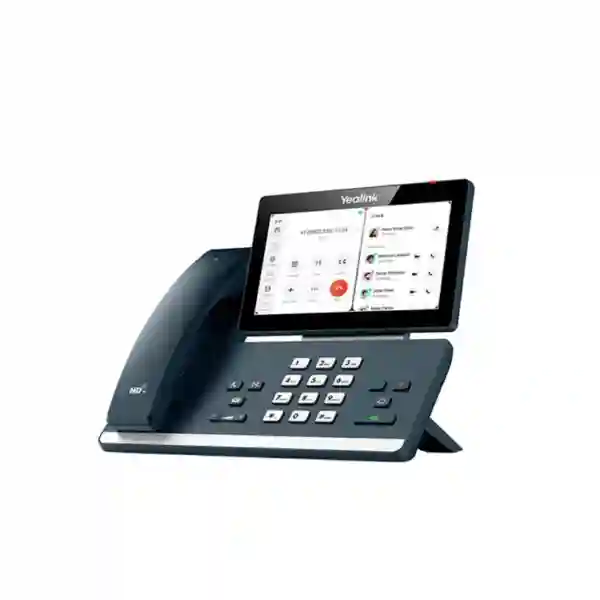
Yealink MP58-WH E2 Zoom Phone Tanzania
The Yealink MP58-WH E2 Zoom Phone is designed for executives, managers, customer-facing professionals and hybrid teams that want a dedicated desktop endpoint for Zoom Phone and Zoom Meetings. Based on Android 13, it combines a 7-inch 1024 × 600 capacitive touchscreen with an adjustable display, a BTH58 Bluetooth wireless handset, Yealink HD audio technologies, full-duplex speakerphone performance, built-in Bluetooth 5.2, dual-band Wi-Fi, dual-port Gigabit Ethernet and Power over Ethernet. For organizations standardizing communications around Zoom, the MP58-WH E2 creates a familiar desk-phone experience while supporting modern collaboration, centralized administration and flexible movement around the workspace.
For Tanzania buyers, the practical value is not just the screen or handset. Procurement teams should evaluate how the phone will connect to the existing wired or wireless network, whether PoE is available at the desk, how Zoom Phone licensing is structured, whether headsets or expansion modules are needed, and how administrators intend to monitor and update devices. FourTeck can help customers frame these requirements before quotation so the device is matched to the intended users, network design and collaboration environment rather than purchased as an isolated endpoint.
Native Zoom Experience
The Zoom edition is tailored for native Zoom Phone and Zoom Meetings operation, giving users direct access to calling, contacts, presence, meeting controls and synchronized collaboration workflows from the desk phone.
Wireless Handset Mobility
The BTH58 Bluetooth handset allows users to move away from the desk during calls while keeping the physical familiarity of a handset. This is useful for managers who regularly move between a workstation, filing area, nearby meeting table or private office space.
Flexible Network Access
Dual-port Gigabit Ethernet, IEEE 802.3af PoE and built-in 2.4/5 GHz Wi-Fi give deployment teams options for connecting desks according to network policy and available infrastructure.
Verified Yealink MP58-WH E2 Zoom Features
| Area | Verified capability | Business relevance |
|---|---|---|
| Operating platform | Android 13 with Zoom user interface | Purpose-built experience for Zoom calling and meetings. |
| Display | 7-inch 1024×600 capacitive touchscreen | Clear access to contacts, status, meeting and call controls. |
| Handset | BTH58 Bluetooth wireless handset | Supports movement around the local office area during calls. |
| Audio | HD voice, Noise Proof technology, full-duplex speakerphone with AEC, HAC handset | Supports clearer business conversations and speakerphone use. |
| Wireless | Bluetooth 5.2 and dual-band 2.4/5 GHz Wi-Fi | Helps integrate wireless headsets and flexible network access. |
| Ethernet | Dual-port Gigabit Ethernet with IEEE 802.3af PoE | Suitable for structured office LAN deployment and simplified power cabling. |
| Management | Zoom Device Management and Yealink management platforms | Supports centralized provisioning, updating and operational oversight. |
Who Should Choose the MP58-WH E2 Zoom Phone?
The MP58-WH E2 is most relevant where a business wants a dedicated Zoom desk endpoint rather than relying exclusively on laptops and mobile applications. Executive offices can benefit from the large touch interface, physical dialing controls and wireless handset. Customer-service or account-management teams can use the dedicated phone to separate voice workflows from computer tasks. Hybrid workplaces may deploy the device to managers who alternate between desk calling and nearby movement during discussions. IT teams can also standardize a defined hardware model across selected roles while managing devices through supported management platforms.
Before procurement, organizations should confirm Zoom Phone service availability and licensing for the intended users, network readiness, PoE capacity, VLAN and security policies, Wi-Fi design where wireless connectivity will be used, and headset requirements. The phone supports extensive features, but the quality of the final deployment still depends on correct identity, network, policy and administration design.
Yealink MP58-WH E2 Zoom Phone Tanzania
In Tanzania, organizations evaluating the Yealink MP58-WH E2 Zoom Phone are typically trying to create a more dependable and professional calling experience for executives, department heads, finance teams, sales managers, reception-adjacent roles and hybrid workers. The strongest use case is a company already using, or planning to adopt, Zoom Phone as a core cloud calling platform. Instead of depending on a laptop softphone for every call, the MP58-WH E2 gives selected users a dedicated endpoint with a large touchscreen, physical controls, wireless handset mobility and enterprise network interfaces. This can make everyday calling easier for users who spend significant time on voice communication while keeping their computer screen available for CRM, ERP, documents, dashboards or collaboration content.
Tanzania procurement teams should begin with network and licensing readiness. The phone supports Gigabit Ethernet and PoE, but the access switch must provide compatible IEEE 802.3af power if the organization wants to avoid separate power adapters. Where cabling is difficult, built-in dual-band Wi-Fi provides an alternative, although wireless deployments should still be planned around coverage, congestion, authentication and security requirements. Bluetooth 5.2 supports the included BTH58 handset and compatible Bluetooth headsets, while USB ports provide additional accessory options. Businesses with many devices should also consider how Zoom Device Management or Yealink management services will be used for deployment, updates and monitoring.
For a Tanzania quotation, it is useful to define quantity, user roles, branch locations, preferred network method, PoE availability, headset requirements and whether expansion modules are required. Buyers should also specify whether the environment is a new Zoom Phone rollout or an extension of an existing tenant. FourTeck can help structure these questions so that the bill of materials reflects the real deployment rather than just the phone quantity. Customers can also review the broader FourTeck Africa technology portfolio when planning multi-country requirements that extend beyond Tanzania.
Yealink MP58-WH E2 Zoom Phone Dar es Salaam
Dar es Salaam businesses often operate fast-moving commercial, logistics, financial, professional-services and regional management environments where voice calls remain important alongside online collaboration. The Yealink MP58-WH E2 Zoom Phone fits offices that want a premium desk endpoint for senior users and high-call-volume professionals. Its 7-inch touch interface makes it easier to work with Zoom contacts, status and meeting controls, while the BTH58 wireless handset lets users continue conversations away from the immediate desk. For an executive office, account team, procurement unit or operations manager, this balance of dedicated hardware and cloud calling can reduce dependence on a laptop for routine voice communication.
A Dar es Salaam deployment should be planned around the office LAN first. Where managed Ethernet is available, PoE can simplify installation because a single network cable can provide both connectivity and power. IT teams should confirm switch power budgets, network segmentation, DHCP or static-address policy, firewall rules, quality-of-service design and any 802.1X requirements before deployment. Built-in Wi-Fi can support alternative placement, but corporate wireless networks should be validated for signal strength and authentication compatibility. The phone also supports IPv4 and IPv6 environments, TLS/SRTP functions and HTTPS-based administration features, making policy alignment an important part of deployment preparation.
When requesting a quote in Dar es Salaam, provide the number of users, whether desks already have PoE, the expected Zoom Phone account configuration, accessory needs and whether central administration is required. If the project spans branch offices or neighboring markets, it can be useful to coordinate standards across locations. Organizations with East African procurement responsibilities may also review FourTeck Kenya for Kenya-related technology requirements while keeping the Tanzania deployment focused on local user roles and network conditions.
Yealink MP58-WH E2 Zoom Phone Mwanza
For organizations in Mwanza, the Yealink MP58-WH E2 Zoom Phone can serve as a dedicated communication endpoint for managers, branch leaders, customer-facing professionals and administrative teams that collaborate with colleagues in other Tanzanian cities or overseas. A dedicated Zoom Phone appliance is particularly useful where calls must remain easy to answer even when a user is working in multiple desktop applications. The large display and direct call controls provide a more traditional phone workflow, while the Zoom-tailored Android interface connects that workflow to cloud calling and meetings.
The BTH58 wireless handset can be valuable in branch offices where a manager needs to move between the main desk, filing storage, a nearby discussion table or shared work area without immediately ending a call. Yealink specifies a working range of up to 10 metres under appropriate conditions, with the exact experience affected by the local environment. For teams that prefer headsets, Bluetooth and USB connectivity broaden accessory choices. Full-duplex speakerphone operation with acoustic echo cancellation can support hands-free calls at the desk, while HD voice and Yealink noise-processing functions are designed to improve intelligibility in normal office conditions.
Mwanza buyers should avoid treating the phone as a stand-alone purchase. A complete requirement should cover Zoom Phone subscription planning, user identity assignment, internet reliability, LAN quality, PoE availability, backup power strategy and remote device administration. If the branch has limited local IT support, centralized provisioning and monitoring can become especially valuable because administrators can standardize configuration and firmware processes rather than managing every phone manually. A clear quotation should identify quantities, user types, branch connectivity and required accessories so the project can be scoped accurately.
Yealink MP58-WH E2 Zoom Phone Arusha
Arusha has organizations in tourism, hospitality, professional services, NGOs, education, regional administration and international business that may communicate frequently with distributed teams. The Yealink MP58-WH E2 Zoom Phone can support senior staff who need a dedicated Zoom calling endpoint while also joining meetings from the same desk device. The 7-inch capacitive touchscreen provides a clear visual surface for collaboration controls, and the adjustable display can help users position the screen for comfortable viewing across different desk layouts.
For hotels, travel businesses or organizations working with international partners, the most important planning issue is not merely the model number but the complete communication workflow. Buyers should confirm whether users are assigned Zoom Phone licenses, how public telephone connectivity is delivered, what emergency calling rules apply, and whether the corporate network prioritizes real-time voice traffic. Where Ethernet cabling and PoE switches are already available, installation can be straightforward. In offices with flexible seating or challenging cable routes, dual-band Wi-Fi offers another deployment option, subject to wireless policy and coverage validation.
Arusha IT teams can also consider centralized management for firmware, status monitoring and provisioning. This is useful if the organization has multiple branches or remote administrators. The phone supports Zoom Device Management and Yealink management platforms, giving administrators options for coordinated operations. When seeking a quote, specify the number of executive or professional users, whether BTH58 wireless handset mobility is important, whether USB or Bluetooth headsets will be used, and whether EXP50 expansion modules are needed for users managing larger contact volumes. These details help ensure the configuration fits the real operational need rather than simply supplying identical devices to every desk.
Yealink MP58-WH E2 Zoom Phone Dodoma
In Dodoma, government-adjacent organizations, professional offices, institutions, project teams and corporate branches may use cloud collaboration to coordinate with colleagues across Tanzania. The Yealink MP58-WH E2 Zoom Phone is suited to decision-makers and professional users who benefit from a physical handset and dedicated calling interface while remaining connected to Zoom workflows. The device combines the familiarity of a desk phone with cloud-centric features such as contacts, status, meeting controls and centralized administration.
Deployment planning should consider security and network governance carefully. The MP58-WH E2 supports HTTPS administration, TLS/SRTP functions and IEEE 802.1X, but organizations must still configure these features in alignment with their own security policies. Network teams should decide whether phones use a dedicated voice VLAN, how DHCP options are applied, whether 802.1X authentication is enforced, and how internet access to Zoom services is controlled. PoE simplifies desk installation when supported by the access switch, while the optional AC adapter is relevant in environments without PoE. Built-in Wi-Fi can offer placement flexibility but should be validated against enterprise wireless requirements.
For Dodoma procurement, define whether the device will be deployed to executives only, to departmental managers, or more broadly. A premium model often provides the best value when matched to users who will actually benefit from the touchscreen, wireless handset, expansion capability and advanced connectivity. Specify quantity, sites, accessory needs, network method and intended management platform in the quotation request. This creates a clearer basis for comparing the total deployment requirement rather than focusing only on the unit price.
Yealink MP58-WH E2 Zoom Phone UAE
Organizations in the UAE often manage regional teams across the GCC, Africa and Asia, making standardized cloud communications important for executives and cross-border managers. The Yealink MP58-WH E2 Zoom Phone can support this environment where Zoom Phone is already part of the corporate collaboration stack. A dedicated appliance gives senior users an always-available endpoint for calls and meetings while their laptop remains focused on business applications. The BTH58 wireless handset is useful for private offices and leadership roles that require movement during conversations.
UAE deployments commonly involve mature enterprise networks, so procurement teams should coordinate with IT security and unified-communications administrators. Gigabit Ethernet, PoE, Wi-Fi, Bluetooth, USB connectivity and centralized management all offer flexibility, but each should be aligned to policy. For example, organizations may prefer wired PoE for fixed executive desks, reserve Wi-Fi for flexible workspaces, standardize specific headset models and manage devices centrally through Zoom Device Management. Expansion modules may also be relevant for assistants or users handling larger contact lists.
For regional purchasing projects, the UAE can act as a coordination point while devices are intended for multiple country offices. Buyers can review FourTeck UAE for UAE technology requirements and then align configurations with Tanzania or other branch deployments. The quotation should separate country quantities, licensing responsibilities, accessories, network assumptions and deployment services so that each site receives an appropriate bill of materials rather than a generic one-size-fits-all package.
Yealink MP58-WH E2 Zoom Phone Uganda
Uganda organizations using Zoom for cloud calling can consider the MP58-WH E2 for executive users, branch managers and professionals who spend substantial time on voice communication. The dedicated 7-inch interface helps keep calling functions separate from the computer, while the BTH58 wireless handset gives users freedom to move within a nearby office area. This combination can be useful for managers who regularly switch between calls, documents and face-to-face discussions throughout the day.
A Uganda rollout should start with an assessment of connectivity and branch support. Voice quality depends on stable network performance, so each site should be checked for internet capacity, LAN health, PoE availability and wireless coverage if Wi-Fi will be used. Central device-management tools can be particularly useful where one IT team supports multiple offices because phones can be provisioned and monitored in a more consistent way. The dual Gigabit ports can fit common desk-network layouts, while Bluetooth and USB options support a range of accessory strategies.
Procurement teams managing Uganda requirements can compare branch quantities and user roles before deciding how many premium MP58-WH E2 units are required. Not every desk needs the same model; executive and high-call-volume users may justify the larger display and wireless handset, while other roles may use different Zoom-certified endpoints. For Uganda-specific technology sourcing and coordination, buyers may consult FourTeck Uganda and align the final requirement with any Tanzania or multi-country standards.
Yealink MP58-WH E2 Zoom Phone Kampala
Kampala businesses often need communication platforms that support both local operations and distributed regional teams. The Yealink MP58-WH E2 Zoom Phone can be a strong fit for executive offices, consultancies, financial teams, sales leaders and administrators using Zoom Phone. The large touchscreen provides a dedicated visual interface for contacts and meetings, while physical keys and the wireless handset preserve the familiarity of a conventional office phone. This is useful for users who want cloud communications without having to keep a softphone window active on a laptop throughout the day.
When deploying in Kampala, IT teams should confirm whether desks are connected to PoE-enabled switches. PoE can reduce cable clutter and simplify installation, but power budgets must be planned across the switch. If Wi-Fi is preferred, administrators should test signal quality and authentication in the actual workspace. Bluetooth can support the BTH58 handset and compatible headsets, while two USB Type-A ports expand accessory options. For managed enterprise environments, security policies around HTTPS, certificates, 802.1X and firmware control should be included in the deployment checklist.
A good Kampala quotation request should identify the user groups receiving the phone, quantities, required accessories, Zoom licensing status and whether deployment spans more than one site. This makes it easier to determine whether centralized device management is needed and whether some users would benefit from EXP50 expansion modules. Procurement should compare total deployment requirements, not just the phone price, because licensing, switching, power, headsets and network readiness can materially affect the final project.
Yealink MP58-WH E2 Zoom Phone Arua
In Arua, branch offices and organizations collaborating with national or international teams may value a dedicated Zoom Phone endpoint that can be centrally managed from another city. The MP58-WH E2 is relevant for branch managers and professional users who require reliable access to cloud calling without depending on a laptop microphone and speakers. Its physical handset, speakerphone, touchscreen and direct call controls provide a familiar user experience while supporting the Zoom ecosystem.
For branch locations, resilience and remote support are especially important. Buyers should assess internet reliability, backup connectivity, power stability and whether PoE switching is available. If a site does not have PoE, the optional power-adapter requirement should be included in planning. Where Wi-Fi will be used, network coverage and security should be validated in advance. Centralized management through Zoom Device Management or Yealink tools can help administrators maintain configuration consistency and reduce the need for local manual intervention.
Arua deployments should be sized according to roles rather than assuming every user needs the premium model. A branch manager, senior administrator or high-call-volume coordinator may gain clear value from the large display and wireless handset, while other users can be served by different models within the broader Zoom phone portfolio. A quotation request should therefore include user profiles, device quantities, accessory preferences, network conditions and the intended management approach. This information supports a more accurate solution and gives IT teams a clearer plan for installation and support.
Yealink MP58-WH E2 Zoom Phone Mbarara
Mbarara organizations using cloud collaboration can deploy the Yealink MP58-WH E2 Zoom Phone for executives and professional users who want a dedicated calling device at the desk. In environments where the computer is heavily used for operational applications, accounting systems, customer records or project work, a separate Zoom Phone appliance keeps call control immediately accessible. The BTH58 wireless handset also supports a more mobile working style within the immediate office area.
Technical planning should focus on network quality and administration. The phone supports wired Gigabit Ethernet with PoE and dual-band Wi-Fi, giving businesses options for fixed and flexible desks. IT teams should check switch capacity, voice traffic prioritization, DHCP, DNS, time synchronization, firewall rules and authentication policies. Bluetooth and USB connectivity provide accessory flexibility, but organizations should standardize approved headsets where possible to simplify support. Central management can also reduce operational effort when phones are deployed across multiple branches.
For Mbarara procurement, buyers should state whether the deployment is a new Zoom Phone rollout or an expansion. Existing Zoom customers can identify the user accounts and policies that will apply, while new deployments may need broader planning around licensing, number assignment and public telephone connectivity. Quantity, site details, PoE availability and accessory requirements should be included with the request for quotation. This helps turn the purchase into a properly scoped communication solution instead of a stand-alone hardware order.
Yealink MP58-WH E2 Zoom Phone Gulu
Gulu-based organizations with distributed operations can use the Yealink MP58-WH E2 Zoom Phone as a dedicated endpoint for branch leadership, project managers and administrative professionals. The device can reduce friction for users who prefer a physical desk-phone workflow but still need direct integration with cloud communications. Its Zoom-tailored interface, large touchscreen and wireless handset create a practical balance between modern collaboration features and familiar telephony ergonomics.
Branch deployment planning should account for both connectivity and support. The phone can connect by Gigabit Ethernet or Wi-Fi, but the best choice depends on the quality and policy of the local network. Wired PoE is often attractive for permanent desks because it combines power and data through one cable. Wi-Fi can improve placement flexibility, provided coverage and authentication are suitable. Administrators should also review network security requirements, firmware policy and how the device will be monitored over time.
Organizations in Gulu should define who truly needs the MP58-WH E2’s premium capabilities. For example, a branch director or coordinator handling frequent calls may benefit from the large screen, wireless handset and expansion support, whereas occasional users might be better served by another certified endpoint. A role-based approach can control project cost while keeping the user experience appropriate. Provide quantities, Zoom licensing status, office network details and accessory needs when requesting a quotation so that the configuration can be evaluated as a complete solution.
Yealink MP58-WH E2 Zoom Phone Kenya
Kenya organizations that use Zoom Phone across Nairobi and other business locations can consider the Yealink MP58-WH E2 for senior personnel and high-call-volume teams. The phone provides a dedicated collaboration endpoint with a 7-inch touchscreen, Bluetooth wireless handset, built-in Wi-Fi, Bluetooth 5.2, USB accessory support and Gigabit Ethernet. This makes it useful where a standardized premium desk phone is needed for executives, account managers, consultants or operational leaders.
In a Kenya deployment, procurement teams should align hardware selection with the existing Zoom environment. Confirm licensing, number assignment, network architecture, PoE availability and management policy before finalizing quantities. Where organizations support several branches, administrators may benefit from centralized provisioning and monitoring rather than manual configuration. The phone’s expansion capability can also matter for assistants or users responsible for many contacts, but buyers should verify the exact accessory requirement per role.
Cross-border organizations operating between Kenya and Tanzania can standardize on the same endpoint where that simplifies training and support, while still adapting network and telecom details to each country. A quotation should therefore separate device quantities by location and identify accessory, licensing and installation assumptions. This provides better visibility into the total project and reduces the risk of ordering hardware without the required infrastructure.
Yealink MP58-WH E2 Zoom Phone Kuwait
Kuwait businesses with regional operations may deploy the Yealink MP58-WH E2 Zoom Phone for executives and professional users who need a fixed corporate endpoint for Zoom calling. The device provides a high-visibility touchscreen, wireless handset, wired and wireless network choices and centrally manageable software. This can be useful for leadership teams that communicate frequently with offices in the GCC, Africa, Europe or Asia and want an appliance that remains available independently of the user’s PC.
Enterprise buyers should plan for network segmentation, PoE, quality of service, authentication and secure administration. The MP58-WH E2 supports 802.1X, HTTPS, TLS/SRTP functions and centralized management, but these capabilities still need to be incorporated into the organization’s security architecture. Where large corporate offices already use managed switching, wired PoE may be the preferred method. Smaller or flexible office layouts can evaluate Wi-Fi, subject to policy and radio coverage.
A Kuwait quotation should specify the number of premium users, headset preferences, BTH58 handset requirements, expansion-module needs and whether devices are being added to an existing Zoom Phone deployment. This role-based approach helps procurement avoid over-specifying general users while giving senior staff the functionality they need. Multi-country buyers should also document whether device-management responsibility sits centrally or within each branch so the deployment design reflects operational reality.
Yealink MP58-WH E2 Zoom Phone Ghana
Ghana organizations adopting Zoom Phone can use the Yealink MP58-WH E2 as a premium desk endpoint for executives, department managers and customer-facing professionals. The large touchscreen supports visual interaction with Zoom calling and meetings, while the wireless Bluetooth handset allows a user to move around a nearby office space during conversations. For organizations that want to reduce dependence on laptop audio while keeping cloud communications, this form factor can provide a more consistent experience.
IT teams should check network readiness before deployment. Gigabit Ethernet and PoE make the phone straightforward to integrate into a managed wired LAN, while dual-band Wi-Fi offers flexibility where cabling is limited. Policies for DHCP, DNS, VLANs, quality of service, firewall access and device authentication should be documented. If the organization operates multiple sites, centralized management can support consistent provisioning and firmware operations. Accessory strategy should also be standardized so that Bluetooth or USB headsets are selected according to approved workplace requirements.
For Ghana procurement, a complete quote request should state quantities, user groups, Zoom licensing status, PoE availability, accessory needs and whether support is required for deployment planning. Organizations operating across multiple African markets can benefit from a common hardware standard, but the telecom and network details for each country should still be addressed separately. The result should be a scalable design that gives premium users the right endpoint without creating unnecessary complexity.
Yealink MP58-WH E2 Zoom Phone Nigeria
Nigeria enterprises and growing businesses with cloud communications strategies can deploy the Yealink MP58-WH E2 Zoom Phone to executives, senior sales personnel, service managers and other roles that rely heavily on voice communication. A dedicated Zoom appliance can keep calling available even when the user’s computer is occupied with CRM, finance, collaboration or operational systems. The 7-inch touchscreen and physical controls support quick interaction, while the wireless handset adds mobility within the immediate work area.
Nigeria deployments should consider connectivity resilience carefully, especially in offices where internet performance or power quality varies. The endpoint itself supports Ethernet, Wi-Fi and PoE, but the overall calling experience depends on the underlying LAN, WAN and power design. Businesses may therefore evaluate redundant internet, backup power for switches and networking equipment, traffic prioritization and centralized monitoring as part of a wider communication strategy. The phone’s management support can help IT teams maintain a standard configuration across geographically distributed offices.
Procurement should identify the exact user population that needs this premium model. Managers and users handling frequent calls may gain value from the larger interface, wireless handset and expansion support, whereas other staff may use lower-tier certified devices. A quotation should clearly separate phone quantity, accessories, network dependencies and Zoom licensing responsibility. Organizations coordinating deployments across Nigeria and Tanzania can maintain a shared technical standard while adapting each location to its own network and operational conditions.
Yealink MP58-WH E2 Zoom Phone Seychelles
Seychelles organizations in hospitality, professional services, financial operations and international business often work with geographically distributed customers and partners. The Yealink MP58-WH E2 Zoom Phone can provide selected executives and professional users with a dedicated cloud-calling endpoint that combines a large touchscreen, wireless handset and enterprise network features. This is useful where organizations want a consistent desk-phone experience while using Zoom for day-to-day collaboration.
Because island operations can place a premium on efficient remote support and well-planned logistics, organizations should define the complete requirement before ordering. Network method, PoE availability, Wi-Fi coverage, accessory needs, licensing and management responsibilities should all be confirmed. Central administration can be valuable when local technical resources are limited, because configurations and firmware processes can be standardized from a central IT team. The phone’s dual Gigabit ports and wireless options give flexibility, but the selected deployment method should remain aligned with corporate security and support policy.
A Seychelles quotation should state the user roles, quantities, required accessories and deployment sites. Buyers should also indicate whether the phones will be part of a new Zoom Phone implementation or an existing tenant. For multi-country organizations, it can be efficient to use a standardized device profile across several branches while keeping country-specific telecom and network planning separate. This creates a supportable endpoint strategy without assuming every location has identical infrastructure.
Compatibility, Expansion and Deployment Planning
The MP58-WH E2 Zoom Phone supports two USB Type-A ports, one USB Type-C port, Bluetooth and Wi-Fi, and Yealink indicates support for up to three EXP50 expansion modules. These interfaces provide flexibility, but accessory compatibility should still be checked against the exact firmware and intended deployment. For users who spend most of the day on calls, an approved headset may be more comfortable than a handset. For executives who value a conventional call experience while moving around a private office, the BTH58 wireless handset may be the more important feature. For assistants or users handling a larger number of contacts, expansion modules can be evaluated.
The network design should specify wired or wireless connectivity, voice VLAN treatment, DHCP, DNS, time synchronization, quality of service, authentication and internet access. PoE is convenient where supported, while the optional power adapter may be needed at desks without PoE. Centralized management should be considered early for larger deployments because it can affect provisioning procedures and administrative ownership. Companies with broader communications projects may also review FourTeck IP Phone solutions when comparing endpoint categories and planning mixed-device environments.
Quotation Checklist
To prepare a useful Yealink MP58-WH E2 Zoom Phone quotation, include the following project information. This reduces back-and-forth and helps align the hardware with the actual communication environment.
- Required phone quantity and deployment locations.
- User roles: executives, managers, front-office, sales, support or shared desks.
- Whether Zoom Phone is already licensed and active.
- Wired Ethernet or Wi-Fi preference.
- PoE switch availability at each site.
- Need for Bluetooth or USB headsets.
- Need for EXP50 expansion modules.
- Any centralized device-management requirements.
- Target rollout date and whether staging/configuration is required.
Frequently Asked Questions
Is the Yealink MP58-WH E2 designed for Zoom Phone?
Yes. The MP58-WH E2 Zoom edition is a Zoom-tailored IP phone and is listed by both Yealink and Zoom as supporting native Zoom Phone and Zoom Meetings capabilities.
Does it include a wireless handset?
The MP58-WH E2 package is specified with the BTH58 Bluetooth wireless handset. Yealink states that the handset is designed to allow movement within approximately 10 metres under suitable conditions.
Can the phone work over Wi-Fi?
Yes. It includes built-in dual-band 2.4 GHz and 5 GHz Wi-Fi. Enterprise buyers should still verify wireless coverage, security and authentication in the intended office before deployment.
Does the MP58-WH E2 support PoE?
Yes. Yealink specifies dual-port Gigabit Ethernet with IEEE 802.3af Power over Ethernet support. Switch power budgets should be checked when many devices are deployed.
Can IT teams manage multiple phones centrally?
Yes. Yealink specifies support for Zoom Device Management and Yealink management platforms, which can assist with deployment, updates and device oversight.
What should I confirm before requesting a quote?
Confirm quantity, user roles, Zoom Phone licensing status, network method, PoE availability, accessory requirements and deployment locations. These details help produce a more accurate bill of materials.
Decision Recap
Choose the Yealink MP58-WH E2 Zoom Phone when the organization needs a premium dedicated Zoom endpoint for executives and professional users, with a large touchscreen, physical phone controls, a wireless Bluetooth handset, strong audio capabilities and enterprise connectivity. It is particularly well suited to offices that want to standardize selected user roles on a native Zoom Phone appliance while preserving centralized management and accessory flexibility.
For the strongest deployment outcome, match the phone to the right user profiles, confirm Zoom licensing, validate wired or wireless connectivity, check PoE and security policy, and define any headset or expansion-module requirements before ordering.
Consult FourTeck for a Structured Requirement
A successful business-phone project depends on more than choosing a model. FourTeck can help customers organize the requirement around user roles, endpoint quantities, Zoom Phone environment, LAN design, PoE, accessories and multi-site considerations. For wider corporate technology planning outside Tanzania, customers can also visit FourTeck global solutions. Request a quotation with your quantities and deployment details so the proposed configuration reflects the intended use case.




Reviews
There are no reviews yet.