
Yealink MShare Tanzania
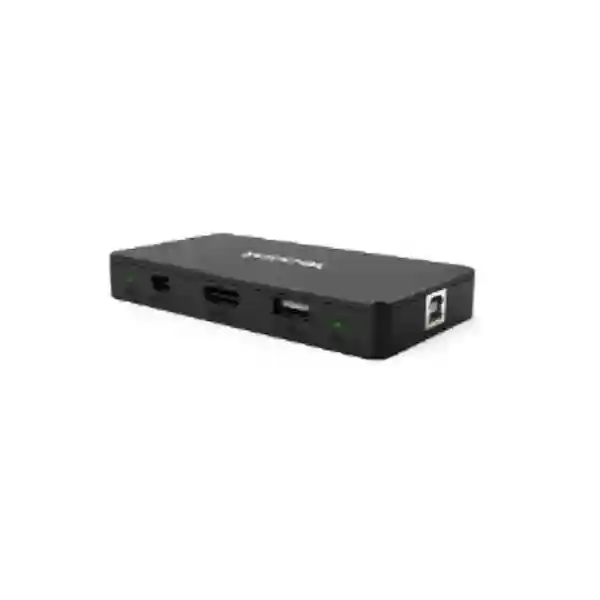
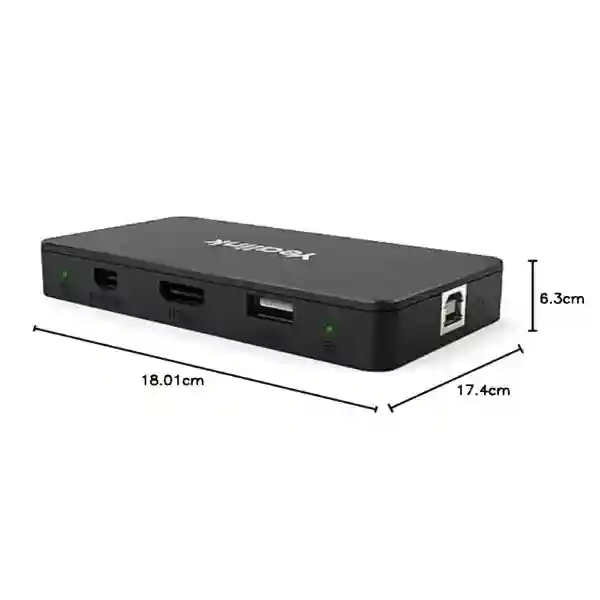
Yealink MShare is a dedicated screen-sharing box for meeting-room collaboration environments. It supports up to 1080p at 30 frames per second for Full HD content sharing, carries audio with shared content, and provides HDMI and Mini-DisplayPort video inputs alongside USB 2.0 Type-B and Type-A connectivity. For organisations using the compatible Yealink WPP20 presentation pod, MShare also incorporates a 2.4GHz/5GHz Wi-Fi access point so users can present wirelessly without relying on the room’s normal wireless LAN for the presentation link.
For Tanzanian businesses, the useful buying question is not simply whether MShare can display a laptop screen. It is whether the accessory fits the exact Yealink room system, the meeting platform, the presenter devices, the cabling path and the way staff or guests actually share content. FourTeck can help build that requirement into a complete conferencing quotation. Explore the FourTeck Tanzania services portfolio for meeting-room design and integration context, or use the Tanzania contact page to request a quotation.
Full HD presentation output is designed for documents, dashboards, slides and everyday collaboration content in supported Yealink room configurations.
HDMI and Mini-DP inputs support common laptop presentation connections, while audio sharing allows meeting participants to hear embedded media.
The built-in dual-band access point is intended for Yealink’s compatible WPP20 presentation pod, enabling one-click wireless sharing in supported deployments.
MShare is best evaluated as part of a Yealink conferencing system rather than as a general-purpose standalone wireless display receiver.
What Yealink MShare solves
A professionally equipped meeting room needs a predictable content-sharing path. Users may arrive with Windows notebooks, MacBooks, presentation files, browser-based dashboards or locally stored media. If sharing depends on a collection of loose adapters or an improvised cable, meetings can lose time before the first slide appears. MShare creates a defined content-ingest point in compatible Yealink room deployments. A presenter can use a supported wired input, while organisations that deploy WPP20 can provide a wireless sharing workflow for compatible computers.
The practical benefit is standardisation. Instead of every room having a different presentation method, IT teams can document a repeatable process, label the presentation cable, position the sharing box where it is easy to access and include the workflow in room training. That can be particularly useful for boardrooms, management rooms, training rooms, project rooms and customer-facing meeting spaces where non-technical users need the system to behave consistently.
MShare is not the newest Yealink sharing accessory and should not be confused with MShare E2. The original MShare uses HDMI and Mini-DP inputs and supports wireless presentation via WPP20; MShare E2 is a different product with USB-C input and a different deployment role. Procurement teams should therefore verify the exact accessory required by the existing Yealink MVC or room-system generation before ordering.
Verified Yealink MShare specifications
| Specification | Verified detail |
|---|---|
| Content sharing | Up to 1080p / 30fps Full HD |
| Audio | Audio sharing supported |
| Video input | 1 × HDMI input |
| Video input | 1 × Mini-DisplayPort input |
| USB | 1 × USB 2.0 Type-B and 1 × USB 2.0 Type-A |
| Wireless presentation | Built-in 2.4GHz/5GHz Wi-Fi AP for compatible Yealink wireless presentation device; WPP20 is the referenced pod for original MShare workflows |
Compatibility should be checked against the exact Yealink room system and software version in use. Wireless workflows can differ by platform, room generation and client operating system, so a quotation should identify the existing room equipment rather than assuming every Yealink endpoint uses MShare in the same way.
Buying and deployment guidance
Before ordering Yealink MShare, identify the room-system model, the meeting platform, the presenter connection expected at the table and whether the installation needs wired sharing, WPP20 wireless sharing or both. Existing Yealink MVC deployments may already include or support particular sharing accessories, while newer room designs may use different Yealink components. A compatibility check reduces the risk of buying an accessory that is physically similar but intended for another generation of equipment.
Cable routing is equally important. A boardroom table may be several metres from the room compute unit, and cable-management decisions influence reliability and appearance. Plan where MShare will be placed, how the USB link reaches the room computer, whether the HDMI or Mini-DP presentation cable can be reached comfortably and how cables will be protected from repeated pulling. For rooms with many guest presenters, clearly labelled presentation connections can reduce support calls.
Network teams should also treat wireless presentation as part of the meeting-room design. MShare’s internal wireless function is associated with Yealink presentation accessories; it does not mean the box is a replacement for general office Wi-Fi. The room’s normal internet and collaboration traffic still depend on the conferencing system’s network connection and the organisation’s wider LAN/WAN design. For related planning, see FourTeck Tanzania’s business technology shop guidance, which explains compatibility, infrastructure and lifecycle checks, and the FourTeck Tanzania solutions overview for conferencing, networking and workplace integration.
Yealink MShare Tanzania
Organisations looking for Yealink MShare in Tanzania are often upgrading an existing meeting room, completing a Yealink MVC installation, replacing a missing sharing accessory or standardising the way staff present content during Microsoft Teams or Zoom meetings. The first procurement step should be to record the exact Yealink room-system model and the accessories already present. That simple inventory helps distinguish the original MShare from later Yealink sharing boxes and prevents an order based only on product name recognition.
For Tanzanian offices, conferencing reliability depends on more than the presentation accessory. The room computer, camera, microphones, speakers, display, controller, LAN connection, internet service and power protection all influence the meeting experience. MShare addresses the content-ingest portion of that chain. When a presenter connects a supported laptop through the wired input or uses a compatible WPP20 workflow, the room can share that content through the conferencing environment. The accessory is therefore most valuable when the rest of the room has been designed and documented coherently.
Procurement teams should include expected presenter devices in the quotation request. If users regularly bring USB-C-only laptops, adapters may be required because the original MShare lists HDMI and Mini-DP video inputs rather than a USB-C video input. If wireless presentation is required, confirm WPP20 availability and compatibility for the intended room system and region. It is also sensible to describe whether guests, employees or both will use the room, since guest presentation workflows need to be intuitive and should not depend on administrator access.
FourTeck can help structure the requirement around room size, existing Yealink equipment, display layout, cable distance, platform and deployment expectations. Buyers planning a broader collaboration upgrade can review the video conferencing and collaboration services and the FourTeck Tanzania company overview. For regional coordination beyond Tanzania, the wider FourTeck Africa technology network can also provide context for multi-country requirements.
Yealink MShare Dar es Salaam
Dar es Salaam organisations frequently operate headquarters, branch offices, professional-services meeting rooms, hospitality spaces, training rooms and customer-facing boardrooms where content sharing must work without disrupting a scheduled meeting. Yealink MShare can be considered when an existing compatible Yealink room system needs a dedicated presentation interface with HDMI or Mini-DP input and optional WPP20-based wireless sharing. For IT teams, the key value is not merely having another port on the table; it is building a defined, supportable workflow that users can follow consistently.
A Dar es Salaam deployment should begin with the physical room. Measure the distance between the table and room compute unit, decide where the sharing box can be secured, and route cables so they are not strained by repeated presenter use. In glass-walled boardrooms or premium executive spaces, concealment and cable management may matter almost as much as technical function. Where multiple displays are installed, confirm how the Yealink room system handles shared content and meeting video so users understand what appears on each screen.
Businesses with visiting partners or customers should decide whether guest presenters will use a wired cable, a preconfigured WPP20 pod or an organisation-managed laptop. That choice affects desk layout, adapter requirements and user instructions. If many modern laptops have only USB-C ports, include the correct video adapter strategy in the room design because original MShare does not list USB-C video input. Wireless presentation should be tested with the actual endpoint and software environment rather than assumed from a generic specification sheet.
When requesting a quote for Yealink MShare in Dar es Salaam, provide the Yealink room-system model, controller model, room-computer details if known, meeting platform, number of displays, table-to-screen distance, preferred sharing method and any existing presentation cables. That information helps determine whether MShare is the correct accessory or whether another Yealink sharing product fits the current architecture better. FourTeck can evaluate the accessory as part of a complete meeting-room requirement rather than treating it as an isolated purchase.
Yealink MShare Mwanza
For businesses and institutions in Mwanza, Yealink MShare may fit conference rooms that already use compatible Yealink collaboration hardware and need a reliable method for presenting documents, dashboards, training materials or operational information from a laptop. The device supports Full HD content sharing up to 1080p/30fps, which is appropriate for common business presentation material. Buyers should evaluate it as part of the room system rather than as a stand-alone consumer casting device.
Mwanza deployments may include branch management meetings, education and training environments, healthcare administration, commercial offices or project rooms where local teams regularly collaborate with colleagues elsewhere. In these settings, the room workflow should be simple enough that participants can share content without rearranging cables or changing system settings. A labelled HDMI connection can be the simplest option for frequent presenters. When WPP20 is supported and available, wireless sharing can reduce cable handling and give users another presentation path.
Power and network stability should be reviewed alongside the meeting-room hardware. MShare handles the content connection, while the conferencing system still relies on the room computer and network path to carry the meeting. If internet quality fluctuates, presentation quality perceived by remote participants can be affected even when the local MShare connection is functioning normally. This distinction is useful during troubleshooting: teams should separate content-ingest issues from LAN, WAN, platform, camera or audio problems.
A Mwanza quotation request should state whether the requirement is for a replacement MShare, an accessory for an existing MVC system or a new conferencing room. Include photographs or a simple diagram when cabling is unclear. If multiple rooms are planned, standardise the cable position and user instructions across rooms. Standardisation reduces training effort and makes support easier because staff encounter the same presentation process in each location. FourTeck can help review compatibility, accessories and related meeting-room infrastructure before procurement.
Yealink MShare Arusha
Arusha has a wide mix of corporate, tourism, NGO, education and project-based organisations that use hybrid meetings to connect local teams with regional or international participants. In a compatible Yealink room, MShare can provide a structured way to place presentation input near users rather than requiring someone to access the room computer directly. That is useful for boardrooms and training environments where different presenters need to display slides, spreadsheets, videos or browser content during the same session.
The original MShare provides HDMI and Mini-DP inputs, so procurement should consider the laptop fleet used by employees and guests. Many current notebooks use USB-C, making a high-quality compatible adapter an important part of the overall room kit when users cannot connect directly. The accessory also supports audio sharing, which matters when presentation content includes recorded speech, training clips or product demonstrations. Test audio routing during commissioning so users do not discover muted content in a live meeting.
For rooms that use WPP20 wireless presentation, the presentation pod and MShare form a specific Yealink workflow. IT administrators should document pairing and user steps, keep the pod in a controlled location, and verify operating-system support for the intended deployment. Wireless convenience is most valuable when it is predictable. If guests frequently arrive with managed corporate laptops that restrict external USB devices, a wired fallback should remain available.
Arusha buyers should also consider room ergonomics. Place presentation connections where users can reach them without walking in front of the camera, and route the cables so they do not cross seating areas. For training rooms, instructors may need access from a lectern rather than the main conference table. The best MShare installation is therefore a combination of verified compatibility and sensible physical design. A quote request should describe the room layout, existing Yealink components, preferred presenter location and platform so FourTeck can recommend an appropriate approach.
Yealink MShare Dodoma
Organisations in Dodoma looking for Yealink MShare may be supporting government-facing offices, corporate branches, associations, training facilities or administrative teams that need clear and repeatable hybrid-meeting workflows. A dedicated screen-sharing box can reduce reliance on informal cable arrangements, particularly when rooms are used by many departments. MShare’s role is straightforward: accept supported presentation content and feed it into a compatible Yealink room environment, with optional wireless sharing through WPP20.
For procurement, compatibility should come before price comparison. Record the exact room-system model, firmware or software environment where possible, and whether the room already includes an MTouch controller, MCore computer or other Yealink accessories. Because Yealink has introduced newer sharing products over time, the word “MShare” alone is not enough to guarantee that the original unit is the appropriate replacement or expansion component. A correctly identified accessory avoids unnecessary returns and project delays.
Meeting-room planners in Dodoma should decide how confidential or controlled presentations will be handled. Wireless presentation offers convenience, but some organisations may prefer a clearly managed wired path for specific meeting types. MShare supports both approaches in compatible configurations, allowing the room policy to guide the preferred method. User instructions should also explain whether presenting duplicates the laptop display and how audio is routed, especially if the room uses more than one display.
The quotation should include all small but important dependencies: adapters for presenter laptops, cable lengths, mounting or table integration, spare presentation leads and any WPP20 requirement. Include the display arrangement and meeting platform as well. FourTeck can combine the accessory request with wider conferencing planning, helping procurement teams evaluate whether an existing room needs only MShare or whether changes to camera, audio, display, network or room control would deliver a more complete improvement.
Yealink MShare UAE
UAE organisations often operate highly standardised meeting rooms across headquarters, branches and customer-facing spaces. Yealink MShare can still be relevant where existing compatible Yealink MVC rooms use the original sharing architecture and require replacement, expansion or standardisation. Procurement teams should distinguish the original MShare from MShare E2 and newer Yealink presentation devices because the interfaces and intended room generations differ.
For a UAE deployment, inventory is the fastest path to an accurate quote. Capture the Yealink room-system model, MCore generation, touch controller, camera, display count and current sharing cable. If the existing unit has failed, photographs of its connections can help identify whether the requirement is a like-for-like original MShare replacement. If the project is a refresh rather than a repair, compare the room’s future platform plan before automatically reproducing the old architecture.
In executive and client spaces, cable management and visual finish matter. MShare can be positioned so presentation connections are accessible while the rest of the installation remains concealed. For hot-desking or multi-purpose rooms, consider the range of laptop ports that users bring. Original MShare provides HDMI and Mini-DP video inputs, so USB-C presenters may require adapters. Where WPP20 is used, document pairing and keep a wired fallback for managed or restricted laptops.
Companies coordinating Tanzania and UAE offices can benefit from a common room standard, but the standard should be based on supported system generations rather than forcing identical accessories into incompatible rooms. FourTeck’s UAE technology solutions site can support regional coordination, while Tanzania-specific procurement can remain aligned with the room architecture at the local site. A good multi-country specification identifies what should be standard—user experience, platform, cable policy and support process—while allowing hardware generation to differ where necessary.
Yealink MShare Uganda
Ugandan organisations evaluating Yealink MShare may be extending a conferencing standard across branch offices or maintaining existing Yealink MVC room systems. The accessory is most relevant when the room needs Full HD content sharing from laptops and the installed Yealink system supports original MShare. It should be specified together with the room platform, controller and presentation workflow so the purchase solves a defined need rather than adding another unmanaged accessory.
A practical Uganda deployment starts with a room audit. Confirm the presentation source devices used by employees, the expected guest workflow and the cable distance from the table to the room compute unit. If WPP20 wireless sharing is part of the plan, verify pod compatibility and availability. If presenters use USB-C laptops, plan the correct adapters because original MShare lists HDMI and Mini-DP inputs. Keep the user process simple: one clearly labelled wired connection and, where applicable, one clearly explained wireless option.
Network and internet performance remain separate considerations. MShare can deliver content into the room system, but the quality seen by remote attendees also depends on the conferencing application and the site’s network path. When troubleshooting, confirm whether the shared content is clear locally before diagnosing WAN performance. This prevents teams from replacing a sharing accessory when the underlying issue is bandwidth, packet loss or platform configuration.
For organisations with operations in both Uganda and Tanzania, procurement can align on room standards, spare accessories and documentation. The FourTeck Uganda site is a relevant regional resource for Uganda requirements, while the Tanzania team can coordinate local project details. A quotation should include the Yealink model, room count, required quantity, existing accessories, cable needs and whether installation or only supply is required.
Yealink MShare Kampala
Kampala businesses often run fast-paced boardrooms, project spaces and customer meeting rooms where presentation delays are especially visible. Yealink MShare can help create a consistent sharing point in a compatible Yealink conferencing system. The unit supports 1080p/30fps Full HD content, audio sharing, HDMI and Mini-DP inputs, and WPP20 wireless presentation through its built-in dual-band access point.
Before purchasing for a Kampala office, identify whether the room is an older MVC deployment that specifically uses MShare or a newer system that may expect another sharing accessory. Yealink’s room portfolio has evolved, so a model-level compatibility check is essential. When replacing a failed unit, compare connectors and room-system documentation. When designing a new room, start from the current Yealink architecture rather than selecting MShare only because it is familiar.
Physical design should support everyday users. Position the sharing connection close to the main presenter seat, label the cable, provide any approved USB-C adapter and secure loose leads so they do not disappear. If WPP20 is used, set a process for storing and charging or protecting the pod as required by the local IT team. Guest presenters may have restrictive device policies, so a wired alternative helps preserve meeting continuity.
Kampala procurement teams should send room details with their quotation request: number of rooms, system model, display count, platform, laptop types and preferred sharing method. If the project includes cameras, microphones, displays or room control, describe those requirements together. A complete room bill of materials is easier to support than a sequence of unrelated accessory purchases, and it gives the organisation a clearer path for future standardisation across sites.
Yealink MShare Arua
In Arua, organisations may use video conferencing to reduce travel between offices, project locations and partner sites. When an existing compatible Yealink room needs a reliable method to share laptop content, MShare can provide a dedicated interface rather than requiring users to manipulate the room computer. Its Full HD 1080p/30fps sharing is appropriate for typical business material such as slide decks, spreadsheets, browser applications and documents.
The accessory decision should be tied to the installed room system. Record the exact Yealink components and confirm whether original MShare is supported. If the organisation is building a room from scratch, evaluate the current Yealink room portfolio first because newer designs may use different sharing hardware. This protects the investment from being based on an accessory that belongs to an earlier architecture.
Arua sites should also plan for operational simplicity. Users may not have on-site AV specialists, so the room must be easy to explain and troubleshoot. Keep a short instruction card near the table: connect the presentation cable, select the appropriate presentation function on the room control where required, and verify the shared content on the display. Wireless WPP20 workflows should be documented separately so staff understand pairing and supported usage.
When requesting supply, state whether remote implementation guidance, installation coordination or only hardware is required. Include cable lengths and any adapter need. If the room is critical for scheduled coordination calls, consider keeping a tested fallback presentation cable or spare adapter. The objective is not to add complexity; it is to ensure that a meeting can continue even if a user’s preferred sharing method is unavailable.
Yealink MShare Mbarara
Mbarara organisations using Yealink conferencing can consider MShare when they need a defined screen-sharing interface for compatible room systems. This can be useful in management rooms, training areas, education environments, healthcare administration and branch offices where presentations are part of daily collaboration. The device’s purpose is narrow but important: make laptop content available to the room meeting environment through supported wired inputs and, when paired with WPP20, a wireless presentation workflow.
A good installation is planned around the users. Determine which seat normally presents, where the laptop will sit and what connector that laptop provides. The original MShare supports HDMI and Mini-DP video input, so USB-C-first fleets should standardise on a tested adapter. Avoid leaving random consumer dongles in the room because inconsistent adapters are a common source of no-signal problems. Label the approved cable and keep spares under IT control.
If the room uses wireless sharing, verify the WPP20 workflow with the actual laptops used by the organisation. Security policies on managed devices can affect USB peripherals, and operating-system behavior may vary. A room that supports both wired and wireless options gives users a practical fallback without needing to change the entire conferencing architecture.
For a Mbarara quotation, include the system model, room photographs if useful, presentation source devices and the expected quantity. If the requirement is part of a multi-room rollout, list all room types separately because a small huddle room and a boardroom may not use the same Yealink equipment. FourTeck can help consolidate those details into a procurement plan that distinguishes confirmed compatibility from assumptions.
Yealink MShare Gulu
For Gulu offices and institutions, reliable hybrid meetings can be especially valuable when teams collaborate across cities or countries. Yealink MShare can support that experience in compatible Yealink rooms by giving presenters a known place to connect a laptop and share content. The 1080p/30fps Full HD capability is designed for ordinary meeting content, while audio sharing supports presentations that include embedded media.
The correct buying process begins with system identification. Check the installed Yealink MVC or room-system model and verify that it supports original MShare. If there is no existing system, do not select the sharing box in isolation; first choose the room architecture and then the supported presentation accessory. This sequence avoids incompatibility and ensures that the camera, microphones, controller, display and sharing method work as one system.
For rooms without dedicated AV support, reliability depends heavily on physical setup. Use good-quality cables, avoid tight bends or strain, provide a stable mounting position and keep adapters consistent. A simple room diagram showing the MShare connection can help remote support teams diagnose issues. When a user reports that content is not visible, support can check the presentation cable, input selection and room-system state before escalating to the network or meeting platform.
A Gulu quote request should describe whether the need is replacement, expansion or a new room. Mention WPP20 if wireless sharing is expected, and identify the laptop operating systems used by staff. For organisations with several Uganda locations, keep the user workflow consistent where technically possible, even if room hardware generations differ. Consistency in labels, instructions and support documentation is often more valuable than forcing every site to use identical physical accessories.
Yealink MShare Kenya
Kenyan organisations that maintain Yealink MVC meeting rooms may require MShare for replacement, expansion or a standardised content-sharing workflow. The original unit supports wired HDMI and Mini-DP content input, audio sharing and WPP20-based wireless presentation in compatible deployments. Because Yealink now offers newer sharing accessories, purchasers should validate the room-system generation before specifying MShare by name.
In offices with frequent cross-border collaboration, meeting rooms benefit from a common user experience. A team member travelling between Nairobi, Dar es Salaam and Kampala should ideally encounter familiar instructions: connect the labelled presentation cable or use the approved wireless pod, confirm the content preview and begin sharing. The hardware behind that workflow can vary by room generation, but standardised user instructions reduce training and support overhead.
Kenyan buyers should also review presenter device trends. USB-C laptops are increasingly common, while original MShare lists HDMI and Mini-DP inputs. Standardising a tested USB-C-to-HDMI adapter can close that gap without changing the MShare itself. For conference rooms used by external guests, keep the adapter physically attached or stored in a clearly marked location so it remains available.
When requesting a regional quote, include model numbers and required quantities per site rather than one combined count. That lets the supplier check compatibility room by room. The FourTeck Kenya site can support Kenya-focused requirements, while Tanzania projects can be coordinated through the local site. Multi-country procurement works best when room inventories, accessories and acceptance tests are documented consistently.
Yealink MShare Kuwait
Kuwait businesses using Yealink conferencing systems may still need the original MShare where it matches the installed MVC architecture. It can be useful for boardrooms, management rooms and training rooms that require wired laptop presentation plus optional WPP20 wireless sharing. The important distinction is that original MShare and MShare E2 are not interchangeable names for the same hardware; their connectivity and deployment roles differ.
For replacement projects, photograph the current unit and its cabling before removing it. Record the Yealink room-system model and the controller or MCore generation. This evidence simplifies compatibility checking and prevents a new accessory from being ordered solely because its name looks similar. If the room is being modernised, evaluate whether retaining the older MShare architecture still fits the organisation’s future platform and laptop standards.
Room users in Kuwait may present from a wide variety of corporate laptops. Because original MShare uses HDMI and Mini-DP for video ingest, a USB-C adapter strategy may be necessary. Use business-grade adapters that have been tested with the organisation’s laptops and displays. If video content with sound is commonly presented, include audio in commissioning tests instead of validating only static slides.
For organisations coordinating Gulf and East African offices, the FourTeck Kuwait site is relevant for Kuwait procurement while Tanzania requirements remain aligned to local project conditions. A multi-site specification should define the user experience, platform and support process, then map the appropriate Yealink accessories to each installed room generation.
Yealink MShare Ghana
Ghanaian organisations operating compatible Yealink meeting rooms can use MShare as a dedicated content-sharing interface where the room design calls for the original accessory. The box supports up to 1080p/30fps Full HD presentation, embedded audio sharing and both HDMI and Mini-DP inputs. For wireless presentation, the original MShare workflow references Yealink WPP20 and the unit’s built-in 2.4GHz/5GHz wireless access point.
Procurement should focus on lifecycle fit. If an existing room is stable and only a sharing accessory needs replacement, an original MShare may be the most practical path when confirmed compatible. If the organisation is refreshing the complete room, compare current Yealink room solutions and presentation accessories instead of assuming the older component should be carried forward. This avoids investing in an accessory that may not match the next room-system generation.
For user experience, decide whether the default method will be wired or wireless. Wired presentation is straightforward and can suit environments where guest device policies are unpredictable. Wireless presentation can reduce cable clutter but depends on supported WPP20 use and the organisation’s endpoint policies. Keeping both options documented gives staff a simple fallback during important meetings.
A Ghana quotation should include exact model information, room count, required quantity, expected laptop connectors and whether any adapters are needed. For multi-country projects, create a room inventory rather than ordering a single accessory list for every office. The FourTeck Ghana site can support Ghana-specific technology requirements while the Tanzania project remains coordinated through FourTeck Tanzania.
Yealink MShare Nigeria
Nigerian enterprises with existing Yealink MVC rooms may require MShare to maintain or standardise screen-sharing capability. Its function is to bring laptop content into the supported room system through HDMI or Mini-DP and to enable compatible WPP20 wireless presentation. Full HD 1080p/30fps sharing is suited to mainstream business content rather than high-frame-rate production video.
Large organisations should manage MShare as part of the meeting-room asset inventory. Record the accessory serial information where available, the room it belongs to, the connected system, cable path and any WPP20 pod paired with it. This makes replacement faster and reduces the chance that an accessory is moved between incompatible rooms. It also gives support teams a clearer picture when diagnosing a presentation issue remotely.
Power and connectivity troubleshooting should be systematic. If the room can join a meeting but cannot share a laptop, first verify the presentation cable and MShare path. If content appears locally but remote participants see poor quality, investigate the conferencing platform and WAN path. If wireless sharing alone fails, examine WPP20 pairing and endpoint policy. Separating these layers prevents unnecessary hardware replacement.
For Nigeria-based procurement, provide the exact Yealink room models and quantities. The FourTeck Nigeria site can support regional requirements, while organisations with Tanzania operations can use a shared bill-of-material process across both countries. Standardising documentation, acceptance tests and user instructions is often the easiest way to keep a multi-country collaboration estate supportable.
Yealink MShare Seychelles
Seychelles organisations using compatible Yealink meeting-room systems may consider MShare where a dedicated presentation input is required. The accessory can be particularly useful in executive rooms, hospitality management spaces, training facilities and professional offices that host remote meetings and need a repeatable way to share laptop content. Its 1080p/30fps Full HD sharing and audio support cover typical business presentation needs.
Because island procurement can make incorrect orders costly, compatibility verification is especially important. Before ordering, capture the exact Yealink room-system model, current accessories, connector types and photographs of the existing installation. Confirm whether original MShare is required or whether the room uses a newer sharing device. That verification is more valuable than selecting an accessory only from a familiar product name.
Plan spare adapters and cables at the same time as the sharing box. Modern presenters may use USB-C laptops, while original MShare provides HDMI and Mini-DP video inputs. A tested USB-C-to-HDMI adapter can therefore be an important room accessory. If WPP20 wireless presentation is used, document the pod workflow and keep a wired option available for guest laptops with restrictive security policies.
For a Seychelles quotation, include installation context as well as quantity. State whether the meeting room is already operational, whether this is a replacement unit, and whether remote configuration support or on-site coordination is expected. For organisations connected to wider African operations, FourTeck’s regional network can help align product identification and procurement documentation without assuming that stock, delivery times or service coverage are identical in every market.
Related FourTeck Tanzania resources
Useful when MShare is part of a complete room involving camera framing, audio pickup, displays, networking and platform configuration.
Provides buying guidance across conferencing, networking, IP telephony and workplace infrastructure where compatibility and lifecycle matter.
Shows how collaboration rooms depend on networks, displays, power, security and wider business infrastructure.
Useful for organisations evaluating FourTeck’s role in planning, supply and integration across business technology categories.
Send the room-system model, quantity, existing accessories and presentation requirements for a compatibility-led quote.
Frequently asked questions
What is Yealink MShare?
Yealink MShare is a screen-sharing box used with compatible Yealink room systems. It accepts laptop presentation content through HDMI or Mini-DP, supports audio sharing and can work with compatible Yealink WPP20 for wireless presentation.
What resolution does Yealink MShare support?
Yealink specifies up to 1080p at 30 frames per second for Full HD screen sharing.
Does MShare support wireless presentation?
Yes, in supported deployments. The original MShare includes a 2.4GHz/5GHz Wi-Fi access point for Yealink wireless presentation devices, with WPP20 documented for the original MShare workflow. Compatibility should be confirmed for the exact room system and software environment.
Does Yealink MShare have USB-C video input?
The original MShare specification lists HDMI and Mini-DP video inputs plus USB 2.0 Type-A and Type-B ports. It does not list USB-C as a video input. Yealink MShare E2 is a different product that includes USB-C input, so the two models should not be confused.
Can I use MShare as a standalone wireless display receiver?
MShare is positioned as a sharing accessory for compatible Yealink room systems. It should be purchased for a verified Yealink conferencing architecture rather than assumed to operate as a generic standalone casting appliance.
What information should I provide for a quote?
Provide the exact Yealink room-system model, controller and room-computer generation if known, number of rooms, required quantity, display count, meeting platform, preferred wired or wireless sharing method, presenter laptop ports and whether installation or only supply is required.
Quotation checklist for Yealink MShare
Decision recap
Choose Yealink MShare when the exact Yealink room system supports the original MShare accessory and the room needs 1080p/30fps wired content sharing through HDMI or Mini-DP, with optional compatible WPP20 wireless presentation. Do not choose it simply because the room uses Yealink: newer systems may use MShare E2, VCH-series sharing boxes, RoomCast or other current accessories. Compatibility, room generation and user workflow should drive the decision.
For procurement teams, the most efficient next step is to send FourTeck the room-system model, existing accessory list and required quantity. That allows the quotation to address the complete requirement, including any presentation adapters, WPP20 needs, cable considerations and related conferencing components. No stock, delivery time, warranty term or local-authorisation claim should be assumed until confirmed in the quotation.
Plan the room, not just the accessory
A screen-sharing box is one part of the meeting experience. Camera framing, microphone coverage, speaker output, display placement, network quality, cable management and user instructions all determine whether a room is genuinely easy to use. Contact FourTeck Tanzania with the existing Yealink model and room details so the MShare requirement can be validated against the wider conferencing design.




Reviews
There are no reviews yet.