
Yealink MTouch Plus-EXT Tanzania
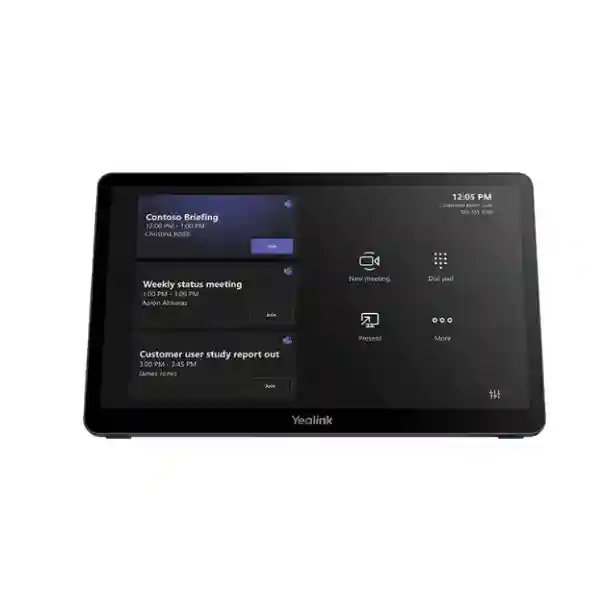
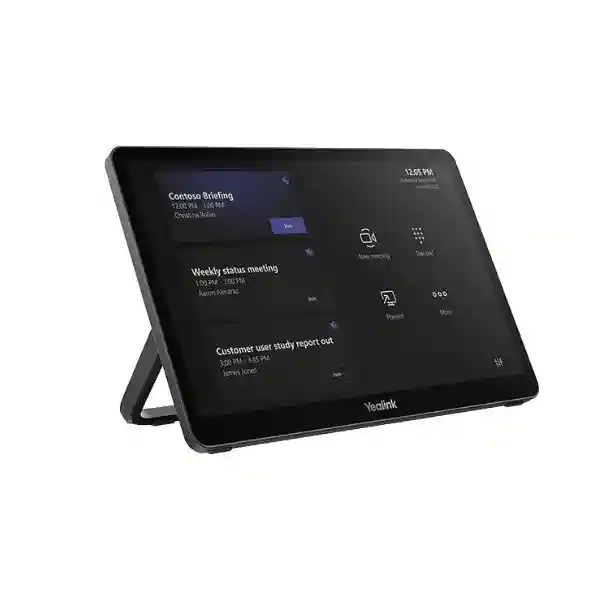
Yealink MTouch Plus-EXT is an extension touch panel designed to work with Yealink MTouch Plus in larger collaboration spaces where a single room-control position is not enough. It gives meeting participants another 11.6-inch, 1920 × 1080 touch interface positioned where it is most useful, whether that is close to a boardroom chair, beside a training presenter, near a secondary collaboration table or at another practical point in a large room. For organizations in Tanzania planning Microsoft Teams Rooms or other Yealink meeting-room deployments built around MTouch Plus, the MTouch Plus-EXT can make control easier to reach without changing the core user experience. One MTouch Plus can work with up to four MTouch Plus-EXT units, creating a five-panel control arrangement when the room layout calls for multiple operating points.
11.6-inch Full HD touch screen
The extension panel uses an 11.6-inch capacitive touch display with 1920 × 1080 resolution. Its narrow-bezel format and approximately 80% screen-to-body ratio give users a clear and familiar interface for meeting-room control.
Multi-panel room control
A single MTouch Plus can be extended with as many as four MTouch Plus-EXT panels. This is useful in longer boardrooms, divisible rooms, training areas and other spaces where participants need control access from more than one position.
PoE-based deployment
The panel is designed for network-based deployment and can receive power and data over the required Ethernet connection. This can simplify cable planning, especially when compared with placing separate local power adapters at every control position.
What Yealink MTouch Plus-EXT solves
Large meeting rooms often have a simple physical problem: the primary meeting controller is positioned at one end of a table, while people who need to change layouts, manage the call, adjust camera views or operate another supported meeting function are sitting elsewhere. Walking around the room to reach the only controller interrupts meetings and can make sophisticated room systems feel less convenient than they should. MTouch Plus-EXT addresses that usability problem by extending the same control approach to additional positions in the room.
Because MTouch Plus-EXT is specifically designed as an accessory to MTouch Plus, it is best evaluated as part of the room design rather than as a standalone tablet. Buyers should first confirm that the intended Yealink room system includes MTouch Plus, then determine how many additional control points the room genuinely needs. The extension concept is particularly useful for executive boardrooms, classrooms, municipal chambers, large meeting tables, training centers, lecture environments and flexible collaboration rooms where several users may need convenient access to the conference controls.
For a broader view of Yealink and collaboration technology procurement in the market, organizations can also explore FourTeck Tanzania technology solutions, which provides a regional route for discussing product selection, room design and quotation requirements alongside the controller itself.
Verified Yealink MTouch Plus-EXT features
Display and visibility
Yealink specifies an 11.6-inch touch screen with 1920 × 1080 resolution. The extension uses a narrow-bezel presentation consistent with MTouch Plus, so a multi-panel deployment keeps a visually coherent control experience across the room.
Scalable control positions
One MTouch Plus supports up to four MTouch Plus-EXT units. That means the room can be designed with as many as five touch-control positions in total when the meeting-space layout justifies that level of access.
Flexible mounting
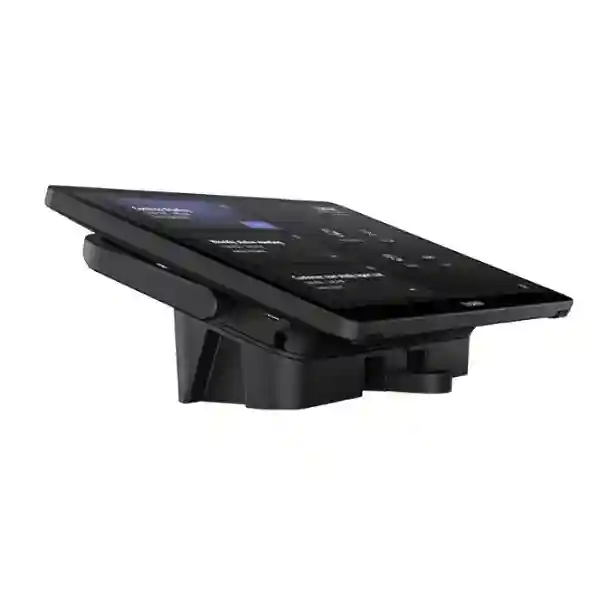
The extension panel supports three deployment approaches: it can sit freely on a desktop, be fixed to a desktop, or be mounted on a wall. This gives integrators useful flexibility when planning executive rooms, training desks, control areas and entrance-side positions.
PoE and network connectivity
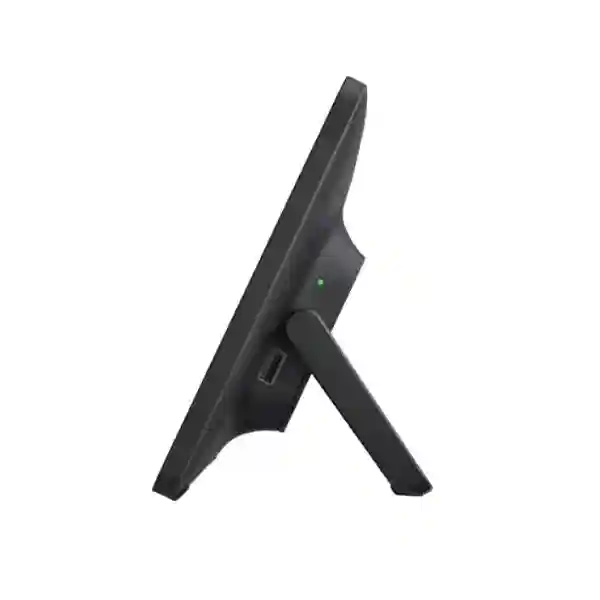
The product uses a PoE power port and includes a Yealink YL PoE30 unit in the documented package contents. Yealink also lists a Type-C debug port. Each extension requires network capacity and should be included in switching, VLAN and cabling plans.
Deployment and buying guidance
MTouch Plus-EXT should be specified only after the main room architecture is understood. Confirm the base Yealink room solution, the presence of MTouch Plus, the number of practical control positions, network-switch availability, PoE design, cable paths, mounting method and the physical seating plan. Yealink notes that each MTouch Plus-EXT requires 8 Mbps of bandwidth, so IT teams should account for multiple units when planning network capacity and segmentation.
A quotation request is more accurate when it identifies the room type, approximate table length, number of expected participants, existing Yealink components, number of extension panels required, preferred mounting positions and whether the customer already has suitable PoE switching. This prevents over-specifying touch panels in smaller spaces and helps avoid under-designing larger rooms where one central control point would be inconvenient.
Yealink MTouch Plus-EXT Tanzania
For organizations in Tanzania, Yealink MTouch Plus-EXT is most relevant where meeting spaces are already being standardized around Yealink room technology and MTouch Plus but the room layout makes a single controller inconvenient. Large executive meeting tables, training centers, university seminar rooms, government conference spaces, project offices and corporate collaboration rooms can all create situations where different participants need access to room controls from different positions. Instead of concentrating operation at one end of the room, an additional MTouch Plus-EXT can place a familiar control interface closer to another decision-maker, presenter or facilitator.
The key procurement question in Tanzania is not simply whether the touch panel is available, but whether the room design actually benefits from extension control. Buyers should map where users sit, who typically starts and manages meetings, whether meetings are presenter-led or collaborative, and whether the main MTouch Plus is reachable without disruption. A long boardroom can benefit from a second control point at the opposite end. A training room can benefit from a controller near the instructor. A multi-zone collaboration room may need an additional panel near a secondary seating cluster. The product is therefore best treated as a usability and room-design component rather than as an isolated accessory.
Network design matters as well. MTouch Plus-EXT relies on the meeting-room network and is designed for PoE deployment, which can simplify installation where structured cabling already exists. Customers should confirm switch-port availability, VLAN policy, cable routing, and mounting surfaces before installation. In new office fit-outs, including the extension panel in the early AV and network plan can produce a cleaner result than adding cable routes later. In retrofit projects, a site survey can determine whether desktop, fixed-desktop or wall placement is most practical.
Tanzania-based buyers comparing meeting-room controllers should also consider the wider system: cameras, microphones, speakers, room compute, displays, content-sharing requirements and support processes. MTouch Plus-EXT does not replace these elements; it improves how people interact with a compatible MTouch Plus deployment. A well-prepared request should therefore include the room dimensions, existing Yealink equipment, number of required extension points and whether the project is a new deployment or an upgrade.
Yealink MTouch Plus-EXT Dar es Salaam
Dar es Salaam has a high concentration of corporate headquarters, professional-services firms, financial organizations, education providers, hospitality venues and project offices that regularly use video collaboration. In these environments, room-control ergonomics become more important as meeting rooms grow in size. A long conference table with a single controller at one end can create an awkward user experience, particularly when several departments share the room and different people are responsible for starting calls, switching layouts or managing the camera. MTouch Plus-EXT gives room designers a practical way to provide a second or additional control point while maintaining the same Yealink control experience as MTouch Plus.
For Dar es Salaam deployments, planning should consider both the room and the building infrastructure. Newer office spaces may already have structured Ethernet and PoE-capable switching available near table boxes or wall points. Older buildings or refurbished rooms may require more careful cable routing. Because the panel can be deployed on a desktop, fixed to a desktop or wall mounted, the installation method can be adapted to the furnishings and the way the room is used. A fixed controller may make sense in a shared corporate boardroom, while a freely placed panel can offer more flexibility where furniture layouts change.
Procurement teams should confirm compatibility with the complete Yealink room configuration rather than ordering the extension panel in isolation. MTouch Plus-EXT is designed to extend MTouch Plus, and one MTouch Plus can support up to four extension units. The actual quantity should reflect user movement and control requirements, not simply room size. A 20-seat boardroom may need only one extension if users are concentrated around a single long table, while a training venue with multiple presenter positions may justify more than one.
When requesting a quotation in Dar es Salaam, it helps to provide the existing room-system model, current MTouch Plus deployment, preferred mounting method, number of control points and whether PoE switching is available. That information allows the quote to focus on the actual room design and reduces the risk of missing supporting network or mounting requirements.
Yealink MTouch Plus-EXT Mwanza
In Mwanza, organizations adopting modern meeting-room systems may be supporting management teams, regional operations, education, healthcare administration, logistics, manufacturing, construction and distributed project coordination. For these users, a reliable conferencing room is most useful when it is straightforward for ordinary staff to operate. An extension panel can improve accessibility in spaces where the primary MTouch Plus is too far from some users, reducing the need for participants to walk around the table or rely on one person to control every meeting function.
A common design approach is to place the main controller where meetings are usually initiated and then position MTouch Plus-EXT where a second user group naturally sits. For example, a room used by both management and project teams may have one panel close to the chairperson and another near the presenter side. A training room may use the main panel on the instructor desk and an extension at a side station. The product supports up to four extensions with one MTouch Plus, but practical requirements should determine the number installed.
Mwanza installations should also account for network resilience and clean cabling. Since the device uses Ethernet and PoE, the network switch and cable path are part of the AV design. IT teams should reserve the required switch capacity, follow their standard network-security practices and ensure the meeting room has stable infrastructure. Yealink specifies 8 Mbps bandwidth for each extension panel, so multiple units should be considered collectively during design.
Before procurement, buyers should document whether the project is a new meeting room, an expansion of an existing Yealink room or a refurbishment. That distinction affects everything from mounting to cabling. A concise specification containing room dimensions, expected meeting size, equipment already installed, panel quantity and preferred installation positions will make the purchasing conversation much more productive.
Yealink MTouch Plus-EXT Arusha
Arusha meeting environments can range from corporate offices and training facilities to hospitality conference venues, development organizations, institutions and project coordination centers. Many of these spaces host visitors and mixed user groups who cannot be expected to learn complex room-control procedures. The value of MTouch Plus-EXT in such settings is consistency: it extends the familiar MTouch Plus interface to another location in the same room, so participants can reach meeting controls without moving to a single designated console.
Venue operators and organizations with frequently changing seating arrangements should think carefully about mounting. A fixed desktop installation keeps the panel secure and predictable. Wall mounting can suit control points near room entrances, side walls or presentation zones. Free desktop placement offers flexibility where tables are reconfigured. Because the panel is part of the room system rather than a generic standalone controller, the installation should still be planned around the MTouch Plus network architecture and the chosen Yealink room solution.
Arusha buyers should also distinguish between adding control convenience and solving broader AV challenges. If participants cannot hear clearly, a second touch panel will not solve microphone coverage. If camera framing is inadequate, a controller extension does not replace the need to address camera choice or placement. MTouch Plus-EXT makes most sense once the underlying audio, video, display and room-compute design is already appropriate. It then improves access to the available controls.
For quotation planning, provide the room purpose, seating pattern, number of users, current Yealink equipment, number of desired control points and the location of Ethernet/PoE resources. This helps determine whether one extension is sufficient or whether a more distributed control arrangement is justified for the way the space is actually used.
Yealink MTouch Plus-EXT Dodoma
Dodoma organizations planning modern collaboration rooms often need systems that are easy to operate across executive, administrative and project teams. Large conference rooms may host formal meetings where control is shared between a chairperson, secretary, technical facilitator or presenter. In those cases, placing a single MTouch Plus at only one seat can limit convenience. Yealink MTouch Plus-EXT allows the same meeting-control environment to be extended to additional positions, which can be especially useful where meetings involve structured agendas and several people have operational roles.
Room planners should first identify the primary and secondary control positions. The main MTouch Plus may remain near the principal meeting leader, while an extension panel can be placed near the presentation side, a secretariat position or another logical operator point. Because one MTouch Plus supports up to four extension panels, designers have flexibility, but additional panels should only be added where they clearly improve usability. More touch panels do not automatically make a room better; thoughtful placement does.
From an infrastructure perspective, MTouch Plus-EXT fits well into environments where network cabling can be planned alongside power, displays and other AV connections. PoE-based deployment reduces the need for a separate local power outlet at the panel position, though the switch and cabling still need to be properly specified. During procurement, teams should include cable length, rack or switch location, mounting surface and the total number of extensions in the deployment plan.
For Dodoma buyers upgrading an existing Yealink room, it is useful to record the current equipment and firmware state before adding extensions. For a new installation, the extension panels can be included in the original design from the beginning. In both cases, the goal is the same: make meeting controls easier to access without adding unnecessary complexity for everyday users.
Yealink MTouch Plus-EXT UAE
In the UAE, meeting-room projects often involve headquarters, regional offices, boardrooms, training centers and hospitality spaces with high expectations for clean installation and consistent user experience. MTouch Plus-EXT can be useful when a large Yealink room deployment needs multiple control points without changing the basic control interface. One MTouch Plus can support up to four extensions, enabling a five-panel arrangement where room size, furniture and operating workflows justify it.
The product is especially relevant in long boardrooms, U-shaped meeting layouts and divisible training spaces. An extension can be mounted close to a second group of participants or installed near a presenter position, while the primary MTouch Plus remains at the main seat. Desktop, fixed-desktop and wall-mount options allow integrators to adapt the panel to interior-design requirements and operational preferences.
Buyers should treat network planning as part of the AV scope. Multiple extensions increase the number of Ethernet connections and total bandwidth requirements, and the PoE design should be confirmed early. For customers coordinating projects across Tanzania and the UAE, FourTeck UAE technology solutions can provide a useful regional reference point for broader infrastructure discussions while the Tanzania project remains focused on the local deployment requirement.
A strong procurement brief should include the room system model, seating layout, number of planned touch points, preferred mounting, available PoE infrastructure and any requirement for standardized room designs across multiple sites. This helps ensure that the extension panel is being added for a defined operational reason rather than simply because it is available.
Yealink MTouch Plus-EXT Uganda
Ugandan organizations using Yealink collaboration technology can consider MTouch Plus-EXT when larger rooms need more than one easily reachable control point. Corporate offices, banks, NGOs, training institutions, government meeting rooms and regional operational centers frequently host hybrid meetings that involve several active participants. When everyone depends on one touch console at the far end of the table, basic meeting actions can become unnecessarily disruptive. The extension panel addresses that physical-access issue while preserving the same general control style as MTouch Plus.
Deployment planning should start with the seating map. Identify where users normally sit, who controls the meeting and whether participants move between presentation, discussion and training positions. A second panel can often solve the accessibility problem without overcomplicating the room. Larger or specialized spaces may justify additional units, up to Yealink’s documented maximum of four extensions paired with one MTouch Plus.
Because the panels rely on the network, organizations should confirm switch ports, PoE capacity, cabling and network policy. IT and facilities teams should work together so the mounting position has both practical user access and a sensible cable route. When regional procurement or support coordination is relevant, customers can also review FourTeck Uganda solutions for the neighboring-market context.
The most useful quotation requests state the exact Yealink room-system environment, whether MTouch Plus is already present, how many extensions are required and where they will be installed. That information helps convert a general product inquiry into a deployment-focused conversation about the real meeting-room requirement.
Yealink MTouch Plus-EXT Kampala
Kampala has many offices and institutions where conference rooms are shared by senior management, project teams, external visitors and training groups. Shared rooms benefit from predictable controls because users may enter the space without prior familiarity with the equipment. MTouch Plus-EXT can improve usability in larger Yealink rooms by placing another control interface at a convenient location while keeping the same visual approach as the MTouch Plus.
For a boardroom, the extension might be positioned at the opposite end of the table from the main MTouch Plus. For a training environment, one panel can sit with the facilitator while another is available at a technical desk. For a flexible collaboration room, wall mounting may create a consistent control point regardless of how tables are moved. These examples illustrate why installation style should follow the workflow rather than being chosen only for appearance.
Kampala procurement teams should confirm that the intended solution is based on MTouch Plus because MTouch Plus-EXT is specifically an extension accessory. They should also verify network readiness. Each extension panel needs the required connection and bandwidth, and IT teams may want static addressing or other standardized network practices depending on the deployment policy. The overall room should be tested as a system after installation so users experience consistent control from each touch point.
A quotation request should therefore include more than the product name. Add the room type, dimensions, existing system, number of displays, approximate seating count, number of requested extensions and preferred mounting method. That context helps determine whether the product is being applied to the right use case and supports a cleaner installation plan.
Yealink MTouch Plus-EXT Arua
In Arua, MTouch Plus-EXT can be relevant for institutions, regional offices, education facilities, development organizations and organizations that depend on video meetings to coordinate with teams in other cities or countries. In these environments, meeting technology is most valuable when staff can operate it without relying on a specialist for every call. An extra touch panel can make a compatible Yealink room easier to use where participants are spread across a large table or where the meeting facilitator sits away from the primary controller.
The product’s three deployment methods allow flexibility in rooms that may not have been originally designed for advanced conferencing. A free desktop position can avoid permanent furniture changes. Fixed desktop installation provides a more controlled placement. Wall mounting can work where a side or entrance position is more practical than adding another device on the meeting table. The choice should consider both usability and cable routing.
Network planning is particularly important when technology support is centralized or when meeting rooms are expected to remain stable for long periods. The extension panel should be connected through a suitable network path and included in documentation so support teams know where each control point is located. If multiple extensions are used, the room’s total switch-port and bandwidth requirement increases accordingly.
For procurement, start by confirming the MTouch Plus base system and then define the reason for adding an extension. If the objective is simply to replace a damaged unrelated controller or add independent room scheduling, another Yealink product may be more appropriate. MTouch Plus-EXT is specifically intended to extend meeting control within the MTouch Plus environment, so the purchasing decision should stay tied to that role.
Yealink MTouch Plus-EXT Mbarara
Mbarara businesses and institutions planning upgraded collaboration spaces can use MTouch Plus-EXT to solve a straightforward usability challenge in large rooms: giving users another place to control the meeting. The extension is particularly practical where the main Yealink MTouch Plus is positioned close to one group of users while managers, presenters or facilitators sit somewhere else. A second touch point reduces unnecessary movement and can help keep formal meetings flowing smoothly.
Room designers should review furniture first. In a long fixed boardroom table, installing an extension at the opposite end may be enough. In a training room with several operating positions, additional panels may be justified. In a room where tables are often moved, a flexible desktop deployment could be more appropriate than permanently fixing the panel. Yealink supports up to four MTouch Plus-EXT panels per MTouch Plus, so the architecture can scale if the space genuinely needs several control locations.
Power and connectivity should be planned together. PoE deployment helps reduce local power clutter, but it places greater importance on the network switch and cable route. IT teams should document the switch ports, verify the network environment and account for the bandwidth of each extension. Where reliable operation is important, the room should be commissioned and tested from every touch position before handover.
When requesting pricing, include the number of MTouch Plus-EXT units, whether MTouch Plus is already installed, how the room is used and where each extension should be mounted. A practical quotation built around the room layout is more useful than a product-only price request because installation requirements can vary significantly between spaces.
Yealink MTouch Plus-EXT Gulu
In Gulu, organizations that use hybrid meetings for administration, education, project coordination or external collaboration may benefit from simple and consistent room controls. When a meeting space is large enough that one controller is not easily reachable, MTouch Plus-EXT can provide an additional interface without introducing a completely different control device. That consistency matters in shared rooms where people should be able to understand the controls quickly.
A useful planning method is to observe a typical meeting before specifying the extension. Note where the meeting leader sits, where presentations originate, where technical support usually stands and how often someone needs to reach across or walk around the room to operate the main controller. The extension should be placed where it removes a real inconvenience. This keeps the installation focused on user experience rather than adding equipment without a clear purpose.
For Gulu projects, cabling and mounting may influence the final design as much as product capability. A wall-mounted panel can be useful when the room has limited table space. Fixed desktop mounting can keep the device stable in heavily shared spaces. Flexible desktop use can suit rooms that are rearranged. In every case, the Ethernet path and PoE design need to be confirmed so the chosen placement is practical.
Organizations should include the extension panels in room documentation and support procedures, especially if meeting technology is managed remotely from another city. Clear records of device location, network connection and room-system association can make future troubleshooting easier and help maintain a consistent user experience over time.
Yealink MTouch Plus-EXT Kenya
Kenyan organizations with larger Yealink meeting rooms can use MTouch Plus-EXT to distribute control across the room while retaining the same MTouch Plus interface. This is useful for enterprise boardrooms, training suites, university spaces and multi-purpose meeting rooms where different users need convenient access to call and room controls. Instead of designing every workflow around one controller, the room can have additional touch points at positions that match how people actually collaborate.
The extension concept can be particularly valuable when organizations are standardizing room designs across offices. If a common Yealink platform is being deployed in several locations, the number of extensions can be determined by room size and seating layout while keeping the same overall operating model. Small rooms may not need any extension. Medium-to-large boardrooms may need one. Specialized spaces may require more, up to the supported maximum of four extensions per MTouch Plus.
For cross-border projects connected with Tanzania, FourTeck Kenya solutions can be useful where organizations want consistent technology standards across East African offices. The procurement brief should define which room designs are standardized and which need site-specific adjustments.
As with any room-control accessory, network and installation details matter. Confirm PoE switch capacity, cable paths, mounting choice and the base MTouch Plus configuration. The MTouch Plus-EXT is not intended as an independent generic tablet; it is an extension of the Yealink room-control environment. That distinction should guide compatibility checks, quotation preparation and deployment planning.
Yealink MTouch Plus-EXT Kuwait
Kuwait-based organizations planning premium boardrooms and conferencing spaces often place strong emphasis on clean room design, predictable operation and well-integrated AV infrastructure. MTouch Plus-EXT can support those goals in larger Yealink rooms by adding control points without forcing users to learn a different interface. The matching design with MTouch Plus also helps maintain a more unified appearance across the room.
For executive rooms, a common approach is to locate the primary MTouch Plus near the meeting leader and place an extension where another decision-maker or technical facilitator can reach it. In training or presentation rooms, an extension may be located at the lectern or side control position. Because wall, fixed-desktop and free-desktop deployment are supported, the same product can fit several interior-design approaches.
Kuwait deployments should include structured cabling and PoE planning from the start, especially where room finishes make later modifications difficult. The panel’s network dependency means AV integrators and IT teams should coordinate on switch ports, VLAN design and cable routes. If several extensions are used, their combined network requirements should be included in the design rather than treated as an afterthought.
For procurement, buyers should verify the exact base Yealink room system and number of MTouch Plus-EXT units required. It is also useful to identify whether the project is part of a wider rollout across several meeting rooms. Standardizing the controller placement and mounting method across similar room types can simplify training and support for users who move between rooms.
Yealink MTouch Plus-EXT Ghana
In Ghana, enterprise and institutional buyers considering Yealink meeting-room technology may need additional touch control in boardrooms, training centers, management meeting spaces and regional collaboration rooms. MTouch Plus-EXT is designed for exactly that extension role. It lets the primary MTouch Plus remain in its normal position while another 11.6-inch Full HD touch panel is placed where additional control access is useful.
The most important design question is how users behave in the room. A second touch point can be useful when meetings regularly involve two leadership positions, a separate presentation area or a technical facilitator. It may be unnecessary in a smaller room where the main MTouch Plus is already within easy reach. This is why procurement should be tied to a room assessment rather than simply ordering extensions by seat count.
For customers coordinating Ghana and Tanzania projects, FourTeck Ghana technology solutions provides a regional point of reference for multi-country planning. Standardizing on the same meeting-room control architecture across offices can make user training and support more consistent, while still allowing each room to have the number of extensions it actually needs.
Infrastructure readiness should cover Ethernet, PoE, switch capacity and panel mounting. If the room is being renovated, include the extension positions in the cabling plan before finishes are completed. For existing rooms, compare desktop and wall deployment options to find the least disruptive installation. The objective is a neat control arrangement that supports daily meeting workflows without unnecessary complexity.
Yealink MTouch Plus-EXT Nigeria
Nigeria has a wide range of enterprise, financial, education, energy, telecom and professional-services environments where large meeting rooms are central to daily operations. In such rooms, user experience can suffer when only one person can conveniently reach the meeting controller. Yealink MTouch Plus-EXT enables organizations using MTouch Plus to add more control positions, making the room easier to operate from different seats or functional zones.
A long boardroom can place an extension near the far end of the table. A training facility can position one beside the instructor. A large meeting room with a dedicated AV operator can place another control point at the technical desk. Since one MTouch Plus supports up to four extensions, the product can accommodate more complex room layouts when justified by the workflow.
For cross-market projects, FourTeck Nigeria solutions may be useful for organizations that want to coordinate collaboration standards across African locations. A standardized controller strategy can reduce confusion for traveling staff and simplify documentation for internal IT teams.
Before purchase, confirm the exact Yealink room design, PoE capacity, Ethernet path and mounting method. Multiple touch panels should be commissioned and tested together so users can operate the meeting consistently from each location. A complete quotation brief should include room type, expected participant count, existing hardware and the number of extension points needed, rather than requesting the accessory without system context.
Yealink MTouch Plus-EXT Seychelles
Seychelles organizations in hospitality, government, financial services, corporate management and education may operate meeting rooms where in-person and remote participants are combined. In premium boardrooms and conference spaces, the usability of the room controller is an important part of the overall experience. MTouch Plus-EXT can add another control position to a compatible Yealink MTouch Plus deployment so participants do not have to reach one centrally located panel for every operation.
Hospitality and multipurpose environments can be especially sensitive to controller placement because the same room may host different seating layouts. A wall-mounted extension offers a fixed control location, while free desktop use can accommodate changing furniture. Fixed desktop mounting can be preferable in executive spaces where the controller should remain in a defined position. Each option should be assessed against both aesthetics and network-cable access.
Organizations managing remote or island locations should also think about support simplicity. Standardizing the base Yealink room platform and documenting extension-panel placement can make remote troubleshooting easier. Network settings, switch ports and room-system associations should be recorded clearly so support teams can identify each component without needing to rediscover the room layout during an incident.
Procurement should therefore focus on lifecycle usability rather than the accessory alone. Confirm how many control positions are needed, who will use them, how each panel will be mounted and how it will connect to the room network. When these decisions are made before purchase, MTouch Plus-EXT becomes a purposeful part of the collaboration design instead of an add-on with no defined role.
Compatibility and integration considerations
MTouch Plus-EXT is specifically designed as an extension of Yealink MTouch Plus. That relationship should be the first compatibility check. Buyers should not assume it is a universal touch controller for unrelated room systems. When reviewing an existing installation, confirm the exact Yealink room solution, the MTouch Plus presence and the intended extension architecture before ordering.
The network is also part of the integration. Yealink’s documentation describes using a PoE switch or the supplied PoE adapter approach and pairing the extension to MTouch Plus through the room network. Organizations should apply their own network standards for addressing, switching and documentation. Yealink recommends static IPs in its setup guidance for reliable reconnection after reboot, which may be useful where it aligns with the customer’s network policy.
Where multiple room components are being added at the same time, coordinate the touch-controller design with cameras, microphones, speakers, displays and room compute. A strong meeting-room design avoids treating each device as a separate purchase and instead considers how users will experience the complete room from start to finish.
Technical specifications at a glance
| Product role | Extension touch panel for Yealink MTouch Plus |
|---|---|
| Display | 11.6-inch capacitive touch screen |
| Resolution | 1920 × 1080 |
| Maximum extension count | Up to 4 MTouch Plus-EXT units with 1 MTouch Plus |
| Deployment options | Free desktop, fixed desktop, wall mount |
| Ports | 1 × Type-C debug port, 1 × PoE power port |
| Bandwidth guidance | 8 Mbps per extension panel |
| Documented package items | MTouch Plus-EXT, 7.5 m cable, 3 m cable, YL PoE30 (IEEE 802.3af), mounting bracket, double-coating tape |
Quotation checklist
For a more useful Yealink MTouch Plus-EXT quotation, prepare the following information before contacting sales:
Frequently asked questions
What is Yealink MTouch Plus-EXT?
It is an extension touch panel designed to work with Yealink MTouch Plus. It adds another 11.6-inch 1080p control interface to a compatible room deployment.
How many MTouch Plus-EXT panels can be used?
Yealink specifies support for up to four MTouch Plus-EXT panels working with one MTouch Plus, allowing up to five touch-control positions in total.
Does MTouch Plus-EXT need PoE?
The unit is designed for PoE-based deployment and its documented package includes a YL PoE30 device. Network-switch design and cabling should be confirmed during planning.
Can the panel be wall mounted?
Yes. Yealink documents three installation approaches: wall mounting, fixed desktop installation and free desktop placement.
Is MTouch Plus-EXT a standalone meeting controller?
It should be evaluated as an extension accessory for MTouch Plus, not as a universal standalone room controller. Confirm the complete Yealink room-system compatibility before procurement.
Decision recap
Choose Yealink MTouch Plus-EXT when a compatible MTouch Plus room needs another convenient control position. It is most useful in large or specialized rooms where users are spread across several seating or operating zones. The main design tasks are to confirm compatibility, decide how many extension panels are actually needed, select the best mounting locations and verify the PoE/network plan.
For buyers in Tanzania, the best next step is to describe the room rather than asking only for a unit price. Include the existing Yealink system, room size, seating layout, number of control points and network readiness. That information supports a more accurate product and deployment discussion.
Consultation for Yealink MTouch Plus-EXT
FourTeck can help customers structure a requirement for Yealink MTouch Plus-EXT around the real meeting-room layout, existing MTouch Plus system, mounting preferences and network design. Share the room details and desired control positions to prepare a focused quotation request for your Tanzania deployment.




Reviews
There are no reviews yet.