
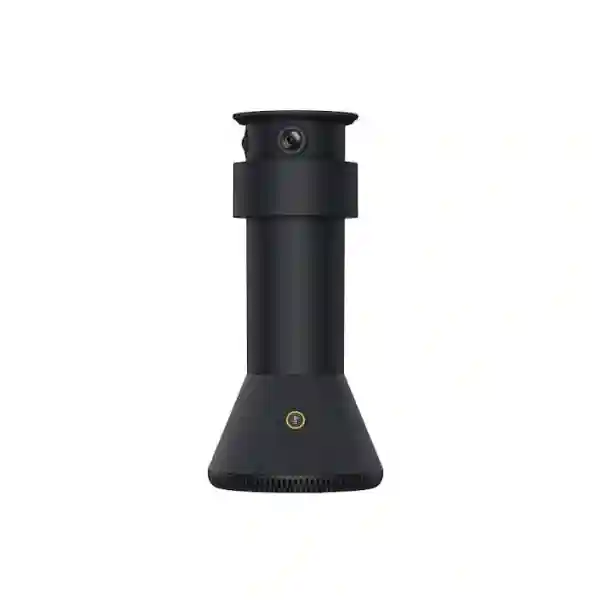
Yealink collaboration accessory for supported meeting-room systems
Yealink MTower Companion Camera
The Yealink MTower Companion Camera is designed to add a center-of-table visual and audio perspective to supported Yealink meeting-room systems. Instead of relying only on a front-of-room camera, MTower places three cameras closer to participants so supported IntelliVision workflows can select more natural, face-on views. For hybrid meetings, that can make side-seated participants easier for remote attendees to follow without asking people to turn toward a distant camera.
Yealink specifies three built-in 8MP cameras: one telephoto camera with an 84.4° horizontal field of view and two wide-angle cameras with 151° horizontal fields of view. MTower also integrates a 6+1 microphone array with beamforming, echo cancellation, intelligent noise cancellation and a stated 3-metre quality voice pickup range. A magnetic levitation privacy cover automatically shields all three lenses according to meeting status. The device uses a VCH RJ-45 connection and is supplied by Yealink with a tabletop fixed bracket and 7.5-metre CAT5e cable.
Quick product answer
MTower is a companion device, not a complete standalone conferencing system. Its value is strongest when the room already uses, or is being designed around, a supported Yealink host camera or Microsoft Teams Rooms solution.
Before buying, confirm the exact host device, firmware, room dimensions, table shape, display position and seating layout. Compatibility is version-sensitive and should be validated for the intended deployment.
Why businesses consider the Yealink MTower Companion Camera
A conventional meeting-room camera normally sees the room from the display wall. That viewpoint is simple and familiar, but in a long or medium-sized meeting room the people seated down the sides of a table can appear in profile, become partially blocked by colleagues, or be captured at a less natural angle. MTower is intended to address that visual limitation by introducing a center-view camera position closer to the participants. In supported Yealink configurations, the room system can combine views from MTower and the host camera and choose a better portrait perspective for the person being shown remotely.
This is not merely a resolution upgrade. The purchasing question is whether the additional viewpoint improves the meeting experience for the actual seating geometry. A room with a compact square table, a large U-shaped table, or a narrow executive table can behave very differently. Yealink specifically recommends rectangular tables for MTower deployment and notes that excessively wide layouts such as U-shaped tables are not recommended. The physical relationship among the MTower, display, host camera and central seating position also matters, which is why MTower should be treated as part of a room design rather than as an isolated USB webcam.
For organizations in Tanzania planning boardrooms, management rooms, training rooms or customer-facing collaboration spaces, the useful approach is to evaluate the entire room: platform, host system, camera eye line, microphone strategy, lighting, acoustics, network quality, display size, cable routes and support model. FourTeck Tanzania can use those inputs to help determine whether MTower is appropriate and what surrounding components should be included in the quotation.
Triple 8MP imaging
One telephoto and two wide-angle cameras provide multiple tabletop perspectives. Yealink lists 84.4° HFOV for the telephoto camera and 151° HFOV for each wide-angle camera.
IntelliVision workflow
With supported Yealink room cameras, IntelliVision can select a more favorable frontal portrait view instead of relying only on a fixed front-of-room perspective.
6+1 microphone array
Beamforming microphones support sound-source positioning and a stated 3-metre quality pickup range, with echo cancellation and intelligent noise cancellation.
Automatic privacy cover
A magnetic levitation cover rises and lowers according to meeting status, covering the three camera lenses without conventional contact-based movement.
Verified MTower technical specifications
| Area | Yealink-published detail |
|---|---|
| Telephoto camera | 8MP Sony sensor; 93.5° DFOV, 84.4° HFOV, 53.1° VFOV; automatic privacy cover |
| Wide-angle cameras | Two 8MP Sony-sensor cameras; 182° DFOV, 151° HFOV, 81° VFOV; automatic privacy cover |
| Audio | Built-in 6+1 microphone beamforming array, echo canceller, intelligent noise cancellation, stated 3-metre quality voice pickup range |
| Controls and interface | 1 camera-mute control, 2 microphone-mute controls, 1 reset control and 1 VCH RJ-45 port |
| Dimensions and weight | Diameter 142.5 mm × height 303 mm; 1.23 kg |
| Package contents | MTower, tabletop fixed bracket and 7.5 m CAT5e cable |
Compatibility, supported features and firmware requirements can change by host product and software release. Confirm the intended room-system combination before ordering.
Compatibility and deployment planning
Current Yealink support documentation shows MTower working with selected Yealink systems and cameras rather than functioning as an independent endpoint. Yealink documents IntelliVision with SmartVision 40, and also provides support guidance for MeetingBar A40 and MeetingBar A50 combinations. Recent MeetingBoard Pro Windows release documentation also lists MTower accessory support for specific MeetingBoard Pro workflows. Because those capabilities depend on the host platform, firmware and operating mode, a procurement specification should name the complete combination rather than saying only “MTower compatible.”
Physical placement is equally important. Yealink advises that the MTower primary camera faces the central position, that the host lens sits slightly higher than the MTower main camera so the center portrait is not obstructed, and that the host lens remain close to the room centerline. After commissioning, the tabletop unit should not be casually moved because that can affect portrait matching. These details matter in rooms where tables are moved for training sessions or multipurpose events; a permanently defined meeting layout is generally easier to maintain.
When preparing a quotation, include the room dimensions, table dimensions and shape, number of seats, current Yealink system model, firmware status if known, display arrangement, desired tracking behavior and whether additional microphones are already installed. Yealink specifically notes that MTower with MeetingBar A40/A50 is not recommended with other expansion microphones, so an existing audio design should be reviewed rather than assumed compatible.
Related FourTeck Tanzania resources
Review the wider IT, telecom, conferencing, network and infrastructure portfolio that can support a complete meeting-room project.
FourTeck Tanzania services
Useful when MTower is part of a room assessment, installation, configuration or multi-system office project.
FourTeck Tanzania shop
Browse product options and related business technology categories for collaboration deployments.
About FourTeck Tanzania
Understand the broader FourTeck approach to integrated business technology planning and supply.
Contact FourTeck Tanzania
Send room size, seating, existing Yealink equipment and quantity for a compatibility-focused quotation discussion.
Yealink MTower Companion Camera Tanzania
Businesses evaluating the Yealink MTower Companion Camera in Tanzania are usually not looking for another ordinary webcam. The purchasing intent is more specific: improve participant framing in a meeting room where a single front-facing camera does not provide ideal views of everyone around the table. In boardrooms, management meeting rooms and hybrid collaboration spaces, people seated along the sides may be shown at an angle or partially obscured. MTower is designed to add a central tabletop perspective so a supported Yealink system can work with more useful views of participants.
For a Tanzania deployment, start with the room rather than with the accessory. Document the room length and width, table dimensions, table shape, seating capacity, display wall, existing Yealink host model and the meeting platform in use. Confirm whether the room is a fixed executive space or a multipurpose area where furniture moves frequently. MTower performs best as part of a deliberate layout, and Yealink’s own guidance emphasizes correct orientation and stable positioning. A customer should therefore avoid ordering the camera only from a model name without confirming how it will sit relative to the main camera and participants.
Network and cable planning also deserves attention. MTower uses a VCH RJ-45 interface and the standard package includes a 7.5-metre CAT5e cable. That does not mean any Ethernet outlet is an interchangeable connection point; the accessory should be wired according to the supported Yealink room architecture. The cable route should be safe around the meeting table, especially where floor boxes, cable trays or furniture grommets are available. Power, display cabling, room-controller placement and the host system should be planned together so the finished room remains clean and serviceable.
When requesting a Yealink MTower quote in Tanzania, provide the quantity of rooms, current room system, desired meeting platform, seat count, room and table dimensions, whether users experience profile-view problems today, and whether any expansion microphones are already installed. This information helps distinguish between a straightforward accessory requirement and a broader redesign. FourTeck can also coordinate related networking, display and room infrastructure through its Tanzania business technology portfolio.
Yealink MTower Companion Camera Dar es Salaam
Organizations searching for the Yealink MTower Companion Camera in Dar es Salaam often need a collaboration upgrade for headquarters, professional-service offices, hospitality administration, financial teams, project offices or executive meeting environments. The main benefit to investigate is not simply “4K video,” because many room cameras already offer high resolution. The distinctive reason to consider MTower is its center-view perspective and supported intelligent selection of more natural participant angles. In a long conference table layout, that can improve the way colleagues and clients appear to people joining remotely.
A Dar es Salaam project should begin by checking the installed Yealink environment. If the room already has a supported MeetingBar or SmartVision-based configuration, firmware and feature compatibility need to be confirmed before ordering. If the room is new, it may be more efficient to specify the complete Microsoft Teams Rooms or meeting-room solution at one time, including host camera, compute or meeting bar, controller, display arrangement and MTower. That reduces the risk of buying a premium companion camera that cannot deliver its intended IntelliVision workflow with the selected host.
Meeting quality also depends on the environment around the camera. Strong backlighting, reflective glass, noisy air conditioning, table reflections, excessive distance and poorly positioned displays can undermine the perceived quality of a collaboration system. The 6+1 microphone array in MTower provides a stated three-metre quality pickup range, but room acoustics and the host audio strategy still matter. If the room already has additional microphones, their compatibility should be reviewed, particularly for configurations where Yealink advises against pairing MTower with other expansion microphones.
For procurement in Dar es Salaam, send a clear bill-of-requirement: number of rooms, number of MTower units, host device model, room dimensions, table shape, expected participant count and installation expectations. FourTeck’s verified Tanzania contact page can be used to submit those details for pricing and suitability discussion. The objective should be a room that is easy to join, easy to understand remotely and maintainable after deployment.
Yealink MTower Companion Camera Mwanza
For buyers in Mwanza, the Yealink MTower Companion Camera can be relevant where regional management, distributed teams, suppliers or customers regularly connect through hybrid meetings. A central camera perspective can be especially useful when the local room hosts several participants while remote attendees join from another city or country. Instead of seeing side profiles from a camera mounted only above the display, supported IntelliVision workflows can use MTower’s additional viewpoints to present a more direct view of people seated around the table.
The most important buying step is to confirm the room topology. Measure the distance from the display to the table, identify the table center, record the seating arrangement and establish where the host camera is mounted. Yealink recommends rectangular tables and provides alignment guidance because participant matching depends on the relationship between the front camera and MTower. A movable table layout, unusually wide table or off-center display may require a different camera strategy. Sending a simple room sketch with dimensions can therefore be more valuable than sending only a product code.
Mwanza organizations should also think about continuity of the whole meeting service. Camera quality cannot compensate for unstable internet, congested Wi-Fi or inadequate room audio. Where possible, meeting-room endpoints should use dependable wired network paths, properly managed switching and a stable internet connection. The local IT team should know which cables belong to the room system and should document firmware and device relationships so troubleshooting is straightforward. This is particularly important with intelligent room accessories whose features may depend on coordinated software versions.
A useful quotation request for Mwanza includes the collaboration platform, current Yealink system, number of seats, table geometry, display size, network availability and whether installation support is required. If the project also needs switching, wireless coverage or displays, those can be assessed as part of a broader meeting-room design instead of being quoted as unrelated items. The aim is to create a consistent participant experience rather than simply add another camera to the table.
Yealink MTower Companion Camera Arusha
In Arusha, demand for the Yealink MTower Companion Camera can come from organizations that hold frequent cross-border, tourism-sector, development, education, consulting or corporate meetings. The accessory is most relevant where several people sit around a fixed conference table and remote participants need a clearer sense of who is speaking. The center-view design places imaging closer to the group, while the three-camera arrangement gives the supported room system additional angles from which to create a more natural portrait view.
Before procurement, determine whether the room actually benefits from MTower. A small huddle room with only two or three seats may already be served well by a compact all-in-one video bar. A larger executive room with side seating and recurring hybrid meetings is more likely to justify a companion camera. The business case is strongest where users routinely complain that remote colleagues cannot see side-seated participants clearly, or where executives must turn toward the display camera during discussion. MTower is intended to reduce that compromise when used with supported Yealink equipment.
Deployment should preserve the intended geometry. Yealink advises orienting the primary MTower camera toward the central position, keeping the host camera slightly higher and avoiding large left-right offsets between host lens and room center. Those are not decorative recommendations; they influence how participant portraits are matched. Cable routing should also be finalized so staff do not move the unit every time the room is cleaned or furniture is rearranged. Where the table contains a cable box, include the MTower path in the furniture and AV plan.
For Arusha quotation planning, send the room layout, desired platform, host system model, quantity and intended meeting scenarios. FourTeck can relate the camera requirement to Tanzania technology services when installation, integration or a wider room upgrade is needed. A compatibility-led approach is preferable to purchasing an accessory first and discovering later that the room system or firmware needs additional changes.
Yealink MTower Companion Camera Dodoma
For organizations in Dodoma, the Yealink MTower Companion Camera can support formal hybrid meetings where participants sit around a fixed table and remote attendees need consistent visibility. Government-facing organizations, associations, professional offices, enterprises and distributed project teams may all value meeting spaces where people can speak naturally rather than turning toward a front-mounted camera. MTower’s role is to provide an additional tabletop viewpoint that supported Yealink intelligence can combine with the main room camera.
Specification work should avoid treating MTower as a standalone conferencing endpoint. It does not replace the complete room system, controller, display or host camera. The project must identify the supported Yealink architecture first. Depending on the selected host device, certain tracking modes and firmware levels are required for IntelliVision features. Procurement documents should therefore list the host model and software requirements so that installers and IT staff know which combination is being delivered.
The physical room should be reviewed as carefully as the device list. Rectangular tables are recommended by Yealink, and the front camera should be positioned in close relationship to the MTower centerline. In formal rooms with large furniture, check that the tabletop camera does not block sightlines to the display or become hidden by monitors, microphones, decorative items or high-backed seating. The 303 mm height and 142.5 mm diameter should be considered in the tabletop plan. The magnetic privacy cover provides a visible privacy behavior for the lenses when the camera is not active.
A practical Dodoma RFQ should state whether the requirement is supply only, installation, commissioning or a complete conferencing refresh. Include the number of rooms, current room system, seat count, table dimensions, display setup, network connection and any existing audio accessories. FourTeck’s Tanzania product shop and collaboration portfolio can be considered alongside the accessory when other meeting-room components are required.
Yealink MTower Companion Camera UAE
In the UAE, Yealink MTower projects frequently fit executive boardrooms, regional headquarters and Microsoft Teams Rooms deployments where users expect premium framing without manual camera control. The practical case for MTower is strongest in rooms with long tables and participants distributed down both sides. Adding a center-view perspective gives a compatible Yealink room system more visual information and can improve the frontal representation of speakers compared with a single display-mounted camera.
UAE buyers should request a complete compatibility statement in the quotation. Current Yealink support material documents MTower with selected systems including SmartVision 40, MeetingBar A40/A50 and supported MeetingBoard Pro workflows, but available modes and firmware requirements differ. An integrator should validate the specific host model, firmware branch and tracking mode planned for the room. If a customer is standardizing multiple boardrooms, record these versions as part of the room standard so future replacements and support remain consistent.
AV planning in UAE offices also needs to account for interior design. Premium conference tables may have integrated cable modules, stone or solid surfaces, concealed floor boxes and strict visual requirements. MTower’s VCH cabling should be routed without creating trip hazards or loose leads. Display height and camera position should be coordinated so the host lens remains slightly above the MTower main camera where recommended. If the room includes additional microphones, DSP or installed audio, confirm how the planned audio architecture interacts with the MTower microphone array rather than assuming every accessory should remain active.
For UAE regional sourcing or multi-office projects, FourTeck’s UAE technology solutions can complement the Tanzania project discussion. Buyers should submit room counts, host systems, seating layouts, preferred deployment dates and whether all sites must use one standardized configuration. Consistency across sites can simplify user experience, support documentation and spare planning.
Yealink MTower Companion Camera Uganda
Organizations sourcing the Yealink MTower Companion Camera for Uganda should first identify the meeting rooms where the center-view concept provides a measurable improvement. It is not necessary for every collaboration space. Small rooms with a few seats may work well with a single front camera, while medium executive rooms and boardrooms with long tables are more likely to benefit from a tabletop perspective. The accessory should be matched to the use case instead of added to every bill of materials automatically.
A Uganda deployment can also be evaluated as part of a regional collaboration standard. If the same organization has offices in Tanzania, Kenya or the UAE, using consistent Yealink room architectures can reduce training differences and simplify support. Standardization should still allow room-size variation: one room may need only a MeetingBar, while another may justify MTower to improve participant views. The standard should define approved host models, firmware policy, cabling, display sizes, controller placement and commissioning tests.
For the camera itself, verified specifications include three 8MP cameras, a 6+1 beamforming microphone array and a magnetic levitation privacy cover. The package includes a fixed tabletop bracket and 7.5-metre CAT5e cable. These facts are useful for physical planning, but buyers should not infer unsupported features such as universal USB operation or independent Teams certification. MTower is best understood as a Yealink room accessory whose intelligent functions rely on the compatible host system.
Uganda procurement teams can use FourTeck Uganda for regional coordination while keeping the Tanzania room standard aligned where required. Provide a room list, quantities, existing equipment, site locations and whether installation or remote commissioning support is needed. This makes it easier to build a project quote rather than a disconnected accessory price list.
Yealink MTower Companion Camera Kampala
Kampala businesses considering MTower are often managing collaboration between headquarters, branches and international partners. In a busy boardroom, a camera mounted only near the display may capture the nearest person well but show side participants at progressively less direct angles. MTower provides a different perspective from within the seating area. When supported IntelliVision features are available, the system can use that additional viewpoint to display a more favorable portrait of the active participant.
The decision should be based on meeting behavior. If most calls involve one presenter facing the display, a traditional front camera may already be sufficient. If meetings are conversational, with many people speaking from both sides of a table, the center-view approach has a stronger rationale. During a room assessment, note where participants normally sit, whether chairs extend beyond the camera’s useful angles, and whether the table is rectangular as recommended. Consider whether laptops, monitors or tabletop equipment could obstruct MTower.
Kampala IT teams should also plan firmware ownership. Intelligent meeting-room features evolve over time, and Yealink support information ties some MTower capabilities to minimum firmware versions on host devices. The organization should decide who owns room-system updates, how changes are tested and how configuration is documented. This is especially important when multiple rooms need the same behavior. Updating one component without understanding accessory requirements can create avoidable support issues.
When requesting pricing in Kampala, include the exact Yealink host system, current firmware if known, number of rooms, table and room dimensions, preferred collaboration platform and installation scope. Ask for the quotation to separate core room components from optional accessories so procurement can understand what is required for the intended experience. A well-defined request produces a more useful commercial comparison than asking only for the lowest MTower unit price.
Yealink MTower Companion Camera Arua
In Arua, the Yealink MTower Companion Camera may be relevant for regional offices, development organizations, education and project teams that depend on remote meetings with colleagues in other cities or countries. The accessory can improve the visual experience when a local room contains several people seated around a conference table. Instead of asking everyone to face the display camera, a supported Yealink system can use the MTower center perspective as part of an intelligent framing workflow.
The room’s connectivity should be assessed at the same time. An intelligent camera can produce excellent local images, but cloud meeting quality still depends on stable bandwidth, low packet loss and a reliable network path. For offices where WAN links are constrained, prioritize consistent connectivity and sensible video policies before investing only in camera upgrades. Where wired Ethernet is available for the room system, it can provide a predictable path compared with congested general-purpose Wi-Fi, although the exact network design depends on the installed collaboration platform.
Physical deployment deserves simple documentation. Record the position of the MTower, host camera, display and table edge in the handover notes. Photograph the approved setup after commissioning. This helps prevent the device from being relocated during cleaning or room rearrangement, which Yealink advises against once placement is finalized. The fixed tabletop bracket supplied with the product should be used according to the vendor instructions and the cable should be routed where it cannot be damaged by chairs or foot traffic.
Arua buyers should provide enough information for compatibility validation: host device, room size, participant count, current microphone setup and expected platform. If the room is being built from scratch, ask for a complete room-system recommendation instead of buying MTower first. The center-view accessory has the greatest value when every surrounding element has been chosen to support the intended collaboration workflow.
Yealink MTower Companion Camera Mbarara
For Mbarara organizations, MTower can be evaluated as a meeting-quality enhancement for fixed rooms where multiple local participants interact with remote teams. The product’s three-camera arrangement and center placement make it fundamentally different from a conventional front-of-room PTZ camera. Rather than trying to solve every angle from one location, the room system gains a second perspective closer to the participants, which can help supported intelligent framing produce more natural face-on views.
The technical specifications are straightforward, but successful deployment depends on context. The telephoto camera uses an 8MP Sony sensor and 84.4° horizontal field of view, while the wide cameras use 8MP Sony sensors with 151° horizontal fields of view. The integrated microphone array supports beamforming and a stated three-metre quality pickup range. Buyers should treat these specifications as components of the Yealink solution rather than as proof that MTower alone can serve every room size or platform.
In a procurement review, compare two scenarios: retaining the existing front camera without MTower, and adding MTower with the required compatible host software. Consider user experience, installation effort, room stability, support complexity and budget. If participants already sit close to a wide-angle camera and appear naturally framed, the incremental value may be limited. If profile views and occlusion are consistent problems, the center-view accessory may provide a meaningful improvement.
Mbarara quotations should therefore include a short problem statement, not only quantities. Explain what remote participants struggle to see or hear today, and identify the current room system. This gives the supplier enough context to validate whether MTower is the right accessory or whether another camera, microphone or room-layout change is more appropriate. Procurement based on the problem is more reliable than selecting features in isolation.
Yealink MTower Companion Camera Gulu
In Gulu, hybrid collaboration can connect local teams with national offices, partners, service providers and international stakeholders. Where meetings regularly include a group seated around one table, MTower offers a specialized approach to participant visibility. The device does not simply zoom a front camera closer; it introduces cameras within the room so the compatible Yealink system can choose among different participant perspectives.
Room suitability should be checked before price becomes the main discussion. Rectangular tables are recommended, and the host camera should remain carefully aligned with the MTower. If the room is frequently converted between classroom, workshop and boardroom layouts, a fixed center-view system may require more operational discipline. Staff should know that moving the table unit after calibration can affect the intended matching behavior. A short room-use policy can be useful in shared facilities.
The privacy design may also matter to organizations with formal meeting policies. MTower uses a magnetic levitation lens cover that can cover all three cameras according to meeting status. This gives occupants a visible physical indication rather than relying only on a software icon. Privacy requirements for microphones, recording and the meeting platform remain separate considerations and should be governed by organizational policy.
For a Gulu RFQ, specify whether the requirement is an upgrade to an existing Teams Room or a new installation. Include existing Yealink hardware, number of local participants, room and table measurements and desired installation scope. If the team lacks exact model details, photographs of the current front camera, controller and room can help identify what must be verified. The quotation should clearly state any required host-system or firmware dependencies so that procurement understands the complete cost of achieving the intended feature set.
Yealink MTower Companion Camera Kenya
Kenya-based organizations evaluating Yealink MTower often have mature hybrid-meeting requirements across Nairobi headquarters, branch offices and regional teams. The product is most useful as part of a standardized Yealink room architecture where the host device is already known. For multi-country businesses, it can be sensible to define a premium boardroom standard that includes MTower only for rooms where table geometry and participant count justify the extra camera perspective.
When comparing suppliers, ask them to identify the exact supported host combination rather than simply listing MTower specifications. Yealink documentation ties IntelliVision behavior to specific devices and modes. A strong quotation should describe the host camera, controller, compute or meeting bar, software requirements and included cabling. It should also state what is outside the scope, such as displays, mounting, network remediation or room acoustic work, so commercial comparisons remain fair.
Installation quality affects user adoption. The unit should be centered and oriented according to Yealink guidance, the host camera should be positioned correctly, and cable routes should preserve a clean tabletop. Commissioning should test real seated participants, not only an empty room. Ask several people to sit in typical positions and confirm that the selected views remain natural during discussion. This user-centered test is more meaningful than checking only that the device powers on.
Regional buyers can coordinate Kenya requirements through FourTeck Kenya while aligning specifications with Tanzania offices. Include site count, room types, existing Yealink inventory, preferred support model and rollout sequence. A standardized deployment record can make future expansion easier because every site knows the approved room configurations and accessory relationships.
Yealink MTower Companion Camera Kuwait
For Kuwait offices and regional organizations, the Yealink MTower Companion Camera can serve executive and customer-facing meeting rooms where visual presentation matters. Long boardroom tables are a common challenge for a single camera near the display because people seated to the side naturally face one another rather than the lens. MTower’s tabletop position gives the system access to alternative viewpoints and can support a more direct portrait of participants when paired with the appropriate Yealink host.
The project should account for the room finish. In formal meeting rooms, cable visibility and device placement can affect acceptance as much as technical capability. The supplied 7.5-metre CAT5e cable needs an intentional route from the table to the Yealink room infrastructure. If the conference table is fixed, plan conduits, grommets or floor boxes before furniture installation. If the table already exists, assess whether cabling can be added without creating exposed runs.
IT teams should define how firmware is maintained and who validates feature behavior after upgrades. Yealink’s support material demonstrates that accessory compatibility evolves with software releases. Keeping the room components on supported versions and documenting those versions reduces uncertainty during troubleshooting. If the organization has a managed AV partner, MTower should be included in the asset and update register alongside the host camera, controller and compute platform.
For Kuwait regional requirements, FourTeck Kuwait can support country-specific coordination while the broader room architecture remains aligned with Tanzania standards. Procurement should send the number of rooms, dimensions, seating, host devices, expected rollout date and required services. This makes it possible to distinguish hardware supply from a complete installed room solution.
Yealink MTower Companion Camera Ghana
Ghanaian businesses considering the Yealink MTower Companion Camera may be improving regional collaboration, executive governance meetings or customer interactions where several people share one conference room. The value proposition is clearest when remote attendees need better visibility of participants seated away from the room display. MTower adds a center-of-table camera position that a supported Yealink room system can use to create a more natural view of speakers.
A product comparison should separate imaging specifications from system behavior. Three 8MP cameras provide the raw viewpoints, but IntelliVision behavior depends on the compatible host and operating mode. The microphone array adds beamforming and sound-source positioning, yet that does not automatically replace every room’s audio design. A wide or acoustically difficult space may still require a different audio architecture. Procurement teams should therefore avoid treating the MTower specification sheet as a complete room design.
For sites with limited internal AV expertise, create a simple commissioning checklist. Confirm cable connections, host firmware, camera orientation, privacy-cover behavior, mute controls, participant framing, microphone pickup and a real Microsoft Teams test call if that is the target platform. Record the final configuration and take reference photographs. This makes future support easier and helps local IT teams restore the room if equipment is moved.
Ghana project teams can reference FourTeck Ghana for regional technology coordination. For cross-border organizations, align naming, firmware policy and room standards with Tanzania so users encounter similar controls and behaviors. The goal of standardization is not to force identical equipment into every room, but to create predictable room categories with known support procedures.
Yealink MTower Companion Camera Nigeria
In Nigeria, enterprise meeting environments often span large headquarters, regional branches and executive rooms with many local participants. The Yealink MTower Companion Camera can be evaluated for spaces where conventional front-camera framing leaves side-seated participants at poor angles. Its center-view design and triple-camera arrangement create additional visual perspectives for supported Yealink intelligence to use during a meeting.
Large organizations should decide which room class receives MTower. A useful standard might define small rooms around an all-in-one video bar, medium rooms around a more expandable room system, and selected boardrooms around the same host system plus MTower. This avoids over-specifying low-use spaces while preserving a premium experience in rooms where executive collaboration and external meetings are frequent. Room standards should include approved displays, controllers, cables and mounting positions as well as cameras.
Power and network resilience should be addressed as part of the wider room. The accessory’s intelligent features are valuable only when the host room system and cloud meeting platform remain available. UPS-backed switching, stable internet, appropriate firewall rules and documented network paths can contribute more to meeting continuity than any single camera feature. These infrastructure items should be considered during project design even though they are not part of the MTower product itself.
Nigeria regional coordination can be handled through FourTeck Nigeria. For quotation accuracy, provide room counts, city/site list, host models, collaboration platform, seat capacities and whether the requirement includes deployment services. Ask for clear model-level compatibility notes and avoid quotations that imply universal operation without identifying the supported Yealink room architecture.
Yealink MTower Companion Camera Seychelles
For organizations in Seychelles, hybrid meeting rooms may support hospitality groups, financial services, public-sector collaboration, professional firms and multi-island operations. The Yealink MTower Companion Camera can be useful where a central executive room hosts several people while partners or colleagues join remotely. Its tabletop camera position is designed to improve the representation of people seated around the table, especially when a single display-mounted camera captures them mainly in profile.
Because island procurement can make replacement cycles and logistics more important, compatibility should be confirmed carefully before equipment is ordered. Specify the exact Yealink host system and ensure the required firmware path is known. Include essential room-system accessories in the same procurement plan when practical so installation is not delayed by a missing controller, cable or mounting component. MTower’s standard package includes the camera, tabletop fixed bracket and 7.5-metre CAT5e cable, but the complete room will contain additional components.
Room preparation should focus on repeatability. Mark the intended tabletop location, keep the host camera aligned, protect the cable route and document the finished setup. If hotel or shared meeting spaces frequently reconfigure furniture, determine whether the room can preserve the required MTower geometry between events. A device that is continually moved is less suitable for a layout-dependent intelligent framing design than one installed in a fixed executive room.
For Seychelles quotations, include the delivery destination, number of rooms, room sizes, host Yealink devices and any requirement for installation guidance. Cross-border sourcing should also identify who will own commissioning and post-deployment support. The best result is a room that local staff can operate and maintain confidently, with documented settings and a clear path for firmware and compatibility questions.
Buying and quotation checklist
Provide the exact Yealink MeetingBar, SmartVision, MeetingBoard or other room-system model. Compatibility should be validated at model and firmware level.
Include room length, width, table dimensions, shape and approximate distance to the display. Rectangular tables are preferred in Yealink deployment guidance.
State the normal seat count and where people sit during typical meetings. Note any current problems with profile views or blocked participants.
Mention existing expansion microphones, DSP or ceiling audio. Do not assume every audio accessory should remain connected with MTower.
Clarify whether you need hardware supply, installation, configuration, commissioning, network work, display mounting or a complete meeting-room refresh.
Ask the quotation to show required host dependencies and optional items separately, so procurement can understand the full solution.
Frequently asked questions about Yealink MTower
Is Yealink MTower a standalone video conferencing camera?
MTower is positioned by Yealink as a center-view intelligent companion camera. Its intelligent meeting experience depends on supported Yealink room systems and host cameras. It should therefore be specified as part of a compatible room architecture rather than treated as a generic standalone webcam.
How many cameras are built into MTower?
Yealink specifies three 8MP cameras: one telephoto camera and two wide-angle cameras. The telephoto camera has an 84.4° horizontal field of view, while the wide-angle cameras each have a 151° horizontal field of view.
Does MTower include microphones?
Yes. Yealink lists a 6+1 microphone beamforming array with echo cancellation, intelligent noise cancellation and a stated three-metre quality voice pickup range. The correct overall microphone strategy still depends on the room and host configuration.
What is IntelliVision?
In supported Yealink deployments, IntelliVision uses views from MTower and the host camera to select a more suitable frontal portrait perspective of meeting participants. Available behavior depends on the host model, tracking mode and firmware.
Can MTower be used with MeetingBar A40 or A50?
Yealink documents IntelliVision support with MeetingBar A40 and A50 under specific firmware requirements and supported camera modes. The exact deployed firmware should be checked before procurement or commissioning.
What table shape is recommended?
Yealink recommends rectangular meeting tables for MTower deployment and notes that tables that are too wide, such as U-shaped layouts, are not recommended. Final suitability depends on the room geometry and host camera position.
Does MTower have a physical privacy feature?
Yes. MTower uses a magnetic levitation privacy cover designed to rise and lower with meeting status and cover all three camera lenses. This provides a visible physical lens-cover behavior.
What should I send for a Yealink MTower quotation?
Send the quantity, destination, exact host room-system model, collaboration platform, room and table dimensions, seat count, existing microphone accessories and whether you need supply only or installation and commissioning.
Decision recap: when MTower is a strong fit
Consider Yealink MTower when a supported Yealink meeting room has several participants around a fixed rectangular table, side-profile views are a recurring problem, the room layout can preserve correct tabletop placement, and the organization wants intelligent perspective selection rather than manual camera control. It is particularly relevant to medium and executive rooms where the meeting is conversational and people naturally face one another.
Consider a simpler camera approach when the room is very small, the seating layout changes constantly, the host system is not compatible, or the existing front camera already gives every participant a natural view. The right decision is based on the complete room experience, not on specification count.
Plan a Yealink MTower room with FourTeck Tanzania
For a useful consultation, send a room sketch or measurements, the exact Yealink room-system model, typical participant count, collaboration platform and photographs of the front display/camera area if an existing room is being upgraded. FourTeck can then discuss whether MTower is appropriate, which compatibility points need confirmation and what additional room components may be required.
The same project can also be coordinated with related infrastructure such as displays, switching, wireless connectivity, room cabling and broader collaboration equipment. That integrated view helps avoid a situation where the camera specification is correct but the network, display placement or room layout prevents the expected user experience.




Reviews
There are no reviews yet.