
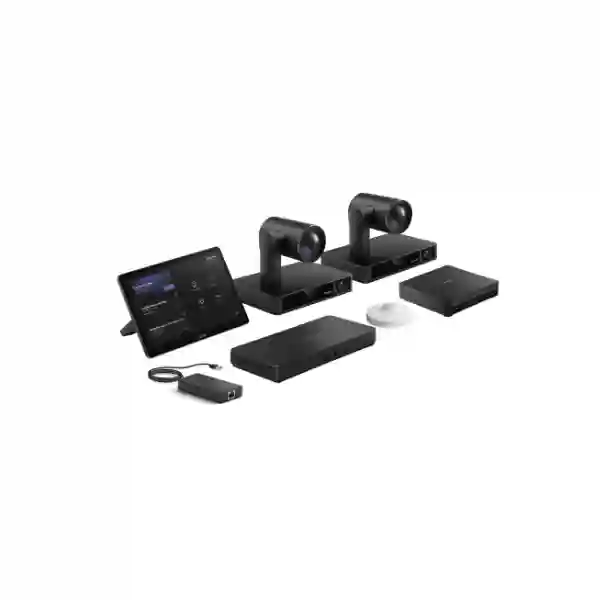
Yealink MVC S90 Teams Rooms System
The Yealink MVC S90 Teams Rooms System is designed for organisations that want a professional Microsoft Teams Rooms experience in boardrooms, large conference rooms, training rooms and other complex collaboration spaces. The platform combines intelligent multi-camera video, dedicated Microsoft Teams Rooms computing, a touch-based room controller and flexible professional audio integration so participants can join, present and communicate without turning every meeting into an AV troubleshooting exercise.
For buyers in Tanzania, the important question is not simply whether the MVC S90 can produce high-quality video. A successful deployment also depends on room geometry, seating layout, microphone coverage, display placement, network quality, internet capacity, cable routes, power, acoustic conditions and the way staff actually use Microsoft Teams. FourTeck Tanzania can help align those dependencies before a quotation is finalised so the room is designed as a complete collaboration environment rather than a collection of unrelated devices.
A dedicated Microsoft Teams Rooms on Windows environment helps organisations standardise how scheduled and ad-hoc meetings are started, controlled and managed.
The MVC S90 uses UVC86 intelligent cameras and AVHub-based processing to support flexible coverage for large tables, training spaces and rooms where one viewing angle is not enough.
The room can be designed around compatible Yealink microphones, DSP and loudspeakers or, where supported, integrated professional third-party audio systems.
The architecture is suitable for organisations that need more than a basic video bar and want camera positioning, audio, displays and room control designed around the space.
What is the Yealink MVC S90?
The Yealink MVC S90 is part of Yealink’s Microsoft Teams Rooms on Windows portfolio and is positioned for boardrooms and large to extra-large collaboration environments. Current Yealink product information describes a solution built around multiple UVC86 intelligent PTZ cameras, the MTouch Plus touch console, AVHub audio-video processing and the newer MCore 4 computing platform. Yealink also documents RoomSensor and BYOD-related options within the S90 ecosystem. Exact bundle contents can vary by SKU, market and revision, so procurement teams should confirm the exact package code and included accessories in the quotation rather than assuming every regional bundle is identical.
The UVC86 is a dual-eye intelligent camera with a 4K sensor, 12x optical zoom and intelligent functions such as auto framing, speaker tracking and presenter tracking. In the S90 design, multiple cameras can be used to cover different areas of a long table, stage, teaching area or training room. This is a major difference from simple single-camera conference-room systems: the solution can be planned around where people sit and move, not merely around the front wall.
The MTouch Plus provides an 11.6-inch touch interface for room control and content workflows. The MCore 4 platform uses Intel Core Ultra 5 processing with an integrated NPU in current Yealink documentation, providing the computing foundation for newer intelligent collaboration experiences. AVHub coordinates multi-camera and professional AV integration. Together, these components make the MVC S90 more suitable for complex rooms where camera coverage, audio zoning, screen layout and room usability all need to work as one system.
Key verified capabilities
UVC86 intelligent video
Yealink specifies a 4K sensor, 12x optical zoom plus digital zoom, a panoramic lens and telephoto lens, along with auto framing, speaker tracking, presenter tracking, Multi-Focus and preset-position support. These functions are useful when remote attendees need both room context and closer participant views.
Multi-camera architecture
Yealink documents AVHub-based multi-camera operation for the MVC S90, with support for expanded camera configurations. This allows integrators to plan multiple viewpoints for large spaces rather than depending on a single PTZ position for every meeting mode.
MCore 4 computing
Current Yealink MVC S90 information lists MCore 4 with Intel Core Ultra 5 processing, 16 GB DDR5 memory, 256 GB SSD storage, HDMI outputs with CEC, HDMI input for content sharing, Bluetooth, Wi-Fi and multiple USB 3.0 interfaces.
MTouch Plus control
The 11.6-inch MTouch Plus provides a 1920 × 1080 touch interface and supports table or wall deployment. Yealink also documents wired content input through HDMI/USB-C and wireless sharing with supported accessories.
Room awareness
Yealink’s RoomSensor can detect occupancy and monitor environmental information such as temperature, humidity and light. In a managed meeting-room estate, sensor data can support a more responsive room experience and better operational visibility.
Flexible professional audio
Yealink positions the MVC S90 for flexible audio designs, including compatible table, wireless and ceiling audio options and professional DSP-based configurations. This matters because large rooms typically need audio to be engineered for the seating plan and room acoustics.
Why room design matters more than the box
The MVC S90 is a modular professional collaboration system. That modularity is valuable only when the components are placed and configured according to the room. Camera height changes sight lines. Display size changes viewing comfort. Microphone location changes speech intelligibility. Hard glass walls can increase reverberation. Long cable routes may affect how the table area and front-of-room equipment are connected. Network congestion can degrade a meeting even when every room device is functioning correctly.
FourTeck Tanzania therefore recommends beginning with a room plan: dimensions, seating positions, display wall, presenter area, ceiling height, microphone preference, existing AV equipment, Teams licensing model, network connection, internet service and any requirement for external BYOD meetings. That information makes the quotation more accurate and reduces changes after installation.
Compatibility, network and infrastructure planning
A Microsoft Teams Room needs dependable network access, name resolution, time services, Microsoft 365 connectivity and organisational policies that allow the room account and endpoint to operate correctly. The physical LAN should have sufficient capacity for sustained real-time traffic and should be designed so video meetings are not disrupted by avoidable local congestion. In offices where backups, large file transfers, CCTV traffic, guest Wi-Fi and Teams meetings all share the same infrastructure, VLAN design and quality-of-service planning may be useful parts of the deployment discussion.
The room also needs the right display interfaces, power outlets, mounting points and cable paths. A dual-display or multi-display boardroom requires more planning than a single-screen meeting room. If ceiling microphones, ceiling loudspeakers or a DSP are used, the ceiling construction, cable routes, maintenance access and acoustic behaviour should be considered. Where the customer already owns professional audio equipment, compatibility should be checked against Yealink’s supported integration information before the final bill of materials is approved.
For related infrastructure planning, FourTeck Tanzania’s technology services page explains how conferencing, networking, security and workplace systems can be coordinated. Buyers can also use the Tanzania business technology shop to review broader equipment categories that may be needed around the meeting room, such as displays, switches, wireless infrastructure and supporting hardware.
Yealink MVC S90 Tanzania
Organisations searching for the Yealink MVC S90 in Tanzania are usually planning more than a routine webcam purchase. The S90 belongs in meeting spaces where multiple participants, large tables, training activity or executive presentations require better visual coverage than a basic all-in-one video bar can provide. For a Tanzania deployment, the first stage should be to define the room geometry and business workflow. A boardroom used for management meetings may prioritise participant framing and a clean table. A training room may prioritise presenter tracking, content visibility and coverage of several seating rows. A council or committee space may need multiple camera angles so remote attendees can follow discussion naturally.
The procurement brief should include the number of rooms, room dimensions, approximate participant count, table shape, display quantity, preferred microphone style, existing audio equipment and whether the organisation already uses Microsoft Teams Rooms licensing. The precise MVC S90 bundle code should also be confirmed because Yealink has released different S90 package revisions over time, including generations based on MCore Pro and newer configurations built around MCore 4. A quotation should identify exactly which compute platform, cameras, controller, AVHub, sensor, sharing accessories and cables are included.
Tanzania projects should also consider practical infrastructure. A room may have excellent conferencing hardware but still deliver poor meetings if the internet connection is unstable, Wi-Fi is congested, the wired network has uplink bottlenecks, or power interruptions affect the room unexpectedly. Where the room is business-critical, procurement teams can discuss wired networking, UPS protection for relevant components, structured cabling and appropriate rack or cabinet organisation. The FourTeck Tanzania technology portfolio includes collaboration, network, Wi-Fi, display and infrastructure planning that can be considered together.
For buyers requesting a Yealink MVC S90 price in Tanzania, the most useful quotation is one that separates the core Teams Room system from optional audio, extra cameras, displays, mounting hardware, cabling, installation and configuration. This avoids comparing two proposals that appear to be for the same model but include very different room scopes. FourTeck can help create a requirement-led bill of materials so the customer understands what is included and what remains site-specific.
Yealink MVC S90 Teams Rooms System Dar es Salaam
Dar es Salaam organisations often use video conferencing to connect head offices with branches, regional management, suppliers, international partners and remote specialists. In this environment, the Yealink MVC S90 is most relevant to larger boardrooms and training spaces where meeting quality has a direct impact on decision-making. A long executive table can create a visual problem for a single camera: people near the camera appear large, participants at the far end appear small, and side discussions may be difficult for remote attendees to follow. The S90’s multi-camera architecture gives designers more flexibility to create usable views for those different positions.
A Dar es Salaam project should start with the room rather than the product list. Offices in commercial towers may have glass partitions, hard ceilings, central air-conditioning and restrictions on cable routes. A standalone corporate building may offer more freedom for ceiling microphones, loudspeakers and conduit. Hotels, conference venues and training centres can have changing furniture layouts that require different camera presets and microphone strategies. These conditions affect whether table microphones, wireless microphones, ceiling audio or a DSP-based system is the most practical companion to the MVC S90.
Connectivity planning is equally important. Teams Rooms traffic should use a stable business internet service and a dependable LAN. If the site also carries CCTV, guest wireless, cloud backups and VoIP, the network design should be reviewed for capacity and separation. FourTeck Tanzania’s services cover video conferencing, network switching, Wi-Fi and infrastructure planning, allowing the meeting room to be treated as part of the wider office technology environment.
When requesting an MVC S90 quotation for Dar es Salaam, share the room dimensions, photos or drawings, table shape, participant count, preferred screen sizes, platform requirements and any existing microphones, speakers or control equipment that should be retained. That information helps determine whether the standard camera arrangement is sufficient or whether additional AV design is justified. It also helps avoid ordering accessories that duplicate equipment already installed.
Yealink MVC S90 Teams Rooms System Mwanza
Businesses and institutions in Mwanza may use large meeting rooms for management coordination, training, regional operations, education, project reviews and communication with teams in other Tanzanian cities or outside the country. For these rooms, the MVC S90 can provide a structured Microsoft Teams Rooms experience instead of relying on a laptop connected temporarily to a camera and display. The benefit of a dedicated room system is repeatability: users should be able to enter the room, start the scheduled meeting, share content and control the meeting from the room interface without rebuilding the setup each time.
The multi-camera design is particularly useful when the room has depth or multiple participant zones. One UVC86 can cover a primary area while another angle can improve visibility of a presenter, far-end seating or a secondary discussion area. Camera positioning should be tested against real eye lines and display locations. Mounting both cameras simply because the package contains them is not enough; each camera should have a defined visual purpose. The same principle applies to audio. A microphone arrangement should be selected by pickup distance, room noise, table layout and acoustic conditions rather than by brand familiarity alone.
For Mwanza deployments, procurement teams should also consider how the room will be supported after installation. Administrators need clear documentation for device names, network addressing, Teams Room account details, display configuration, camera presets and any audio processor settings. Where remote support is planned, management access should be configured securely. Firmware and application updates should follow an agreed operational process so room reliability is not left to ad-hoc changes.
A quotation request should identify whether the project is a new room, an upgrade of an existing video conferencing system or a migration to Microsoft Teams Rooms. Existing screens, amplifiers, microphones, loudspeakers or control systems may influence the final architecture. FourTeck can assess those dependencies and build the MVC S90 scope around what the Mwanza site actually needs rather than automatically replacing every existing component.
Yealink MVC S90 Teams Rooms System Arusha
Arusha has a broad mix of corporate, hospitality, development, education and conference-oriented organisations, and those environments can place different demands on a meeting room. A hotel boardroom may need to support visiting organisations with different presentation devices. A headquarters meeting room may use only Microsoft Teams and prioritise security, consistency and central administration. A training facility may need presenter tracking and flexible seating. The Yealink MVC S90 is attractive in these scenarios because it provides a modular Teams Rooms foundation that can be designed around the room rather than forcing every space into an all-in-one appliance format.
For an Arusha boardroom, visual design should begin with participant positions and the main remote-view requirement. If the objective is to show individual speakers clearly, camera presets and intelligent tracking can be planned around the table. If the room is used for workshops, one camera may prioritise the presenter zone while another covers participants. If there are two displays, content and remote participants can be separated in a way that makes collaboration easier. The MTouch Plus controller can provide a consistent user interface at the table while the compute and AV components remain installed in more appropriate locations.
Audio requires equal attention. Rooms with glass, hard flooring or high ceilings can create reflections that reduce speech clarity. A ceiling microphone may keep the table clean but needs proper placement and acoustic evaluation. Table or wireless microphones can be effective in other layouts. Professional DSP and loudspeaker designs may be appropriate for larger spaces. The right approach depends on the acoustic environment and the customer’s expectations for speech reinforcement as well as conferencing.
When asking for an MVC S90 proposal in Arusha, provide the room dimensions, ceiling type, furniture plan, expected meeting style and preferred content-sharing methods. If guests frequently need to use other conferencing applications from their own laptops, BYOD requirements should be raised during design rather than after deployment. FourTeck can then distinguish between the native Teams workflow and any additional guest-device requirement in the final scope.
Yealink MVC S90 Teams Rooms System Dodoma
Organisations in Dodoma that conduct policy meetings, administrative reviews, training sessions, management briefings or multi-site coordination can benefit from a dedicated room system when remote participation is frequent. The Yealink MVC S90 is designed for larger spaces where simple camera coverage can become a limitation. Its architecture allows intelligent UVC86 cameras to be positioned for different viewpoints, with AVHub coordinating the wider room design and MTouch Plus providing a familiar touch-control point for the user.
For a formal meeting room, the technology should be visually unobtrusive and operationally predictable. Cameras should not block displays or appear at awkward eye lines. Microphones should capture every expected seat without forcing participants to lean toward them. Loudspeaker output should be even across the room. Cables should be secured and documented. The room account, display behaviour and content-sharing method should be standardised so staff can start meetings without waiting for technical assistance. These details are often more important to day-to-day user satisfaction than headline specifications.
Dodoma procurement teams should request a proposal that identifies the exact MVC S90 bundle revision, additional audio equipment, display assumptions, mounting hardware, cable requirements and configuration scope. Microsoft licensing and room-account preparation should be discussed separately from hardware if they are managed by the customer’s internal IT team or Microsoft partner. If the room must integrate with existing audio or control infrastructure, compatibility should be confirmed against supported interfaces and vendor documentation before purchase.
FourTeck can also review the supporting environment. The FourTeck Tanzania shop covers network switches, wireless access points, conferencing equipment, displays and infrastructure categories that may form part of a larger room upgrade. This is useful when a project involves not only the Teams Room system but also network refresh, display replacement, structured cabling or UPS requirements.
Yealink MVC S90 Teams Rooms System UAE
For organisations operating between Tanzania and the UAE, standardising selected meeting-room platforms can simplify training, procurement and support. The Yealink MVC S90 is relevant where UAE offices have boardrooms, large training rooms or executive collaboration spaces that need multi-camera Microsoft Teams Rooms. A common room standard can help users move between offices without learning a completely different control workflow, while still allowing each room to use audio and display components that match its physical design.
A UAE installation may involve sophisticated fit-out requirements, integrated lighting, room control, multiple displays or existing professional audio systems. The MVC S90’s AV integration approach makes it suitable for conversations with AV designers because cameras, control and Teams computing can be planned as part of a broader room architecture. If the existing room has third-party DSP or ceiling audio, compatibility should be validated before reuse. If the room is a new fit-out, conduit, floor-box, rack, power and network requirements should be coordinated with the interior and MEP teams early enough to avoid visible retrofit cabling.
For customers with requirements in both markets, FourTeck’s regional network can support coordinated technology discussions. The FourTeck UAE technology site is relevant to UAE-based procurement and integration requirements, while the Tanzania site remains the reference for Tanzania projects. A shared bill-of-material framework can still be adapted for differences in room size, local availability and existing infrastructure.
When comparing UAE quotations, confirm whether displays, microphones, speakers, DSP, rack hardware, installation, programming, Teams Room account setup and end-user orientation are included. A lower equipment-only price may not represent the full installed-room cost. Equally, a larger proposal may include unnecessary items if the room already has usable AV infrastructure. The best commercial comparison is therefore based on a clearly defined scope and equivalent assumptions.
Yealink MVC S90 Teams Rooms System Uganda
Ugandan organisations planning large Microsoft Teams Rooms can use the MVC S90 as a modular base for executive boardrooms, training centres and multi-purpose collaboration spaces. The system is most valuable when room coverage is complex enough to justify multiple intelligent cameras or when the customer wants professional audio flexibility instead of being limited to the microphones built into a single video bar. The design can therefore be scaled to the room while preserving a consistent Teams Rooms user experience.
Before ordering, buyers should define whether the room is primarily for seated meetings, training, presentations or mixed use. A seated boardroom may benefit from camera positions that capture opposite ends of a table and intelligent switching between speakers. A training room may need a presenter zone, audience coverage and content sharing that remains visible while remote participants are displayed. A divisible room creates another layer of complexity because camera, microphone and display behaviour can change when partitions move. These are design questions that should be answered before quantities are fixed.
Network and power conditions should be reviewed as part of the room project. Microsoft Teams media requires a stable internet path, while the local network should avoid congestion and unreliable wireless dependencies for critical components. UPS protection may be considered for the computing, network and display equipment where continuity during short power events is important. If the site uses multiple VLANs or security zones, the room’s network placement and required cloud access should be documented.
FourTeck’s Uganda technology site is a relevant regional resource for organisations with deployment or procurement requirements in Uganda. Customers with offices in both Uganda and Tanzania can also standardise room naming, account configuration, device documentation and user guidance so cross-border support teams work with a more consistent operating model.
Yealink MVC S90 Teams Rooms System Kampala
Kampala headquarters and regional offices often need conference rooms that serve executive meetings, client presentations, project reviews and connections to international teams. In these rooms, the Yealink MVC S90 can provide more deliberate visual coverage than a single front-of-room camera. Dual UVC86 cameras in the solution can be assigned to different visual zones, and AVHub-based processing provides a path for broader multi-camera room design where required.
For an executive boardroom, camera placement should support natural eye contact with remote participants. If displays are mounted too high or the cameras are placed far above eye level, participants can appear to look away even when they are watching the screen. A better design places cameras and screens in relation to seating height, table depth and viewing distance. In long rooms, a secondary camera can help keep far-end participants large enough to be useful on remote screens. Presenter tracking can be valuable when the same room is used for management presentations or training.
Kampala installations may also need to coordinate with existing office networks and AV systems. If the meeting room shares switching with phones, access points, cameras and user devices, the network should be checked for uplink and PoE capacity, even if the MVC S90 itself does not rely on PoE for every component. Where wireless sharing is required, the organisation should also consider wireless policy, guest access and whether users frequently bring unmanaged devices into the room.
A strong quotation request includes photos of the front wall and table, room measurements, number of displays, participant count, microphone preference, existing amplifier or DSP details, and the Microsoft Teams licensing context. This allows the supplier to separate mandatory S90 components from accessories and room-specific integration. Customers can also reference FourTeck Uganda for wider Kampala and Uganda technology requirements.
Yealink MVC S90 Teams Rooms System Arua
For organisations in Arua, a professionally designed Teams Room can reduce the need for staff to travel simply to join recurring management, project or training meetings. The Yealink MVC S90 is suitable where the meeting space is large enough to need more than a compact video bar and where participant visibility must remain useful for remote attendees. Its intelligent cameras, dedicated room computing and touch controller create a more structured environment than temporary laptop-based conferencing.
Arua deployments should give particular attention to infrastructure readiness because a sophisticated conferencing system can only perform as well as the network and power environment supporting it. The room should have a stable wired network path where practical, reliable internet capacity for Teams meetings and properly protected power for critical components. If the site uses backup power or UPS systems, the meeting room can be included in continuity planning according to business importance. The objective is not to over-engineer the room, but to avoid predictable interruptions caused by basic infrastructure gaps.
The camera plan should be simple enough to support daily use. Two cameras do not automatically mean two equally useful views. One may be assigned to the main participant group and another to a presenter or secondary seating zone. Presets and intelligent tracking should be configured around real meeting behaviour. Audio should likewise be selected to cover the actual seats. If ceiling microphones are difficult to install or maintain, table-based or wireless options may be more practical depending on the room.
When requesting a quote, identify whether the Arua site has local technical staff, how often the room will be used, whether remote management is required and whether the organisation has a standard equipment policy across other branches. Standardising the MVC S90 configuration, user guide and documentation with other offices can make remote troubleshooting easier and reduce variation between sites.
Yealink MVC S90 Teams Rooms System Mbarara
Mbarara organisations that run regional operations, education, healthcare administration, commercial projects or distributed teams may use large meeting rooms for both local collaboration and remote participation. The Yealink MVC S90 supports this kind of multi-purpose space by combining a dedicated Microsoft Teams Rooms workflow with intelligent camera coverage and flexible audio design. It is particularly relevant when participants are spread across a long table or when meetings move between seated discussion and presentation modes.
The design process should separate what is required every day from what is only occasionally needed. A boardroom that holds ten executive participants most days but hosts twenty-five people for quarterly meetings may need camera and audio coverage that can handle the larger event without making normal meetings unnecessarily complex. Similarly, a training room may need presenter tracking only during workshops. The MVC S90’s modular approach allows the solution designer to define these operating modes and configure cameras, audio and displays accordingly.
For Mbarara sites, cable planning can have a major effect on installation quality. Long tables may need floor boxes or controlled cable routes. Ceiling microphones and loudspeakers require ceiling access. Cameras need stable mounting and unobstructed views. Display power and HDMI paths should be planned before finishing work is complete. If the room is being renovated, involving the AV requirements early can reduce visible surface cabling and avoid reopening walls or ceilings later.
Procurement teams should also confirm whether the quote includes only hardware or a complete deployment service. A complete scope may include installation, camera positioning, Teams Rooms configuration, audio tuning, display setup, content-sharing tests, network checks, documentation and user orientation. These services should be itemised so the customer can compare proposals on an equivalent basis and decide which activities will be handled internally.
Yealink MVC S90 Teams Rooms System Gulu
In Gulu, large collaboration rooms may support NGOs, institutions, regional businesses, education, government-related administration or project teams that frequently connect to remote colleagues. A dedicated Microsoft Teams Room can make those interactions more consistent because the meeting space has its own room account, camera system, controller and standardised workflow. The Yealink MVC S90 is a suitable option where the room requires professional multi-camera video and audio flexibility rather than a minimal conferencing appliance.
The practical value of multi-camera coverage is that remote participants can see useful detail without a technician manually moving a single camera throughout the meeting. Speaker tracking and presenter tracking can support this experience, but intelligent features should still be validated in the real room. Seating distance, lighting, camera angles and background movement can all influence how tracking appears. The commissioning process should therefore include live test meetings rather than stopping once devices power on.
Audio testing is equally important. Every expected seat should be checked for clear pickup, and remote speech should be heard at a comfortable level across the room. If participants need local speech reinforcement as well as conferencing, that should be stated during design because it can change the DSP and loudspeaker requirements. The MVC S90 can participate in a professional audio design, but the exact microphones and speakers should be selected for the room.
For Gulu procurement, ask for a bill of materials that names each item and identifies optional accessories. Confirm the compute generation, camera quantity, controller, AVHub, sensor, cables and audio components. If the organisation operates other offices, ask whether the same room standard can be replicated with local adjustments. This creates a more manageable technology estate and can make staff training, remote support and spare planning more consistent across locations.
Yealink MVC S90 Teams Rooms System Kenya
Kenyan organisations with large boardrooms and training spaces can use the Yealink MVC S90 when they need a native Microsoft Teams Rooms environment with flexible video and professional AV integration. For companies operating across East Africa, standardising on the same room platform in Kenya and Tanzania can simplify support while still allowing each site to use different audio, display and mounting designs based on room conditions. The Teams workflow can remain familiar even when the physical spaces are not identical.
A Nairobi corporate boardroom, for example, may have integrated ceiling audio, two large displays and formal executive seating. A branch training room may use tabletop microphones and a single display. Both can still follow an MVC S90 architecture if the room size and collaboration requirements justify it. The key is to avoid turning standardisation into rigid duplication. Standardise the user experience, naming, documentation and core platform where useful, then engineer the camera and audio layout for each room.
The network layer should also be consistent. Meeting-room endpoints can be placed in defined network segments, documented with predictable naming and monitored by IT teams. Internet bandwidth planning should reflect simultaneous conferencing demand across the site rather than the needs of one room in isolation. If multiple branches join Teams meetings at the same time, WAN and firewall capacity may become part of the collaboration design.
Customers with Kenyan requirements can use FourTeck Kenya for regional technology discussions while coordinating Tanzania requirements through the Tanzania site. When asking for cross-border pricing, request separate country-specific quotations because taxes, logistics, availability and installation scope can differ. The technical standard can be shared, but commercial assumptions should remain explicit for each project location.
Yealink MVC S90 Teams Rooms System Kuwait
Kuwait enterprises planning executive collaboration rooms can consider the Yealink MVC S90 where Microsoft Teams is the primary meeting platform and the room requires multi-camera visual coverage, professional audio integration and dedicated room control. The modular architecture is suitable for boardrooms and training rooms where interior design, AV quality and predictable user experience are important. It also provides a platform for customers who want to integrate conferencing with installed microphones, loudspeakers and displays rather than using a consumer-style setup.
A Kuwait fit-out should coordinate the conferencing design with interior and electrical work. Camera mounting heights, display recesses, table connectivity, floor boxes, rack ventilation and ceiling microphone locations are easier to solve before decorative finishes are complete. If the room has motorised shades, lighting scenes or third-party control, those systems should be considered separately from Teams Rooms control so users understand what the MTouch Plus manages and what remains on another controller.
Customers should also confirm the exact S90 package generation. Current Yealink information highlights MCore 4, while older channel inventory may reference MCore Pro bundles. Both belong to the S90 family, but their computing specifications and package codes differ. Procurement documents should therefore identify the exact code rather than accepting a generic ‘MVC S90’ description. This is especially important for multi-country rollouts where different distributors may quote different revisions.
For Kuwait projects, FourTeck Kuwait provides a relevant regional contact point within the broader FourTeck network. Customers operating in Kuwait and Tanzania can align technical standards while still allowing each local quotation to reflect the actual room, installation environment and commercial conditions.
Yealink MVC S90 Teams Rooms System Ghana
Ghanaian companies, institutions and regional organisations can use the MVC S90 for large Microsoft Teams Rooms where meeting participants need to be seen clearly from more than one camera position. The system’s value is strongest in boardrooms, training rooms and multi-purpose spaces where a single wide-angle view makes people too small on screen or where presenters move through a defined area. Intelligent camera functions can reduce the need for constant manual control, while MTouch Plus gives users a dedicated place to start and manage meetings.
For Accra or other Ghana locations, room design should be based on measurable conditions. Record the room length and width, table dimensions, number of seats, display wall, ceiling height, ambient lighting and available cable routes. Note whether the room already has microphones, ceiling speakers, amplifiers or DSP. This information determines whether existing AV can be reused and whether camera placement will achieve the intended framing. It also makes the quotation more transparent because optional equipment can be linked to a documented requirement.
A network readiness check should verify wired connectivity, internet stability, firewall access requirements and the ability to manage the room according to the customer’s IT policies. Meeting Rooms should not be treated as isolated appliances; they are cloud-connected corporate endpoints that deserve the same attention to account security, updates and operational ownership as other managed systems.
For Ghana-based requirements, customers can reference FourTeck Ghana. Organisations that operate both Ghanaian and Tanzanian offices can benefit from a shared design template covering naming, Teams Room account conventions, camera presets, documentation and support escalation. Local room differences can then be handled as controlled variations rather than completely different deployments.
Yealink MVC S90 Teams Rooms System Nigeria
Nigeria’s large corporate offices, financial organisations, energy companies, professional services firms, education providers and multi-site enterprises often need meeting spaces capable of supporting complex hybrid collaboration. The Yealink MVC S90 is relevant where a room is too large or visually complex for a single all-in-one conference bar. Its multi-camera approach allows the system designer to create dedicated views for participants, presenters and different seating zones while maintaining a native Microsoft Teams Rooms workflow.
In a large Lagos or Abuja boardroom, the camera design should consider table length, participant spacing and display placement. A wide establishing view is useful, but remote attendees also need close enough framing to read expressions and follow who is speaking. Intelligent tracking and multi-camera switching can improve this experience when configured correctly. Lighting should also be reviewed because bright windows behind participants can make even a high-quality camera produce difficult images. Blinds, supplementary lighting or different camera positions may improve results more than changing the camera model.
Power and network resilience may be part of the room specification according to the customer’s business-continuity requirements. The room compute, networking and displays can be included in UPS or backup-power planning where appropriate. Dual internet or WAN resilience may also matter for executive rooms used for critical cross-border meetings. These are infrastructure choices rather than built-in MVC S90 features, but they strongly influence the real meeting experience.
For Nigerian requirements, FourTeck Nigeria is the relevant regional FourTeck site. When standardising meeting rooms across Nigeria and Tanzania, customers should use exact bundle codes and room-specific bills of materials so local procurement teams do not assume that every S90 quotation includes identical microphones, sharing accessories, displays or installation services.
Yealink MVC S90 Teams Rooms System Seychelles
Seychelles organisations in hospitality, government, professional services, education and regional operations may need high-quality collaboration rooms to reduce travel and maintain reliable communication with teams, partners and customers abroad. The Yealink MVC S90 can fit larger boardrooms and training spaces where a dedicated Microsoft Teams Room and multi-camera coverage provide a more professional experience than an ad-hoc laptop setup. Its modular architecture also gives designers flexibility to work with installed audio and display systems.
Island deployments should pay careful attention to procurement completeness. Missing a small mounting accessory, cable or adapter can delay commissioning more than the cost of the item itself. The quotation should therefore specify the exact MVC S90 bundle, camera mounts, required cabling, sharing accessories, microphones, speakers, DSP if used, display interfaces and any installation materials. If the project uses existing equipment, model numbers and interface details should be captured before the final bill of materials is issued.
Remote administration can also be useful when specialist technical staff are not always on site. Device naming, network addressing, room-account information, firmware processes and support contacts should be documented at handover. Where cloud or remote device-management tools are used, access should follow the customer’s security policy and be limited to authorised administrators. A clean documentation package helps local staff restart or isolate basic faults while giving remote engineers enough information to troubleshoot efficiently.
The room itself should still be commissioned with real users. Test scheduled meetings, external invitations, content sharing, microphone pickup from every seat, camera tracking, display switching and restart behaviour. This verifies the complete workflow rather than only individual hardware. For Seychelles buyers requesting pricing through FourTeck, include room drawings and the intended meeting pattern so the proposed S90 configuration is tied to practical use rather than a generic product list.
Buying guidance: choosing the right MVC S90 configuration
Start by confirming the exact room type. If the room is small or medium and does not need multi-camera coverage, a simpler Microsoft Teams Room may be more economical and easier to manage. The MVC S90 becomes more compelling as the room grows, seating becomes more complex, participants need closer framing, professional audio is required or the organisation wants a modular AV architecture. Choosing it because it is the highest specification in a comparison table can lead to unnecessary cost if the room does not use its flexibility.
Next, confirm the hardware revision. Yealink’s S90 family has evolved, and current product information highlights MCore 4. Older documentation and inventory may refer to MCore Pro. Procurement should therefore identify the exact bundle part number and compare the included components line by line. The quote should state the compute platform, UVC86 quantity, MTouch Plus, AVHub, RoomSensor, BYOD components, wireless presentation accessories if included, power supplies, cables and mounting accessories.
Then design audio. Large rooms often fail because video receives all the attention while audio is treated as an accessory. Decide whether table microphones, wireless microphones, ceiling arrays or professional Dante/DSP solutions best suit the space. Check whether local speech reinforcement is needed in addition to conferencing. Consider HVAC noise and room reverberation. Confirm whether third-party audio will be reused and whether it is supported for the planned architecture.
Finally, define services. Installation, configuration, Teams Room commissioning, camera presets, audio tuning, network checks, testing, documentation and user orientation should be separately identified. This lets the customer decide what FourTeck should deliver and what internal IT or an existing AV contractor will handle.
Related FourTeck Tanzania resources
Useful when the MVC S90 project is part of a wider office technology, network, security or infrastructure programme.
FourTeck Tanzania services
Covers video conferencing, audio, networking, Wi-Fi, switching, displays, cabling and lifecycle support considerations.
Business technology shop
Browse conferencing, displays, switches, wireless access points and related business technology categories.
About FourTeck Tanzania
Background on the integrated IT, telecom, security and workplace technology approach used for customer projects.
Quotation checklist for Yealink MVC S90
Frequently asked questions
What room size is the Yealink MVC S90 designed for?
Yealink positions the MVC S90 for boardrooms and large to extra-large meeting spaces, including training and other professional collaboration rooms. Suitability should still be confirmed from the room dimensions, seating layout, camera distances and audio requirements rather than relying only on participant count.
Does the MVC S90 include two cameras?
Current and recent Yealink S90 bundle documentation commonly lists two UVC86 intelligent cameras. However, package codes and revisions vary, so the exact quantity and accessories should be confirmed on the quotation and manufacturer part number.
Can the Yealink MVC S90 use professional ceiling microphones?
Yes, the S90 is designed for flexible professional audio integration. Yealink provides compatible ceiling microphone, DSP and loudspeaker options, and the platform can also integrate selected third-party professional audio equipment when supported. The audio design should be matched to the room and verified for compatibility.
Does MVC S90 support speaker tracking?
Yes. Yealink documents speaker tracking, presenter tracking, auto framing and multi-camera intelligent viewing features within the UVC86 and MVC S90 solution. Actual behaviour should be commissioned and tested in the installed room.
What is the MTouch Plus?
MTouch Plus is Yealink’s 11.6-inch touch console used to control the meeting-room experience. It provides an interface for joining meetings, managing calls and supporting content workflows, with desktop and wall-mount deployment options.
Is the current MVC S90 based on MCore 4?
Current Yealink MVC S90 product information lists the MCore 4 platform with Intel Core Ultra 5 processing. Older MVC S90 stock and documentation may refer to MCore Pro. Buyers should confirm the exact hardware generation and package code in writing before purchase.
Can users share content from laptops?
The MVC S90 ecosystem supports wired content input and supported wireless sharing options. BYOD functionality can also be part of the solution depending on the selected accessories and bundle. State your guest-sharing workflow during quotation so the correct accessories are included.
Can FourTeck quote only the MVC S90 hardware?
A quotation can be structured around the hardware requirement, but for large rooms it is useful to identify installation, audio, displays, cabling and configuration separately so there are no gaps between the purchased system and the working room.
What information is needed for an MVC S90 price in Tanzania?
Provide the exact quantity, room dimensions, intended participant count, display requirement, microphone preference, existing AV equipment, installation location and whether you need hardware only or a complete room deployment. This makes the commercial scope much clearer.
Decision recap
Choose the Yealink MVC S90 when your meeting room is large enough to benefit from flexible multi-camera coverage, when Microsoft Teams Rooms on Windows is the preferred collaboration platform, and when audio, displays and room integration need more flexibility than a basic all-in-one video bar provides. The strongest deployment is not the one with the longest equipment list; it is the one where camera views, audio pickup, user workflow, network readiness and room infrastructure have been designed together.
For FourTeck Tanzania to prepare a useful quotation, share the room dimensions or floor plan, expected participants, display setup, microphone preference, existing AV equipment and the exact project location. The proposal can then distinguish core MVC S90 components from optional accessories and installation services.
Talk to FourTeck about your Teams Room
A large Microsoft Teams Room is an AV, network and user-experience project, not simply a hardware purchase. FourTeck Tanzania can review the room, identify the supporting requirements and build a quotation around the actual meeting workflow. Use the contact page to send room details, drawings, photos or your existing bill of materials.




Reviews
There are no reviews yet.