
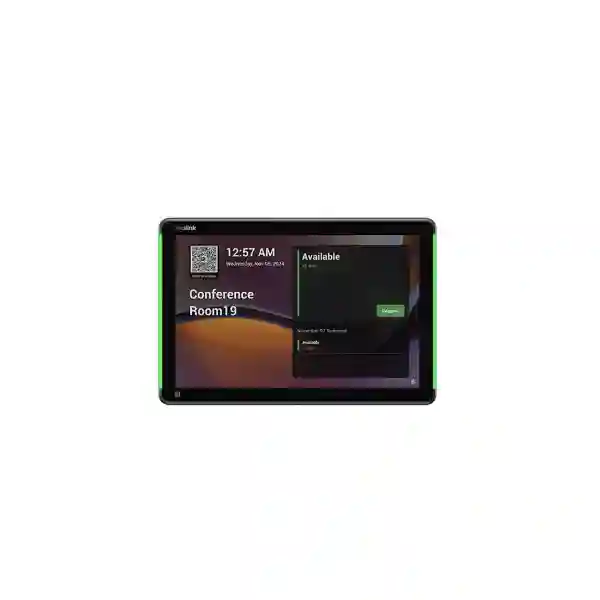
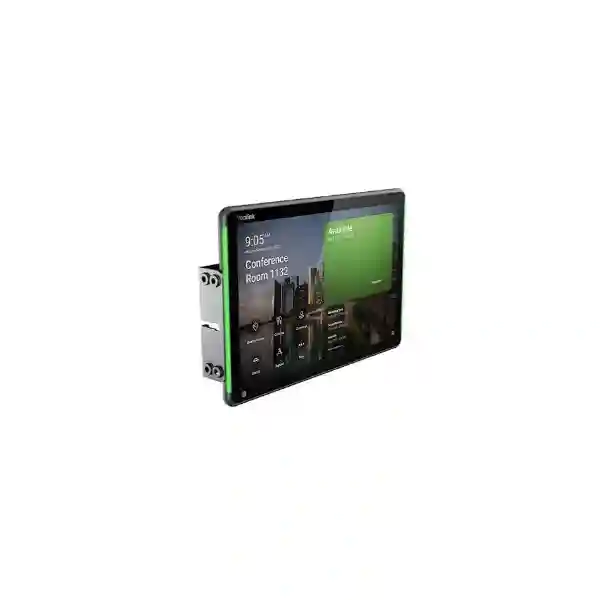
Yealink RoomPanel E2
Yealink RoomPanel E2 is an all-in-one 8-inch meeting-room scheduling panel for modern workplaces that need a clearer way to see room status, reserve spaces, check in and coordinate shared meeting environments. It runs Android 13 and combines a 1280×800 multi-point touch display with high-visibility RGB status lighting, PoE, 802.11ac Wi-Fi, Bluetooth 5.0, NFC/RFID, proximity sensing and ambient-light sensing. For organisations in Tanzania, the device is especially relevant when meeting rooms need a dedicated scheduling endpoint mounted outside the room rather than relying on users to search calendars from laptops or phones.
Use it to bring booking information to the doorway, simplify room discovery and support a more structured meeting-space experience.
What the Yealink RoomPanel E2 is designed to solve
Shared meeting rooms often fail for simple operational reasons: people cannot tell whether a room is actually free, recurring meetings remain on calendars even when nobody arrives, staff interrupt occupied rooms to check availability, and facilities teams lack a consistent endpoint for room scheduling. The RoomPanel E2 is designed to move the booking experience to the physical space. Its touchscreen provides an interface for room scheduling workflows, while the full RGB programmable LED illumination makes room state visible from a distance. This combination reduces dependence on improvised paper signs, manual coordination and hallway guesswork.
The panel is not a camera or full video-conferencing endpoint. It is a room-scheduling device. That distinction matters when planning a complete collaboration environment. A room may still need a conferencing camera, microphones, speakers, display, room controller and suitable network infrastructure. FourTeck Tanzania’s broader business technology portfolio is useful when the scheduling panel is part of a larger room modernization project rather than an isolated purchase.
8-inch touch interface
The 16:10 LCD panel uses a 1280×800 resolution and multi-point capacitive touch, giving users a dedicated interface at the room entrance for supported booking, check-in and room-status workflows.
Visible room status
Full RGB programmable LED background illumination is intended to make room status visible around the panel, helping users identify availability without standing directly in front of the screen.
PoE or DC power
IEEE 802.3af Power over Ethernet can simplify installation where compatible network switching is available, while 12 V DC provides another powering option for sites with different cabling arrangements.
Flexible connectivity
The official specification includes Fast Ethernet, 802.11a/b/g/n/ac Wi-Fi, Bluetooth 5.0, 13.56 MHz RFID/NFC and USB-C, giving deployment teams several options for network and accessory planning.
Verified Yealink RoomPanel E2 specifications
| Category | RoomPanel E2 specification |
|---|---|
| Operating system | Android 13 |
| Display | 8-inch LCD, 16:10, 1280×800, 1000:1 contrast, ±80° horizontal/vertical viewing angle, multi-point capacitive touch, anti-fingerprint coating, typical brightness 320 nits |
| Sensors | Proximity sensor and ambient-light sensor |
| Network | 1 × 10/100 Mbps Fast Ethernet; 802.11a/b/g/n/ac Wi-Fi; IEEE 802.1X methods listed by Yealink include EAP-MD5, EAP-TLS, EAP-PEAP/MSCHAPv2 and EAP-TTLS/EAP-MSCHAPv2 |
| Wireless / identity | Bluetooth 5.0; RFID/NFC at 13.56 MHz |
| Audio | 2 × array microphones and 2 × speakers |
| Power | IEEE 802.3af PoE or 12 V power adapter |
| Mounting | Surface mount for 2-gang US electrical box, 20° tilt mount kit for wall or glass, flush mount kit for wall or glass, and glass mount kit |
| Physical / environment | 209 × 146 mm display size; 0.53 kg; 0–40°C operating temperature; 10–95% non-condensing operating humidity |
Specifications above are based on Yealink’s official RoomPanel E2 datasheet. Application-dependent functions, platform capabilities and accessory behavior should be confirmed against the current Yealink documentation and the collaboration platform selected for the project.
Deployment and integration planning
A successful room-panel project begins with the booking platform and room-resource design, not with the wall mount. Determine which calendar or room-management application will drive the experience, confirm licensing and room-resource requirements, and verify that the chosen platform supports the functions expected on the RoomPanel E2. Yealink documentation lists support for platforms including Teams, Zoom, RingCentral, Gingco, GoBright, Flowscape, Space Connect and Appspace, but specific features can vary by application. Functions such as RFID/NFC behavior or occupancy-sensor automation may depend on third-party applications, so they should not be assumed to work identically in every deployment.
Network planning comes next. PoE is attractive because it can carry power and network connectivity over one cable, but the network switch must support the required IEEE 802.3af power budget. In environments that prefer Wi-Fi, the device supports 802.11ac, yet a stable enterprise wireless design remains important. A panel at the edge of a corridor or behind dense walls should not be deployed on the assumption that a weak signal is sufficient because the interface may still rely on cloud connectivity. For wired enterprise networks, confirm VLAN assignment, DNS, DHCP, authentication and any firewall rules required by the booking platform.
Physical installation also deserves attention. Wall type, glass thickness, electrical-box placement, cable route, viewing height and door swing all affect usability. The objective is for users to see room status before entering and interact with the panel without blocking the corridor. FourTeck Tanzania’s technology services can be considered when RoomPanel E2 deployment needs to be coordinated with structured cabling, PoE switching, displays, conferencing systems or broader workplace infrastructure.
Buying guidance: what to include in a RoomPanel E2 quotation request
A useful quotation should identify the exact model, required quantity, number of meeting rooms, preferred booking platform, existing Microsoft 365 or other collaboration environment, network method, PoE availability and intended mounting surface. Include whether each room already has a display or conferencing system and whether the project is limited to scheduling panels or forms part of a complete meeting-room upgrade.
For multi-room projects, also provide a room list with names, capacity, floor location and current scheduling workflow. This makes it easier to plan a consistent deployment rather than treating every panel as an unrelated endpoint. Businesses can also review the FourTeck Tanzania shop for broader technology categories and use the contact page when a configuration or commercial quote is required.
Yealink RoomPanel E2 Tanzania
For Tanzanian organizations, Yealink RoomPanel E2 addresses a practical workplace-management problem: how to make shared meeting rooms easier to find, book and use without depending on informal coordination. In offices where several teams share a limited number of meeting spaces, users can lose time walking between rooms, opening doors to check occupancy or messaging colleagues to ask whether a calendar booking is still active. A dedicated scheduling panel outside each room turns the doorway into a clear decision point. Staff can see the room status, use supported booking and check-in functions, and understand whether the space is intended to be available or occupied.
Tanzania deployments should be planned around the actual office network and collaboration platform. The RoomPanel E2 supports both Fast Ethernet and 802.11ac Wi-Fi, but wired PoE is often attractive in a structured office because a single network cable can provide both power and data. Where the panel is installed on glass, masonry or partitions, the mounting method and cable route should be decided before installation. In a new office fit-out, cabling can be coordinated early. In an existing building, the project may need to balance appearance, accessibility and disruption to finished walls.
Procurement teams should also distinguish between the scheduling panel and the conferencing system inside the room. The RoomPanel E2 does not replace the camera, microphones, speakers, display or compute platform needed for video meetings. Instead, it complements those systems by organizing room access and availability. That makes it suitable for headquarters, corporate offices, universities, healthcare administration, professional services, banks, government offices and other environments with shared meeting spaces. A phased rollout can begin with high-demand rooms, allowing facilities and IT teams to standardize naming, mounting and network configuration before scaling to additional floors or branches.
When requesting pricing in Tanzania, include quantity, room locations, preferred platform, whether PoE switching is already available, mounting surfaces and any requirement for related meeting-room equipment. This avoids a quote that covers only the display panel while missing essential infrastructure. FourTeck Tanzania can help frame the requirement in terms of the complete room experience rather than the panel alone.
Yealink RoomPanel E2 Dar es Salaam
Dar es Salaam organizations often operate busy offices where conference rooms are shared between sales, finance, management, project teams, customers and visiting partners. In this setting, a scheduling panel can deliver value beyond simple calendar display. It creates an immediate visual cue outside the room, so a person moving through a corridor can identify the room’s status without opening the door or checking a separate application. Yealink’s full RGB programmable illumination is particularly useful for this physical visibility, while the 8-inch touch interface brings supported booking actions directly to the meeting-room entrance.
For multi-floor offices in Dar es Salaam, standardization is important. If every room is named differently across calendars, signs and conferencing systems, user confusion remains even after new hardware is installed. A RoomPanel E2 rollout should therefore include a room-resource naming policy, consistent display names, network VLAN rules, device labels and documentation. IT teams should also verify the booking application before deployment. Yealink lists multiple supported platforms, but each platform can expose different features and licensing requirements. The safest approach is to validate the exact workflow—reservation, check-in, release, identity and occupancy integration—against the platform used by the customer.
Physical conditions differ between newly built offices and older commercial spaces. In a fit-out, installers may be able to bring Cat6 cabling directly to the doorway and power the panel through IEEE 802.3af PoE. In a completed office, glass meeting-room walls may make the glass-mount options more attractive, while existing cable routes can determine whether wired or wireless networking is more practical. Ambient-light and proximity sensors can help the panel adapt to its environment, but the installation position should still avoid direct glare, awkward reaching positions or interference with doors and circulation paths.
A procurement request for Dar es Salaam should specify the number of rooms, wall or glass construction, preferred booking system, network availability and whether each room also needs a video bar, camera, microphones or display. This creates a cleaner bill of materials and supports a consistent rollout across executive rooms, boardrooms, training rooms and smaller huddle spaces.
Yealink RoomPanel E2 Mwanza
For organizations in Mwanza, the Yealink RoomPanel E2 can support a more structured approach to shared meeting spaces where offices, branch operations, training rooms and customer-facing facilities need predictable room availability. Rather than expecting users to remember which calendar belongs to which room, the scheduling panel places the current room context at the point of use. Staff can approach the room, identify its status through the display and RGB illumination, and use supported on-panel functions according to the collaboration platform configured by the organization.
A Mwanza deployment should be evaluated as an IT endpoint project. Every panel needs reliable power, network connectivity, identity and management. PoE may reduce the number of separate power adapters in corridors and can simplify UPS protection if the network switch is already backed by a UPS. Where wired Ethernet is not available at the door, 802.11ac Wi-Fi provides another deployment path, but signal quality should be tested at the exact mounting location. A wireless signal that works well at a desk may not behave the same way near reinforced walls, glass partitions or dense building materials.
Facilities and IT teams should jointly decide where panels are mounted and how room names are presented. A clear room-naming standard—such as floor, wing and room name—helps users and support teams. Mounting height should suit typical users and accessibility expectations, while the visible status lighting should not be hidden behind frames or decorative features. If the office later adds occupancy sensors or additional workplace-management tools, Bluetooth 5.0 and the wider Yealink ecosystem may become relevant, but compatibility should be confirmed before equipment is ordered.
Businesses procuring RoomPanel E2 in Mwanza should therefore request more than a unit price. A complete request should list quantity, calendar platform, network method, switch PoE capability, mounting surfaces and the existing room technology. This provides a better basis for deciding whether the project is a straightforward endpoint supply or a broader meeting-room upgrade requiring cabling, displays, conferencing equipment and configuration support.
Yealink RoomPanel E2 Arusha
Arusha businesses, hospitality organizations, NGOs, conference facilities and professional offices often host internal teams together with visitors, project partners or international participants. In environments where meeting spaces are heavily shared, the Yealink RoomPanel E2 can make the physical room schedule easier to understand. The device’s 8-inch display offers a dedicated interface at the room entrance, while the surrounding RGB lighting is designed to communicate room state clearly. This can reduce interruptions and help reception or administrative teams manage bookings with less manual coordination.
The booking platform should be the first design decision. If the organization operates Microsoft Teams rooms, the scheduling workflow and account setup should be validated against current Microsoft and Yealink guidance. If another supported platform is used, confirm the features available on that application before assuming identical behavior. Features connected with occupancy, RFID/NFC or third-party applications can be platform-dependent. A pilot installation on one or two rooms is often useful because it lets the organization test actual user behavior, naming conventions and administrative processes before expanding to a larger site.
From an infrastructure perspective, PoE is useful where structured cabling reaches the meeting-room entrance. It can simplify power distribution and reduce visible cabling. The panel also supports 12 V power and Wi-Fi, giving alternatives for completed interiors where network cabling may be difficult to extend. Arusha projects with glass meeting-room walls should review Yealink’s glass mounting options and ensure that cable routes do not undermine the visual quality of the installation. The anti-fingerprint coating is also relevant in shared spaces where many users touch the screen throughout the day.
When RoomPanel E2 is part of a wider hospitality or conference-room project, include the display, camera, microphones, speakers, room controller and network in the same design discussion. The panel’s role is scheduling; the quality of a video meeting still depends on the in-room collaboration system and connectivity. A coordinated quotation can reduce incompatibility and unnecessary duplication.
Yealink RoomPanel E2 Dodoma
In Dodoma, government offices, administrative organizations, education institutions, associations and commercial enterprises may need structured meeting-space management across multiple rooms or departments. Yealink RoomPanel E2 provides a dedicated interface outside the room rather than placing the entire scheduling burden on personal calendars. The visual room-status lighting is useful in corridors where several rooms are grouped together, and the touchscreen can support reservation and check-in actions according to the configured room-management application.
For institutional deployments, device administration matters as much as the user interface. IT teams should document each panel’s room resource, network assignment, firmware level, physical location and administrative ownership. Yealink supports remote device-management options, which can help reduce the need to visit every panel for routine checks, although the exact management platform and licensing approach should be confirmed for the chosen environment. IEEE 802.1X support is another relevant capability for organizations that use enterprise network authentication, but deployment teams should validate certificates and supported EAP methods in advance.
Physical planning should also account for procurement and building conditions. If the office uses PoE switching, confirm available ports and power budget before ordering dozens of panels. If new cabling is required, include it in the project scope rather than assuming installation ends with mounting the device. For glass partitions, select a compatible mounting kit. For masonry walls, check how cabling will be concealed and how the panel can be positioned at a practical viewing height. Where the device will be installed in public or semi-public spaces, define who is allowed to make walk-up bookings and how room ownership is governed.
A Dodoma quotation request should therefore include room count, building/floor locations, platform, identity method, network design, PoE availability and mounting type. Organizations replacing informal booking processes may also benefit from a short user-adoption plan so staff understand how to reserve, check in and release rooms consistently.
Yealink RoomPanel E2 UAE
For UAE offices, the Yealink RoomPanel E2 is relevant to organizations operating high-density corporate floors, executive suites, flexible workplaces and customer meeting centers where room utilization must remain visible and organized. A scheduling panel outside each room creates a consistent physical interface regardless of whether users arrive with laptops, mobile devices or no device at all. The RGB status illumination can help staff scan a corridor for availability, while the 8-inch 1280×800 touch screen provides the supported room-management interface at the doorway.
UAE deployments frequently involve modern glass meeting rooms and highly finished interiors, making mounting quality and cable concealment important. Yealink lists wall, glass, flush and tilt mounting options, so the installation can be matched more closely to the architecture. PoE may be especially convenient in centrally managed offices because it reduces separate power supplies and can be integrated with managed switching. Where customers require wireless deployment, Wi-Fi should still be treated as business infrastructure rather than assumed coverage. Verify signal strength, SSID security and firewall requirements at each panel location.
Regional organizations with offices in both Tanzania and the UAE can gain additional value from standardization. The same device naming rules, room-resource structure, mounting approach and support documentation can be reused across countries while allowing local differences in network design and room layout. This is more efficient than letting every branch invent a separate meeting-room process. For wider UAE technology requirements, the FourTeck UAE technology site can complement Tanzania project planning when the customer is building a cross-regional standard.
Before purchasing, confirm the chosen scheduling platform, required licenses, panel quantity, room account design, mounting surface and whether related conferencing equipment is part of the scope. Features controlled by third-party applications should be validated in a pilot, especially where occupancy automation, NFC/RFID or specialized workplace workflows are important.
Yealink RoomPanel E2 Uganda
Ugandan organizations can use Yealink RoomPanel E2 to bring a consistent room-booking experience to offices where calendars and physical room use do not always match. In many workplaces, a meeting remains scheduled even when participants do not arrive, while another team cannot easily tell whether the room is genuinely available. A purpose-built scheduling panel provides a visible reference at the door and, with a supported application, can enable booking and check-in workflows that reduce this disconnect.
The technical design should reflect the building and the network. For a new Kampala headquarters or branch modernization project, Cat6 cabling and PoE can be planned from the start. For an existing office, teams may need to choose between extending Ethernet and using Wi-Fi. The RoomPanel E2 supports both, but a stable connection to the room platform is essential. Verify DHCP, DNS, internet access, enterprise authentication and any required VLAN or firewall policy. If the panel is intended to operate during short utility interruptions, powering it through a UPS-backed PoE switch may be more manageable than using separate local adapters.
Uganda deployments should also be evaluated alongside the meeting-room hardware already in use. A booking panel does not improve camera framing or microphone pickup inside the room, so organizations upgrading hybrid meeting spaces should plan those elements separately. The RoomPanel E2 complements that system by improving room access and scheduling visibility. For customers with operations spanning Tanzania and Uganda, the FourTeck Uganda site can support regional technology planning and standardization.
When asking for a quote, state the exact number of panels, cities/sites, collaboration platform, mounting type and network method. If rooms vary significantly—for example, executive boardrooms, training rooms and small huddle rooms—list them separately so the broader room technology can be planned around actual use rather than a single generic bill of materials.
Yealink RoomPanel E2 Kampala
Kampala is a natural fit for dedicated room-scheduling technology in corporate headquarters, financial services offices, NGOs, professional firms and growing technology teams where meeting rooms are heavily booked. Yealink RoomPanel E2 can reduce friction by giving users a persistent display at the room entrance. Rather than checking a calendar, walking into the room and discovering it is in use, or relying on reception to coordinate every booking, staff can use the room’s own panel as the visible point of reference.
For a multi-room Kampala office, the project should start with an inventory. Record each room name, floor, capacity, booking account, existing conferencing system, wall type and network availability. This exposes inconsistencies before hardware is installed. One room might have PoE nearby while another relies on Wi-Fi; one may have a glass partition while another has a solid wall; one may already be integrated with Teams while another is used for general meetings. The RoomPanel E2 has flexible connectivity and mounting options, but project teams still need to select the correct method room by room.
IT administrators should also consider how the panels will be monitored after deployment. Yealink supports remote management capabilities, which can help with device visibility and diagnostics. However, access policies, firmware maintenance, administrative credentials and configuration ownership should be documented. If the office uses IEEE 802.1X authentication, certificate deployment and the selected EAP method should be tested before the roll-out date. If third-party occupancy sensors are planned, verify interoperability and application behavior instead of assuming that all occupancy actions are available automatically.
The purchasing decision should therefore look beyond screen size. The most important question is whether the RoomPanel E2 fits the organization’s room platform, network standards, physical architecture and support model. A well-planned deployment makes the interface feel simple to employees precisely because the complex decisions have already been handled by the IT and facilities teams.
Yealink RoomPanel E2 Arua
For offices and institutions in Arua, Yealink RoomPanel E2 can be appropriate where a smaller number of meeting rooms still needs a formal booking process. A business does not require dozens of conference rooms to benefit from visible room scheduling. Even with two or three shared spaces, double bookings and uncertainty can interrupt daily work. Placing a scheduling panel outside each room creates a familiar routine: check the status, follow the organization’s booking rules and use the room with less informal coordination.
In regional locations, network and power planning can be especially important. The RoomPanel E2 supports IEEE 802.3af PoE, allowing the panel to draw power from a compatible switch. If the switch and network rack are protected by suitable UPS infrastructure, this can centralize power resilience for the room panels. Alternatively, 12 V power and Wi-Fi are available, but each local power adapter then becomes another item to install and maintain. The right approach depends on the office’s existing cabling, network equipment and electrical design.
Arua deployments should also avoid unnecessary complexity. If the organization only needs basic room status and reservation, focus first on that workflow. Features involving RFID/NFC, Bluetooth-connected sensors or advanced automation should be added only when there is a clear operational requirement and confirmed platform support. This keeps the project understandable for local administrators and makes training easier. The 8-inch display and visible LED status are already significant improvements over paper signs or unclear calendar ownership.
For procurement, include exact room quantities, collaboration platform, preferred mounting method and available network connections. If support will be coordinated from Kampala or another central office, document IP addressing, room-resource names and device configurations so remote teams can understand the Arua installation without needing to reconstruct the design later. Standardization is particularly valuable when a company has several branch offices with limited local IT staff.
Yealink RoomPanel E2 Mbarara
Mbarara organizations considering Yealink RoomPanel E2 should start with how their meeting rooms are used today. If employees frequently ask whether rooms are free, meetings overrun because the next booking is not visible, or calendars are disconnected from physical occupancy, a dedicated scheduling panel can introduce a clearer process. The RoomPanel E2’s touchscreen and RGB lighting are designed specifically for this environment, giving each room a visible scheduling identity outside the door.
The panel should be integrated into the office network with the same discipline as other managed endpoints. Choose wired Ethernet or Wi-Fi based on reliability and installation constraints, not convenience alone. Where PoE is used, confirm the switch port supports IEEE 802.3af and that the overall switch power budget can handle all connected devices. In a site that already powers IP phones, wireless access points or cameras from the same switch, the cumulative PoE budget matters. Segmenting collaboration endpoints into an appropriate VLAN may also simplify security and troubleshooting.
Facilities teams should decide how users will interact with the panels. A touch device mounted too high, hidden behind a door or placed where people stand in a narrow corridor will be less useful. The selected mounting kit should match wall or glass construction, and cable entry should look intentional. The ambient-light and proximity sensors can improve the user experience, but they do not replace good placement. The room name displayed on the panel should match signage and the calendar resource exactly to avoid confusion.
For Mbarara customers, a strong quotation request includes the number of rooms, wall materials, booking platform, network design and whether installation is required. If the rooms also need conferencing upgrades, include that requirement at the same time. Planning the scheduling panel together with the camera, audio, display and network produces a more coherent workplace solution than buying each component independently.
Yealink RoomPanel E2 Gulu
In Gulu, organizations with shared offices, training centers, education facilities, development-program premises or branch operations may use meeting rooms for internal collaboration, visiting teams and remote conferencing. Yealink RoomPanel E2 can help make these spaces easier to manage by placing scheduling information outside the room where people actually need it. The device combines an 8-inch multi-point touch interface with highly visible RGB lighting, allowing supported room-status and booking workflows to become part of the physical environment.
A regional branch may not have the same on-site IT resources as a head office, so centralized planning is valuable. Before installation, define the room resource, user permissions, network settings and management process. Label the device and associated switch port, record the MAC address if required by network policy, and document any Wi-Fi profile or 802.1X authentication configuration. These simple steps reduce troubleshooting time if the panel later needs support from another city or country.
Power design should also be deliberate. PoE can reduce wall adapters and make the installation neater, provided the switch has sufficient power budget and reliable backup. If a separate 12 V adapter is selected, ensure that power outlets are accessible for maintenance but not exposed to casual disconnection. Where meeting-room walls are glass, review the compatible mounting options and cable routing in advance. A clean installation improves both reliability and the professional appearance of the workspace.
Gulu customers should request pricing with enough context to prevent under-scoping. List the number of rooms, platform, network type, mounting surface, installation needs and any related collaboration equipment. If the organization operates branches in Kampala, Arua or Mbarara, consider a common RoomPanel configuration standard across all sites so users encounter the same booking experience when they travel between offices.
Yealink RoomPanel E2 Kenya
Kenyan businesses with hybrid workplaces, regional headquarters and multiple meeting rooms can use Yealink RoomPanel E2 to make room booking visible at the point of entry. The scheduling panel is particularly useful in offices where people move between huddle rooms, client rooms and boardrooms throughout the day. RGB status illumination supports quick visual recognition, and the touch interface can present supported reservation and check-in functions without requiring the user to open a separate device.
For Nairobi and other major office locations, meeting-room technology often combines several layers: calendar platform, scheduling panel, conferencing system, room display, wireless presentation, corporate network and centralized management. The RoomPanel E2 occupies one specific layer in that design. Procurement teams should avoid assuming that a scheduling panel includes the capabilities of the room’s camera or control console. Instead, use it as the doorway interface while ensuring that the in-room system is designed around the room size and collaboration platform.
Regional groups operating in Tanzania and Kenya may benefit from a shared standard. Using the same room naming scheme, mounting position, network segment and device-management process can reduce training and support effort. Local building differences can still be accommodated through Yealink’s wired/Wi-Fi connectivity and multiple mounting options. The FourTeck Kenya site provides a related regional point of reference for organizations coordinating projects across East Africa.
Before ordering, verify the exact room-management application and any required licenses or room accounts. Confirm whether walk-up booking, check-in, occupancy integration or RFID/NFC functions are required, then validate those workflows against the current application documentation. This requirement-led approach is more dependable than purchasing on a feature list alone and discovering later that a particular workflow depends on software configuration or a third-party platform.
Yealink RoomPanel E2 Kuwait
Kuwait offices can deploy Yealink RoomPanel E2 in corporate meeting-room environments where room status needs to remain visible and professional. The panel’s compact 8-inch format suits installation beside meeting-room entrances, while full RGB programmable lighting can communicate room condition across a corridor. Because many modern offices use glass partitions, Yealink’s wall and glass mounting options are relevant for maintaining a clean architectural appearance without turning the scheduling system into an improvised add-on.
The best deployments align facilities design with IT standards. Decide whether the panel will use wired Ethernet with PoE or Wi-Fi, and then test the path to the selected booking platform. If the organization uses enterprise network access control, RoomPanel E2 supports IEEE 802.1X methods listed by Yealink, but certificates, authentication servers and EAP settings should be validated before the rollout. For organizations that need centralized oversight, confirm the appropriate Yealink management service and how device monitoring will be incorporated into existing IT operations.
Room scheduling is also an organizational process. Technology cannot fully solve rooms that are booked incorrectly, left reserved all day or named inconsistently. Kuwait deployments should define policies for walk-up booking, check-in grace periods, cancellations and resource ownership according to the capabilities of the booking platform. If occupancy sensors are planned, confirm the third-party application requirements and test automation in a sample room. A pilot helps facilities teams observe how employees actually use the panel before every meeting room is equipped.
For purchasing, request the exact RoomPanel E2 model, quantity, mounting accessories, installation needs and platform integration scope. If meeting-room audio, video or displays also need renewal, combine the requirements in one project brief so cabling and network changes can be coordinated. This reduces rework and creates a consistent user experience from corridor to conference call.
Yealink RoomPanel E2 Ghana
Ghanaian organizations adopting more structured hybrid-work practices can use Yealink RoomPanel E2 to improve the relationship between digital calendars and physical meeting rooms. A common workplace problem is that employees can see a booking in software but cannot tell whether the room is actually being used. A scheduling panel makes room status visible at the doorway and creates a dedicated interaction point for supported booking or check-in actions. The result is a clearer experience for both regular staff and visitors who may not know the organization’s room conventions.
For offices in Accra or other business locations, network reliability should be treated as part of the scheduling system. The panel supports Fast Ethernet, 802.11ac Wi-Fi and PoE, giving designers flexibility. A wired PoE installation can keep cabling tidy and centralize power, while Wi-Fi may be helpful where finished walls cannot easily be modified. Whichever method is selected, confirm network segmentation, security, DNS and access to the required cloud services. If a branch depends on centralized IT support, document every panel so remote troubleshooting does not rely on local memory.
RoomPanel E2 is also a good opportunity to standardize room identity. The label on the door, the calendar resource, the scheduling panel and the conferencing system should all use the same room name. In multi-floor offices, this small discipline prevents confusion and makes help-desk support more efficient. Mounting should account for visibility, accessibility, wall type and cable paths. Glass-room installations should use appropriate hardware rather than ad-hoc adhesive solutions that could affect reliability or appearance.
When requesting a Ghana quotation, include the number of rooms, collaboration platform, room-resource status, network method and mounting requirements. If occupancy or RFID/NFC workflows are important, describe the intended process so compatibility can be checked against the current application. Buying the hardware is only one step; the deployment should align people, software, network and physical room design.
Yealink RoomPanel E2 Nigeria
Nigeria’s larger corporate offices, professional-service firms, financial institutions and multi-site enterprises can have dozens of shared meeting spaces across several floors. In those environments, Yealink RoomPanel E2 can become part of a broader room-governance standard. The device provides an 8-inch touch display and visible RGB lighting at the doorway, helping employees identify room availability and interact with supported scheduling workflows. The value becomes greater when every room follows the same naming and booking conventions.
Large deployments should be managed like any other endpoint fleet. Create a room inventory, assign each panel to a resource account, define network VLANs, confirm PoE budgets and decide how firmware and configuration will be maintained. Yealink’s remote-management capabilities can support centralized operations, but the organization should still define administrative roles and change control. For wired enterprise networks using IEEE 802.1X, test authentication in advance. If certificates are required, include certificate lifecycle planning so future expirations do not unexpectedly disconnect panels.
Physical rollout across a Nigerian office portfolio may include different building types, from new towers with structured cabling to older offices where door locations have no nearby Ethernet. RoomPanel E2 supports wired and wireless options, so the design can adapt, but each site should still be surveyed. Where PoE is available, it can simplify power and allow centralized UPS protection. Where Wi-Fi is used, verify signal at every doorway. Avoid assuming that a floor-level access-point plan automatically provides strong coverage beside all meeting-room entrances.
For procurement, ask for a project quote that includes device quantity, mounts, installation, network preparation and platform configuration scope. If the organization is standardizing meeting rooms across Nigeria, Ghana, Tanzania, Kenya or the UAE, create one reference design and then adapt it to local site conditions. This reduces user training and helps regional IT teams support a familiar room-booking experience.
Yealink RoomPanel E2 Seychelles
In Seychelles, Yealink RoomPanel E2 can be useful for hotels, resorts, corporate offices, meeting venues, public institutions and service organizations that operate bookable rooms for staff or guests. A dedicated scheduling panel gives each room a clear digital identity and can reduce the need for manual signs or reception staff to explain availability repeatedly. The screen provides room information at the entrance, while the RGB lighting makes the status easier to see from several meters away.
Hospitality and venue environments should pay particular attention to workflow. A staff meeting room and a guest-facing conference room may not use the same reservation system. Before purchasing RoomPanel E2, confirm that the selected booking application is supported and that the functions required by the property are available. Yealink lists several platforms, but exact features vary by application. If the goal includes automatic release from occupancy sensors, RFID/NFC identity or other automation, validate the end-to-end design rather than treating the panel as a standalone solution.
Installation in island environments still follows the same core principles: reliable network, appropriate power, correct mounting and maintainable cabling. PoE can simplify doorway installations by reducing local power adapters. For Wi-Fi deployments, verify coverage and network security. In glass-walled conference areas, use the designated glass mounting approach and keep cable routing neat. IT teams should also maintain configuration backups, asset records and spare planning, especially where replacement logistics may require additional lead time compared with a major mainland hub.
A Seychelles quotation request should state whether the panels are for internal offices, hotel meeting rooms or public booking areas, because the user workflow may differ. Include room quantity, platform, mounting surface, network method and any integration with conferencing or digital signage. This allows the recommendation to focus on the operational purpose of each room instead of supplying identical hardware without context.
Compatibility, platform and lifecycle questions to resolve before purchase
The RoomPanel E2 hardware specification is only one part of the buying decision. Room scheduling depends on software, account configuration and the organization’s meeting-room policies. Verify the exact platform version and current certification or support status for the intended application. Confirm whether the deployment needs a dedicated room-resource account, which licenses are required, whether users can create walk-up bookings, and what happens when a scheduled meeting is not checked in. These are software-workflow questions, and they should be resolved before the device is rolled out across many rooms.
Also distinguish native hardware features from application-dependent features. Bluetooth 5.0 and 13.56 MHz RFID/NFC are built into the device, but the way those interfaces are used can depend on the third-party application. Likewise, occupancy-related automation may depend on compatible sensors and software. For procurement teams, the safest requirement is not “must have NFC” but “must support this specific identity or attendance workflow with our chosen platform.” That wording makes validation measurable.
Related meeting-room infrastructure
PoE switching
If panels are powered through IEEE 802.3af, confirm available PoE ports and overall power budget. A managed switch also improves visibility and can support VLAN-based segmentation.
Business Wi-Fi
For wireless deployments, test 802.11ac coverage at the actual doorway. Corridor placement, dense walls and glass can change radio behavior compared with desk areas.
Conferencing systems
The scheduling panel complements, rather than replaces, the camera, microphones, speaker, display and room controller used for Teams, Zoom or other video meetings.
Structured cabling
New builds should route data cabling to the planned panel location. Existing sites should assess whether visible cable, surface containment or Wi-Fi is the most practical approach.
Yealink RoomPanel E2 FAQ
What is Yealink RoomPanel E2?
It is an 8-inch all-in-one meeting-room scheduling panel running Android 13. It provides a touch interface and programmable RGB status lighting for supported room-booking and availability workflows.
Does RoomPanel E2 support Power over Ethernet?
Yes. Yealink specifies IEEE 802.3af PoE. A compatible PoE switch or injector must still be selected with sufficient power budget for the deployment.
Can Yealink RoomPanel E2 use Wi-Fi?
Yes. The official specification lists 802.11a/b/g/n/ac Wi-Fi. Business deployments should verify wireless coverage, security and access to required platform services at each installation point.
Does the RoomPanel E2 replace a Teams Room or Zoom Room system?
No. It is a room-scheduling panel, not a complete conferencing system. The meeting room may still require a camera, microphones, speakers, display and conferencing compute or video bar.
Can RoomPanel E2 be mounted on glass?
Yealink lists mounting options for wall and glass installations, including tilt, flush and glass mount kits. The correct accessory should be matched to the site and planned cable route.
What should I provide when requesting a quote?
Provide quantity, office/city, room count, preferred scheduling platform, whether PoE is available, mounting surface, installation needs and any related conferencing equipment. For large deployments, include a room list and floor plan if available.
Quotation checklist
Decision recap
Choose Yealink RoomPanel E2 when your requirement is a dedicated, modern room-scheduling endpoint with an 8-inch touch screen, visible RGB room status, Android 13, PoE, Wi-Fi, Bluetooth and NFC/RFID. It is particularly suitable for organizations standardizing shared meeting rooms and wanting the booking interface to be visible at the physical doorway.
Do not choose it on hardware specifications alone. Confirm platform support, room-account design, required application licenses, mounting conditions and network availability. If the project also includes video conferencing, displays, switching or structured cabling, plan those layers together so the user experiences one coherent meeting-room system.
Consult FourTeck Tanzania
For a Yealink RoomPanel E2 quotation, share the number of rooms, city or site, scheduling platform, PoE/network availability and mounting surface. FourTeck can use that information to distinguish a straightforward product request from a wider collaboration-room deployment involving switching, Wi-Fi, cabling, conferencing hardware or displays. Use the FourTeck Tanzania contact page to start the requirement discussion.




Reviews
There are no reviews yet.