
Yealink RoomPanel Plus E2 Tanzania
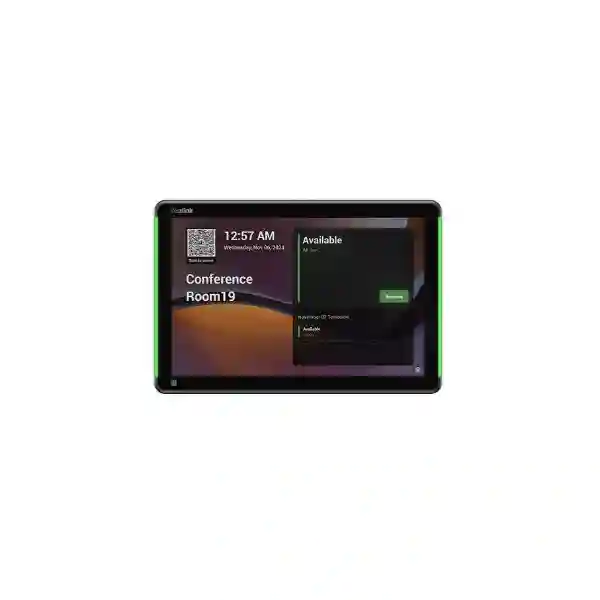
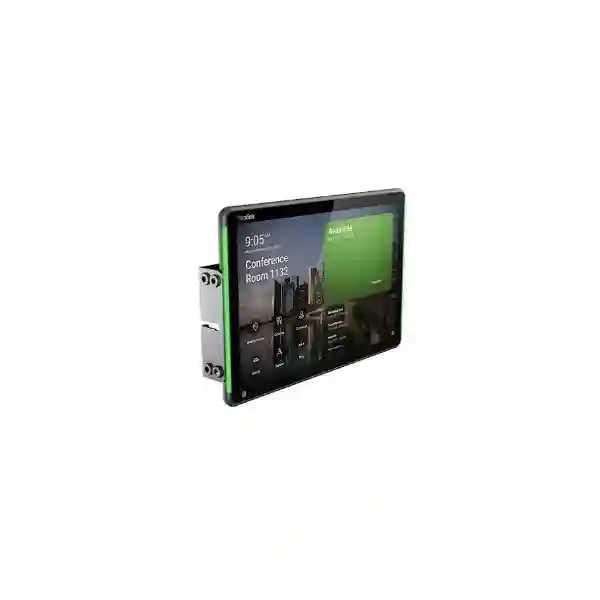
Yealink RoomPanel Plus E2 is a purpose-built meeting-room scheduling panel for organisations that want room availability, booking, check-in and workspace status to be visible before a user enters the room. Yealink specifies a 10.1-inch LCD touchscreen running Android 13, with a 1280 × 800 resolution, full RGB programmable room-status lighting, ambient-light sensing, a TOF proximity sensor, integrated NFC/RFID, Wi-Fi, Bluetooth 5.0, Fast Ethernet, USB-A, dual microphones and dual speakers. Power can be supplied through IEEE 802.3af Power over Ethernet or 12V DC, allowing installers to choose an approach that suits the available cabling and room design.
For Tanzanian organisations, the practical value is not simply the screen size. A room scheduling panel becomes useful when it is planned with the collaboration platform, resource-account structure, network authentication, PoE switching, mounting surface, room naming convention and user workflow. RoomPanel Plus E2 supports Microsoft Teams, Zoom, Gingco, GoBright, Flowscape, Space Connect and Appspace according to Yealink’s current datasheet. Third-party features, including certain orientation, badge, occupancy or automation functions, remain dependent on the capabilities of the selected application, so the software environment should be confirmed before procurement.
Fourteck Tanzania can help buyers place this device within a broader meeting-room design that includes conferencing systems, displays, audio, LAN switching and structured cabling. Explore the Fourteck Tanzania technology portfolio for the wider collaboration and infrastructure context, or review the Tanzania business technology shop when comparing conferencing, networking and supporting equipment.
What the Yealink RoomPanel Plus E2 is designed to solve
Room visibility
Full RGB programmable LED illumination helps people see room status from the corridor without walking up to the panel. This is useful in office floors where several meeting rooms sit close together and employees need a quick visual cue before checking details on-screen.
Booking interaction
The 10.1-inch multi-point capacitive display provides a larger interactive surface for room information and supported booking actions. Actual user workflows depend on the selected platform and application configuration.
Cleaner installation
IEEE 802.3af PoE can carry power over the network cable, reducing the need for a separate nearby electrical outlet. DC 12V/1.25A power remains available where the site design calls for it.
Workspace automation
Yealink positions the panel to work with room sensors and third-party applications for scenarios such as automatic check-in or room release. These functions should be validated against the intended application, licences and supported sensor workflow.
Verified Yealink RoomPanel Plus E2 specifications
| Operating system | Android 13 |
| Display | 10.1-inch LCD, 1280 × 800, multi-point capacitive touch, 1000:1 contrast, ±90° viewing angle, anti-fingerprint coating |
| Power | IEEE 802.3af PoE or DC 12V / 1.25A |
| Wired networking | 1 × 10/100 Mbps Fast Ethernet, IEEE 802.1X with EAP-MD5, EAP-TLS, PEAP/MSCHAPv2 and TTLS/MSCHAPv2 methods |
| Wireless | Wi-Fi 802.11a/b/g/n/ac and Bluetooth 5.0 |
| Identification | 13.56 MHz RFID/NFC; supported functions are application dependent |
| Sensors | Ambient-light sensor and TOF proximity sensor |
| Audio and USB | 2 microphones, 2 speakers, 1 USB-A port |
| Mounting | Wall, glass or side mounting with 0° mount, 20° mount or mullion mounting options |
| Operating environment | 0–40°C; 10–95% relative humidity, non-condensing |
| Size and weight | Display size 247.6 × 166.36 mm; weight 0.627 kg |
Platform, network and mounting planning
RoomPanel Plus E2 should be selected together with the software platform that will control the room-booking experience. Yealink lists Teams, Zoom, Gingco, GoBright, Flowscape, Space Connect and Appspace as supported platforms. Before purchase, organisations should verify the required room or resource account, application subscription, supported sign-in method, desired check-in behaviour and any dependency on occupancy sensors. NFC/RFID support can be valuable where a platform uses badge-based identity or attendance features, but buyers should not assume a specific badge workflow without confirming it in the target application.
Network planning is equally important. For wired deployments, the panel offers Fast Ethernet and IEEE 802.1X authentication options, which can fit managed enterprise networks where endpoint authentication is required. Where PoE is used, the serving switch must provide IEEE 802.3af power and the total switch PoE budget should account for all powered devices on the same access switch. Wi-Fi 802.11a/b/g/n/ac can support deployments where wireless connectivity is preferred, while Bluetooth 5.0 is relevant to compatible Yealink sensor connectivity.
Physical placement should be decided after checking the doorway, wall finish, glass partition, mullion width, user approach direction and available cable route. Yealink provides compatible 0° and 20° mounting brackets plus a mullion mount. The datasheet also notes optional portrait or landscape orientation where supported by the application. For wider room projects, review Fourteck Tanzania services for planning, installation, configuration and integrated infrastructure considerations.
Yealink RoomPanel Plus E2 Tanzania
For businesses in Tanzania, Yealink RoomPanel Plus E2 is most relevant where meeting rooms are shared by several departments, where staff regularly move between rooms, or where facility and IT teams want a more visible scheduling experience at the room entrance. A headquarters, bank, university, professional-services office, hotel administration floor, telecom company, government office or multi-branch organisation can all face the same practical issue: meeting rooms exist, but employees cannot immediately tell whether a room is booked, available, waiting for check-in or about to be used. A door-side scheduling panel helps move that information out of calendars and into the physical workplace.
The RoomPanel Plus E2 is particularly suited to organisations standardising Microsoft Teams, Zoom or one of Yealink’s listed workspace applications. In Tanzania, procurement should begin with software compatibility and room-account design before the hardware quantity is fixed. Each room may need a dedicated resource account, naming policy and scheduling rules. The IT team should also decide whether the panels will use Ethernet or Wi-Fi, and whether PoE switching is already available near each room. If PoE is chosen, structured cabling becomes part of the room-booking project even though the panel itself is a compact device.
Office conditions also affect installation. Modern Tanzanian offices may use gypsum walls, glass partitions, aluminum mullions or mixed finishes. The mounting kit should match the actual surface and viewing angle. Where room entrances sit along a busy corridor, the full RGB status lighting can provide a faster visual cue than reading a small calendar label. The ambient-light and proximity sensors can help the panel adapt to changing corridor brightness and wake behaviour. For sites with controlled enterprise networks, IEEE 802.1X support can also matter because room panels should be treated as managed endpoints rather than anonymous devices.
A useful Tanzania quotation request should include the number of rooms, desired platform, current PoE switch model, whether Ethernet points already exist, wall or glass mounting type, any RFID/NFC requirement, occupancy-sensor plans and whether the project includes conference-room cameras, audio or displays. That information allows a supplier to evaluate the complete room experience instead of quoting a panel in isolation.
Yealink RoomPanel Plus E2 Dar es Salaam
In Dar es Salaam, the RoomPanel Plus E2 fits offices where meeting-room demand is high and teams need a clearer way to coordinate shared spaces. Corporate headquarters, financial institutions, technology companies, consulting firms, logistics businesses and regional offices often operate multiple meeting rooms across one or more floors. In that environment, the value of a scheduling panel comes from consistency. Every room should use a predictable naming convention, the same booking policy and an obvious status indicator so employees do not need to search several calendars or interrupt an ongoing meeting to check availability.
For a Dar es Salaam deployment, planners should map each meeting-room entrance and identify the nearest network path before ordering mounting hardware. Glass-heavy office interiors may favour glass or mullion mounting, while traditional walls may suit a zero-degree or 20-degree bracket. PoE can simplify the visual finish because one Ethernet cable can provide both network and power, but the upstream switch must support IEEE 802.3af and have enough power budget for the complete floor. If wireless networking is preferred, Wi-Fi coverage at corridor locations should be measured rather than assumed from coverage inside the meeting rooms.
Dar es Salaam organisations also commonly need meeting rooms to support hybrid collaboration. In such cases, the room scheduling layer should be coordinated with the video bar or room system, display, microphone arrangement, internet path and platform licensing. The scheduling panel does not replace the conferencing endpoint; it complements it by making the room resource easier to discover and manage. IT teams should decide who owns room accounts, who can change bookings, how no-shows are handled and whether occupancy-based automation is needed.
Before requesting a quote, prepare a room list with room names, capacity, floor, door surface, network outlet availability and preferred platform. This creates a stronger basis for procurement and reduces the chance of discovering missing cables, wrong brackets or licensing assumptions after installation begins.
Yealink RoomPanel Plus E2 Mwanza
For organisations in Mwanza, Yealink RoomPanel Plus E2 can support a structured approach to shared meeting spaces in branch offices, education environments, healthcare administration, hospitality operations and growing regional businesses. The key benefit is making room usage visible and manageable without forcing staff to depend on informal coordination. When booking information is presented at the room entrance, employees can understand whether a room is available and use supported platform actions directly from the panel.
A Mwanza project should pay particular attention to infrastructure readiness. Confirm that each planned mounting point has a suitable network route, stable power strategy and secure connection method. The panel supports PoE as well as 12V DC, giving organisations flexibility where existing cabling varies between rooms. PoE is usually the cleaner choice when structured Ethernet is available because it reduces separate power adapters at the door. However, the switch’s PoE capacity must be checked for all connected devices, particularly if the same switch also powers IP phones, cameras or wireless access points.
The 10.1-inch display can be useful in offices where room names, upcoming bookings and supported controls need to be easy to read. Full RGB status lighting adds a corridor-level indication, while the proximity and ambient-light sensors help the device behave more naturally as people approach or lighting conditions change. If an organisation is evaluating NFC/RFID check-in, it should confirm that the selected scheduling application supports the required identity workflow before including badge functionality in project expectations.
For procurement, Mwanza buyers should ask for the exact panel quantity, mounting-kit type, power method, platform compatibility, licensing assumptions, installation scope and configuration responsibility to be stated clearly. This makes it easier to compare quotations on a like-for-like basis and prevents a lower equipment-only price from hiding missing installation components.
Yealink RoomPanel Plus E2 Arusha
In Arusha, meeting-room scheduling can be especially useful for organisations that host clients, partner meetings, training sessions and internal collaboration throughout the day. Hospitality groups, tour operators, development organisations, professional services, education institutions and regional offices may have a mixture of boardrooms, training rooms and smaller huddle spaces. RoomPanel Plus E2 provides a consistent door-side interface that can help staff and visitors understand the room’s current status while connecting that physical space to the organisation’s scheduling platform.
The product should be planned as part of the room experience rather than purchased as a standalone screen. A room with a Teams or Zoom conferencing system may already have a resource account, display and camera. The scheduler should use the same room identity and calendar logic so that a booking made from a user’s calendar corresponds to the correct physical space. Where third-party workspace applications are used, integration should be checked against Yealink’s supported-platform list and the software vendor’s current deployment guidance.
Arusha offices with attractive glass partitions or reception-facing meeting suites can benefit from the panel’s mounting options and all-around RGB status visibility. A 20-degree mount may improve the viewing angle in some corridors, while a zero-degree bracket can create a flatter appearance. Mullion mounting can be useful where the room has framed glass and there is limited wall surface. Cable routing should be considered before the bracket is selected, particularly where the installation needs to preserve a premium office finish.
When requesting an Arusha quotation, include room count, room names, current booking platform, door construction, available Ethernet points, PoE switch details and whether room sensors are planned. If the panel is part of a new meeting-room build, include cameras, microphones, displays, cabling and network readiness in the same project discussion.
Yealink RoomPanel Plus E2 Dodoma
For organisations in Dodoma, Yealink RoomPanel Plus E2 offers a practical scheduling endpoint for offices that need clearer use of boardrooms, committee rooms, project rooms and shared collaboration spaces. Government-related organisations, associations, enterprises, universities and service businesses can all benefit from making room schedules visible at the point of use. The panel’s role is to reduce uncertainty around room status and provide a supported interface for booking-related actions defined by the chosen platform.
Deployment should start with policy. Decide who may book rooms, how far ahead bookings can be made, how recurring reservations are handled, whether users must check in and what happens when a reservation is not used. Technology works best when these rules are consistent. If occupancy-sensor automation is planned, confirm the supported sensor, application behaviour and licence requirements before procurement. The panel can operate as a gateway to room sensors in supported scenarios, but the exact automation depends on the application.
Infrastructure planning is equally important. The device’s IEEE 802.3af PoE support can simplify cabling, while its 10/100 Mbps Ethernet interface is sufficient for its scheduling role when connected to a properly designed network. Enterprise IT teams can also use supported IEEE 802.1X authentication methods where network access control is enforced. Wi-Fi remains another connectivity option, but a wired PoE installation may offer a cleaner, more controlled deployment where cable pathways are available.
A Dodoma procurement package should list each room, mounting surface, network outlet, switch location, selected application and required accessories. Ask the supplier to separate hardware, mounting, configuration and any related software or subscription items in the quotation. This makes approval easier and supports better lifecycle documentation after handover.
Yealink RoomPanel Plus E2 UAE
In the UAE, Yealink RoomPanel Plus E2 is well suited to organisations designing modern meeting suites, hybrid workplaces and shared collaboration floors where room utilisation needs to be visible and centrally managed. Corporate offices in high-rise environments often use glass partitions, multiple meeting-room sizes and cloud collaboration platforms, making a consistent scheduling-panel standard useful across the workplace. The 10.1-inch touchscreen provides a clear interaction surface, while RGB status illumination can make room availability visible from corridor approaches.
For UAE projects, installers should coordinate the scheduler with structured cabling, PoE switching and interior-fit-out requirements. The panel supports wall, glass and mullion mounting options, which is valuable where office designs vary across meeting areas. IEEE 802.3af PoE can reduce the need for a separate power outlet and help maintain a cleaner finish. On networks that enforce endpoint authentication, the listed IEEE 802.1X methods can help the panel fit an enterprise access-control model.
Multinational businesses should also consider standardisation across offices. Using the same scheduling platform, room naming policy, mounting height and check-in logic across UAE and regional locations can reduce training and support effort. Yealink’s compatibility list includes Teams, Zoom and several workspace-management platforms, but every site should confirm the specific application version, subscription and feature set before rollout. NFC/RFID and occupancy workflows are particularly important to validate because the device hardware may support them while the final user experience depends on software.
Organisations comparing UAE sourcing options can review the broader Fourteck UAE IT and collaboration portfolio. A complete quote should specify the panel, bracket, power approach, installation, network prerequisites, application licensing assumptions and any room-sensor integration.
Yealink RoomPanel Plus E2 Uganda
For Uganda-based organisations, RoomPanel Plus E2 can support meeting-room standardisation across headquarters, branches, education facilities, healthcare administration and enterprise offices. A shared calendar alone does not always prevent room conflicts because staff may not know the real-time status of a physical room. A door-side panel creates a visible link between the calendar resource and the space itself, helping users check status before entering and use supported booking or check-in functions close to the room.
Ugandan deployments should confirm the collaboration platform first. If the business uses Microsoft Teams or Zoom, the room resource and scheduler can be planned as part of the same ecosystem. If another workplace platform is being considered, compare it with Yealink’s supported list and verify current functionality directly with the software provider. Do not assume that all platforms expose the same booking, NFC, occupancy or portrait-orientation features.
Power and connectivity are straightforward but still need design discipline. The panel can use IEEE 802.3af PoE or DC power. Where a managed PoE switch already serves phones or access points, adding room panels may be easy, but the total PoE budget and available ports should be reviewed. If the office is extending Ethernet to meeting-room entrances, cable paths and surface finishes should be agreed before fit-out is complete.
For organisations coordinating technology across Tanzania and Uganda, the Fourteck Uganda technology site provides a regional reference for business communications and infrastructure. A Uganda quote request should include room count, application, mounting type, PoE availability, expected installation scope and any planned sensor or badge workflow.
Yealink RoomPanel Plus E2 Kampala
In Kampala, RoomPanel Plus E2 is a strong fit for busy office environments where conference rooms are booked frequently by several teams. Banks, telecom operators, NGOs, technology companies, regional headquarters and professional-services organisations may have concentrated meeting-room clusters where visual room status saves time. Full RGB LED lighting can make availability easier to recognise from a corridor, while the touchscreen provides room information and supported interaction without requiring users to open a laptop or phone.
A successful Kampala deployment starts with an accurate room inventory. Record each room’s name, capacity, calendar identity, meeting platform, wall type and network connection. This is especially important in multi-floor buildings where room names can become inconsistent between signage, Outlook or Zoom resources, and the actual room system. Standardised names reduce confusion and make support easier when several schedulers are managed centrally.
Kampala IT teams should also decide how to authenticate the devices on the LAN. Yealink lists several IEEE 802.1X methods for the wired interface, which may fit organisations with network access-control policies. If Wi-Fi is used, corridor coverage and roaming behaviour should be tested. The panel’s data demand is modest compared with video-conferencing equipment, but stable connectivity remains essential because scheduling information must remain current.
For procurement, ask for the exact RoomPanel Plus E2 model, mounting kit, cabling scope, configuration responsibility and software assumptions. If the business plans automatic release of unused rooms, include the intended occupancy sensor and application behaviour in the design review rather than treating it as an after-installation add-on.
Yealink RoomPanel Plus E2 Arua
In Arua, organisations introducing formal meeting-room scheduling can use RoomPanel Plus E2 as part of a broader workplace-modernisation project. Branch offices and institutions may have only a few shared rooms, yet those spaces can still become difficult to coordinate when bookings are made informally. A scheduler at the door makes the room resource visible and creates a clear place for supported booking, check-in and status information.
The right design depends on whether the office already uses a cloud collaboration suite. A Teams-based organisation should align the panel with its room resources and user policies; a Zoom environment should do the same with its room scheduling configuration. Other supported workplace applications can be evaluated according to the organisation’s wider desk, visitor or occupancy-management strategy. Hardware capabilities such as NFC/RFID or sensor connectivity become valuable only when the chosen application is configured to use them.
Arua installations should also be practical to maintain. PoE is attractive because the same Ethernet run can supply power and connectivity, reducing reliance on a local wall adapter. Where PoE is unavailable, the DC option provides an alternative, but the cable route should remain secure and tidy. Mounting surfaces should be checked before equipment is ordered so the correct wall, glass or mullion solution can be included from the beginning.
When preparing a quotation request, include photographs of each doorway if a site survey is not practical, along with the number of rooms, platform, available network points and switch details. This gives the supplier enough information to identify likely installation dependencies and reduce surprises during deployment.
Yealink RoomPanel Plus E2 Mbarara
For businesses and institutions in Mbarara, the RoomPanel Plus E2 can improve how shared boardrooms, training rooms and meeting spaces are managed. The panel is especially useful when different departments compete for a limited number of rooms and need a visible, consistent scheduling process. Rather than relying on paper signs, messaging groups or verbal coordination, organisations can connect the physical room to a supported digital scheduling platform.
The 10.1-inch screen gives room information more space than smaller schedulers, while the RGB illumination provides a quick corridor-level status cue. Ambient-light and TOF proximity sensors help the panel adapt to its surroundings. These features are helpful in reception areas, office corridors and training facilities where users approach the room from different angles and may need to understand availability quickly.
Mbarara IT planners should assess the LAN before procurement. Check available switch ports, PoE capability, VLAN design and whether endpoint authentication is required. If meeting-room technology already includes video bars, displays and wireless presentation systems, the scheduling panels should be added to the same infrastructure documentation so that IP addressing, device names and support ownership remain clear.
A well-prepared Mbarara order should specify the number of devices, required brackets, power method and application platform. It should also define whether installation includes cable extension, wall work, device configuration, account sign-in and handover documentation. Clear scope is particularly important when the product is one part of a larger collaboration-room upgrade.
Yealink RoomPanel Plus E2 Gulu
In Gulu, RoomPanel Plus E2 can support organisations that are formalising meeting-space management as their offices expand. A small number of high-demand rooms can create disproportionate scheduling problems, especially when external visitors, training sessions and recurring internal meetings share the same spaces. A door-mounted panel makes the schedule visible where the decision is being made: directly outside the room.
The product’s flexible power and mounting options are useful where office infrastructure is mixed. A modern section of a building may have PoE-ready Ethernet near meeting-room entrances, while another area may need DC power or new cabling. Wall, glass and mullion mounting choices allow the physical installation to be matched to the room construction. Before selecting a bracket, installers should confirm the approach angle and make sure the screen and status lighting will be easy to see.
The software workflow should remain simple for users. Staff should know whether they book from Outlook, Teams, Zoom or another workspace application, what happens if they do not check in, and whether a room can be booked directly from the panel. Where badge or occupancy features are desired, those should be tested during a pilot because they are dependent on the application environment.
Gulu buyers can reduce project risk by piloting one or two rooms before a larger rollout. A pilot can validate screen placement, network authentication, application behaviour, naming, mounting and user adoption. Once those elements are confirmed, the same standard can be repeated across additional rooms.
Yealink RoomPanel Plus E2 Kenya
For organisations in Kenya, Yealink RoomPanel Plus E2 is relevant to corporate offices, shared work environments, universities, hotels, financial institutions and technology businesses that need a more visible room-booking experience. Larger offices often have dozens of rooms spread across floors, which makes standardisation essential. A consistent scheduler at each door can reduce room-hunting and make the workplace easier to navigate for both employees and visitors.
Kenyan enterprises commonly use Microsoft 365 and other cloud collaboration tools, making platform compatibility a central procurement question. Yealink lists Teams and Zoom alongside Gingco, GoBright, Flowscape, Space Connect and Appspace. Buyers should still verify the desired feature set in the exact platform they intend to deploy, particularly for room release, check-in, identity and occupancy functions. A hardware feature is not a guarantee that every application exposes it in the same way.
For multi-site Kenyan businesses, device management and repeatable installation standards matter. Decide on one mounting height, cable exit position, naming structure, VLAN, PoE switch requirement and handover template. The Yealink Management Cloud Server support described by the vendor can be considered within the broader device-management approach, subject to the organisation’s selected management environment and policies.
Regional procurement teams can also review the Fourteck Kenya IT solutions site when coordinating collaboration and network requirements. A Kenya quote should include quantity by site, platform, mounting accessories, installation scope, PoE readiness and any room-sensor requirement.
Yealink RoomPanel Plus E2 Kuwait
In Kuwait, RoomPanel Plus E2 can support premium office environments where shared meeting rooms are tightly scheduled and interior design places a high value on clean, integrated technology. The 10.1-inch touchscreen, RGB status lighting and flexible mounting options make it suitable for executive floors, corporate headquarters, professional-services offices and collaboration centres that want room status to be visible without adding bulky signage.
Kuwait projects should coordinate the panel installation with fit-out teams early. Glass walls, decorative wall panels and mullions can limit cable routes if the scheduling hardware is added late. PoE can simplify the final look by carrying data and power through one cable, but the Ethernet drop should terminate at the exact mounting point and the switch should have sufficient 802.3af power capacity. Where DC power is used instead, the adapter and cable should be placed so that they do not reduce the visual quality of the meeting-room entrance.
Organisations using Teams or Zoom should define room-resource naming and booking policy before configuration. Multi-language workplace signage may also influence how room names and instructions are presented in the selected software interface. The panel’s anti-fingerprint coating and wide viewing angle are useful practical characteristics in frequently used shared spaces, while proximity and ambient-light sensing help the display respond to its environment.
Kuwait buyers should request a quotation that clearly lists the panel model, bracket type, cabling responsibility, configuration, software assumptions and support handover. This avoids comparing an equipment-only price against a project-inclusive price without recognising the difference in scope.
Yealink RoomPanel Plus E2 Ghana
For Ghanaian organisations, Yealink RoomPanel Plus E2 can provide a more organised way to manage shared conference rooms, training spaces and project rooms. As companies expand, meeting-room conflicts often increase because spaces are booked through multiple channels or users cannot tell whether a room is genuinely occupied. A scheduling panel creates a visible single point of information at the room entrance and can support booking actions defined by the chosen workplace platform.
The device is suitable for offices where Teams or Zoom are already part of daily collaboration, as well as environments using supported workspace-management platforms. Procurement teams should verify the software subscription and resource-account structure before ordering panels in quantity. If the desired workflow includes NFC/RFID identification, automatic check-in or release based on occupancy, those requirements should be included in the proof-of-concept rather than assumed from hardware specifications alone.
Ghana deployments can benefit from PoE because meeting-room entrances may not have convenient electrical outlets. One Ethernet cable can deliver connectivity and power, but switch capacity and cable routes need to be planned. Glass meeting-room walls may require a different bracket from masonry or partition walls. The zero-degree, 20-degree and mullion options make it possible to match the installation more closely to the building.
A procurement checklist should include device quantity, door surface, network availability, PoE port count, selected application, mounting accessory, installation, configuration and training. For organisations buying multiple panels, ask for a room-by-room schedule so that each unit can be labelled and configured against the correct calendar resource before handover.
Yealink RoomPanel Plus E2 Nigeria
In Nigeria, RoomPanel Plus E2 can support large and medium-size organisations that operate many shared meeting rooms across corporate offices, banks, technology firms, oil and gas operations, professional-services environments and multi-floor headquarters. The larger the room estate, the more important consistency becomes. A standard room scheduler can reduce uncertainty by showing booking status at the door and presenting the same interaction model across floors and departments.
Nigeria-based enterprises should treat the panel as an endpoint on the corporate network. Decide whether Ethernet or Wi-Fi will be used, whether IEEE 802.1X authentication is required, which VLAN the panel will join and who is responsible for device updates. PoE can simplify deployment, but network teams should confirm switch budgets and backup-power strategy if the organisation expects room scheduling to remain available during brief power interruptions.
The software environment is just as important as the LAN. Teams and Zoom are supported, along with several workspace platforms, yet feature behaviour can differ. Pilot the intended booking, check-in, no-show and badge workflows before rolling out a large number of panels. If RoomSensor integration is part of the plan, test the sensor location and automation logic in representative rooms.
Nigeria procurement teams should ask suppliers to separate the panel cost from brackets, cabling, switches, installation and software. A detailed bill of materials makes it easier to understand the real per-room cost and prevents missing accessories from delaying deployment.
Yealink RoomPanel Plus E2 Seychelles
In Seychelles, Yealink RoomPanel Plus E2 can serve hospitality groups, corporate offices, government entities, financial services, education organisations and resort administration environments where meeting rooms or business spaces are shared. A visible room scheduler can be particularly helpful at properties where internal staff, visiting managers and external partners use the same conference facilities and need clear information without relying on reception staff to coordinate every booking.
Because many Seychelles workplaces place a strong emphasis on interior presentation, mounting and cabling should be planned carefully. Glass partitions and premium wall finishes can make a late scheduling-panel installation difficult. The RoomPanel Plus E2 supports wall, glass and side mounting with multiple bracket options, while PoE offers a clean single-cable approach when Ethernet is available. The final mounting position should keep the screen visible without obstructing doors, access-control readers or signage.
For organisations with limited local IT resources at smaller sites, standardisation becomes even more valuable. Use the same room naming, platform, device configuration, management process and documentation across locations. The panel supports remote management through Yealink’s management environment, which can be considered as part of the organisation’s broader support model. If Wi-Fi is selected instead of Ethernet, test the corridor coverage and verify that guest-network policies do not accidentally isolate the panel from required cloud services.
A Seychelles request for quotation should state the number of rooms, property or site locations, collaboration platform, preferred mount, cable availability and installation expectations. This helps distinguish a simple supply order from a complete deployment and makes the project easier to schedule around operational hours.
Buying and deployment checklist
1. Confirm platform
State whether the room uses Teams, Zoom, Gingco, GoBright, Flowscape, Space Connect, Appspace or another application being evaluated. Confirm licences and room/resource accounts separately.
2. Confirm network and power
Choose Ethernet/PoE, Wi-Fi, or DC power based on the site. Verify PoE budget, switch ports, VLAN and 802.1X requirements before installation.
3. Choose the mounting method
Document whether each room uses wall, glass or mullion mounting and whether a flat or angled view is preferable. Confirm cable exit location before fitting the bracket.
4. Define automation
If badge identification, occupancy sensing, automatic check-in or room release is required, test the exact software workflow because these features depend on the selected third-party application.
Frequently asked questions
What size is the Yealink RoomPanel Plus E2?
It uses a 10.1-inch LCD panel with 1280 × 800 resolution and multi-point capacitive touch. Yealink lists the display size as 247.6 × 166.36 mm and the device weight as 0.627 kg.
Does RoomPanel Plus E2 support PoE?
Yes. Yealink specifies IEEE 802.3af Power over Ethernet, with 12V/1.25A DC as an alternative power option. The serving switch must have an available PoE-capable port and sufficient total power budget.
Does it work with Microsoft Teams and Zoom?
Yealink lists both Teams and Zoom among the supported platforms. The datasheet also lists Gingco, GoBright, Flowscape, Space Connect and Appspace. Specific features and licensing should be checked for the selected application before deployment.
Can it be mounted on glass?
Yes. Yealink documents wall, glass and side mounting and offers compatible 0°, 20° and mullion mounting options. The correct accessory should be chosen according to the actual doorway and partition design.
Does it include NFC and RFID?
Yes, the hardware includes 13.56 MHz RFID/NFC. Yealink notes that related functions are subject to third-party application capabilities, so badge workflows should be confirmed with the intended platform.
Can it work with room occupancy sensors?
Yealink describes RoomPanel Plus E2 as able to connect with meeting-room sensors and support actions such as automatic release or check-in in compatible environments. Exact behaviour depends on the application and sensor configuration.
Decision recap
Choose Yealink RoomPanel Plus E2 when you need a larger 10.1-inch scheduling display, visible RGB room-status lighting, flexible PoE/DC deployment, multiple mounting options and compatibility with major meeting-room scheduling platforms. It is especially useful for organisations standardising room booking across several shared spaces and for projects that may later add badge or occupancy workflows.
Before purchase, confirm the exact platform, room/resource accounts, software subscriptions, number of rooms, mounting surface, PoE availability, network authentication and whether any sensor integration is required. This prevents an apparently simple panel purchase from being delayed by missing infrastructure or licensing decisions.
Prepare a useful quotation request
Send the number of RoomPanel Plus E2 units required, the city or country of deployment, your meeting platform, room names, mounting surfaces, available Ethernet/PoE, switch model if known, and whether installation or configuration is required. Also mention if your project includes Yealink room systems, displays, microphones, switches, Wi-Fi or structured cabling so the dependencies can be reviewed together.
A clear requirement helps separate confirmed product capabilities from application-dependent options and produces a quotation that is easier for procurement, IT and facilities teams to approve.




Reviews
There are no reviews yet.