
Yealink SIP-T44U
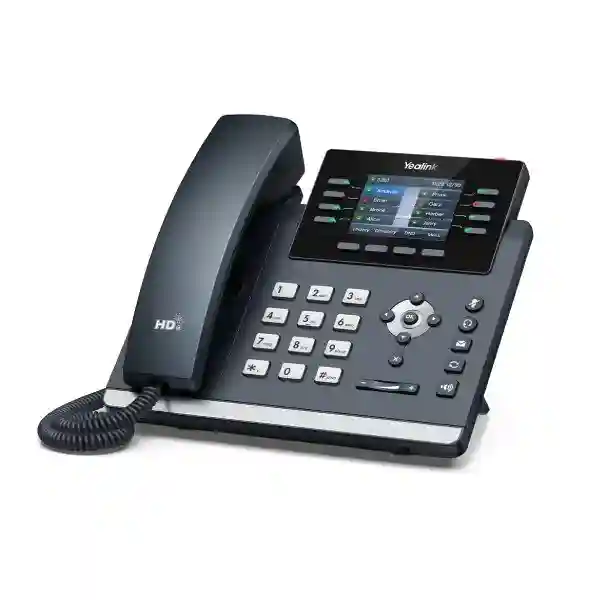
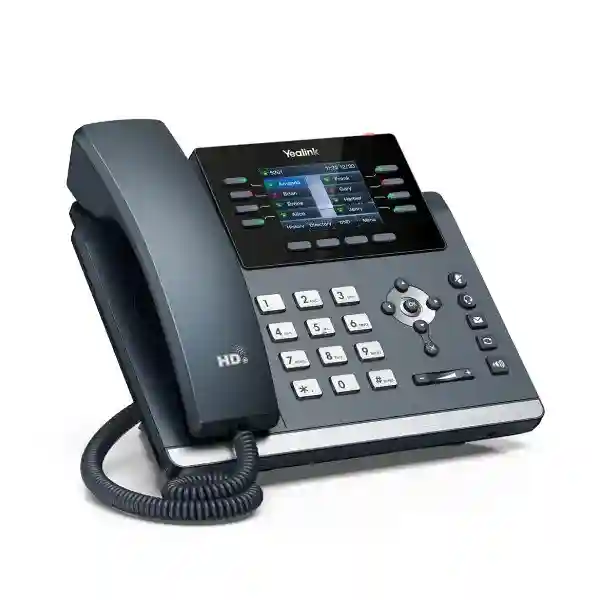
The Yealink SIP-T44U is a feature-rich, 12-line SIP desk phone built for business users who need dependable voice quality, practical call handling and room to expand. Its 2.8-inch 320×240 color display, dual-port Gigabit Ethernet, PoE, dual USB connectivity and support for the EXP43 expansion module make it suitable for general office users, reception teams, administrators and shared workspaces. For organizations in Tanzania planning a new IP PBX rollout or refreshing an existing VoIP estate, the T44U provides a balanced endpoint between entry-level phones and larger executive models.
Why businesses choose the Yealink SIP-T44U
The SIP-T44U is designed for organizations that want a professional desk-phone experience without moving immediately to a large touch-screen endpoint. Yealink positions it within the T4U family as a well-rounded SIP office phone. The practical value is in how its features work together: the phone can register up to 12 SIP accounts, provides multiple programmable keys, connects to modern Gigabit Ethernet networks, can be powered through PoE, and offers two USB ports for accessories. This combination supports both everyday users and busier call-handling roles.
For IT teams, the model is especially relevant when phones are deployed in quantity. Yealink supports centralized provisioning methods, including its Redirection and Provisioning Service and boot-based provisioning workflow. Unified T4U firmware and auto-provisioning templates can simplify repetitive configuration work across a fleet. That matters in multi-floor offices, branch environments and phased refresh projects where consistent configuration, naming and firmware control are more important than configuring each phone individually.
The T44U also gives buyers flexibility in wireless and headset choices. Bluetooth and Wi-Fi are available through compatible Yealink USB adapters rather than being built in, so procurement teams can buy the core phone for wired desks and add wireless capability only where it is needed. Organizations that want built-in Wi-Fi and Bluetooth may instead compare the T44U with the T44W. For wired business networks with PoE and established VLANs, however, the T44U can be a cost-conscious and capable fit.
Suitable for users who handle multiple identities, lines or call flows on a single business desk phone.
A 320×240 backlit color LCD provides a clearer interface for contacts, call status and programmable functions.
Supports combinations of USB headsets, recording and compatible Wi-Fi or Bluetooth adapters.
Fits modern managed networks and can receive power from compatible PoE switching, reducing desk-side power adapters.
Verified Yealink SIP-T44U technical highlights
| Display | 2.8-inch 320×240 color LCD with backlight |
| SIP capacity | Up to 12 SIP accounts |
| Network | Dual-port Gigabit Ethernet with PoE support |
| USB | Two USB ports for supported accessories and functions |
| Audio | Yealink Optima HD Voice, HD handset and speaker, wideband G.722 |
| Wireless options | Wi-Fi via compatible WF40/WF50 adapter; Bluetooth via compatible Yealink USB Bluetooth adapter |
| Expansion | Supports Yealink EXP43 color-screen expansion modules |
| Mounting | Two-position stand and wall-mount capability |
Audio quality, call handling and desk productivity
Business phones succeed or fail on daily usability. The T44U combines Yealink Optima HD Voice with wideband audio support and acoustic technologies intended to make speech easier to understand in typical office environments. For users who spend substantial time on the phone, consistent audio through handset, speakerphone or compatible headset can have more operational value than a long list of rarely used features.
The phone includes eight line keys and three pages of programmable functions, providing up to 21 paperless DSS keys. These can be used for line appearance, speed dial, busy-lamp-field functions and other PBX-dependent features. Reception or administrative users who need substantially more monitored extensions can add supported EXP43 expansion modules. That makes the handset flexible enough to remain useful when a user moves from basic extension duties into a busier call-routing role.
Before purchase, confirm the PBX feature set and licensing. A SIP phone can support standards-based signaling while still depending on the PBX or hosted platform for functions such as BLF, call recording, directory synchronization, voicemail integration, queues and auto-provisioning. The most reliable procurement approach is therefore to validate both physical phone specifications and the intended telephony platform.
Network, PoE and deployment planning
The SIP-T44U is a network endpoint, so voice quality depends on more than the handset. Business deployments should check switch capacity, PoE budget, VLAN design, DHCP, DNS, QoS and internet or SIP-trunk stability. The phone’s Gigabit Ethernet interfaces help it fit into contemporary LANs and can simplify desk cabling where a workstation shares the local connection path, subject to the organization’s network design and policy.
PoE can reduce clutter by powering the phone from a compatible network switch. For sites with UPS-backed switching, this can also help preserve internal phone availability during brief power interruptions, although continued external calling still depends on the PBX, gateways, routers, internet links and carrier services remaining available. When PoE is not available, verify the appropriate power adapter separately because package contents can vary by market and channel.
For larger rollouts, deployment documentation should capture MAC addresses, extension assignments, user names, VLAN settings, firmware version and provisioning status. Standardizing these details supports faster troubleshooting and simpler moves, adds and changes. FourTeck’s broader Tanzania IT and telecom solutions can also help buyers consider the phone together with switching, IP PBX, cabling and wider infrastructure rather than as an isolated endpoint.
Compatibility and accessories to confirm before ordering
Confirm SIP registration, provisioning, BLF, directory, voicemail, transfer and queue behavior with the selected voice platform.
Check whether users need RJ9, USB or EHS headset connectivity and whether call-control functions are required.
Wi-Fi and Bluetooth are provided through compatible Yealink adapters on the T44U rather than being built in.
For reception or high-volume transfer desks, confirm the number of EXP43 modules and monitored extensions required.
Yealink SIP-T44U Tanzania
Businesses evaluating the Yealink SIP-T44U in Tanzania are often replacing analog extensions, standardizing mixed IP-phone fleets or extending an existing IP PBX to new users. The T44U is particularly relevant where staff need more than an entry-level SIP handset but do not require a large executive touch screen. Its 12 SIP accounts, color display, programmable keys, PoE, Gigabit Ethernet and USB expansion options create a strong middle tier for finance teams, administrators, managers, operations desks and shared-office users.
For Tanzania deployments, start with the voice architecture. Confirm whether the system is an on-premises IP PBX, a hosted PBX, a SIP service integrated through a gateway, or a multi-site platform. Then verify how phones will be provisioned, whether voice VLANs are used and how QoS is handled across branch links or internet circuits. A handset may be technically compatible with SIP but still require platform-specific provisioning templates, certificates or feature settings. Capturing these dependencies before ordering reduces configuration surprises.
Procurement teams should also decide which accessories are needed per user. Most general desks can use Ethernet and PoE without additional wireless hardware. Selected users may require a compatible headset, Bluetooth adapter or Wi-Fi adapter, while reception positions may need EXP43 expansion modules. This role-based approach keeps the bill of materials focused and avoids buying accessories for every handset unnecessarily.
When requesting a Tanzania quotation, include quantity, PBX or hosted-platform name, existing phone models, PoE availability, headset requirements and any reception-console needs. If the project includes network upgrades, it can also be useful to review switching and cabling at the same time. FourTeck can discuss the T44U within a wider business-voice design, including the related FourTeck IP phone portfolio for organizations comparing multiple SIP endpoint classes.
Yealink SIP-T44U Dar es Salaam
In Dar es Salaam, the Yealink SIP-T44U fits offices that handle a steady mix of internal calls, customer enquiries and interdepartmental transfers. Corporate headquarters, professional-services firms, logistics companies, hospitality administration teams, schools, clinics and multi-branch businesses may all need desk phones that are simple for users while still providing the programmable features administrators expect from an IP PBX environment. The T44U’s 12 SIP accounts and paperless DSS keys allow a single device to accommodate more complex call roles than basic two- or four-line models.
Network planning is important in dense office environments. If voice, CCTV, Wi-Fi and business data share the same switching infrastructure, segmenting traffic with VLANs and maintaining adequate PoE capacity can make support much easier. QoS should be designed around the actual WAN and LAN architecture rather than enabled blindly. For offices using cloud PBX or remote SIP services, stable internet, sensible firewall rules and reliable DNS are all part of the user experience.
Reception desks in Dar es Salaam may benefit from the T44U’s expansion capability when staff need rapid access to many extensions. General office desks may need only the base phone, while call-intensive teams can add compatible USB or EHS headsets. This mixed deployment keeps the device standard consistent without forcing every user to receive the same accessories.
For a meaningful quotation, provide the expected handset quantity, location or floor count, PBX platform, SIP-trunk environment, PoE switch details, and whether existing cabling will be reused. If the rollout is part of a larger communications refresh, reviewing extension numbering, IVR, call queues and failover procedures at the same time can reduce later rework. Dar es Salaam buyers should request current availability and commercial terms rather than relying on online prices from other markets because channel pricing and package contents can differ.
Yealink SIP-T44U Mwanza
For organizations in Mwanza, the Yealink SIP-T44U can support branch offices, administrative teams, educational environments, clinics, trading companies and service businesses that want structured VoIP calling without overcomplicating the desktop. The phone is most useful when the surrounding network is prepared for voice, including adequate PoE, organized switching and predictable connectivity to the PBX or hosted service.
A branch deployment should begin with operational questions. How many staff need dedicated extensions? Which users transfer calls regularly? Are there shared phones at counters, security desks or common areas? Does the branch call head office frequently? These questions determine whether the T44U should be used across all desks or reserved for roles that benefit from its larger set of programmable keys and multi-account capability. Simpler phones can be mixed into the same SIP platform when appropriate.
Connectivity resilience also deserves attention. A cloud-hosted voice platform depends on internet availability, while an on-premises PBX depends on local server or appliance uptime. In either case, the handset itself is only one layer. Consider UPS coverage for PoE switches, routers and firewalls, as well as alternate call-routing procedures if a WAN link is unavailable. Where branch links use VPN or SD-WAN, latency and packet-loss behavior should be tested under real traffic conditions.
When comparing suppliers for a Mwanza rollout, focus on complete fit rather than headline price. Ask whether the quoted unit includes the required power method, whether wireless adapters are needed, whether headsets are compatible and whether the PBX provisioning template is available. A clear device schedule that maps each phone to an extension and user role makes installation easier and supports future troubleshooting, especially when a business has several locations across Tanzania.
Yealink SIP-T44U Arusha
Arusha organizations often combine front-office communication with tourism, hospitality, professional services, education, NGOs and distributed operations. The Yealink SIP-T44U is a practical desk-phone option when these environments need consistent call handling, multiple extensions or line appearances and the ability to connect headsets or expansion modules for selected users. Its color display and programmable keys help users reach common functions without relying on complicated key sequences.
Hotels, travel offices and service desks may have reception or reservation staff who benefit from BLF and speed-dial keys, while back-office users may need only core calling, transfer, hold and voicemail features. Because many of these functions are delivered by the PBX, procurement should include a short compatibility review before phones are ordered in volume. Confirm SIP registration, BLF behavior, directory support and any auto-provisioning requirements with the intended platform.
Headsets are another role-specific choice. Staff who handle long calls may benefit from wired or wireless headset options, while occasional callers may prefer the handset or speakerphone. The T44U’s dual USB ports create flexibility for supported accessories, but compatible adapters and headsets should be selected deliberately. If built-in Wi-Fi and Bluetooth are standard requirements across the entire office, compare the T44U with models that integrate those radios natively.
For Arusha quotations, share the number of extensions, user roles, branch connectivity, expected call flows and whether a reception expansion module is needed. Include photos or a simple network overview if the project also involves switching, cabling or Wi-Fi. This allows the phone requirement to be evaluated as part of the full communications environment rather than quoted as an isolated device list.
Yealink SIP-T44U Dodoma
The Yealink SIP-T44U can suit public-sector offices, corporate branches, institutions, consultants and service organizations in Dodoma that need a capable SIP endpoint for everyday business calling. Its up-to-12-account design supports complex extension needs, while PoE and Gigabit Ethernet make it easier to integrate into a managed office network. For projects where many handsets are deployed together, consistent provisioning and firmware control can be more valuable than individual handset customization.
A structured rollout should define extension numbering, user names, phone labels, VLAN settings and provisioning rules before devices are placed on desks. This is particularly important when a site has multiple departments or when phones are delivered in phases. A standard template makes replacement simpler because the configuration can be reproduced rather than rebuilt manually.
For offices that use centralized PBX services in another city or country, WAN planning becomes part of the voice design. The T44U supports SIP communication, but voice quality depends on end-to-end packet delivery. Routers, firewalls, VPNs and internet links should avoid unnecessary latency, jitter and packet loss. Where voice is business-critical, organizations should document backup procedures for connectivity outages and decide whether mobile or alternate-route calling is required.
Before requesting a Dodoma quote, list the exact number of T44U units, whether PoE is already available, the PBX platform, headset requirements, expansion-module needs and any future growth estimate. If the project includes new network switches, calculate the combined PoE demand for phones, access points and cameras rather than sizing switches only by port count. A coordinated infrastructure plan can make the phone deployment easier to support over its lifecycle.
Yealink SIP-T44U UAE
UAE buyers often compare the Yealink SIP-T44U with other T4-series phones for office upgrades, call-center-adjacent roles, reception desks and multi-site business communication. The T44U stands out as a wired, expansion-friendly model with a color screen, up to 12 SIP accounts, dual USB ports and Gigabit Ethernet. It is a useful choice when the network already provides PoE and when built-in Wi-Fi is not required on every desk.
In the UAE market, project teams should distinguish the T44U from the T44W. Both share a similar desk-phone concept, but the T44W integrates wireless connectivity while the T44U uses compatible USB adapters for Wi-Fi and Bluetooth. For fixed desks in structured-cabling environments, this can be perfectly appropriate. For hot desks or areas where Ethernet is unavailable, buyers may prefer a phone with integrated wireless connectivity.
PBX compatibility remains central. Businesses using 3CX, BroadWorks-based services, hosted SIP platforms or other standards-based systems should validate provisioning and feature behavior with their service provider. For larger deployments, unified configuration and remote provisioning can reduce manual work. The FourTeck IP PBX resource for Dubai and UAE projects can be useful when the handset is being evaluated alongside the wider voice platform.
Commercial quotations should specify whether a power adapter is needed, because PoE deployments may not require one and package bundles differ by seller. Buyers should also state whether headsets, wall mounts, wireless dongles or EXP43 modules are required. Comparing like-for-like bills of materials avoids selecting a lower headline unit price that excludes necessary accessories.
Yealink SIP-T44U Uganda
Businesses in Uganda considering the Yealink SIP-T44U can use it as part of a new IP telephony deployment or to standardize an existing SIP environment. The phone is suited to offices that need dependable desk calling, multiple programmable functions and room for growth without moving to premium executive handsets. Its support for PoE and Gigabit Ethernet fits managed business networks, while USB expansion provides options for headsets and wireless adapters.
For organizations with offices in both Uganda and Tanzania, standardizing on the same handset family can simplify user training, spare-device planning and configuration. The extension numbering and PBX architecture do not need to be identical at every branch, but consistent endpoint models make it easier for IT teams to maintain familiar menus and provisioning procedures. The FourTeck Uganda regional site can support country-specific procurement discussions for related voice and infrastructure requirements.
Connectivity should be assessed before hosted voice is deployed widely. A stable LAN, correct PoE budget, voice VLANs where appropriate and controlled firewall behavior all contribute to reliable calls. If branch links are inconsistent, the design may need failover connectivity or alternative call-routing methods. These are architecture questions rather than handset limitations.
When preparing an Uganda request for quotation, include the number of phones, site locations, PBX platform, current switching environment, desired headsets and any users who need expansion modules. Buyers should also identify whether they are replacing existing phones because reuse of cabling and PoE infrastructure may reduce project complexity. Current pricing and availability should always be confirmed for the intended purchase date and quantity.
Yealink SIP-T44U Kampala
In Kampala, the T44U is appropriate for businesses that want a capable desk phone for administrators, client-service teams, managers and reception-related roles. Its programmable keys can provide faster access to frequently used extensions and functions, while support for an EXP43 module allows a reception position to monitor or reach a larger set of users. This makes one handset model flexible enough to support several job roles.
Before deployment, confirm whether the office will power phones using PoE or separate adapters. PoE is usually cleaner for managed office installations because it centralizes power at the switch and can be protected by the same UPS strategy as the network. The combined PoE demand of phones, access points and cameras should be calculated rather than assuming all switch ports can deliver full power simultaneously.
For call-heavy users, headset selection should be included in the pilot stage. A headset that fits the user’s work pattern can improve comfort and reduce handset handling. The T44U supports USB headset and EHS-related options, but specific headset models and call-control functions should be checked for compatibility. Wireless requirements should also be explicit because the T44U depends on supported USB adapters for Wi-Fi and Bluetooth.
Kampala buyers comparing the T44U with entry-level phones should focus on line capacity, color display, programmable-key needs and future expansion. Buyers comparing it with higher-end Yealink models should ask whether a larger display, more native wireless features or additional line keys justify the extra cost for the user role. A short pilot with representative users can produce better decisions than selecting one phone solely from a specification sheet.
Yealink SIP-T44U Arua
For branches and institutions in Arua, the Yealink SIP-T44U can be a practical choice where business calling needs to connect to a centralized IP PBX or hosted SIP service. The model’s feature set is substantial enough for managers and administrators while remaining straightforward for everyday desk use. Its wired Ethernet design can be advantageous in environments where structured cabling is preferred for stable voice traffic.
Remote or branch deployments benefit from standardized provisioning. Rather than configuring each handset locally, IT teams can predefine account settings, server addresses, feature keys and firmware policies so phones come online predictably. This is especially valuable when technical staff are not permanently located at the branch. The exact provisioning process depends on the PBX and management environment, so it should be tested before a large rollout.
Power and connectivity resilience can have a greater impact at smaller sites than phone specifications. If phones are powered by PoE, the switch and router should have appropriate UPS protection if continued service during short outages is important. If the phone connects to a cloud PBX, internet availability becomes part of the telephony risk plan. Businesses may also define fallback calling procedures for critical users.
Arua procurement requests should state whether the deployment is a new installation or an extension of an existing system. Provide current PBX details, extension quantity, user roles and any known network constraints. If phones are being shipped to a branch, ask for a complete accessory list in advance so required power adapters, headsets or expansion modules are not discovered missing during installation.
Yealink SIP-T44U Mbarara
Organizations in Mbarara can consider the SIP-T44U for branch administration, education, healthcare, hospitality and commercial offices that need a flexible SIP desk endpoint. The phone’s 12-account capacity can support users with multiple line identities, while its DSS keys give quick access to transfer targets or service functions. It is also well matched to structured office networks using managed Gigabit switching and PoE.
For a new voice project, map business call flows before assigning devices. A receptionist who handles external calls has different needs from a back-office employee who makes occasional calls. A department supervisor may want BLF visibility, while a meeting room may not need a full desk phone at all. Matching the endpoint to the role can control cost and improve usability across the installation.
The T44U’s USB ports give room for supported accessories, but accessory planning should be intentional. A Wi-Fi adapter is useful only where Ethernet is not practical. Bluetooth is valuable for certain headset workflows, while wired USB headsets may be simpler for fixed workstations. Reception roles that need many monitored extensions may benefit more from EXP43 expansion than from wireless accessories.
For Mbarara buyers, a strong quotation request includes handset quantity, role breakdown, PBX type, required accessories, PoE status and preferred deployment schedule. If the office network is being upgraded at the same time, ask for switch port and PoE calculations that include future growth. This makes the telephony deployment part of a sustainable network plan instead of a separate purchasing exercise.
Yealink SIP-T44U Gulu
The Yealink SIP-T44U can serve Gulu offices that need a professional SIP phone with more flexibility than an entry-level handset. Its color display, programmable keys, PoE, Gigabit Ethernet and support for multiple SIP accounts make it suitable for staff who handle regular business calls, transfer activity or multiple service lines. The expansion path also means a single handset family can support both standard and higher-activity desks.
A reliable Gulu deployment should be designed around the network path to the PBX. If the PBX is hosted or located at another branch, the phone depends on WAN connectivity, routing and firewall behavior. Where possible, voice traffic should be monitored for latency, jitter and packet loss, especially at busy times when backups, cloud applications or video traffic may compete for bandwidth.
Phone placement and power method should also be reviewed. PoE simplifies desks and centralizes power, while wall mounting may suit shared areas or service counters. For common areas, it may be sensible to limit features and use a dedicated extension profile. For managers or receptionists, more programmable keys and headsets can improve call efficiency. One configuration does not have to fit every location.
When planning procurement, include spare units and documented configuration for sites where replacement logistics could take time. A preconfigured spare can restore service more quickly than waiting for a new handset to be sourced and set up from the beginning. Confirm current commercial availability and accessory compatibility before finalizing the order, particularly for wireless dongles and expansion modules.
Yealink SIP-T44U Kenya
Kenya has an active market for Yealink business phones, and the SIP-T44U is commonly positioned as a feature-rich T4-series model for office users. For organizations standardizing across East Africa, using the same phone family in Kenya, Tanzania and Uganda can reduce training differences and simplify spares. The device’s 12 SIP accounts, Gigabit Ethernet, PoE and USB expansion make it adaptable to both general users and more call-intensive roles.
Buyers should compare offers carefully because package contents and warranty terms can vary by seller. A price that appears lower may exclude a power adapter, headset, wall mount or other accessory that another bundle includes. In PoE environments, an adapter may not be required, but this should be a deliberate design choice. Ask for an itemized bill of materials so the total project cost is visible.
For multi-site deployments, it is useful to standardize the provisioning template and document country-specific telecom dependencies separately. The handset itself can remain consistent while SIP trunks, numbering and carrier services differ. Organizations can coordinate regional requirements through the FourTeck Kenya regional site when a project extends beyond Tanzania.
A Kenyan project should also consider network switching and PoE at scale. Forty phones do not only consume forty switch ports; they also draw power and generate traffic that must coexist with computers, access points and cameras. Uplink capacity, VLAN design and UPS requirements should therefore be part of the rollout plan. This broader perspective helps ensure the phones work consistently after installation rather than merely powering on.
Yealink SIP-T44U Kuwait
In Kuwait, the Yealink SIP-T44U can suit offices that need an interoperable SIP desk phone for on-premises or hosted business communications. The device is appropriate where users need a compact color interface, multiple programmable functions and support for headsets or expansion accessories. Its dual-port Gigabit Ethernet and PoE capabilities also make it straightforward to integrate into structured enterprise LANs.
Project teams should decide whether desk phones will be standardized around wired Ethernet or whether large numbers of users require wireless connectivity. The T44U can add Wi-Fi and Bluetooth through compatible adapters, but organizations expecting wireless on most desks may prefer a model with those functions built in. In fixed-office environments with Cat6 cabling and PoE, the T44U’s wired-first design can be efficient and predictable.
For PBX migrations, test more than basic calling. Validate transfer, hold, conference, BLF, voicemail notification, corporate directory behavior and any automatic provisioning process. If users rely on call recording, headset control or application integration, test those workflows as well. A short pilot group can reveal configuration differences before a large order is committed.
Kuwait quotations should identify quantity, expected user roles, PBX platform, PoE availability and required accessories. Where phones are part of a broader GCC standard, procurement teams can compare configuration consistency across offices while keeping carrier-specific settings separate. Avoid assuming that a price or stock status seen online applies to a business project; request a current project quotation and exact scope.
Yealink SIP-T44U Ghana
Ghanaian businesses evaluating the Yealink SIP-T44U can use it for office VoIP, branch connectivity and PBX refresh projects where a mid-range desk phone is preferred. The handset supports up to 12 SIP accounts and provides a color interface, programmable keys and expansion capability that can support reception, administrative and general office roles with different configurations.
For a stable deployment, confirm the local network first. Managed switching, correct PoE capacity and a clear voice-VLAN strategy can simplify troubleshooting. Hosted PBX environments should also be checked for internet quality and firewall compatibility. A phone that is correctly configured can still experience poor calls if the WAN path introduces packet loss or high jitter, so network testing should be part of the acceptance process.
Accessory choices can be matched to role. Customer-service and administrative users may benefit from headsets. Reception roles may need an EXP43 module for more monitored extensions. Users without cabling at the desk can use compatible wireless adapters where practical, though a wired connection is generally easier to control in fixed office environments. This selective accessory model can keep project cost aligned with actual need.
When requesting a Ghana quote, include the PBX platform and any existing Yealink models so configuration continuity can be assessed. If the business operates in multiple countries, document a common extension and provisioning standard while leaving carrier and numbering details country-specific. This can make regional support and future replacement easier without forcing every site into an identical telecom arrangement.
Yealink SIP-T44U Nigeria
Nigeria has a broad commercial market for SIP phones, and the Yealink SIP-T44U is relevant to offices, service desks, branch networks and businesses replacing legacy PBX handsets. The T44U’s feature balance makes it particularly useful when organizations want more programmable functions and accessory flexibility than basic SIP endpoints provide but do not need a premium large-screen phone at every desk.
Because online listings can vary widely in price, warranty and bundle contents, business buyers should compare complete project scope. Confirm whether the quoted phone includes or excludes a power adapter, whether PoE is available, and whether Wi-Fi or Bluetooth requires additional dongles. For bulk deployments, request project pricing rather than relying on single-unit marketplace values.
In larger offices, the phone should be integrated with VLAN and QoS policy rather than attached to an unmanaged flat network by default. Voice traffic is usually modest in bandwidth, but it is sensitive to delay and packet loss. Firewall SIP handling should be tested with the actual provider because unnecessary SIP ALG behavior can sometimes complicate registration or call flow, depending on the network architecture.
Nigeria projects should define user profiles before ordering. Receptionists may require expansion modules, high-call-volume teams may require headsets, and ordinary staff may need only the base phone. This segmentation avoids unnecessary accessory cost and makes the rollout easier to standardize. A pilot of representative users can also confirm audio, feature behavior and provisioning before the full quantity is deployed.
Yealink SIP-T44U Seychelles
Businesses and hospitality organizations in Seychelles may consider the Yealink SIP-T44U for front-office, administration and management roles where dependable SIP calling and programmable functions are required. The handset’s color display, PoE, Gigabit Ethernet and expansion support make it suitable for structured business networks and PBX environments that need more capability than basic analog-style endpoints.
For island and hospitality deployments, procurement planning should pay particular attention to spares and accessory completeness. A missing adapter, headset cable or expansion module can delay installation when replacement logistics are less immediate. Creating a detailed bill of materials and keeping a small quantity of preconfigured spare phones can reduce service disruption when devices need replacement.
Hotels and resorts should also distinguish guest-room telephony from administrative desk-phone requirements. The T44U is better suited to staff who need features, multiple lines or programmable keys than to simple guest-room calling. Front desk and reservation teams may benefit from expansion modules and headsets, while back-office roles can use the same handset with a simpler key layout. This role-based approach improves usability.
For Seychelles quotations, provide the number of units, PBX platform, site type, PoE capability and any accessory needs. If several buildings or properties are connected, note whether phones register to one central PBX or separate local systems. The answer affects provisioning, WAN design and troubleshooting. Current availability, freight, support arrangements and commercial terms should be confirmed for the exact project instead of inferred from another market.
Who should choose the T44U?
A good fit for users who need a professional color-screen SIP phone with multiple accounts and programmable keys.
Expansion-module support makes the phone useful where users monitor or reach many extensions.
Centralized provisioning and unified T4U management can help standardize larger fleets.
Dual USB and headset support create options for call-intensive users when compatible accessories are selected.
T44U or T44W: which is the better fit?
The T44U and T44W occupy a similar class, but the purchasing decision often comes down to wireless requirements. The T44U supports Wi-Fi and Bluetooth through compatible USB adapters. The T44W integrates wireless connectivity. If desks already have Ethernet and PoE, the T44U can be a straightforward choice. If wireless connectivity is expected on many desks, built-in radios can reduce accessory management.
Do not compare only the base-phone price. Include any required Wi-Fi dongles, Bluetooth adapters, headsets, power adapters and expansion modules. The most suitable model is the one that meets the deployment requirement with the fewest unnecessary components and the simplest support model.
Related FourTeck resources
For broader endpoint comparisons, review the FourTeck IP phone specialist resource, which helps frame SIP handset selection across different user roles and brands.
For organizations planning the PBX layer together with endpoints, the FourTeck IP PBX resource provides related business-telephony context around extensions, call routing and platform planning.
Regional organizations can coordinate related requirements through FourTeck Uganda and FourTeck Kenya when a multi-country project includes offices outside Tanzania.
For the Tanzania project itself, the FourTeck Tanzania technology portfolio provides context for networking, IP telephony, switching, Wi-Fi and supporting business infrastructure.
Quotation checklist for Yealink SIP-T44U
Frequently asked questions
How many SIP accounts does the Yealink SIP-T44U support?
The Yealink SIP-T44U supports up to 12 SIP accounts. The number of accounts a user actually needs depends on the PBX design, line appearances and user role.
Does the T44U have built-in Wi-Fi?
No. Wi-Fi is available through compatible Yealink USB adapters such as the WF40 or WF50. Buyers who need built-in wireless connectivity can also compare the T44U with the T44W.
Does the Yealink SIP-T44U support Bluetooth?
Bluetooth can be added through compatible Yealink USB Bluetooth adapters. Confirm the exact adapter and headset combination before purchase.
Can the T44U be powered by PoE?
Yes. The phone supports Power over Ethernet. Check that the connected switch provides compatible PoE and has sufficient total power budget for all connected devices.
Can the T44U be used for a reception desk?
Yes, depending on the PBX and call flow. The phone provides programmable keys and supports Yealink EXP43 expansion modules, which can be useful for receptionists who monitor or transfer to many extensions.
Does the T44U work with 3CX or other SIP PBX systems?
Yealink identifies broad interoperability with leading SIP platforms, and 3CX is among platforms commonly associated with T4U deployments. Exact feature behavior, provisioning and firmware should still be validated for the specific PBX version and deployment.
Is a power adapter included?
Package contents can vary by region and seller. Because the T44U supports PoE, many business deployments do not need desk-side adapters. Confirm the exact quoted bundle before ordering.
What should I include in a request for quotation?
Provide quantity, delivery location, PBX platform, PoE availability, headset requirements, wireless requirements, expansion-module needs and whether installation or provisioning support is required.
Decision recap
Choose the Yealink SIP-T44U when you need a color-screen business SIP phone with up to 12 accounts, PoE, Gigabit Ethernet, programmable keys, dual USB connectivity and a path to reception-style expansion. It is especially suitable for wired office networks where wireless connectivity is optional rather than mandatory on every desk.
Before purchase, validate the PBX platform, provisioning method, PoE budget, accessory requirements and exact package contents. For larger deployments, a pilot with representative users is recommended so call handling, headsets, BLF keys and provisioning can be confirmed before the full rollout.
Consult FourTeck about your Yealink SIP-T44U requirement
Share the number of handsets, user roles, PBX platform and network environment. FourTeck can help frame the requirement around compatibility, accessories, PoE, provisioning and broader IP-telephony infrastructure. For a new deployment, include expected extension count and reception needs. For an upgrade, include the existing phone models and PBX details so the migration path can be reviewed.




Reviews
There are no reviews yet.