
YEALINK BUSINESS VOIP PHONE
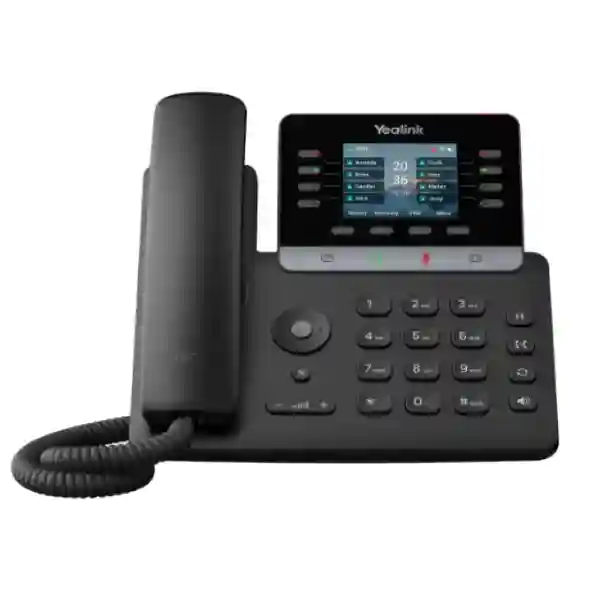
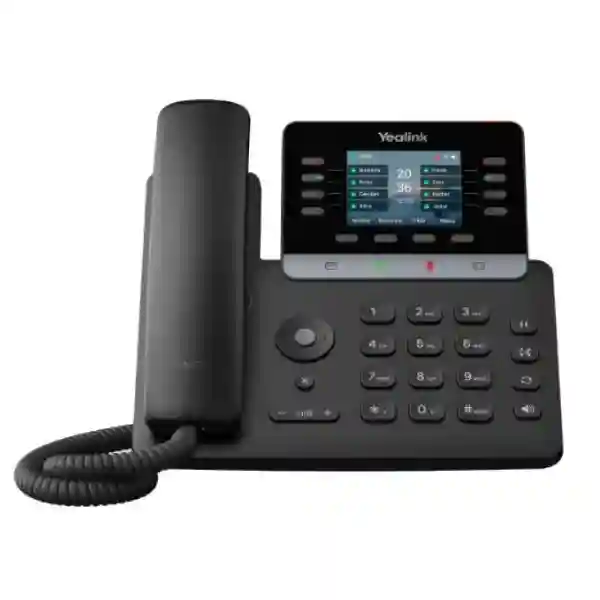
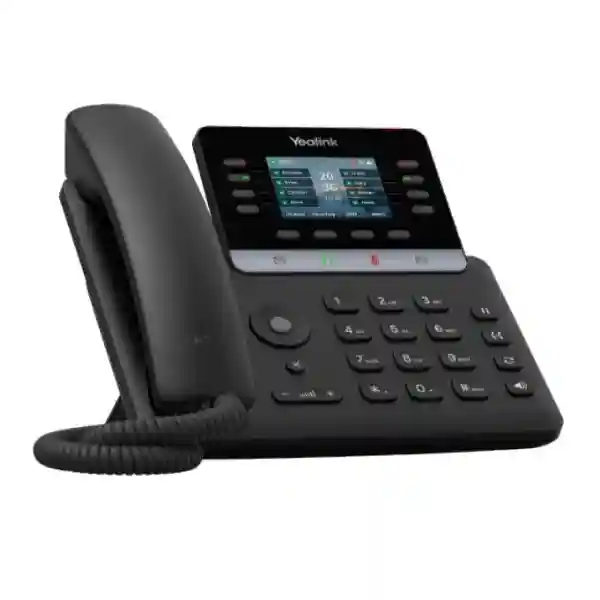
Yealink SIP-T73W Business Phone
The Yealink SIP-T73W is a modern SIP desk phone for organisations that want dependable voice, wireless flexibility, fast Gigabit networking and practical enterprise telephony controls in one compact endpoint. It supports up to 12 SIP accounts, a 2.8-inch 320 × 240 colour display, built-in dual-band Wi-Fi 6, Bluetooth 5.0, dual Gigabit Ethernet ports, IEEE 802.3af PoE, USB 2.0, HD voice, smart noise filtering, programmable line keys and expansion through Yealink EXP55 modules. For Tanzania deployments, the phone is particularly useful where businesses want a consistent endpoint for office staff, managers, reception teams, branch users and hybrid environments without depending on a single connectivity method.
Suitable for users who need multiple line identities, shared appearances or role-based extensions.
Built-in wireless options reduce dependence on extra adapters and support flexible desk placement.
Dual Gigabit ports and PoE support make the phone practical for structured office networks.
TLS 1.3, SRTP, secure boot, encrypted configuration files and TEE hardware encryption help protect voice deployments.
What the Yealink SIP-T73W solves for business users
Business telephony endpoints have to do more than make calls. They must register reliably with the chosen PBX, present frequently used call functions clearly, support headsets, fit the network architecture and remain manageable as the number of users grows. The SIP-T73W addresses these needs with a balance of physical keys, colour-screen navigation, programmable DSS functions, wireless connectivity and standards-based SIP support. Its eight line keys can provide up to 40 DSS functions across five pages, which helps users access speed dials, busy-lamp fields and other PBX functions without placing every action deep inside menus.
The phone also supports common call handling functions including hold, forward, waiting, transfer, redial, auto answer, direct IP calling and local five-way conferencing. For organisations using reception or supervisory workflows, the ability to connect up to three EXP55 colour expansion modules can provide a much larger set of programmable controls. The exact available feature set still depends on the PBX or hosted SIP service, so extension licensing, call recording, presence, BLF and server-side functions should be confirmed against the target platform before rollout.
Network flexibility is another important advantage. A wired office can use dual Gigabit Ethernet with PoE, while a site where data cabling is constrained can use built-in dual-band 2.4 GHz/5 GHz Wi-Fi 6 where wireless voice is operationally appropriate. Bluetooth 5.0 supports compatible Bluetooth headsets and device connections, while USB 2.0 can be used for supported USB headsets, recording and expansion accessories. These options make the SIP-T73W useful for standardised deployments in which different desks have different connectivity constraints.
Verified Yealink SIP-T73W technical highlights
| Display | 2.8-inch 320 × 240 colour LCD with backlight |
| SIP capacity | Up to 12 VoIP/SIP accounts |
| Ethernet | Dual-port Gigabit Ethernet |
| Power | IEEE 802.3af PoE Class 2; optional 5V/2A adapter |
| Wireless | Built-in Wi-Fi 6, IEEE 802.11a/b/g/n/ac/ax, 2.4 GHz and 5 GHz; built-in Bluetooth 5.0 |
| Audio | HD handset and speaker, G.722 wideband codec, smart noise filtering, full-duplex speakerphone with AEC |
| Security | TLS 1.3, SRTP, WPA2/WPA3, secure boot, AES256 configuration encryption and TEE hardware encryption |
| Expansion | Supports EXP55 colour-screen expansion modules; up to three can be cascaded |
| Management | Web/phone configuration, auto-provisioning via FTP/TFTP/HTTP/HTTPS, PnP and Yealink management options |
Compatibility, PBX integration and deployment planning
Yealink positions the SIP-T73W as a standards-based SIP endpoint and lists compatibility with platforms including 3CX and BroadSoft/BroadWorks environments. In practical procurement, buyers should still validate the exact call server, firmware, provisioning method and desired PBX features before standardising on any endpoint. Basic SIP registration may work broadly, but advanced functions such as BLF, shared line appearance, server-side recording, directory integration, visual voicemail and feature-key behaviour can depend on the PBX implementation.
For a structured office rollout, start with the network. A voice VLAN can separate phone traffic from ordinary user traffic, QoS can prioritise real-time voice, and PoE switching can reduce the need for individual desk adapters. The phone supports VLAN-related mechanisms including 802.1Q tagging, LLDP, CDP and DHCP VLAN. It also supports IPv4 and IPv6, SRTP, TLS, 802.1X and several VPN-related capabilities. These features are useful only when the wider network is designed consistently, so switch policies, DHCP options, firewall rules, SIP trunk settings and PBX security should be reviewed together.
For buyers building or upgrading a complete system, FourTeck Tanzania’s business technology overview explains how IP telephony fits alongside switching, Wi-Fi, security and structured infrastructure. The FourTeck Tanzania technology shop provides a broader purchasing framework for IP phones, IP PBX hardware and supporting equipment, while the FourTeck Tanzania services page is relevant when an endpoint purchase forms part of a larger configuration, migration or network-readiness project.
Yealink SIP-T73W Business Phone Tanzania
For organisations in Tanzania, the Yealink SIP-T73W is a practical business phone for offices that want to standardise on SIP without giving up modern connectivity. A Tanzania deployment may include conventional Ethernet-connected desks in headquarters, Wi-Fi-connected phones in flexible work areas and users who need Bluetooth headsets for frequent calls. The T73W supports all three deployment patterns, which can reduce the need to maintain separate phone models solely because different desks have different cabling conditions. The most important planning step is to confirm the voice platform, SIP trunk or cloud PBX, user count, line requirements, power design and network readiness before ordering.
In a typical Tanzanian office environment, PoE is often the cleanest method because the handset receives power from the network switch and uses one cable for network connectivity. If the switch and upstream network are protected by suitable UPS capacity, voice endpoints can continue operating through short utility power interruptions, subject to PBX and internet availability. Where structured cabling does not reach a desk, the built-in Wi-Fi 6 capability can provide an alternative, but voice over wireless should still be evaluated for signal quality, roaming behaviour, interference and client density. The phone supports 2.4 GHz and 5 GHz wireless bands, giving administrators flexibility to align it with the site’s WLAN design.
Procurement teams in Tanzania should also separate hardware features from PBX-dependent functions. The T73W provides programmable keys, directories, headset interfaces, encryption and SIP support, but call queues, recording, extension privileges, dial plans, voicemail and branch routing are usually determined by the phone system or hosted service. A useful quotation request therefore includes the number of phones, the PBX or SIP platform, desired extension features, PoE availability, headset requirements, Wi-Fi expectations and whether expansion modules are needed. This allows the endpoint, network and call-flow requirements to be reviewed together rather than as isolated purchases.
The SIP-T73W can suit professional services, hospitality administration, education, healthcare administration, NGOs, logistics, financial operations, retail headquarters and multi-branch businesses that need predictable desk calling. For larger estates, central provisioning becomes increasingly important because consistent firmware, templates, account settings and security policies simplify operations. Yealink supports auto-provisioning methods and management tools that can help administrators deploy and maintain multiple devices. The right implementation in Tanzania should prioritise compatibility, stable voice networking and lifecycle management rather than buying solely on display size or headline features.
Yealink SIP-T73W Business Phone Dar es Salaam
Dar es Salaam organisations often operate from busy commercial offices where communication load can vary significantly between departments. The SIP-T73W fits this environment well because it can serve ordinary office users while still offering enough programmable controls for staff who handle a larger number of calls. Sales desks, front-office teams, customer service groups, operations personnel and managers can use separate SIP identities, speed dials and PBX features from the same hardware platform. This can simplify device standardisation across a building without forcing every user into an oversized executive handset.
For a Dar es Salaam deployment, network architecture deserves as much attention as the handset. Offices with managed switching should consider a dedicated voice VLAN, QoS, LLDP or DHCP-based phone provisioning and appropriate firewall rules. The T73W’s dual Gigabit ports allow a desk computer and phone to share one network drop where that design is approved, while PoE can remove the need for individual power adapters. For offices that move desks frequently, built-in Wi-Fi 6 may offer another placement option, although stable voice service still depends on strong signal, low interference and suitable access-point capacity.
Reception and supervisory users in Dar es Salaam may benefit from the phone’s support for EXP55 expansion modules. Up to three expansion modules can be cascaded, providing a larger field of programmable buttons for monitored extensions and frequent call actions. Whether those keys can show the desired BLF, shared-line or call-status information depends on the PBX platform and configuration, so this should be tested before a large rollout. Organisations using Bluetooth headsets can also take advantage of Bluetooth 5.0, while USB and RJ9 headset options support different user preferences.
When requesting a quotation in Dar es Salaam, buyers should specify the number of users, existing PBX or planned phone system, SIP provider, network-switch model, PoE availability, required headset type and any reception-console requirements. If the project is replacing an older analogue or proprietary phone system, include the existing extensions, inbound numbers, IVR or hunt-group requirements and branch connections. That information makes it possible to evaluate whether the T73W is the right endpoint and what additional PBX, switching, firewall, cabling or power work may be required for a smooth transition.
Yealink SIP-T73W Business Phone Mwanza
Businesses in Mwanza considering SIP telephony can use the Yealink SIP-T73W as a flexible endpoint for office, administration and branch communication. The phone is useful where organisations want a modern desk handset that can operate on a wired Ethernet network but also offers Wi-Fi when desk cabling is impractical. Its 12 SIP-account capacity gives administrators room to assign multiple line identities or services to a user when the PBX design requires it, while the colour display and dedicated physical keys keep everyday call handling accessible.
For Mwanza sites, the quality of the underlying LAN and internet connection directly influences the user experience. SIP voice requires consistent latency, low packet loss and correct QoS treatment. A phone cannot compensate for overloaded WAN links, poorly configured firewalls or congested wireless networks. Before rollout, organisations should review switch capacity, PoE budget, VLAN configuration, router or firewall policies, DHCP, DNS and the path to the PBX or hosted voice platform. If a cloud PBX is used, internet resilience may be an important business requirement, especially for teams that depend heavily on inbound customer communication.
The SIP-T73W includes business-oriented security functions that can support a more controlled environment, including TLS 1.3, SRTP, HTTPS certificate management, secure boot and encrypted configuration files. These features should be combined with strong PBX credentials, restricted management access, current firmware and network segmentation. Administrators should avoid treating the phone as an isolated appliance; it is a managed network endpoint and should follow the same lifecycle discipline as switches, access points and other connected devices.
Mwanza procurement teams can improve quotation accuracy by documenting the exact deployment context. Note how many phones are required, which users need headsets, whether desks have PoE, whether Wi-Fi will be used, whether expansion modules are required and which call server will control the phones. Also identify branch-to-branch calling requirements, emergency call policies, directory integration and any server-side recording needs. The SIP-T73W is best selected as part of a complete voice architecture, not merely because it has an attractive feature list. Careful planning helps ensure the endpoint’s capabilities are actually usable after installation.
Yealink SIP-T73W Business Phone Arusha
Arusha businesses in tourism, professional services, hospitality administration, education, NGOs and regional operations often need reliable voice communication between customer-facing teams, offices and remote contacts. The Yealink SIP-T73W offers a compact endpoint for these environments with HD voice, smart noise filtering, a full-duplex speakerphone and multiple connectivity choices. Users can work with the handset, speakerphone or compatible headset, while the phone’s programmable keys can surface frequently used contacts and PBX features.
A common consideration in Arusha is how the phone will connect within the building. If the office already has structured cabling, dual Gigabit Ethernet and PoE provide a straightforward deployment model. If the organisation occupies a flexible or renovated space where adding new cables is difficult, built-in dual-band Wi-Fi 6 can reduce installation constraints. Wireless voice, however, should not be assumed to be identical to wired voice. Access-point placement, interference, channel use, roaming and backhaul all matter. A site assessment can determine whether Wi-Fi is appropriate for fixed voice endpoints or whether new cabling is the better long-term investment.
Hospitality and service-oriented organisations may also need reception workflows, room or department extensions, transfer keys and monitored lines. The T73W’s DSS keys and optional EXP55 modules can support richer call handling when the PBX exposes the required functions. For standard office users, the base handset may already provide enough programmable controls. This allows a single model family to cover several user profiles while keeping firmware and training more consistent.
Before ordering in Arusha, confirm whether the power adapter is needed because Yealink lists it as optional; many business deployments instead use PoE. Buyers should also verify headset compatibility, PBX compatibility, firmware requirements and whether advanced functions are licensed on the call platform. A useful procurement list includes handset quantity, expansion modules, PoE switches if required, cabling, UPS capacity, PBX or cloud service, SIP trunk requirements and user training. That broader view prevents a situation where the phones arrive but cannot be deployed immediately because supporting network or platform components were overlooked.
Yealink SIP-T73W Business Phone Dodoma
Organisations in Dodoma planning modern office communications can use the Yealink SIP-T73W as a standards-based SIP endpoint for government-adjacent services, professional offices, education, administration, projects and multi-site businesses. Its combination of 12 SIP accounts, programmable line keys, secure communications support and modern wireless connectivity makes it suitable for both individual desks and more structured enterprise deployments. The phone can register to a compatible on-premises or hosted SIP platform, but the final feature experience depends on that server and the way it is configured.
For offices that are expanding or moving into new facilities, telephony should be designed together with the LAN. A managed PoE switch can power the T73W and carry voice traffic, while VLANs and QoS can help keep real-time communication separate from ordinary data use. If phones and computers share a network point, the dual Gigabit Ethernet ports help maintain high-speed connectivity at the desk. Where Wi-Fi is used, administrators should ensure the wireless network has adequate coverage and capacity rather than treating Wi-Fi 6 support as a substitute for radio planning.
Security is especially relevant where voice systems connect to public networks or cloud services. The SIP-T73W supports SRTP and TLS for encrypted media and signalling when the connected platform is configured accordingly, as well as WPA2/WPA3 for wireless access, 802.1X, secure boot and TEE hardware encryption. These capabilities should form part of a wider security policy that includes strong credentials, limited administrative access, firmware management, firewall controls and documented provisioning.
Dodoma buyers should think about operational support after installation. Large phone estates are easier to manage when naming conventions, extension assignments, firmware versions, configuration templates and asset records are standardised. Yealink’s provisioning capabilities can reduce repeated manual configuration, but the deployment server and templates must be prepared correctly. When requesting a quote, include current extension counts, expected growth, departments, branch offices, reception requirements, directory needs, headsets and any expansion modules. This allows the phone system to be sized around real workflows rather than simply matching one phone to one employee without considering how calls are handled.
Yealink SIP-T73W Business Phone UAE
For UAE organisations evaluating the Yealink SIP-T73W, the handset offers a practical mix of enterprise SIP features and modern connectivity for offices, branches, reception areas and hybrid workspaces. Its 12 SIP accounts, Wi-Fi 6, Bluetooth 5.0, Gigabit Ethernet, PoE and support for expansion modules make it suitable for deployments that need a standardised phone across different user roles. The endpoint can be integrated with compatible IP PBX or hosted voice platforms, but procurement teams should validate platform-specific functionality before committing to volume.
In UAE office environments, structured cabling and PoE are commonly preferred for predictable desk connectivity, while built-in Wi-Fi can help in flexible spaces or temporary locations. The handset’s two Gigabit Ethernet ports allow a connected workstation to share the desk network path where network policy permits. Bluetooth support can serve users who prefer wireless headsets, and USB expands accessory and recording options. For reception or operator roles, EXP55 support can add a larger programmable-key surface for monitored extensions and rapid call handling.
Security and manageability are important for organisations with multiple UAE sites. The T73W supports TLS 1.3, SRTP, secure boot, AES256 configuration encryption and 802.1X, while auto-provisioning options can help keep large groups of handsets aligned. These controls are most effective when combined with central PBX policies, voice VLANs, controlled management access and disciplined firmware maintenance. IT teams should also document whether phones connect directly to a cloud service, through an SBC or to an internal call server, because the network and firewall design differs between architectures.
A strong UAE quotation request should list phone quantity, PBX platform, user profiles, required line appearances, headset preferences, PoE availability, Wi-Fi use, expansion-module quantity and any service requirements. If the buyer is coordinating a broader regional deployment, consistent configuration templates can help maintain a common user experience across offices. The focus should remain on validated compatibility and total solution readiness rather than treating the endpoint specification as the entire phone system.
Yealink SIP-T73W Business Phone Uganda
Uganda businesses can consider the Yealink SIP-T73W when moving from basic desk telephony to centrally managed SIP communication. The handset offers enough capability for many office roles without requiring a large touchscreen device: 12 SIP accounts, programmable DSS keys, HD voice, a colour display, Bluetooth, Wi-Fi 6, USB and PoE. This combination is useful for organisations that want one phone model to cover ordinary users, managers and selected call-handling roles while maintaining a consistent interface and firmware family.
The quality of a Uganda deployment depends on the call platform and network. A reliable IP PBX or hosted service, correctly configured SIP trunk, suitable firewall policies and voice-aware LAN all contribute to call quality. Where PoE switching is available, phones can be powered centrally and connected through the wired LAN. Where offices have cabling constraints, built-in Wi-Fi can provide another path, but wireless voice should be tested for signal quality and congestion. Bluetooth and headset options can support staff who need hands-free operation during long calls.
For multi-branch organisations, the T73W can be part of a standardised endpoint strategy. Central provisioning can help configure extension accounts, key layouts, directories and firmware across many devices. Administrators should also plan secure management, SRTP/TLS settings and access control. Yealink’s security features provide useful building blocks, but the PBX, network and credentials must be protected as well. A compromised SIP account can create operational and financial risk even when the handset itself supports strong encryption.
FourTeck’s Uganda IT solutions site covers IP PBX and VoIP requirements for businesses planning communication projects in Uganda. For a SIP-T73W quotation, buyers should provide user quantity, locations, current phone platform, call-flow needs, headsets, PoE status and internet connectivity. That makes it easier to decide whether the project needs only handsets or a broader PBX, switching, cabling and security scope.
Yealink SIP-T73W Business Phone Kampala
Kampala offices often need to support reception, sales, customer service and management users from the same communications platform. The Yealink SIP-T73W can serve these different profiles through programmable keys, multiple SIP accounts and optional EXP55 expansion modules. Standard users can keep a simple key layout, while reception or supervisory users can expose more monitored extensions, speed dials and call functions. This role-based configuration can help organisations standardise hardware while adapting the interface to the job.
For Kampala sites, network preparation should begin with switching and internet connectivity. The phone supports dual Gigabit Ethernet and PoE, so managed PoE access switches are a natural fit for fixed desks. QoS and voice VLAN configuration can help protect call traffic during busy periods. If Wi-Fi 6 is used instead of Ethernet, administrators should verify access-point placement, channel planning and network capacity. Voice traffic is sensitive to jitter and packet loss, so a phone with modern wireless capability still needs a stable WLAN to perform consistently.
Organisations that use cloud PBX platforms should also review WAN resilience. If the primary internet connection fails, external calling may be affected unless the architecture includes an alternate path. Depending on the business requirement, this can lead to discussions about secondary internet, SD-WAN, mobile failover or local survivability. Those decisions sit outside the handset itself but directly determine whether the phone remains useful during a connectivity incident.
A Kampala procurement brief should identify the exact PBX, extension count, inbound-call flow, departments, reception needs, headsets, directory integration and security expectations. Buyers should also confirm whether power adapters are necessary, because PoE may already satisfy desk power. If EXP55 modules are planned, define which users need them and which monitored extensions should appear. This approach turns the SIP-T73W from a generic hardware purchase into a repeatable, supportable communications endpoint aligned with the organisation’s operational processes.
Yealink SIP-T73W Business Phone Arua
Arua organisations looking for business SIP phones may value the T73W’s ability to support both wired and wireless deployment models. For an office with structured cabling and PoE switches, the handset can connect through Gigabit Ethernet and receive power from the network. For smaller or evolving facilities where adding a cable run is inconvenient, built-in Wi-Fi 6 offers another option. This flexibility can be useful for branch offices, project locations, education, healthcare administration and service businesses that want professional desk calling without maintaining different handset types.
The phone’s voice capabilities include HD handset and speaker audio, smart noise filtering and full-duplex hands-free operation. These features support everyday business conversation, but call quality still depends heavily on the network and codec negotiated with the PBX or service provider. G.722 is supported for wideband audio, while several narrowband codecs are also available. Administrators should align codec policy with bandwidth, trunk compatibility and call-server settings rather than assuming every call will automatically use HD voice end to end.
For an Arua branch connected to a central PBX, security and provisioning deserve early attention. The T73W supports encrypted signalling and media using TLS and SRTP when configured with compatible systems. Auto-provisioning can reduce manual setup, especially when phones are shipped to several sites. IT teams should create controlled templates, assign extensions carefully and protect provisioning credentials. A consistent configuration process is particularly valuable when local technical resources are limited or when a central team manages multiple branches.
When planning a purchase, provide the number of desks, expected calls, PBX type, internet links, switch model, PoE availability and any need for headsets or expansion modules. Also identify whether local calling must continue during WAN outages and whether the phone system is hosted or on premises. These details determine much more than the handset choice. The SIP-T73W can be a capable endpoint, but the surrounding architecture decides how reliable and easy to support the complete service will be.
Yealink SIP-T73W Business Phone Mbarara
Mbarara businesses can use the Yealink SIP-T73W as part of a transition to IP-based calling where flexibility, manageable deployment and professional desk controls are priorities. The phone gives users a colour screen, physical function keys and up to 12 SIP accounts, while administrators gain several provisioning and security options. It is suited to offices that need more capability than a basic entry phone but do not require a large video or touchscreen endpoint on every desk.
In new deployments, the physical network should be assessed first. The T73W’s PoE support can simplify cabling and power, and its dual Gigabit ports can reduce the need for a separate switch port for a computer at the same desk. However, the switch must have enough PoE budget for the total phone count and any other powered devices. Voice VLANs and QoS should be considered when phones share infrastructure with PCs, cameras and wireless access points. If Wi-Fi is used, test the intended desk locations under real load before making wireless the default.
For users who spend much of the day on calls, headset selection is part of the buying decision. The T73W supports RJ9, USB and Bluetooth connectivity options, and selected Yealink accessories can integrate additional call controls. Procurement teams should confirm the exact headset model, connection method and required answer/end functionality before purchase. Reception users who need many visible extensions may instead need an EXP55 module in addition to the base phone.
A Mbarara deployment should also include operational planning: who will create extensions, how configuration will be backed up, how firmware updates will be managed, how faulty devices will be replaced and how users will receive support. The phone supports a range of central management and auto-provisioning mechanisms, which can make larger estates easier to administer. The strongest purchase decision therefore considers not only unit features but also the complete lifecycle from provisioning and training through updates, troubleshooting and future expansion.
Yealink SIP-T73W Business Phone Gulu
For Gulu offices and branches, the Yealink SIP-T73W can provide a consistent SIP desk-phone experience across a range of business roles. Its display is compact but clear for everyday line and menu navigation, while dedicated call-control keys and programmable DSS functions reduce the number of steps needed for common actions. Built-in Bluetooth 5.0 and Wi-Fi 6 are useful additions for modern workplaces because they provide connectivity choices without requiring separate wireless modules for basic use.
Branch communication projects should start by deciding where the PBX resides. A cloud PBX can simplify centralisation, but every external call may depend on internet connectivity. A central on-premises PBX in another city may also depend on the WAN. A local PBX can provide different survivability characteristics but adds equipment to manage at the site. The T73W can work as the endpoint in different architectures, yet the network path and call server determine resilience. Gulu organisations should therefore include WAN design, backup connectivity and firewall rules in telephony planning.
Security should be configured deliberately. The handset supports modern TLS, SRTP, WPA security, secure boot and configuration encryption, but administrators still need strong extension passwords and a controlled provisioning process. Remote management should not be exposed more broadly than necessary. For organisations with central IT teams, templates can standardise settings across offices and reduce accidental variation between phones.
When requesting a SIP-T73W quote for Gulu, state the number of phones, current or planned PBX, SIP trunk arrangement, whether desks have wired Ethernet, PoE availability, headset requirements and expected growth. If a reception desk will monitor many users, indicate the number of extensions that must be visible so the need for EXP55 modules can be evaluated. Also identify whether users need shared lines, call queues, recording or directory services. These are often platform functions rather than handset features, and confirming them early avoids confusion after installation.
Yealink SIP-T73W Business Phone Kenya
Kenyan businesses evaluating the Yealink SIP-T73W can use it as a mid-range business endpoint for office, branch and customer-facing users who need more connectivity and programmable functions than a basic phone. Built-in Wi-Fi 6 and Bluetooth 5.0 complement the wired Gigabit and PoE interfaces, allowing IT teams to use one model in several desk environments. The phone supports up to 12 SIP accounts and can work with optional expansion modules for call-handling roles that need more visible keys.
A Kenya deployment should be planned around the phone system rather than treated as an isolated hardware purchase. The PBX or cloud voice service controls extension features, routing, queues, voicemail, recording and many presence functions. Buyers should therefore verify platform support for the T73W, required firmware and provisioning method. Yealink provides auto-provisioning capabilities that are particularly valuable when an organisation is rolling out phones to more than one location.
Network engineering is equally important. Voice VLANs, QoS, PoE budget, DNS, DHCP and firewall policies can all affect the outcome. The dual Gigabit Ethernet ports are useful when a workstation needs to share the same desk cable path, while Wi-Fi can help in spaces where wired expansion is difficult. If a business uses wireless for fixed phones, it should test channel capacity and signal quality under working conditions instead of assuming headline Wi-Fi 6 capability guarantees call stability.
FourTeck’s Kenya IT solutions site provides regional context for IP PBX, VoIP phones and related network infrastructure. A complete quotation request should include quantity, user roles, PBX platform, branch locations, PoE requirements, headsets, expansion modules and service scope. For multi-country organisations, a common endpoint such as the T73W can support consistent training and configuration, but regional telecom services and deployment conditions should still be reviewed separately.
Yealink SIP-T73W Business Phone Kuwait
Kuwait organisations that need secure, manageable SIP desk phones can consider the Yealink SIP-T73W for ordinary office users, managers and selected reception or operations roles. The handset combines 12 SIP accounts, programmable keys, Gigabit networking, PoE, Wi-Fi 6, Bluetooth 5.0 and USB connectivity in a compact form. It can be deployed on wired or supported wireless networks and used with compatible PBX or hosted SIP platforms.
In established Kuwait offices, PoE over structured cabling is often preferable because it centralises power and network connectivity. The phone’s pass-through Gigabit port can support a connected PC, while voice VLAN and QoS settings help keep call traffic predictable. Wi-Fi can provide flexibility in temporary or renovated areas but should be backed by suitable enterprise WLAN design. Bluetooth headsets can support executive and high-call-volume users, and USB or RJ9 connections offer additional accessory choices.
The T73W’s enterprise security options are relevant where SIP endpoints are connected to cloud or internet-facing services. TLS 1.3 and SRTP can protect signalling and media when the server supports the same configuration. Secure boot, certificate management, 802.1X and encrypted configuration files add controls at the device and network-access layers. Administrators should still restrict management interfaces, protect SIP credentials and maintain current firmware.
Kuwait procurement teams should ask for the complete solution scope rather than the handset alone when the existing telephony environment is changing. List extensions, inbound numbers, IVR, reception requirements, queues, call recording, branch links, headsets and any need for expansion modules. Also confirm whether the PBX is on premises or hosted and whether SBC or firewall changes are required. The SIP-T73W provides the endpoint capabilities, but the final user experience is created by the phone, call platform and network working together.
Yealink SIP-T73W Business Phone Ghana
Ghana businesses planning a SIP upgrade can use the Yealink SIP-T73W as a standard business handset for multiple user groups. Its 12 SIP-account capacity, programmable controls and expansion support can cover both routine desk calling and more demanding roles. Wi-Fi 6 and Bluetooth 5.0 add flexibility for modern offices, while dual Gigabit Ethernet and PoE support a conventional structured-cabling approach where predictable performance is the priority.
For branch and headquarters deployments, call quality should be designed rather than assumed. The PBX, SIP trunk, internet or WAN links, switching, firewall and endpoint all contribute. Organisations should check bandwidth, latency, QoS and failover strategy, especially if cloud telephony is business-critical. The T73W includes QoS-related support and can participate in voice VLAN designs, but upstream devices must be configured consistently for those controls to have practical effect.
Operational management also matters as phone quantities grow. Yealink supports browser, phone and auto-provisioned configuration as well as central-management options. This allows IT teams to build templates for accounts, line keys and policies instead of manually programming every device. Standardisation also simplifies user training: staff moving between sites can encounter familiar controls, while support teams troubleshoot a smaller number of endpoint variations.
A Ghana quotation request should describe how many users need ordinary handsets, how many require headsets, whether reception teams need EXP55 expansion and whether PoE is already available. The PBX or hosted platform should be named, along with any feature requirements such as BLF, queues, recording, voicemail and directory integration. Buyers should also confirm included accessories and power arrangements because optional components can vary by supply configuration. This preparation helps procurement compare complete offers rather than focusing only on the phone unit price.
Yealink SIP-T73W Business Phone Nigeria
Nigeria organisations looking for scalable office VoIP endpoints may find the Yealink SIP-T73W attractive because it combines high account capacity with flexible connectivity and central deployment features. A single handset can support up to 12 SIP accounts, and its programmable keys can be adapted to different departments. For organisations with many offices or rapidly changing teams, using one endpoint family can simplify spares, configuration templates and user support.
Power and connectivity resilience deserve particular planning in any business-critical voice project. When the T73W is powered by PoE, protecting the switch and upstream network with suitable backup power can help maintain internal endpoint operation during short electrical interruptions. External calling through a cloud PBX still depends on internet availability, so organisations with strict uptime requirements should assess WAN redundancy and call-routing alternatives. The phone itself supports wired Gigabit Ethernet and Wi-Fi 6, but resilience comes from the entire architecture.
Security controls include TLS 1.3, SRTP, secure boot, WPA2/WPA3, 802.1X and TEE hardware encryption. These features make the handset suitable for security-conscious deployments when configured correctly. Administrators should pair them with strong SIP passwords, trusted certificates, limited web-management access and controlled provisioning. PBX anti-fraud policies, dial restrictions and monitoring can further reduce risk because account misuse can occur at the service layer even if the physical phone is secure.
Nigeria buyers should build the quote around user profiles. Standard office users may need only the base phone, while receptionists or operators may need EXP55 expansion modules and headsets. Managers may value Bluetooth and Wi-Fi flexibility. State the PBX platform, quantity, locations, SIP service, switch environment, PoE status, accessories and deployment services required. This enables a more accurate total-cost comparison and makes it easier to identify dependencies such as additional switches, cabling, firewall changes, PBX licenses or provisioning work.
Yealink SIP-T73W Business Phone Seychelles
Seychelles businesses in hospitality, administration, professional services and distributed operations can use the Yealink SIP-T73W as a modern desk endpoint within an IP-based communications system. The phone supports wired Gigabit Ethernet, PoE, Wi-Fi 6, Bluetooth 5.0 and multiple headset methods, which gives IT teams several ways to place it in offices where physical layouts and cabling vary. Up to 12 SIP accounts and programmable keys provide enough flexibility for many business roles.
Hospitality and service environments may need frequent call transfers, department extensions, reception monitoring and reliable internal communication. The T73W can support these workflows when paired with a compatible PBX, and optional EXP55 modules can provide additional programmable keys for users who need to view many extensions. The PBX configuration determines features such as room extensions, groups, queues, voicemail, recording and call routing, so these requirements should be documented before handset configuration begins.
Network design is central to a Seychelles rollout, particularly where multiple buildings, floors or sites are linked over WAN connections. Voice VLANs, QoS, managed PoE switching and stable uplinks can improve consistency. Wi-Fi may be useful where running cables is difficult, but fixed phone deployment over wireless should be verified with coverage and interference testing. If the PBX is hosted outside the local site, internet resilience and firewall configuration become even more important to business continuity.
When requesting a quotation, specify phone quantity, locations, department roles, PBX type, SIP trunk or hosted service, PoE availability, headset requirements and whether expansion modules are needed. Organisations should also ask how devices will be provisioned and maintained after deployment. Yealink’s auto-provisioning capabilities can reduce manual configuration, but a clear central template and asset-management process are still required. The goal is not simply to install handsets; it is to build a voice environment that remains understandable, secure and supportable as users and locations change.
Buying guidance: who should choose the SIP-T73W?
Standard office users
A strong fit where users need a professional SIP phone, colour display, headset options and modern networking without a large touchscreen.
Managers and high-call users
Bluetooth, Wi-Fi 6, multiple SIP accounts and programmable DSS keys provide flexibility for more demanding users.
Reception and operators
EXP55 compatibility makes the platform more useful when a user must monitor or reach many extensions quickly.
Quotation checklist for Yealink SIP-T73W
For a precise quotation, prepare the following information: required handset quantity; existing or planned PBX/cloud voice platform; SIP trunk or service provider; number of branches; PoE switch availability; wired versus Wi-Fi desk locations; headset model preferences; reception or EXP55 needs; voice VLAN and QoS status; required call features; directory integration; provisioning expectations; installation or configuration scope; and expected growth. If the project includes PBX migration, also document existing extensions, inbound numbers, IVR menus, queues, hunt groups, call recording, voicemail and after-hours routing.
Frequently asked questions
How many SIP accounts does the Yealink SIP-T73W support?
Yealink specifies support for up to 12 VoIP/SIP accounts. The number of active extensions or line appearances actually used depends on the connected PBX and the organisation’s configuration.
Does the SIP-T73W have Wi-Fi and Bluetooth built in?
Yes. It includes dual-band Wi-Fi 6 supporting 2.4 GHz and 5 GHz networks and built-in Bluetooth 5.0. This can support flexible network placement and compatible Bluetooth headsets.
Can the Yealink T73W be powered by PoE?
Yes. Yealink specifies IEEE 802.3af PoE Class 2. A compatible PoE switch must have adequate total power budget for all connected powered devices.
Does it work with 3CX and BroadSoft/BroadWorks?
Yealink states broad compatibility and specifically references 3CX and BroadSoft/BroadWorks. Buyers should still verify the exact PBX version, firmware and advanced feature requirements before a large rollout.
Can it support a reception console?
The phone supports Yealink EXP55 colour-screen expansion modules and Yealink states that up to three can be cascaded. The PBX must support the monitored-line or BLF behaviour required by the receptionist.
What security features are built into the SIP-T73W?
The published specification includes TLS 1.3, SRTP, WPA2/WPA3, secure boot, AES256 configuration-file encryption, certificate management, 802.1X and TEE hardware encryption. Actual protection depends on correct PBX and network configuration.
Do I need a power adapter?
Not when the phone is powered from a compatible PoE switch. Yealink lists the 5V/2A power adapter as optional, so buyers should confirm whether an adapter is included or required for their deployment.
Can the phone be centrally provisioned?
Yes. Yealink supports several automated provisioning methods including FTP, TFTP, HTTP and HTTPS, as well as PnP and Yealink management options. This is useful when deploying many phones with standard settings.
Decision recap
Choose the Yealink SIP-T73W when you need a professional business SIP phone with 12 accounts, Wi-Fi 6, Bluetooth 5.0, Gigabit Ethernet, PoE, strong headset flexibility, programmable DSS keys and modern security capabilities. It is especially useful for organisations that want to standardise a handset across normal desks, managers and selected reception roles while keeping expansion available through the EXP55. Before purchase, confirm PBX compatibility, desired advanced features, PoE and VLAN readiness, wireless coverage where used, accessory requirements and the provisioning method.
For Tanzania projects, reviewing the complete network and PBX context is more valuable than comparing phones by price alone. A well-planned deployment aligns the handset with call flows, SIP services, switches, firewall policies, internet resilience, power protection and user support. That approach helps the T73W deliver the business value its feature set is designed for.
Plan your Yealink SIP-T73W deployment with FourTeck
Share the number of users, your current phone system, SIP provider, branch locations, PoE and Wi-Fi environment, headset requirements and reception workflow. FourTeck can use that information to frame a practical quotation and identify whether the project requires only handsets or also PBX, switching, cabling, firewall, provisioning or migration work.




Reviews
There are no reviews yet.